ECO mode TOYOTA HILUX 2019 User Guide
[x] Cancel search | Manufacturer: TOYOTA, Model Year: 2019, Model line: HILUX, Model: TOYOTA HILUX 2019Pages: 708, PDF Size: 95.31 MB
Page 128 of 708
1282. Instrument cluster
HILUX_OM_OM0K375E_(EE)
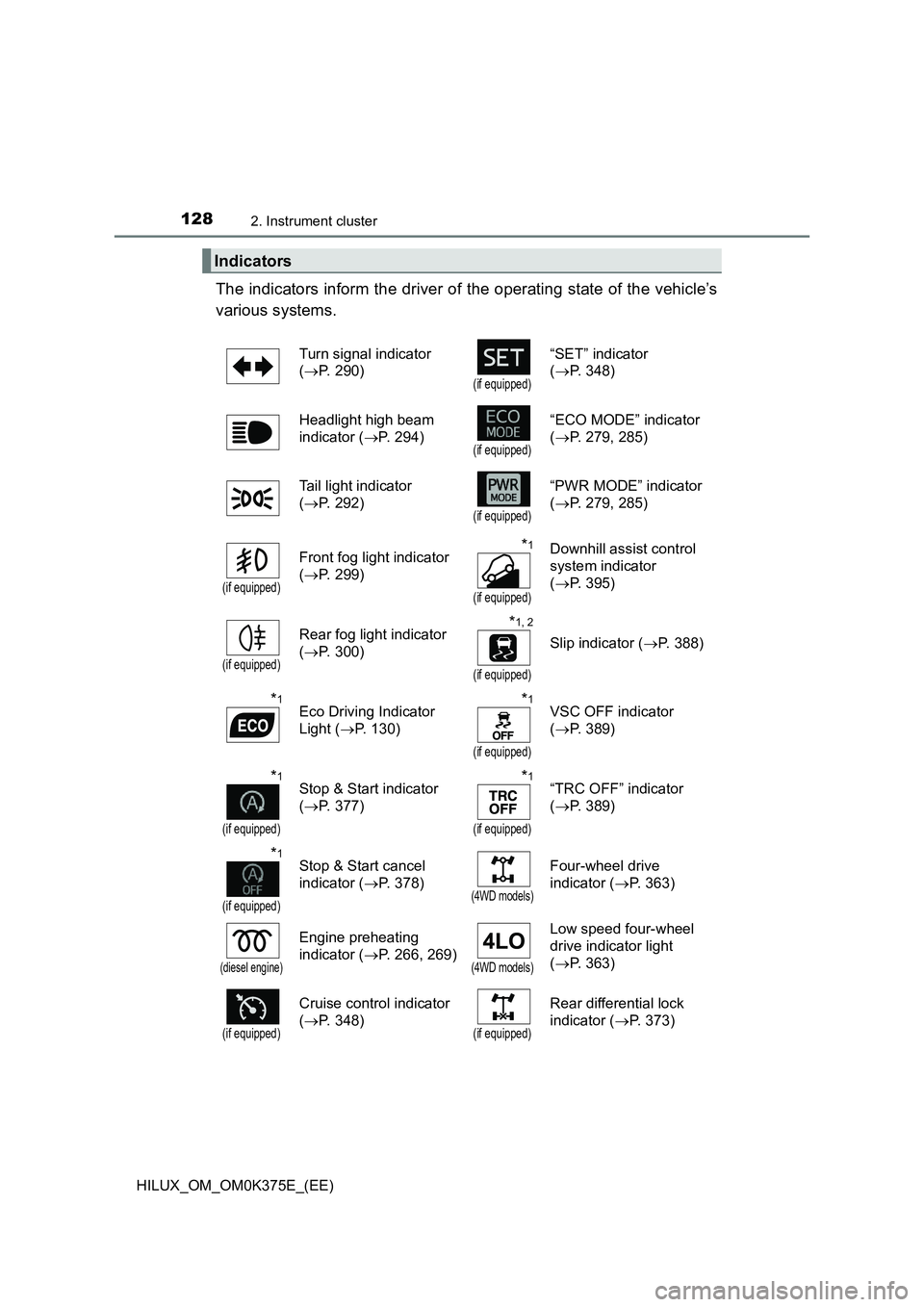
The indicators inform the driver of the operating state of the vehicle’s
various systems.
Indicators
Turn signal indicator
( P. 290)(if equipped)
“SET” indicator
( P. 348)
Headlight high beam
indicator ( P. 294)(if equipped)
“ECO MODE” indicator
( P. 279, 285)
Tail light indicator
( P. 292)(if equipped)
“PWR MODE” indicator
( P. 279, 285)
(if equipped)
Front fog light indicator
( P. 299)
*1
(if equipped)
Downhill assist control
system indicator
( P. 395)
(if equipped)
Rear fog light indicator
( P. 300)
*1, 2
(if equipped)
Slip indicator (P. 388)
*1Eco Driving Indicator
Light ( P. 130)
*1
(if equipped)
VSC OFF indicator
( P. 389)
*1
(if equipped)
Stop & Start indicator
( P. 377)
*1
(if equipped)
“TRC OFF” indicator
( P. 389)
*1
(if equipped)
Stop & Start cancel
indicator ( P. 378)(4WD models)
Four-wheel drive
indicator ( P. 363)
(diesel engine)
Engine preheating
indicator ( P. 266, 269)(4WD models)
Low speed four-wheel
drive indicator light
( P. 363)
(if equipped)
Cruise control indicator
( P. 348)(if equipped)
Rear differential lock
indicator ( P. 373)
Page 129 of 708
1292. Instrument cluster
2
Instrument cluster
HILUX_OM_OM0K375E_(EE)
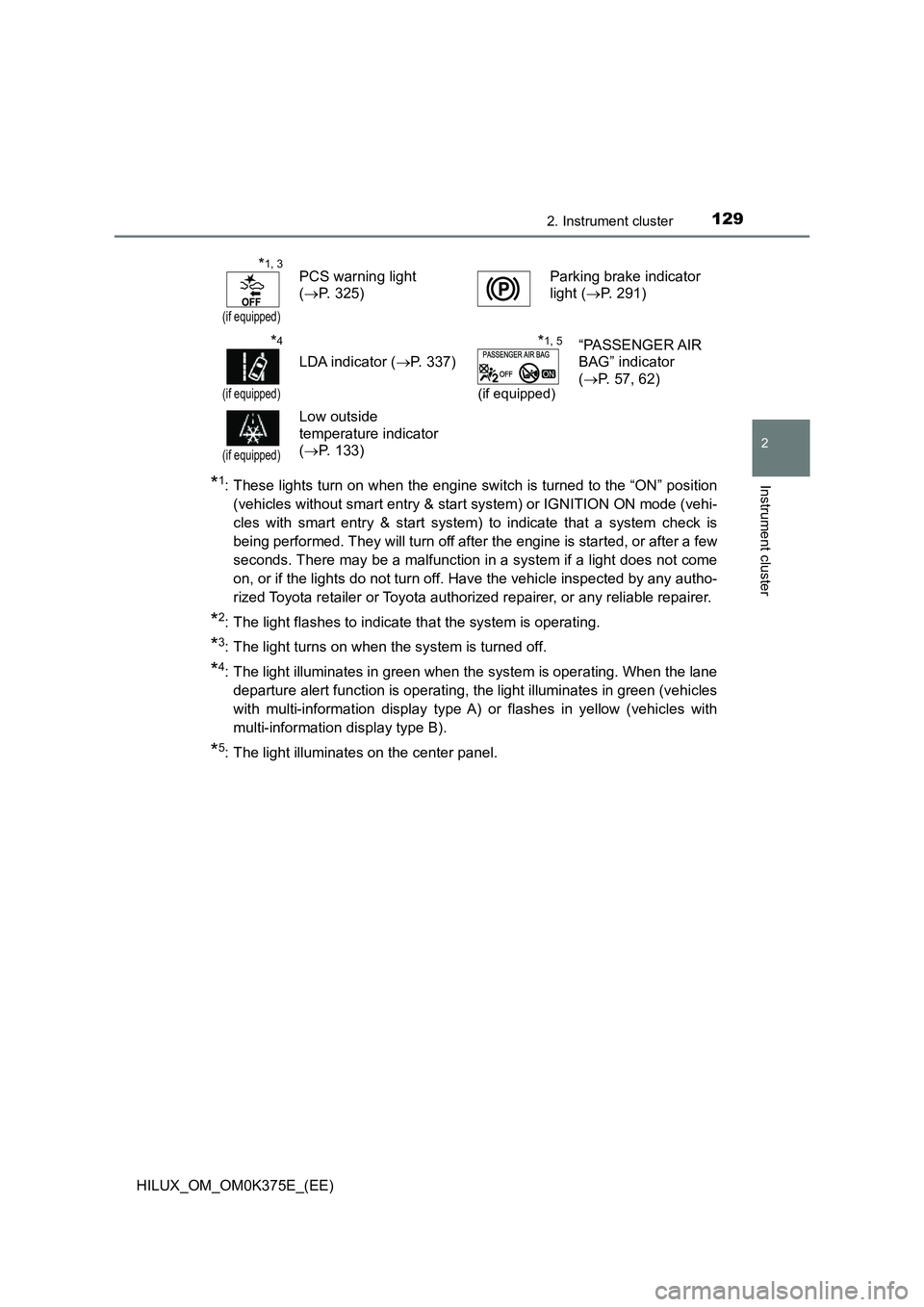
*1: These lights turn on when the engine switch is turned to the “ON” position
(vehicles without smart entry & start system) or IGNITION ON mode (vehi-
cles with smart entry & start system) to indicate that a system check is
being performed. They will turn off after the engine is started, or after a few
seconds. There may be a malfunction in a system if a light does not come
on, or if the lights do not turn off. Have the vehicle inspected by any autho-
rized Toyota retailer or Toyota authorized repairer, or any reliable repairer.
*2: The light flashes to indicate that the system is operating.
*3: The light turns on when the system is turned off.
*4: The light illuminates in green when the system is operating. When the lane
departure alert function is operating, the light illuminates in green (vehicles
with multi-information display type A) or flashes in yellow (vehicles with
multi-information display type B).
*5: The light illuminates on the center panel.
*1, 3
(if equipped)
PCS warning light
( P. 325)
Parking brake indicator
light ( P. 291)
*4
(if equipped)
LDA indicator (P. 337)
*1, 5
(if equipped)
“PASSENGER AIR
BAG” indicator
( P. 57, 62)
(if equipped)
Low outside
temperature indicator
( P. 133)
Page 130 of 708
1302. Instrument cluster
HILUX_OM_OM0K375E_(EE)
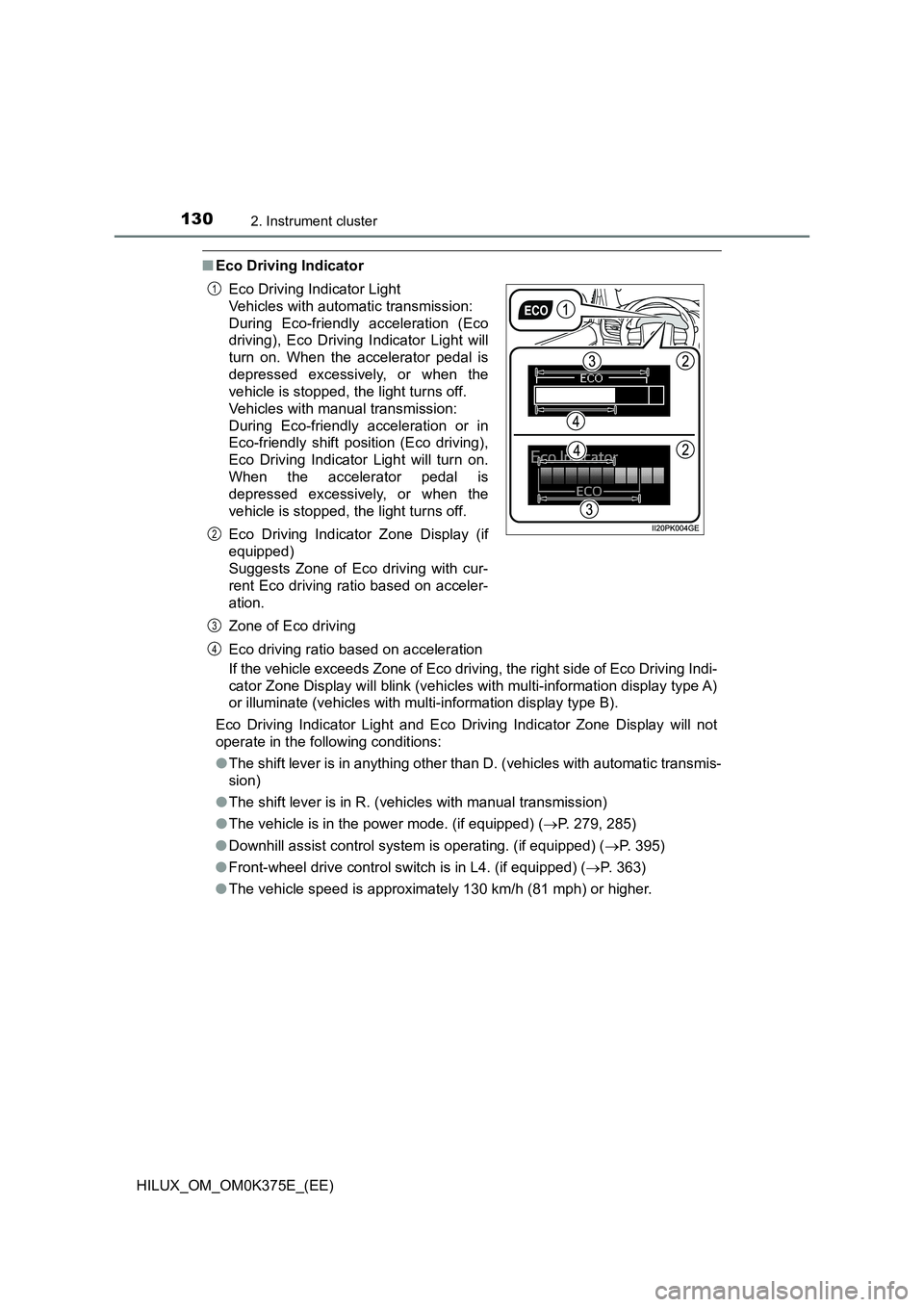
■Eco Driving Indicator
If the vehicle exceeds Zone of Eco driving, the right side of Eco Driving Indi-
cator Zone Display will blink (vehicles with multi-information display type A)
or illuminate (vehicles with multi-information display type B).
Eco Driving Indicator Light and Eco Driving Indicator Zone Display will not
operate in the following conditions:
● The shift lever is in anything other than D. (vehicles with automatic transmis-
sion)
● The shift lever is in R. (vehicles with manual transmission)
● The vehicle is in the power mode. (if equipped) (P. 279, 285)
● Downhill assist control system is operating. (if equipped) (P. 395)
● Front-wheel drive control switch is in L4. (if equipped) (P. 363)
● The vehicle speed is approximately 130 km/h (81 mph) or higher.
Eco Driving Indicator Light
Vehicles with automatic transmission:
During Eco-friendly acceleration (Eco
driving), Eco Driving Indicator Light will
turn on. When the accelerator pedal is
depressed excessively, or when the
vehicle is stopped, the light turns off.
Vehicles with manual transmission:
During Eco-friendly acceleration or in
Eco-friendly shift position (Eco driving),
Eco Driving Indicator Light will turn on.
When the accelerator pedal is
depressed excessively, or when the
vehicle is stopped, the light turns off.
Eco Driving Indicator Zone Display (if
equipped)
Suggests Zone of Eco driving with cur-
rent Eco driving ratio based on acceler-
ation.
Zone of Eco driving
Eco driving ratio based on acceleration
1
2
3
4
Page 135 of 708
1352. Instrument cluster
2
Instrument cluster
HILUX_OM_OM0K375E_(EE)
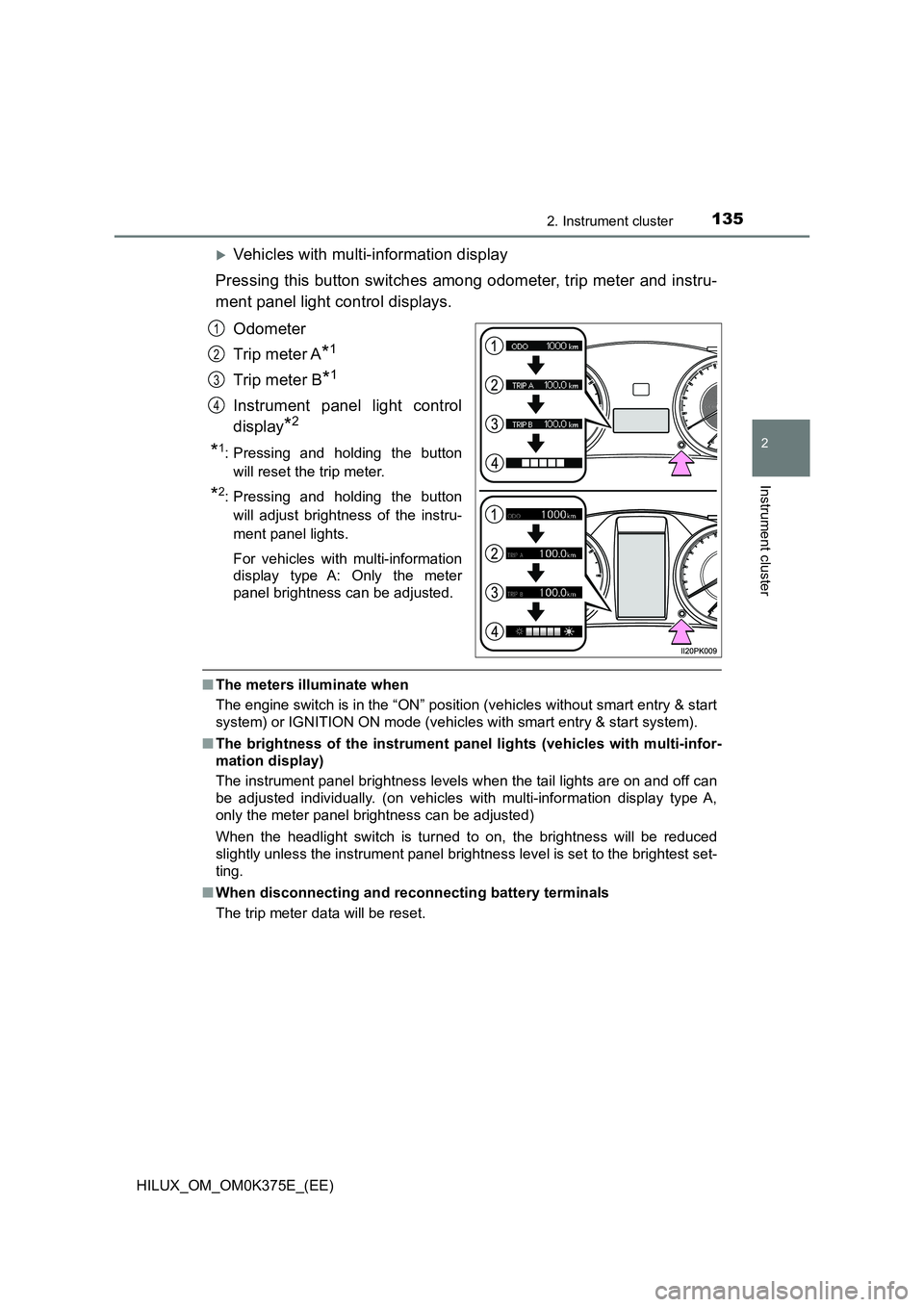
Vehicles with multi-information display
Pressing this button switches among odometer, trip meter and instru-
ment panel light control displays.
Odometer
Trip meter A*1
Trip meter B*1
Instrument panel light control
display*2
*1: Pressing and holding the button
will reset the trip meter.
*2: Pressing and holding the button
will adjust brightness of the instru-
ment panel lights.
For vehicles with multi-information
display type A: Only the meter
panel brightness can be adjusted.
■ The meters illuminate when
The engine switch is in the “ON” position (vehicles without smart entry & start
system) or IGNITION ON mode (vehicles with smart entry & start system).
■ The brightness of the instrument panel lights (vehicles with multi-infor-
mation display)
The instrument panel brightness levels when the tail lights are on and off can
be adjusted individually. (on vehicles with multi-information display type A,
only the meter panel brightness can be adjusted)
When the headlight switch is turned to on, the brightness will be reduced
slightly unless the instrument panel brightness level is set to the brightest set-
ting.
■ When disconnecting and reconnecting battery terminals
The trip meter data will be reset.
1
2
3
4
Page 138 of 708
1382. Instrument cluster
HILUX_OM_OM0K375E_(EE)
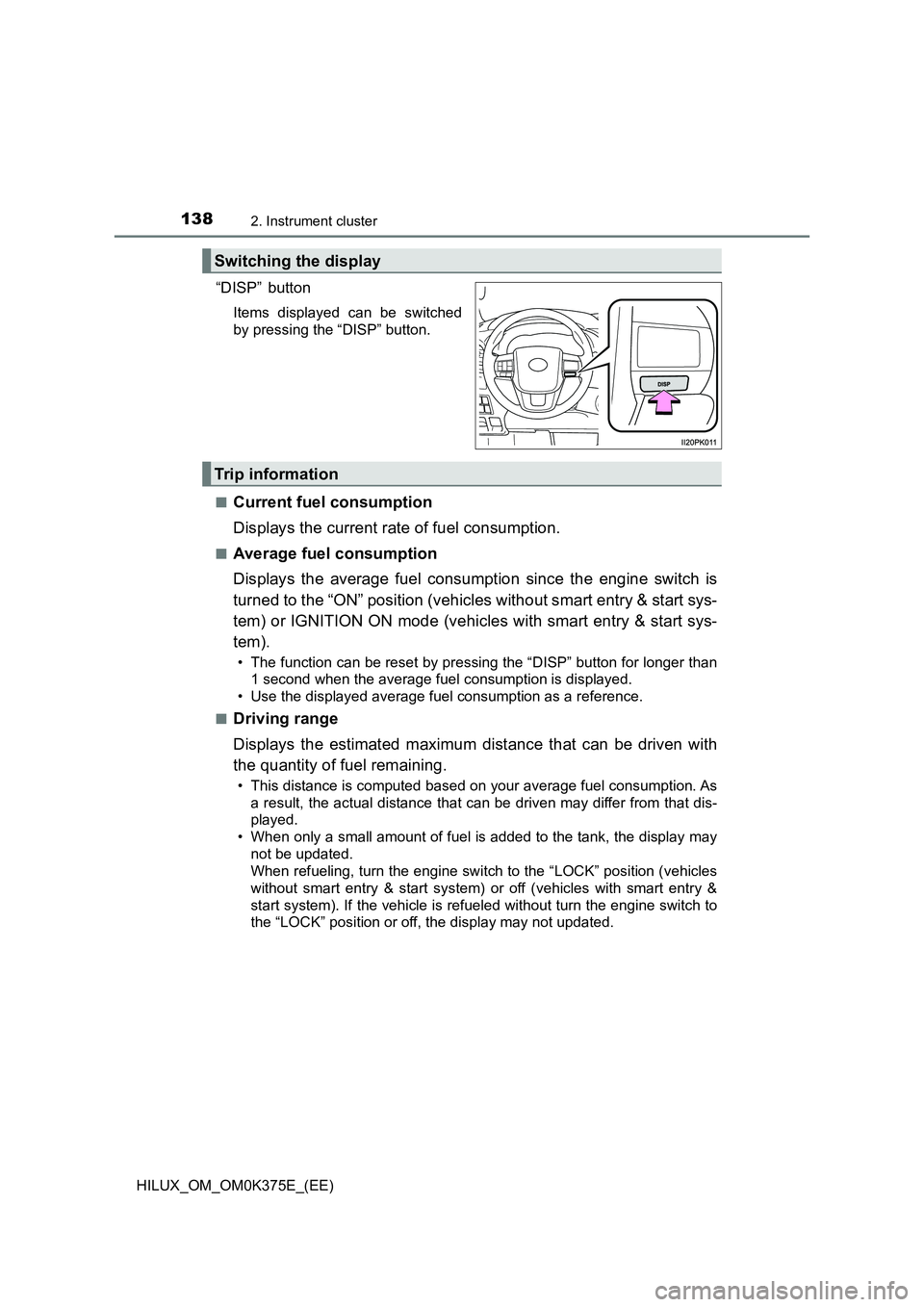
“DISP” button
Items displayed can be switched
by pressing the “DISP” button.
■Current fuel consumption
Displays the current rate of fuel consumption.
■Average fuel consumption
Displays the average fuel consumption since the engine switch is
turned to the “ON” position (vehicles without smart entry & start sys-
tem) or IGNITION ON mode (vehicles with smart entry & start sys-
tem).
• The function can be reset by pressing the “DISP” button for longer than
1 second when the average fuel consumption is displayed.
• Use the displayed average fuel consumption as a reference.
■Driving range
Displays the estimated maximum distance that can be driven with
the quantity of fuel remaining.
• This distance is computed based on your average fuel consumption. As
a result, the actual distance that can be driven may differ from that dis-
played.
• When only a small amount of fuel is added to the tank, the display may
not be updated.
When refueling, turn the engine switch to the “LOCK” position (vehicles
without smart entry & start system) or off (vehicles with smart entry &
start system). If the vehicle is refueled without turn the engine switch to
the “LOCK” position or off, the display may not updated.
Switching the display
Trip information
Page 139 of 708
1392. Instrument cluster
2
Instrument cluster
HILUX_OM_OM0K375E_(EE)
■Average vehicle speed
Displays the average vehicle speed since the engine switch is
turned to the “ON” position (vehicles without smart entry & start sys-
tem) or IGNITION ON mode (vehicles with smart entry & start sys-
tem).
The function can be reset by pressing the “DISP” button for longer than
1 second when the average vehicle speed is displayed.
■Elapsed time
Displays the elapsed time after the engine switch is turned to the
“ON” position (vehicles without smart entry & start system) or IGNI-
TION ON mode (vehicles with smart entry & start system).
• When the engine switch is turned on, time is counted from 00:00. When
the time exceeds 99:59, the counter returns to 00:00.
• The function can be reset by pressing the “DISP” button for longer than
1 second when the elapsed time is displayed.
■Eco Driving Indicator Zone Display
Displays Zone of Eco driving with current Eco driving ratio based on
acceleration. ( P. 130)
■Display off
A blank screen is displayed.
■ Setting display automatic cancelation
In the following situations, setting display in which the settings can be
changed through the “DISP” button will automatically be turned off.
● If a warning message appears while the setting display is displayed
● When the vehicle begins to move while the setting display is displayed
■ When disconnecting and reconnecting battery terminals
The trip information data and settings will be reset.
■ Liquid crystal display
Small spots or light spots may appear on the display. This phenomenon is
characteristic of liquid crystal displays, and there is no problem continuing to
use the display.
■ Customization
Settings (e.g. on/off operation of the Eco Driving Indicator Light) can be
changed.
(Customizable features: P. 683)
Page 147 of 708
1472. Instrument cluster
2
Instrument cluster
HILUX_OM_OM0K375E_(EE)
If the accelerator pedal is not depressed, such as when the vehicle is driven
using cruise control (if equipped), the driven distance is not included in the
Eco Score.
The Eco Score evaluation differs depending on the driving conditions and
environmental factors. The Eco Score may not be linked to fuel consumption.
The Eco Score will not operate in the following conditions:
● The vehicle speed is approximately 130 km/h (80 mph) or higher.
● The shift lever is in a position other than D. (vehicles with automatic trans-
mission)
● Front-wheel drive control switch is in L4. (if equipped)
● Downhill assist control system is operating. (if equipped)
● The vehicle is in the power mode. (if equipped)
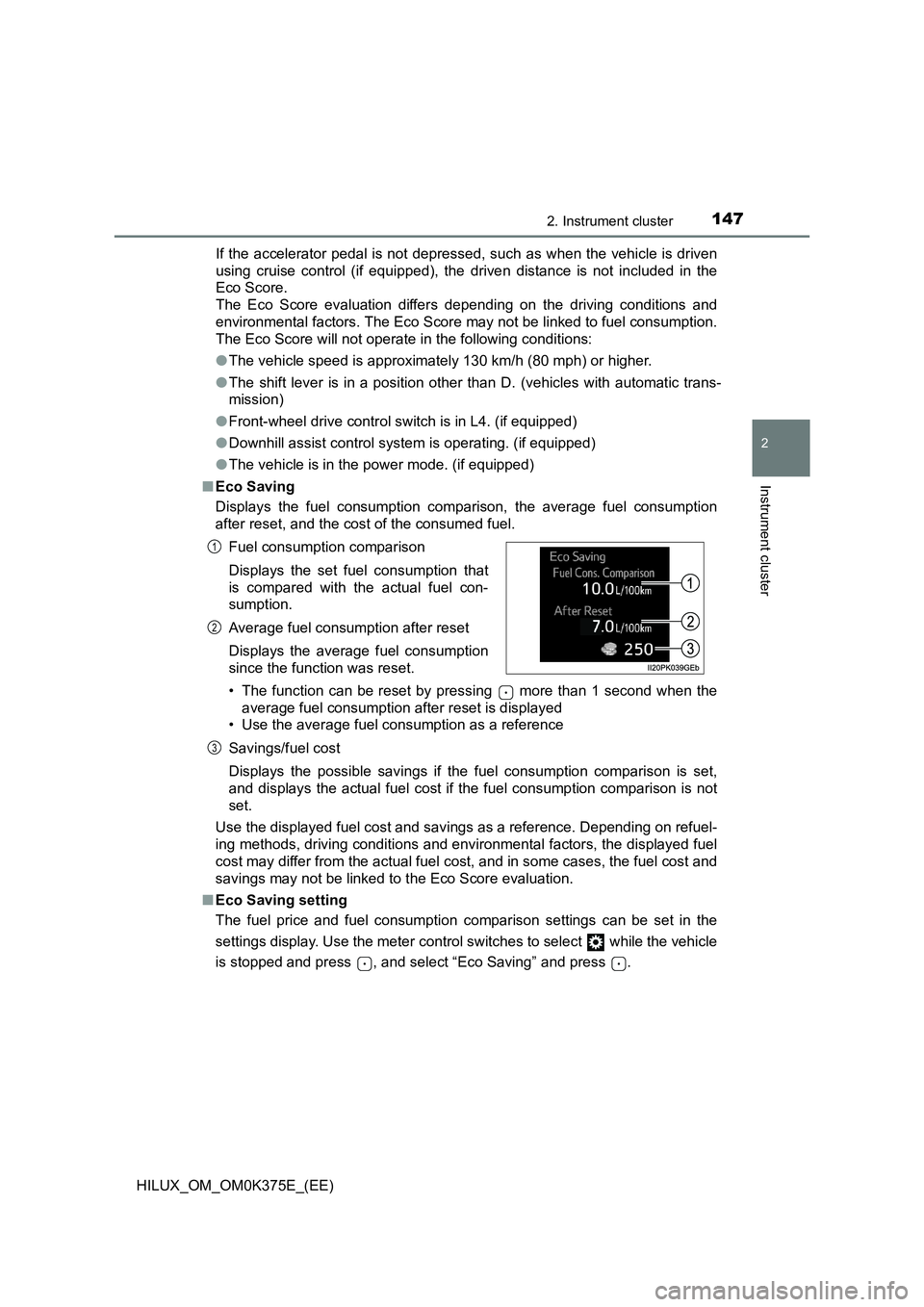
■ Eco Saving
Displays the fuel consumption comparison, the average fuel consumption
after reset, and the cost of the consumed fuel.
• The function can be reset by pressing more than 1 second when the
average fuel consumption after reset is displayed
• Use the average fuel consumption as a reference
Savings/fuel cost
Displays the possible savings if the fuel consumption comparison is set,
and displays the actual fuel cost if the fuel consumption comparison is not
set.
Use the displayed fuel cost and savings as a reference. Depending on refuel-
ing methods, driving conditions and environmental factors, the displayed fuel
cost may differ from the actual fuel cost, and in some cases, the fuel cost and
savings may not be linked to the Eco Score evaluation.
■ Eco Saving setting
The fuel price and fuel consumption comparison settings can be set in the
settings display. Use the meter control switches to select while the vehicle
is stopped and press , and select “Eco Saving” and press .
Fuel consumption comparison
Displays the set fuel consumption that
is compared with the actual fuel con-
sumption.
Average fuel consumption after reset
Displays the average fuel consumption
since the function was reset.
1
2
3
Page 149 of 708
149
2
2. Instrument cluster
Instrument cluster
HILUX_OM_OM0K375E_(EE)
Fuel consumption information
Press the “CAR” button.
Select “Trip information” or “Past record”.
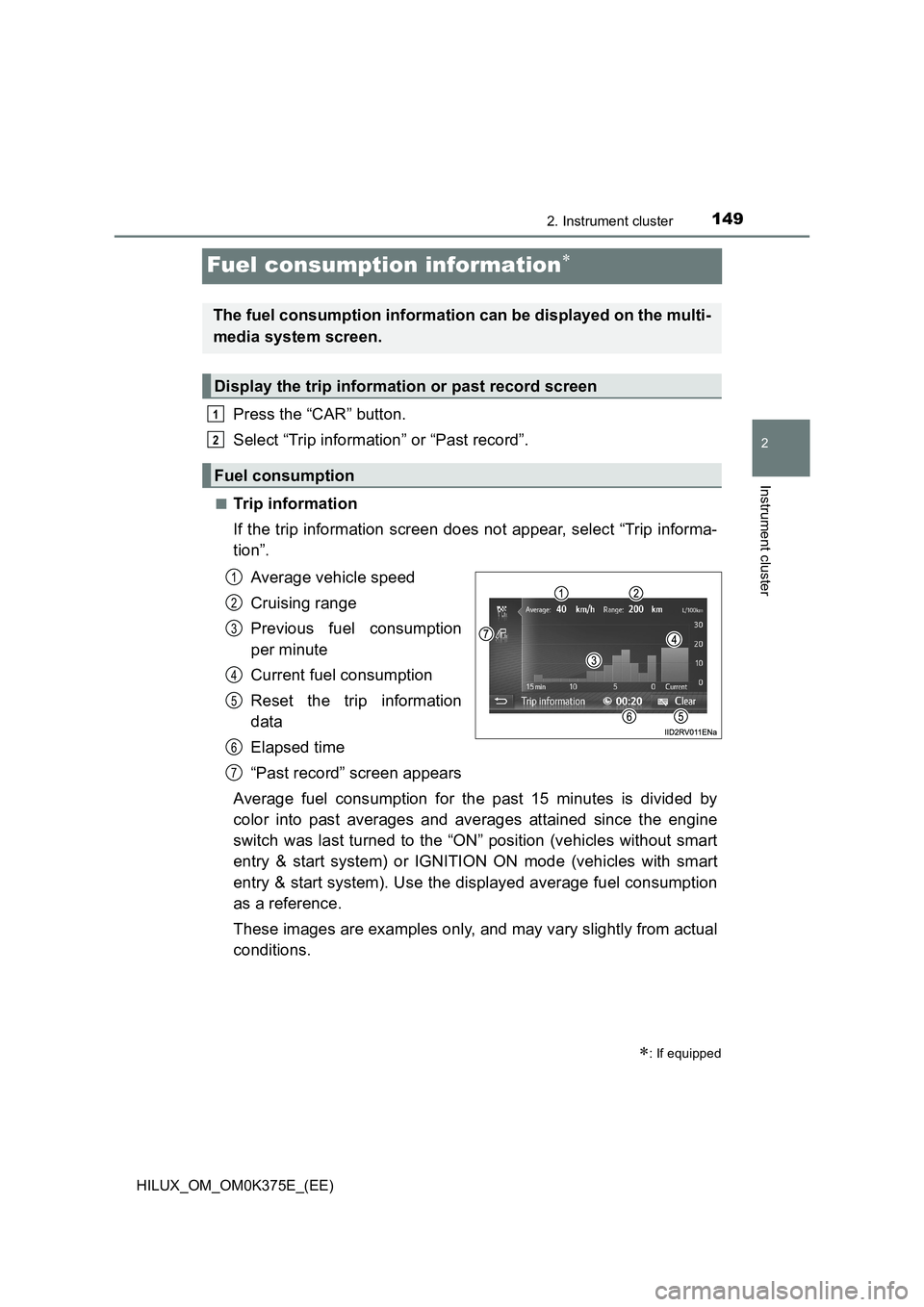
■Trip information
If the trip information screen does not appear, select “Trip informa-
tion”.
Average vehicle speed
Cruising range
Previous fuel consumption
per minute
Current fuel consumption
Reset the trip information
data
Elapsed time
“Past record” screen appears
Average fuel consumption for the past 15 minutes is divided by
color into past averages and averages attained since the engine
switch was last turned to the “ON” position (vehicles without smart
entry & start system) or IGNITION ON mode (vehicles with smart
entry & start system). Use the displayed average fuel consumption
as a reference.
These images are examples only, and may vary slightly from actual
conditions.
: If equipped
The fuel consumption information can be displayed on the multi-
media system screen.
Display the trip information or past record screen
Fuel consumption
1
2
1
2
3
4
5
6
7
Page 155 of 708
1553-1. Key information
3
Operation of each component
HILUX_OM_OM0K375E_(EE)
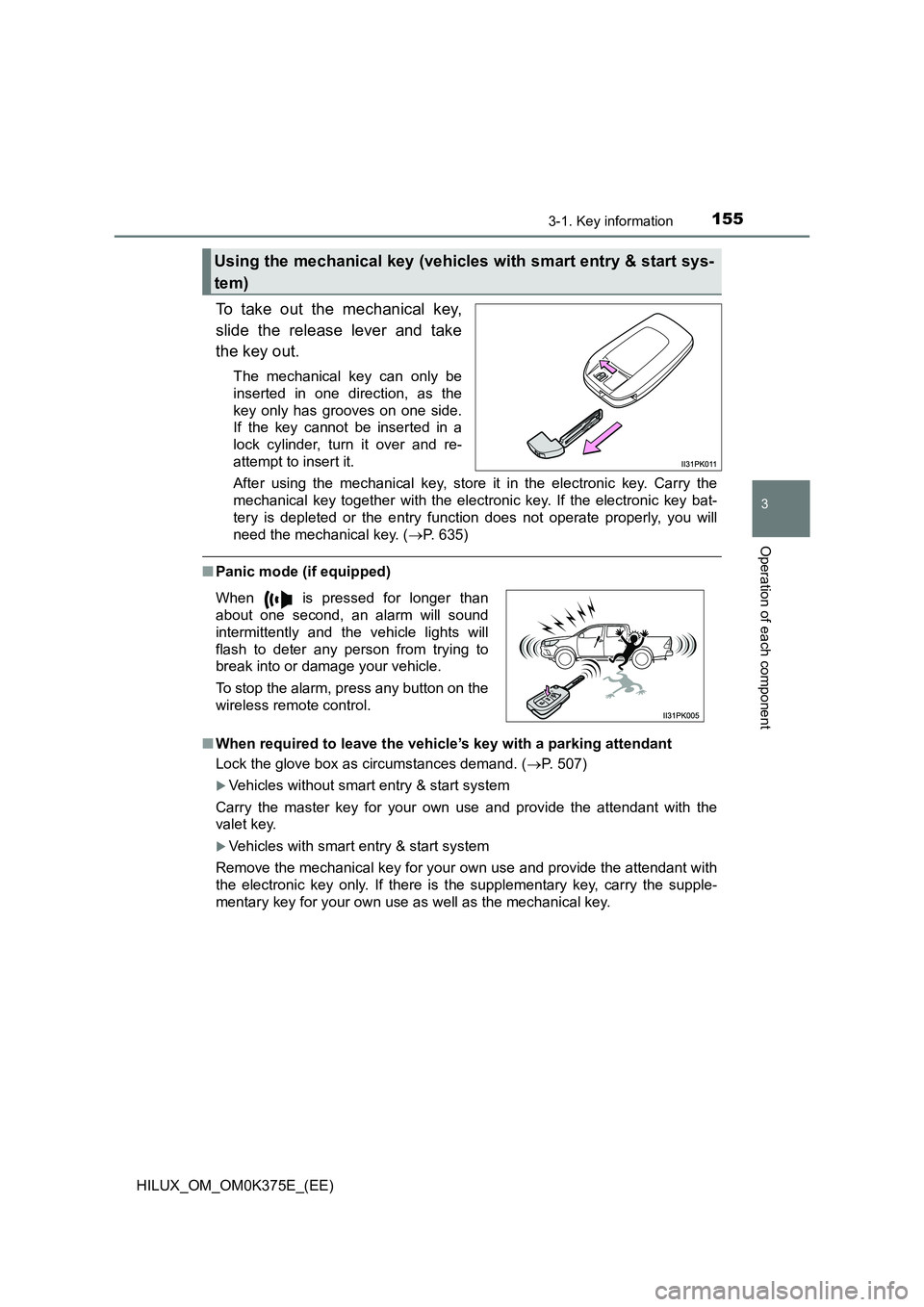
To take out the mechanical key,
slide the release lever and take
the key out.
The mechanical key can only be
inserted in one direction, as the
key only has grooves on one side.
If the key cannot be inserted in a
lock cylinder, turn it over and re-
attempt to insert it.
After using the mechanical key, store it in the electronic key. Carry the
mechanical key together with the electronic key. If the electronic key bat-
tery is depleted or the entry func tion does not operate properly, you will
need the mechanical key. ( P. 635)
■Panic mode (if equipped)
■ When required to leave the vehicle’s key with a parking attendant
Lock the glove box as circumstances demand. ( P. 507)
Vehicles without smart entry & start system
Carry the master key for your own use and provide the attendant with the
valet key.
Vehicles with smart entry & start system
Remove the mechanical key for your own use and provide the attendant with
the electronic key only. If there is the supplementary key, carry the supple-
mentary key for your own use as well as the mechanical key.
Using the mechanical key (vehicles with smart entry & start sys-
tem)
When is pressed for longer than
about one second, an alarm will sound
intermittently and the vehicle lights will
flash to deter any person from trying to
break into or damage your vehicle.
To stop the alarm, press any button on the
wireless remote control.
Page 178 of 708
1783-2. Opening, closing and locking the doors
HILUX_OM_OM0K375E_(EE)
The following functions can be set or canceled:
■Setting and canceling the functions
To switch between setting and canceling, follow the procedure
below.
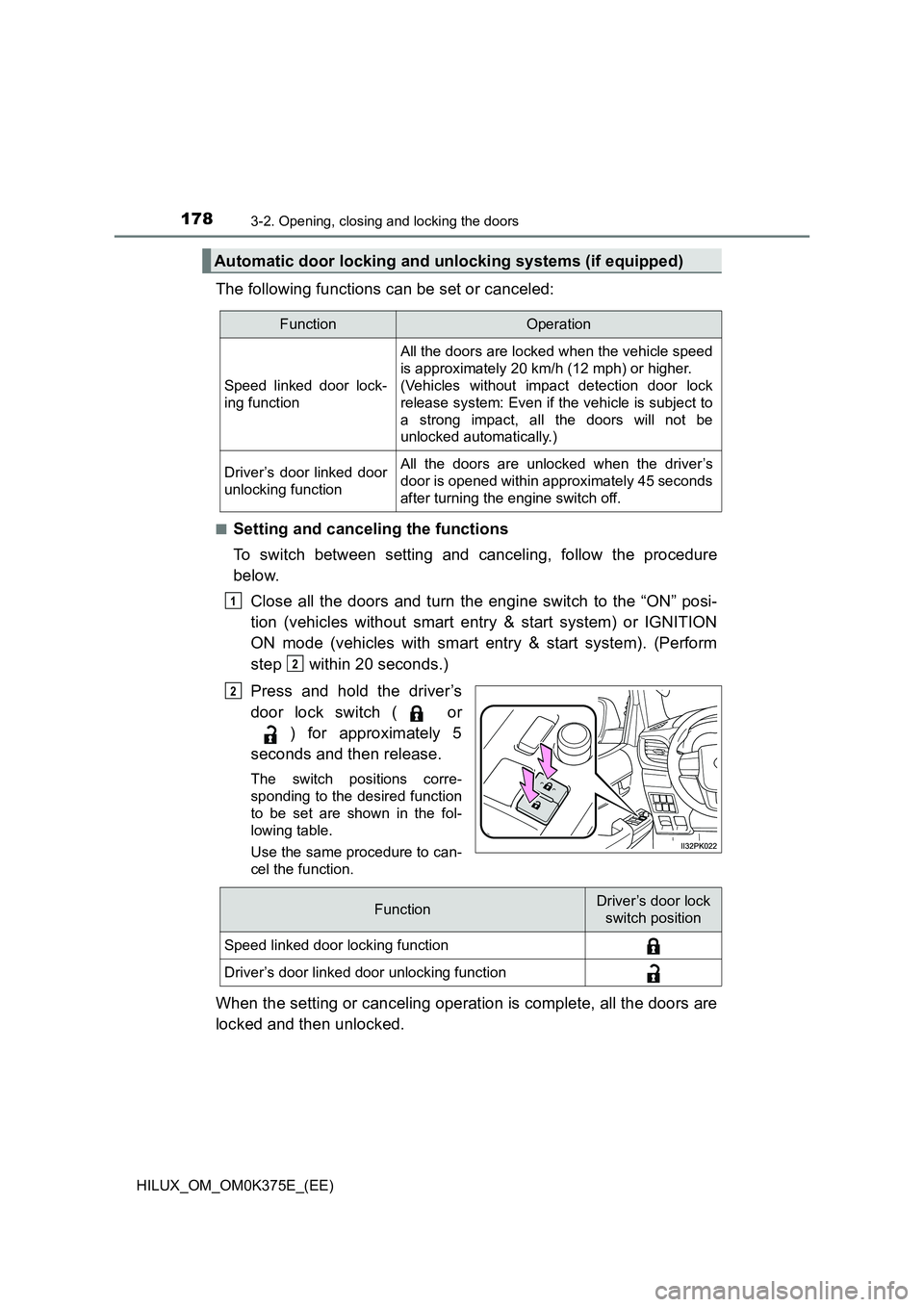
Close all the doors and turn the engine switch to the “ON” posi-
tion (vehicles without smart entry & start system) or IGNITION
ON mode (vehicles with smart entry & start system). (Perform
step within 20 seconds.)
Press and hold the driver’s
door lock switch ( or
) for approximately 5
seconds and then release.
The switch positions corre-
sponding to the desired function
to be set are shown in the fol-
lowing table.
Use the same procedure to can-
cel the function.
When the setting or canceling operation is complete, all the doors are
locked and then unlocked.
Automatic door locking and unlocking systems (if equipped)
FunctionOperation
Speed linked door lock-
ing function
All the doors are locked when the vehicle speed
is approximately 20 km/h (12 mph) or higher.
(Vehicles without impact detection door lock
release system: Even if the vehicle is subject to
a strong impact, all the doors will not be
unlocked automatically.)
Driver’s door linked door
unlocking function
All the doors are unlocked when the driver’s
door is opened within approximately 45 seconds
after turning the engine switch off.
1
2
2
FunctionDriver’s door lock
switch position
Speed linked door locking function
Driver’s door linked door unlocking function