USB TOYOTA HILUX 2019 User Guide
[x] Cancel search | Manufacturer: TOYOTA, Model Year: 2019, Model line: HILUX, Model: TOYOTA HILUX 2019Pages: 708, PDF Size: 95.31 MB
Page 413 of 708
413
5
5-1. Basic Operations
Audio system
HILUX_OM_OM0K375E_(EE)
AUX port/USB port
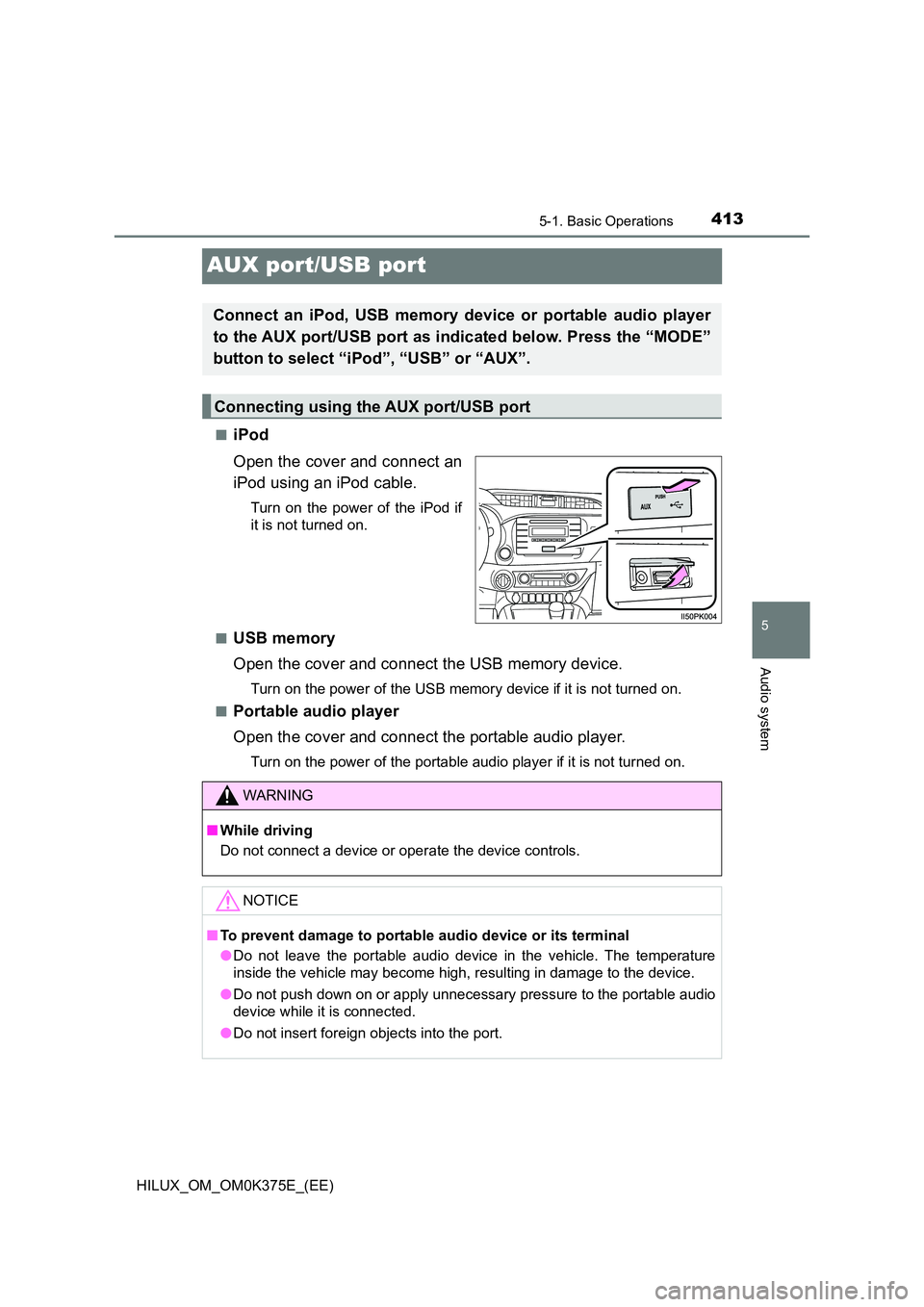
■iPod
Open the cover and connect an
iPod using an iPod cable.
Turn on the power of the iPod if
it is not turned on.
■USB memory
Open the cover and connect the USB memory device.
Turn on the power of the USB memory device if it is not turned on.
■Portable audio player
Open the cover and connect the portable audio player.
Turn on the power of the portable audio player if it is not turned on.
Connect an iPod, USB memory device or portable audio player
to the AUX port/USB port as indicated below. Press the “MODE”
button to select “iPod”, “USB” or “AUX”.
Connecting using the AUX port/USB port
WARNING
■ While driving
Do not connect a device or operate the device controls.
NOTICE
■ To prevent damage to portable audio device or its terminal
● Do not leave the portable audio device in the vehicle. The temperature
inside the vehicle may become high, resulting in damage to the device.
● Do not push down on or apply unnecessary pressure to the portable audio
device while it is connected.
● Do not insert foreign objects into the port.
Page 439 of 708
439
5
5-5. Using an external device
Audio system
HILUX_OM_OM0K375E_(EE)
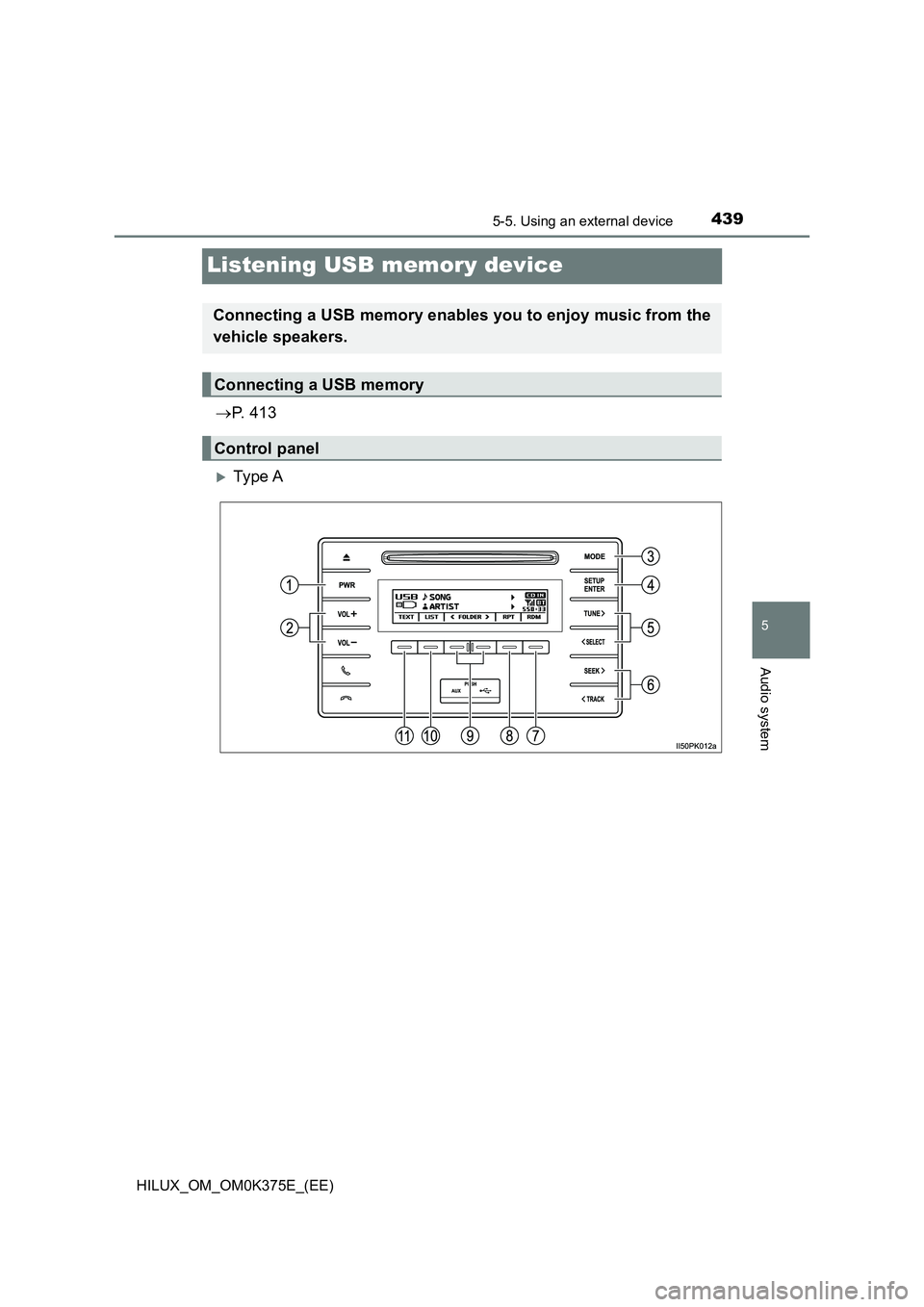
Listening USB memory device
P. 4 1 3
Ty pe A
Connecting a USB memory enables you to enjoy music from the
vehicle speakers.
Connecting a USB memory
Control panel
Page 442 of 708
4425-5. Using an external device
HILUX_OM_OM0K375E_(EE)
■USB memory functions
● Depending on the USB memory that is connected to the system, the device
itself may not be operable and certain functions may not be available. If the
device is inoperable or a function is unavailable due to a malfunction (as
opposed to a system specification), disconnecting the device and recon-
necting it once again may resolve the problem.
● If the USB memory still does not begin operation after being disconnected
and reconnected, format the memory.
■ Display
P. 425
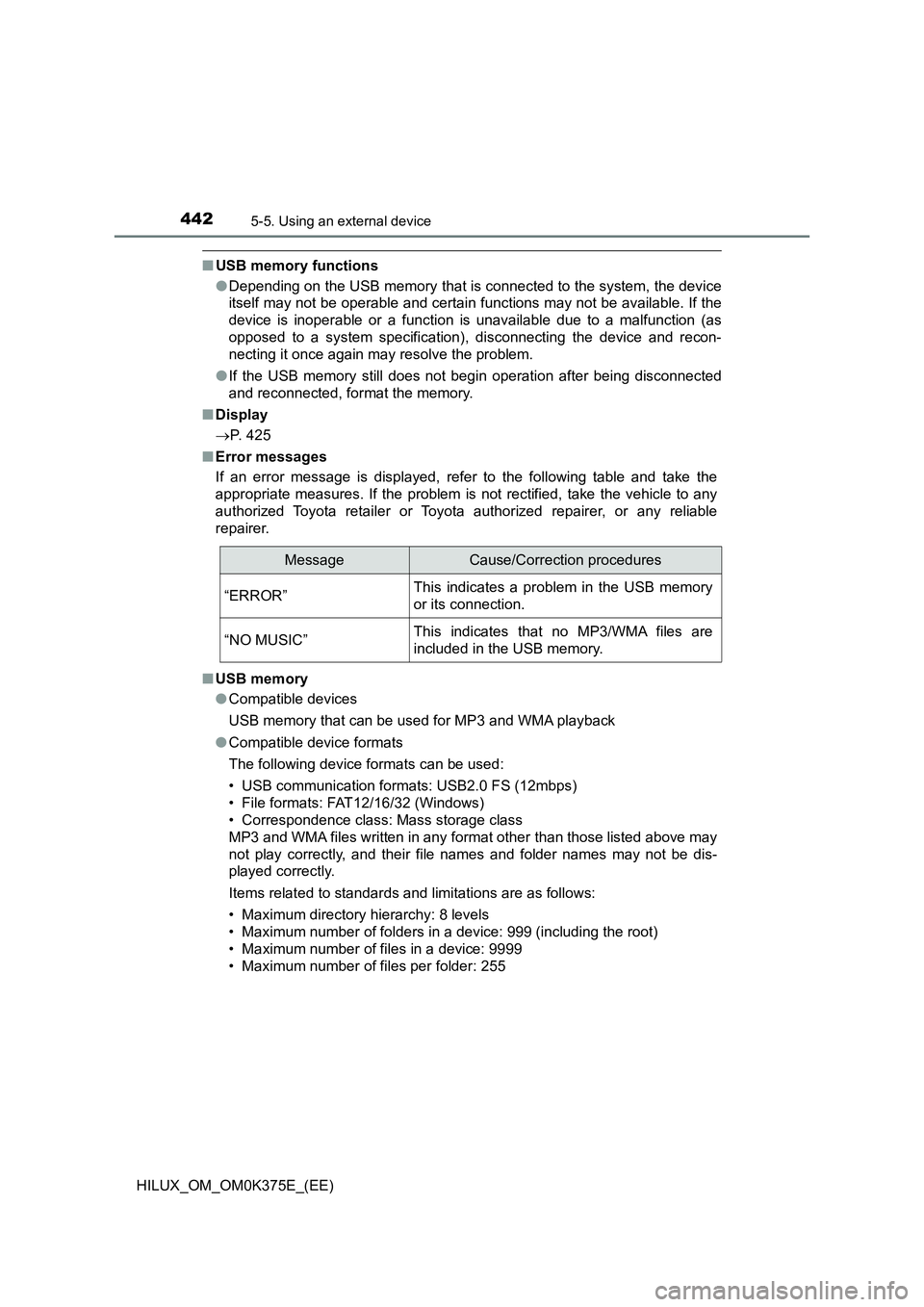
■ Error messages
If an error message is displayed, refer to the following table and take the
appropriate measures. If the problem is not rectified, take the vehicle to any
authorized Toyota retailer or Toyota authorized repairer, or any reliable
repairer.
■ USB memory
● Compatible devices
USB memory that can be used for MP3 and WMA playback
● Compatible device formats
The following device formats can be used:
• USB communication formats: USB2.0 FS (12mbps)
• File formats: FAT12/16/32 (Windows)
• Correspondence class: Mass storage class
MP3 and WMA files written in any format other than those listed above may
not play correctly, and their file names and folder names may not be dis-
played correctly.
Items related to standards and limitations are as follows:
• Maximum directory hierarchy: 8 levels
• Maximum number of folders in a device: 999 (including the root)
• Maximum number of files in a device: 9999
• Maximum number of files per folder: 255
MessageCause/Correction procedures
“ERROR”This indicates a problem in the USB memory
or its connection.
“NO MUSIC”This indicates that no MP3/WMA files are
included in the USB memory.
Page 444 of 708
4445-5. Using an external device
HILUX_OM_OM0K375E_(EE)
● File names
The only files that can be recognized as MP3/WMA and played are those
with the extension .mp3 or .wma.
● ID3 and WMA tags
ID3 tags can be added to MP3 files, making it possible to record the track
title, artist name, etc.
The system is compatible with ID3 Ver. 1.0, 1.1, and Ver. 2.2, 2.3, 2.4 ID3
tags. (The number of characters is based on ID3 Ver. 1.0 and 1.1.)
WMA tags can be added to WMA files, making it possible to record the
track title and artist name in the same way as with ID3 tags.
● MP3 and WMA playback
• When a device containing MP3 or WMA files is connected, all files in the
USB memory device are checked. Once the file check is finished, the first
MP3 or WMA file is played. To make the file check finish more quickly, we
recommend that you do not include any files other than MP3 or WMA
files or create any unnecessary folders.
• When the USB device is connected and the audio source is changed to
USB memory mode, the USB device will start playing the first file in the
first folder. If the same device is removed and reinserted (and the con-
tents have not been changed), the USB memory will resume play from
the same point in which it was last used.
● Extensions
If the file extensions .mp3 and .wma are used for files other than MP3 and
WMA files, they will be skipped (not played).
Page 445 of 708
4455-5. Using an external device
5
Audio system
HILUX_OM_OM0K375E_(EE)
● Playback
• To play MP3 files with steady s ound quality, we recommend a fixed bit
rate of at least 128 kbps and a sampling frequency of 44.1 kHz.
• There is a wide variety of freewar e and other encoding software for MP3
and WMA files on the market, and depending on the status of the encod-
ing and the file format, poor sound quality or noise at the start of playback
may result. In some cases, playback may not be possible at all.
• Microsoft, Windows, and Windows Media are registered trademarks of
Microsoft Corporation in the U.S.A. and other countries.
WARNING
■ While driving
Do not connect USB memory or operate the controls. Doing so may cause
an accident, resulting in death or serious injury.
NOTICE
■ To prevent damage to USB memory
● Do not leave USB memory in the vehicle. The temperature inside the vehi-
cle may become high, resulting in damage to the USB memory.
● Do not push down on or apply unnecessary pressure to the USB memory
while it is connected as this may damage the USB memory or its terminal.
● Do not insert foreign objects into the port as this may damage the USB
memory or its terminal.
Page 696 of 708
696Alphabetical index
HILUX_OM_OM0K375E_(EE)
Alphabetical index
A/C..................................... 484, 492
Air conditioning filter.............. 565
Automatic air conditioning
system ................................ 492
Manual air conditioning
system ................................ 484
ABS (Anti-lock Brake
System) .................................. 387
Function ................................ 387
Warning light ......................... 603
Access panels .......................... 180
AdBlue™................................... 553
Capacity ................................ 555
Low AdBlue™ level
warning light ....................... 607
Refilling ................................. 555
Air conditioning filter .............. 565
Air conditioning
system ............................ 484, 492
Air conditioning filter.............. 565
Automatic air conditioning
system ................................ 492
Manual air conditioning
system ................................ 484
Airbags ....................................... 45
Airbag manual on-off
system .................................. 62
Airbag operating
conditions ............................. 52
Airbag precautions for
your child .............................. 47
Airbag warning light .............. 603
Correct driving posture............ 38
Curtain shield airbag
operating conditions ............. 53
Curtain shield airbag
precautions ........................... 49
Front passenger occupant
classification system ............. 57
General airbag
precautions........................... 47
Locations of airbags................ 45
Modification and
disposal of airbags ............... 51
Side airbag operating
conditions ............................. 53
Side airbag precautions .......... 49
Side and curtain shield
airbags operating
conditions ............................. 53
Side and curtain shield
airbags precautions .............. 49
SRS airbags............................ 45
Airbag manual on-off
system ...................................... 62
Alarm ........................................ 119
Antenna ............................ 420, 526
Antennas (smart entry &
start system) .......................... 184
Anti-lock brake system
(ABS) ...................................... 387
Function ................................ 387
Warning light ......................... 603
Armrest ..................................... 519
Audio input*............ 431, 439, 446
Audio system ........................... 408
Antenna ........................ 420, 526
Audio input ............................ 413
AUX port ............................... 413
Bluetooth® audio................... 467
CD player ............................. 421
iPod....................................... 431
MP3/WMA disc ..................... 421
Optimal use........................... 414
Portable music
player.................................. 446
Radio .................................... 416
Steering wheel audio
switches.............................. 410
USB memory ........................ 439
A
Page 706 of 708
706Alphabetical index
HILUX_OM_OM0K375E_(EE)
Tires .......................................... 558
Chains ................................... 404
Checking ............................... 558
If you have a flat tire.............. 616
Inflation pressure .......... 561, 677
Replacing .............................. 616
Rotating tires ......................... 559
Size ....................................... 677
Snow tires ............................. 403
Spare tire .............................. 616
Tools ......................................... 619
Towing
Emergency towing ................ 595
Towing hook.......................... 597
Trailer towing ................ 252, 253
Toyota Safety Sense................ 309
Traction control ....................... 387
Trailer towing ................... 252, 253
Transmission
Automatic transmission ......... 277
If the shift lever cannot be
shifted from P ..................... 282
Manual transmission ............. 284
TRC (Traction Control) ............ 387
Trip information ............... 138, 143
Trip meters ............................... 134
Turn signal lights
Replacing light
bulbs................... 580, 586, 588
Turn signal lever ................... 290
Wattage ................................ 679
USB memory ............................ 439
USB port*................................. 413
Valet key ................................... 152
Vanity mirror ............................ 514
Vehicle identification
number ................................... 656
Vehicle Stability Control
(VSC) ...................................... 387
VSC (Vehicle Stability
Control) .................................. 387
Warning buzzers
Fuel filter ............................... 604
Key reminder ........................ 268
Pre-collision braking ............. 321
Seat belt reminder ................ 606
U
V
W