ignition TOYOTA HILUX 2019 User Guide
[x] Cancel search | Manufacturer: TOYOTA, Model Year: 2019, Model line: HILUX, Model: TOYOTA HILUX 2019Pages: 708, PDF Size: 95.31 MB
Page 149 of 708
149
2
2. Instrument cluster
Instrument cluster
HILUX_OM_OM0K375E_(EE)
Fuel consumption information
Press the “CAR” button.
Select “Trip information” or “Past record”.
■Trip information
If the trip information screen does not appear, select “Trip informa-
tion”.
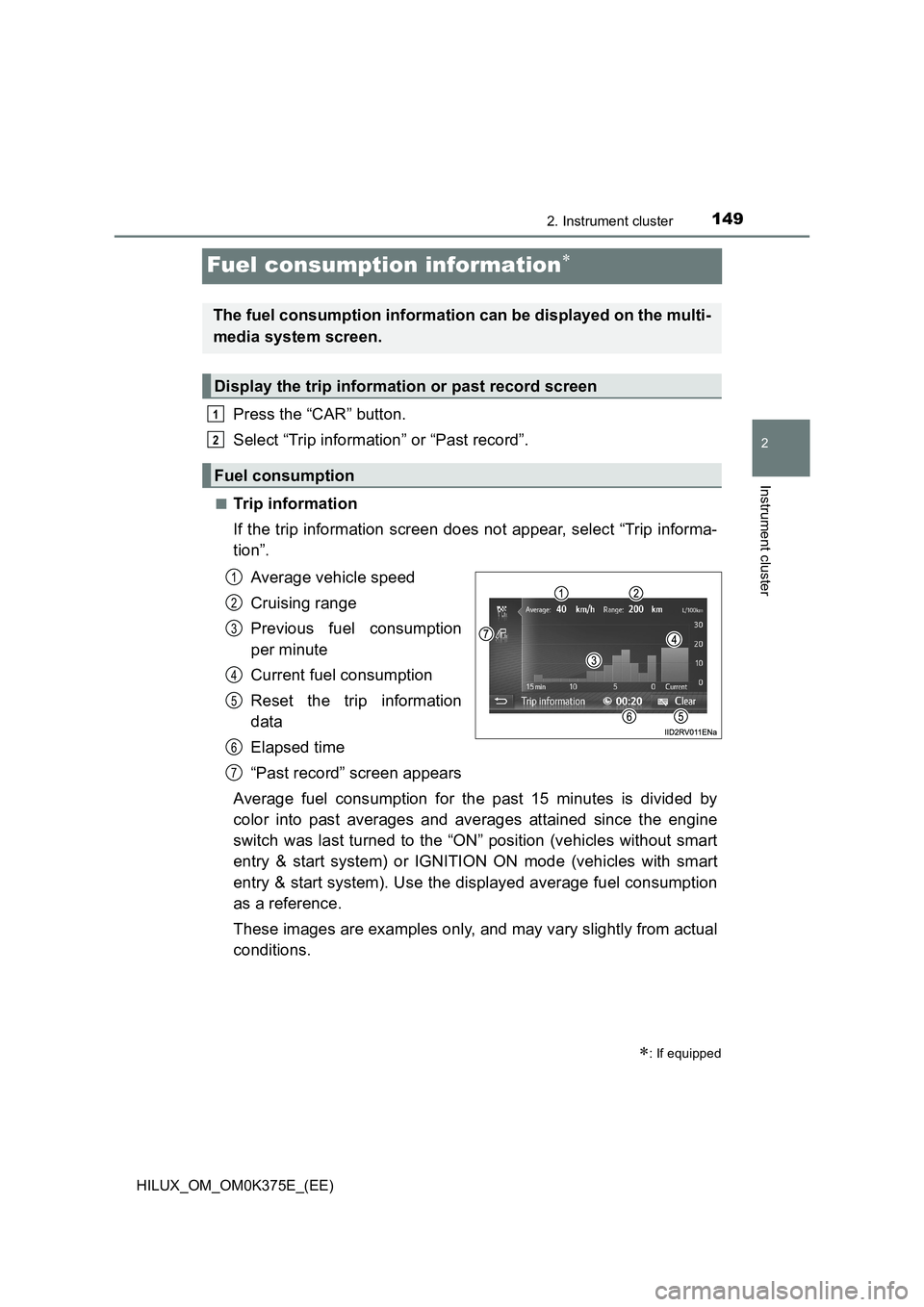
Average vehicle speed
Cruising range
Previous fuel consumption
per minute
Current fuel consumption
Reset the trip information
data
Elapsed time
“Past record” screen appears
Average fuel consumption for the past 15 minutes is divided by
color into past averages and averages attained since the engine
switch was last turned to the “ON” position (vehicles without smart
entry & start system) or IGNITION ON mode (vehicles with smart
entry & start system). Use the displayed average fuel consumption
as a reference.
These images are examples only, and may vary slightly from actual
conditions.
: If equipped
The fuel consumption information can be displayed on the multi-
media system screen.
Display the trip information or past record screen
Fuel consumption
1
2
1
2
3
4
5
6
7
Page 177 of 708
1773-2. Opening, closing and locking the doors
3
Operation of each component
HILUX_OM_OM0K375E_(EE)
Move the inside lock button to the lock position.
Close the door while pulling the door handle.
Vehicles without smart entry & start system (vehicles with power door
lock system): The driver’s door cannot be locked if either of the door is
open and the key is in the engine switch.
Vehicles with smart entry & start system: The door cannot be locked if
the engine switch is in ACCESSORY or IGNITION ON mode, or the
electronic key is left inside the vehicle.
However, the key may not be detected correctly and the door may be
locked.
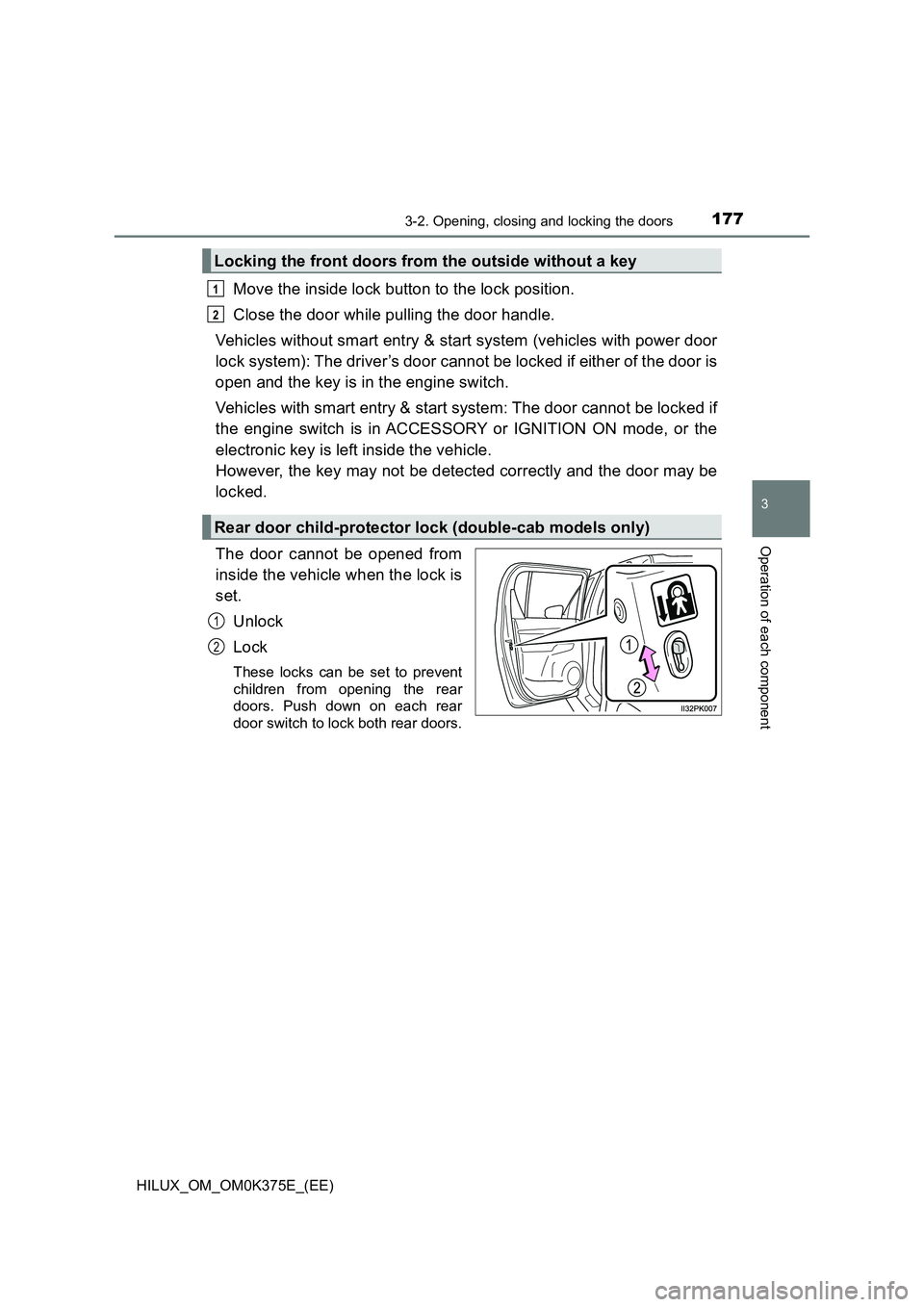
The door cannot be opened from
inside the vehicle when the lock is
set.
Unlock
Lock
These locks can be set to prevent
children from opening the rear
doors. Push down on each rear
door switch to lock both rear doors.
Locking the front doors from the outside without a key
Rear door child-protector lock (double-cab models only)
1
2
1
2
Page 178 of 708
1783-2. Opening, closing and locking the doors
HILUX_OM_OM0K375E_(EE)
The following functions can be set or canceled:
■Setting and canceling the functions
To switch between setting and canceling, follow the procedure
below.
Close all the doors and turn the engine switch to the “ON” posi-
tion (vehicles without smart entry & start system) or IGNITION
ON mode (vehicles with smart entry & start system). (Perform
step within 20 seconds.)
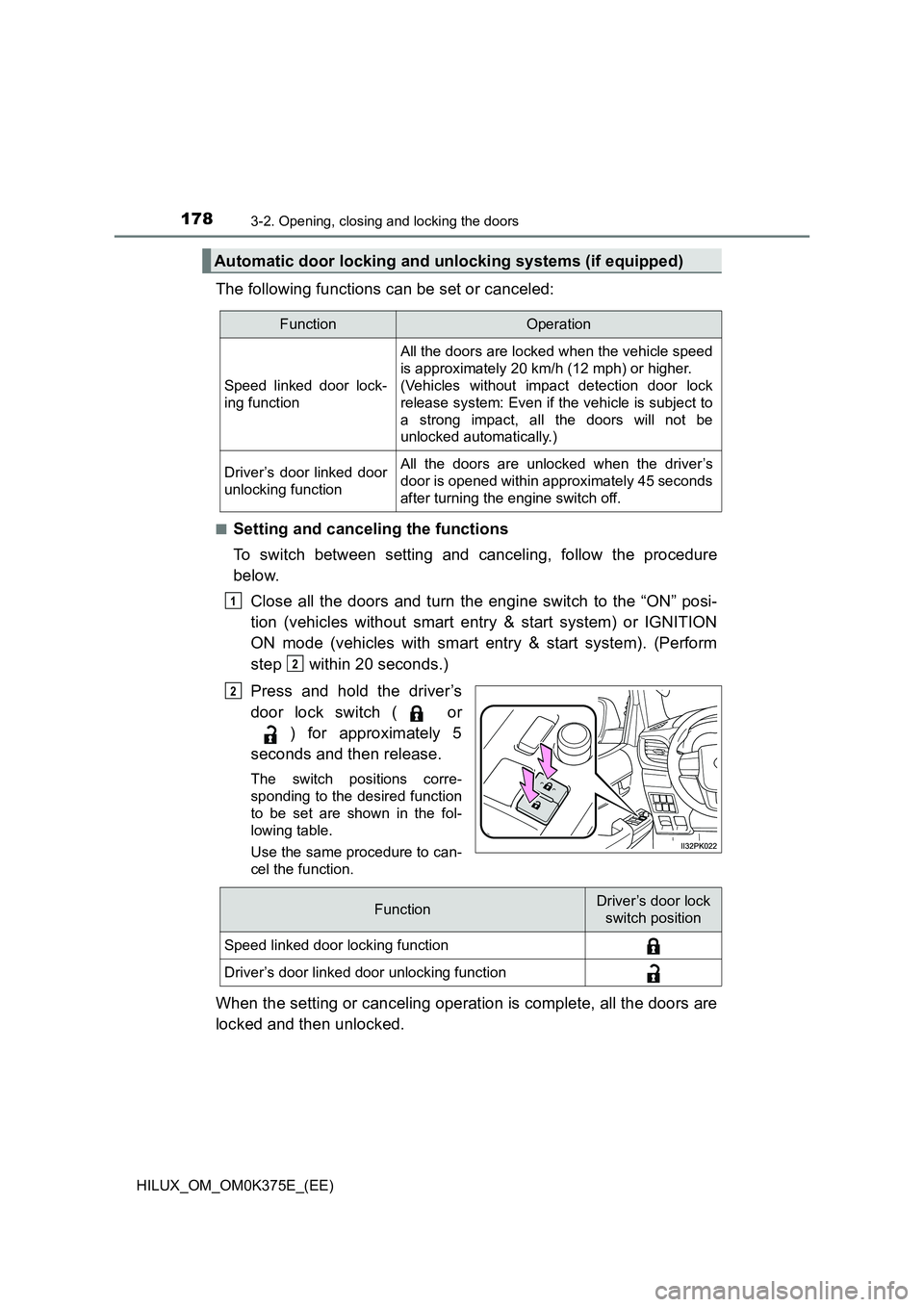
Press and hold the driver’s
door lock switch ( or
) for approximately 5
seconds and then release.
The switch positions corre-
sponding to the desired function
to be set are shown in the fol-
lowing table.
Use the same procedure to can-
cel the function.
When the setting or canceling operation is complete, all the doors are
locked and then unlocked.
Automatic door locking and unlocking systems (if equipped)
FunctionOperation
Speed linked door lock-
ing function
All the doors are locked when the vehicle speed
is approximately 20 km/h (12 mph) or higher.
(Vehicles without impact detection door lock
release system: Even if the vehicle is subject to
a strong impact, all the doors will not be
unlocked automatically.)
Driver’s door linked door
unlocking function
All the doors are unlocked when the driver’s
door is opened within approximately 45 seconds
after turning the engine switch off.
1
2
2
FunctionDriver’s door lock
switch position
Speed linked door locking function
Driver’s door linked door unlocking function
Page 230 of 708
2303-4. Adjusting the steering wheel and mirrors
HILUX_OM_OM0K375E_(EE)
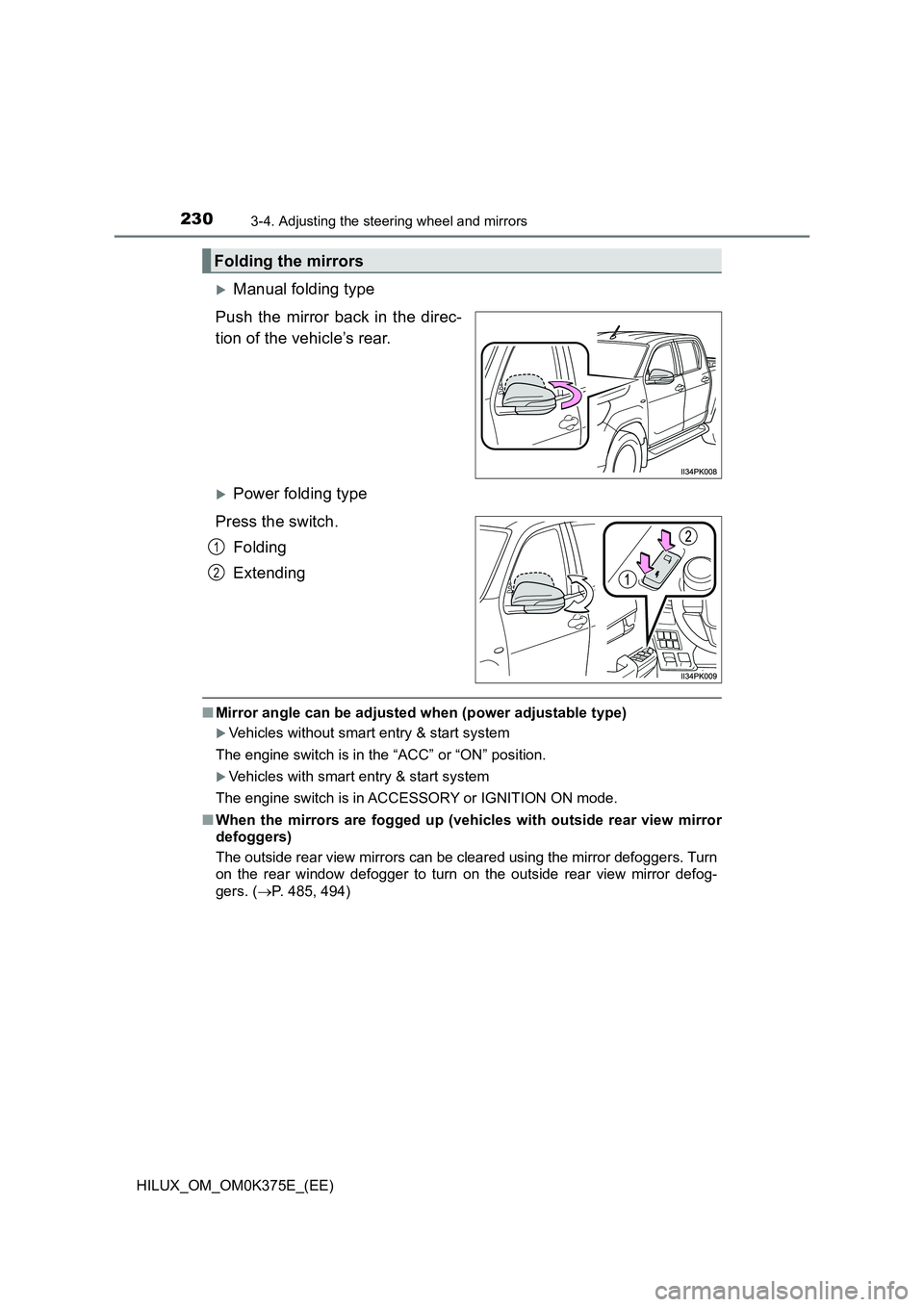
Manual folding type
Push the mirror back in the direc-
tion of the vehicle’s rear.
Power folding type
Press the switch.
Folding
Extending
■ Mirror angle can be adjusted when (power adjustable type)
Vehicles without smart entry & start system
The engine switch is in the “ACC” or “ON” position.
Vehicles with smart entry & start system
The engine switch is in ACCESSORY or IGNITION ON mode.
■ When the mirrors are fogged up (vehicles with outside rear view mirror
defoggers)
The outside rear view mirrors can be cleared using the mirror defoggers. Turn
on the rear window defogger to turn on the outside rear view mirror defog-
gers. ( P. 485, 494)
Folding the mirrors
1
2
Page 233 of 708
2333-5. Opening and closing the windows
3
Operation of each component
HILUX_OM_OM0K375E_(EE)
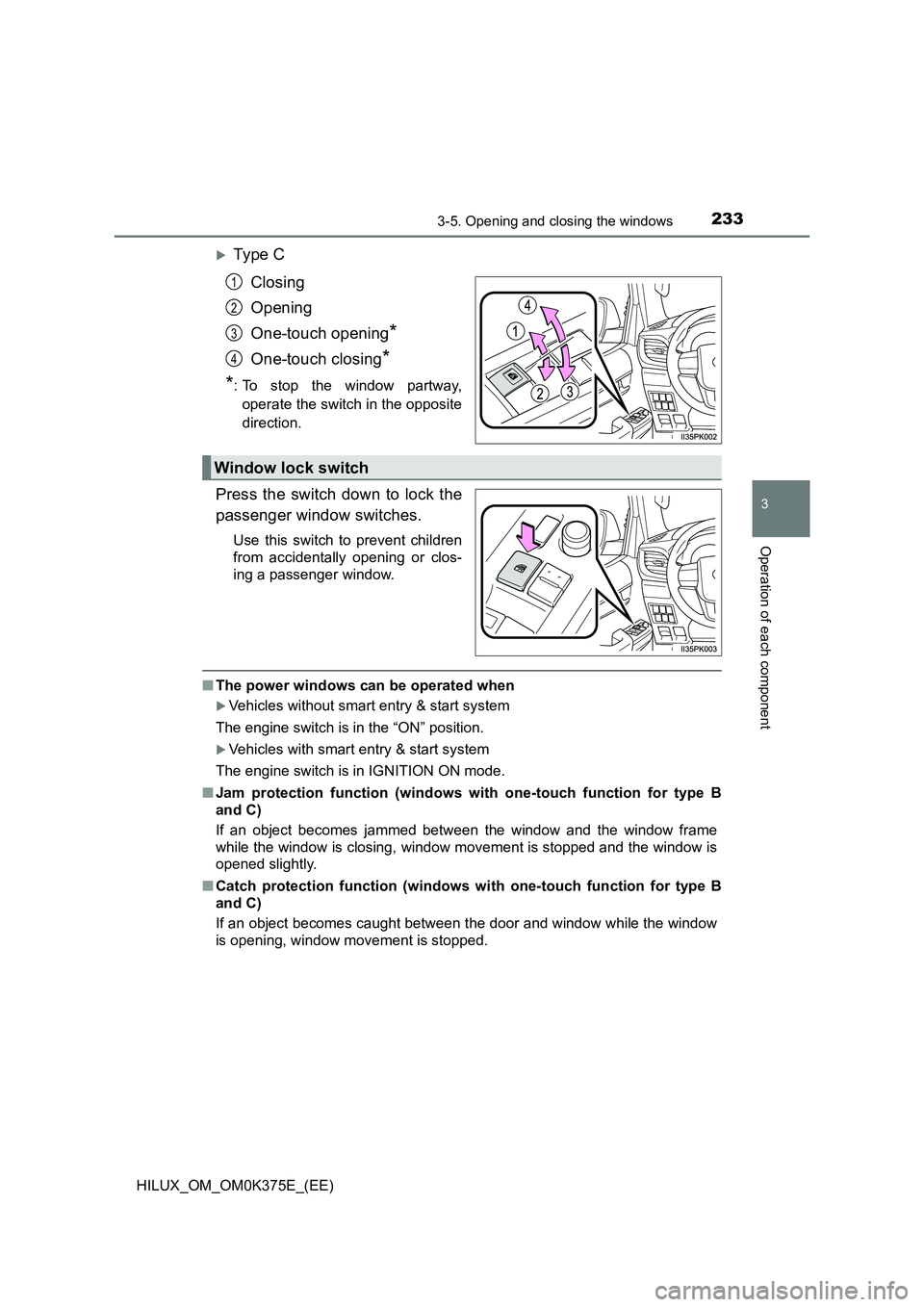
Ty pe C
Closing
Opening
One-touch opening*
One-touch closing*
*: To stop the window partway,
operate the switch in the opposite
direction.
Press the switch down to lock the
passenger window switches.
Use this switch to prevent children
from accidentally opening or clos-
ing a passenger window.
■ The power windows can be operated when
Vehicles without smart entry & start system
The engine switch is in the “ON” position.
Vehicles with smart entry & start system
The engine switch is in IGNITION ON mode.
■ Jam protection function (windows with one-touch function for type B
and C)
If an object becomes jammed between the window and the window frame
while the window is closing, window movement is stopped and the window is
opened slightly.
■ Catch protection function (windows with one-touch function for type B
and C)
If an object becomes caught between the door and window while the window
is opening, window movement is stopped.
1
2
3
4
Window lock switch
Page 234 of 708
2343-5. Opening and closing the windows
HILUX_OM_OM0K375E_(EE)
■ Operating the power windows after turning the engine off
Vehicles without smart entry & start system
The power windows can be operated for approximately 45 seconds even
after the engine switch is turned to the “ACC” or “LOCK” position. They can-
not, however, be operated once either front door is opened.
Vehicles with smart entry & start system
The power windows can be operated for approximately 45 seconds even
after the engine switch is turned to ACCESSORY mode or turned off. They
cannot, however, be operated once either front door is opened.
■ When the window cannot be opened or closed (windows with one-touch
function for type B and C)
When the jam protection function or catch protection function operates
unusually and the window cannot be opened or closed, perform the following
operations with the power window switch of that door.
● Stop the vehicle. With the engine switch in the “ON” position (vehicles with-
out smart entry & start system) or IGNITION ON mode (vehicles with smart
entry & start system), within 4 seconds of the jam protection function or
catch protection function activating, continually operate the power window
switch in the one-touch closing dire ction or one-touch opening direction so
that the window can be opened and closed.
● If the window cannot be opened and closed even when performing the
above operations, perform the following procedure for function initialization.
Turn the engine switch to the “ON” position (vehicles without smart entry
& start system) or IGNITION ON mode (vehicles with smart entry & start
system).
Pull and hold the power window switch in the one-touch closing direction
and completely close the window.
Release the power window switch for a moment, resume pulling the
switch in the one-touch closing direction, and hold it there for approxi-
mately 6 seconds or more.
Press and hold the power window switch in the one-touch opening direc-
tion. After the window is completely opened, continue holding the switch
for an additional 1 second or more.
Release the power window switch for a moment, resume pushing the
switch in the one-touch opening direction, and hold it there for approxi-
mately 4 seconds or more.
Pull and hold the power window switch in the one-touch closing direction
again. After the window is completely closed, continue holding the switch
for a further 1 second or more.
If you release the switch while the window is moving, start again from the
beginning.
If the window reverses and cannot be fully closed or opened, have the vehi-
cle inspected by any authorized Toyota retailer or Toyota authorized
repairer, or any reliable repairer.
1
2
3
4
5
6
Page 237 of 708
237
4Driving
HILUX_OM_OM0K375E_(EE)
4-1. Before driving
Driving the vehicle ............. 238
Cargo and luggage ............ 251
Trailer towing (except
models for model code
destination W).................. 252
Trailer towing (models for
model code destination
W) .................................... 253
4-2. Driving procedures
Engine (ignition) switch
(vehicles without smart
entry & start system)........ 266
Engine (ignition) switch
(vehicles with smart
entry & start system)........ 269
Automatic transmission ..... 277
Manual transmission.......... 284
Turn signal lever ................ 290
Parking brake .................... 291
4-3. Operating the lights
and wipers
Headlight switch ................ 292
Fog light switch .................. 299
Windshield wipers and
washer ............................. 302
4-4. Refueling
Opening the fuel tank
cap ................................... 304
4-5. Using the driving support
systems
Toyota Safety Sense ......... 309
PCS (Pre-Collision
System) ........................... 321
LDA (Lane Departure
Alert) ................................ 334
RSA (Road Sign Assist)..... 343
Cruise control..................... 348
Rear view monitor
system ............................. 352
Four-wheel drive
system ............................. 363
Rear differential
lock system ...................... 373
Stop & Start system
(Smart Stop) .................... 377
Driving assist systems ....... 387
Downhill assist control
system ............................. 395
DPF (Diesel Particulate
Filter) system ................... 398
4-6. Driving tips
Winter driving tips .............. 403
Page 266 of 708
2664-2. Driving procedures
HILUX_OM_OM0K375E_(EE)
Engine (ignition) switch (vehicles without
smart entry & start system)
Automatic transmission (gasoline engine)
Check that the parking brake is set.
Check that the shift lever is set in P.
Firmly depress the brake pedal.
Turn the engine switch to the “START” position to start the engine.
Automatic transmission (diesel engine)
Check that the parking brake is set.
Check that the shift lever is set in P.
Firmly depress the brake pedal.
Turn the engine switch to the “ON” position.
The indicator turns on.
After the indicator light goes out, turn the engine switch to the
“START” position to start the engine.
Manual transmission (gasoline engine)
Check that the parking brake is set.
Check that the shift lever is set in N.
Firmly depress the clutch pedal.
Turn the engine switch to the “START” position to start the engine.
Manual transmission (diesel engine)
Check that the parking brake is set.
Check that the shift lever is set in N.
Firmly depress the clutch pedal.
Turn the engine switch to the “ON” position.
The indicator turns on.
After the indicator light goes out, turn the engine switch to the
“START” position to start the engine.
Starting the engine
1
2
3
4
1
2
3
4
5
1
2
3
4
1
2
3
4
5
Page 269 of 708
269
4
4-2. Driving procedures
Driving
HILUX_OM_OM0K375E_(EE)
Engine (ignition) switch (vehicles with
smart entry & start system)
Automatic transmission
Check that the parking brake is set.
Check that the shift lever is set in P.
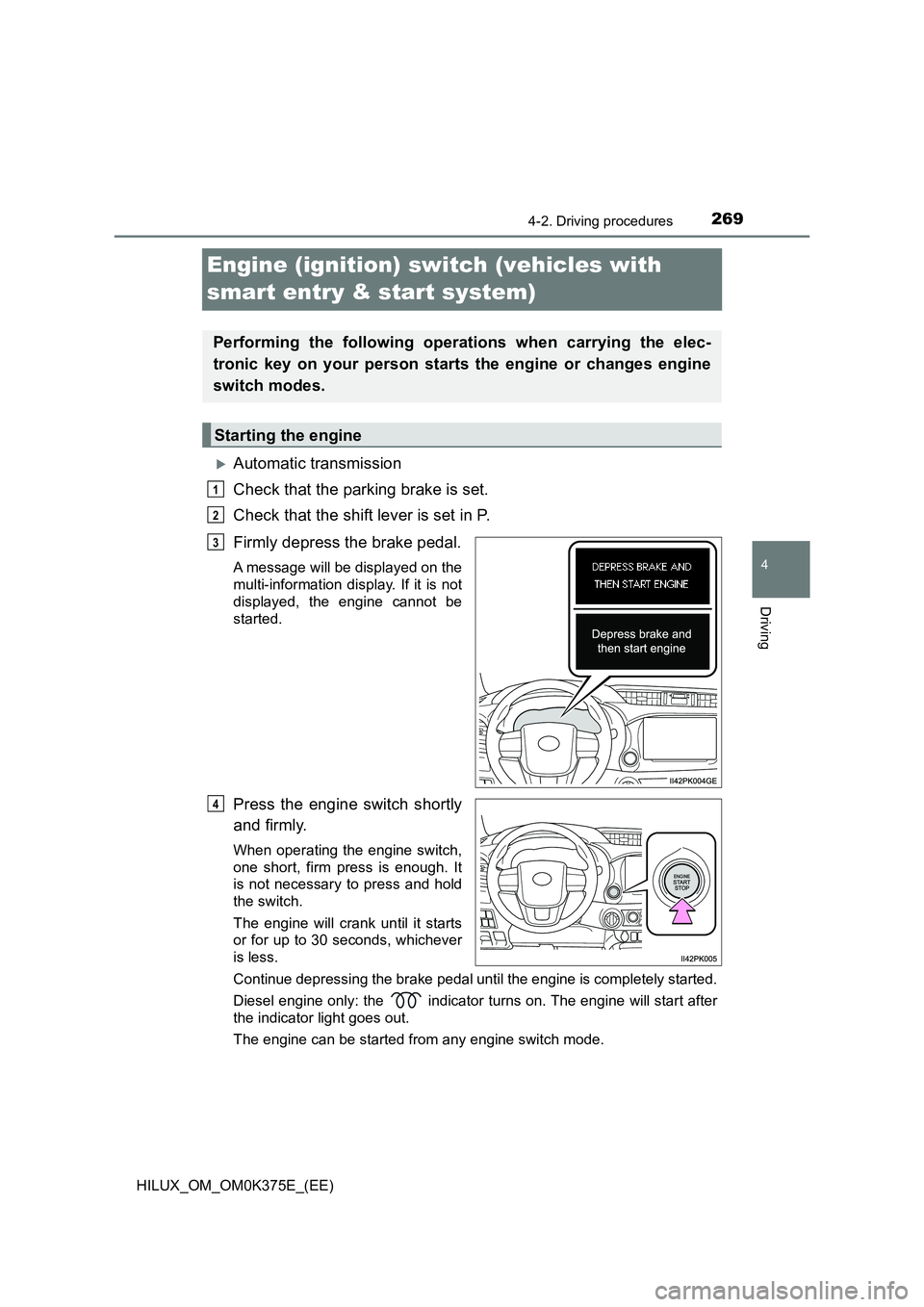
Firmly depress the brake pedal.
A message will be displayed on the
multi-information display. If it is not
displayed, the engine cannot be
started.
Press the engine switch shortly
and firmly.
When operating the engine switch,
one short, firm press is enough. It
is not necessary to press and hold
the switch.
The engine will crank until it starts
or for up to 30 seconds, whichever
is less.
Continue depressing the brake pedal until the engine is completely started.
Diesel engine only: the indicator turns on. The engine will start after
the indicator light goes out.
The engine can be started from any engine switch mode.
Performing the following operations when carrying the elec-
tronic key on your person starts the engine or changes engine
switch modes.
Starting the engine
1
2
3
4
Page 272 of 708
2724-2. Driving procedures
HILUX_OM_OM0K375E_(EE)
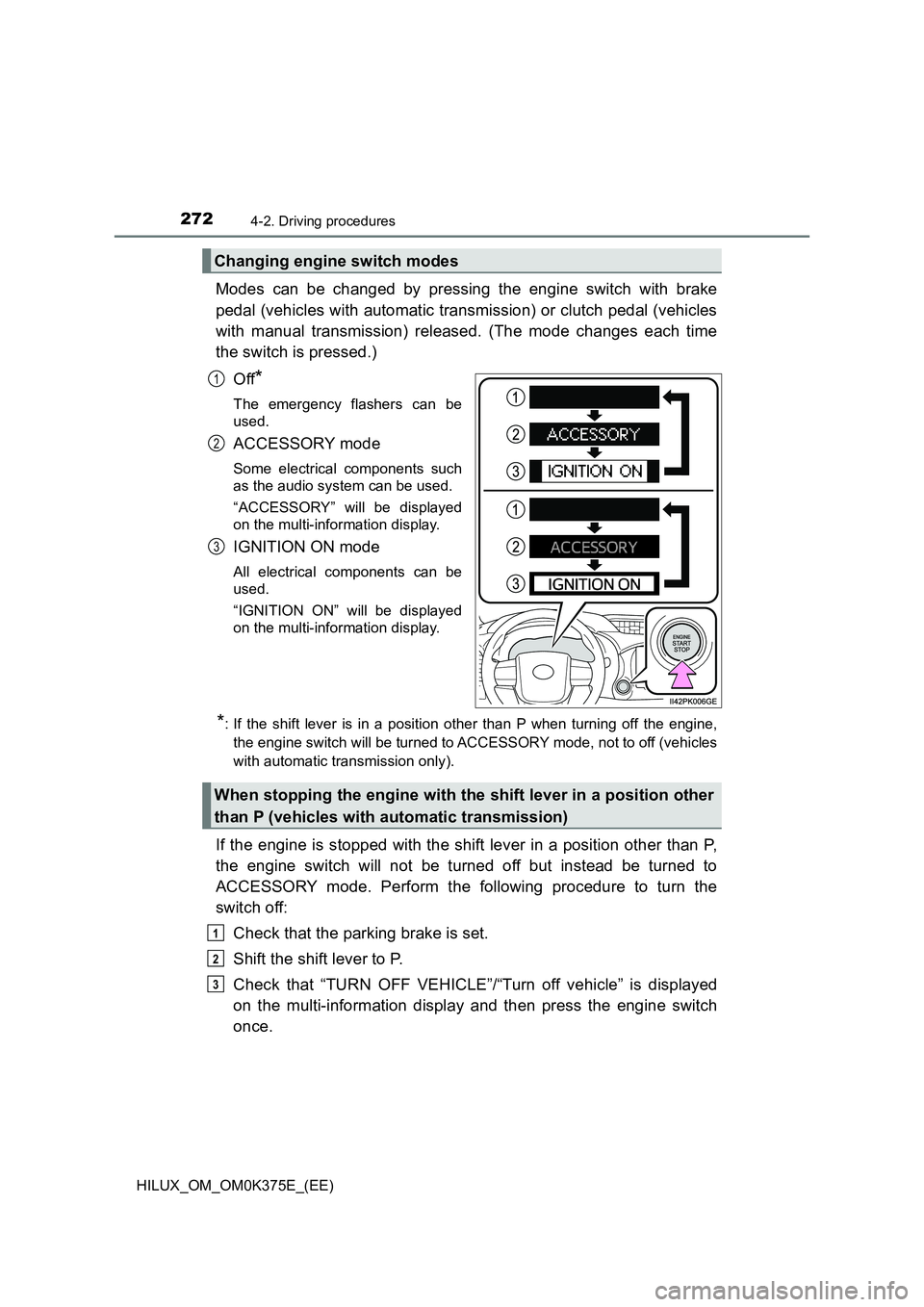
Modes can be changed by pressing the engine switch with brake
pedal (vehicles with automatic transmission) or clutch pedal (vehicles
with manual transmission) released. (The mode changes each time
the switch is pressed.)
Off*
The emergency flashers can be
used.
ACCESSORY mode
Some electrical components such
as the audio system can be used.
“ACCESSORY” will be displayed
on the multi-information display.
IGNITION ON mode
All electrical components can be
used.
“IGNITION ON” will be displayed
on the multi-information display.
*: If the shift lever is in a position other than P when turning off the engine,
the engine switch will be turned to ACCESSORY mode, not to off (vehicles
with automatic transmission only).
If the engine is stopped with the shift lever in a position other than P,
the engine switch will not be turned off but instead be turned to
ACCESSORY mode. Perform the following procedure to turn the
switch off:
Check that the parking brake is set.
Shift the shift lever to P.
Check that “TURN OFF VEHICLE”/“Turn off vehicle” is displayed
on the multi-information display and then press the engine switch
once.
Changing engine switch modes
1
2
3
When stopping the engine with the shift lever in a position other
than P (vehicles with automatic transmission)
1
2
3