lights TOYOTA HILUX 2019 User Guide
[x] Cancel search | Manufacturer: TOYOTA, Model Year: 2019, Model line: HILUX, Model: TOYOTA HILUX 2019Pages: 708, PDF Size: 95.31 MB
Page 63 of 708
631-2. Child safety
1
HILUX_OM_OM0K375E_(EE)
For safety and security
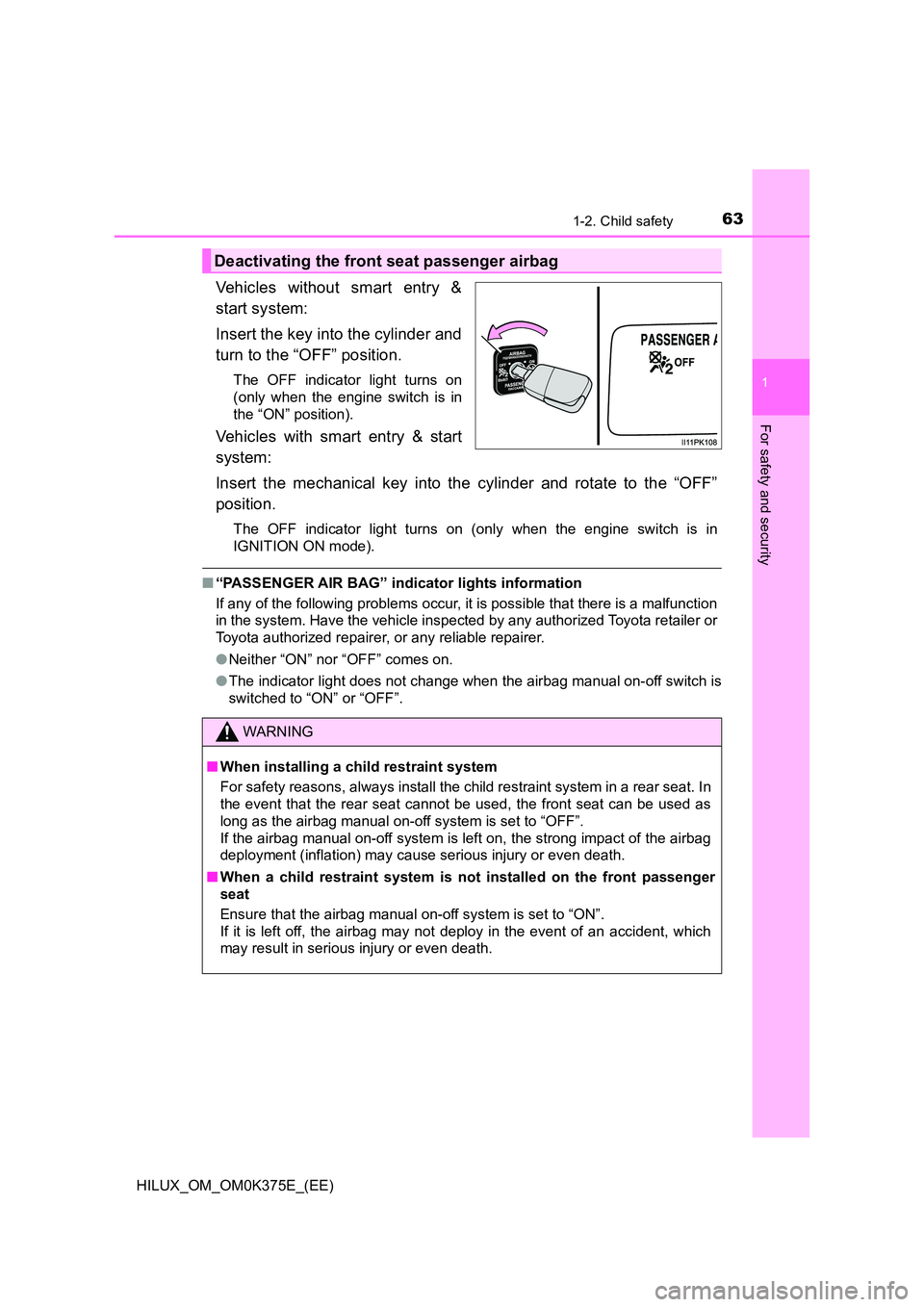
Vehicles without smart entry &
start system:
Insert the key into the cylinder and
turn to the “OFF” position.
The OFF indicator light turns on
(only when the engine switch is in
the “ON” position).
Vehicles with smart entry & start
system:
Insert the mechanical key into the cylinder and rotate to the “OFF”
position.
The OFF indicator light turns on (only when the engine switch is in
IGNITION ON mode).
■ “PASSENGER AIR BAG” indicator lights information
If any of the following problems occur, it is possible that there is a malfunction
in the system. Have the vehicle inspected by any authorized Toyota retailer or
Toyota authorized repairer, or any reliable repairer.
● Neither “ON” nor “OFF” comes on.
● The indicator light does not change when the airbag manual on-off switch is
switched to “ON” or “OFF”.
Deactivating the front seat passenger airbag
WARNING
■ When installing a child restraint system
For safety reasons, always install the child restraint system in a rear seat. In
the event that the rear seat cannot be used, the front seat can be used as
long as the airbag manual on-off system is set to “OFF”.
If the airbag manual on-off system is left on, the strong impact of the airbag
deployment (inflation) may cause serious injury or even death.
■ When a child restraint system is not installed on the front passenger
seat
Ensure that the airbag manual on-off system is set to “ON”.
If it is left off, the airbag may not deploy in the event of an accident, which
may result in serious injury or even death.
Page 123 of 708
123
2Instrument cluster
HILUX_OM_OM0K375E_(EE)
2. Instrument cluster
Warning lights
and indicators .................. 124
Gauges and meters ........... 132
Multi-information display
(Type A) ........................... 137
Multi-information display
(Type B) ........................... 141
Fuel consumption
information ....................... 149
Page 124 of 708
1242. Instrument cluster
HILUX_OM_OM0K375E_(EE)
Warning lights and indicators
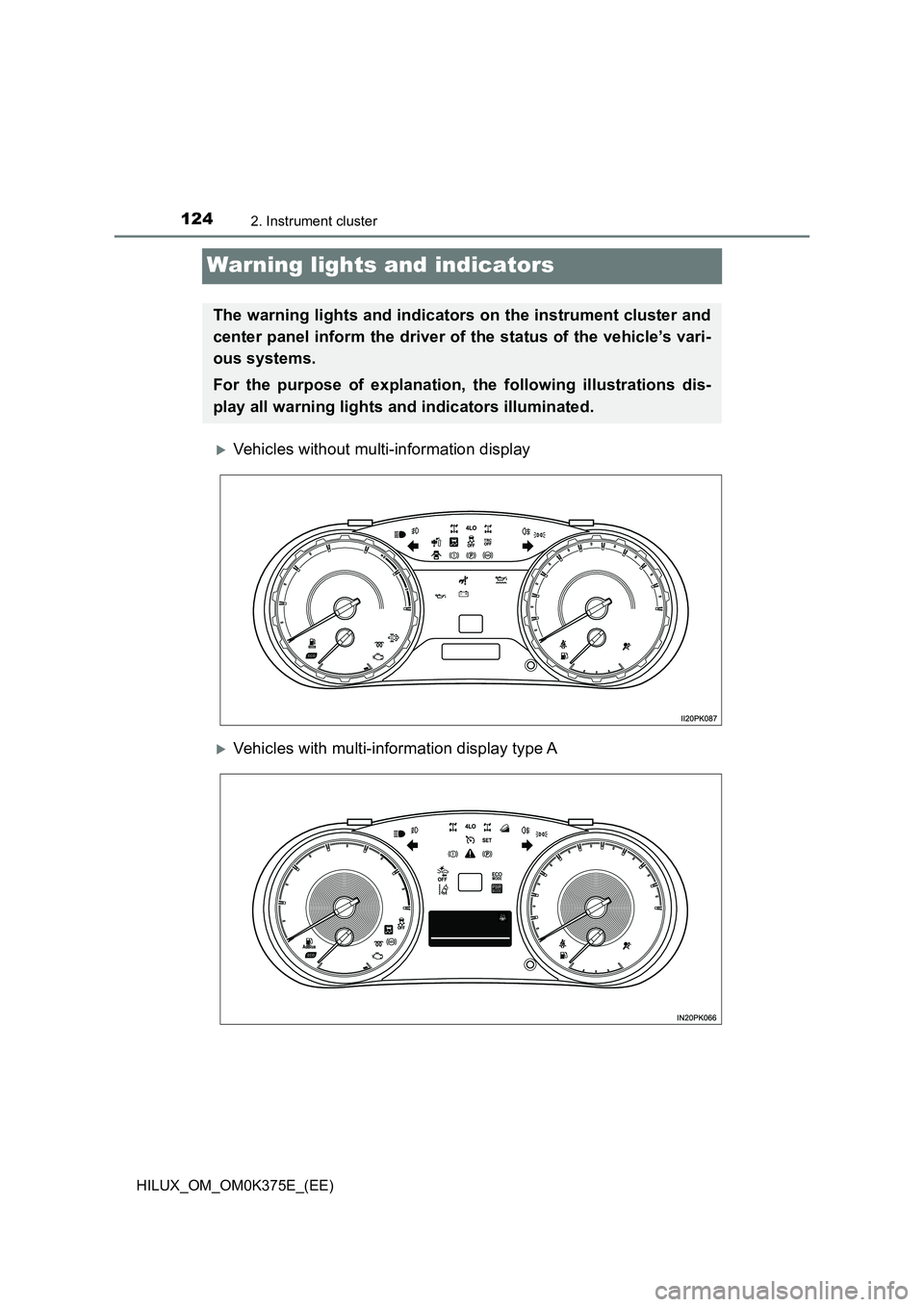
Vehicles without multi-information display
Vehicles with multi-information display type A
The warning lights and indicators on the instrument cluster and
center panel inform the driver of the status of the vehicle’s vari-
ous systems.
For the purpose of explanation, the following illustrations dis-
play all warning lights and indicators illuminated.
Page 125 of 708
1252. Instrument cluster
2
Instrument cluster
HILUX_OM_OM0K375E_(EE)
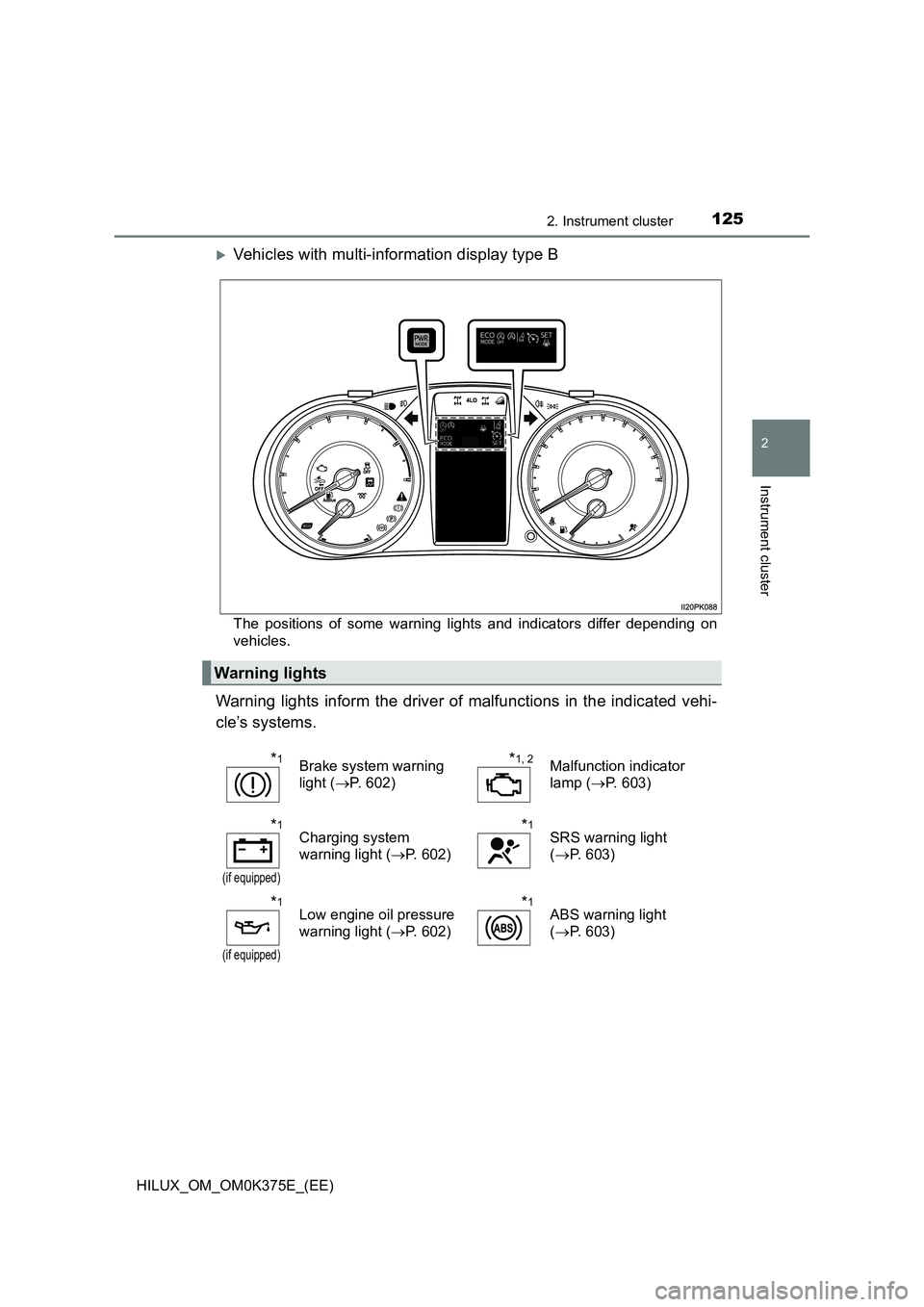
Vehicles with multi-information display type B
The positions of some warning lights and indicators differ depending on
vehicles.
Warning lights inform the driver of malfunctions in the indicated vehi-
cle’s systems.
Warning lights
*1Brake system warning
light ( P. 602)
*1, 2Malfunction indicator
lamp ( P. 603)
*1
(if equipped)
Charging system
warning light ( P. 602)
*1SRS warning light
( P. 603)
*1
(if equipped)
Low engine oil pressure
warning light ( P. 602)
*1ABS warning light
( P. 603)
Page 126 of 708
1262. Instrument cluster
HILUX_OM_OM0K375E_(EE)
*1
(if equipped)
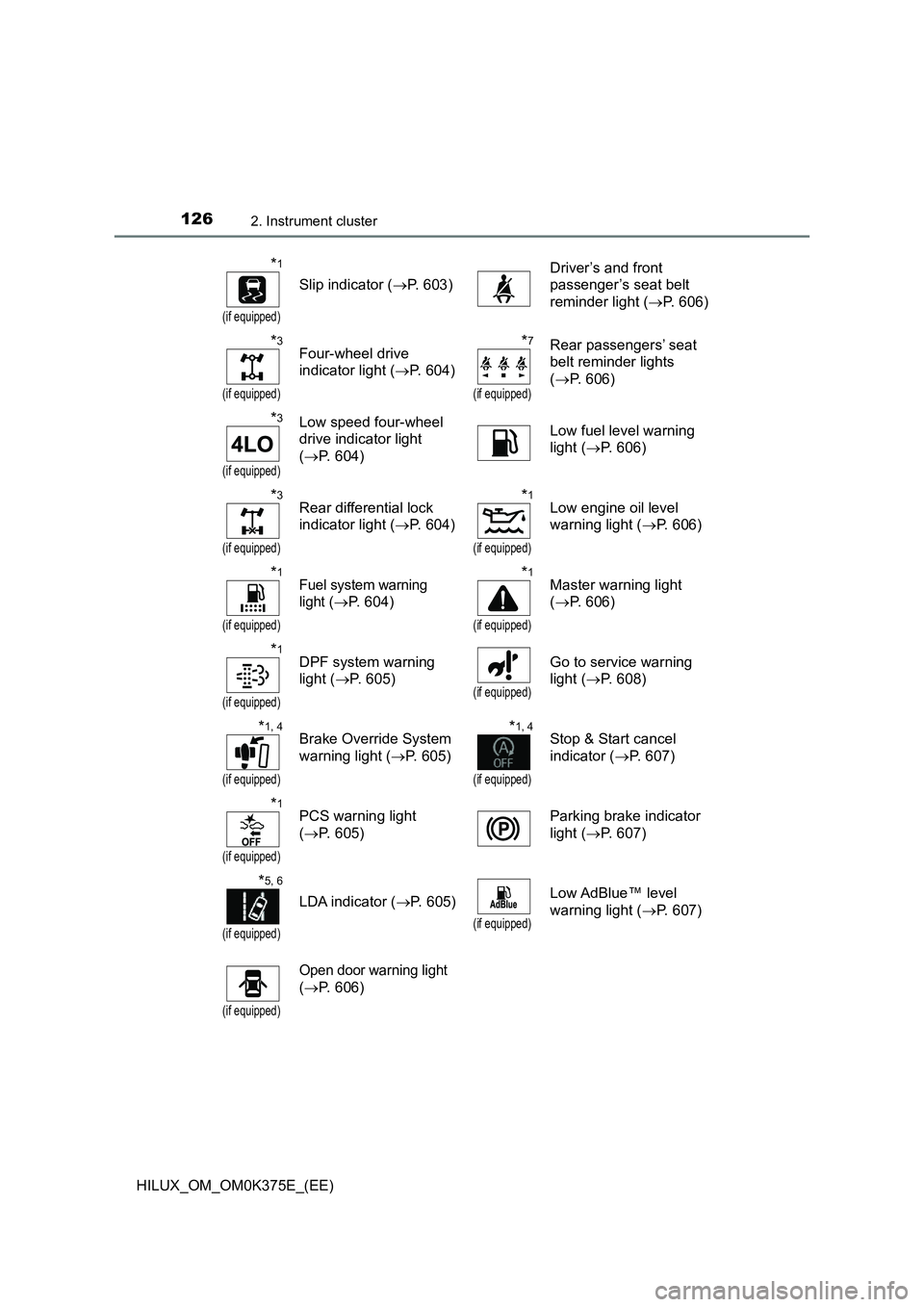
Slip indicator (P. 603)
Driver’s and front
passenger’s seat belt
reminder light ( P. 606)
*3
(if equipped)
Four-wheel drive
indicator light ( P. 604)
*7
(if equipped)
Rear passengers’ seat
belt reminder lights
( P. 606)
*3
(if equipped)
Low speed four-wheel
drive indicator light
( P. 604)
Low fuel level warning
light ( P. 606)
*3
(if equipped)
Rear differential lock
indicator light ( P. 604)
*1
(if equipped)
Low engine oil level
warning light ( P. 606)
*1
(if equipped)
Fuel system warning
light ( P. 604)
*1
(if equipped)
Master warning light
( P. 606)
*1
(if equipped)
DPF system warning
light ( P. 605)(if equipped)
Go to service warning
light ( P. 608)
*1, 4
(if equipped)
Brake Override System
warning light ( P. 605)
*1, 4
(if equipped)
Stop & Start cancel
indicator ( P. 607)
*1
(if equipped)
PCS warning light
( P. 605)
Parking brake indicator
light ( P. 607)
*5, 6
(if equipped)
LDA indicator (P. 605)
(if equipped)
Low AdBlue™ level
warning light ( P. 607)
(if equipped)
Open door warning light
( P. 606)
Page 127 of 708
1272. Instrument cluster
2
Instrument cluster
HILUX_OM_OM0K375E_(EE)
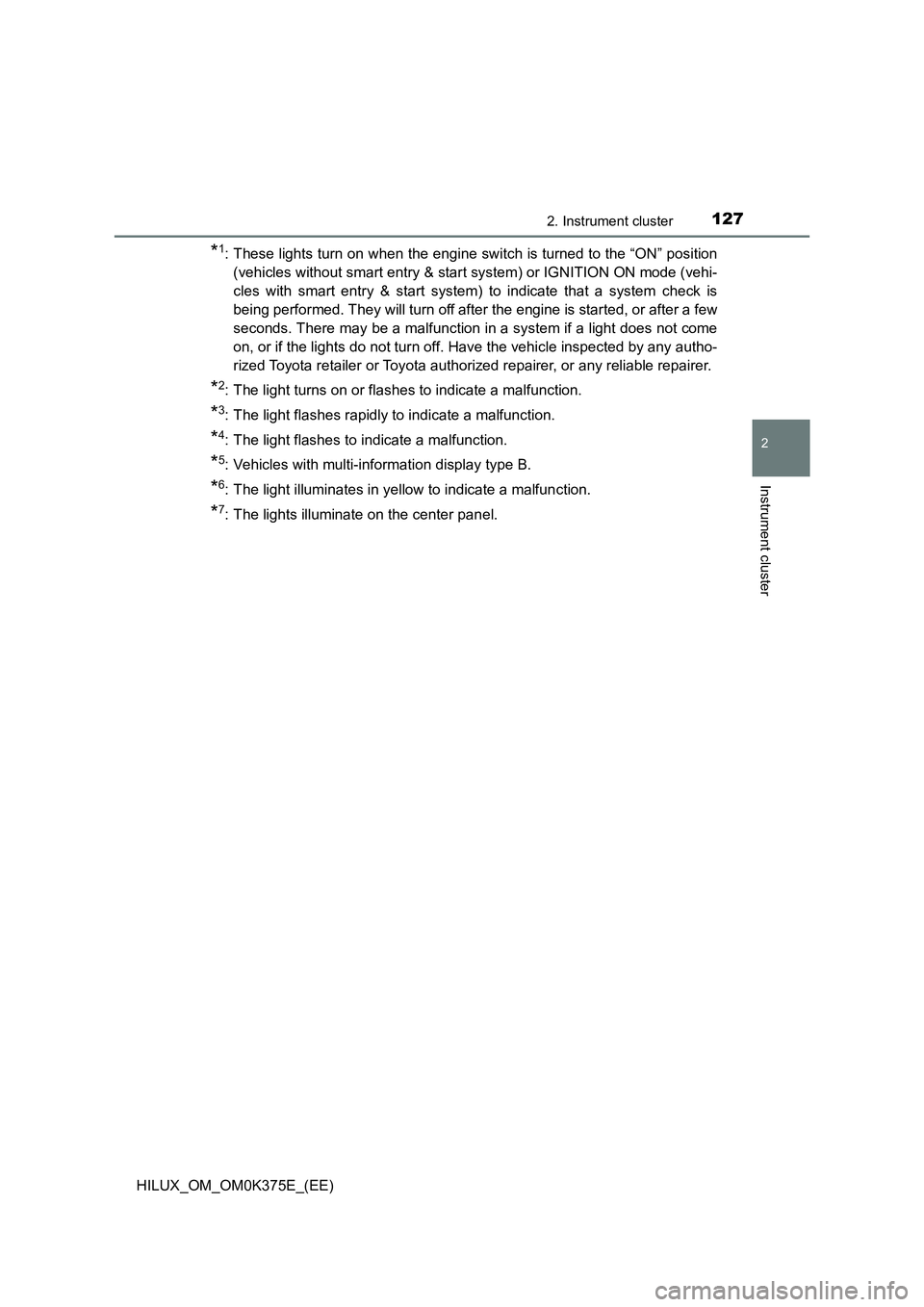
*1: These lights turn on when the engine switch is turned to the “ON” position
(vehicles without smart entry & start system) or IGNITION ON mode (vehi-
cles with smart entry & start system) to indicate that a system check is
being performed. They will turn off after the engine is started, or after a few
seconds. There may be a malfunction in a system if a light does not come
on, or if the lights do not turn off. Have the vehicle inspected by any autho-
rized Toyota retailer or Toyota authorized repairer, or any reliable repairer.
*2: The light turns on or flashes to indicate a malfunction.
*3: The light flashes rapidly to indicate a malfunction.
*4: The light flashes to indicate a malfunction.
*5: Vehicles with multi-information display type B.
*6: The light illuminates in yellow to indicate a malfunction.
*7: The lights illuminate on the center panel.
Page 129 of 708
1292. Instrument cluster
2
Instrument cluster
HILUX_OM_OM0K375E_(EE)
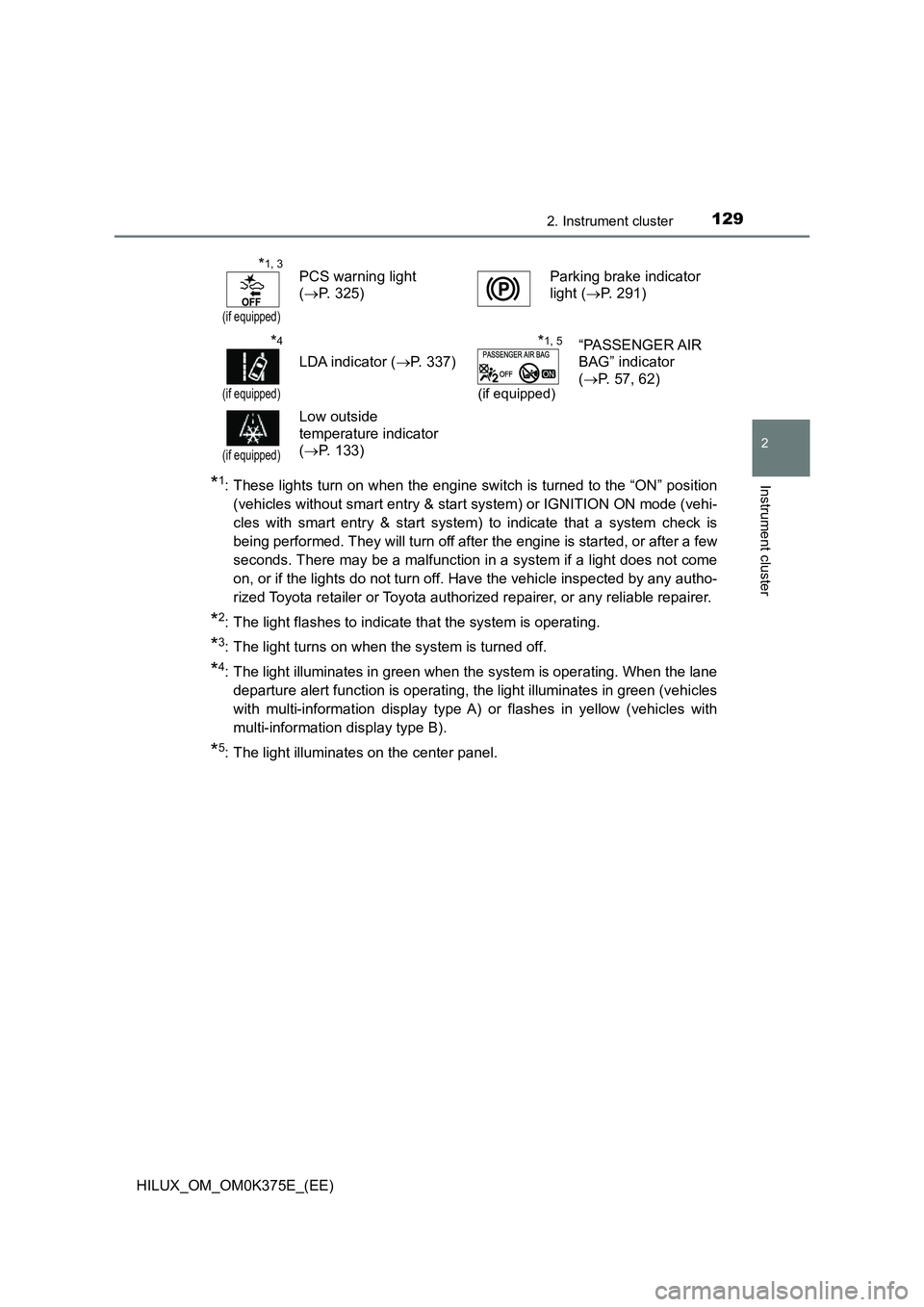
*1: These lights turn on when the engine switch is turned to the “ON” position
(vehicles without smart entry & start system) or IGNITION ON mode (vehi-
cles with smart entry & start system) to indicate that a system check is
being performed. They will turn off after the engine is started, or after a few
seconds. There may be a malfunction in a system if a light does not come
on, or if the lights do not turn off. Have the vehicle inspected by any autho-
rized Toyota retailer or Toyota authorized repairer, or any reliable repairer.
*2: The light flashes to indicate that the system is operating.
*3: The light turns on when the system is turned off.
*4: The light illuminates in green when the system is operating. When the lane
departure alert function is operating, the light illuminates in green (vehicles
with multi-information display type A) or flashes in yellow (vehicles with
multi-information display type B).
*5: The light illuminates on the center panel.
*1, 3
(if equipped)
PCS warning light
( P. 325)
Parking brake indicator
light ( P. 291)
*4
(if equipped)
LDA indicator (P. 337)
*1, 5
(if equipped)
“PASSENGER AIR
BAG” indicator
( P. 57, 62)
(if equipped)
Low outside
temperature indicator
( P. 133)
Page 135 of 708
1352. Instrument cluster
2
Instrument cluster
HILUX_OM_OM0K375E_(EE)
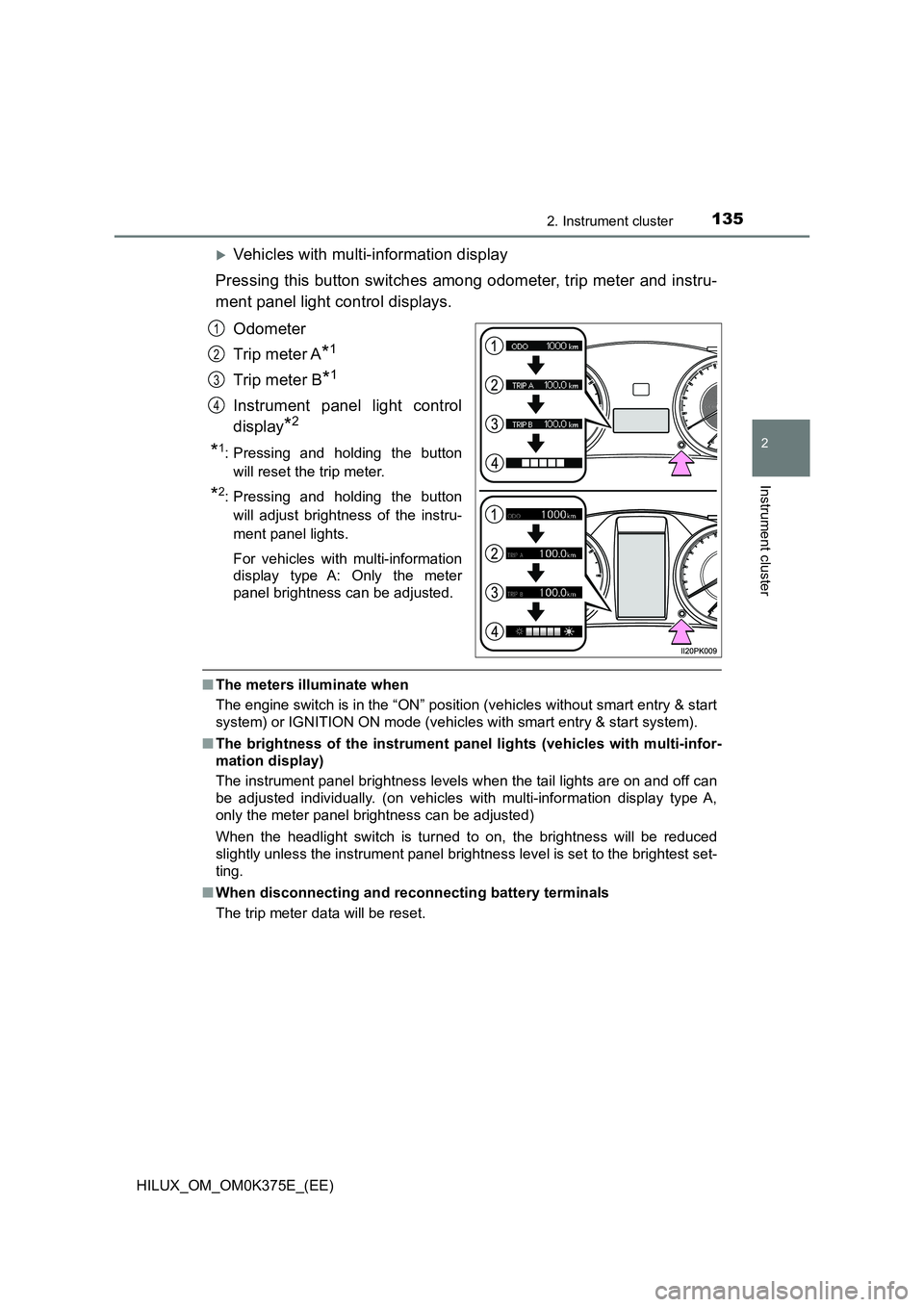
Vehicles with multi-information display
Pressing this button switches among odometer, trip meter and instru-
ment panel light control displays.
Odometer
Trip meter A*1
Trip meter B*1
Instrument panel light control
display*2
*1: Pressing and holding the button
will reset the trip meter.
*2: Pressing and holding the button
will adjust brightness of the instru-
ment panel lights.
For vehicles with multi-information
display type A: Only the meter
panel brightness can be adjusted.
■ The meters illuminate when
The engine switch is in the “ON” position (vehicles without smart entry & start
system) or IGNITION ON mode (vehicles with smart entry & start system).
■ The brightness of the instrument panel lights (vehicles with multi-infor-
mation display)
The instrument panel brightness levels when the tail lights are on and off can
be adjusted individually. (on vehicles with multi-information display type A,
only the meter panel brightness can be adjusted)
When the headlight switch is turned to on, the brightness will be reduced
slightly unless the instrument panel brightness level is set to the brightest set-
ting.
■ When disconnecting and reconnecting battery terminals
The trip meter data will be reset.
1
2
3
4
Page 155 of 708
1553-1. Key information
3
Operation of each component
HILUX_OM_OM0K375E_(EE)
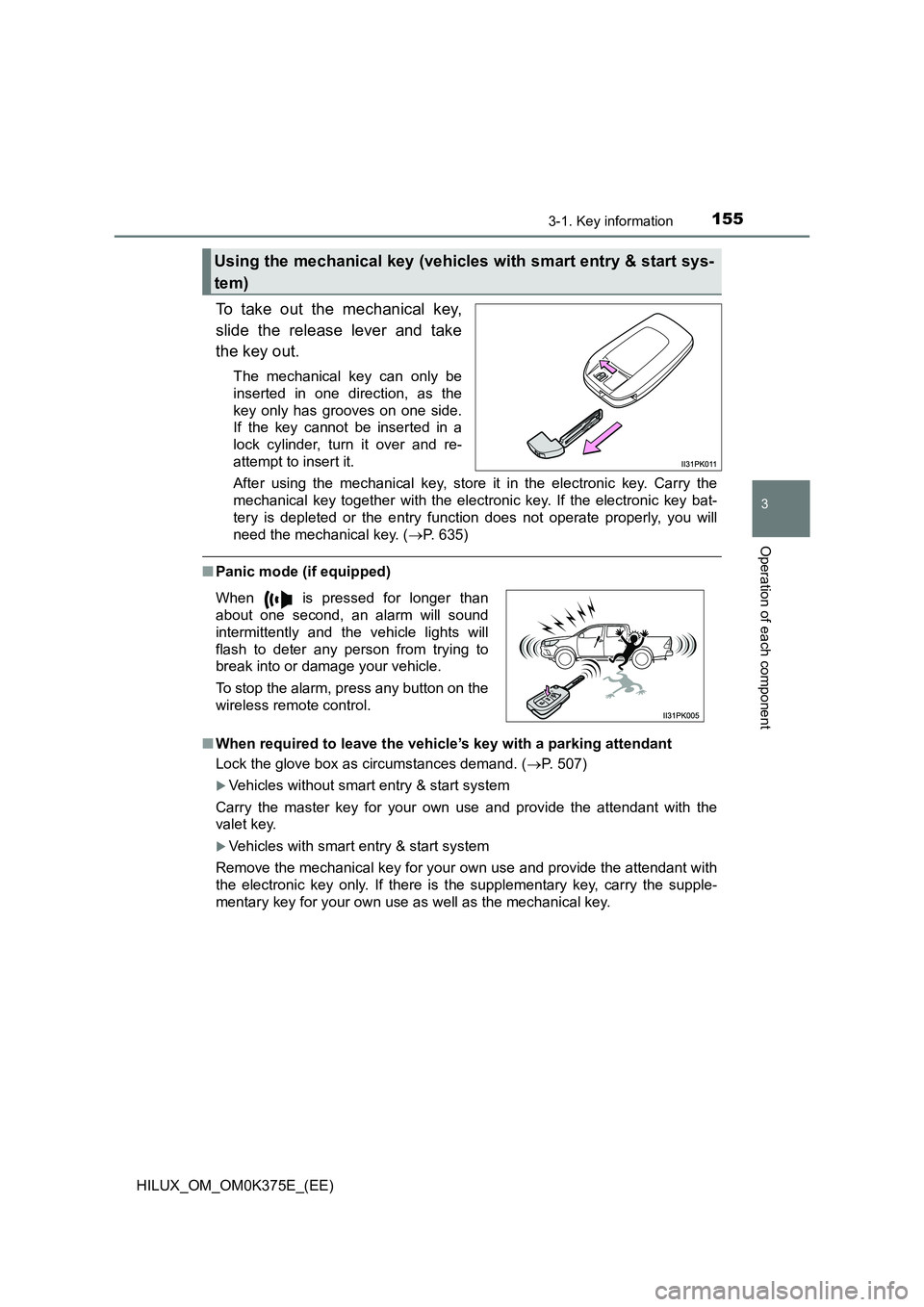
To take out the mechanical key,
slide the release lever and take
the key out.
The mechanical key can only be
inserted in one direction, as the
key only has grooves on one side.
If the key cannot be inserted in a
lock cylinder, turn it over and re-
attempt to insert it.
After using the mechanical key, store it in the electronic key. Carry the
mechanical key together with the electronic key. If the electronic key bat-
tery is depleted or the entry func tion does not operate properly, you will
need the mechanical key. ( P. 635)
■Panic mode (if equipped)
■ When required to leave the vehicle’s key with a parking attendant
Lock the glove box as circumstances demand. ( P. 507)
Vehicles without smart entry & start system
Carry the master key for your own use and provide the attendant with the
valet key.
Vehicles with smart entry & start system
Remove the mechanical key for your own use and provide the attendant with
the electronic key only. If there is the supplementary key, carry the supple-
mentary key for your own use as well as the mechanical key.
Using the mechanical key (vehicles with smart entry & start sys-
tem)
When is pressed for longer than
about one second, an alarm will sound
intermittently and the vehicle lights will
flash to deter any person from trying to
break into or damage your vehicle.
To stop the alarm, press any button on the
wireless remote control.
Page 228 of 708
2283-4. Adjusting the steering wheel and mirrors
HILUX_OM_OM0K375E_(EE)
Inside rear view mirror
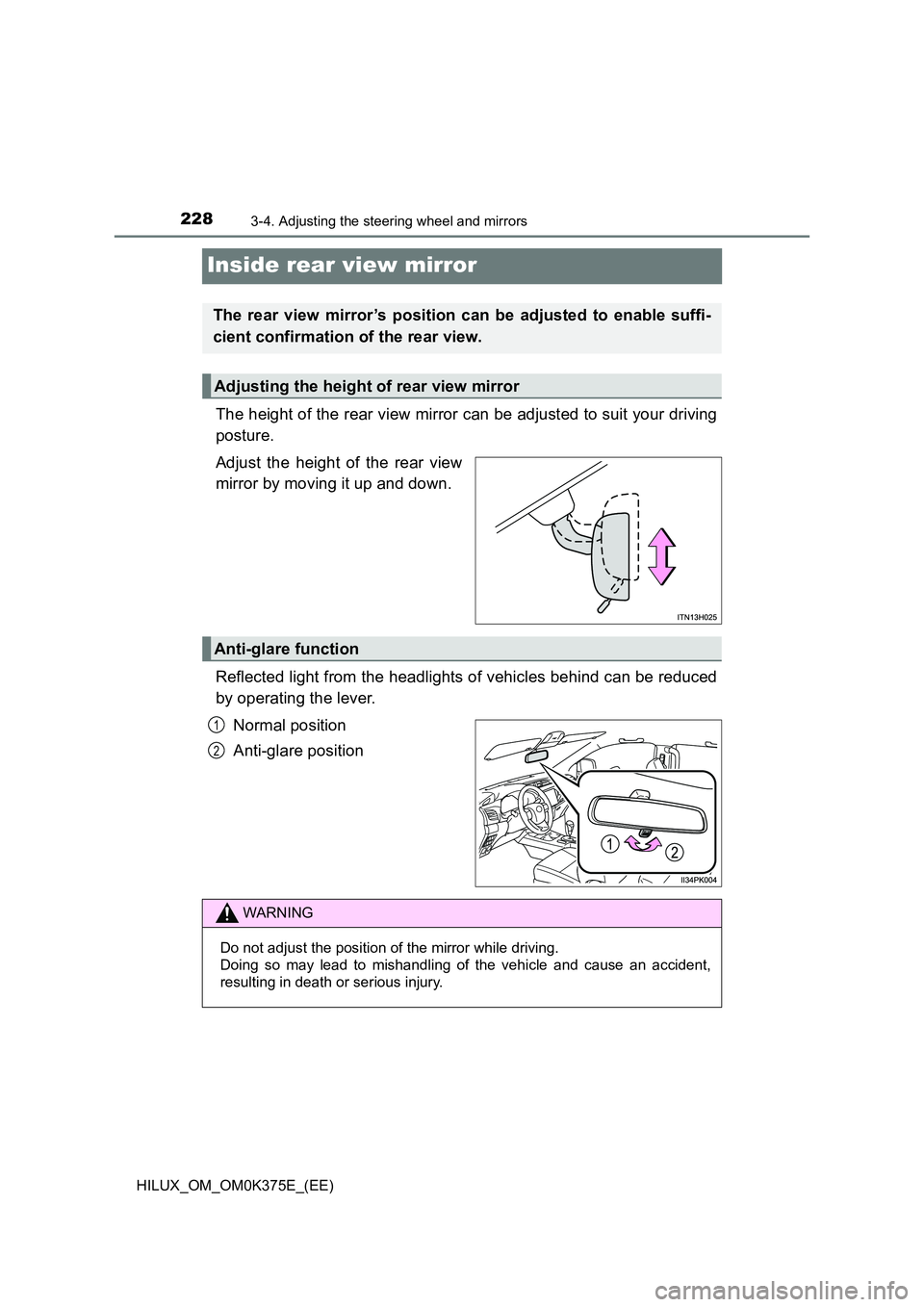
The height of the rear view mirror can be adjusted to suit your driving
posture.
Adjust the height of the rear view
mirror by moving it up and down.
Reflected light from the headlights of vehicles behind can be reduced
by operating the lever.
Normal position
Anti-glare position
The rear view mirror’s position can be adjusted to enable suffi-
cient confirmation of the rear view.
Adjusting the height of rear view mirror
Anti-glare function
1
2
WARNING
Do not adjust the position of the mirror while driving.
Doing so may lead to mishandling of the vehicle and cause an accident,
resulting in death or serious injury.