tail light TOYOTA HILUX 2019 Owner's Manual
[x] Cancel search | Manufacturer: TOYOTA, Model Year: 2019, Model line: HILUX, Model: TOYOTA HILUX 2019Pages: 708, PDF Size: 95.31 MB
Page 314 of 708
3144-5. Using the driving support systems
HILUX_OM_OM0K375E_(EE)
WARNING
●Replace the windshield if it is damaged or cracked.
If the windshield needs to be replaced, contact any authorized Toyota
retailer or Toyota authorized repairer, or any reliable repairer.
● Do not get the camera sensor wet.
● Do not allow bright lights to shine into the camera sensor.
● Do not dirty or damage the camera sensor.
When cleaning the inside of the windshi eld, do not allow glass cleaner to
contact the lens. Also, do not touch the lens.
If the lens is dirty or damaged, contact any authorized Toyota retailer or
Toyota authorized repairer, or any reliable repairer.
● Do not subject the camera sensor to a strong impact.
● Do not change the installation position or direction of the camera sensor or
remove it.
● Do not disassemble the camera sensor.
● Do not modify any components of the vehicle around the camera sensor
(inside rear view mirror, etc.) or ceiling.
● Do not attach any accessories that may obstruct the camera sensor to the
hood, front grille or front bumper. C ontact any authorized Toyota retailer or
Toyota authorized repairer, or any reliable repairer for details.
● If a surfboard or other long object is to be mounted on the roof, make sure
that it will not obstruct the camera sensor.
● Do not modify the headlights or other lights.
Page 333 of 708
3334-5. Using the driving support systems
4
Driving
HILUX_OM_OM0K375E_(EE)
■ If the PCS warning light flashes or illuminates and a warning message is
displayed on the multi-information display
The pre-collision system may be tem porarily unavailable or there may be a
malfunction in the system.
● In the following situations, the warning light will turn off, the message will
disappear and the system will beco me operational when normal operating
conditions return:
• When the radar sensor or camera s ensor or the area around either sen-
sor is hot, such as in the sun
• When the radar sensor or camera s ensor or the area around either sen-
sor is cold, such as in an extremely cold environment
• When a front sensor is dirty or covered with snow, etc.
• When the part of the windshield in front of the camera sensor is fogged
up or covered with condensation or ice.
(Defogging the windshield: P. 485, 494)
• If the camera sensor is obstructed, such as when the hood is open or a
sticker is attached to the windshield near the camera sensor
● If the PCS warning light continues to flash or remains illuminated or the
warning message does not disappear even though the vehicle has returned
to normal, the system may be malfunctioning. Have the vehicle inspected by
any authorized Toyota retailer or Toyota authorized repairer, or any reliable
repairer immediately.
■ If VSC is disabled
● If VSC is disabled (P. 389), the pre-collision brake assist and pre-collision
braking functions are also disabled.
● The PCS warning light will turn on and “VSC TURNED OFF PRE-COLLI-
SION BRAKE SYSTEM UNAVAILABLE”/“VSC Turned Off Pre-Collision
Brake System Unavailable” will be di splayed on the multi-information dis-
play.
Page 336 of 708
3364-5. Using the driving support systems
HILUX_OM_OM0K375E_(EE)
WARNING
■Situations unsuitable for LDA system
Do not use the LDA system in the following situations.
The system may not operate properly and lead to an accident, resulting in
death or serious injury.
● A spare tire, tire chains, etc., are equipped.
● Objects or patterns that could be mistaken for white (yellow) lines are
present on the side of the road (guardrails, curbs, reflective poles, etc.).
● Vehicle is driven on a snow-covered road.
● White (yellow) lines are difficult to see due to rain, snow, fog, dust, etc.
● Asphalt repair marks, white (yellow) line marks, etc., are present due to
road repair.
● Vehicle is driven in a temporary lane or restricted lane due to construction
work.
● Vehicle is driven in a construction zone.
■ Preventing LDA system malfunctions and operations performed by
mistake
● Do not modify the headlights or place stickers, etc., on the surface of the
lights.
● Do not modify the suspension etc. If the suspension etc. needs to be
replaced, contact any authorized Toyota retailer or Toyota authorized
repairer, or any reliable repairer.
● Do not install or place anything on the hood or grille. Also, do not install a
grille guard (bull bars, kangaroo bar, etc.).
● If your windshield needs repairs, contact any authorized Toyota retailer or
Toyota authorized repairer, or any reliable repairer.
Page 359 of 708
3594-5. Using the driving support systems
4
Driving
HILUX_OM_OM0K375E_(EE)
■If you notice any symptoms
If you notice any of the following symptoms, refer to the likely cause
and the solution, and re-check.
If the symptom is not resolved by the solution, have the vehicle
inspected by any authorized Toyota retailer or Toyota authorized
repairer, or any reliable repairer.
Things you should know
Likely causeSolution
The image is difficult to see
• The vehicle is in a dark area
• The temperature around the lens
is either high or low
• The outside temperature is low
• There are water droplets on the
camera
• It is raining or humid
• Foreign matter (mud etc.) is
adhering to the camera
• There are scratches on the cam-
era
• Sunlight or headlights are shining
directly into the camera
• The vehicle is under fluorescent
lights, sodium lights, mercury
lights etc.
If this happens due to these causes,
it does not indicate a malfunction.
Back up while visually checking the
vehicle’s surroundings. (Use the
monitor again once conditions have
been improved.)
The image on the rear view monitor
system screen can be adjusted,
refer to the “Navigation and
multimedia system Owner’s
manual”.
The image is blurry
Dirt or foreign matter (such as water
droplets, snow, mud etc.) is adher-
ing to the camera.
Flush the camera with a large quan-
tity of water and wipe the camera
lens clean with a soft and wet cloth.
Page 362 of 708
3624-5. Using the driving support systems
HILUX_OM_OM0K375E_(EE)
NOTICE
■How to use the camera
● The rear view monitor system may not operate properly in the following
cases.
• If the back of the vehicle is hit, the position and mounting angle of the
camera may change.
• As the camera has a water proof construction, do not detach, disassem-
ble or modify it. This may cause incorrect operation.
• When cleaning the camera lens, flush the camera with a large quantity
of water and wipe it with a soft and wet cloth. Strongly rubbing the cam-
era lens may cause the camera lens to be scratched and unable to
transmit a clear image.
• Do not allow organic solvent, car wax, window cleaner or glass coat to
adhere to the camera. If this happens, wipe it off as soon as possible.
• If the temperature changes rapidly, such as when hot water is poured
on the vehicle in cold weather, the system may not operate normally.
• When washing the vehicle, do not apply intensive bursts of water to the
camera or camera area. Doing so may result in the camera malfunc-
tioning.
• When the camera is used under fluorescent lights, sodium light or mer-
cury light etc., the lights and the illuminated areas may appear to flicker.
● Do not expose the camera to strong impact as this could cause a malfunc-
tion. If this happens, have the vehicle inspected by any authorized Toyota
retailer or Toyota authorized repairer, or any reliable repairer as soon as
possible.
Page 386 of 708
3864-5. Using the driving support systems
HILUX_OM_OM0K375E_(EE)
WARNING
■When the Stop & Start system is operating
● Keep the shift lever in N (manual transmission), depress the brake pedal
and apply the parking brake when necessary while the engine is stopped
by the Stop & Start system (while the Stop & Start indicator is on).
● Do not allow anyone to leave the vehicle while the engine is stopped by
the Stop & Start system (while the Stop & Start indicator is on).
An accident may occur due to the automatic engine start function.
● Ensure that the engine is not stopped by the Stop & Start system while the
vehicle is in a poorly ventilated area. The engine may restart due to the
automatic engine start function, causing exhaust gases to collect and
enter the vehicle, possibly resulting in death or a serious health hazard.
■ Off-road driving precaution
When driving off-road, such as driving through water, press the Stop & Start
cancel switch to disable the Stop & Start system. Failure to do so may
cause the engine to be unable to restart.
NOTICE
■ To ensure the system operates correctly
If any of the following situations occur, the Stop & Start system may not
operate correctly. Have your vehicle inspected by any authorized Toyota
retailer or Toyota authorized repairer, or any reliable repairer.
● While the driver’s seat belt is fastened, the driver’s and front passenger’s
seat belt reminder light flashes.
● Even though the driver’s seat belt is not fastened, the driver’s and front
passenger’s seat belt reminder light does not illuminate.
● Even though the driver’s door is closed, the open door warning is dis-
played on the multi-information display or the interior light is illuminated
when door linked illumination is enabled ( P. 504).
● Even though the driver’s door is open, the open door warning is not dis-
played on the multi-information display or the interior light does not illumi-
nate when door linked illumination is enabled ( P. 504).
Page 390 of 708
3904-5. Using the driving support systems
HILUX_OM_OM0K375E_(EE)
■Turning off TRC, A-TRC, VSC and Trailer Sway Control systems
Vehicles without multi-information display
To turn the TRC, A-TRC, VSC and Trailer Sway Control systems off, press
and hold for more than 3 seconds while the vehicle is stopped.
The “TRC OFF” indicator light and VSC OFF indicator light will come on.*
Press again to turn the system back on.
Vehicles with multi-information display
To turn the TRC, A-TRC, VSC and Trailer Sway Control systems off, press
and hold for more than 3 seconds while the vehicle is stopped.
The VSC OFF indicator light will come on and the “TRC TURNED OFF”/“TRC
turned off” will be shown on the multi-information display.*
Press again to turn the system back on.
*: On vehicles with pre-collision system, pre-collision brake assist and pre-
collision braking will also be disabled. The PCS warning light will come on
and the message will be shown on the multi-information display. ( P. 390)
■ When “TRC OFF” indicator light comes on or the message is displayed
on the multi-information display sh owing that TRC/A-TRC has been dis-
abled even if has not been pressed
TRC, A-TRC and downhill assist control is temporary deactivated. If the indi-
cator light continues to remain on or the information continues to show, con-
tact any authorized Toyota retailer or Toyota authorized repairer, or any
reliable repairer.
■ If “VSC TURNED OFF PRE-COLLISION BRAKE SYSTEM UNAVAIL-
ABLE”/“VSC Turned Off Pre-Collision Brake System Unavailable” is
shown on the multi-information display
The pre-collision brake assist and pre- collision braking functions are stopped
since VSC was turned off. To activate the functions, turn VSC on.
Page 400 of 708
4004-5. Using the driving support systems
HILUX_OM_OM0K375E_(EE)
●If the DPF system warning light flashes rapidly (vehicles without
multi-information display) or the DPF system warning message
“DPF FULL VISIT YOUR DEALER”/“DPF full Visit your dealer”
appears on the display (vehicles with multi-information display), the
malfunction indicator lamp comes on, have the vehicle inspected by
any authorized Toyota retailer or Toyota authorized repairer, or any
reliable repairer immediately.
■ Regeneration with the DPF system switch
● After pressing the DPF system switch, depressing the accelerator pedal or
clutch pedal (manual transmission) will stop regeneration. If regeneration
has been stopped, restart regeneration as soon as possible.
● After regeneration is finished, race the engine several time to clean the
exhaust system.
■ DPF system warning
Under the following driving conditions, the DPF system warning light (vehi-
cles without the multi-information display) or the DPF system warning mes-
sage (vehicles with multi-information display) may come on earlier than
normal.*
● When only driving at low speeds (for example 20 km/h [12 mph] or below).
● If the engine is turned on and off frequently (if the engine is not left running
for more than 10 minutes at a time).
*: Differs in accordance with weather, driving conditions, etc.
Page 401 of 708
4014-5. Using the driving support systems
4
Driving
HILUX_OM_OM0K375E_(EE)
WARNING
■During regeneration
Observe the following precautions.
Failure to do so may result in serious injury such as burns caused by the hot
exhaust pipe and exhaust gases, or may cause a fire.
● Do not carry out regeneration when the vehicle is in an enclosed area,
such as a garage.
● Do not touch the exhaust pipe and exhaust gases during regeneration.
■ If the malfunction indicator lamp comes on
The malfunction indicator lamp comes on if you continue driving while the
DPF system warning light is flashing (v ehicles without multi-information dis-
play) or the DPF system warning message appears on the display (vehicles
with multi-information display). In this event, damage may be caused to the
vehicle or an accident may occur. Have the vehicle inspected by any autho-
rized Toyota retailer or Toyota authorized repairer, or any reliable repairer
immediately.
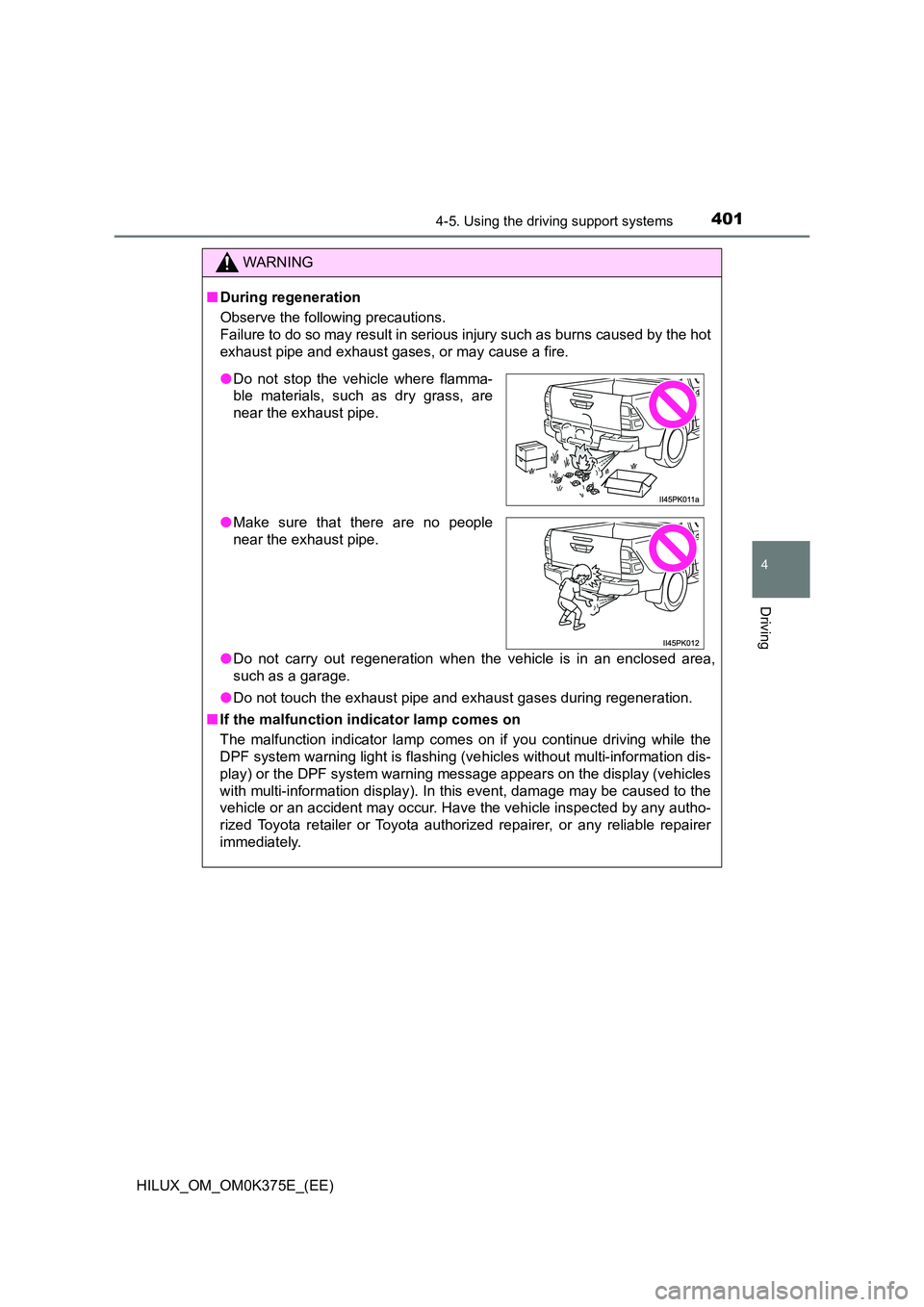
● Do not stop the vehicle where flamma-
ble materials, such as dry grass, are
near the exhaust pipe.
● Make sure that there are no people
near the exhaust pipe.
Page 522 of 708
5226-4. Using the other interior features
HILUX_OM_OM0K375E_(EE)
When the engine switch is turned to the “ON” position (vehicles with-
out smart entry & start system) or IGNITION ON mode (vehicles with
smart entry & start system), the red indicator light will illuminate for 10
seconds and then the green indicator light will illuminate, indicating
that the system is enabled. The indicator lights indicate the following:
● If the green indicator light illuminates and stays on, the system is
enabled.
● If the green indicator light flashes twice per second, an automatic or
manual Emergency Call is being made.
● If no indicator lights illuminate, the system is not enabled.
● If the red indicator light illuminates at any time other than immedi-
ately after the engine switch is turned to the “ON” position (vehicles
without smart entry & start system) or IGNITION ON mode (vehi-
cles with smart entry & start system), the system may be malfunc-
tioning or the backup battery may be depleted.
● If the red indicator light blinks for approximately 30 seconds during
an Emergency Call, the call has been disconnected or the cellular
network signal is weak.
The service life of the backup battery does not exceed 3 years.
A test mode is provided for to check the performance of the Emer-
gency Call system. To test the device, contact any authorized Toyota
retailer or Toyota authorized repairer, or any reliable repairer.
Indicator lights
Device test mode