lock TOYOTA HILUX 2022 Owner's Guide
[x] Cancel search | Manufacturer: TOYOTA, Model Year: 2022, Model line: HILUX, Model: TOYOTA HILUX 2022Pages: 798, PDF Size: 131.88 MB
Page 149 of 798
147
3
Operation of
each component
HILUX_OM_OM0K513E_(EE)
3-1. Key information
Keys ................................... 148
3-2. Opening, closing and
locking the doors
Side doors.......................... 153
Access panels (smart-cab
models only) .................... 159
Tailgate .............................. 160
Smart entry & start
system ............................. 163
3-3. Adjusting the seats
Front seats ......................... 170
Rear seats ......................... 172
Head restraints .................. 175
3-4. Adjusting the steering
wheel and mirrors
Steering wheel ................... 178
Inside rear view mirror ....... 180
Outside rear view
mirrors ............................. 182
3-5. Opening and closing
the windows
Power windows .................. 185
Quarter windows
(smart-cab models).......... 189
Page 150 of 798
1483-1. Key information
HILUX_OM_OM0K513E_(EE)
Keys
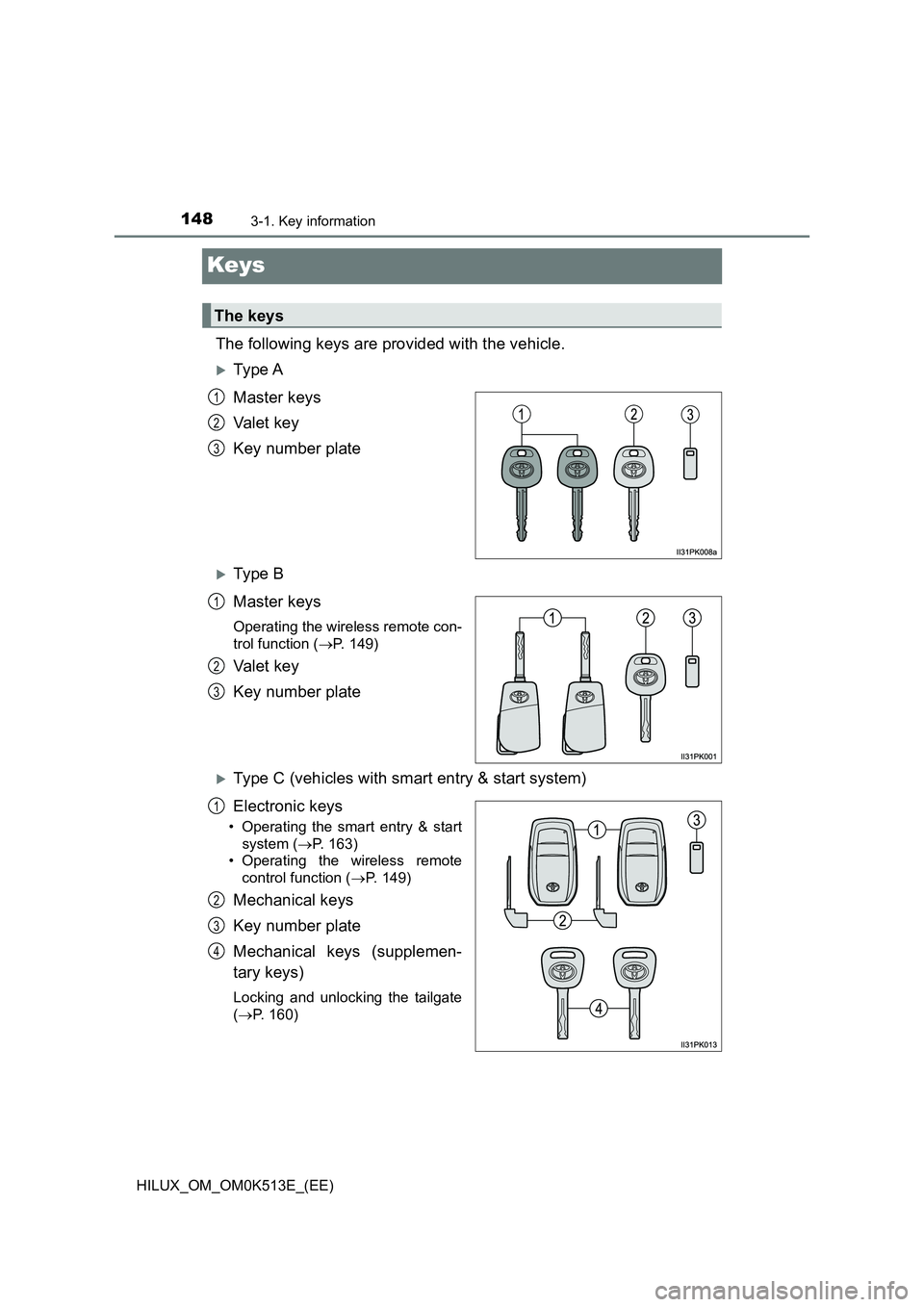
The following keys are provided with the vehicle.
Ty pe A
Master keys
Va l e t k e y
Key number plate
Ty pe B
Master keys
Operating the wireless remote con-
trol function ( P. 149)
Va l e t k e y
Key number plate
Type C (vehicles with smart entry & start system)
Electronic keys
• Operating the smart entry & start
system ( P. 163)
• Operating the wireless remote
control function ( P. 149)
Mechanical keys
Key number plate
Mechanical keys (supplemen-
tary keys)
Locking and unlocking the tailgate
( P. 160)
The keys
1
2
3
1
2
3
1
2
3
4
Page 151 of 798
1493-1. Key information
3
Operation of each component
HILUX_OM_OM0K513E_(EE)
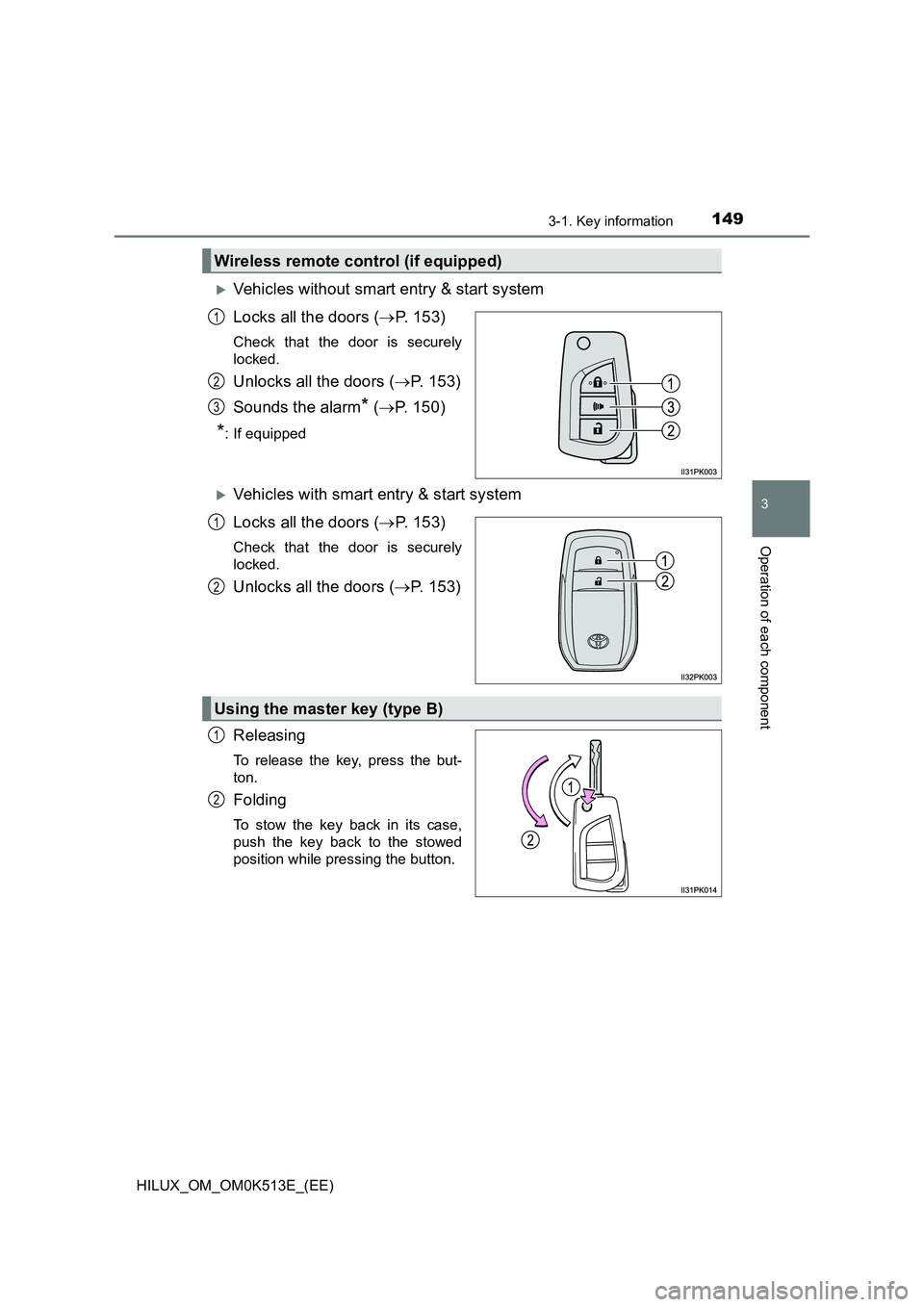
Vehicles without smart entry & start system
Locks all the doors ( P. 153)
Check that the door is securely
locked.
Unlocks all the doors ( P. 153)
Sounds the alarm* ( P. 150)
*: If equipped
Vehicles with smart entry & start system
Locks all the doors ( P. 153)
Check that the door is securely
locked.
Unlocks all the doors ( P. 153)
Releasing
To release the key, press the but-
ton.
Folding
To stow the key back in its case,
push the key back to the stowed
position while pressing the button.
Wireless remote control (if equipped)
1
2
3
1
2
Using the master key (type B)
1
2
Page 152 of 798
1503-1. Key information
HILUX_OM_OM0K513E_(EE)
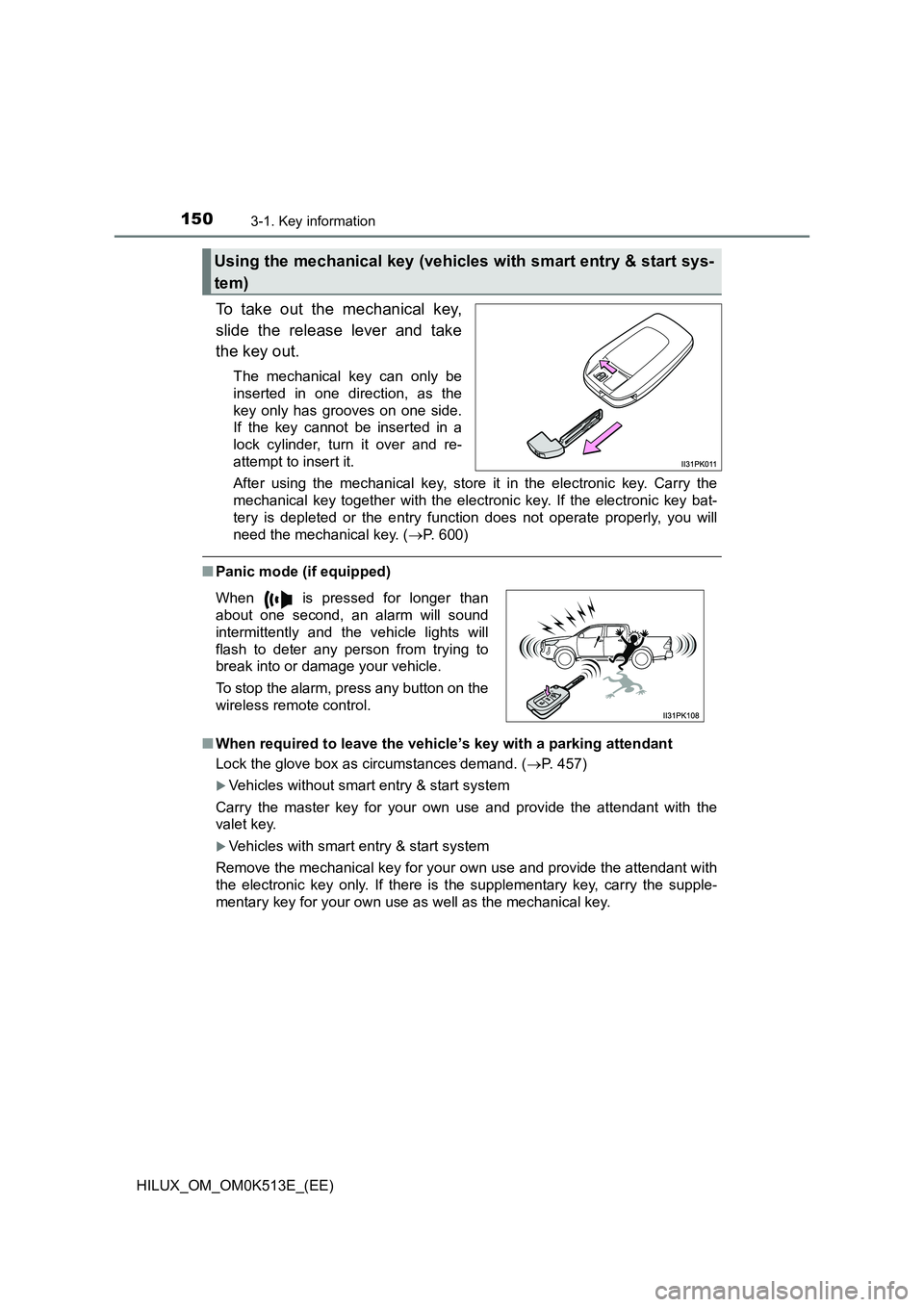
To take out the mechanical key,
slide the release lever and take
the key out.
The mechanical key can only be
inserted in one direction, as the
key only has grooves on one side.
If the key cannot be inserted in a
lock cylinder, turn it over and re-
attempt to insert it.
After using the mechanical key, store it in the electronic key. Carry the
mechanical key together with the electronic key. If the electronic key bat-
tery is depleted or the entry func tion does not operate properly, you will
need the mechanical key. ( P. 600)
QPanic mode (if equipped)
Q When required to leave the vehicle’s key with a parking attendant
Lock the glove box as circumstances demand. ( P. 457)
Vehicles without smart entry & start system
Carry the master key for your own use and provide the attendant with the
valet key.
Vehicles with smart entry & start system
Remove the mechanical key for your own use and provide the attendant with
the electronic key only. If there is the supplementary key, carry the supple-
mentary key for your own use as well as the mechanical key.
Using the mechanical key (vehicles with smart entry & start sys-
tem)
When is pressed for longer than
about one second, an alarm will sound
intermittently and the vehicle lights will
flash to deter any person from trying to
break into or damage your vehicle.
To stop the alarm, press any button on the
wireless remote control.
Page 155 of 798
153
3
3-2. Opening, closing and locking the doors
Operation of each component
HILUX_OM_OM0K513E_(EE)
Side doors
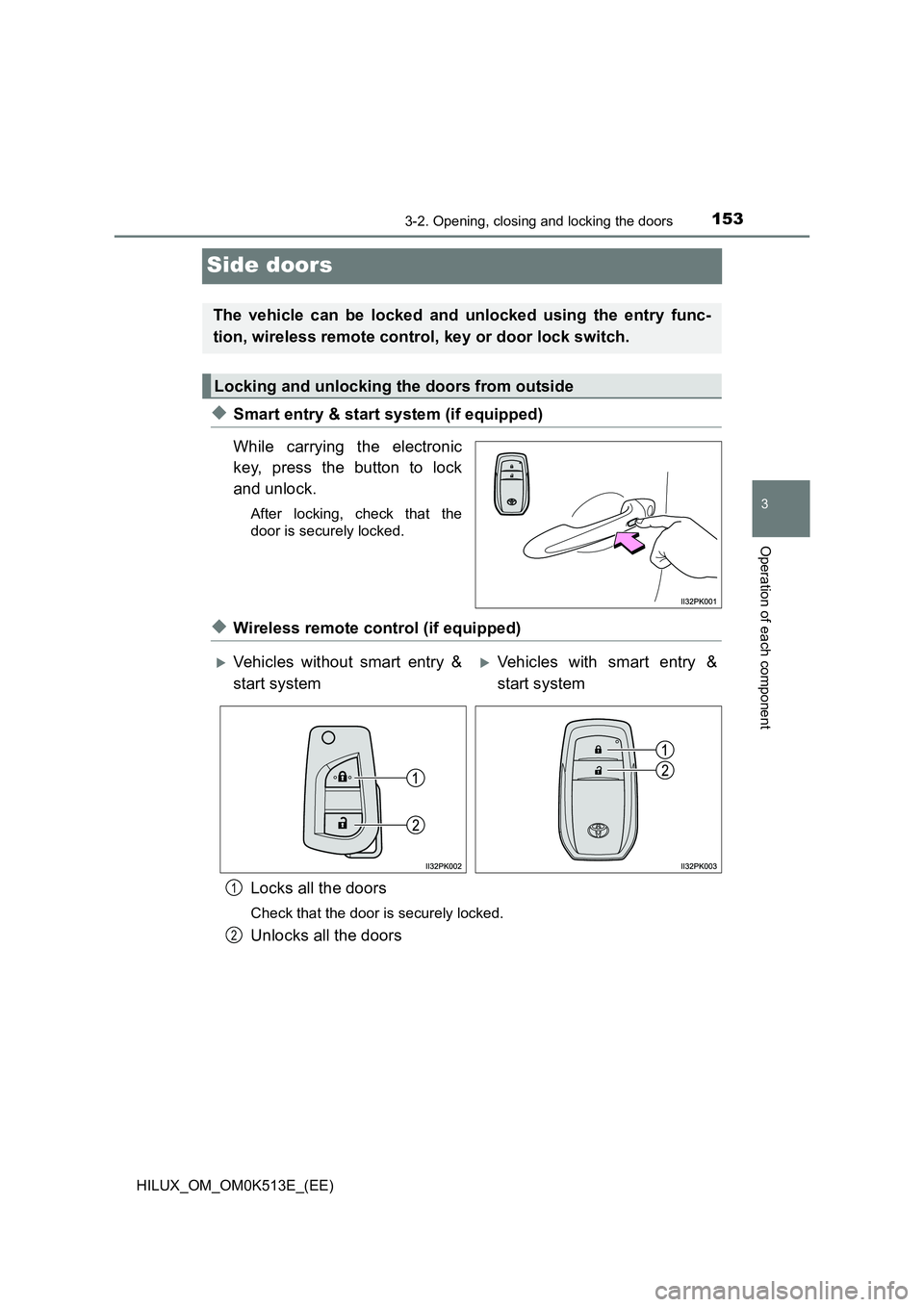
XSmart entry & start system (if equipped)
While carrying the electronic
key, press the button to lock
and unlock.
After locking, check that the
door is securely locked.
XWireless remote control (if equipped)
Locks all the doors
Check that the door is securely locked.
Unlocks all the doors
The vehicle can be locked and unlocked using the entry func-
tion, wireless remote control, key or door lock switch.
Locking and unlocking the doors from outside
Vehicles without smart entry &
start system
Vehicles with smart entry &
start system
1
2
Page 156 of 798
1543-2. Opening, closing and locking the doors
HILUX_OM_OM0K513E_(EE)
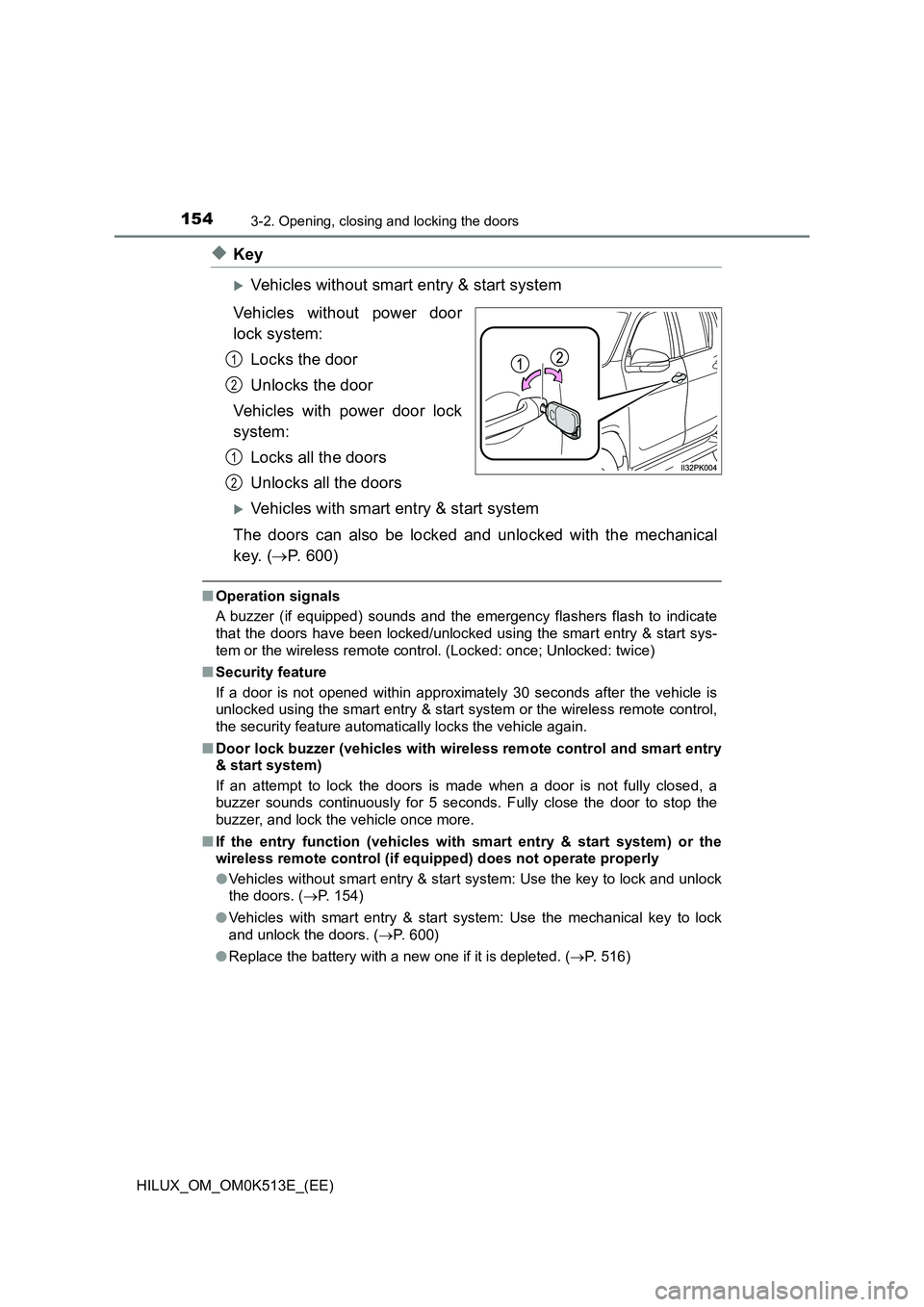
XKey
Vehicles without smart entry & start system
Vehicles without power door
lock system:
Locks the door
Unlocks the door
Vehicles with power door lock
system:
Locks all the doors
Unlocks all the doors
Vehicles with smart entry & start system
The doors can also be locked and unlocked with the mechanical
key. ( P. 600)
QOperation signals
A buzzer (if equipped) sounds and the em ergency flashers flash to indicate
that the doors have been locked/unlocked using the smart entry & start sys-
tem or the wireless remote control. (Locked: once; Unlocked: twice)
Q Security feature
If a door is not opened within approximately 30 seconds after the vehicle is
unlocked using the smart entry & start system or the wireless remote control,
the security feature automatically locks the vehicle again.
Q Door lock buzzer (vehicles with wireless remote control and smart entry
& start system)
If an attempt to lock the doors is made when a door is not fully closed, a
buzzer sounds continuously for 5 seconds. Fully close the door to stop the
buzzer, and lock the vehicle once more.
Q If the entry function (vehicles with smart entry & start system) or the
wireless remote control (if equipped) does not operate properly
O Vehicles without smart entry & start system: Use the key to lock and unlock
the doors. ( P. 154)
O Vehicles with smart entry & start system: Use the mechanical key to lock
and unlock the doors. ( P. 600)
O Replace the battery with a new one if it is depleted. (P. 516)
1
2
1
2
Page 157 of 798
1553-2. Opening, closing and locking the doors
3
Operation of each component
HILUX_OM_OM0K513E_(EE)
Q Setting the alarm (if equipped)
Locking the doors will set the alarm system. ( P. 117)
Q If a symbol indicating one or more doors are open is shown on the multi-
information display
One or more of the doors is not fully closed. The system also indicates which
doors are not fully closed. If the vehicle reaches a speed of 5 km/h (3 mph),
master warning light flashes and a buzzer sounds to indicate that the door(s)
are not yet fully closed.
Make sure that all the doors are closed.
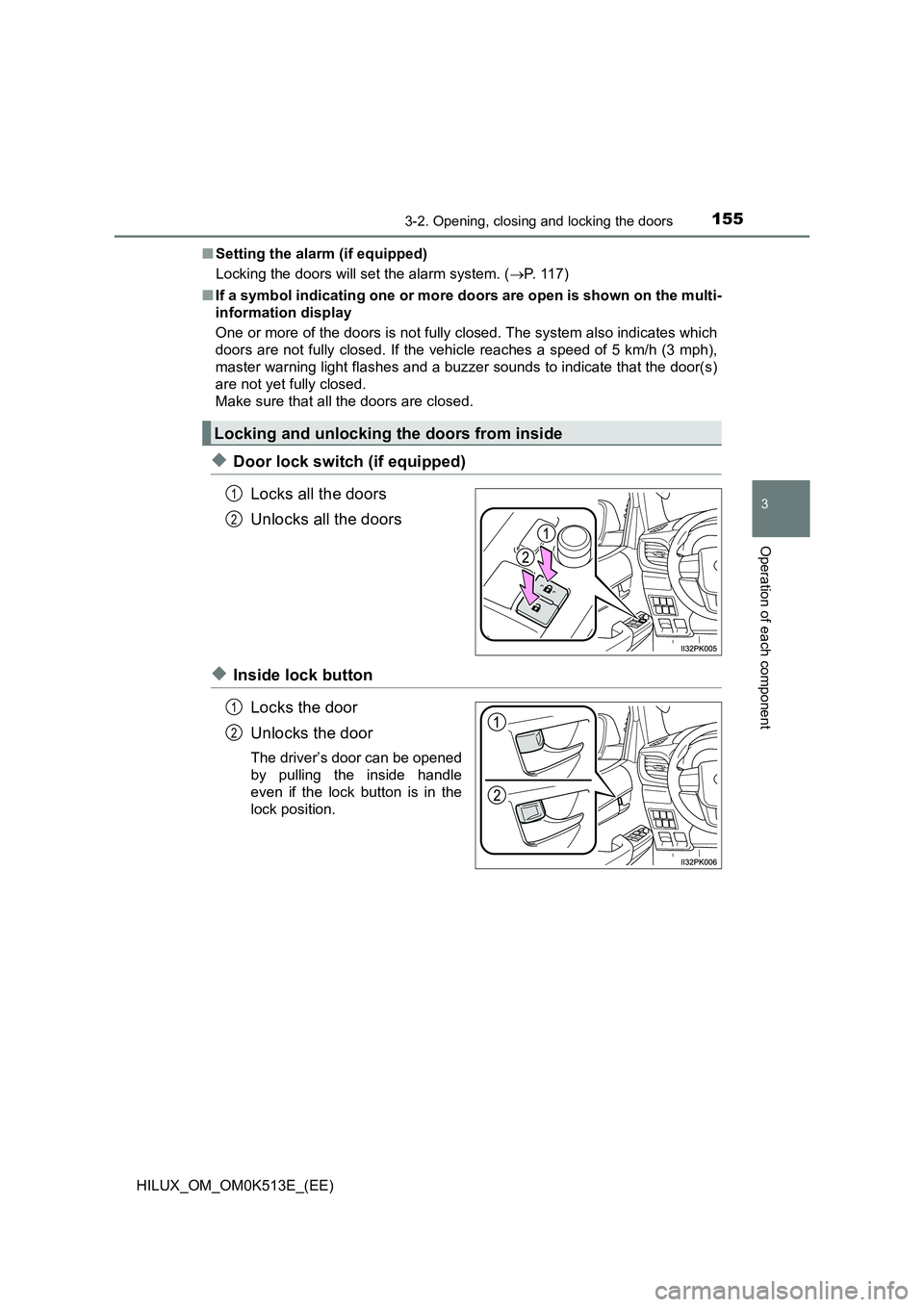
XDoor lock switch (if equipped)
Locks all the doors
Unlocks all the doors
XInside lock button
Locks the door
Unlocks the door
The driver’s door can be opened
by pulling the inside handle
even if the lock button is in the
lock position.
Locking and unlocking the doors from inside
1
2
1
2
Page 158 of 798
1563-2. Opening, closing and locking the doors
HILUX_OM_OM0K513E_(EE)
Move the inside lock button to the lock position.
Close the door while pulling the door handle.
Vehicles without smart entry & start system (vehicles with power door
lock system): The driver’s door cannot be locked if either of the door is
open and the key is in the engine switch.
Vehicles with smart entry & start system: The door cannot be locked if
the engine switch is in ACCESSORY or IGNITION ON mode, or the
electronic key is left inside the vehicle.
However, the key may not be detected correctly and the door may be
locked.
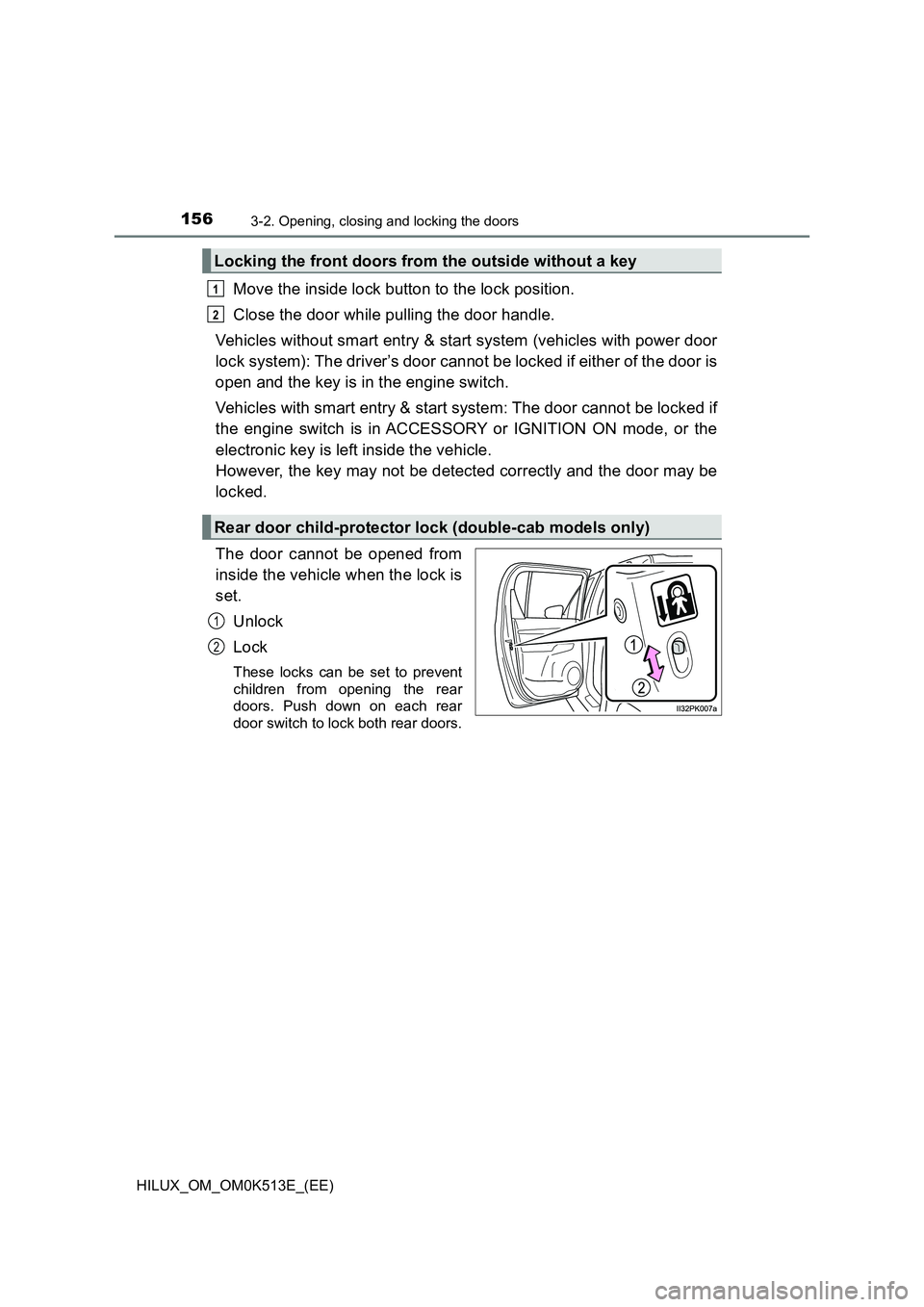
The door cannot be opened from
inside the vehicle when the lock is
set.
Unlock
Lock
These locks can be set to prevent
children from opening the rear
doors. Push down on each rear
door switch to lock both rear doors.
Locking the front doors from the outside without a key
Rear door child-protector lock (double-cab models only)
1
2
1
2
Page 159 of 798
1573-2. Opening, closing and locking the doors
3
Operation of each component
HILUX_OM_OM0K513E_(EE)
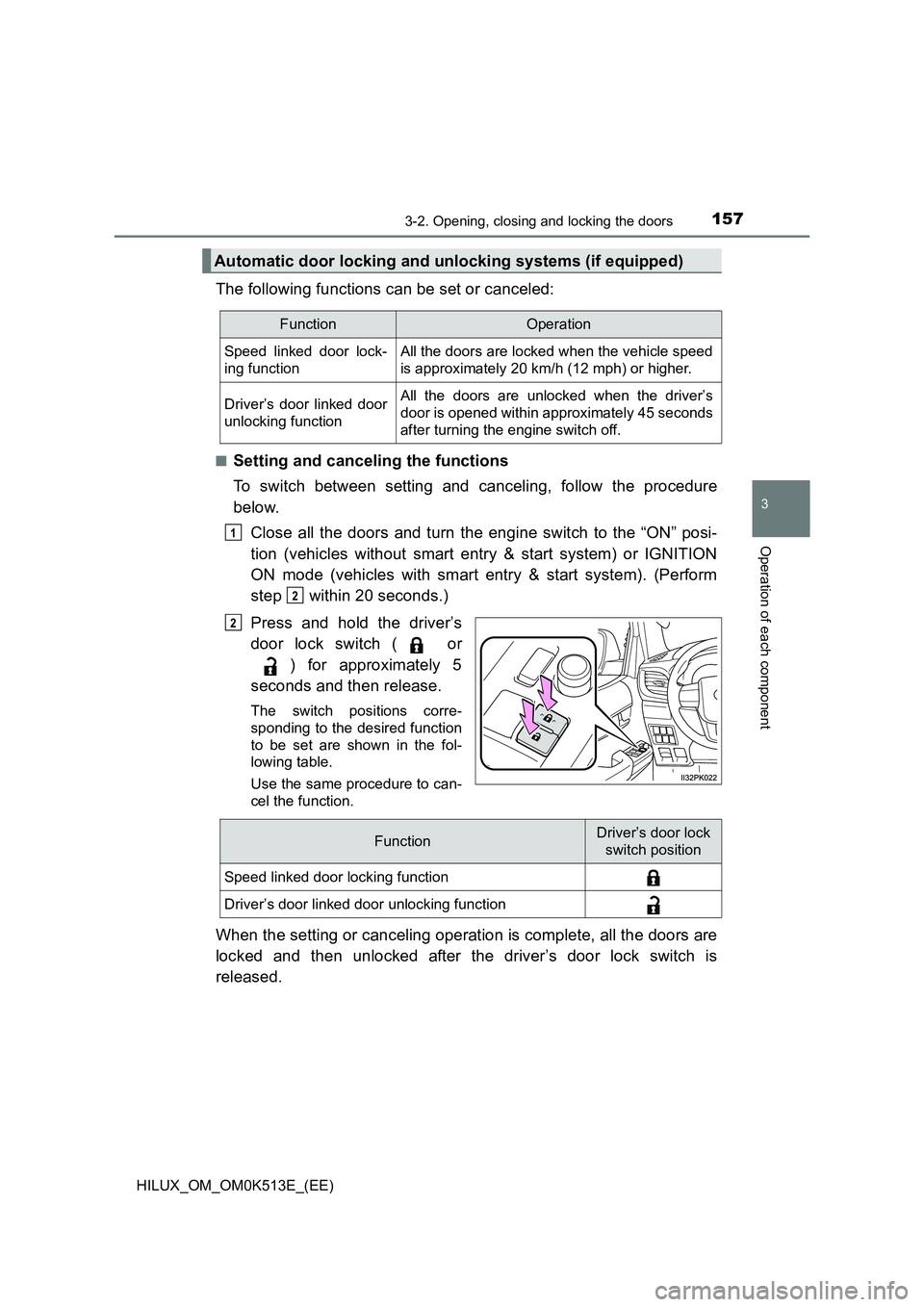
The following functions can be set or canceled:
QSetting and canceling the functions
To switch between setting and canceling, follow the procedure
below.
Close all the doors and turn the engine switch to the “ON” posi-
tion (vehicles without smart entry & start system) or IGNITION
ON mode (vehicles with smart entry & start system). (Perform
step within 20 seconds.)
Press and hold the driver’s
door lock switch ( or
) for approximately 5
seconds and then release.
The switch positions corre-
sponding to the desired function
to be set are shown in the fol-
lowing table.
Use the same procedure to can-
cel the function.
When the setting or canceling operation is complete, all the doors are
locked and then unlocked after the driver’s door lock switch is
released.
Automatic door locking and unlocking systems (if equipped)
FunctionOperation
Speed linked door lock-
ing function
All the doors are locked when the vehicle speed
is approximately 20 km/h (12 mph) or higher.
Driver’s door linked door
unlocking function
All the doors are unlocked when the driver’s
door is opened within approximately 45 seconds
after turning the engine switch off.
1
2
2
FunctionDriver’s door lock
switch position
Speed linked door locking function
Driver’s door linked door unlocking function
Page 160 of 798
1583-2. Opening, closing and locking the doors
HILUX_OM_OM0K513E_(EE)
QImpact detection door lock release system (if equipped)
In the event that the vehicle is subject to a strong impact, all the doors are
unlocked. Depending on the force of the impact or the type of accident, how-
ever, the system may not operate.
Q Conditions affecting operation
Vehicles without smart entry & start system
The wireless remote control function may not operate normally in the follow-
ing situations:
O Near a TV tower, radio station, electric power plant, airport or other facility
that generates strong radio waves
O When carrying a portable radio, cellular phone or other wireless communi-
cation device
O When multiple wireless keys are in the vicinity
O When the wireless key is in contact with, or is covered by a metallic object
O When a wireless key (that emits radio waves) is being used nearby
O When the wireless key has been left near an electrical appliance such as a
personal computer
Vehicles with smart entry & start system
P. 166
WARNING
QTo prevent an accident
Observe the following precautions while driving the vehicle.
Failing to do so may result in a door opening and an occupant falling out,
resulting in death or serious injury.
O Ensure that all doors are properly closed and locked.
O Do not pull the inside handle of the doors while driving.
Be especially careful for the driver’s door, as the door may be opened
even if the inside lock button is in locked position.
O Set the rear door child-protector locks when children are seated in the rear
seats.