ECO mode TOYOTA IQ 2012 User Guide
[x] Cancel search | Manufacturer: TOYOTA, Model Year: 2012, Model line: IQ, Model: TOYOTA IQ 2012Pages: 476, PDF Size: 23.52 MB
Page 208 of 476
208 2-2. Instrument cluster
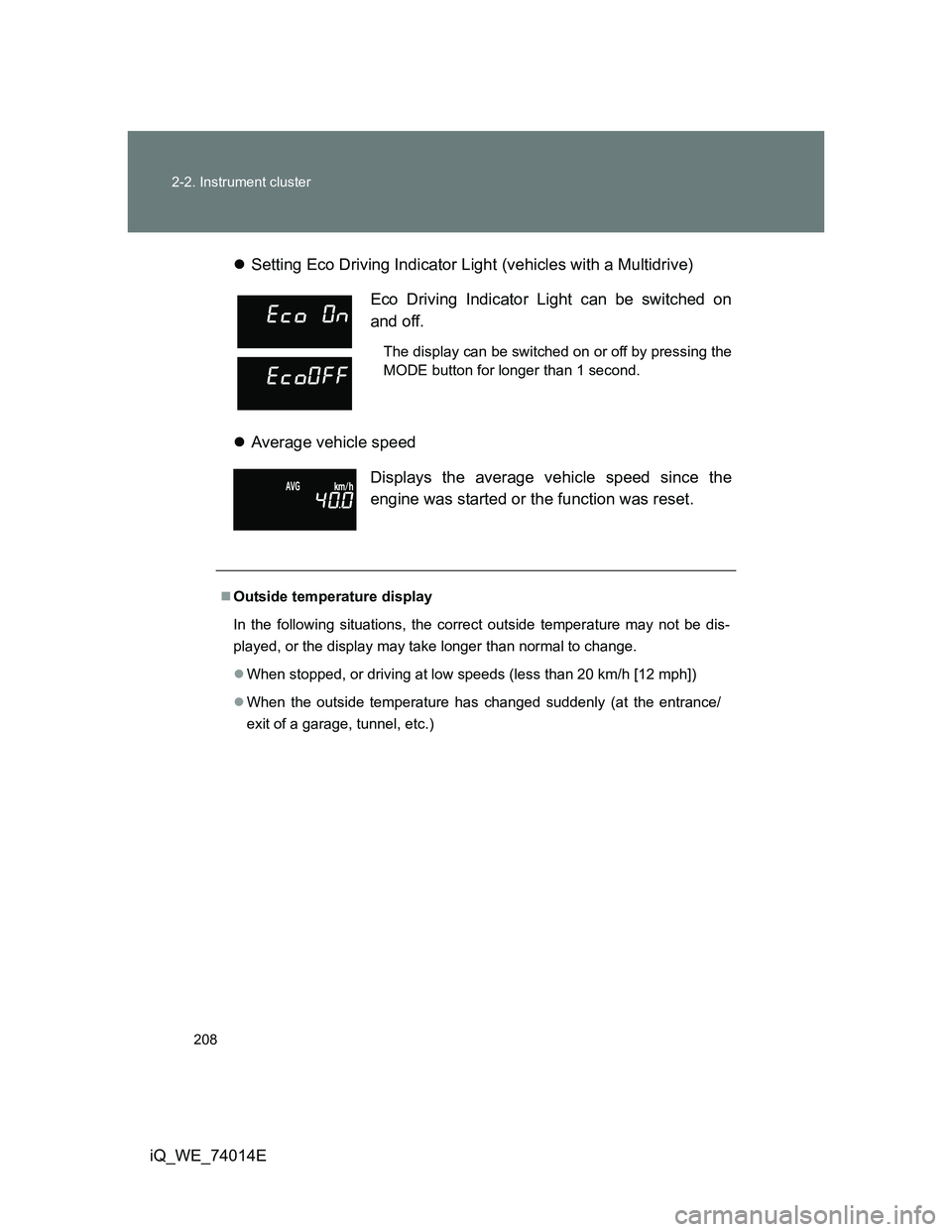
iQ_WE_74014ESetting Eco Driving Indicator Light (vehicles with a Multidrive)
Average vehicle speed
Eco Driving Indicator Light can be switched on
and off.
The display can be switched on or off by pressing the
MODE button for longer than 1 second.
Displays the average vehicle speed since the
engine was started or the function was reset.
Outside temperature display
In the following situations, the correct outside temperature may not be dis-
played, or the display may take longer than normal to change.
When stopped, or driving at low speeds (less than 20 km/h [12 mph])
When the outside temperature has changed suddenly (at the entrance/
exit of a garage, tunnel, etc.)
Page 209 of 476
209 2-2. Instrument cluster
2
When driving
iQ_WE_74014E
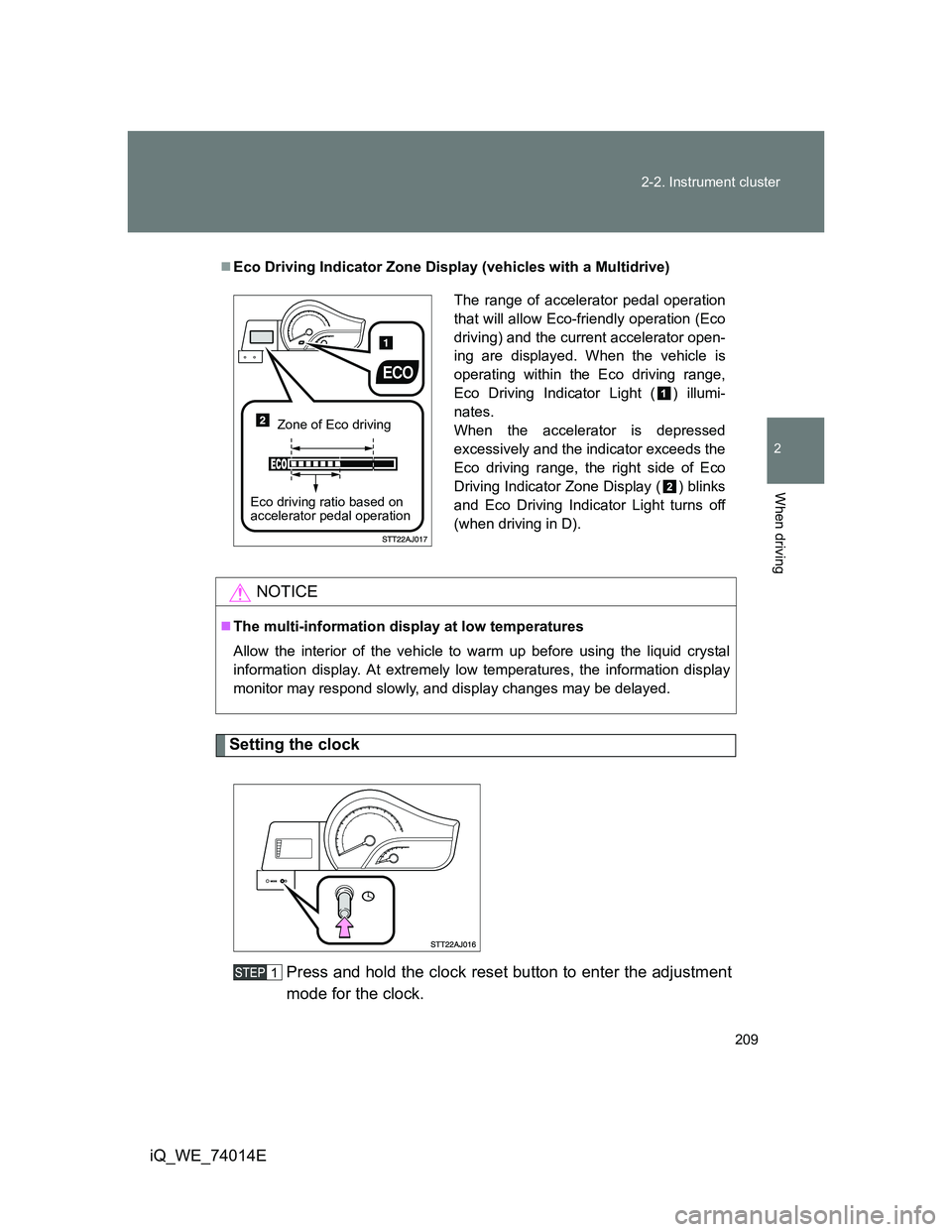
Setting the clock
Press and hold the clock reset button to enter the adjustment
mode for the clock.
Eco Driving Indicator Zone Display (vehicles with a Multidrive)
NOTICE
The multi-information display at low temperatures
Allow the interior of the vehicle to warm up before using the liquid crystal
information display. At extremely low temperatures, the information display
monitor may respond slowly, and display changes may be delayed.
The range of accelerator pedal operation
that will allow Eco-friendly operation (Eco
driving) and the current accelerator open-
ing are displayed. When the vehicle is
operating within the Eco driving range,
Eco Driving Indicator Light ( ) illumi-
nates.
When the accelerator is depressed
excessively and the indicator exceeds the
Eco driving range, the right side of Eco
Driving Indicator Zone Display ( ) blinks
and Eco Driving Indicator Light turns off
(when driving in D).
Zone of Eco driving
Eco driving ratio based on
accelerator pedal operation
Page 210 of 476
210 2-2. Instrument cluster
iQ_WE_74014EPress the clock reset button to adjust the minutes.
After adjusting the minutes, wait 5 seconds to allow the minutes to
be automatically input.
Press the clock reset button to adjust the hours.
After adjusting the hours, wait 5 seconds to allow the hours to be
automatically input and the mode to return to normal.
The multi-information display can be operated when
Vehicles without smart entry & start system
The engine switch is in the ON position.
Vehicles with smart entry & start system
The “ENGINE START STOP” switch is in IGNITION ON mode.
When disconnecting and reconnecting battery terminals
The following information will be reset.
Clock
Trip meter
Average fuel consumption after refueling
Average vehicle speed
Adjusting to a full hour
If you press the clock reset button, the minute values will be rounded to the
nearest hour. So, minute values from “:00” to “:29” are rounded down, and
values from “:30” to “:59” are rounded up.
*
*
: e.g.
1:00 to 1:29 1:00
1:30 to 1:59 2:00
Page 221 of 476
221 2-3. Operating the lights and wipers
2
When driving
iQ_WE_74014E
Vehicles without smart entry & start system:
If the wiper switch is turned to AUTO position while the engine switch is in
the ON position, the wiper will operate once to show that AUTO mode is
activated.
Vehicles with smart entry & start system:
If the wiper switch is turned to AUTO position while the “ENGINE START
STOP” switch is in IGNITION ON mode, the wiper will operate once to
show that AUTO mode is activated.
If the temperature of the raindrop sensor is 90°C (194°F) or higher, or
-10°C (14°F) or lower, automatic operation may not occur. In this case,
operate the wipers in any mode other than “AUTO”.
If no windshield washer fluid sprays
Check that the washer nozzles are not blocked and that there is washer fluid
in the windshield washer fluid reservoir.
CAUTION
Caution regarding the use of windshield wipers in AUTO mode
(vehicles with rain-sensing windshield wipers)
The windshield wipers may operate unexpectedly if the sensor is touched or
the windshield is subject to vibration in AUTO mode. Take care that your fin-
gers or anything else does not become caught in the windshield wipers.
NOTICE
When the windshield is dry
Do not use the wipers, as they may damage the windshield.
When there is no washer fluid spray from the nozzle
Damage to the washer fluid pump may be caused if the lever is pulled
toward you and held continually.
When a nozzle becomes blocked
Do not try to clear it with a pin or other object. The nozzle will be damaged.
Page 243 of 476
243 3-1. Using the air conditioning system and defogger
3
Interior features
iQ_WE_74014E
Air conditioning odors
During use, various odors from inside and outside the vehicle may enter
into and accumulate in the air conditioning system. This may then cause
odor to be emitted from the vents.
To reduce potential odors from occurring:
It is recommended that the air conditioning system be set to outside air
mode prior to turning the vehicle off.
CAUTION
To prevent the windshield from fogging up
Do not set the air outlet selection dial to during cool air operation in
extremely humid weather. The difference between the temperature of the
outside air and that of the windshield can cause the outer surface of the
windshield to fog up, blocking your vision.
NOTICE
To prevent battery discharge
Do not leave the air conditioning system on longer than necessary when the
engine is stopped.
Page 251 of 476
251 3-1. Using the air conditioning system and defogger
3
Interior features
iQ_WE_74014E
When outside air temperature approaches 0C (32F)
The air conditioning system may not operate even when is pressed.
When
is selected for the air outlets used
For your driving comfort, air flowing to the feet may be warmer than air flow-
ing to the upper body depending on the position of the temperature adjust-
ment dial.
Air conditioning odors
During use, various odors from inside and outside the vehicle may enter
into and accumulate in the air conditioning system. This may then cause
odor to be emitted from the vents.
To reduce potential odors from occurring:
• It is recommended that the air conditioning system be set to outside air
mode prior to turning the vehicle off.
• The start timing of the blower may be delayed for a short period of time
immediately after the air conditioning system is started in AUTO mode.
CAUTION
To prevent the windshield from fogging up
Do not use during cool air operation in extremely humid weather. The
difference between the temperature of the outside air and that of the wind-
shield can cause the outer surface of the windshield to fog up, blocking your
vision.
NOTICE
To prevent battery discharge
Do not leave the air conditioning system on longer than necessary when the
engine is stopped.
Page 255 of 476
255 3-1. Using the air conditioning system and defogger
3
Interior features
iQ_WE_74014E
The rear window and outside rear view mirror defoggers can be oper-
ated when
Vehicles without smart entry & start system
The engine switch is in the ON position.
Vehicles with smart entry & start system
The “ENGINE START STOP” switch is in IGNITION ON mode.
CAUTION
When the outside rear view mirror defoggers are on
Do not touch the rear view mirror surfaces, as they can become very hot and
burn you.
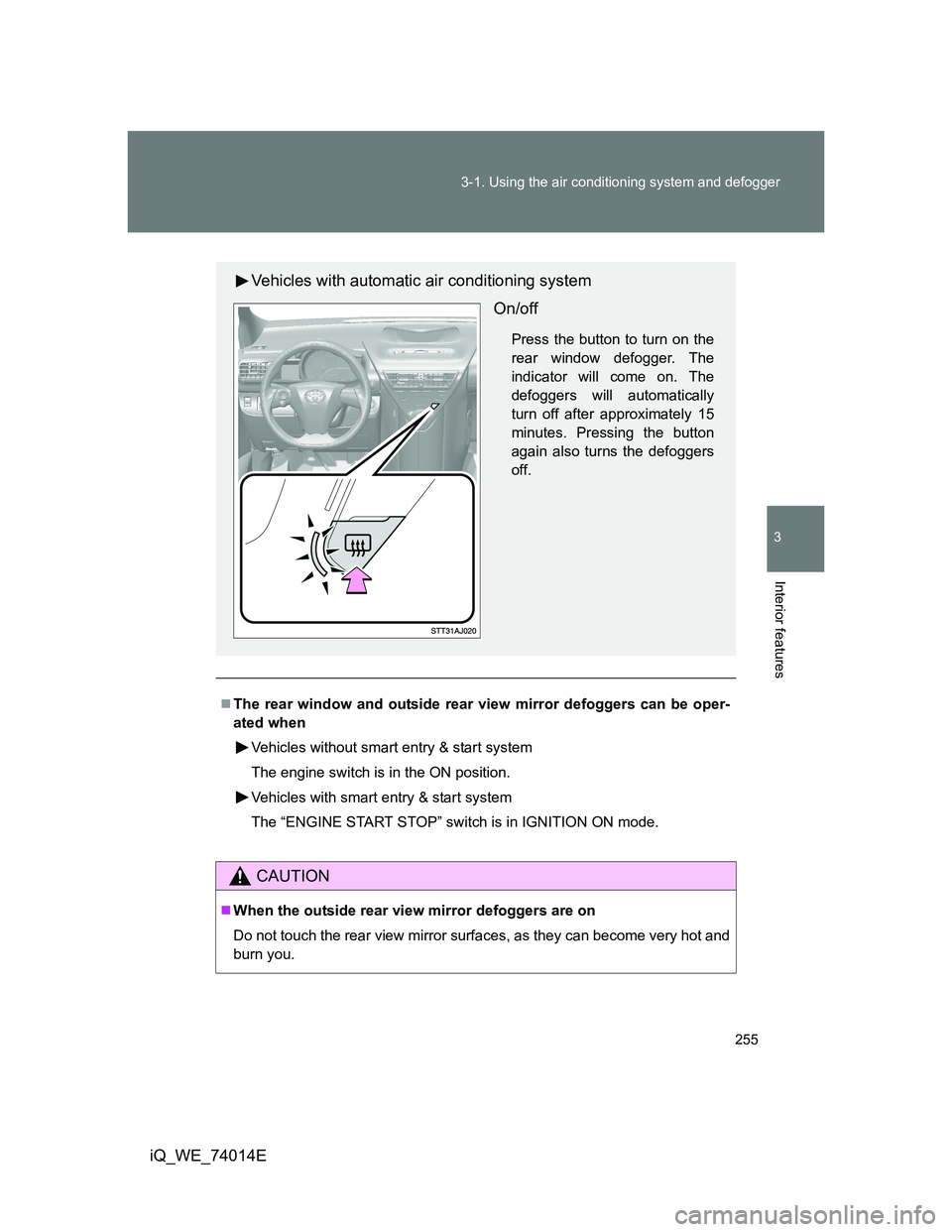
Vehicles with automatic air conditioning system
On/off
Press the button to turn on the
rear window defogger. The
indicator will come on. The
defoggers will automatically
turn off after approximately 15
minutes. Pressing the button
again also turns the defoggers
off.
Page 277 of 476
277 3-2. Using the audio system
3
Interior features
iQ_WE_74014E
MP3 and WMA files
MP3 (MPEG Audio LAYER3) is a standard audio compression format.
Files can be compressed to approximately 1/10 of their original size by using
MP3 compression.
WMA (Windows Media Audio) is a Microsoft audio compression format.
This format compresses audio data to a size smaller than that of the MP3
format.
There is a limit to the MP3 and WMA file standards and to the media/formats
recorded by them that can be used.
MP3 file compatibility
• Compatible standards
MP3 (MPEG1 LAYER3, MPEG2 LSF LAYER3)
• Compatible sampling frequencies
MPEG1 LAYER3: 32, 44.1, 48 (kHz)
MPEG2 LSF LAYER3: 16, 22.05, 24 (kHz)
• Compatible bit rates (compatible with VBR)
MPEG1 LAYER3: 64, 80, 96, 112, 128, 160, 192, 224, 256, 320 (kbps)
MPEG2 LSF LAYER3: 64, 80, 96, 112, 128, 144, 160 (kbps)
• Compatible channel modes: stereo, joint stereo, dual channel and
monaural
WMA file compatibility
• Compatible standards
WMA Ver. 7, 8, 9
• Compatible sampling frequencies
32, 44.1, 48 (kHz)
• Compatible bit rates (only compatible with 2-channel playback)
Ver. 7, 8: CBR 48, 64, 80, 96, 128, 160, 192 (kbps)
Ver. 9: CBR 48, 64, 80, 96, 128, 160, 192, 256, 320 (kbps)
Page 278 of 476
278 3-2. Using the audio system
iQ_WE_74014E
Compatible media
Media that can be used for MP3 and WMA playback are CD-Rs and CD-
RWs.
Playback in some instances may not be possible, depending on the status
of the CD-R or CD-RW. Playback may not be possible or the audio may
jump if the disc is scratched or marked with fingerprints.
Compatible disc formats
The following disc formats can be used.
• Disc formats: CD-ROM Mode 1 and Mode 2
CD-ROM XA Mode 2, Form 1 and Form 2
• File formats: ISO9660 Level 1, Level 2, (Romeo, Joliet)
MP3 and WMA files written in any format other than those listed above
may not play correctly, and their file names and folder names may not
be displayed correctly.
Items related to standards and limitations are as follows.
• Maximum directory hierarchy: 8 levels
• Maximum length of folder names/file names: 32 characters
• Maximum number of folders: 192 (including the root)
• Maximum number of files per disc: 255
File names
The only files that can be recognized as MP3/WMA and played are those
with the extension .mp3 or .wma.
Multi-sessions
As the audio system is compatible with multi-sessions, it is possible to play
discs that contain MP3 and WMA files. However, only the first session can
be played.
ID3 and WMA tags
ID3 tags can be added to MP3 files, making it possible to record the track
title and artist name, etc.
The system is compatible with ID3 Ver. 1.0, 1.1, and Ver. 2.2, 2.3 ID3 tags.
(The number of characters is based on ID3 Ver. 1.0 and 1.1.)
WMA tags can be added to WMA files, making it possible to record the
track title and artist name in the same way as with ID3 tags.
Page 300 of 476
300 3-5. Other interior features
iQ_WE_74014E
CAUTION
Observe the following precautions.
Failure to do so may cause the driver’s floor mat to slip, possibly interfering
with the pedals while driving. An unexpectedly high speed may result or it may
become difficult to stop the vehicle, leading to a serious accident.
When installing the driver’s floor mat
Do not use floor mats designed for other models or different model year
vehicles, even if they are Toyota Genuine floor mats.
Only use floor mats designed for the driver’s seat.
Always install the floor mat securely using the retaining hooks (clips) pro-
vided.
Do not use two or more floor mats on top of each other.
Do not place the floor mat bottom-side up or upside-down.
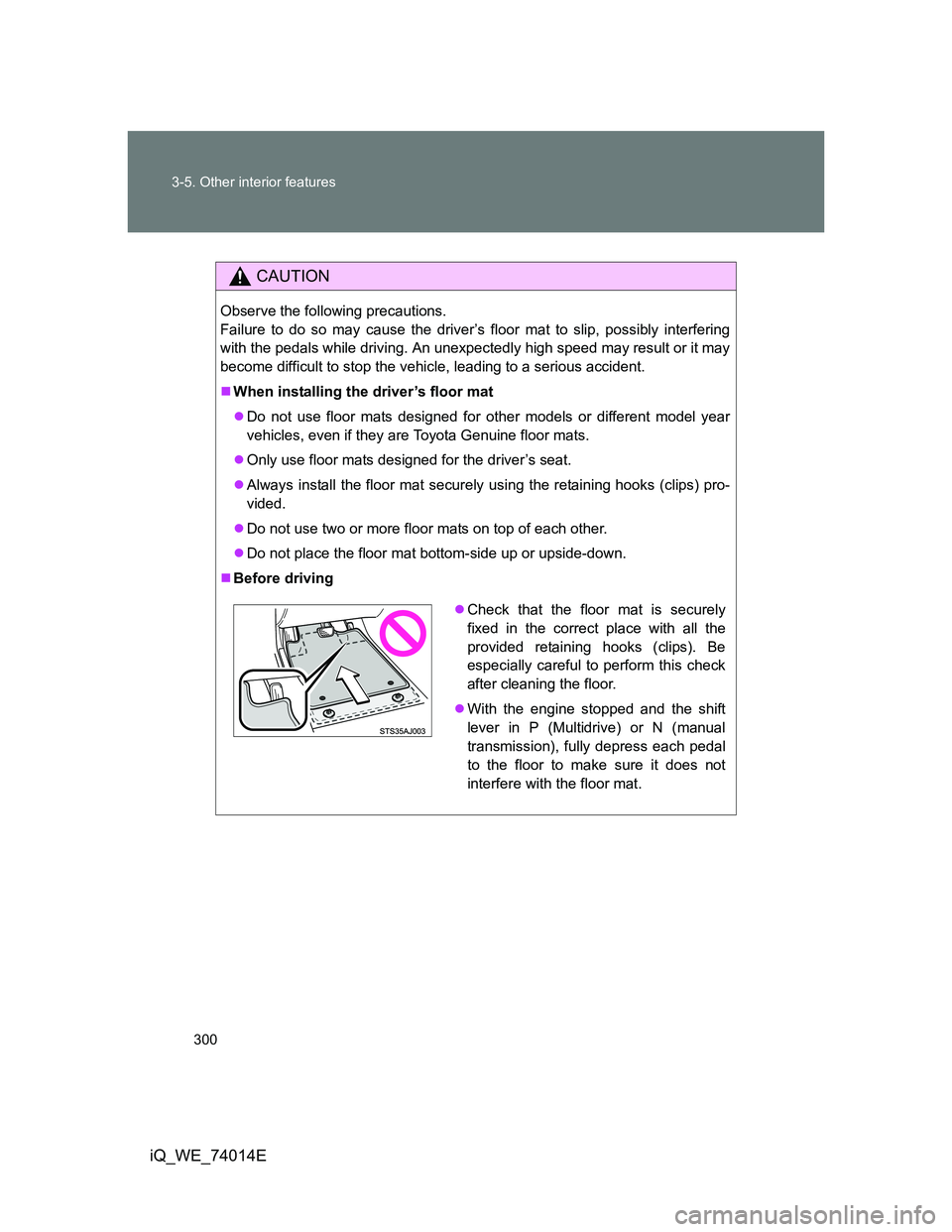
Before driving
Check that the floor mat is securely
fixed in the correct place with all the
provided retaining hooks (clips). Be
especially careful to perform this check
after cleaning the floor.
With the engine stopped and the shift
lever in P (Multidrive) or N (manual
transmission), fully depress each pedal
to the floor to make sure it does not
interfere with the floor mat.