ESP TOYOTA IQ 2012 Owners Manual
[x] Cancel search | Manufacturer: TOYOTA, Model Year: 2012, Model line: IQ, Model: TOYOTA IQ 2012Pages: 476, PDF Size: 23.52 MB
Page 45 of 476
45 1-2. Opening, closing and locking the doors
1
Before driving
iQ_WE_74014E
Note for door locking operation
When touching a lock sensor to lock the doors while wearing gloves, the
response may be slow or the doors may not be locked. In this case,
touch the lock sensor without wearing a glove.
When door handles get wet while washing the vehicle with the electronic
key on your person, the doors may be locked and unlocked repeatedly. In
this case, keep the electronic key 2 m (6 ft.) or more away from the vehi-
cle while washing (pay attention to key theft).
When the electronic key is inside the vehicle and door handles get wet
due to a car wash, interior and exterior alarms may sound. In this case,
lock the doors to stop the alarms.
A lock sensor covered with ice, snow or mud may not work properly. In
this case, remove the ice, snow or mud from the lock sensor surface and
then touch the sensor again, or unlock the doors using the lock sensor
located on the lower edge of the door handle.
Fingernails may come into contact with a door when taking hold of a door
handle. Be careful not to damage the door surface or your fingernails.
Note for door unlocking operation
The doors may not be unlocked when a door handle is operated quickly,
or if you suddenly enter the operating range of the exterior antenna and
operate a door handle. In this case, return the door handle to its original
position, unlock the doors again, and then check that the doors are
unlocked before pulling the door handle.
When taking hold of a door handle while wearing gloves, the unlocking
response may become slow or the doors may not be unlocked.
If there is another electronic key in the operating range, the response
time to unlock the doors after a door handle is taken hold of may become
longer.
When the vehicle is not driven for extended periods
To prevent theft of the vehicle, do not leave the electronic key within 2 m
(6 ft.) of the vehicle.
The smart entry & start system can be disabled. (P. 459)
Security feature
If a door is not opened within approximately 30 seconds after the vehicle is
unlocked, the security feature automatically locks the vehicle again.
Page 74 of 476
74 1-2. Opening, closing and locking the doors
iQ_WE_74014E
CAUTION
To prevent an accident
Observe the following precautions while driving the vehicle.
Failing to do so may result in a door opening and an occupant falling out,
resulting in death or serious injury.
Always use a seat belt.
Ensure that all doors are properly closed.
Do not pull the inside handle of the doors while driving.
The doors may be opened and the passengers are thrown out of the vehi-
cle and it may result in serious injury or death.
Be especially careful for the driver’s door, as the door may be opened
even if the inside lock button is in locked position.
Page 85 of 476
85 1-3. Adjustable components (seats, mirrors, steering wheel)
1
Before driving
iQ_WE_74014E
CAUTION
Head restraint precautions
Observe the following precautions regarding the head restraints.
Failure to do so may result in death or serious injury.
Use the head restraints designed for each respective seat.
Adjust the head restraints to the correct position at all times.
After adjusting the head restraints, push down on them and make sure
they are locked in position.
Do not drive with the head restraints removed.
NOTICE
Before folding the seatbacks
The seat belts buckles must be stowed.
The head restraints must be removed.
When operating the rear seat
Make sure that the rear seat does not come into contact with the front seat.
Do not forcibly operate the rear seat. Otherwise, the seat cover may be dam-
aged or the seat may be broken.
Page 127 of 476
127 1-7. Safety information
1
Before driving
iQ_WE_74014E
Vehicles with curtain shield airbags: Parts of the airbag module (steering
wheel hub, airbag cover and inflator) as well as the front seats, and parts
of the front and rear pillars, roof side rail and rear roof headlining may be
hot for several minutes. The airbag itself may also be hot.
The front windshield may crack.
Operating conditions (front airbags)
The SRS front airbags will deploy in the event of an impact that exceeds
the set threshold level (the level of force corresponding to an approxi-
mately 20-30 km/h [12-18 mph] frontal collision with a fixed wall that does
not move or deform).
However, this threshold velocity will be considerably higher if the vehicle
strikes an object, such as a parked vehicle or sign pole, which can move or
deform on impact, or if the vehicle is involved in an underride collision (e.g.
a collision in which the front of the vehicle “underrides”, or goes under, the
bed of a truck, etc.).
Depending on the type of collision, it is possible that only the seat belt
pretensioners will activate.
The SRS seat cushion airbag on the front passenger’s seat will not oper-
ate if the occupant is not wearing a seat belt.
Operating conditions (side airbags & curtain shield airbags [if
equipped])
The SRS side airbags & SRS curtain shield airbags will deploy in the event
of an impact that exceeds the set threshold level (the level of force corre-
sponding to the impact force produced by an approximately 1500 kg [3300
lb.] vehicle colliding with the vehicle cabin from a direction perpendicular to
the vehicle orientation at an approximate speed of 20-30 km/h [12-18 mph]).
Operating conditions (rear window curtain shield airbag [if equipped])
The SRS rear window curtain shield airbag is designed to inflate when the
passenger compartment is subjected to a severe impact from the rear or
side.
Page 132 of 476
132 1-7. Safety information
iQ_WE_74014E
CAUTION
SRS airbag precautions
Observe the following precautions regarding the airbags.
Failure to do so may cause death or serious injury.
The driver and all passengers in the vehicle must wear their seat belts
properly.
The SRS airbags are supplemental devices to be used with the seat belts.
The SRS driver airbag deploys with considerable force, and can cause
death or serious injury especially if the driver is very close to the airbag.
Since the risk zone for the driver’s airbag is the first 50 - 75 mm (2 - 3 in.) of
inflation, placing yourself 250 mm (10 in.) from your driver airbag provides
you with a clear margin of safety. This distance is measured from the center
of the steering wheel to your breastbone. If you sit less than 250 mm (10 in.)
away now, you can change your driving position in several ways:
• Move your seat to the rear as far as you can while still reaching the
pedals comfortably.
• Slightly recline the back of the seat.
Although vehicle designs vary, many drivers can achieve the 250 mm
(10 in.) distance, even with the driver seat all the way forward, simply
by reclining the back of the seat somewhat. If reclining the back of your
seat makes it hard to see the road, raise yourself by using a firm, non-
slippery cushion, or raise the seat if your vehicle has that feature.
• If your steering wheel is adjustable, tilt it downward. This points the air-
bag toward your chest instead of your head and neck.
The seat should be adjusted as recommended above, while still maintaining
control of the foot pedals, steering wheel, and your view of the instrument
panel controls.
The SRS front passenger airbag also deploys with considerable force, and
can cause death or serious injury especially if the front passenger is very
close to the airbag. The front passenger seat should be as far from the air-
bag as possible with the seatback adjusted, so the front passenger sits
upright.
Page 166 of 476
166 2-1. Driving procedures
iQ_WE_74014E
Starting on a steep uphill
Multidrive
With the brake pedal depressed, firmly set the parking brake
and shift the shift lever to D.
Gently depress the accelerator pedal.
Release the parking brake.
Manual transmission
With the parking brake firmly set and the clutch pedal fully
depressed, shift the shift lever to 1.
Lightly depress the accelerator pedal at the same time as
gradually releasing the clutch pedal.
Release the parking brake.
Driving in the rain
Drive carefully when it is raining, because visibility will be reduced, the
windows may become fogged-up, and the road will be slippery.
Drive carefully when it starts to rain, because the road surface will be
especially slippery.
Refrain from high speeds when driving on an expressway in the rain,
because there may be a layer of water between the tires and the road
surface, preventing the steering and brakes from operating properly.
Page 168 of 476
168 2-1. Driving procedures
iQ_WE_74014E
CAUTION
When starting the vehicle (vehicles with a Multidrive)
Always keep your foot on the brake pedal while stopped with the engine run-
ning. This prevents the vehicle from creeping.
When driving the vehicle
Do not drive if you are unfamiliar with the location of the clutch, brake and
accelerator pedals to avoid depressing the wrong pedal.
• Accidentally depressing the accelerator pedal instead of the brake
pedal will result in sudden acceleration that may lead to an accident
that could result in death or serious injury.
• When backing up, you may twist your body around, leading to a diffi-
culty in operating the pedals. Make sure to operate the pedals properly.
• Make sure to keep a correct driving posture even when moving the
vehicle only slightly, allowing you to depress the brake and accelerator
pedals properly.
• Depress the brake pedal using your right foot. Depressing the brake
pedal using your left foot may delay response in an emergency, result-
ing in an accident.
Do not drive the vehicle over or stop the vehicle near flammable materials.
The exhaust system and exhaust gases can be extremely hot. This may
cause a fire if there is any flammable material nearby.
Do not let the vehicle roll backward while the shift lever is in a driving posi-
tion, or roll forward while the shift lever is in R.
Doing so may cause the engine to stall or lead to poor brake and steering
performance, resulting in an accident or damage to the vehicle.
If the smell of exhaust is noticed inside the vehicle, open the windows and
check that the back door is closed. Large amounts of exhaust in the
vehicle can cause driver drowsiness and an accident, resulting in death or
a serious health hazard. Have the vehicle inspected by any authorized
Toyota dealer or repairer, or another duly qualified and equipped
professional immediately.
On vehicles with a Multidrive, do not shift the shift lever to P while the vehi-
cle is moving.
Doing so can damage the transmission and may result in a loss of vehicle
control.
Page 209 of 476
209 2-2. Instrument cluster
2
When driving
iQ_WE_74014E
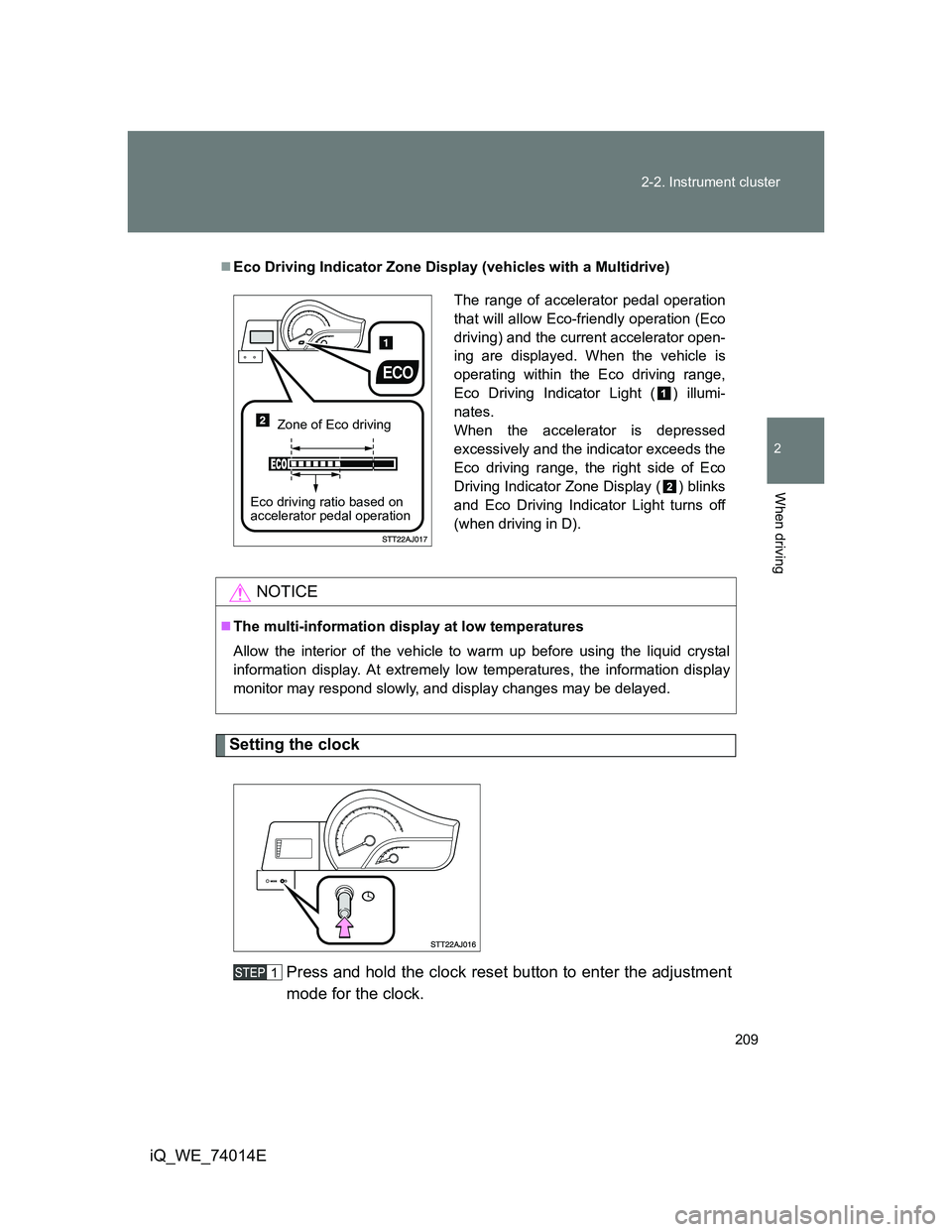
Setting the clock
Press and hold the clock reset button to enter the adjustment
mode for the clock.
Eco Driving Indicator Zone Display (vehicles with a Multidrive)
NOTICE
The multi-information display at low temperatures
Allow the interior of the vehicle to warm up before using the liquid crystal
information display. At extremely low temperatures, the information display
monitor may respond slowly, and display changes may be delayed.
The range of accelerator pedal operation
that will allow Eco-friendly operation (Eco
driving) and the current accelerator open-
ing are displayed. When the vehicle is
operating within the Eco driving range,
Eco Driving Indicator Light ( ) illumi-
nates.
When the accelerator is depressed
excessively and the indicator exceeds the
Eco driving range, the right side of Eco
Driving Indicator Zone Display ( ) blinks
and Eco Driving Indicator Light turns off
(when driving in D).
Zone of Eco driving
Eco driving ratio based on
accelerator pedal operation
Page 224 of 476
224
iQ_WE_74014E
2-4. Using other driving systems
Driving assist systems
To help enhance driving safety and performance, the following sys-
tems operate automatically in response to various driving situations.
Be aware, however, that these systems are supplementary and
should not be relied upon too heavily when operating the vehicle.
ABS (Anti-lock Brake System)
Helps to prevent wheel lock when the brakes are applied suddenly, or if
the brakes are applied while driving on a slippery road surface.
Brake Assist
Generates an increased level of braking force after the brake pedal is
depressed, when the system detects a panic stop situation.
VSC (Vehicle Stability Control)
Helps the driver to control skidding when swerving suddenly or turning
on slippery road surfaces.
VSC+ (Vehicle Stability Control+)
Provides cooperative control of the ABS, TRC, VSC and EPS.
Helps to maintain directional stability when swerving on slippery road
surfaces by controlling steering performance.
TRC (Traction Control)
Maintains drive power and prevents the front wheels from spinning
when starting the vehicle or accelerating on slippery roads.
EPS (Electric Power Steering)
Employs an electric motor to reduce the amount of effort needed to turn
the steering wheel.
Page 227 of 476
227 2-4. Using other driving systems
2
When driving
iQ_WE_74014E
Reduced effectiveness of EPS
The effectiveness of EPS is reduced to prevent the system from overheating
when there is frequent steering input over an extended period of time. The
steering wheel may feel heavy as a result. Should this occur, refrain from
excessive steering input or stop the vehicle and turn the engine off. The sys-
tem should return to normal within 10 minutes.
CAUTION
The following situations may lead to an accident resulting in serious injury or
even death.
The ABS does not operate effectively when
The limits of tire gripping performance have been exceeded.
The vehicle hydroplanes while driving at high speed on the wet or slick
road.
Stopping distance when the ABS is operating may exceed that of nor-
mal conditions
The ABS is not designed to shorten the vehicle’s stopping distance. Always
maintain a safe distance from the vehicle in front of you, especially in the fol-
lowing situations.
When driving on dirt, gravel or snow-covered roads
When driving with tire chains
When driving over bumps in the road
When driving over roads with potholes or roads with uneven roads
When TRC may not operate effectively
Directional control and power may not be achievable while driving on slip-
pery road surfaces, even if the TRC system is operating.
Do not drive the vehicle in conditions where stability and power may be lost.
When the VSC is activated
The slip indicator flashes. Always drive carefully. Reckless driving may
cause an accident. Exercise particular care when the indicator flashes.