engine TOYOTA IQ 2013 Owner's Manual
[x] Cancel search | Manufacturer: TOYOTA, Model Year: 2013, Model line: IQ, Model: TOYOTA IQ 2013Pages: 372, PDF Size: 7.77 MB
Page 108 of 372
108 2-1. Driving procedures
CAUTION
■Exhaust gases
Exhaust gases include harmful carbon monoxide (CO) that is colorless and
odorless. Inhaling exhaust gases may lead to death or a serious health haz-
ard.
●If the vehicle is in a poorly ventilated area, stop the engine. In a closed
area, such as a garage, exhaust gases may collect and enter the vehicle.
This may lead to death or a serious health hazard.
● The exhaust should be checked occasionally. If there is a hole or crack
caused by corrosion, damage to a joint or abnormal exhaust noise, be
sure to have the vehicle inspected and repaired by your Scion dealer. Fail-
ure to do so may allow exhaust gases to enter the vehicle, resulting in
death or a serious health hazard.
■ When taking a nap in the vehicle
Always turn the engine off. Otherwise, you may accidentally move the shift
lever or depress the accelerator pedal, which could cause an accident or fire
due to engine overheating. Additionally, if the vehicle is parked in a poorly
ventilated area, exhaust gases may collect and enter the vehicle, leadin\
g to
death or a serious health hazard.
■ When braking the vehicle
●When the brakes are wet, drive more cautiously.
Braking distance increases when the brakes are wet, and may cause one
side of the vehicle to brake differently than the other side. Also the parking
brake may not securely hold the vehicle.
● If the power brake assist function does not operate, do not follow other
vehicles closely and avoid downhills or sharp turns that require braking.
In this case, braking is still possible, but it will require more force on the
pedal than usual. Braking distance may also increase.
● Do not pump the brake pedal if the engine stalls.
Each push on the brake pedal uses up the reserve for the power-assisted
brakes.
Page 110 of 372

110 2-1. Driving procedures
NOTICE
■If you get a flat tire while driving
A flat or damaged tire may cause the following situations. Hold the steering
wheel firmly and gradually press the brake pedal to slow down the vehicle.
●It may be difficult to control your vehicle.
● The vehicle will make abnormal sounds.
● The vehicle will behave abnormally.
If a tire goes flat, confirm the extent of the damage to the tire.
● If the tire is reparable, complete the emergency repair procedure.
( P. 284)
● If the tire is irreparable, please contact your Scion dealer.
■ When encountering flooded roads
Do not drive on a road that has flooded after heavy rain etc. Doing so may
cause the following serious damage to the vehicle.
●Engine stalling
● Short in electrical components
● Engine damage caused by water immersion
In the event that you drive on a flooded road and the vehicle is flooded, be
sure to have your Scion dealer check the following.
● Brake function
● Changes in quantity and quality of eng ine oil, transmission fluid, etc.
● Lubricant condition for the bearings and suspension joints (where possi-
ble) and the function of all joints, bearings, etc.
Page 111 of 372
111
2-1. Driving procedures
2
When driving
Engine (ignition) switch
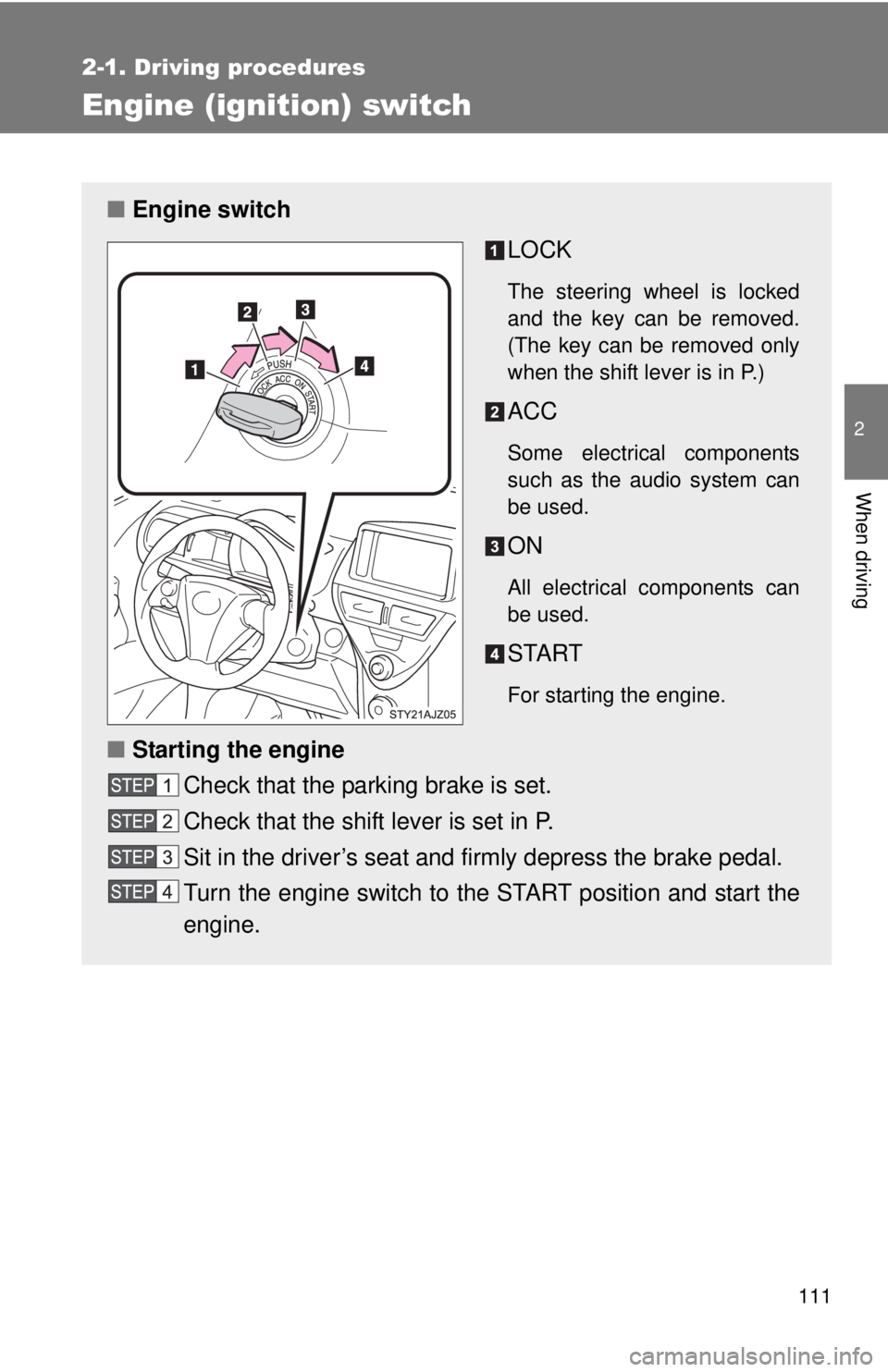
■Engine switch
LOCK
The steering wheel is locked
and the key can be removed.
(The key can be removed only
when the shift lever is in P.)
ACC
Some electrical components
such as the audio system can
be used.
ON
All electrical components can
be used.
START
For starting the engine.
■Starting the engine
Check that the parking brake is set.
Check that the shift lever is set in P.
Sit in the driver’s seat and firmly depress the brake pedal.
Turn the engine switch to the START position and start the
engine.
Page 112 of 372
112 2-1. Driving procedures
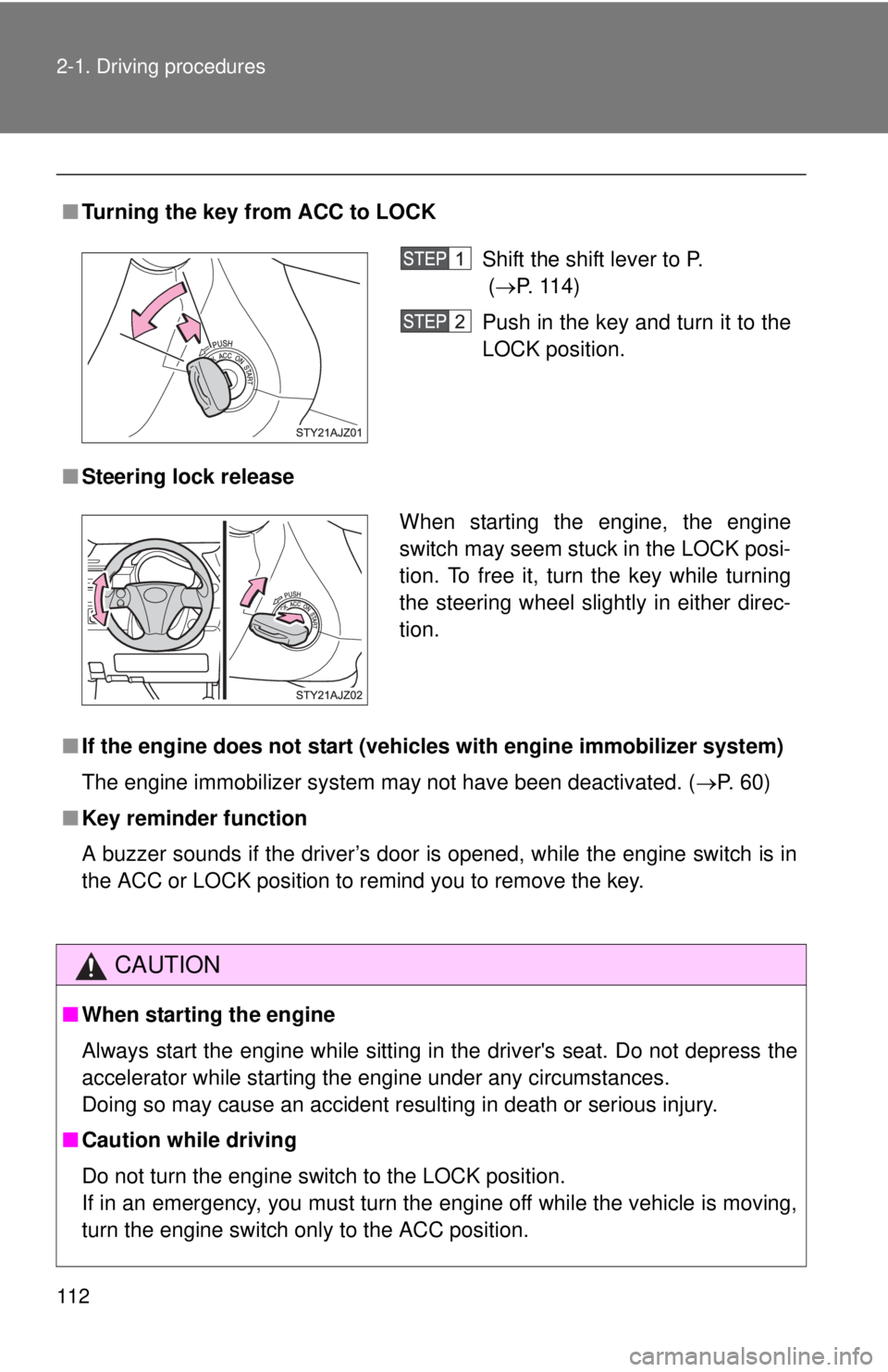
■Turning the key from ACC to LOCK
■ Steering lock release
■ If the engine does not start (vehic les with engine immobilizer system)
The engine immobilizer system may not have been deactivated. ( P. 60)
■ Key reminder function
A buzzer sounds if the driver’s door is opened, while the engine switch is in
the ACC or LOCK position to remind you to remove the key.
CAUTION
■When starting the engine
Always start the engine while sitting in the driver's seat. Do not depress the
accelerator while starting the engine under any circumstances.
Doing so may cause an accident resulting in death or serious injury.
■ Caution while driving
Do not turn the engine switch to the LOCK position.
If in an emergency, you must turn the engine off while the vehicle is moving,
turn the engine switch only to the ACC position.
Shift the shift lever to P.
(P. 114)
Push in the key and turn it to the
LOCK position.
When starting the engine, the engine
switch may seem stuck in the LOCK posi-
tion. To free it, turn the key while turning
the steering wheel slightly in either direc-
tion.
Page 113 of 372

113
2-1. Driving procedures
2
When driving
NOTICE
■
To prevent battery discharge
Do not leave the key in the ACC or ON position for long periods if the engine
is not running.
■ When starting the engine
●Do not crank for more than 30 seconds at a time. This may overheat the
starter and wiring systems.
● Do not race a cold engine.
● If the engine becomes difficult to start or stalls frequently, have the engine
checked immediately.
Page 114 of 372
114
2-1. Driving procedures
Automatic transmission
■If the shift lever cannot be shifted from P (P. 303)
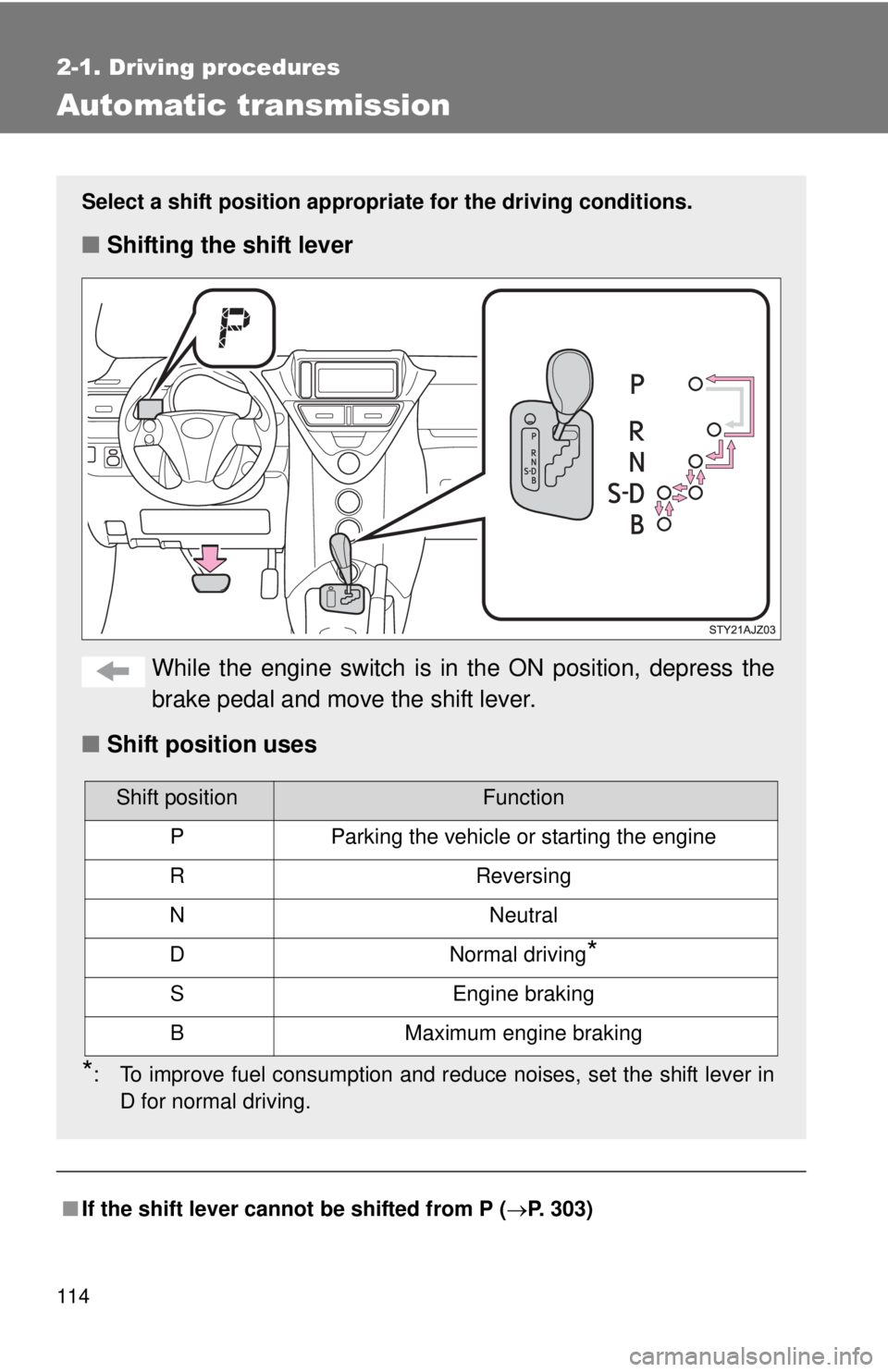
Select a shift position appropri ate for the driving conditions.
■Shifting the shift lever
While the engine switch is in the ON position, depress the
brake pedal and move the shift lever.
■ Shift position uses
*: To improve fuel consumption and reduce noises, set the shift lever in
D for normal driving.
Shift positionFunction
PParking the vehicle or starting the engine
RReversing
NNeutral
DNormal driving*
SEngine braking
BMaximum engine braking
Page 115 of 372
115
2-1. Driving procedures
2
When driving
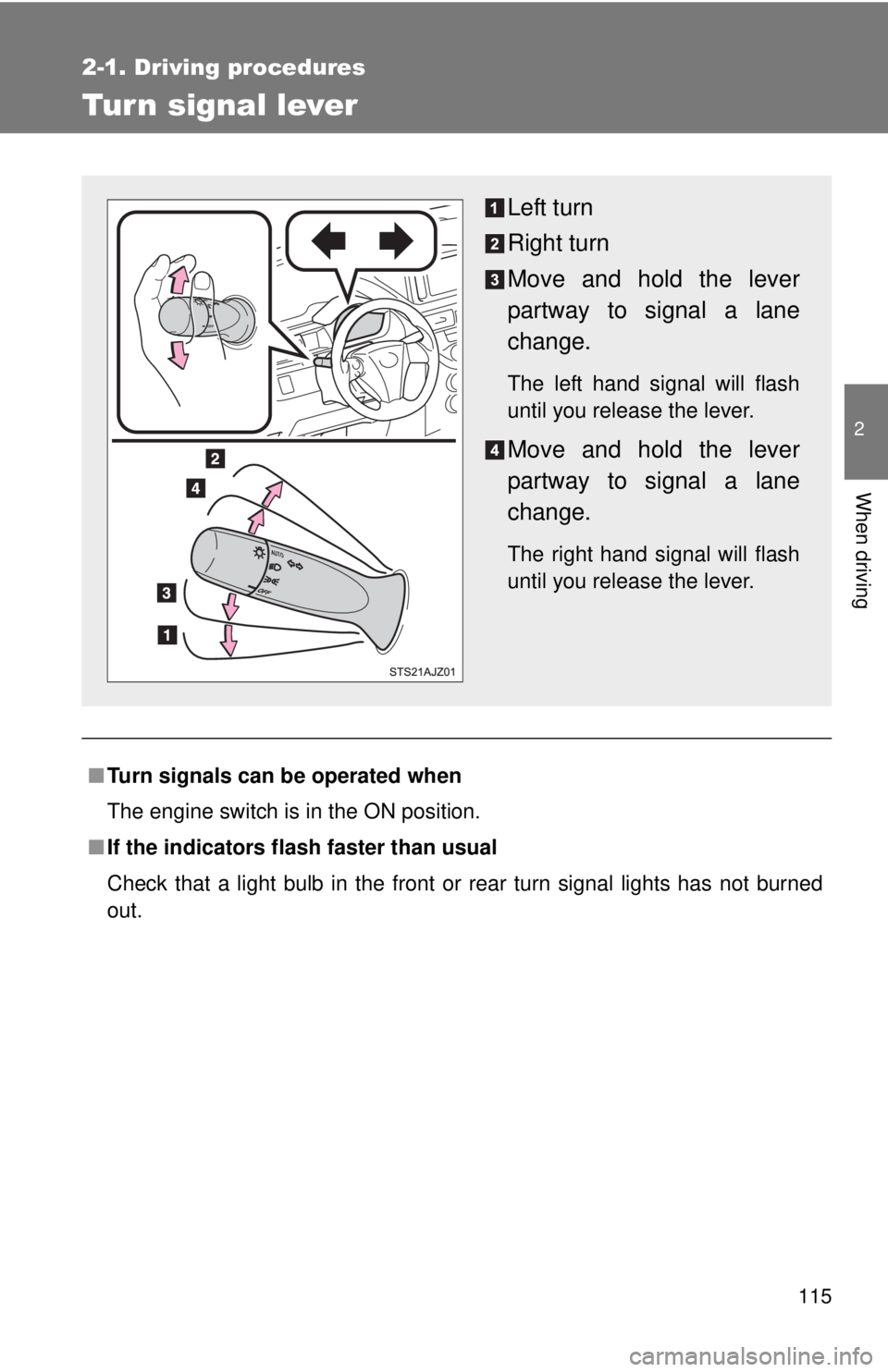
Tur n signal lever
■Turn signals can be operated when
The engine switch is in the ON position.
■ If the indicators flash faster than usual
Check that a light bulb in the front or rear turn signal lights has not burned
out.
Left turn
Right turn
Move and hold the lever
partway to signal a lane
change.
The left hand signal will flash
until you release the lever.
Move and hold the lever
partway to signal a lane
change.
The right hand signal will flash
until you release the lever.
Page 119 of 372
119
2
When driving
2-2. Instrument cluster
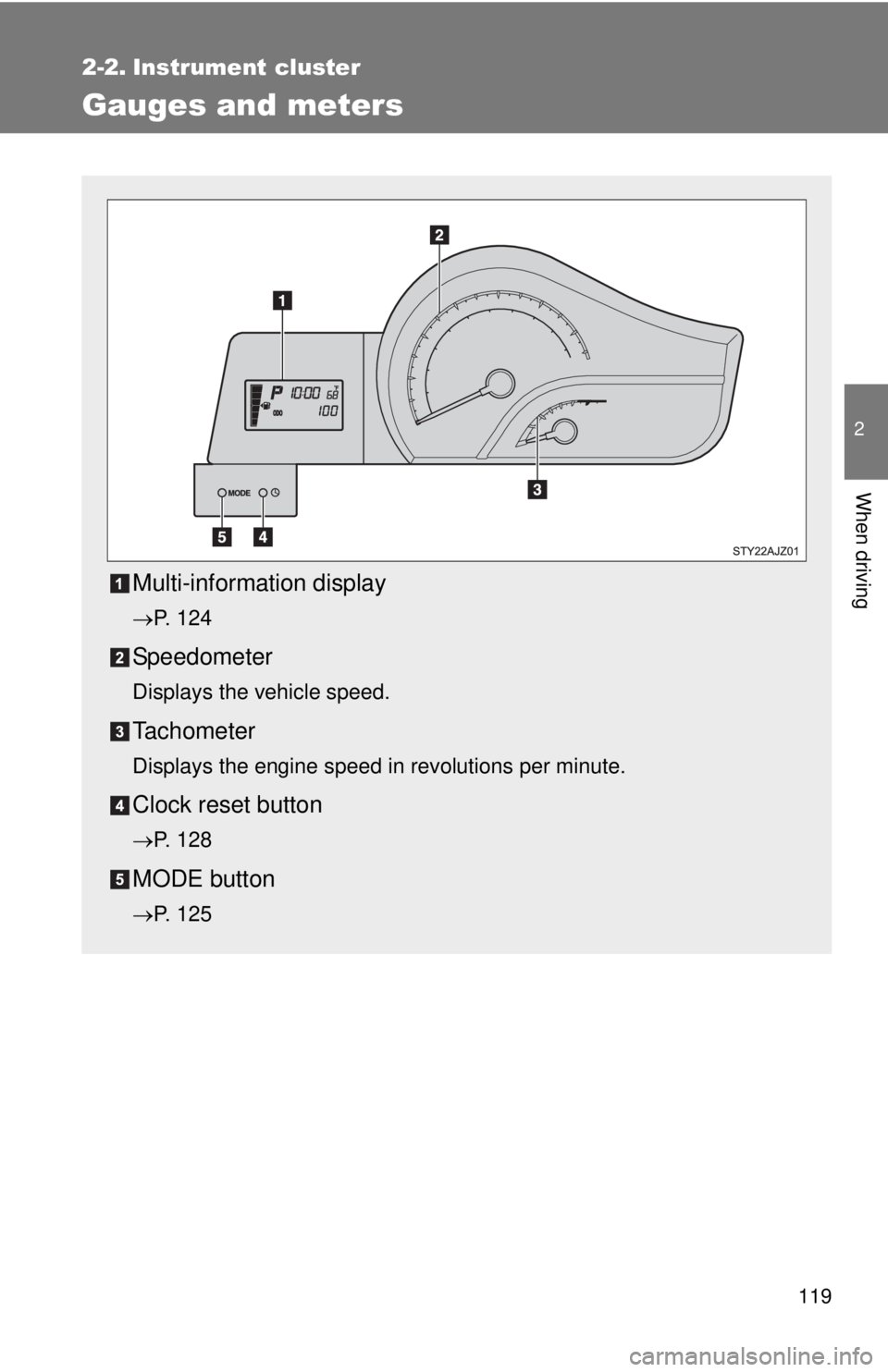
Gauges and meters
Multi-information display
P. 124
Speedometer
Displays the vehicle speed.
Tachometer
Displays the engine speed in revolutions per minute.
Clock reset button
P. 128
MODE button
P. 125
Page 120 of 372
120 2-2. Instrument cluster
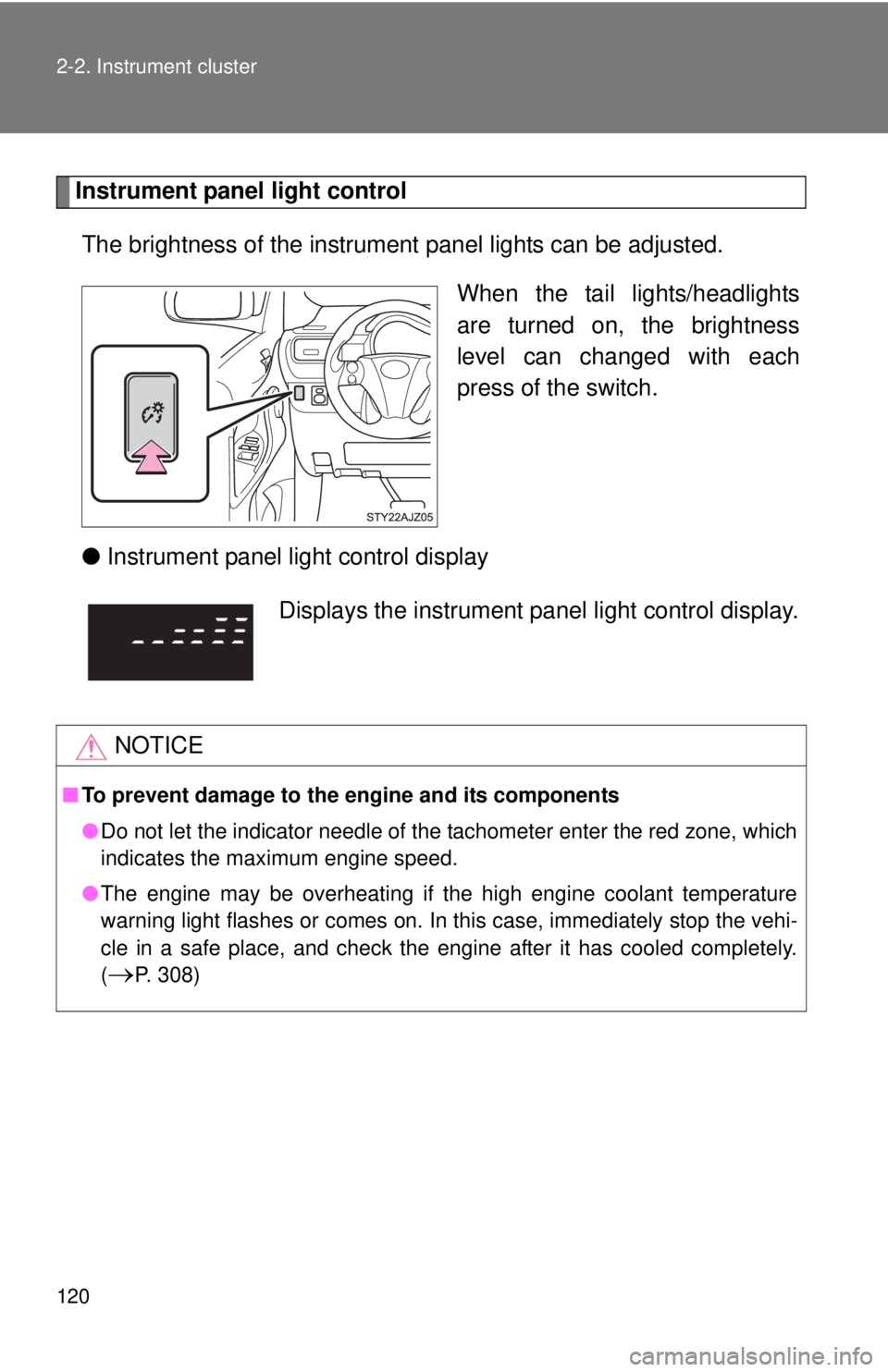
Instrument panel light controlThe brightness of the instrument panel lights can be adjusted.
When the tail lights/headlights
are turned on, the brightness
level can changed with each
press of the switch.
● Instrument panel light control display
Displays the instrument pa nel light control display.
NOTICE
■To prevent damage to the engine and its components
●Do not let the indicator needle of the tachometer enter the red zone, which
indicates the maximum engine speed.
● The engine may be overheating if the high engine coolant temperature
warning light flashes or comes on. In this case, immediately stop the vehi-
cle in a safe place, and check the engine after it has cooled completely.
(
P. 308)
Page 122 of 372
122 2-2. Instrument cluster
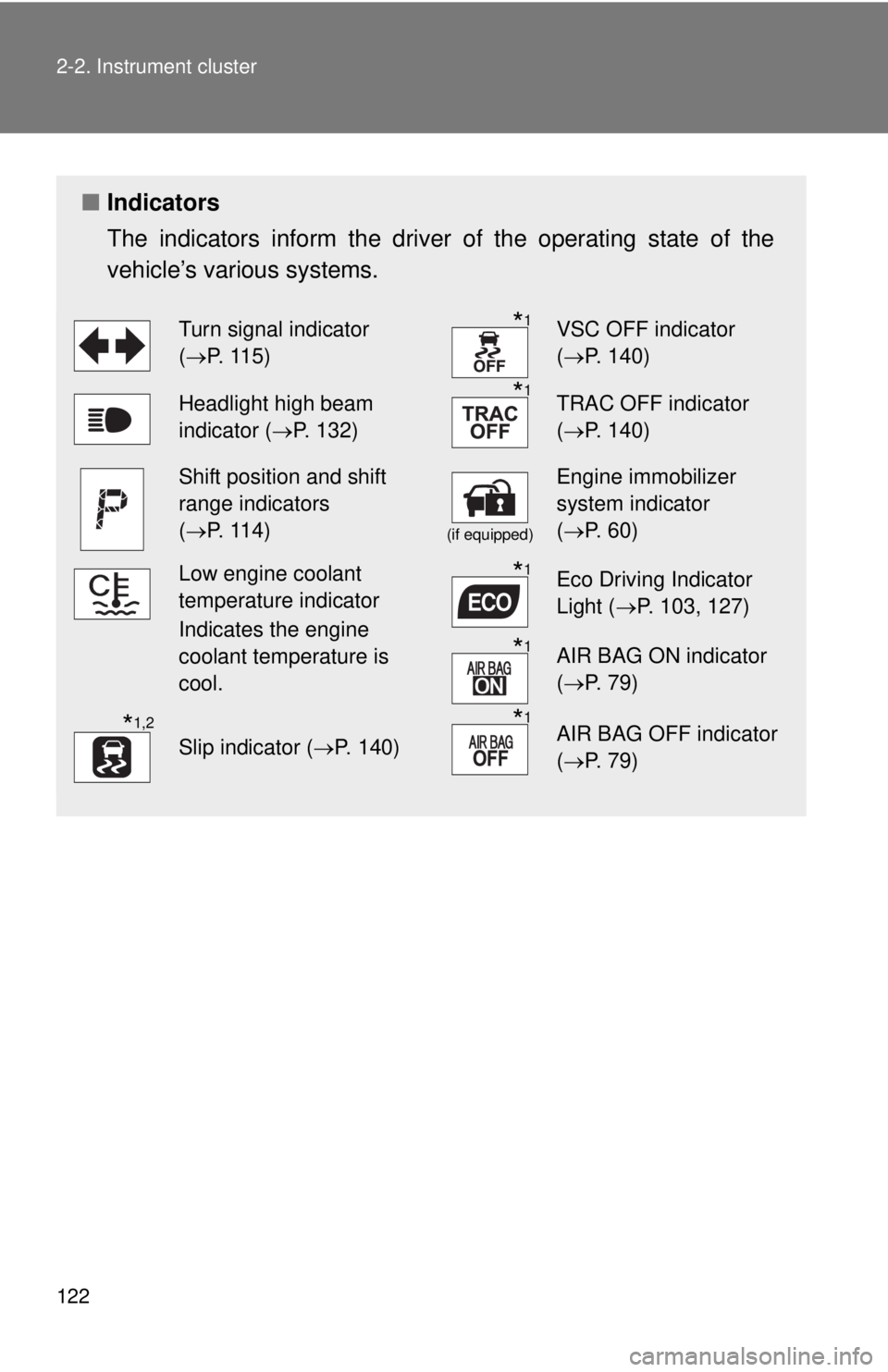
■Indicators
The indicators inform the driver of the operating state of the
vehicle’s various systems.
Turn signal indicator
(P. 115)*1VSC OFF indicator
( P. 140)
Headlight high beam
indicator ( P. 132)*1TRAC OFF indicator
(P. 140)
Shift position and shift
range indicators
(P. 114)
(if equipped)
Engine immobilizer
system indicator
( P. 60)
Low engine coolant
temperature indicator
Indicates the engine
coolant temperature is
cool.*1Eco Driving Indicator
Light ( P. 103, 127)
*1AIR BAG ON indicator
(P. 79)
*1,2
Slip indicator ( P. 140)
*1AIR BAG OFF indicator
(P. 79)