lock TOYOTA IQ 2013 Workshop Manual
[x] Cancel search | Manufacturer: TOYOTA, Model Year: 2013, Model line: IQ, Model: TOYOTA IQ 2013Pages: 372, PDF Size: 7.77 MB
Page 156 of 372
156
3-1. Using the air conditioning system and defogger
Air conditioning system
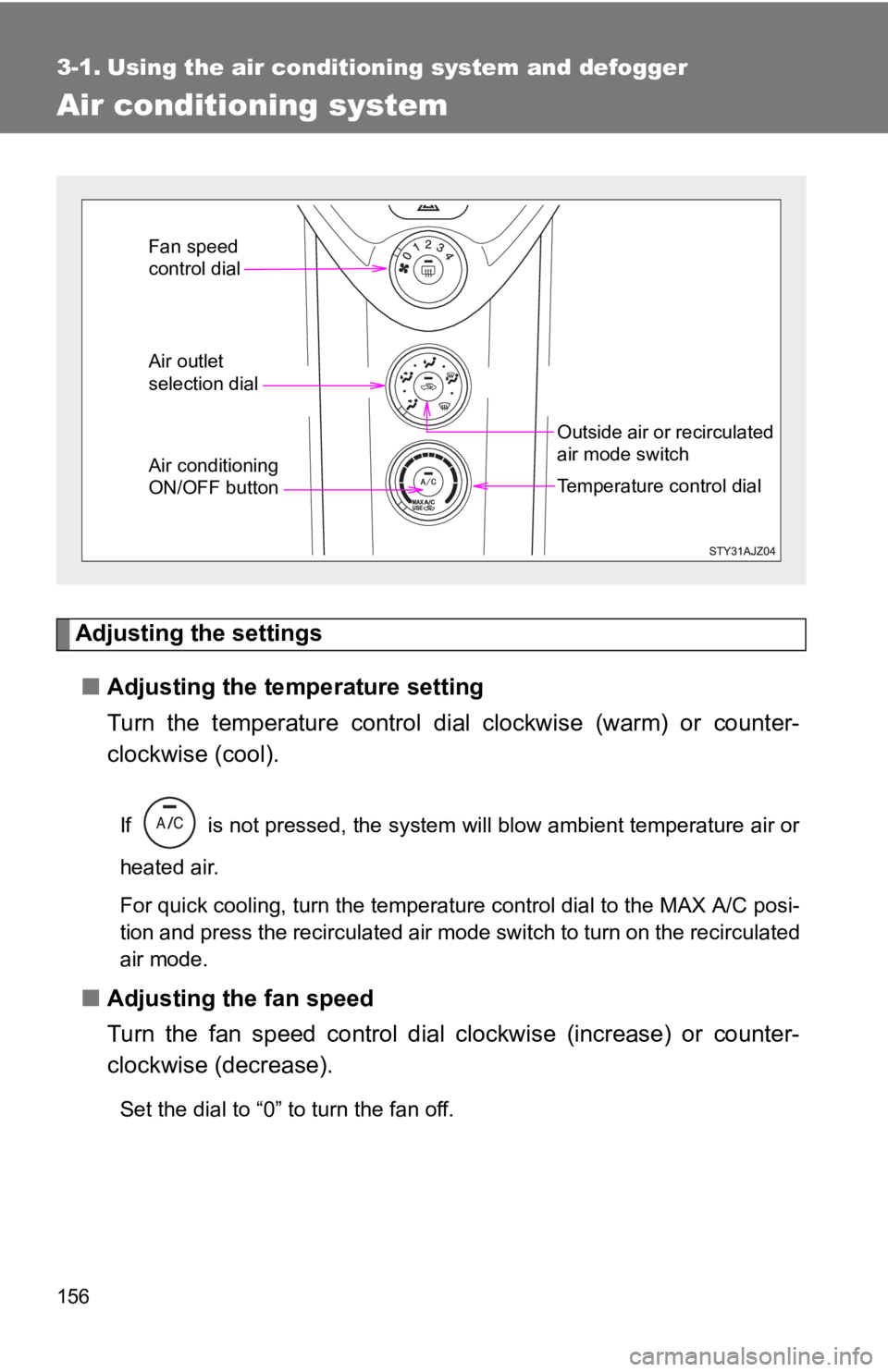
Adjusting the settings■ Adjusting the temperature setting
Turn the temperature control dial clockwise (warm) or counter-
clockwise (cool).
If is not pressed, the system will blow ambient temperature air or
heated air.
For quick cooling, turn the temperature control dial to the MAX A/C posi-
tion and press the recirculated air mode switch to turn on the recirculated
air mode.
■ Adjusting the fan speed
Turn the fan speed control dial clockwise (increase) or counter-
clockwise (decrease).
Set the dial to “0” to turn the fan off.
Air outlet
selection dial
Temperature control dial
Outside air or recirculated
air mode switch
Fan speed
control dial
Air conditioning
ON/OFF button
Page 161 of 372

161
3-1. Using the air conditioning system
and defogger
3
Interior features
■Air conditioning odors
●During use, various odors from inside and outside the vehicle may enter
into and accumulate in the air conditioning system. This may then cause
odor to be emitted from the vents.
● To reduce potential odors from occurring:
It is recommended that the air conditioning system be set to outside air
mode prior to turning the vehicle off.
CAUTION
■To prevent the windshield from fogging up
Do not set the air outlet selection dial to during cool air operation in
extremely humid weather. The difference between the temperature of the
outside air and that of the windshield can cause the outer surface of the
windshield to fog up, blocking your vision.
NOTICE
■To prevent battery discharge
Do not leave the air conditioning system on longer than necessary when the
engine is stopped.
Page 167 of 372

167
3
Interior features
3-3. Using the interior lights
Interior lights list
■Illuminated entry system
When the interior light switch is in the position, the interior light auto-
matically turns on/off according to whether the doors are locked/unlocked,
whether the doors are open/closed, and the engine switch position.
■ To prevent the battery from being discharged
If the interior light remains on when the door is not fully closed and the inte-
rior light switch is in the position, the light will go off automatically
after 20 minutes.
■ Customization that can be configured at Scion dealer
Settings (e.g. The time elapsed before lights turn off) can be changed.
(Customizable features P. 339)
Interior light (P. 168)
Page 189 of 372

189
4-2. Maintenance
4
Maintenance and care
Turn the engine switch to the LOCK position.
While pressing the MODE button, turn the engine switch to the ON
position (but do not start the engine because otherwise the reset
mode will be cancelled). Continue to press and hold the button until
the trip meter displays “000000”.
■ Allow inspection and repairs to be performed by a Scion dealer
● Scion technicians are well-trained specialists and are kept up to date with
the latest service information. They are well informed about the opera-
tions of all systems on your vehicle.
● Keep a copy of the repair order. It proves that the maintenance that has
been performed is under warranty coverage. If any problem should arise
while your vehicle is under warranty, your Scion dealer will promptly take
care of it.
CAUTION
■ If your vehicle is not properly maintained
It could result in serious damage to the vehicle and possible serious in\
jury or
death.
■ Warning in handling of battery
●Engine exhaust, some of its constituents, and a wide variety of automobile
components contain or emit chemicals known to the State of California to
cause cancer and birth defects and other reproductive harm. Work in a
well ventilated area.
● Oils, fuels and fluids contained in vehicles as well as waste produced by
component wear contain or emit chemicals known to the State of
California to cause cancer and birth defects or other reproductive harm.
Avoid exposure and wash any affected area immediately.
● Battery posts, terminals and related accessories contain lead and lead
compounds which are known to cause brain damage. Wash your hands
after handling. ( P. 216)
Page 190 of 372
190
4-2. Maintenance
General maintenance
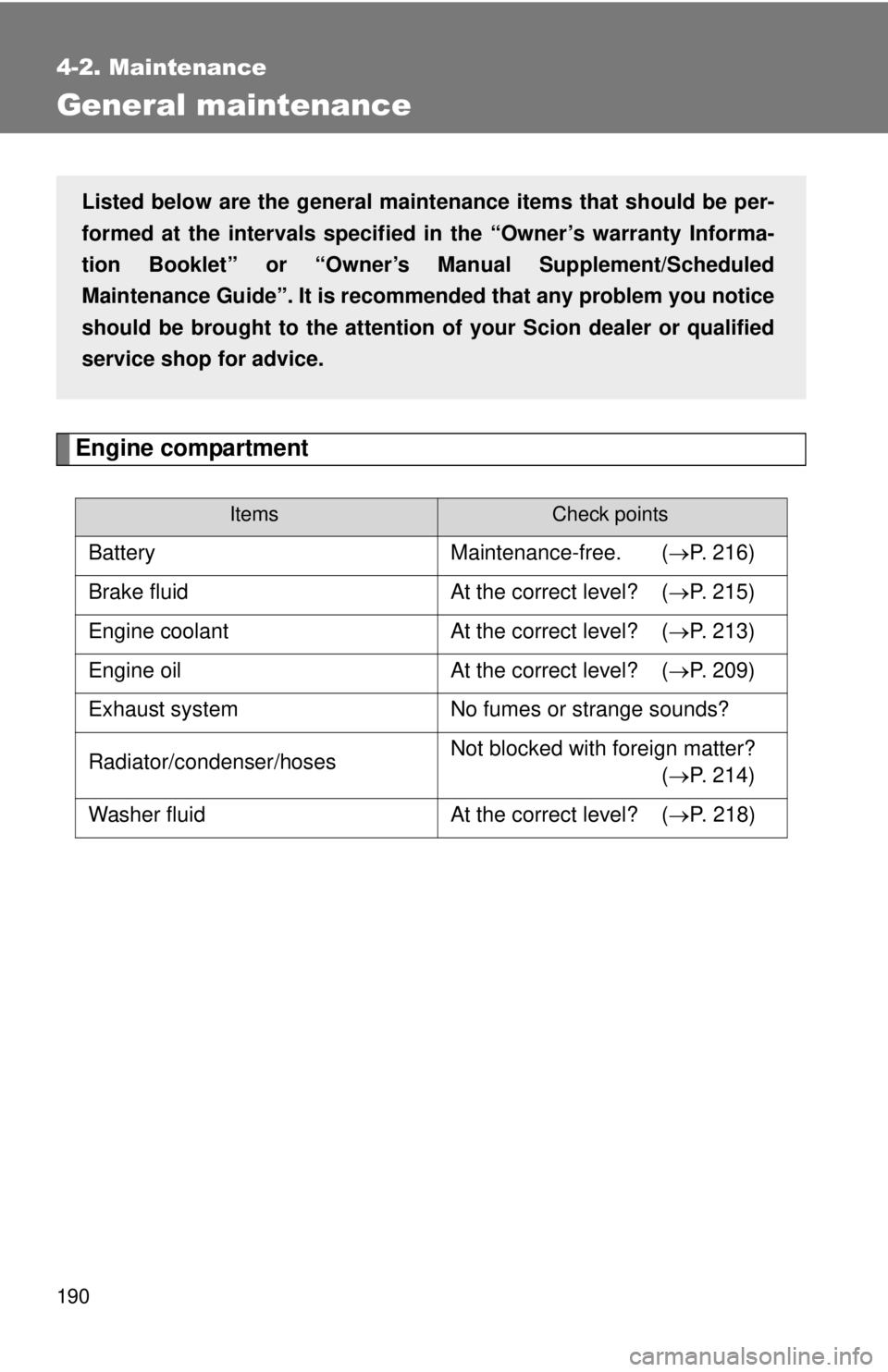
Engine compartment
ItemsCheck points
BatteryMaintenance-free. (P. 216)
Brake fluid At the correct level? (P. 215)
Engine coolant At the correct level? (P. 213)
Engine oil At the correct level? (P. 209)
Exhaust system No fumes or strange sounds?
Radiator/condenser/hoses Not blocked with foreign matter?
(P. 214)
Washer fluid At the correct level? (P. 218)
Listed below are the general maintenance items that should be per-
formed at the intervals specified in the “Owner’s warranty Informa-
tion Booklet” or “Owner’s Manual Supplement/Scheduled
Maintenance Guide”. It is recommended that any problem you notice
should be brought to the attention of your Scion dealer or qualified
service shop for advice.
Page 191 of 372

191
4-2. Maintenance
4
Maintenance and care
Vehicle interior
ItemsCheck points
Accelerator pedal
• Moves smoothly (without uneven
pedal effort or catching)?
Automatic transmission “Park”
mechanism • Can the vehicle be hold securely
on an incline with the shift lever in
P?
Brake pedal • Moves smoothly?
• Does it have appropriate clear-
ance and correct amount of free
play?
Brakes • Not pull to one side when
applied?
• Loss of brake effectiveness?
• Spongy feeling brake pedal?
• Pedal almost touches floor?
Head restraints • Move smoothly and lock
securely?
Indicators/buzzers • Function properly?
Lights • Do all the lights come on?
• Headlights aimed correctly?
Parking brake • Moves smoothly?
• Can hold the vehicle securely on
an incline?
Seat belts • Does the seat belt system oper-
ate smoothly?
• Are the belts undamaged?
Seats • Do the seat controls operate
properly?
Steering wheel • Moves smoothly?
• Has correct free play?
• No strange noises?
Page 192 of 372

192 4-2. Maintenance
Vehicle exterior
ItemsCheck points
Doors• Operate smoothly?
Engine hood • The lock system works properly?
Fluid leaks • Is there any leakage after park-
ing?
Tires • Inflation pressure is correct?
• Tire surfaces not worn or dam-
aged?
• Tires rotated according to the maintenance schedule?
• Wheel nuts are not loose?
CAUTION
■ If the engine is running
Turn the engine off and ensure that there is adequate ventilation before per-
forming maintenance checks.
Page 196 of 372

196 4-3. Do-it-yourself maintenance
CAUTION
■When working on the engine compartment
●Take care because brake fluid can harm your hands or eyes and damage
painted surfaces.
If fluid gets on your hands or in your eyes, flush the affected area with
clean water immediately.
If you still experience discomfort, see a doctor.
■ When working near the electric cooling fan or radiator grille
Be sure the engine switch is in the LOCK position.
With the engine switch in the ON position, the electric cooling fan may \
auto-
matically start to run if the air condi tioning system is on and/or the coolant
temperature is high. ( P. 214)
■ Safety glasses
Wear safety glasses to prevent flying or falling material, fluid spray, etc. from
getting in the eyes.
NOTICE
■If you remove the air cleaner
Driving with the air cleaner removed may cause excessive engine wear due
to dirt in the air.
Page 197 of 372
197
4-3. Do-it-yourself maintenance
4
Maintenance and care
Hood
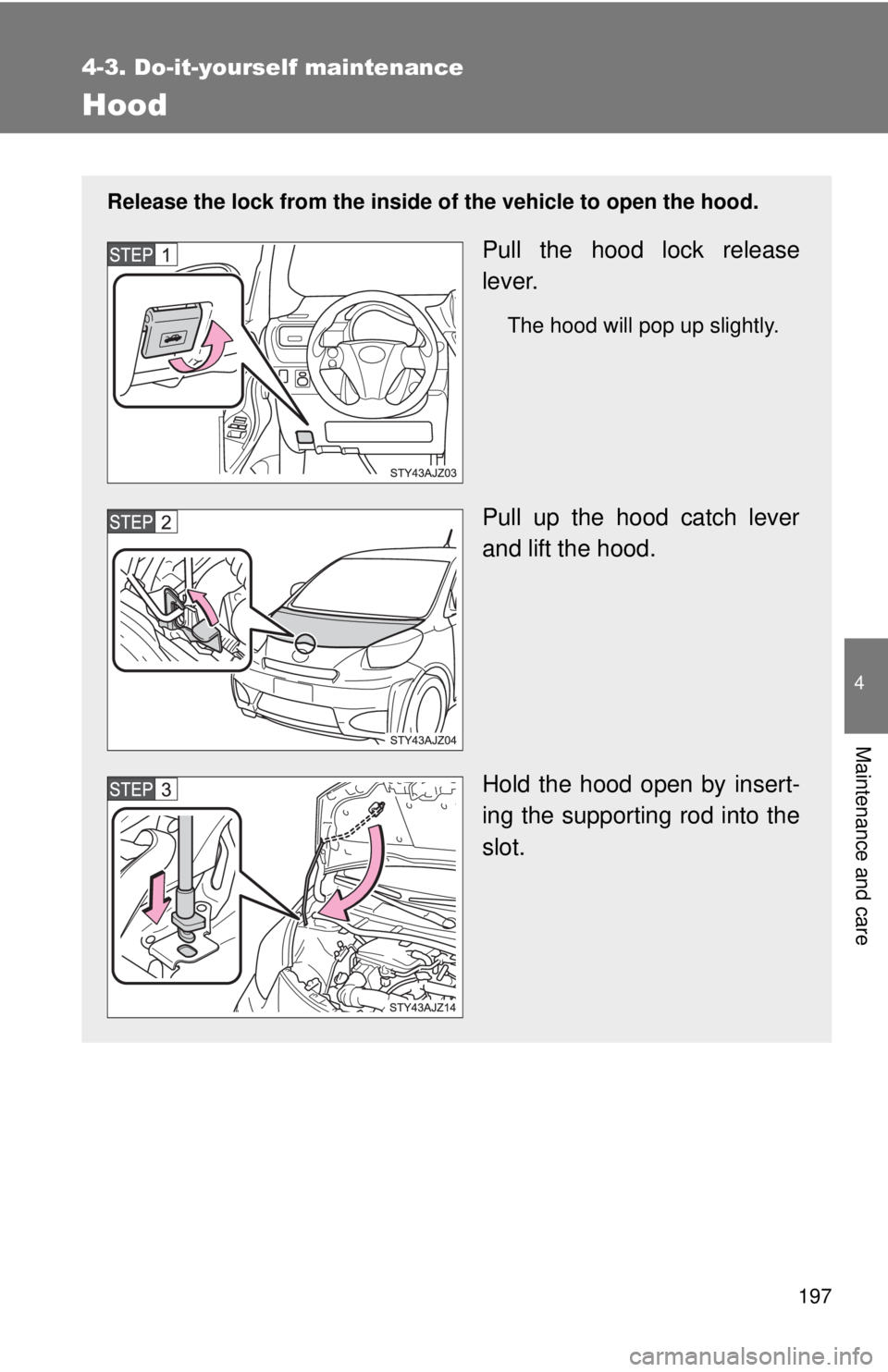
Release the lock from the inside of the vehicle to open the hood.
Pull the hood lock release
lever.
The hood will pop up slightly.
Pull up the hood catch lever
and lift the hood.
Hold the hood open by insert-
ing the supporting rod into the
slot.
Page 198 of 372

198 4-3. Do-it-yourself maintenance
CAUTION
■Pre-driving check
Check that the hood is fully closed and locked.
If the hood is not locked properly, it may open while the vehicle is in motion
and cause an accident, which may result in death or serious injury.
■ When opening the hood
Make sure to use the support rod to support the hood when opening it,
ensuring that the rod is fixed correctly. The hood may stay open without sup-
port on slope, however, it is dangerous because the hood may suddenly
close.
NOTICE
■When closing the hood
Be sure to return the support rod to its clip before closing the hood. Closing
the hood with the support rod up could cause the hood to bend.