change time TOYOTA LAND CRUISER 2000 Owners Manual
[x] Cancel search | Manufacturer: TOYOTA, Model Year: 2000, Model line: LAND CRUISER, Model: TOYOTA LAND CRUISER 2000Pages: 235, PDF Size: 5.13 MB
Page 72 of 235
L/C 100_U
94 2000 L/C 100 (OM60866U)
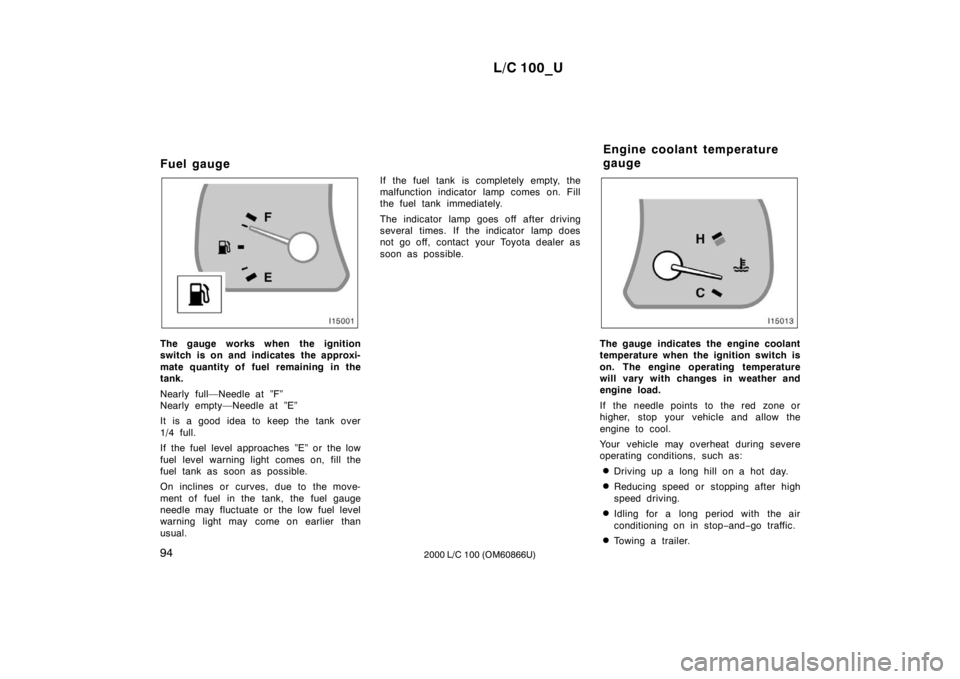
Fuel gauge
The gauge works when the ignition
switch is on and indicates the approxi-
mate quantity of fuel remaining in the
tank.
Nearly full—Needle at ”F”
Nearly empty—Needle at ”E”
It is a good idea to keep the tank over
1/4 full.
If the fuel level approaches ”E” or the low
fuel level warning light comes on, fill the
fuel tank as soon as possible.
On inclines or curves, due to the move-
ment of fuel in the tank, the fuel gauge
needle may fluctuate or the low fuel level
warning light may come on earlier than
usual.
If the fuel tank is completely empty, the
malfunction indicator lamp comes on. Fill
the fuel tank immediately.
The indicator lamp goes off after driving
several times. If the indicator lamp does
not go off, contact your Toyota dealer as
soon as possible.The gauge indicates the engine coolant
temperature when the ignition switch is
on. The engine operating temperature
will vary with changes in weather and
engine load.
If the needle points to the red zone or
higher, stop your vehicle and allow the
engine to cool.
Your vehicle may overheat during severe
operating conditions, such as:
Driving up a long hill on a hot day.
Reducing speed or stopping after high
speed driving.
Idling for a long period with the air
conditioning on in stop −and −go traffic.
Towing a trailer.
Engine coolant temperature
gauge
Page 74 of 235
L/C 100_U
96 2000 L/C 100 (OM60866U)
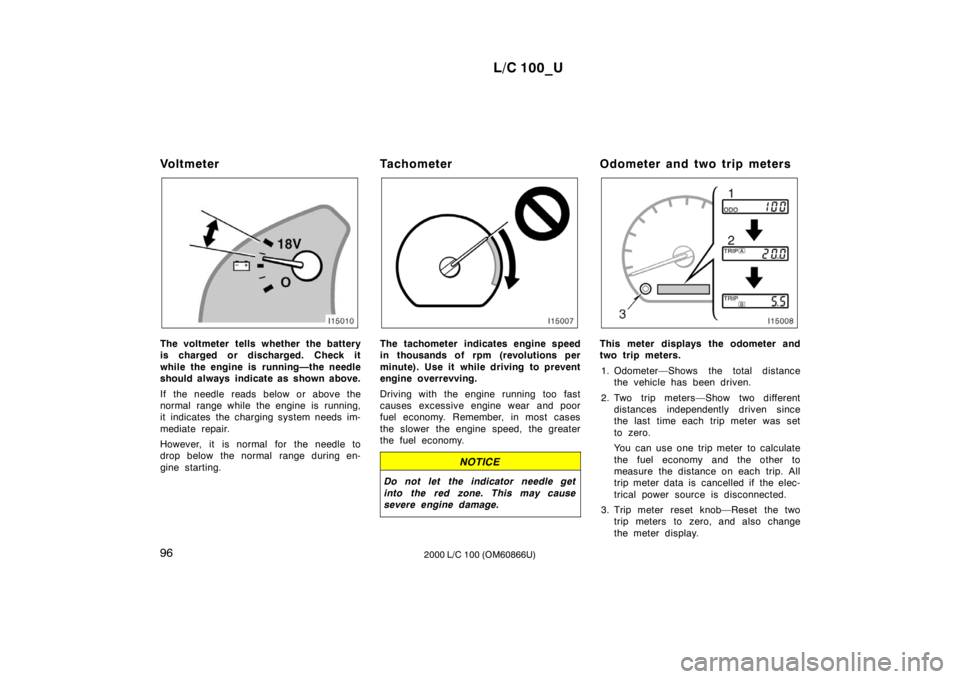
Vo l t m e t e r
The voltmeter tells whether the battery
is charged or discharged. Check it
while the engine is running—the needle
should always indicate as shown above.
If the needle reads below or above the
normal range while the engine is running,
it indicates the charging system needs im-
mediate repair.
However, it is normal for the needle to
drop below the normal range during en-
gine starting.
Tachometer The tachometer indicates engine speed
in thousands of rpm (revolutions per
minute). Use it while driving to prevent
engine overrevving.
Driving with the engine running too fast
causes excessive engine wear and poor
fuel economy. Remember, in most cases
the slower the engine speed, the greater
the fuel economy.
NOTICE
Do not let the indicator needle get
into the red zone. This may cause
severe engine damage.
Odometer and two trip meters
This meter displays the odometer and
two trip meters.
1. Odometer—Shows the total distance the vehicle has been driven.
2. Two trip meters—Show two different distances independently driven since
the last time each trip meter was set
to zero.
You can use one trip meter to calculate
the fuel economy and the other to
measure the distance on each trip. All
trip meter data is cancelled if the elec-
trical power source is disconnected.
3. Trip meter reset knob—Reset the two trip meters to zero, and also change
the meter display.
Page 75 of 235
L/C 100_U97
2000 L/C 100 (OM60866U)
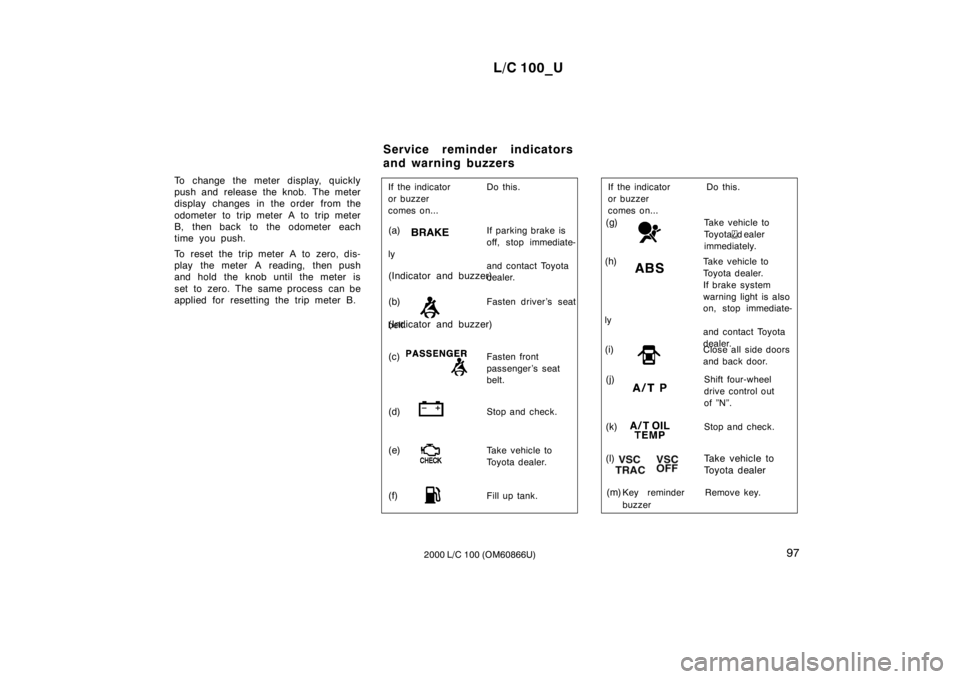
To change the meter display, quickly
push and release the knob. The meter
display changes in the order from the
odometer to trip meter A to trip meter
B, then back to the odometer each
time you push.
To reset the trip meter A to zero, dis-
play the meter A reading, then push
and hold the knob until the meter is
set to zero. The same process can be
applied for resetting the trip meter B.
(c)Fasten front
passenger’s seat
belt.
If the indicator Do this.
or buzzer
comes on...
(a)
If parking brake is
off, stop immediate-
ly and contact Toyota
dealer.
(b) Fasten driver’s seat
belt .
(d) Stop and check.
(f) Fill up tank.
(e)
Take vehicle to
Toyota dealer.
(Indicator and buzzer)
(Indicator and buzzer)
(g)
Take vehicle to
To y o t a
d ealer
immediately.
(i) Close all side doors
and back door.
(k) Stop and check.
(j)Shift four-wheel
drive control out
of ”N”.
Key reminder
buzzer
(h) Take vehicle to
Toyota dealer.
If brake system
warning light is also
on, stop immediate-
ly and contact Toyota
dealer.
If the indicator Do this.
or buzzer
comes on...
(m) Remove key.
(l) Take vehicle to
To y o t a d e a l e r
Service reminder indicators
and warning buzzers
Page 94 of 235
L/C 100_U
11 6 2000 L/C 100 (OM60866U)
The brake actuator temperature increases
during the active traction control system
or vehicle skid control system operating.
If the brake actuator temperature becomes
too high while the active traction control
system or vehicle skid control system is
operating, a buzzer will start to sound
intermittently to indicate that the active
traction control system can no longer op-
erate. In this case, immediately stop your
vehicle at a safe place. If the system
continues to operate, the buzzer sound
changes from intermittent to continuous
and at the same time, “VSC/TRAC” warn-
ing light will come on. After the continu-
ous buzzer sound stopped after about 3
seconds, the active traction control system
temporarily stops operating in order to
protect the brake actuator. (Although the
active traction control system does not
operate, there is no problem to continue
your driving.) The system will be automati-
cally restored after a short time and
“VSC/TRAC” warning light goes off if the
accelerator pedal is released.
When the “ABS” warning light come on,
the active traction control system is not
operating.
The “VSC/TRAC” warning light will come
on when the ignition key is turned “ON”,
and will go off after a few seconds.
The “VSC/TRAC” warning light may stay
on for 60 seconds after the engine is
started. It is normal if it goes off after a
few seconds.
Depressing the brake pedal repeatedly
may turn on the “VSC/TRAC” warning
light. It is normal if it goes off after a few
seconds.
When the “VSC/TRAC” warning light
comes on the active traction control sys-
tem is not operating, but there is no prob-
lem if you continue to drive.
In the following cases, contact your Toyota
dealer:
The “VSC/TRAC” warning light does not
come on after the ignition key is turned
“ON”.
The “VSC/TRAC” remains on after the
ignition key is turned “ON”.
CAUTION
Under certain slippery road condi-
tions, full traction of the vehicles and
power to 4 wheels may not be main-
tained, even though the active trac-
tion control system is in operation.
Do not drive the vehicle under any
speed or maneuvering conditions
which will cause the vehicle to lose
traction. In situations where the road
surface is covered with ice or snow,
your vehicle should be fitted with
snow tires or tire chains. Always
drive at an appropriate and cautious
speed for the road conditions pres-
ent.
Page 102 of 235

L/C 100_U
124 2000 L/C 100 (OM60866U)
1 2 3 4 5 6 (Preset buttons)
These buttons are used to preset and
tune in radio stations.
To preset a station to a button: Tune in
the desired station (see “TUNE” knob or
“SEEK” button). Push and hold down the
button until you hear a beep—this will set
the station to the button. The button num-
ber will appear on the display.
To tune in to a preset station: Push the
button for the station you want. The but-
ton number and station frequency will ap-
pear on the display.
These systems can store one AM and two
FM stations for each button (The display
will show “AM”, “FM1” or “FM2” when you
push “AM” “FM1·2”).
(Eject button)
Cassette tape
Push the cassette tape eject button to
eject a cassette.
After you turn the ignition to “LOCK”, you
will be able to eject a cassette, but you
will not be able to reinsert it. Compact disc
To eject one compact disc only: Push and
release the compact disc eject button. If
you hold the button too long (if the audio
system is on at this time, you hear a
beep.), the mechanism will change to the
mode for ejecting all the discs loaded in
the changer. You can also eject any spe-
cific one of the discs loaded in the player
as follows:
1. Push either side of the “DISC” button until the number of the disc you want
to eject is displayed.
2. Push and release the compact disc eject button.
To eject all the discs loaded in the player:
Push and hold the compact disc eject but-
ton (until you hear a beep when the audio
system is on). The last compact disc
played before pushing the button will be
ejected first. If a disc is left in the slot
for a long time, the function to eject all
the discs will be automatically cancelled.
After you turn the ignition to “LOCK”, you
will be able to eject one compact disc
only or all the discs loaded in the player,
but you will not be able to reinsert it or
them.
(Program)
Push “
” to select the other side of a
cassette tape. The display indicates which
side is currently selected (“
” indicates
top side, “
” indicates bottom side).
Auto −reverse feature: After the cassette
player reaches the end of a tape side, it
automatically reverses and begins to play
the other side. This is true whether the
cassette was playing or fast forwarding.
(Reverse/Fast forward buttons)
Cassette Player
Push the fast forward button to fast for-
ward a cassette tape. “FF” will appear on
the display. Push the reverse button to
rewind a tape. “REW” will appear on the
display.
To stop the tape while it is fast forward-
ing, push the fast forward button or
“TAPE”; to stop the tape while it is re-
winding, push the reverse button or
“TAPE”.
Page 104 of 235

L/C 100_U
126 2000 L/C 100 (OM60866U)
If “WAIT” appears on the display,
it indi-
cates that the inside of the player unit
may be too hot due to the very high ambi-
ent temperature. Remove the disc or mag-
azine from the player and allow the player
to cool down.
If “Err 1” appears on the display, it
indicates the disc is dirty, damaged. Clean
the disc or insert it correctly.
If “Err 3” appears on the display, it
indicates there is a trouble inside the sys-
tem. Eject the disc. Set the disc again.
If the malfunction is not rectified, take
your vehicle to your Toyota dealer.
DISC
By using this button, you can select a
disc you wish to listen to.
Push either side of the button until the
number of the disc you want to listen to
appears on the display.
Dolby
B NR
If you are listening to a tape that was
recorded with Dolby B Noise Reduction,
push the button marked with the double −D
symbol. The double −D symbol will appear
on the display. Push the button again to
turn off Dolby B NR. The Dolby NR mode reduces tape noise
by about 10 dB. For best sound reproduc-
tion, play your tapes with this button on
or off according to the mode used for
recording the tape.
: Dolby noise reduction manufactured under license from
Dolby Laboratories Licensing Corporation. “DOLBY” and the
double D symbol
are trademarks of Dolby Laboratories
Licensing Corporation.
FM1·2
Push “FM1·2” to turn on the radio and
select the FM band. “FM1” or “FM2” will
appear on the display. This system allows
you to set twelve FM stations, two for
each button.
If the audio system is off, you can turn
on the radio by pushing “FM1·2”. Also,
push “FM1·2” to switch from cassette or
compact disc operation to radio operation. LOAD
This button is used to load the compact
discs in the compact disc auto changer
which is integrated with the radio and cas-
sette player. This compact disc auto
changer can store up to 6 di scs.
The key must be in the “ACC” or “ON”
position. Loading one compact disc only—
To load one compact disc only, quickly
push and release the button. If you hold
the button too long (if the audio system
is on at this time, you hear a beep.), the
mechanism will change to the mode for
loading multiple compact discs. After
pushing the button, insert a compact disc.
At this time, the indicators on both sides
of the slot are flashing. After the disc is
loaded, the shutter of the slot will close
and the indicators will stop flashing.
If no compact disc is inserted, the shutter
will close after 15 seconds.
Loading multiple compact di
scs—
To load multiple compact discs, push and
hold (until you hear a beep when the au-
dio system is on). After pushing the but-
ton, insert the first compact disc. At this
time, the indicators on both sides of the
slot are flashing. After the disc is loaded,
the shutter of the slot will close and the
indicators will stop flashing. After a few
seconds, the shutter will automatically
open again so the next disc can be in-
serted. The same process can be applied
for loading the rest of the di scs.
If no compact disc is inserted, the shutter
will close after 15 seconds.
Page 107 of 235
L/C 100_U129
2000 L/C 100 (OM60866U)
There must be at least 3 seconds of blank
space between tracks for the track button
to work correctly. In addition, the feature
may not work well with some spoken
word, live, or classical recordings.
ST (Stereo reception) display
Your radio automatically changes to stereo
reception when a stereo broadcast is re-
ceived. “ST” appears on the display. If the
signal becomes weak, the radio reduces
the amount of channel separation to prev-
ent the weak signal from creating noise.
If the signal becomes extremely weak, the
radio switches from stereo to mono recep-
tion.
TA P E
Push “TAPE” to switch from radio or com-
pact disc operation to cassette operation.
If the audio system is off, you can turn
on the cassette player by pushing “TAPE”.
In both cases, a cassette must already be
loaded in the player.
TRACK (Track up/down button):
Compact disc player
By using this button, you can skip up or
down to a different track.
Push either side of the track button until
the number of the track you want to listen
to appears on the display. If you want to
return to the beginning of the current
track, push the down side of the button
one time, quickly.
TUNE (Tuning)
Your Toyota has an electronic tuning radio
(ETR). Turn the knob clockwise to step up
the frequency. Turn the knob counterclock-
wise to step down the frequency.
NOTICE
To ensure the correct audio system
operation:
Be careful not to spill beverages
over the audio system.
Do not put anything other than a
cassette tape or Compact Disc into
the slot.
The use of cellular phone inside or
near the vehicle may cause a noise
from the speakers of the audio sys-
tem which you are listening to.
However, this does not indicate a
malfunction.
RADIO RECEPTION
Usually, a problem with radio reception
does not mean there is a problem with
your radio—it is just the normal result of
conditions outside the vehicle.
For example, nearby buildings and terrain
can interfere with FM reception. Power
lines or telephone wires can interfere with
AM signals. And of course, radio signals
have a limited range. The farther you are
from a station, the weaker its signal will
be. In addition, reception conditions
change constantly as your vehicle moves.Car audio system operating
hints
Page 124 of 235
L/C 100_U
146 2000 L/C 100 (OM60866U)
Clock
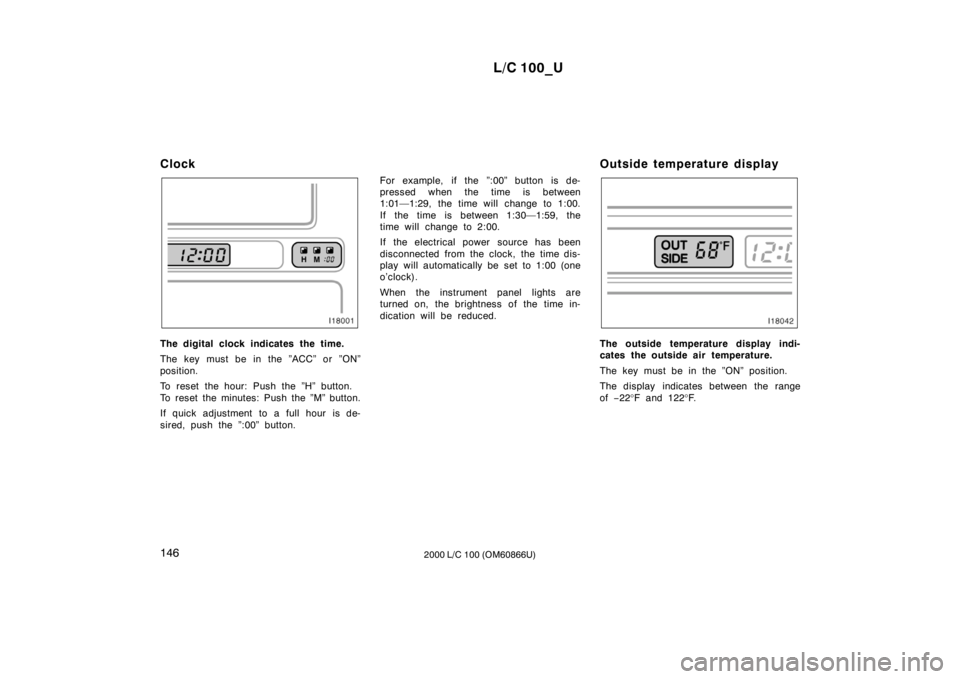
The digital clock indicates the time.
The key must be in the ”ACC” or ”ON”
position.
To reset the hour: Push the ”H” button.
To reset the minutes: Push the ”M” button.
If quick adjustment to a full hour is de-
sired, push the ”:00” button.
For example, if the ”:00” button is de-
pressed when the time is between
1:01—1:29, the time will change to 1:00.
If the time is between 1:30—1:59, the
time will change to 2:00.
If the electrical power source has been
disconnected from the clock, the time dis-
play will automatically be set to 1:00 (one
o’clock).
When the instrument panel lights are
turned on, the brightness of the time in-
dication will be reduced.
Outside temperature displayThe outside temperature display indi-
cates the outside air temperature.
The key must be in the ”ON” position.
The display indicates between the range of
−22 °F and 122 °F.
Page 145 of 235
L/C 100_U167
2000 L/C 100 (OM60866U)
To ensure that the three −way cata-
lytic converter and the entire emis-
sion control system operate proper-
ly, your vehicle must receive the
periodic inspections required by the
Toyota Maintenance Schedule. For
scheduled maintenance information,
refer to the separate ”Scheduled
Maintenance Guide” or ”Owner’s
Manual Supplement”.
Engine exhaust cautions
CAUTION
Avoid inhaling the engine exhaust.
It contains carbon monoxide, which
is a colorless and odorless gas. It
can cause unconsciousness or even
death.
Make sure the exhaust system has
no holes or loose connections. The
system should be checked from
time to time. If you hit something,
or notice a change in the sound of
the exhaust, have the system
checked immediately.
Do not run the engine in a garage
or enclosed area except for the
time needed to drive the vehicle in
or out. The exhaust gases cannot
escape, making this a particularly
dangerous situation.
Do not remain for a long time in a
parked vehicle with the engine run-
ning. If it is unavoidable, however,
do so only in an unconfined area
and adjust the heating or cooling
system to force outside air into the
vehicle.
Keep the back door and quarter
windows closed while driving. An
open or unsealed back door and
quarter windows may cause exhaust
gases to be drawn into the vehicle.
To allow proper operation of your
vehicle’s ventilation system, keep
the inlet grilles in front of the wind-
shield clear of snow, leaves, or oth-
er obstructions.
If you smell exhaust fumes in the
vehicle, drive with the windows
open and the back door closed.
Have the cause immediately located
and corrected.
Page 146 of 235
L/C 100_U
168 2000 L/C 100 (OM60866U)
FUNCTIONS OF ENGINE OIL
Engine oil has the primary functions of
lubricating and cooling the inside of the
engine, and plays a major role in main-
taining the engine in proper working order.
ENGINE OIL CONSUMPTION
It is normal that an engine should con-
sume some engine oil during normal
engine operation. The causes of oil
consumption in a normal engine are as
follows.
Oil is used to lubricate pistons, piston
rings and cylinders. A thin film of oil
is left on the cylinder wall when a pis-
ton moves downwards in the cylinder.
High negative pressure generated when
the vehicle is decelerating sucks some
of this oil into the combustion chamber.
This oil as well as some part of the oil
film left on the cylinder wall is burned
by the high temperature combustion
gases during the combustion process.
Oil is also used to lubricate the stems
of the intake valves. Some of this oil
is sucked into the combustion chamber
together with the intake air and is
burned along with the fuel. High tem-
perature exhaust gases also burn the
oil used to lubricate the exhaust valve
stems.
The amount of engine oil consumed de-
pends on the viscosity of the oil, the
quality of the oil and the conditions the
vehicle is driven under.
More oil is consumed by high −speed driv-
ing and frequent acceleration and decel-
eration.
A new engine consumes more oil, since
its pistons, piston rings and cylinder walls
have not become conditioned.
When judging the amount of oil con-
sumption, note that the oil may become
diluted and make it difficult to judge
the true level accurately. As an example, if a vehicle is used for
repeated short trips, and consumes a nor-
mal amount of oil, the dipstick may not
show any drop in the oil level at all, even
after 1000 km (600 miles) or more. This
is because the oil is gradually becoming
diluted with fuel or moisture, making it
appear that the oil level has not changed.
The diluting ingredients evaporate out
when the vehicle is then driven at high
speeds, as on an expressway, making it
appear that oil is excessively consumed
after driving at high speeds.
IMPORTANCE OF ENGINE OIL LEVEL CHECK
One of the most important points in prop-
er vehicle maintenance is to keep the en-
gine oil at the optimum level so that oil
function will not be impaired. Therefore, it
is essential that the oil level be checked
regularly. Toyota recommends that the oil
level be checked every time you refuel
the vehicle.
NOTICE
Failure to check the oil level regularly
could lead to serious engine trouble
due to insufficient oil.
Facts about engine oil
consumption