clock TOYOTA LAND CRUISER 2010 J200 Owners Manual
[x] Cancel search | Manufacturer: TOYOTA, Model Year: 2010, Model line: LAND CRUISER, Model: TOYOTA LAND CRUISER 2010 J200Pages: 592, PDF Size: 7.98 MB
Page 4 of 592

TABLE OF CONTENTSIndex
4
L/C200_U
3-5. Using the interior lightsInterior lights list ................. 369
• Interior lights .................... 370
• Personal lights ................. 371
3-6. Using the storage features List of storage features....... 372
• Glove box ......................... 373
• Console box ..................... 374
• Overhead console ............ 375
• Cup holders...................... 376
• Bottle holders ................... 377
• Card holders .................... 379
• Auxiliary box..................... 379
3-7. Other interior features Cool box ............................. 380
Sun visors .......................... 382
Vanity mirror ....................... 383
Clock .................................. 384
Outside temperature display .............................. 385
Ashtrays ............................. 386
Cigarette lighter .................. 388
Power outlets ..................... 389
Seat heaters ....................... 391
Armrest............................... 393
Floor mats .......................... 394
Luggage compartment features ............................ 395
Garage door opener ........... 397
Safety Connect................... 404 4-1. Maintenance and care
Cleaning and protecting the vehicle exterior ........... 412
Cleaning and protecting the vehicle interior ............ 415
4-2. Maintenance Maintenance requirements .................... 418
General maintenance ......... 420
Emission inspection and maintenance (I/M)
programs .......................... 423
4-3. Do-it-yourself maintenance Do-it-yourself service precautions ....................... 424
Hood ................................... 427
Engine compartment .......... 428
Tires.................................... 443
Tire inflation pressure ......... 452
Wheels................................ 456
Air conditioning filter ........... 458
Electronic key battery ......... 461
Checking and replacing fuses ................................. 464
Light bulbs .......................... 477
4Maintenance and care
Page 13 of 592
13
L/C200_U
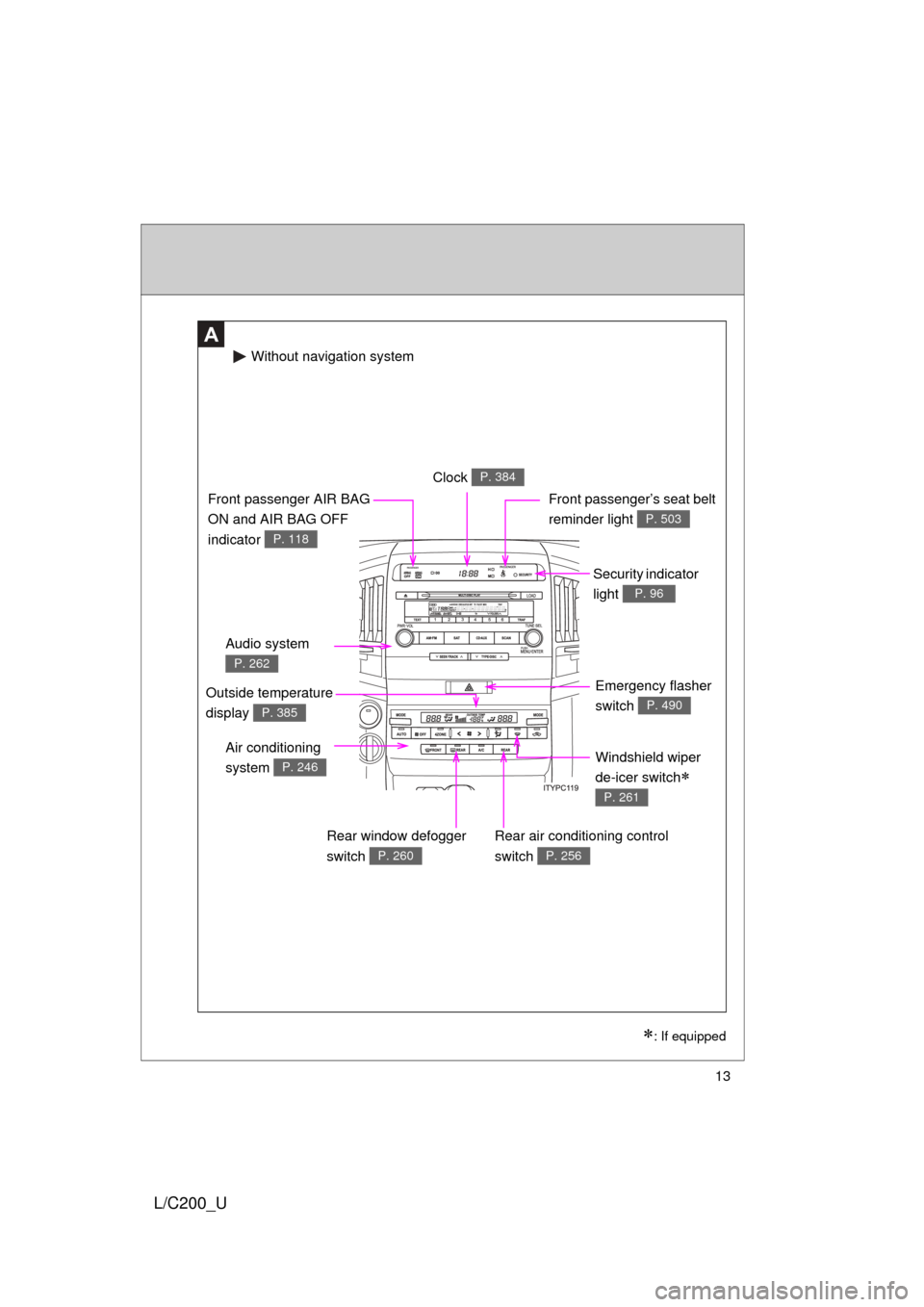
A
Windshield wiper
de-icer switch
P. 261
Clock P. 384
Security indicator
light
P. 96
Audio system
P. 262
Front passenger AIR BAG
ON and AIR BAG OFF
indicator
P. 118
Front passenger’s seat belt
reminder light
P. 503
Air conditioning
system
P. 246
Rear air conditioning control
switch
P. 256
Emergency flasher
switch
P. 490
Rear window defogger
switch
P. 260
Without navigation system
: If equipped
Outside temperature
display
P. 385
Page 14 of 592
14
L/C200_U
Pictorial indexInstrument panel
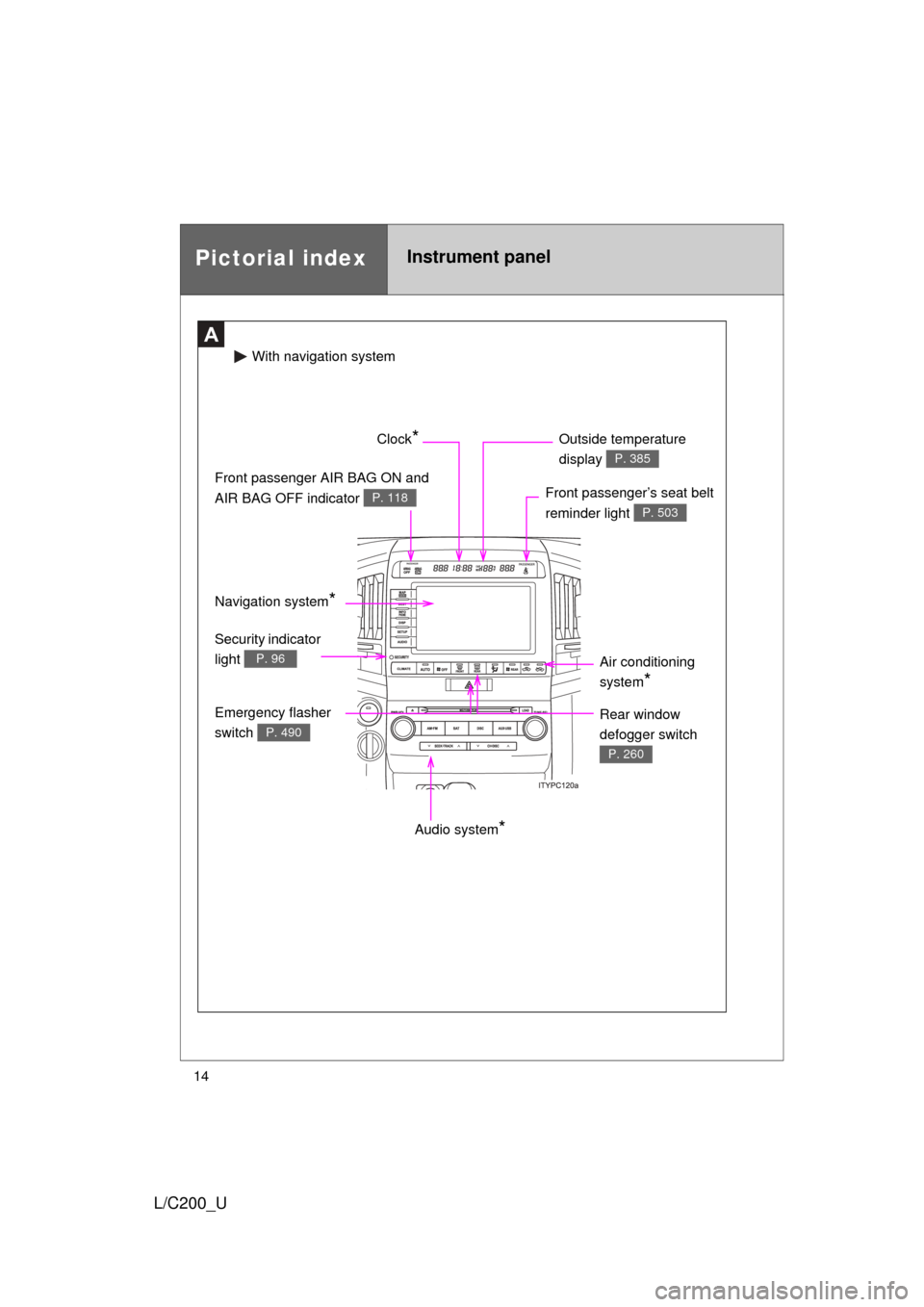
A
Audio system*
Front passenger’s seat belt
reminder light
P. 503
Front passenger AIR BAG ON and
AIR BAG OFF indicator
P. 118
Clock* Outside temperature
display
P. 385
Air conditioning
system
*
Emergency flasher
switch
P. 490
Security indicator
light
P. 96
With naviga tion system
Rear window
defogger switch
P. 260
Navigation system*
Page 198 of 592
198 2-4. Using other driving systems
L/C200_U
Shifting between “H4”and “L4”■ Shifting from “H4” to “L4”
Stop the vehicle completely.
Shift the shift lever to “N”.
Push and turn the four-wheel drive control switch fully clock-
wise.
Maintain this condition until the low speed four-wheel drive indica-
tor light turns on.
■Shifting from “L4” to “H4”
Stop the vehicle completely.
Shift the shift lever to “N”.
Turn the four-wheel drive control switch fully counterclock-
wise.
Maintain this condition until the low speed four-wheel drive indica-
tor light turns off.
STEP1
STEP2
STEP3
STEP1
STEP2
STEP3
Page 219 of 592

219
2-5. Driving information
2
When driving
L/C200_U
Adjusting the position of cross rails
Turn the knobs counterclockwise
to release the cross rails.
Slide the cross rails to the appro-
priate position for loading lug-
gage and turn the knobs
clockwise to tighten the cross
rails securely.
ITY25C040
STEP1
ITY25C041
STEP2
Page 245 of 592
Interior features3
245
L/C200_U
3-3. Using the Bluetooth® audio
system
Bluetooth
® audio
system ........................... 311
Using the Bluetooth
® audio
system ........................... 314
Operating a Bluetooth
®
enabled portable
player ............................. 320
Setting up a Bluetooth
®
enabled portable
player ............................. 323
Bluetooth
® audio system
setup .............................. 330
3-4. Using the hands-free system (for cellular phone)
Hands-free system (for cellular phone) ......... 331
Using the hands-free system ........................... 335
Making a phone call ......... 343
Setting a cellular phone ... 348
Security and system setup .............................. 354
Using the phone book ...... 360
3-5. Using the interior lights Interior lights list ............... 369
• Interior lights .................. 370
• Personal lights ............... 371 3-6. Using the storage features
List of storage features .... 372
• Glove box....................... 373
• Console box ................... 374
• Overhead console .......... 375
• Cup holders ................... 376
• Bottle holders ................. 377
• Card holders .................. 379
• Auxiliary box .................. 379
3-7. Other interior features Cool box ........................... 380
Sun visors ........................ 382
Vanity mirror..................... 383
Clock ................................ 384
Outside temperature display............................ 385
Ashtrays ........................... 386
Cigarette lighter................ 388
Power outlets ................... 389
Seat heaters..................... 391
Armrest ............................ 393
Floor mats ........................ 394
Luggage compartment features .......................... 395
Garage door opener......... 397
Safety Connect ................ 404
Page 305 of 592
305
3-2. Using the audio system
3
Interior features
L/C200_U
■
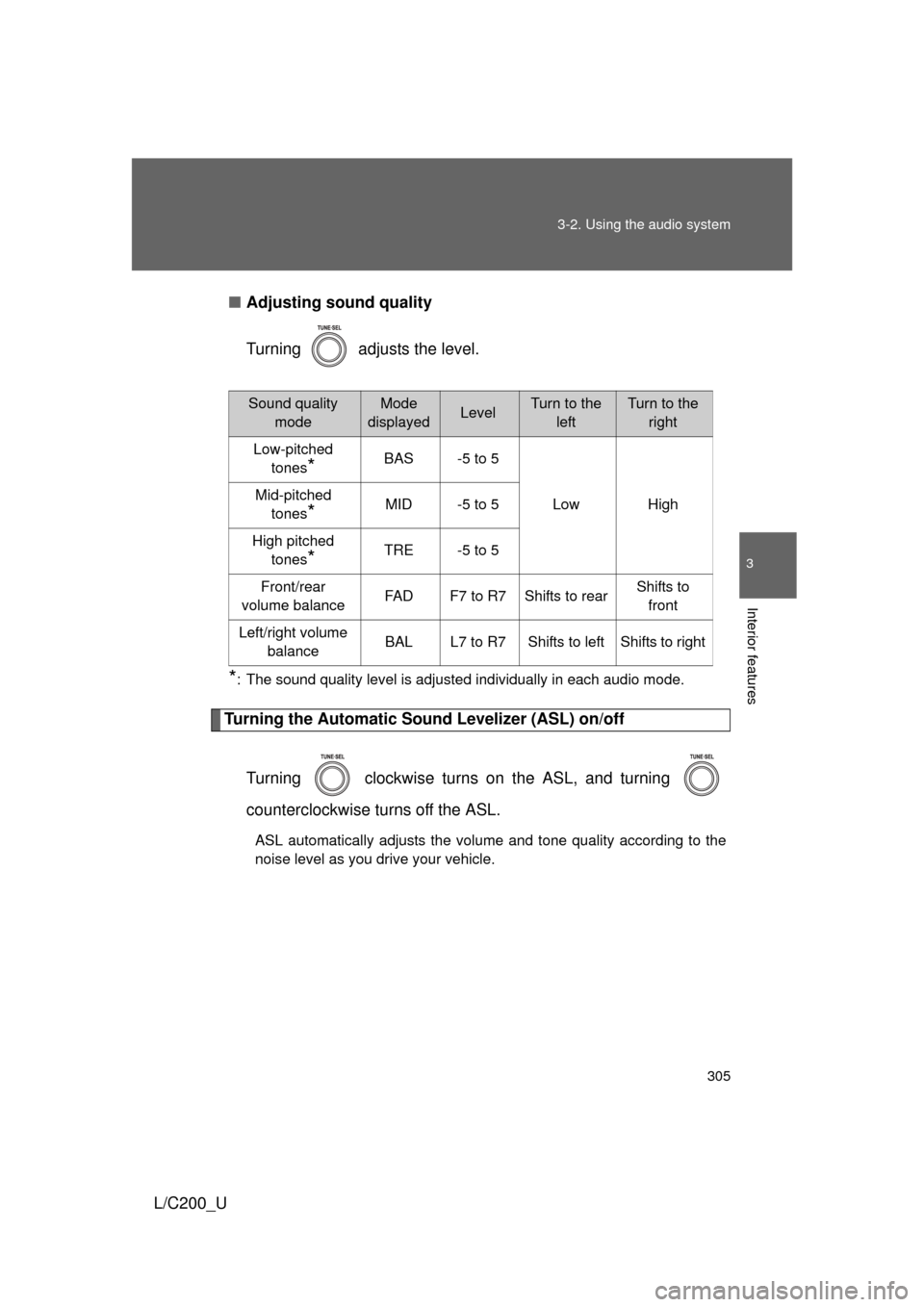
Adjusting sound quality
Turning adjusts the level.
*: The sound quality level is adjusted individually in each audio mode.
Turning the Automatic Sound Levelizer (ASL) on/off
Turning clockwise turns on the ASL, and turning
counterclockwise turns off the ASL.
ASL automatically adjusts the volume and tone quality according to the
noise level as you drive your vehicle.
Sound quality modeMode
displayedLevelTurn to the leftTurn to the right
Low-pitched tones
*BAS -5 to 5
Low High
Mid-pitched
tones
*MID -5 to 5
High pitched tones
*TRE -5 to 5
Front/rear
volume balance FAD F7 to R7 Shifts to rear Shifts to
front
Left/right volume balance BAL L7 to R7 Shifts to left Shifts to right
Page 357 of 592
357
3-4. Using the hands-free
system (for cellular phone)
3
Interior features
L/C200_U
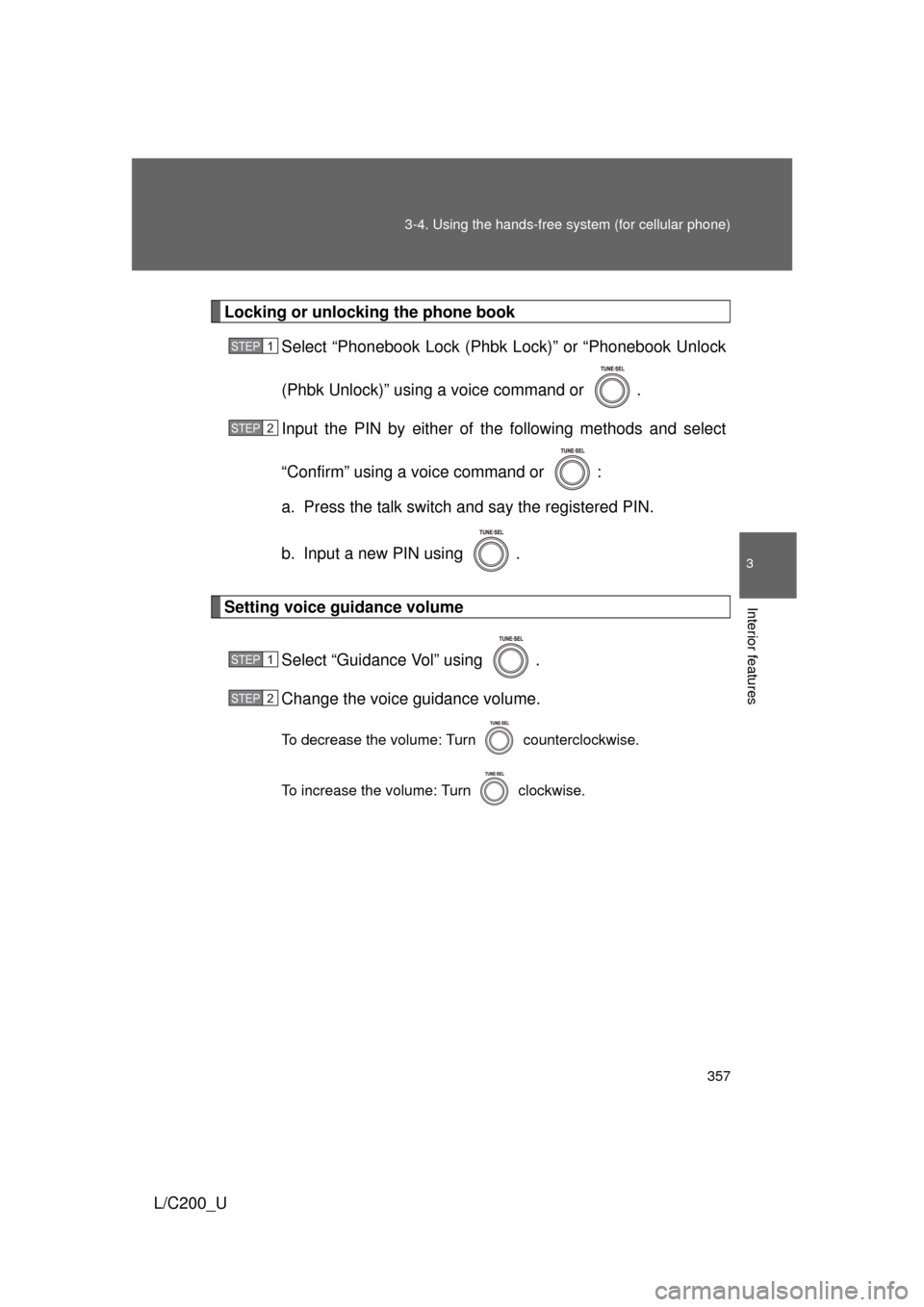
Locking or unlocking the phone book
Select “Phonebook Lock (Phbk Lock)” or “Phonebook Unlock
(Phbk Unlock)” using a voice command or .
Input the PIN by either of the following methods and select
“Confirm” using a voice command or :
a. Press the talk switch and say the registered PIN.
b. Input a new PIN using .
Setting voice guidance volume
Select “Guidance Vol” using .
Change the voice guidance volume.
To decrease the volume: Turn counterclockwise.
To increase the volume: Turn clockwise.
STEP1
STEP2
STEP1
STEP2
Page 384 of 592
384
3-7. Other interior features
L/C200_U
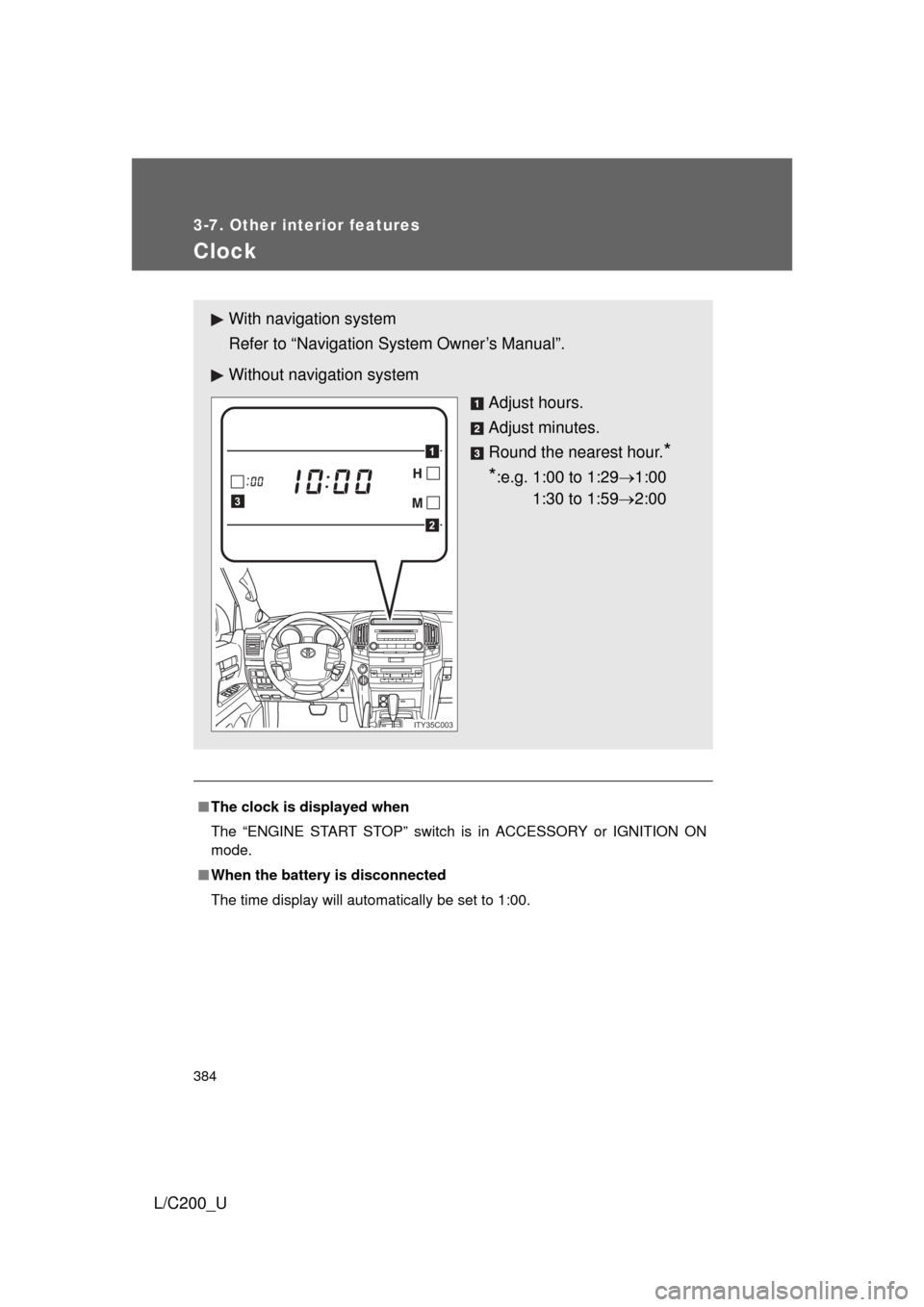
Clock
■The clock is displayed when
The “ENGINE START STOP” switch is in ACCESSORY or IGNITION ON
mode.
■ When the battery is disconnected
The time display will automatically be set to 1:00.
With navigation system
Refer to “Navigation System Owner’s Manual”.
Without navig ation system
Adjust hours.
Adjust minutes.
Round the nearest hour.
*
*
:e.g. 1:00 to 1:29 1:00
1:30 to 1:59 2:00
2
1
3
ITY35C003
Page 391 of 592
391
3-7. Other interior features
3
Interior features
L/C200_U
Seat heaters
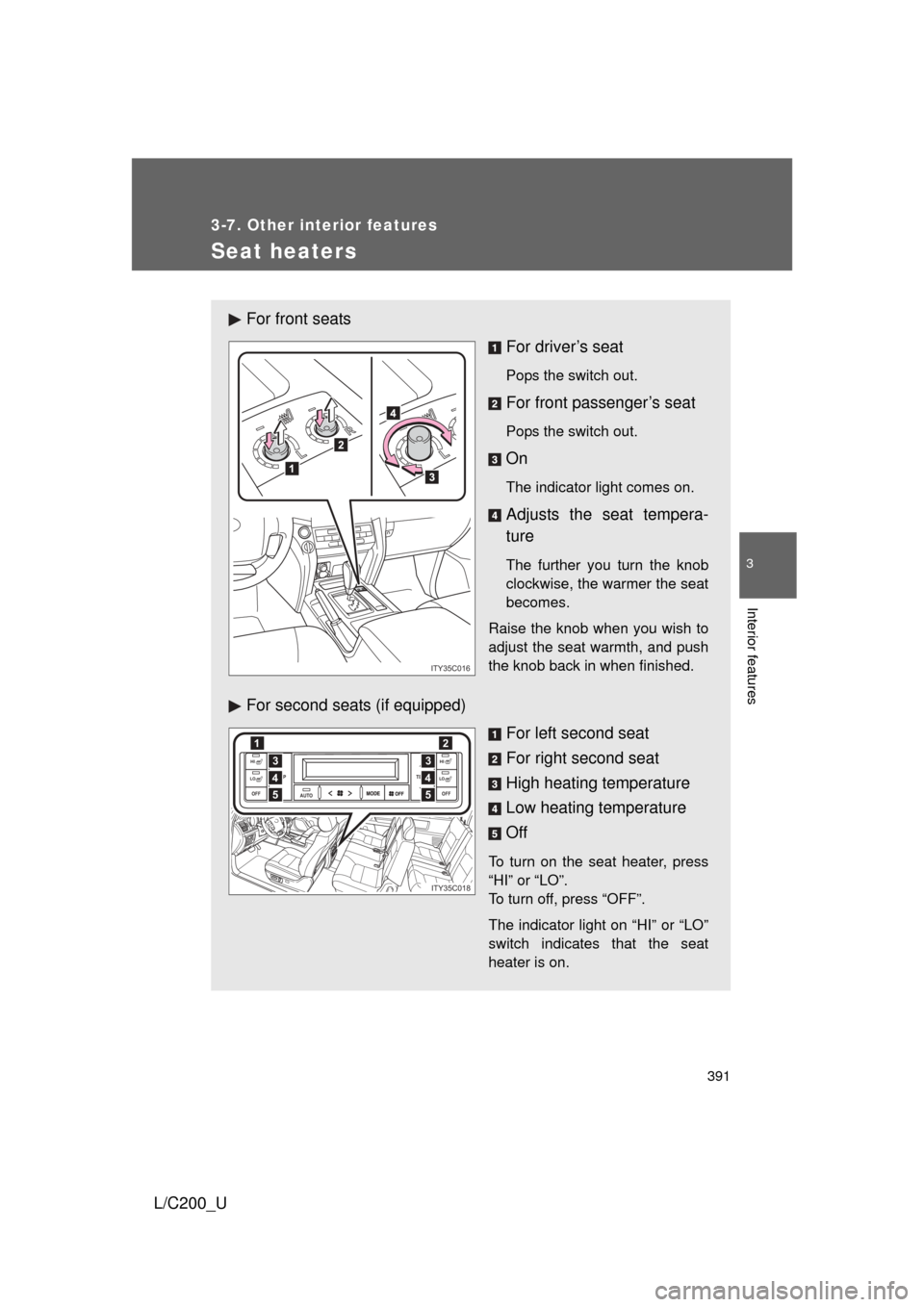
For front seatsFor driver’s seat
Pops the switch out.
For front passenger’s seat
Pops the switch out.
On
The indicator light comes on.
Adjusts the seat tempera-
ture
The further you turn the knob
clockwise, the warmer the seat
becomes.
Raise the knob when you wish to
adjust the seat warmth, and push
the knob back in when finished.
For second seats (if equipped) For left second seat
For right second seat
High heating temperature
Low heating temperature
Off
To turn on the seat heater, press
“HI” or “LO”.
To turn off, press “OFF”.
The indicator light on “HI” or “LO”
switch indicates that the seat
heater is on.
L
R
L
ITY35C016
AUTO
TEMP
OFF TEMP
HI
LOOFF
HI
LO4
12
3
5
4
3
5
ITY35C018