sensor TOYOTA LAND CRUISER 2011 J200 User Guide
[x] Cancel search | Manufacturer: TOYOTA, Model Year: 2011, Model line: LAND CRUISER, Model: TOYOTA LAND CRUISER 2011 J200Pages: 608, PDF Size: 8.29 MB
Page 183 of 608
183
2-3. Operating the lights and wipers
2
When driving
L/C200_U (OM60F74U)
■
The windshield wiper and washer can be operated when
The “ENGINE START STOP” switch is in IGNITION ON mode.
■ Effects of vehicle speed on wiper operation (vehicles equipped with
rain-sensing windshield wipers)
Vehicle speed affects the wiper operation when the washer is being used
(delay until drip prevention wiper sweep occurs) even when the wipers are
not in “AUTO” mode.
With “ ” selected, wiper operation will be switched from low speed to inter-
mittent wiper operation only when the vehicle is stationary.
(However, when the sensor sensitivity is adjusted to the highest level, the
mode cannot be switched.)
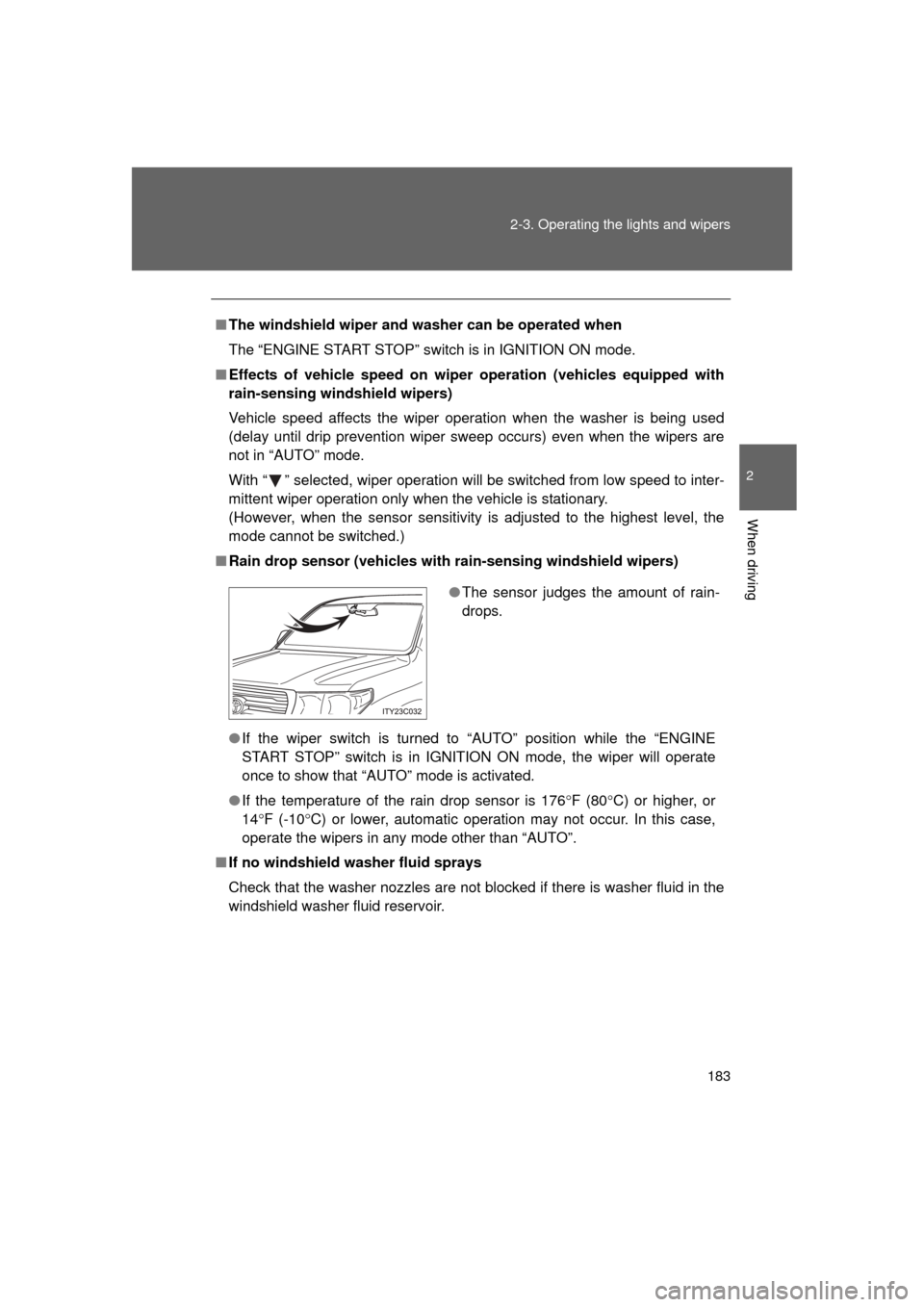
■ Rain drop sensor (vehicles with rain-sensing windshield wipers)
● If the wiper switch is turned to “AUTO” position while the “ENGINE
START STOP” switch is in IGNITION ON mode, the wiper will operate
once to show that “AUTO” mode is activated.
● If the temperature of the rain drop sensor is 176 F (80 C) or higher, or
14 F (-10 C) or lower, automatic operation may not occur. In this case,
operate the wipers in any mode other than “AUTO”.
■ If no windshield washer fluid sprays
Check that the washer nozzles are not blocked if there is washer fluid in the
windshield washer fluid reservoir.
●The sensor judges the amount of rain-
drops.
Page 184 of 608
184 2-3. Operating the lights and wipers
L/C200_U (OM60F74U)
■Windshield wiper features
The rear window and outside rear view mirror defoggers automatically turn
on when you operate the wipers.
CAUTION
■Caution regarding the use of windshield wipers in “AUTO” mode
The windshield wipers may operate unexpec tedly if the sensor is touched or
the windshield is subject to vibration in “AUTO” mode. Take care that your
fingers or anything else do not become caught in the windshield wipers.
NOTICE
■ When the windshield is dry
Do not use the wipers, as they may damage the windshield.
■ When there is no washer fluid spray from the nozzle
Damage to the washer fluid pump may be caused if the lever is pulled
toward you and held continually.
■ When a nozzle becomes blocked
Do not try to clear it with a pin or other object. The nozzle will be damaged.
Page 191 of 608
191
2-4. Using other driving systems
2
When driving
L/C200_U (OM60F74U)
Intuitive parking assist
Intuitive parking assist uses sensors in the corners and rear of the
vehicle to detect the distance between the vehicle and any obsta-
cles, and informs the driver of th is distance using the multi-informa-
tion display, the touch screen, and warning beeps.
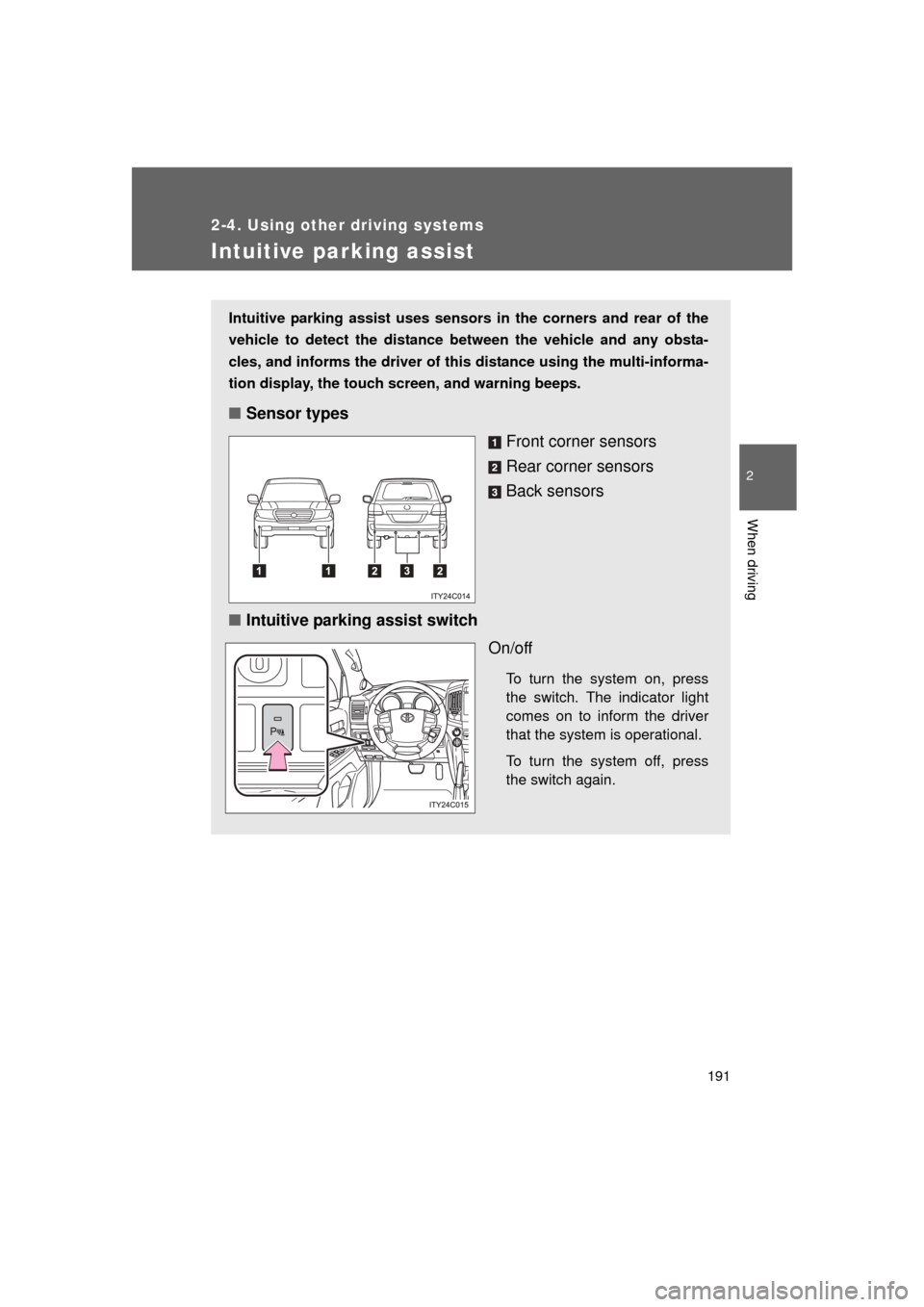
■Sensor types
Front corner sensors
Rear corner sensors
Back sensors
■ Intuitive parking assist switch
On/off
To turn the system on, press
the switch. The indicator light
comes on to inform the driver
that the system is operational.
To turn the system off, press
the switch again.
Page 192 of 608
192 2-4. Using other driving systems
L/C200_U (OM60F74U)
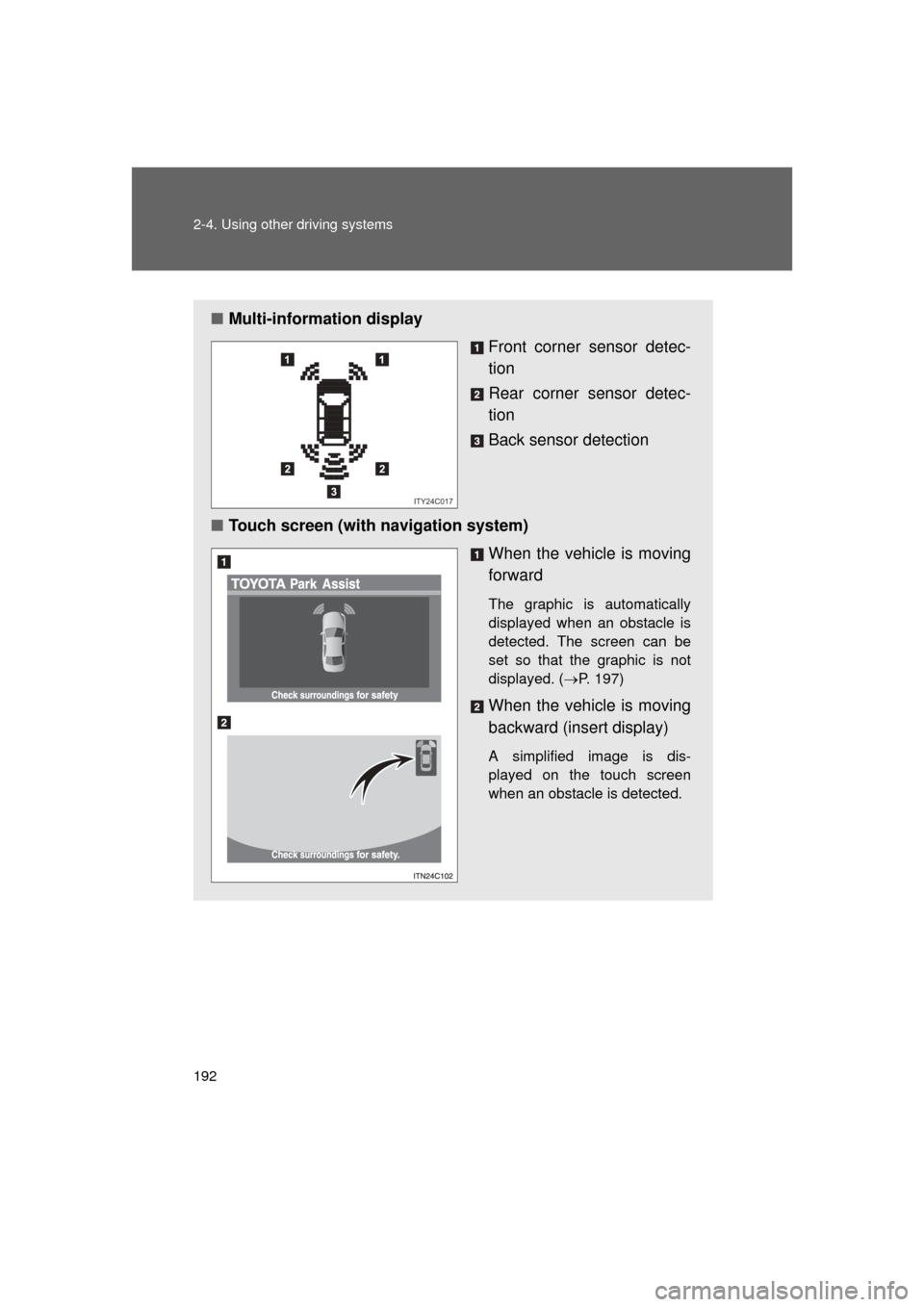
■Multi-information display
Front corner sensor detec-
tion
Rear corner sensor detec-
tion
Back sensor detection
■ Touch screen (with navigation system)
When the vehicle is moving
forward
The graphic is automatically
displayed when an obstacle is
detected. The screen can be
set so that the graphic is not
displayed. (P. 197)
When the vehicle is moving
backward (insert display)
A simplified image is dis-
played on the touch screen
when an obstacle is detected.
ITY24C017
Page 193 of 608
193
2-4. Using other
driving systems
2
When driving
L/C200_U (OM60F74U)
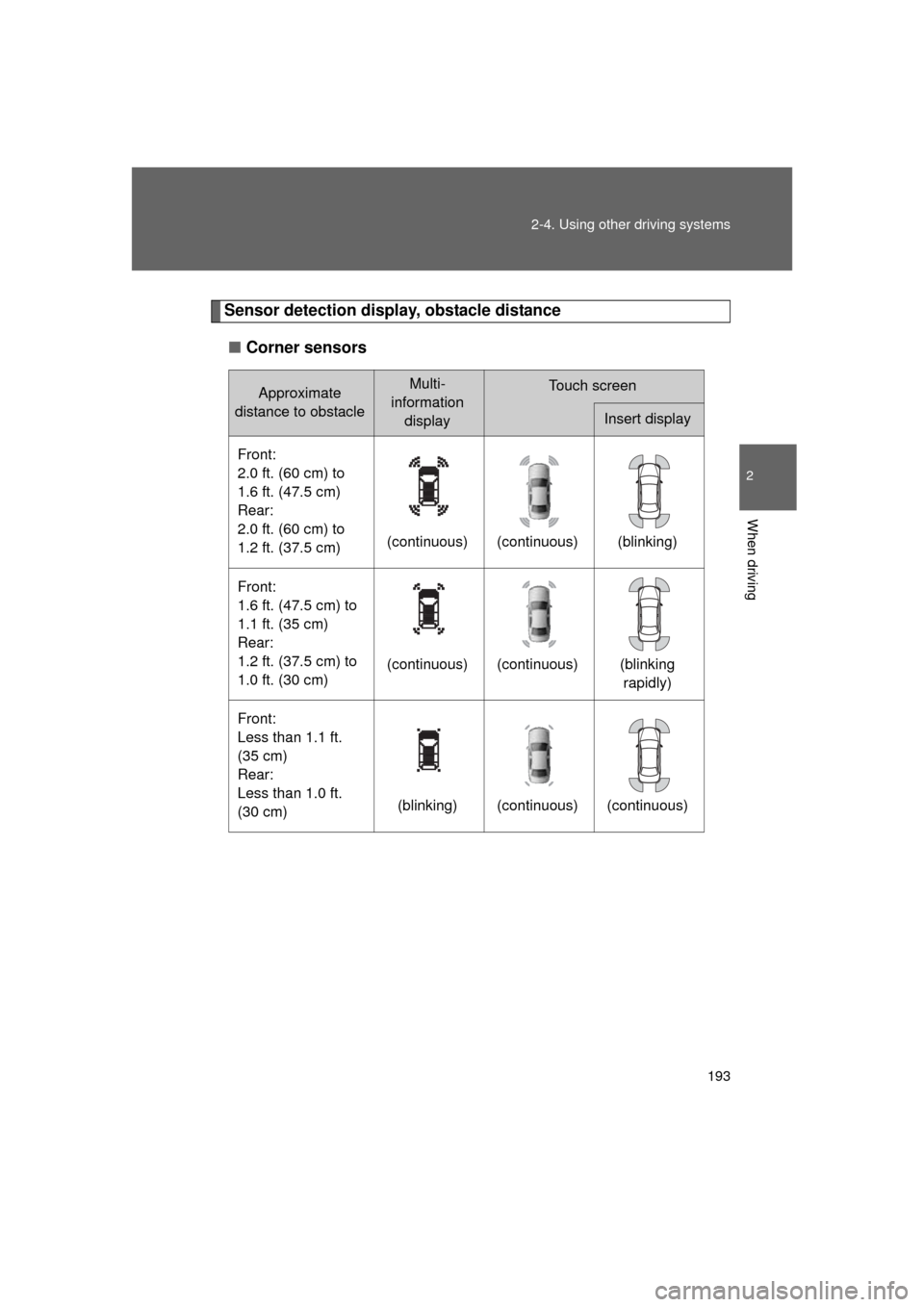
Sensor detection display, obstacle distance
■ Corner sensors
Approximate
distance to obstacleMulti-
information displayTouch screen
Insert display
Front:
2.0 ft. (60 cm) to
1.6 ft. (47.5 cm)
Rear:
2.0 ft. (60 cm) to
1.2 ft. (37.5 cm) (continuous) (continuous) (blinking)
Front:
1.6 ft. (47.5 cm) to
1.1 ft. (35 cm)
Rear:
1.2 ft. (37.5 cm) to
1.0 ft. (30 cm) (continuous) (continuous) (blinking
rapidly)
Front:
Less than 1.1 ft.
(35 cm)
Rear:
Less than 1.0 ft.
(30 cm) (blinking) (continuous) (continuous)
Page 194 of 608
194 2-4. Using other driving systems
L/C200_U (OM60F74U)■
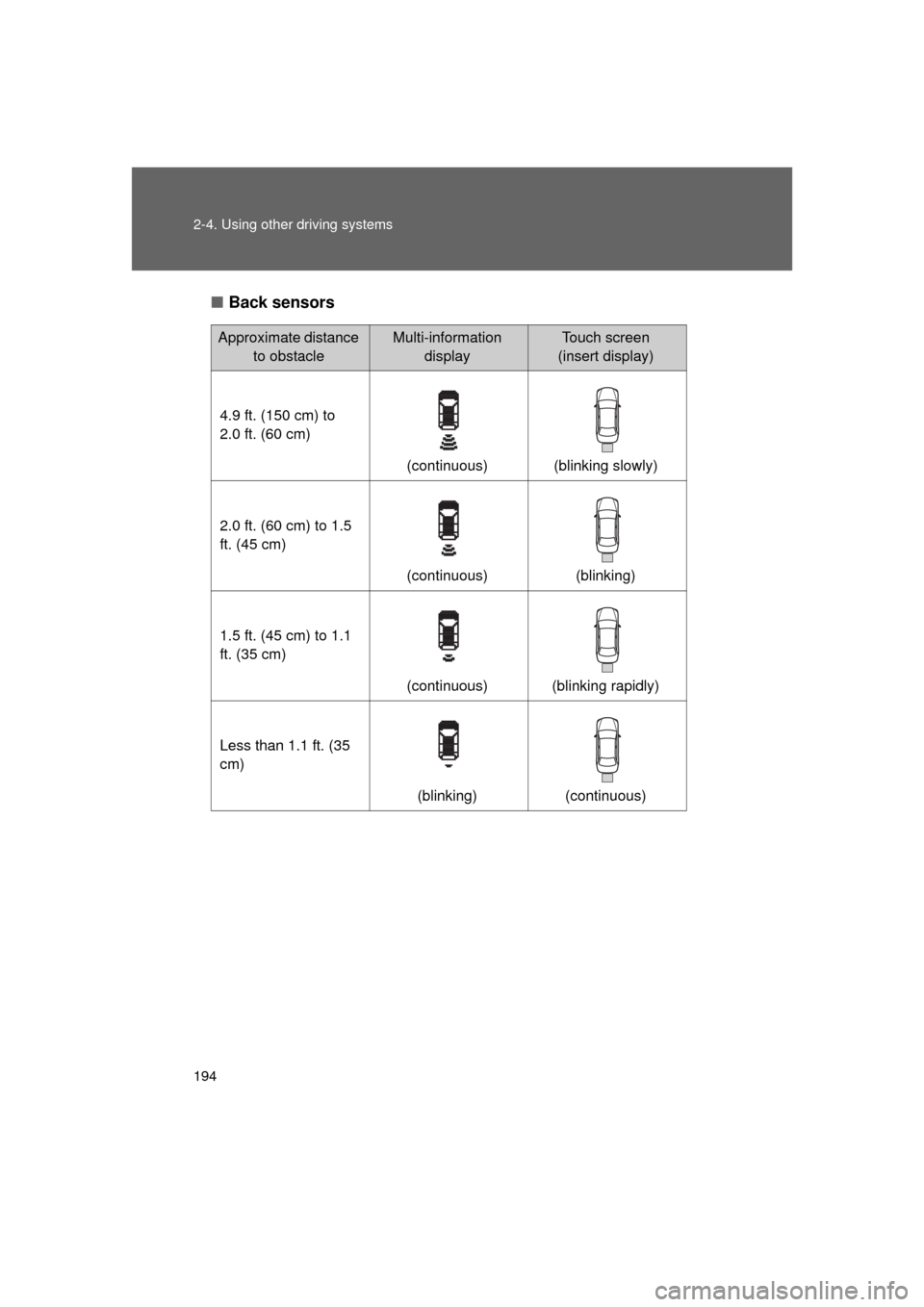
Back sensors
Approximate distance
to obstacleMulti-information displayTouch screen
(insert display)
4.9 ft. (150 cm) to
2.0 ft. (60 cm) (continuous) (blinking slowly)
2.0 ft. (60 cm) to 1.5
ft. (45 cm) (continuous) (blinking)
1.5 ft. (45 cm) to 1.1
ft. (35 cm) (continuous) (blinking rapidly)
Less than 1.1 ft. (35
cm) (blinking) (continuous)
Page 195 of 608
195
2-4. Using other
driving systems
2
When driving
L/C200_U (OM60F74U)
Beeps and obstacle distance
A beep sounds when the corner sensors and back sensors are oper-
ating.
● The beep sounds faster as the vehicle approaches an obstacle.
When the vehicle comes within the following distance of the obsta-
cle, the beep sounds continuously.
• Front corner and back sensors: Approximately 1.1 ft. (35 cm)
• Rear corner sensors: Approximately 1.0 ft. (30 cm)
● When two or more obstacles are detected simultaneously, the
beep system responds to the nearest obstacle. If one or both come
within the above distances, the bee p will repeat a long tone, fol-
lowed by fast beeps.
● You can change the volume of the warning beeps. ( P. 197)
Page 196 of 608
196 2-4. Using other driving systems
L/C200_U (OM60F74U)
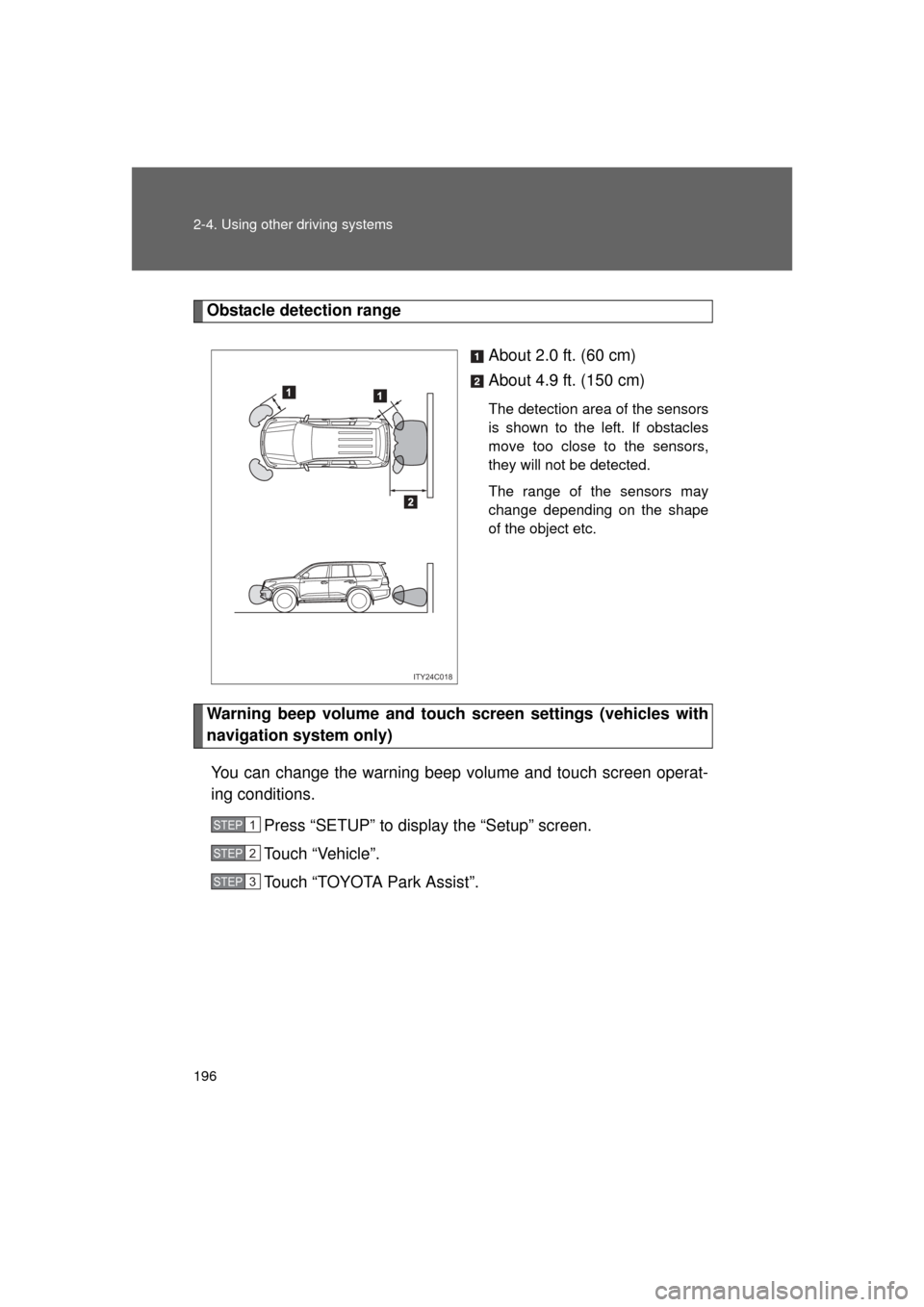
Obstacle detection rangeAbout 2.0 ft. (60 cm)
About 4.9 ft. (150 cm)
The detection area of the sensors
is shown to the left. If obstacles
move too close to the sensors,
they will not be detected.
The range of the sensors may
change depending on the shape
of the object etc.
Warning beep volume and touch screen settings (vehicles with
navigation system only)
You can change the warning beep volume and touch screen operat-
ing conditions. Press “SETUP” to display the “Setup” screen.
Touch “Vehicle”.
Touch “TOYOTA Park Assist”.
ITY24C018
STEP1
STEP2
STEP3
Page 197 of 608
197
2-4. Using other
driving systems
2
When driving
L/C200_U (OM60F74U)■
Changing the warning beep volume
Touch “1” to “5” of “Alert Volume”.
Adjust the beep volume, then touch “Save”.
■ Display off setting
Touch “On” or “Off” of “Display”.
When an obstacle is detected while the rear view monitor is in use, the
warning indicator will appear in the top right of the screen even “Of\
f” has
been selected.
■Changing display and alert settings
Touch “Distance”.
Touch “Rear” to change the distance for the back sensors dis-
play and tone indication, then touch “Save”.
■The intuitive parking assist can be operated when
● Front corner sensors:
• The “ENGINE START STOP” switch is in IGNITION ON mode.
• The shift lever is in a position other than “P”.
• The vehicle speed is less than about 6 mph (10 km/h).
● Rear corner and back sensors:
• The “ENGINE START STOP” switch is in IGNITION ON mode.
• The shift lever is in “R”.
STEP1
STEP2
STEP1
STEP2
Page 198 of 608
198 2-4. Using other driving systems
L/C200_U (OM60F74U)
■Sensor detection information
● Certain vehicle conditions and the surrounding environment may affect
the ability of the sensor to correctly detect obstacles. Particular instances
where this may occur are listed below.
• There is dirt, snow or ice on the sensor. (Wiping the sensor will resolve
this problem.)
• The sensor is frozen. (Thawing the sensor will resolve this problem.)
• The sensor is covered in any way.
• In harsh sunlight or intense cold weather.
• When driving on bumpy, sloped or gravel roads, or over grass.
• If there is something producing ultrasonic waves nearby, such as another vehicle’s horn, motorcycle engine noise, air braking sound
from heavy-duty vehicles, or another vehicle using the park assist sys-
tem.
• In heavy rain, or if water is splashed on the sensors.
• The vehicle is leaning considerably to one side.
• If a commercial fender pole or radio antenna is installed.
• If moving towards a high curb or a curb corner.
• If towing eyelet is installed on your vehicle.
• The bumper or sensor receives a strong impact.
• A non-genuine Toyota suspension (lowered suspension etc.) is installed.
In addition to the examples above, there are instances in which, because of
their shapes, signs and other objects may be judged by the sensor to be
closer than they are.
● The shape of the obstacle may prevent the sensor from detecting it. Pay
particular attention to the following obstacles.
• Thin objects such as wire, fencing or rope.
• Objects that absorb sound waves, such as cotton or snow.
• Objects with sharp corners.
• Low objects.
• Objects where the upper section projects out over the lower section.