engine TOYOTA LAND CRUISER 2011 J200 Repair Manual
[x] Cancel search | Manufacturer: TOYOTA, Model Year: 2011, Model line: LAND CRUISER, Model: TOYOTA LAND CRUISER 2011 J200Pages: 608, PDF Size: 8.29 MB
Page 186 of 608
186
2-3. Operating the lights and wipers
L/C200_U (OM60F74U)
Headlight cleaner switch
: If equipped
■The headlight cleaner can be operated when
The “ENGINE START STOP” switch is in IGNITION ON mode and the head-
light switch is turned on.
NOTICE
■When the washer fluid tank is empty
Do not use this function when the washer fluid tank is empty. This may
cause the washer fluid pump to overheat.
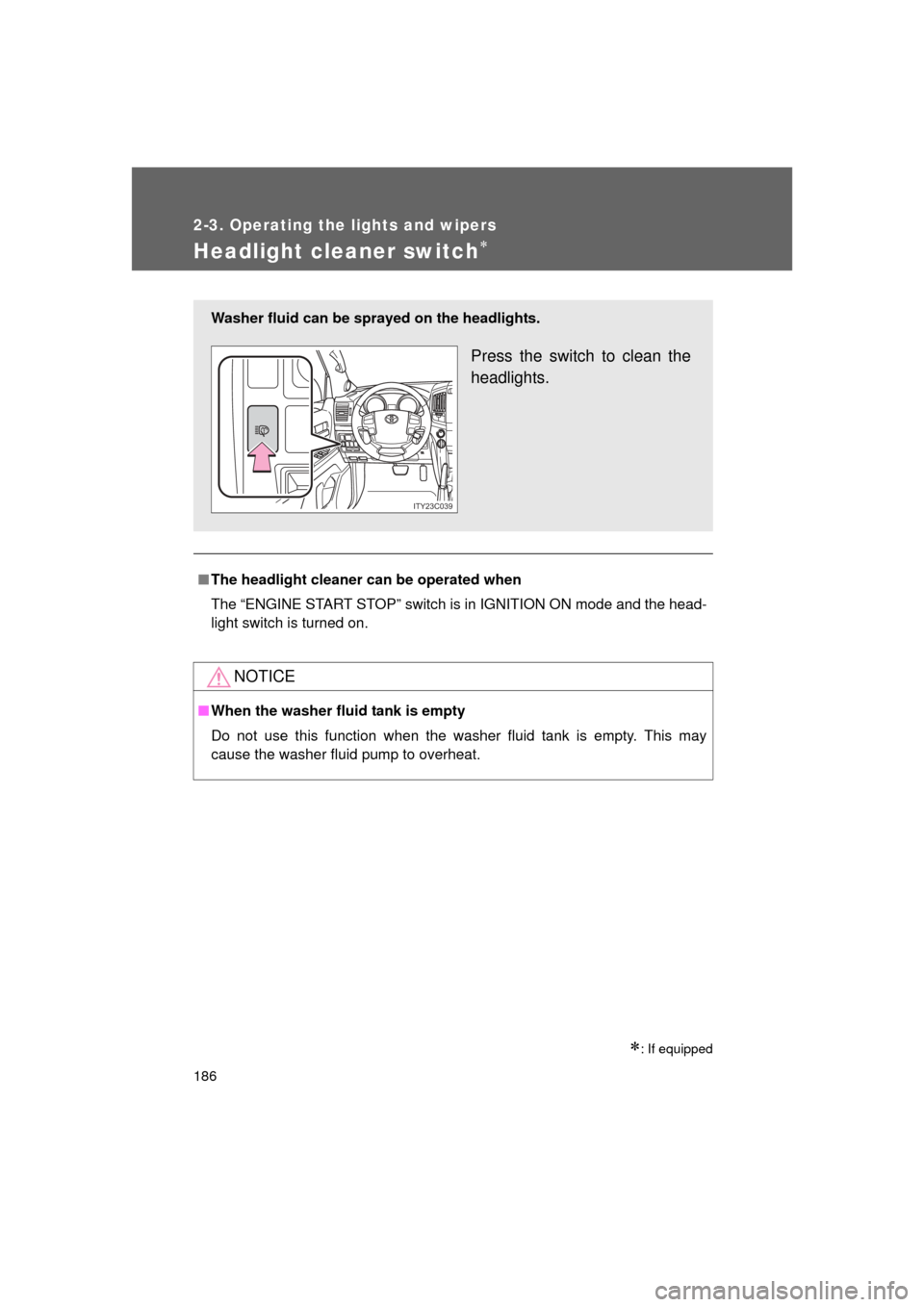
Washer fluid can be sprayed on the headlights.
Press the switch to clean the
headlights.
ITY23C039
Page 197 of 608
197
2-4. Using other
driving systems
2
When driving
L/C200_U (OM60F74U)■
Changing the warning beep volume
Touch “1” to “5” of “Alert Volume”.
Adjust the beep volume, then touch “Save”.
■ Display off setting
Touch “On” or “Off” of “Display”.
When an obstacle is detected while the rear view monitor is in use, the
warning indicator will appear in the top right of the screen even “Of\
f” has
been selected.
■Changing display and alert settings
Touch “Distance”.
Touch “Rear” to change the distance for the back sensors dis-
play and tone indication, then touch “Save”.
■The intuitive parking assist can be operated when
● Front corner sensors:
• The “ENGINE START STOP” switch is in IGNITION ON mode.
• The shift lever is in a position other than “P”.
• The vehicle speed is less than about 6 mph (10 km/h).
● Rear corner and back sensors:
• The “ENGINE START STOP” switch is in IGNITION ON mode.
• The shift lever is in “R”.
STEP1
STEP2
STEP1
STEP2
Page 198 of 608

198 2-4. Using other driving systems
L/C200_U (OM60F74U)
■Sensor detection information
● Certain vehicle conditions and the surrounding environment may affect
the ability of the sensor to correctly detect obstacles. Particular instances
where this may occur are listed below.
• There is dirt, snow or ice on the sensor. (Wiping the sensor will resolve
this problem.)
• The sensor is frozen. (Thawing the sensor will resolve this problem.)
• The sensor is covered in any way.
• In harsh sunlight or intense cold weather.
• When driving on bumpy, sloped or gravel roads, or over grass.
• If there is something producing ultrasonic waves nearby, such as another vehicle’s horn, motorcycle engine noise, air braking sound
from heavy-duty vehicles, or another vehicle using the park assist sys-
tem.
• In heavy rain, or if water is splashed on the sensors.
• The vehicle is leaning considerably to one side.
• If a commercial fender pole or radio antenna is installed.
• If moving towards a high curb or a curb corner.
• If towing eyelet is installed on your vehicle.
• The bumper or sensor receives a strong impact.
• A non-genuine Toyota suspension (lowered suspension etc.) is installed.
In addition to the examples above, there are instances in which, because of
their shapes, signs and other objects may be judged by the sensor to be
closer than they are.
● The shape of the obstacle may prevent the sensor from detecting it. Pay
particular attention to the following obstacles.
• Thin objects such as wire, fencing or rope.
• Objects that absorb sound waves, such as cotton or snow.
• Objects with sharp corners.
• Low objects.
• Objects where the upper section projects out over the lower section.
Page 202 of 608

202 2-4. Using other driving systems
L/C200_U (OM60F74U)
■The four-wheel drive control switch can be operated when
● The “ENGINE START STOP” switch is in IGNITION ON mode.
● The shift lever is in the “N” position.
● The vehicle is stopped completely.
■ The low speed four-wheel drive indicator light
The indicator light blinks while shifting between “H4” and “L4”.
■ Advice for driving on slippery roads
● If you shift the four-wheel drive control switch to “L4” and the shift lever to
the “2” range of “S” while driving in steep off-road areas, the output of the
brake can be controlled effectively by the Active TRAC, which assists the
driver to control the driving power of 4 wheels.
● Use the “1” range of “S” of the shift lever for maximum power and traction
when your wheels get stuck or when driving down a steep incline.
■ The center differential lock indicator light
The indicator light blinks while locking/unlocking the center differential.
■ The center differential lock/unlo ck button can be operated when
● The “ENGINE START STOP” switch is in IGNITION ON mode.
● The vehicle speed is less than 60 mph (100 km/h).
■ Locking/unlocking the center differential
● When the center differential is locked, VSC is automatically turned off.
(The center differential lock and “VSC OFF” indicator lights come on.)
● If the operation is not completed, the center differential lock indicator
blinks. If the indicator light does not turn off when unlocking the center
differential, drive straight ahead while accelerating or decelerating, or
drive in reverse.
● If the center differential lock/unlock is not completed within 5 seconds
while the cruise control system is on, cancel the cruise control system.
Page 203 of 608
203
2-4. Using other
driving systems
2
When driving
L/C200_U (OM60F74U)
■If the low speed four-wheel drive in dicator light or the center differen-
tial lock indicator light blinks
● If the low speed four-wheel drive indicator light continues to blink when
using the four-wheel drive control switch, stop the vehicle completely,
move the shift lever to “N” and operate the switch again.
● If the shift lever is moved before the low speed four-wheel drive indicator
turns on/off, the transfer mode may not be shifted completely. The trans-
fer mode disengages both the front and rear driveshafts from the power-
train and allows the vehicle to move regardless of the shift position. (At
this time, the indicator blinks and the buzzer sounds.)
Therefore, the vehicle is free to roll even if the automatic transmission is in
“P”. You or someone else could be seriously injured. You must complete
the shifting of the transfer mode.
To complete the shifting, stop the vehicle completely, return the shift lever
to “N”, and confirm that the shift was completed (the indicator turns on/off).
● If the engine coolant temperature is too low, the four-wheel drive control
system may not be able to shift. When the engine is warmer press the
switch again.
If the low speed four-wheel drive indicator light or the center differential lock
indicator light continues to blink even after attempting the above, there may
be a malfunction in the engine, the brake system or the four-wheel drive sys-
tem. In this case, you may not be able to shift between “H4” and “L4”, and
the center differential lock may not be operable. Have the vehicle inspected
by your Toyota dealer immediately.
Page 206 of 608

206 2-4. Using other driving systems
L/C200_U (OM60F74U)
When the system is turned offIf the system is turned off when Crawl Control is operating, the slip
indicator turns off, and the Crawl Control indicator flashes until the
system has turned off completely. When turning off Crawl Control
while traveling, stop the vehicle before the Crawl Control indicator
turns off, or drive extremely carefully.
■ The Crawl Control can be operated when
● The engine is running.
● The shift lever is in any gear other than “P” or “N”.
● The four-wheel drive control switch is in “L4”.
● The driver’s door is closed.
■ Automatic system cancelation
In either of the following situations, a buzzer sounds for approximately 3 sec-
onds. The Crawl Control indicator goes off after the system has automati-
cally turned off:
● When the shift lever is moved to “P”.
● When the four-wheel drive control switch is in “H4”.
In either of the following situations, a buzzer sounds for approximately 3 sec-
onds, the Crawl Control indicator blinks, and the control will decrease gradu-
ally. The Crawl Control indicator goes off after the system has automatically
turned off:
● When the shift lever is moved to “N”.
● If the driver’s door is opened.
Page 207 of 608
207
2-4. Using other
driving systems
2
When driving
L/C200_U (OM60F74U)
■Function limitations
● In the following situations, brake control can be used to drive downhill at
a constant speed. However, engine control is not available when driving
uphill at a constant speed.
• When switched to second start mode
• When the vehicle speed exceeds approximately 6 mph (10 km/h).
● In the following situation, engine control and brake control will be tempo-
rarily canceled.
• When the vehicle speed exceeds approximately 15 mph (25 km/h).
■ If the brake system overheats
The system will cease operation and a buzzer will sound to alert the driver.
Stop the vehicle in a safe place. (Ther e is no problem with continuing normal
driving.)
■ If the automatic transmission system overheats
The system will cease operation, a buzzer will sound and a warning mes-
sage will be displayed, or the automat ic transmission fluid temperature warn-
ing light will come on to alert the driver. Stop the vehicle in a safe place until
the warning message or the warning light turns off.
■ Sounds and vibrations caused by the Crawl Control system
● A sound may be heard from the engine compartment when the engine is
started or just after the vehicle begins to move. This sound does not indi-
cate that a malfunction has occurred in Crawl Control system.
● Either of the following conditions may occur when the Crawl Control sys-
tem is operating. None of these are indicators that a malfunction has
occurred.
• Vibrations may be felt through the vehicle body and steering.
• A motor sound may be heard after the vehicle comes to a stop.
Page 211 of 608
211
2-4. Using other
driving systems
2
When driving
L/C200_U (OM60F74U)
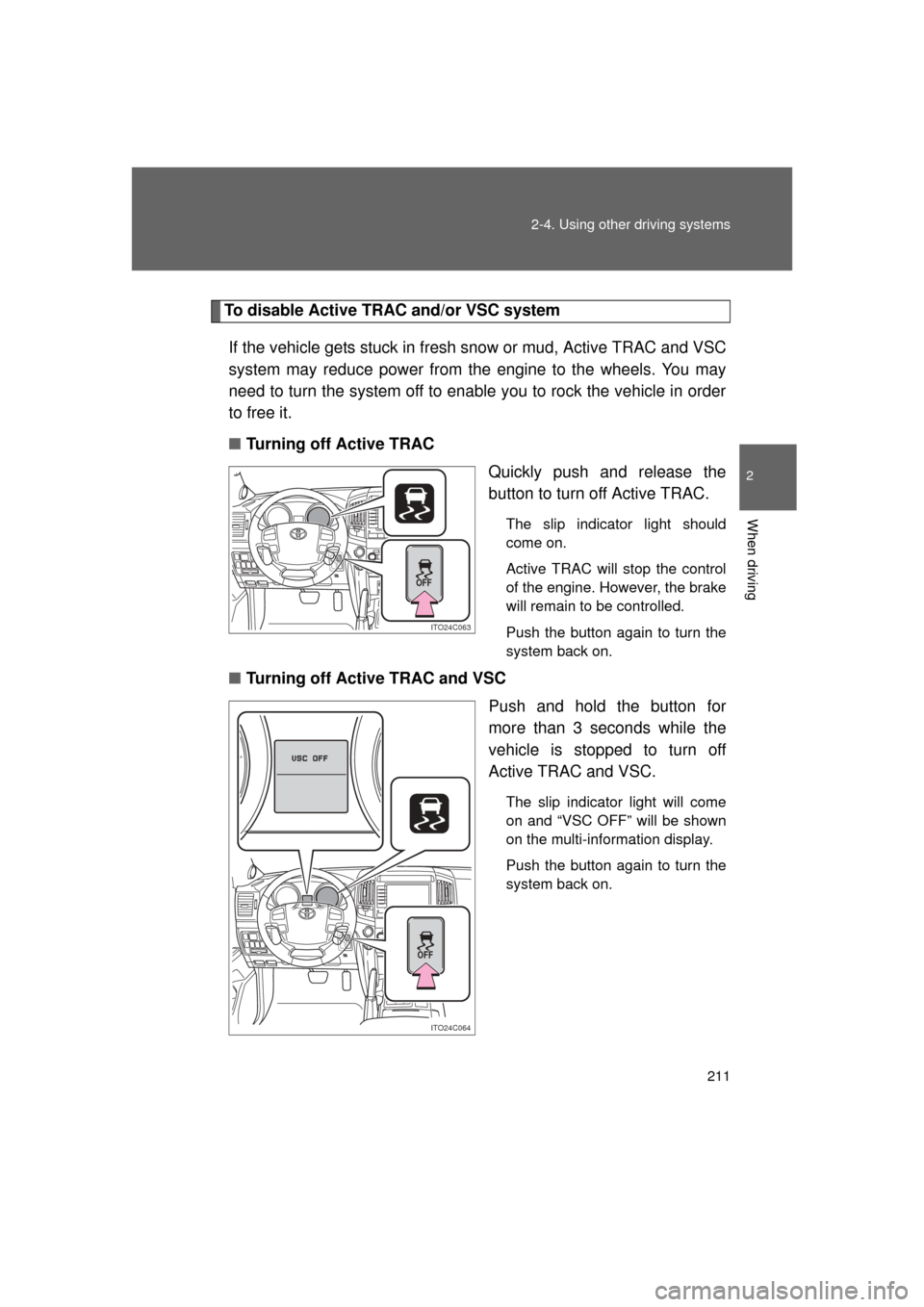
To disable Active TRAC and/or VSC system
If the vehicle gets stuck in fresh snow or mud, Active TRAC and VSC
system may reduce power from the engine to the wheels. You may
need to turn the system off to enable you to rock the vehicle in order
to free it.
■ Turning off Active TRAC
Quickly push and release the
button to turn off Active TRAC.
The slip indicator light should
come on.
Active TRAC will stop the control
of the engine. However, the brake
will remain to be controlled.
Push the button again to turn the
system back on.
■Turning off Active TRAC and VSC
Push and hold the button for
more than 3 seconds while the
vehicle is stopped to turn off
Active TRAC and VSC.
The slip indicator light will come
on and “VSC OFF” will be shown
on the multi-information display.
Push the button again to turn the
system back on.
ITO24C063
OFF
ITO24C064
OFF
Page 212 of 608

212 2-4. Using other driving systems
L/C200_U (OM60F74U)
■Active TRAC can be turned off when
The four-wheel drive control switch is in “H4” and the center differential is
unlocked.
■ Automatic reactivation of Active TRAC and VSC
Turning the “ENGINE START STOP” switch off after turning off the Active
TRAC and VSC systems will automatically re-enable them.
■ Automatic Active TRAC reactivation
If only the Active TRAC system is turned off, the Active TRAC system will
turn on when vehicle speed increases.
■ Automatic Active TRAC and VSC reactivation
If the Active TRAC and VSC systems are turned off, the systems will not turn
on even when vehicle speed.
■ If the brake system overheats
The Active TRAC and hill-start assist control will cease operation and a
buzzer will sound to alert the driver. Stop the vehicle in a safe place. (There
is no problem with continuing normal driving.)
■ Sounds and vibrations caused by the Multi Terrain ABS, brake assist,
Active TRAC, VSC and hill-start assist control
● A sound may be heard from the engine compartment when the engine is
started or just after the vehicle begins to move. This sound does not indi-
cate that a malfunction has occurred in any of these systems.
● Any of the following conditions may occur when the above systems are
operating. None of these indicates that a malfunction has occurred.
• Vibrations may be felt through the vehicle body and steering.
• A motor sound may be heard after the vehicle comes to a stop.
• The brake pedal may pulsate slightly after the Multi Terrain ABS is acti-
vated.
• The brake pedal may move down slightly after the Multi Terrain ABS is activated.
■ Hill-start assist control is operational when
● The shift lever is in “D” or “S”.
● The brake pedal is not depressed.
Page 220 of 608

220 2-5. Driving information
L/C200_U (OM60F74U)
NOTICE
■To prevent the water damage
Take all necessary safety measures to ensure that water damage to the
engine or other components does not occur.
● Water entering the engine air intake will cause severe engine damage.
● Water entering the automatic transmission will cause deterioration in shift
quality, locking up of your transmission accompanied by vibration, and ulti-
mately damage.
● Water can wash the grease from wheel bearings, causing rusting and pre-
mature failure, and may also enter the differentials, transmission and
transfer case, reducing the gear oil’s lubricating qualities.
■ When you drive through water
If driving through water, such as when crossing shallow streams, first check
the depth of the water and the bottom of the river bed for firmness. Drive
slowly and avoid deep water.
■ Inspection after off-road driving
● Sand and mud that has accumulate d in brake drums and around brake
discs may affect braking efficiency and may damage brake system compo-
nents.
● Always perform a maintenance inspection after each day of off-road driv-
ing that has taken you through rough terrain, sand, mud, or water. For
scheduled maintenance information, refer to the “Scheduled Maintenance
Guide” or “Owner’s Manual Supplement”.