change TOYOTA LAND CRUISER 2011 J200 Owners Manual
[x] Cancel search | Manufacturer: TOYOTA, Model Year: 2011, Model line: LAND CRUISER, Model: TOYOTA LAND CRUISER 2011 J200Pages: 608, PDF Size: 8.29 MB
Page 18 of 608

18
L/C200_U (OM60F74U)
For your information
Main Owner’s Manual
Please note that this manual applies to all models and explains all equip-
ment, including options. Therefore, you may find some explanations for
equipment not installed on your vehicle.
All specifications provided in this manual are current at the time of printing.
However, because of the Toyota policy of continual product improvement, we
reserve the right to make changes at any time without notice.
Depending on specifications, the vehicle shown in the illustration may differ
from your vehicle in terms of equipment.
Noise from under vehicle after turning off the engine
Approximately five hours after the engine is turned off, you may hear sound
coming from under the vehicle for several minutes. This is the sound of a fuel
evaporation leakage check and, it does not indicate a malfunction.
Accessories, spare parts and modification of your Toyota
A wide variety of non-genuine spare parts and accessories for Toyota vehi-
cles are currently available in the market. You should know that Toyota does
not warrant these products and is not responsible for their performance,
repair, or replacement, or for any damage they may cause to, or adverse
effect they may have on, your Toyota vehicle.
This vehicle should not be modified with non-genuine Toyota products. Mod-
ification with non-genuine Toyota products could affect its performance,
safety or durability, and may even violate governmental regulations. In addi-
tion, damage or performance problems resulting from the modification may
not be covered under warranty.
Page 31 of 608
31
1-2. Opening, closing and locking the doors
1
Before driving
L/C200_U (OM60F74U)
■
Switching the door unlock function
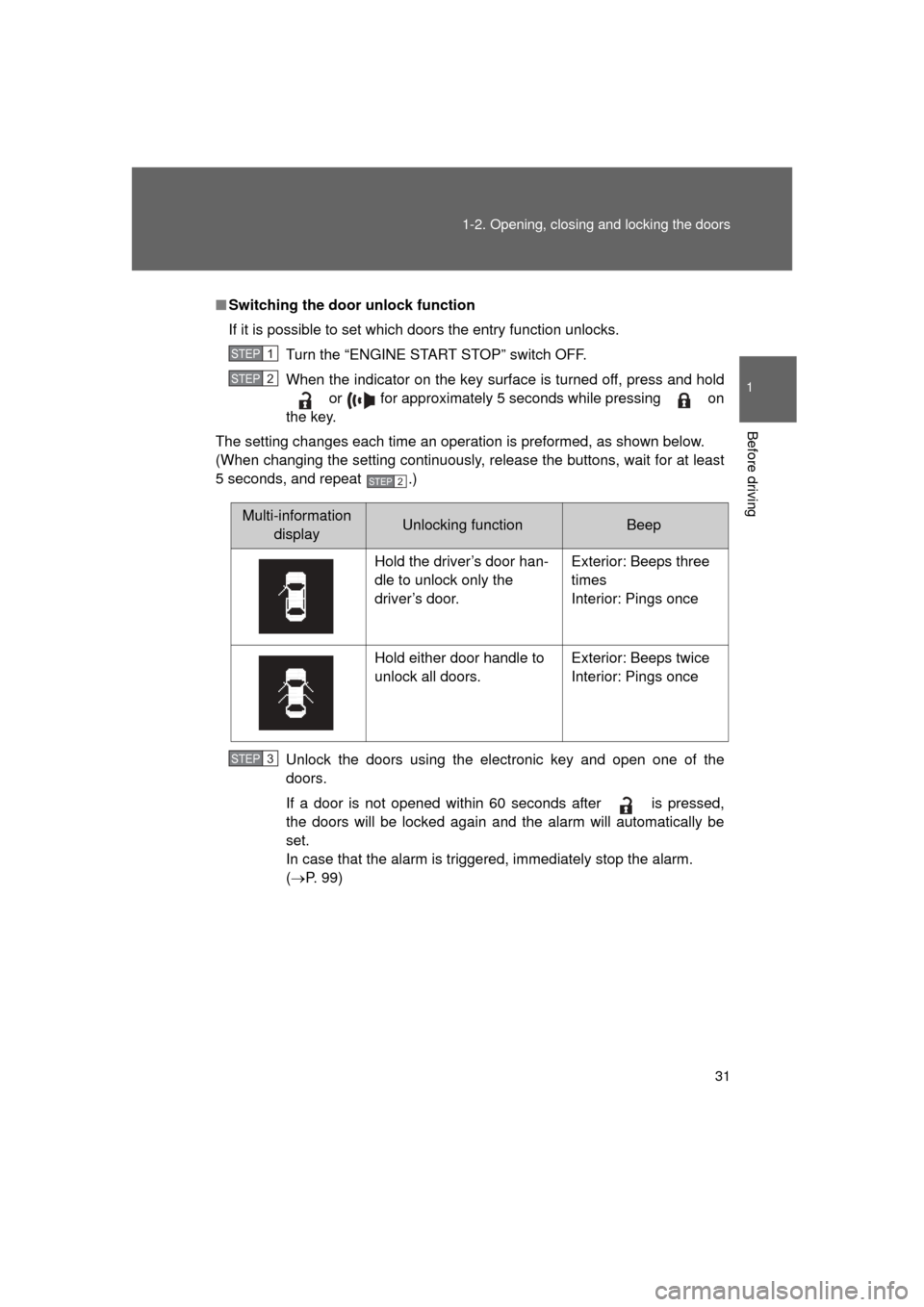
If it is possible to set which doors the entry function unlocks.
Turn the “ENGINE START STOP” switch OFF.
When the indicator on the key surface is turned off, press and hold or for approximately 5 seconds while pressing on
the key.
The setting changes each time an operation is preformed, as shown below.
(When changing the setting continuously, release the buttons, wait for at least
5 seconds, and repeat .)
Unlock the doors using the electronic key and open one of the
doors.
If a door is not opened within 60 seconds after is pressed,
the doors will be locked again and the alarm will automatically be
set.
In case that the alarm is triggered, immediately stop the alarm.
(P. 99)
STEP1
STEP2
STEP2
Multi-information
displayUnlocking functionBeep
Hold the driver’s door han-
dle to unlock only the
driver’s door. Exterior: Beeps three
times
Interior: Pings once
Hold either door handle to
unlock all doors. Exterior: Beeps twice
Interior: Pings once
STEP3
Page 33 of 608

33
1-2. Opening, closing and locking the doors
1
Before driving
L/C200_U (OM60F74U)
■
Note for the smart key system
● Even when the electronic key is within the effective range (detection
areas), the system may not operate properly in the following cases.
• The electronic key is too close to the window or outside door handle,
near the ground, or in a high place when the doors are locked or
unlocked.
• The electronic key is near the ground or in a high place, or too close to the rear bumper center when the back door is locked or unlocked.
• The electronic key is on the instrument panel, floor or in the glove box when the engine is started or “ENGINE START STOP” switch modes
are changed.
● As long as the electronic key is within the effective range, the doors may
be locked or unlocked by anyone.
● Even if the electronic key is not inside the vehicle, it may be possible to
start the engine if the electronic key is near the window.
● The doors may unlock if a large amount of water splashes on the door
handle, such as in the rain or in a car wash. (The doors will automatically
be locked after approximately 60 seconds if the doors are not opened
and closed.)
● Gripping the door handle when wearing a glove may not unlock the door.
● If the wireless remote control is used to lock the doors when the elec-
tronic key is near the vehicle, there is a possibility that the door may not
be unlocked by the smart key system. (Use the wireless remote control to
unlock the doors.)
● A sudden approach to the effective range or door handle operation may
prevent the doors from being unlocked. In this case, return the door han-
dle to the original position and check that the doors unlock before pulling
the door handle.
■ When the vehicle is not dr iven for extended periods
To prevent theft of the vehicle, do not leave the electronic key within 6 ft. (2
m) of the vehicle.
■ Security feature
If a door is not opened within approximately 60 seconds after the vehicle is
unlocked, the security feature automatically locks the vehicle again.
Page 36 of 608
36 1-2. Opening, closing and locking the doors
L/C200_U (OM60F74U)
*1: A message will be shown on the multi-information display in the instru-ment cluster.
*2: If the engine does not start when the electronic key is inside the vehicle,the electronic key battery may be depleted or there may be difficulties
receiving signal from the key. ( P. 545)
■ If the smart key system does not operate properly
● Locking and unlocking the doors: Use the mechanical key. ( P. 545)
● Starting the engine ( P. 154)
■ When the electronic key battery is fully depleted
P. 473
■ Customization
Settings (e.g. smart key system) can be changed.
(Customizable features P. 583)
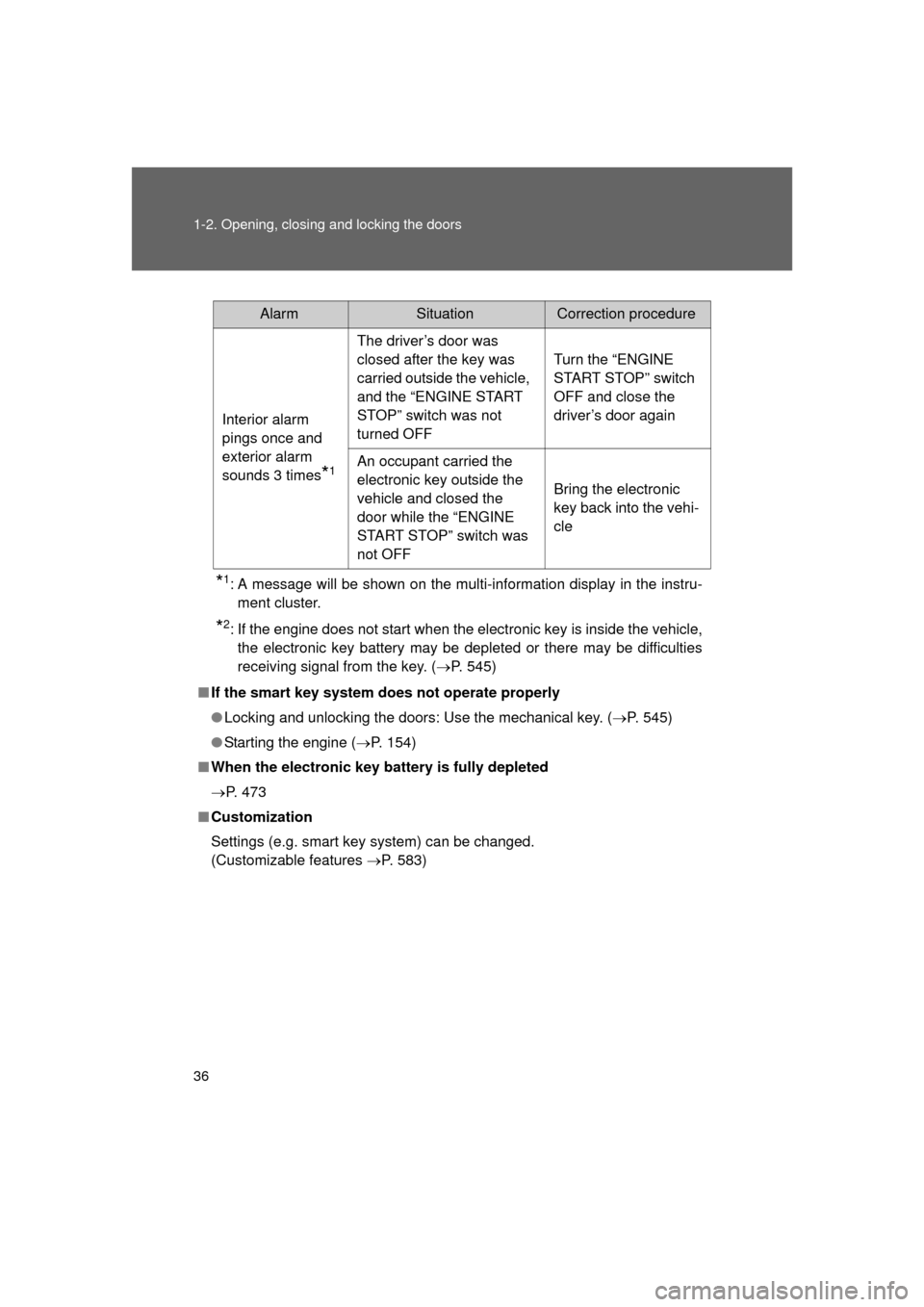
AlarmSituationCorrection procedure
Interior alarm
pings once and
exterior alarm
sounds 3 times
*1
The driver’s door was
closed after the key was
carried outside the vehicle,
and the “ENGINE START
STOP” switch was not
turned OFF Turn the “ENGINE
START STOP” switch
OFF and close the
driver’s door again
An occupant carried the
electronic key outside the
vehicle and closed the
door while the “ENGINE
START STOP” switch was
not OFF Bring the electronic
key back into the vehi-
cle
Page 37 of 608
37
1-2. Opening, closing and locking the doors
1
Before driving
L/C200_U (OM60F74U)
■
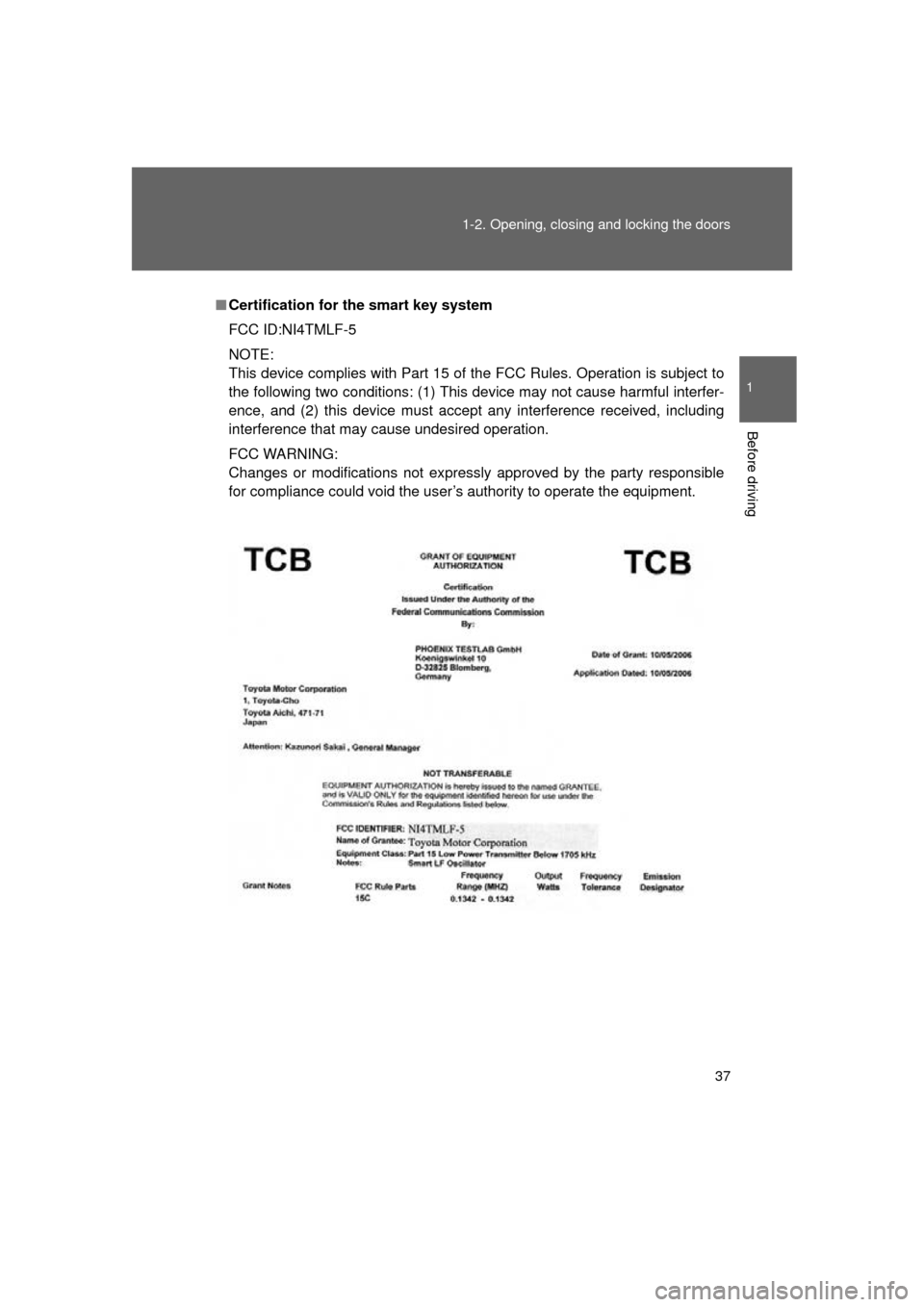
Certification for the smart key system
FCC ID:NI4TMLF-5
NOTE:
This device complies with Part 15 of the FCC Rules. Operation is subject to
the following two conditions: (1) This device may not cause harmful interfer-
ence, and (2) this device must accept any interference received, including
interference that may cause undesired operation.
FCC WARNING:
Changes or modifications not expressly approved by the party responsible
for compliance could void the user’s authority to operate the equipment.
Page 40 of 608

40 1-2. Opening, closing and locking the doors
L/C200_U (OM60F74U)
■Alarm
Using the wireless remote control to lock the door will set the alarm system.
(P. 99)
■ Electronic key battery depletion
P. 545
■ If the wireless remote cont rol does not operate properly
● Locking and unlocking the doors: Use the mechanical key. ( P. 545)
● Starting the engine ( P. 154)
■ When the electronic key battery is fully depleted
P. 473
■ Conditions affecting operation
P. 3 0
■ Customization
Settings (e.g. 2-step unlocking function) can be changed.
(Customizable features P. 583)
■ Certification for wir eless remote control
FCC ID: HYQ14AAB
FCC ID: HYQ14AEM
FCC ID: HYQ13BZS
FCC ID: HYQ14ABK
*
FCC ID: HYQ13CZA*
*
: For U.S. mainland only
NOTE:
This device complies with Part 15 of the FCC Rules. Operation is subject to
the following two conditions: (1) this device may not cause harmful interfer-
ence, and (2) this device must accept any interference received, including
interference that may cause undesired operation.
FCC WARNING:
Changes or modifications not expressly approved by the party responsible
for compliance could void the user’s authority to operate the equipment.
Page 44 of 608
44 1-2. Opening, closing and locking the doors
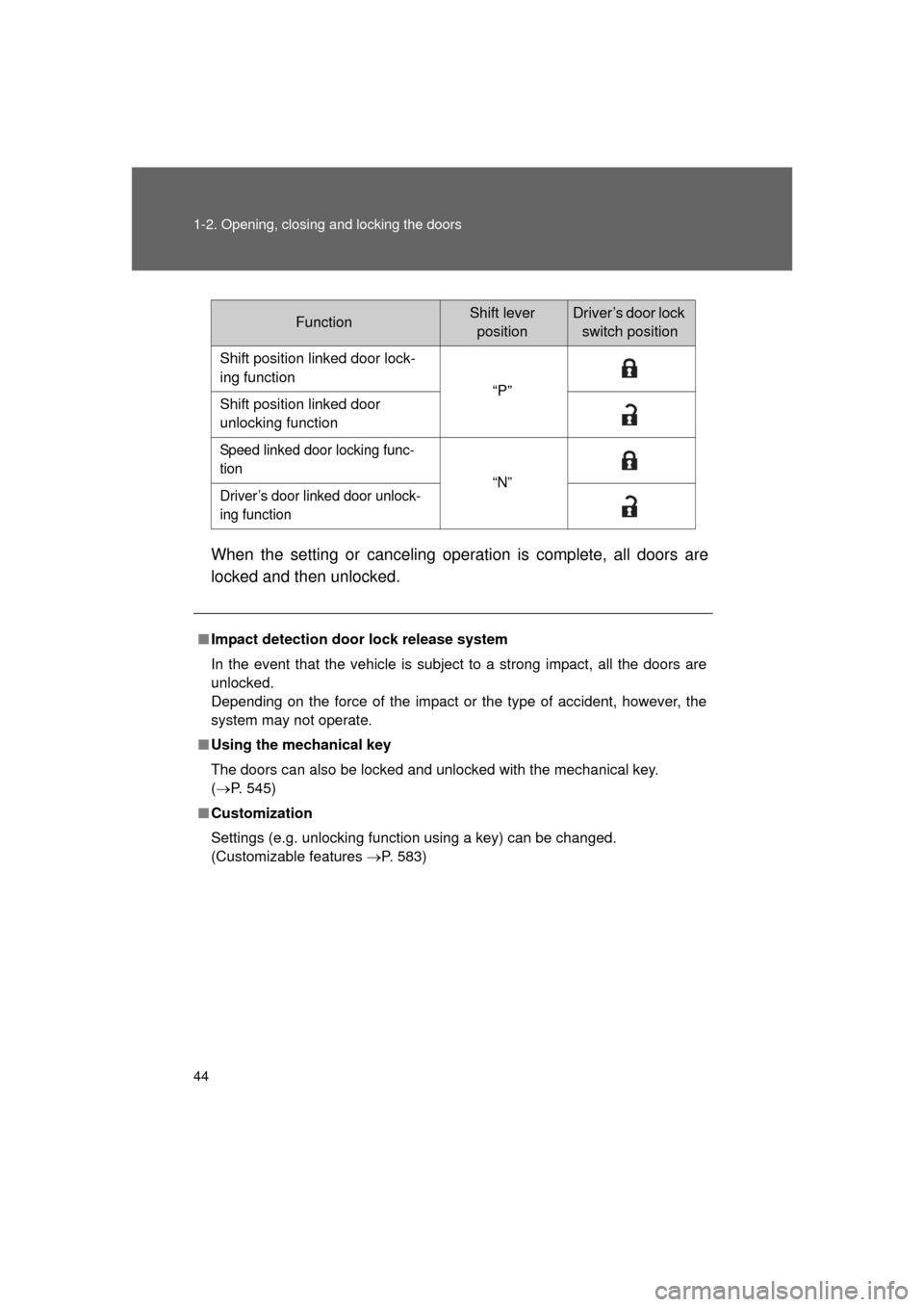
L/C200_U (OM60F74U)When the setting or canceling operation is complete, all doors are
locked and then unlocked.
FunctionShift lever
positionDriver’s door lock switch position
Shift position linked door lock-
ing function “P”
Shift position linked door
unlocking function
Speed linked door locking func-
tion “N”
Driver’s door linked door unlock-
ing function
■ Impact detection door lock release system
In the event that the vehicle is subject to a strong impact, all the doors are
unlocked.
Depending on the force of the impact or the type of accident, however, the
system may not operate.
■ Using the mechanical key
The doors can also be locked and unlocked with the mechanical key.
(P. 545)
■ Customization
Settings (e.g. unlocking function using a key) can be changed.
(Customizable features P. 583)
Page 88 of 608
88 1-4. Opening and closing the windows and moon roof
L/C200_U (OM60F74U)
■When the power window does not close normally
If the jam protection function is operating abnormally and a window cannot
be closed, perform the following operations using the power window switch
on the relevant door.
● After stopping the vehicle, the window can be closed by holding the
power window switch in the one-touch closing position while the
“ENGINE START STOP” switch is turned to IGNITION ON mode.
● If the window still cannot be closed even by carrying out the operation
explained above, initialize the function by performing the following proce-
dure.
Hold the power window switch in the one-touch closing position.
Continue holding the switch for a further 6 seconds after the win-
dow has closed.
Hold the power window switch in the one-touch opening position.
Continue holding the switch for a further 2 seconds after the win-
dow has opened completely.
Hold the power window switch in the one-touch closing position
once again. Continue holding the switch for a further 2 seconds
after the window has closed.
If you release the switch while the window is moving, start again from the
beginning. If the window continues to close but then re-open slightly even
after performing the above procedure correctly, have the vehicle inspected
by your Toyota dealer.
■ Customization
Settings (e.g. linked door lock operation) can be changed.
(Customizable features P. 583)
STEP1
STEP2
STEP3
Page 92 of 608
92 1-4. Opening and closing the windows and moon roof
L/C200_U (OM60F74U)
■Moon roof open warning buzzer
The buzzer sounds and message is shown on the multi-information display
in the instrument panel when the “E NGINE START STOP” switch is turned
OFF and the driver’s door is opened with the moon roof open.
■ Customization
Settings (e.g. linked door lock operation) can be changed.
(Customizable features P. 583)
CAUTION
■Opening the moon roof
Observe the following precautions.
Failing to do so may cause death or serious injury.
● Do not allow any passengers to put their hands or heads outside the vehi-
cle while it is moving.
● Do not sit on top of the moon roof.
■ Closing the moon roof
Observe the following precautions.
Failing to do so may result in death or serious injury.
● Check to make sure that all passengers do not have any part of their bod-
ies in a position where they could be caught when the moon roof is being
operated.
● Do not allow children to operate the moon roof.
Closing the moon roof on someone can cause death or serious injury.
■ Jam protection function
● Never try jamming any part of your body to activate the jam protection
function intentionally.
● The jam protection function may not work if something gets caught just
before the moon roof fully closes.
Page 98 of 608

98 1-6. Theft deterrent system
L/C200_U (OM60F74U)
■System maintenance
The vehicle has a maintenance-free type engine immobilizer system.
■ Conditions that may cause the system to malfunction
● If the key is in contact with a metallic object.
● If the key is in close proximity to or touching a key to the security system
(key with a built-in transponder chip) of another vehicle.
■ Certifications for the en gine immobilizer system
FCC ID: NI4TMIMB-1
NOTE:
This device complies with Part 15 of the FCC Rules. Operation is subject to
the following two conditions: (1) this device may not cause harmful interfer-
ence, and (2) this device must accept any interference received, including
interference that may cause undesired operation.
FCC WARNING:
Changes or modifications not expressly approved by the party responsible
for compliance could void the user’s authority to operate the equipment.
CAUTION
■ Certifications for the engine immobilizer system
Changes or modifications not expressly approved by the party responsible
for compliance could void the user’s authority to operate the equipment.
NOTICE
■ To ensure the system operates correctly
Do not modify or remove the system. If modified or removed, the proper
operation of the system cannot be guaranteed.