check engine TOYOTA LAND CRUISER 2012 User Guide
[x] Cancel search | Manufacturer: TOYOTA, Model Year: 2012, Model line: LAND CRUISER, Model: TOYOTA LAND CRUISER 2012Pages: 692, PDF Size: 29.3 MB
Page 193 of 692
193 2-1. Driving procedures
2
When driving
L/C200_EE (OM60G38E)
CAUTION
When starting the engine
Always start the engine while sitting in the driver’s seat. Do not depress the
accelerator pedal while starting the engine under any circumstances.
Doing so may cause an accident resulting in death or serious injury.
Stopping the engine in an emergency
If you want to stop the engine in an emergency while driving the vehicle,
press and hold the “ENGINE START STOP” switch for more than 3 seconds,
or press it briefly 3 times or more in succession. (P. 640)
However, do not touch the “ENGINE START STOP” switch while driving
except in an emergency. Turning the engine off while driving will not cause
loss of steering or braking control, but the power assist to these systems will
be lost. This will make it more difficult to steer and brake, so you should pull
over and stop the vehicle as soon as it is safe to do so.
NOTICE
To prevent battery discharge
Do not leave the “ENGINE START STOP” switch in ACCESSORY or IGNI-
TION ON mode for long periods without the engine running.
When starting the engine
Do not race a cold engine.
If the engine becomes difficult to start or stalls frequently, have your vehi-
cle checked by any authorized Toyota dealer or repairer, or another duly
qualified and equipped professional immediately.
Symptoms indicating a malfunction with the “ENGINE START STOP”
switch
If the “ENGINE START STOP” seems to be operating somewhat differently
than usual, such as the switch sticking slightly, there may be a malfunction.
Contact any authorized Toyota dealer or repairer, or another duly qualified
and equipped professional.
Page 200 of 692
200
2-1. Driving procedures
L/C200_EE (OM60G38E)
Turn signal lever
Turn signals can be operated when
The “ENGINE START STOP” switch is in IGNITION ON mode.
If the indicators flash faster than usual
Check that a light bulb in the front or rear turn signal lights has not burned
out.
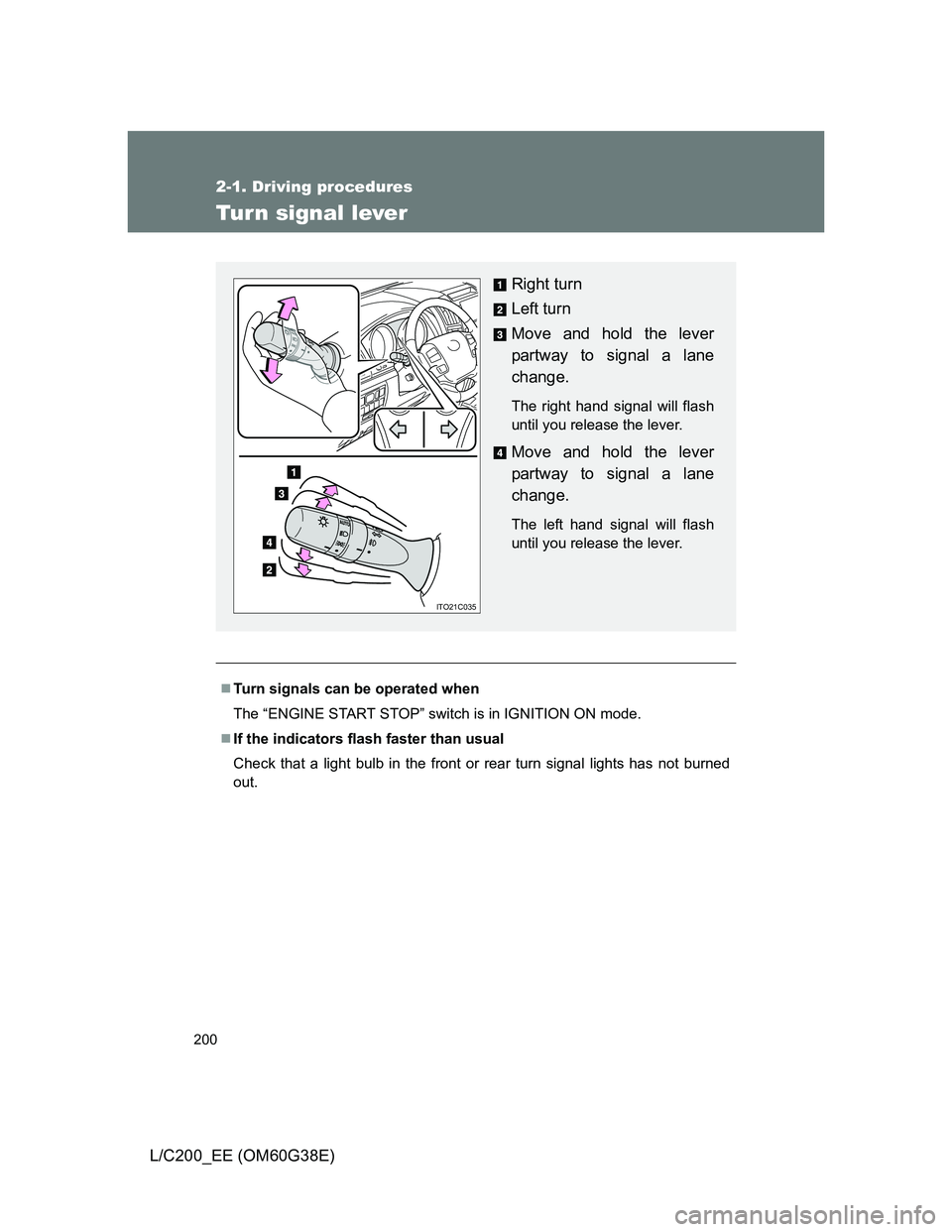
Right turn
Left turn
Move and hold the lever
partway to signal a lane
change.
The right hand signal will flash
until you release the lever.
Move and hold the lever
partway to signal a lane
change.
The left hand signal will flash
until you release the lever.
ITO21C035
Page 206 of 692
206 2-2. Instrument cluster
L/C200_EE (OM60G38E)
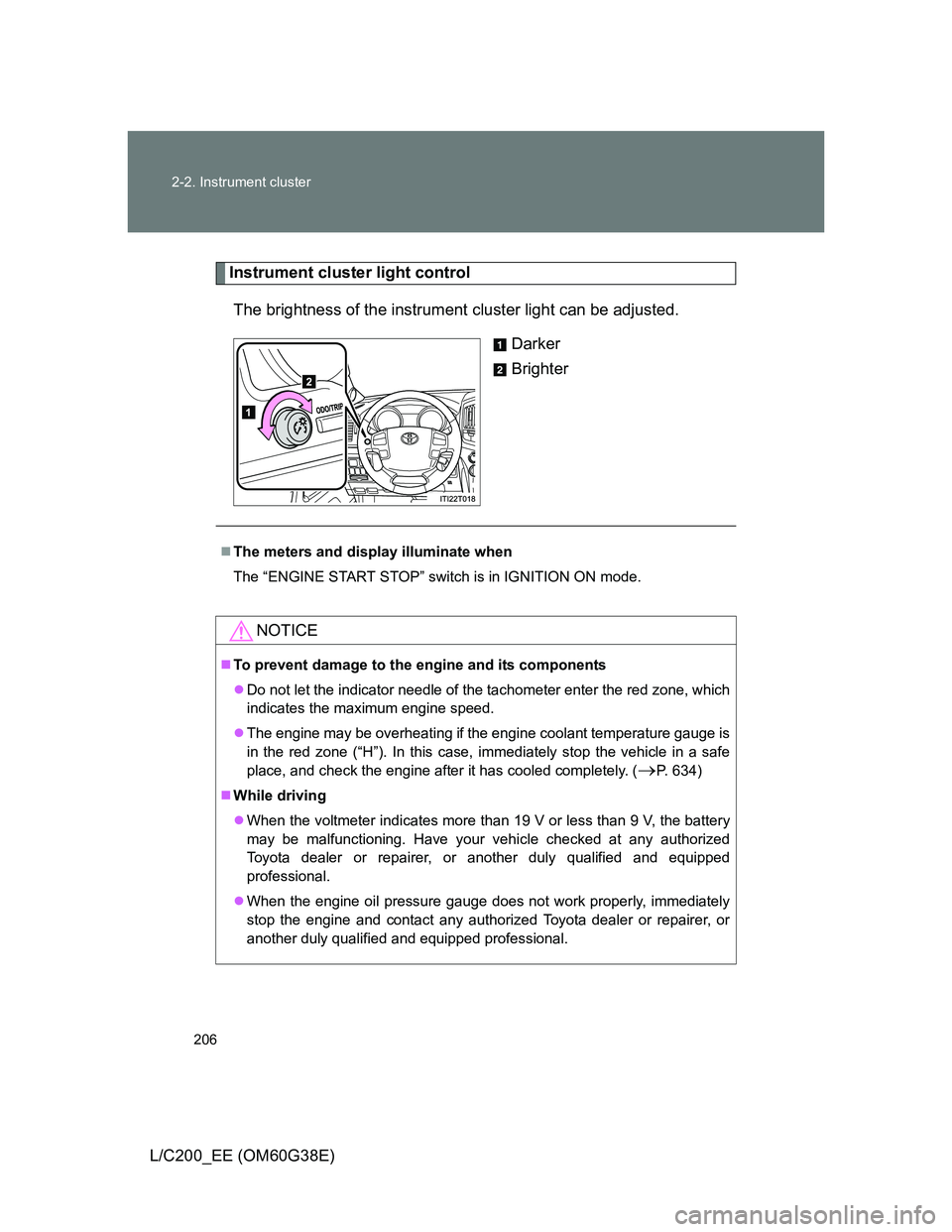
Instrument cluster light control
The brightness of the instrument cluster light can be adjusted.
Darker
Brighter
The meters and display illuminate when
The “ENGINE START STOP” switch is in IGNITION ON mode.
NOTICE
To prevent damage to the engine and its components
Do not let the indicator needle of the tachometer enter the red zone, which
indicates the maximum engine speed.
The engine may be overheating if the engine coolant temperature gauge is
in the red zone (“H”). In this case, immediately stop the vehicle in a safe
place, and check the engine after it has cooled completely. (
P. 634)
While driving
When the voltmeter indicates more than 19 V or less than 9 V, the battery
may be malfunctioning. Have your vehicle checked at any authorized
Toyota dealer or repairer, or another duly qualified and equipped
professional.
When the engine oil pressure gauge does not work properly, immediately
stop the engine and contact any authorized Toyota dealer or repairer, or
another duly qualified and equipped professional.
Page 210 of 692
210 2-2. Instrument cluster
L/C200_EE (OM60G38E)
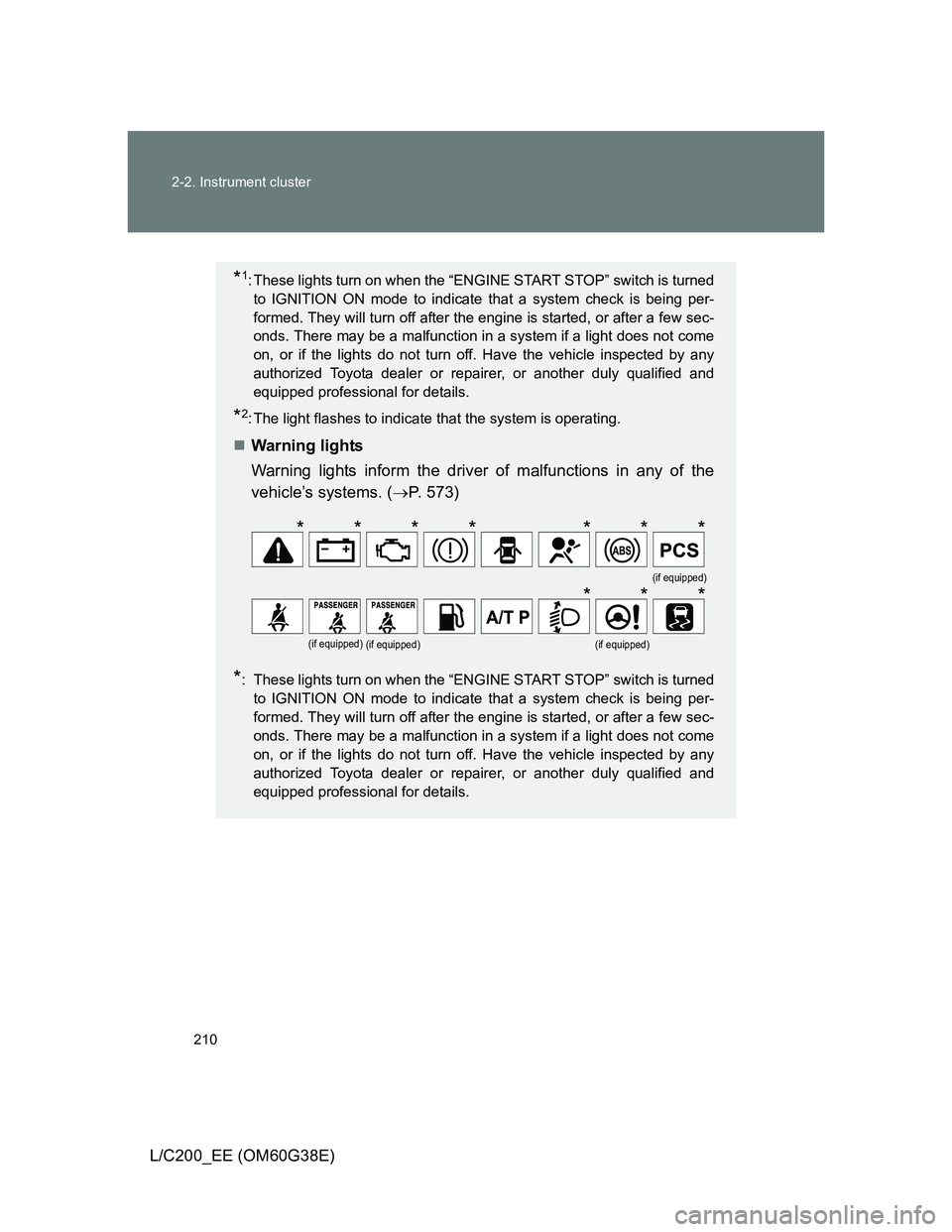
*1: These lights turn on when the “ENGINE START STOP” switch is turned
to IGNITION ON mode to indicate that a system check is being per-
formed. They will turn off after the engine is started, or after a few sec-
onds. There may be a malfunction in a system if a light does not come
on, or if the lights do not turn off. Have the vehicle inspected by any
authorized Toyota dealer or repairer, or another duly qualified and
equipped professional for details.
*2: The light flashes to indicate that the system is operating.
Warning lights
Warning lights inform the driver of malfunctions in any of the
vehicle’s systems. (P. 573)
*: These lights turn on when the “ENGINE START STOP” switch is turned
to IGNITION ON mode to indicate that a system check is being per-
formed. They will turn off after the engine is started, or after a few sec-
onds. There may be a malfunction in a system if a light does not come
on, or if the lights do not turn off. Have the vehicle inspected by any
authorized Toyota dealer or repairer, or another duly qualified and
equipped professional for details.
(if equipped)
(if equipped)(if equipped)(if equipped)
*******
***
Page 216 of 692

216 2-2. Instrument cluster
L/C200_EE (OM60G38E)Speedometer
Turn-by-turn navigation (vehicles with a navigation system)
Display off
A blank screen is displayed
Displays the vehicle speed.
The speed units (MPH or km/h) can be
selected by pressing the “DISP” switch for
longer than 1 second when the speedometer
is displayed.
The turn-by-turn navigation can be set to on
or off.
The function can be activated or deactivated
by pressing the “DISP” switch for longer than
1 second when turn-by-turn navigation setting
screen is displayed.
System check display
After turning the “ENGINE START STOP” switch to IGNITION ON mode,
“LAND CRUISER” is displayed while system operation is checked. When the
system check is complete, the normal screen will return.
Page 228 of 692
228 2-3. Operating the lights and wipers
L/C200_EE (OM60G38E)
The windshield wiper and washer can be operated when
The “ENGINE START STOP” switch is in IGNITION ON mode.
Effects of vehicle speed on wiper operation (vehicles equipped with
rain-sensing windshield wipers)
Vehicle speed affects the wiper operation when the washer is being used
(delay until drip prevention wiper sweep occurs) even when the wipers are
not in “AUTO” mode.
With “ ” selected, wiper operation will be switched from low speed to inter-
mittent wiper operation only when the vehicle is stationary.
(However, when the sensor sensitivity is adjusted to the highest level, the
mode cannot be switched.)
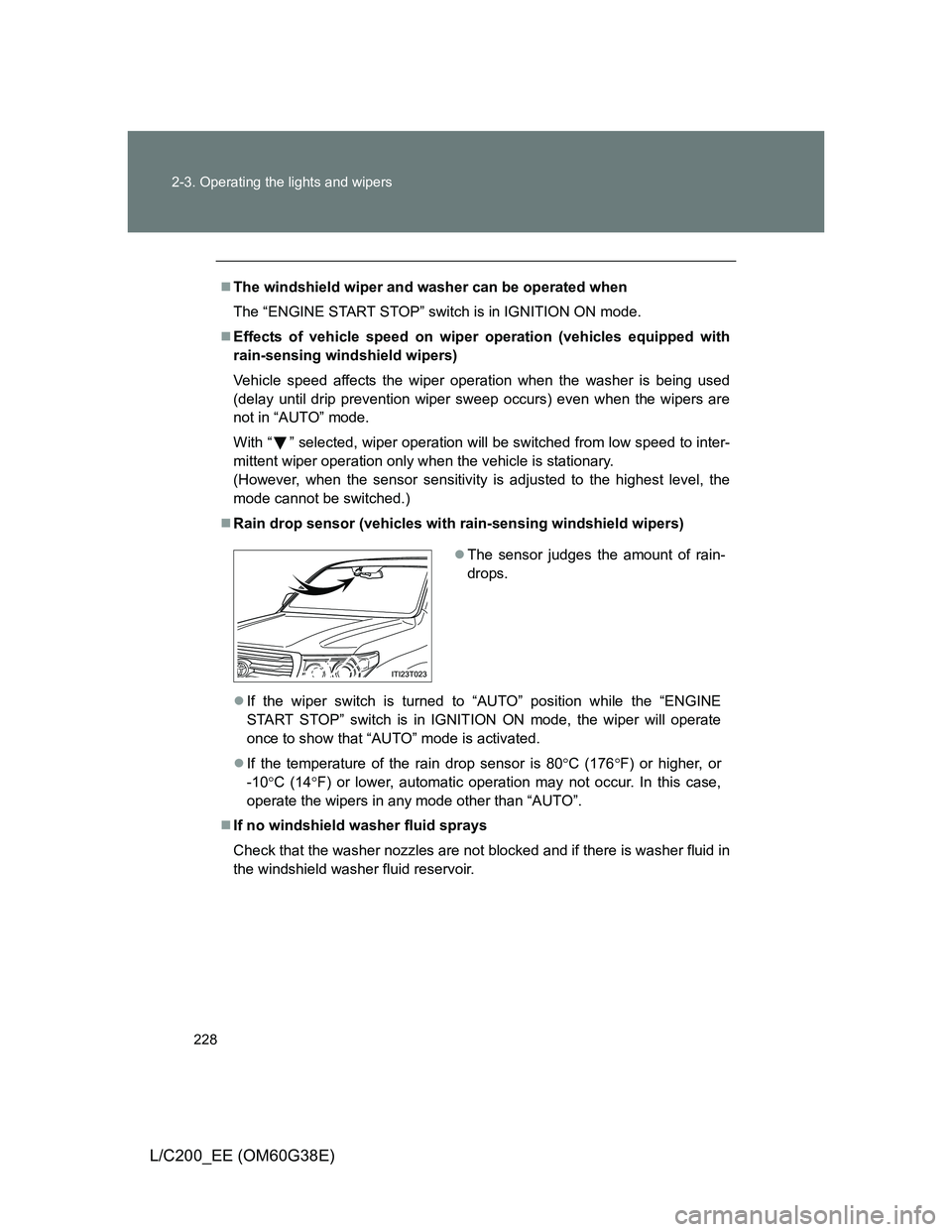
Rain drop sensor (vehicles with rain-sensing windshield wipers)
If the wiper switch is turned to “AUTO” position while the “ENGINE
START STOP” switch is in IGNITION ON mode, the wiper will operate
once to show that “AUTO” mode is activated.
If the temperature of the rain drop sensor is 80C (176F) or higher, or
-10C (14F) or lower, automatic operation may not occur. In this case,
operate the wipers in any mode other than “AUTO”.
If no windshield washer fluid sprays
Check that the washer nozzles are not blocked and if there is washer fluid in
the windshield washer fluid reservoir.
The sensor judges the amount of rain-
drops.
Page 255 of 692
255 2-4. Using other driving systems
2
When driving
L/C200_EE (OM60G38E)
Propeller shaft noise
If the vehicle height is adjusted on a slope, or with the shift lever in a position
other than “P” or “N” while the vehicle is stopped, you may hear a sound
caused by the expansion and contraction of the propeller shaft. This does
not indicate a malfunction.
4-Wheel AHC failure warning
If a malfunction occurs in the 4-Wheel AHC, normal mode is automatically
selected. However, the system may not switch to normal mode depending
on the location of the malfunction.
The warning message is displayed on the multi-information display, and the
4-Wheel AHC cannot be activated until the malfunction is corrected.
Stop the engine and start it again. If the warning message turns off, the sys-
tem is operating correctly. If the warning message continues to be displayed,
have the vehicle checked at any authorized Toyota dealer or repairer, or
another duly qualified and equipped professional as soon as possible.
Page 256 of 692
256 2-4. Using other driving systems
L/C200_EE (OM60G38E)
CAUTION
When switching the vehicle height mode
Before lowering the vehicle height, check that there are no people under or
around the vehicle, and check for obstacles.
If you do not do this, body parts may be caught in the vehicle, possibly lead-
ing to an accident.
Using the high mode
The high mode should only be used when driving on rough roads, for exam-
ple when driving off-road. Because the vehicle’s center of gravity will
become higher when in the mode, the vehicle may become unstable when
turning abruptly, resulting in an accident.
When jacking up the vehicle or installing tire chains
Turn off the height control and stop the engine, otherwise the vehicle height
may change due to the automatic leveling function, and you may catch part
of your body in the vehicle, resulting in an accident.
When crossing rivers
Select the high mode and turn off the height control. Drive at 30 km/h
(18 mph) or lower. Otherwise the vehicle height may change due to the auto-
matic leveling function, resulting in an accident.
If your vehicle must be towed
Put the vehicle height in the normal mode and turn off the height control, oth-
erwise the vehicle height may change due to the automatic leveling function
and you may catch part of your body in the vehicle, resulting in an accident.
If your vehicle becomes stuck in a ditch
Turn off the height control, otherwise the vehicle height may change due to
the automatic leveling function, resulting in an accident.
When loading cargo on the roof luggage carrier
Do not switch to high mode. Sudden steering could cause the vehicle to lose
stability due to the vehicle’s higher center of gravity, possibly leading to an
accident.
Page 269 of 692
269 2-4. Using other driving systems
2
When driving
L/C200_EE (OM60G38E)
Sounds and vibrations caused by the Crawl Control system
A sound may be heard from the engine compartment when the engine is
started or just after the vehicle begins to move. This sound does not indi-
cate that a malfunction has occurred in Crawl Control system.
Either of the following conditions may occur when the Crawl Control sys-
tem is operating. None of these are indicators that a malfunction has
occurred.
• Vibrations may be felt through the vehicle body and steering.
• A motor sound may be heard after the vehicle comes to a stop.
When there is a malfunction in the system
Warning lights and/or warning messages will turn on. (P. 573, 579)
CAUTION
When using Crawl Control and Turn Assist function
Do not rely solely on the Crawl Control and Turn Assist function. This func-
tion does not extend the vehicle’s performance limitations. Always thor-
oughly check the road conditions, and drive safely.
These conditions may cause the system not to operate properly
When driving on the following surfaces, the system may not be able to main-
tain a fixed low speed, which may result in an accident:
Extremely steep inclines.
Extremely uneven surfaces.
Snow-covered roads, or other slippery surfaces.
NOTICE
When using Turn Assist function
The Turn Assist function is a function to assist turning performance when
driving off road. The function may be less effective on paved road surfaces.
Page 316 of 692
316 2-5. Driving information
L/C200_EE (OM60G38E)
NOTICE
To prevent the water damage
Take all necessary safety measures to ensure that water damage to the
engine or other components does not occur.
Water entering the engine air intake will cause severe engine damage.
Water entering the automatic transmission will cause deterioration in shift
quality, locking up of your transmission accompanied by vibration, and ulti-
mately damage.
Water can wash the grease from wheel bearings, causing rusting and pre-
mature failure, and may also enter the differentials, transmission and
transfer case, reducing the gear oil’s lubricating qualities.
When you drive through water
If driving through water, such as when crossing shallow streams, first check
the depth of the water and the bottom of the river bed for firmness. Drive
slowly and avoid deep water.
Inspection after off-road driving
Sand and mud that has accumulated in brake drums and around brake
discs may affect braking efficiency and may damage brake system compo-
nents.
Always perform a maintenance inspection after each day of off-road driv-
ing that has taken you through rough terrain, sand, mud, or water.