four wheel drive TOYOTA LAND CRUISER 2012 User Guide
[x] Cancel search | Manufacturer: TOYOTA, Model Year: 2012, Model line: LAND CRUISER, Model: TOYOTA LAND CRUISER 2012Pages: 692, PDF Size: 29.3 MB
Page 259 of 692
259
2-4. Using other driving systems
2
When driving
L/C200_EE (OM60G38E)
Four-wheel drive system
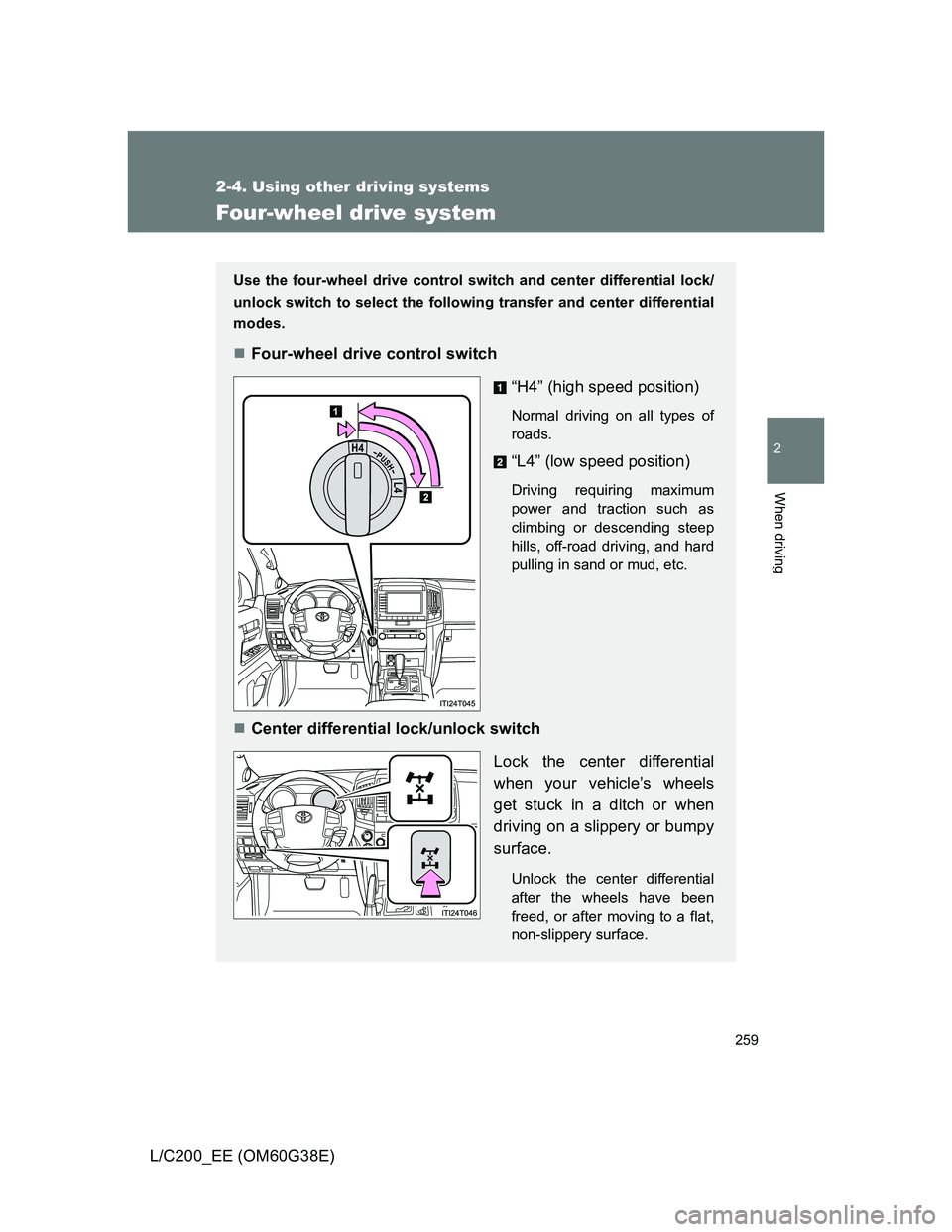
Use the four-wheel drive control switch and center differential lock/
unlock switch to select the following transfer and center differential
modes.
Four-wheel drive control switch
“H4” (high speed position)
Normal driving on all types of
roads.
“L4” (low speed position)
Driving requiring maximum
power and traction such as
climbing or descending steep
hills, off-road driving, and hard
pulling in sand or mud, etc.
Center differential lock/unlock switch
Lock the center differential
when your vehicle’s wheels
get stuck in a ditch or when
driving on a slippery or bumpy
surface.
Unlock the center differential
after the wheels have been
freed, or after moving to a flat,
non-slippery surface.
4
4
Page 260 of 692
260 2-4. Using other driving systems
L/C200_EE (OM60G38E)
Shifting between “H4” and “L4”
Shifting from “H4” to “L4”
Stop the vehicle completely.
Shift the shift lever to “N”.
Push and turn the four-wheel drive control switch fully clock-
wise.
Maintain this condition until the low speed four-wheel drive indica-
tor light turns on.
Shifting from “L4” to “H4”
Stop the vehicle completely.
Shift the shift lever to “N”.
Turn the four-wheel drive control switch fully counterclock-
wise.
Maintain this condition until the low speed four-wheel drive indica-
tor light turns off.
The four-wheel drive control switch can be operated when
The “ENGINE START STOP” switch is in IGNITION ON mode.
The shift lever is in the “N” position.
The vehicle is stopped completely.
The low speed four-wheel drive indicator light
The indicator light blinks while shifting between “H4” and “L4”.
STEP1
STEP2
STEP3
STEP1
STEP2
STEP3
Page 261 of 692
261 2-4. Using other driving systems
2
When driving
L/C200_EE (OM60G38E)
Advice for driving on slippery roads
If you shift the four-wheel drive control switch to “L4” and the shift lever to
the “2” range of “S” while driving in steep off-road areas, the output of the
brake can be controlled effectively by the Active TRC, which assists the
driver to control the driving power of 4 wheels.
Use the “1” range of “S” of the shift lever for maximum power and traction
when your wheels get stuck or when driving down a steep incline.
The center differential lock indicator light
The indicator light blinks while locking/unlocking the center differential.
The center differential lock/unlock button can be operated when
The “ENGINE START STOP” switch is in IGNITION ON mode.
The vehicle speed is less than 100 km/h (60 mph).
Locking/unlocking the center differential
When the center differential is locked, VSC is automatically turned off.
(The center differential lock and VSC OFF indicator lights come on.)
If the operation is not completed, the center differential lock indicator
blinks. If the indicator light does not turn off when unlocking the center
differential, drive straight ahead while accelerating or decelerating, or
drive in reverse.
If the center differential lock/unlock is not completed within 5 seconds
while the cruise control system is on, cancel the cruise control system.
Page 262 of 692
262 2-4. Using other driving systems
L/C200_EE (OM60G38E)
If the low speed four-wheel drive indicator light or the center differen-
tial lock indicator light blinks
If the low speed four-wheel drive indicator light continues to blink when
using the four-wheel drive control switch, stop the vehicle completely,
move the shift lever to “N” and operate the switch again.
If the shift lever is moved before the low speed four-wheel drive indicator
turns on/off, the transfer mode may not be shifted completely. The trans-
fer mode disengages both the front and rear driveshafts from the power-
train and allows the vehicle to move regardless of the shift position. (At
this time, the indicator blinks and the buzzer sounds.)
Therefore, the vehicle is free to roll even if the automatic transmission is in
“P”. You or someone else could be seriously injured. You must complete
the shifting of the transfer mode.
To complete the shifting, stop the vehicle completely, return the shift lever
to “N”, and confirm that the shift was completed (the indicator turns on/off).
If the engine coolant temperature is too low, the four-wheel drive control
system may not be able to shift. When the engine is warmer operate the
switch again.
If the low speed four-wheel drive indicator light or the center differential lock
indicator light continues to blink even after attempting the above, there may
be a malfunction in the engine, the brake system or the four-wheel drive sys-
tem. In this case, you may not be able to shift between “H4” and “L4”, and
the center differential lock may not be operable. Have the vehicle inspected
by any authorized Toyota dealer or repairer, or another duly qualified and
equipped professional immediately.
Page 263 of 692
263 2-4. Using other driving systems
2
When driving
L/C200_EE (OM60G38E)
CAUTION
While driving
Never move the four-wheel drive control switch if the wheels have lost trac-
tion. Doing so may cause an accident resulting in death or serious injury.
When the vehicle is parked
If the shift lever is moved before the low speed four-wheel drive indicator
turns on/off, the transfer mode may not be shifted completely. The transfer
mode disengages both the front and rear driveshafts from the powertrain
and allows the vehicle to move regardless of the shift position. (At this time,
the indicator blinks and the buzzer sounds.)
Therefore, the vehicle is free to roll even if the automatic transmission is in
“P”. You or someone else could be seriously injured. You must complete the
shifting of the transfer mode. (P. 259)
NOTICE
To prevent damage to the center differential
For normal driving on dry and hard surface roads, unlock the center differ-
ential.
Unlock the center differential after the wheels are out of the ditch or off the
slippery or bumpy surface.
Do not push the center differential lock/unlock button when the vehicle is
turning or when its wheels are spinning freely off the ground.
Page 267 of 692
267 2-4. Using other driving systems
2
When driving
L/C200_EE (OM60G38E)
The Crawl Control and Turn Assist function can be operated when
Crawl Control
The engine is running.
The shift lever is in any gear other than “P” or “N”.
The four-wheel drive control switch is in “L4”.
The driver’s door is closed.
Turn Assist function
Crawl Control is operating.
The center differential is not locked.
The accelerator and brake are not being operated.
The shift lever is in any gear other than “P”, “R” or “N”.
The steering wheel is turned very far.
Automatic system cancelation
Crawl Control
In the following situations, the buzzer will sound intermittently and Crawl
Control will be canceled automatically. In this event, the Crawl Control indi-
cator will flash and then go off, the Turn Assist indicator will go off (if the Turn
Assist function is in use), and a message stating that Crawl Control has
been turned off will be displayed on the multi-information display for several
seconds
When the shift lever is moved to “P” or “N”.
When the four-wheel drive control switch is in “H4”.
When the driver’s door is opened.
Turn Assist function
When the center differential is locked, the buzzer will sound intermittently
and the Turn Assist function will be canceled automatically. In this event, the
Turn Assist indicator will go off, and a message stating that the Turn Assist
function has been turned off will be displayed on the multi-information dis-
play for several seconds.
Page 272 of 692
272 2-4. Using other driving systems
L/C200_EE (OM60G38E)
Multi-terrain Select control starting conditions
When all of the following conditions are satisfied, the Multi-ter-
rain Select indicator will come on, the mode select screen will be
displayed on the multi-information display, and Multi-terrain
Select control will begin.
The four-wheel drive control switch is in “L4”.
Both Active TRC and VSC are not off.
Crawl Control is off.
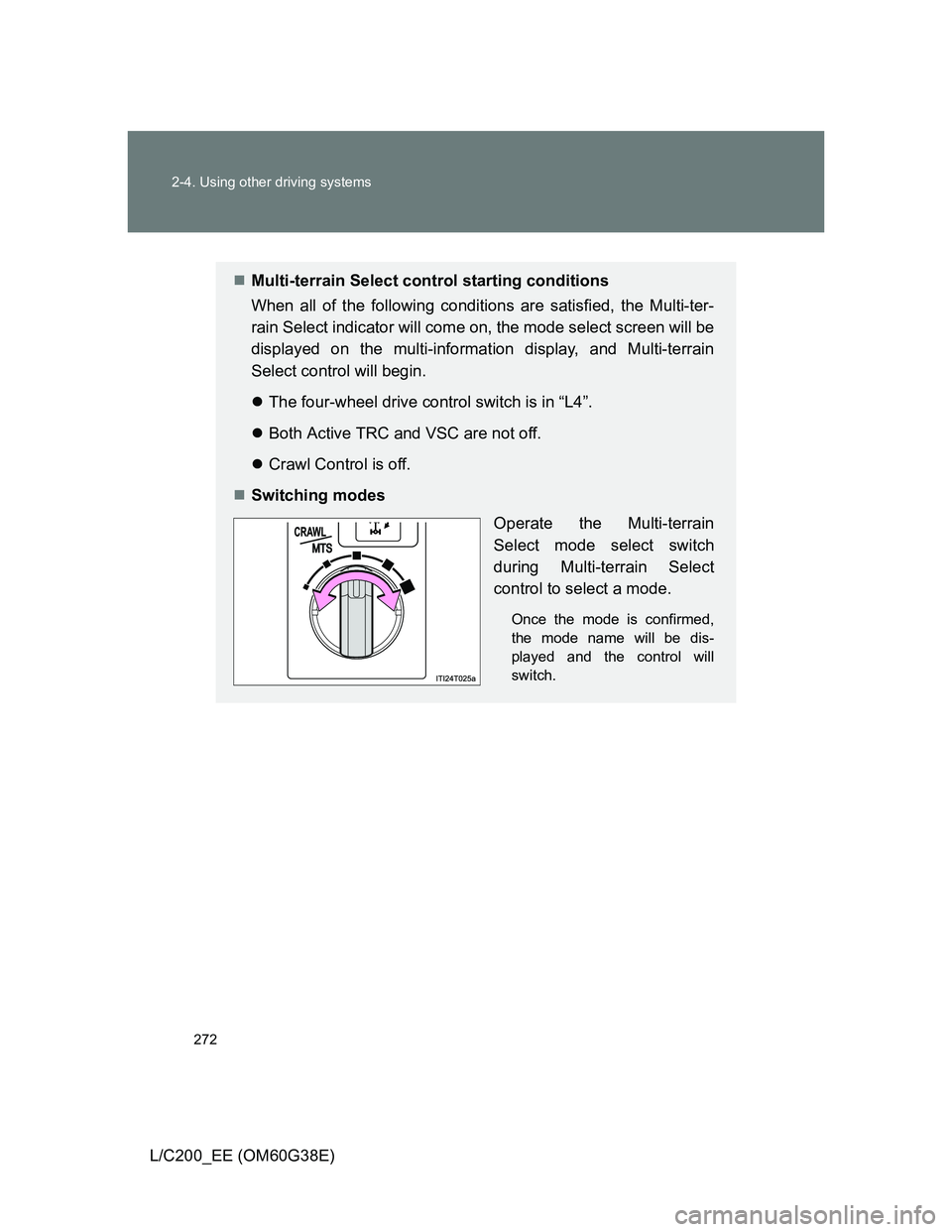
Switching modes
Operate the Multi-terrain
Select mode select switch
during Multi-terrain Select
control to select a mode.
Once the mode is confirmed,
the mode name will be dis-
played and the control will
switch.
Page 274 of 692
274 2-4. Using other driving systems
L/C200_EE (OM60G38E)
Automatic system cancelation
In the following situations, the Multi-terrain Select indicator will go off, and
Multi-terrain Select will be canceled automatically.
When the four-wheel drive control switch is in “H4”.
When Active TRC and VSC are off.
When Crawl Control is on.
When it is difficult to generate traction
MUD & SAND mode provides the largest amount of tire slippage, followed
by LOOSE ROCK, MOGUL, ROCK & DIRT and ROCK mode.
Drivability can be improved by selecting a mode which provides a smaller
amount of tire slippage than the current mode when the amount of tire slip-
page is large, or conversely selecting a mode which provides a larger
amount of tire slippage than the current mode when the amount of tire slip-
page is small.
When the vehicle is stuck
Switching the transfer and differential
For the operation of the following functions, refer to the following pages.
Four-wheel drive system (P. 259)
Center differential lock (P. 259)
When the brake system operates continuously
The brake system may overheat. In this case, a buzzer will sound, either the
“TRC OFF” will be displayed on the multi-information display, and Multi-ter-
rain Select will be temporarily inoperable. In this event, stop the vehicle
immediately in a safe place, and allow the brake system to cool down suffi-
ciently. (There is no problem with continuing normal driving.)
After a short time, the message on the multi-information display will go off,
and you will be able to use Multi-terrain Select.
When there is a malfunction in the system
The slip indicator light will come on. Have the vehicle inspected by any
authorized Toyota dealer or repairer, or another duly qualified and equipped
professional, immediately.
Page 277 of 692
277 2-4. Using other driving systems
2
When driving
L/C200_EE (OM60G38E)
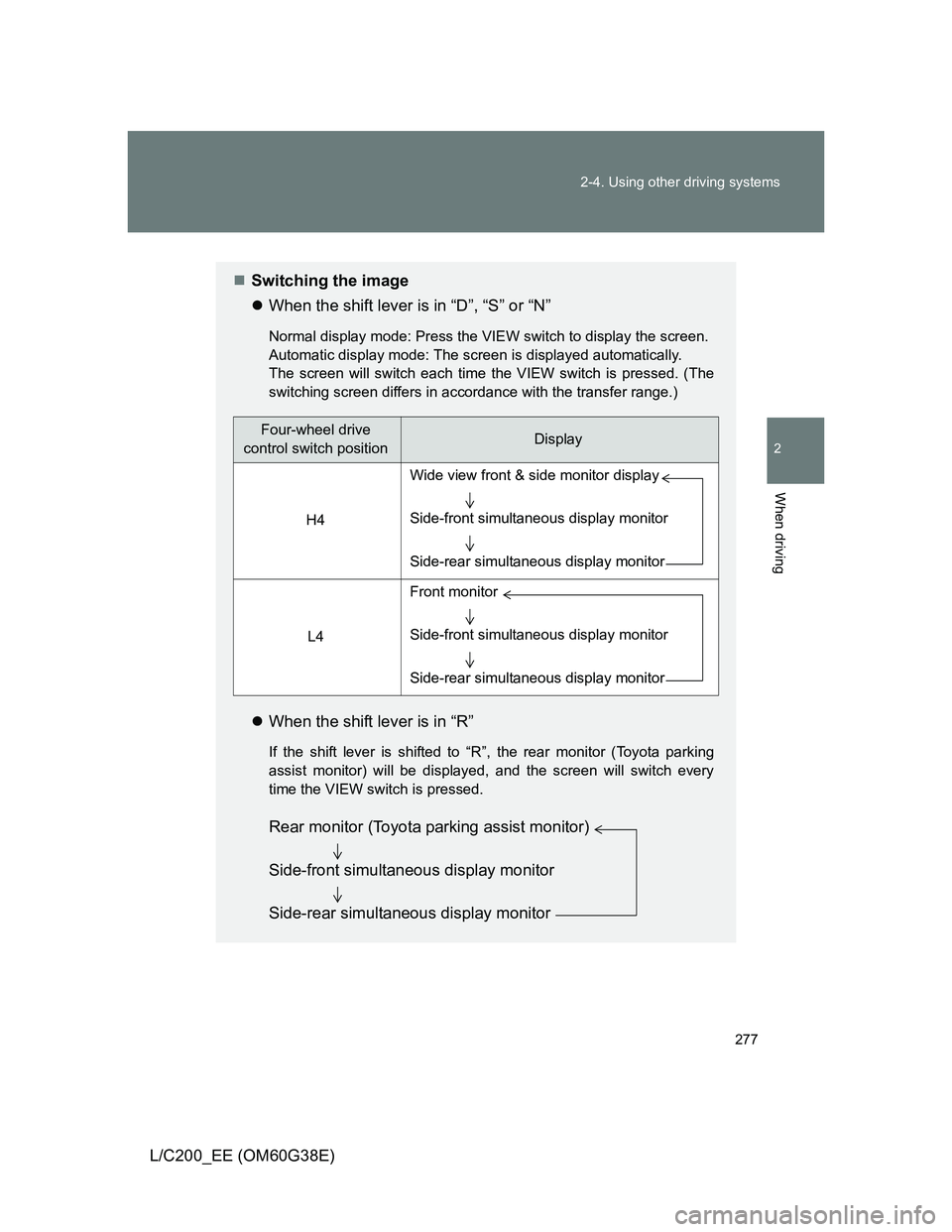
Switching the image
When the shift lever is in “D”, “S” or “N”
Normal display mode: Press the VIEW switch to display the screen.
Automatic display mode: The screen is displayed automatically.
The screen will switch each time the VIEW switch is pressed. (The
switching screen differs in accordance with the transfer range.)
When the shift lever is in “R”
If the shift lever is shifted to “R”, the rear monitor (Toyota parking
assist monitor) will be displayed, and the screen will switch every
time the VIEW switch is pressed.
Four-wheel drive
control switch positionDisplay
H4
L4
Wide view front & side monitor display
Side-front simultaneous display monitor
Side-rear simultaneous display monitor
Front monitor
Side-front simultaneous display monitor
Side-rear simultaneous display monitor
Rear monitor (Toyota parking assist monitor)
Side-front simultaneous display monitor
Side-rear simultaneous display monitor
Page 327 of 692
327 2-5. Driving information
2
When driving
L/C200_EE (OM60G38E)
Connecting and disconnecting a trailer (vehicles with 4-Wheel
AHC)
Stop your vehicle and a trailer in line and perform the following:
Connecting a trailer
Put the 4-Wheel AHC in the “LO” (low) mode.
Turn off the “ENGINE START STOP” switch or the 4-Wheel
AHC.
Connect a trailer.
Turn on the “ENGINE START STOP” switch or the 4-Wheel
AHC.
Select the “N” (normal) mode with the height select switch.
When a vehicle loaded with four occupants tows a trailer of about
1800 kg (4000 lb.) with more than about 180 kg (400 lb.) tongue
load, the normal mode may not be selected. However, there is no
problem to continue normal driving. Drive with sufficient care
because of large load.
Disconnecting a trailer
Put the 4-Wheel AHC in the “LO” (low) mode. (Make sure the
vehicle height is in the “LO” mode by pushing
“” on the
height select switch.)
Turn off the “ENGINE START STOP” switch or the 4-Wheel
AHC.
Set the supporting leg of a trailer on the ground and raise the
hitch by 100 mm (4 in.).
Turn on the “ENGINE START STOP” switch or the 4-Wheel
AHC.
STEP1
STEP2
STEP3
STEP4
STEP5
STEP1
STEP2
STEP3
STEP4