ECO mode TOYOTA LAND CRUISER 2012 Owner's Manual
[x] Cancel search | Manufacturer: TOYOTA, Model Year: 2012, Model line: LAND CRUISER, Model: TOYOTA LAND CRUISER 2012Pages: 692, PDF Size: 29.3 MB
Page 256 of 692
256 2-4. Using other driving systems
L/C200_EE (OM60G38E)
CAUTION
When switching the vehicle height mode
Before lowering the vehicle height, check that there are no people under or
around the vehicle, and check for obstacles.
If you do not do this, body parts may be caught in the vehicle, possibly lead-
ing to an accident.
Using the high mode
The high mode should only be used when driving on rough roads, for exam-
ple when driving off-road. Because the vehicle’s center of gravity will
become higher when in the mode, the vehicle may become unstable when
turning abruptly, resulting in an accident.
When jacking up the vehicle or installing tire chains
Turn off the height control and stop the engine, otherwise the vehicle height
may change due to the automatic leveling function, and you may catch part
of your body in the vehicle, resulting in an accident.
When crossing rivers
Select the high mode and turn off the height control. Drive at 30 km/h
(18 mph) or lower. Otherwise the vehicle height may change due to the auto-
matic leveling function, resulting in an accident.
If your vehicle must be towed
Put the vehicle height in the normal mode and turn off the height control, oth-
erwise the vehicle height may change due to the automatic leveling function
and you may catch part of your body in the vehicle, resulting in an accident.
If your vehicle becomes stuck in a ditch
Turn off the height control, otherwise the vehicle height may change due to
the automatic leveling function, resulting in an accident.
When loading cargo on the roof luggage carrier
Do not switch to high mode. Sudden steering could cause the vehicle to lose
stability due to the vehicle’s higher center of gravity, possibly leading to an
accident.
Page 257 of 692
257 2-4. Using other driving systems
2
When driving
L/C200_EE (OM60G38E)
NOTICE
When parking in areas with limited overhead height
After leaving the vehicle or unloading the luggage, the vehicle height may be
slightly higher than normal. Take care when overhead height is limited.
To avoid damage to the vehicle
Normal mode will be switched to automatically even if the vehicle is started
off in low mode. Take care when overhead height is limited.
Do not select the low mode when driving on bumpy roads, as the under-
body of the vehicle may contact the road surface.
Avoid rapid changes to the vehicle height
As the pump may overheat. Leave at a few seconds between selections
when changing the vehicle height mode.
Page 261 of 692
261 2-4. Using other driving systems
2
When driving
L/C200_EE (OM60G38E)
Advice for driving on slippery roads
If you shift the four-wheel drive control switch to “L4” and the shift lever to
the “2” range of “S” while driving in steep off-road areas, the output of the
brake can be controlled effectively by the Active TRC, which assists the
driver to control the driving power of 4 wheels.
Use the “1” range of “S” of the shift lever for maximum power and traction
when your wheels get stuck or when driving down a steep incline.
The center differential lock indicator light
The indicator light blinks while locking/unlocking the center differential.
The center differential lock/unlock button can be operated when
The “ENGINE START STOP” switch is in IGNITION ON mode.
The vehicle speed is less than 100 km/h (60 mph).
Locking/unlocking the center differential
When the center differential is locked, VSC is automatically turned off.
(The center differential lock and VSC OFF indicator lights come on.)
If the operation is not completed, the center differential lock indicator
blinks. If the indicator light does not turn off when unlocking the center
differential, drive straight ahead while accelerating or decelerating, or
drive in reverse.
If the center differential lock/unlock is not completed within 5 seconds
while the cruise control system is on, cancel the cruise control system.
Page 265 of 692
265 2-4. Using other driving systems
2
When driving
L/C200_EE (OM60G38E)
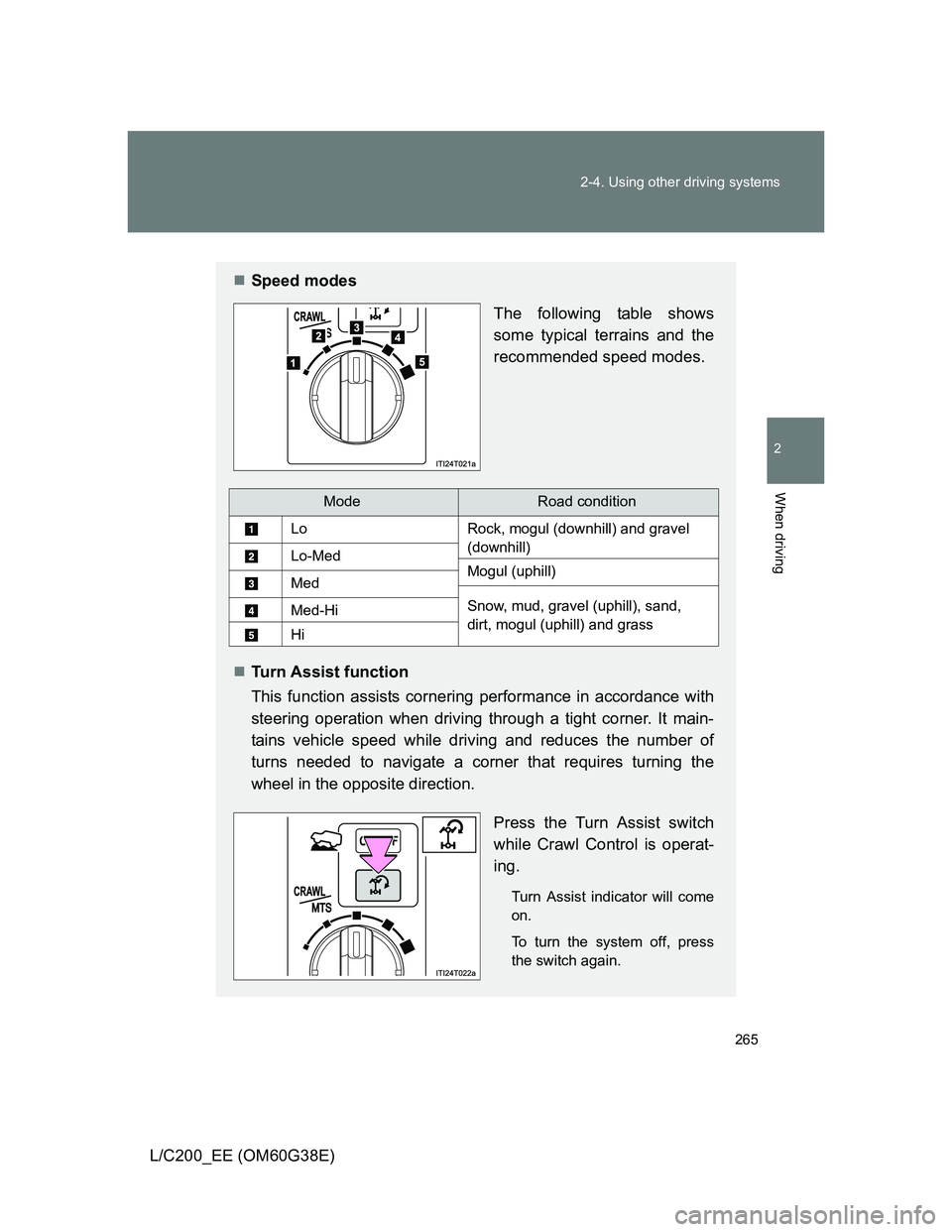
Speed modes
The following table shows
some typical terrains and the
recommended speed modes.
Turn Assist function
This function assists cornering performance in accordance with
steering operation when driving through a tight corner. It main-
tains vehicle speed while driving and reduces the number of
turns needed to navigate a corner that requires turning the
wheel in the opposite direction.
Press the Turn Assist switch
while Crawl Control is operat-
ing.
Turn Assist indicator will come
on.
To turn the system off, press
the switch again.
ModeRoad condition
LoRock, mogul (downhill) and gravel
(downhill)
Lo-MedMogul (uphill)Med
Snow, mud, gravel (uphill), sand,
dirt, mogul (uphill) and grassMed-Hi
Hi
Page 268 of 692
268 2-4. Using other driving systems
L/C200_EE (OM60G38E)
Function limitations
Crawl Control
In the following situations, brake control can be used to drive downhill at
a constant speed. However, engine control is not available when driving
uphill at a constant speed.
• When switched to second start mode.
In the following situation, engine control and brake control will stop tem-
porarily. In this event, the Crawl Control indicator will flash.
• When the vehicle speed exceeds approximately 25 km/h (15 mph).
Turn Assist function
In the following situations, the Turn Assist function will stop temporarily. In
this event, the Turn Assist indicator will flash.
When the vehicle speed exceeds approximately 10km/h (6 mph).
When the shift lever is moved to “R”.
When the Crawl Control system is operated continuously
If Crawl Control is used continuously for a long time, the buzzer will
sound, a malfunction notification will be displayed on the multi-informa-
tion display, the Crawl Control indicator will go off, and Crawl Control will
be temporarily inoperable as a result of the brake system overheating. In
this event, stop the vehicle immediately in a safe place, and allow the
brake system to cool down sufficiently until the “TRC OFF” on the multi-
information display go off. (In the meantime, normal driving is possible.)
If Crawl Control is used continuously for a long time, the buzzer will
sound, the system will be temporarily canceled, and a malfunction notifi-
cation will be displayed on the multi-information display as a result of the
automatic transmission system overheating. Stop the vehicle in a safe
place until the display goes off.
Page 302 of 692
302 2-4. Using other driving systems
L/C200_EE (OM60G38E)
To disable Active TRC and/or VSC system
If the vehicle gets stuck in fresh snow or mud, Active TRC and VSC
system may reduce power from the engine to the wheels. You may
need to turn the system off to enable you to rock the vehicle in order
to free it.
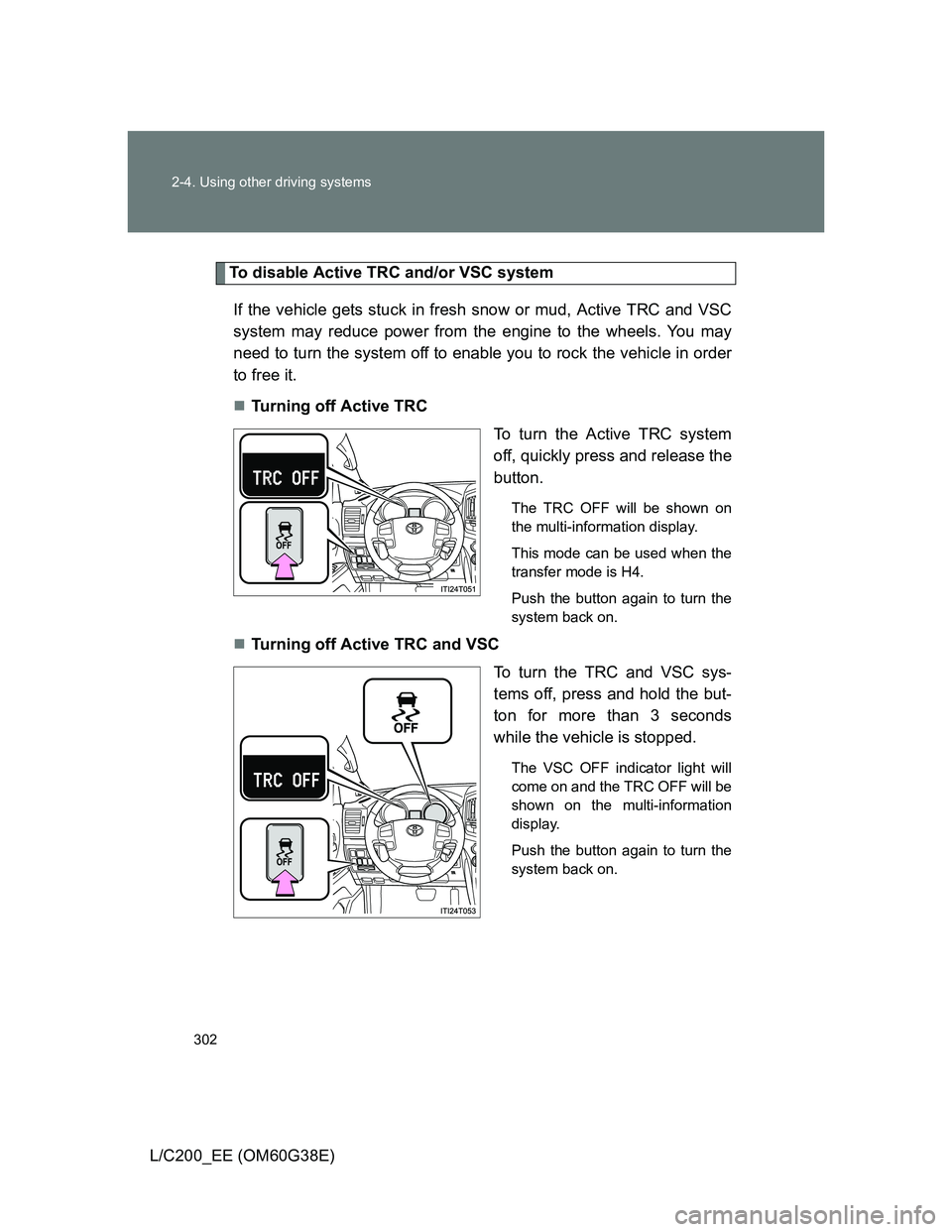
Turning off Active TRC
To turn the Active TRC system
off, quickly press and release the
button.
The TRC OFF will be shown on
the multi-information display.
This mode can be used when the
transfer mode is H4.
Push the button again to turn the
system back on.
Turning off Active TRC and VSC
To turn the TRC and VSC sys-
tems off, press and hold the but-
ton for more than 3 seconds
while the vehicle is stopped.
The VSC OFF indicator light will
come on and the TRC OFF will be
shown on the multi-information
display.
Push the button again to turn the
system back on.
Page 328 of 692
328 2-5. Driving information
L/C200_EE (OM60G38E)Wait for about 20 seconds until the rear vehicle height is low-
ered by the automatic leveling function.
Make sure the hitch is disconnected. If not, raise the hitch
higher and repeat steps 2 through 5.
Move the vehicle forward in the “LO” mode where the hitch
does not touch anything in the “N” (normal) mode.
Put the 4-Wheel AHC in the “N” mode.
Tire information
Increase the air pressure of the trailer tires in accordance with the total trailer
weight and according to the values recommended by the manufacturer of
your trailer.
Trailer lights
Please consult at any authorized dealer or repairer, or another duly qualified
and equipped professional when installing trailer lights, as incorrect installa-
tion may cause damage to the vehicle’s lights. Please take care to comply
with your state’s laws when installing trailer lights.
Break-in schedule
Toyota recommends that vehicles fitted with new power train components
should not be used for towing trailers for the first 800 km (500 miles).
Maintenance
Maintenance must be performed more frequently when using the vehicle
for towing due to the greater weight burden placed on the vehicle com-
pared to normal driving.
Retighten all bolts securing the hitching ball and bracket after towing for
approximately 1000 km (600 miles).
STEP5
STEP6
STEP7
STEP8
Page 348 of 692
348 3-1. Using the air conditioning system and defogger
L/C200_EE (OM60G38E)
When outside temperature approaches 0°C (32°F)
The air conditioning system may not operate even when
is
pressed.
Pollen removal mode
In order to prevent the windows from fogging up when the outside air is
cold, the following may occur.
• Outside air mode does not switch to recirculated air mode.
• The air conditioning system operates automatically.
• The operation cancels after 1 minute.
In rainy weather, the windows may fog up. Press .
Air conditioning odors
During use, various odors from inside and outside the vehicle may enter
into and accumulate in the air conditioning system. This may then cause
odor to be emitted from the vents.
To reduce potential odors from occurring:
• It is recommended that the air conditioning system be set to outside air
mode prior to turning the vehicle off.
• The start timing of the blower may be delayed for a short period of time
immediately after the air conditioning system is started in automatic
mode.
Air conditioning filter
P. 525
Page 357 of 692
357 3-1. Using the air conditioning system and defogger
3
Interior features
L/C200_EE (OM60G38E)
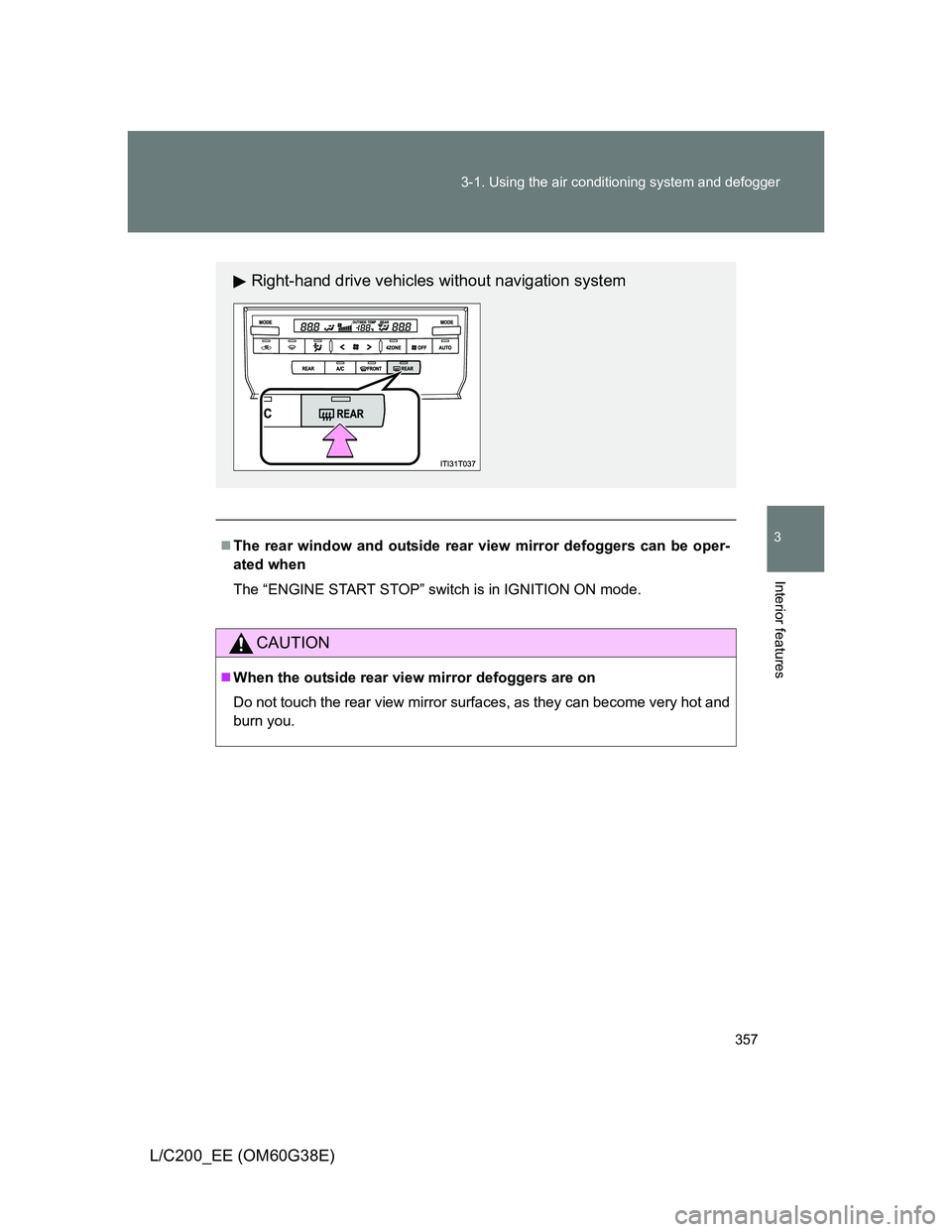
The rear window and outside rear view mirror defoggers can be oper-
ated when
The “ENGINE START STOP” switch is in IGNITION ON mode.
CAUTION
When the outside rear view mirror defoggers are on
Do not touch the rear view mirror surfaces, as they can become very hot and
burn you.
Right-hand drive vehicles without navigation system
Page 359 of 692
359 3-1. Using the air conditioning system and defogger
3
Interior features
L/C200_EE (OM60G38E)
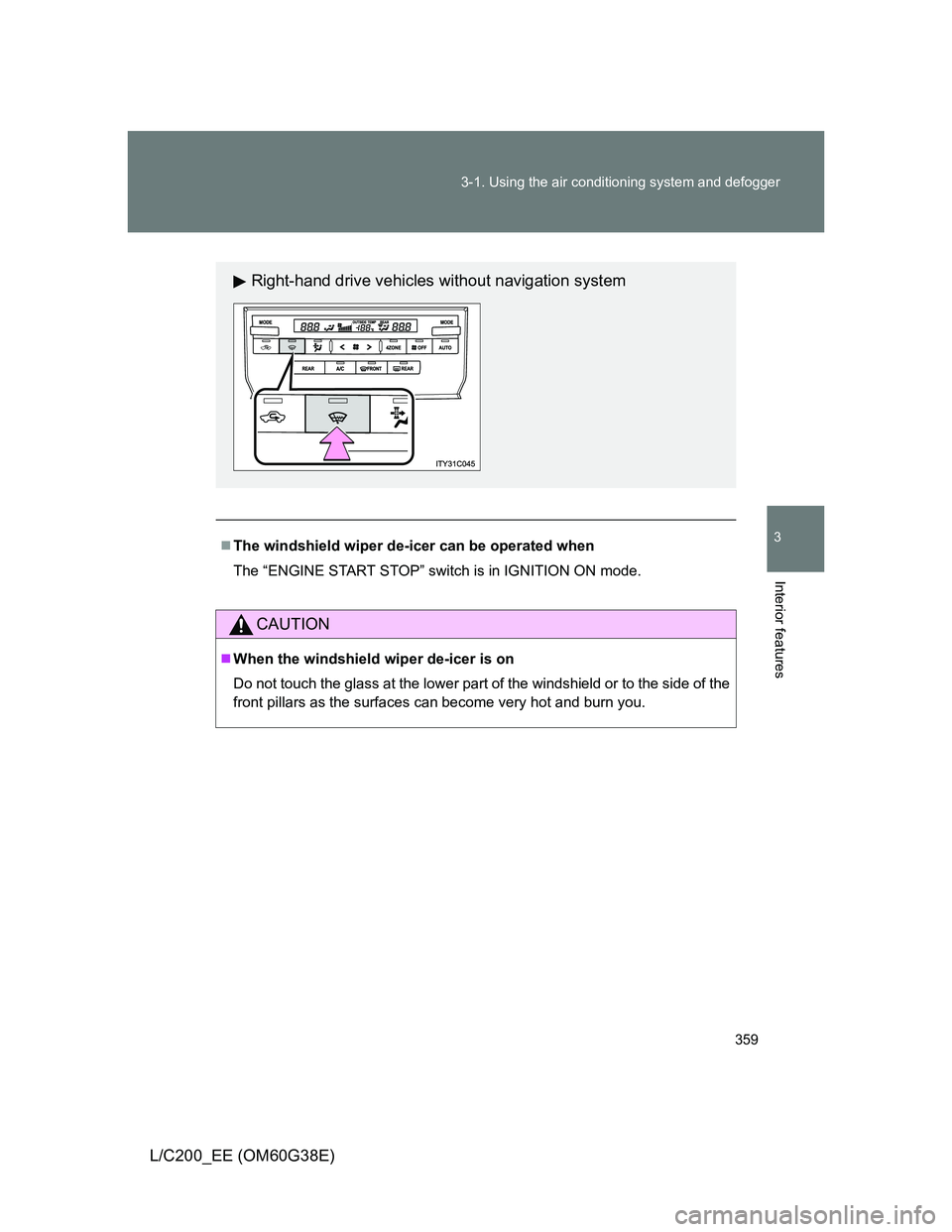
The windshield wiper de-icer can be operated when
The “ENGINE START STOP” switch is in IGNITION ON mode.
CAUTION
When the windshield wiper de-icer is on
Do not touch the glass at the lower part of the windshield or to the side of the
front pillars as the surfaces can become very hot and burn you.
Right-hand drive vehicles without navigation system