ignition TOYOTA LAND CRUISER 2012 Owners Manual
[x] Cancel search | Manufacturer: TOYOTA, Model Year: 2012, Model line: LAND CRUISER, Model: TOYOTA LAND CRUISER 2012Pages: 692, PDF Size: 29.3 MB
Page 3 of 692
1
2
3
4
5
6
3
L/C200_EE (OM60G38E)
2-1. Driving procedures
Driving the vehicle .............. 178
Engine (ignition) switch ....... 190
Automatic transmission....... 194
Turn signal lever ................. 200
Parking brake...................... 201
Horn .................................... 202
2-2. Instrument cluster
Gauges and meters ............ 203
Indicators and
warning lights.................... 207
Multi-information display ..... 212
2-3. Operating the lights and
wipers
Headlight switch.................. 218
Fog light switch ................... 222
Windshield wipers and
washer .............................. 224
Rear window wiper and
washer .............................. 231
Headlight cleaner switch ..... 2322-4. Using other driving systems
Cruise control ..................... 233
Toyota parking
assist-sensor .................... 237
4-Wheel AHC
(Active Height Control
Suspension) ..................... 248
AVS (Adaptive Variable
Suspension system)......... 258
Four-wheel drive system .... 259
Crawl Control (with Turn
Assist function)................. 264
Multi-terrain Select ............. 270
Multi-terrain Monitor ........... 276
Driving assist systems........ 300
PCS (Pre-Crash Safety) ..... 307
DPF (Diesel Particulate
Filter) system ................... 308
2-5. Driving information
Off-road precautions .......... 313
Cargo and luggage............. 317
Winter driving tips............... 319
Trailer towing...................... 323
2When driving
Page 18 of 692
18
L/C200_EE (OM60G38E)
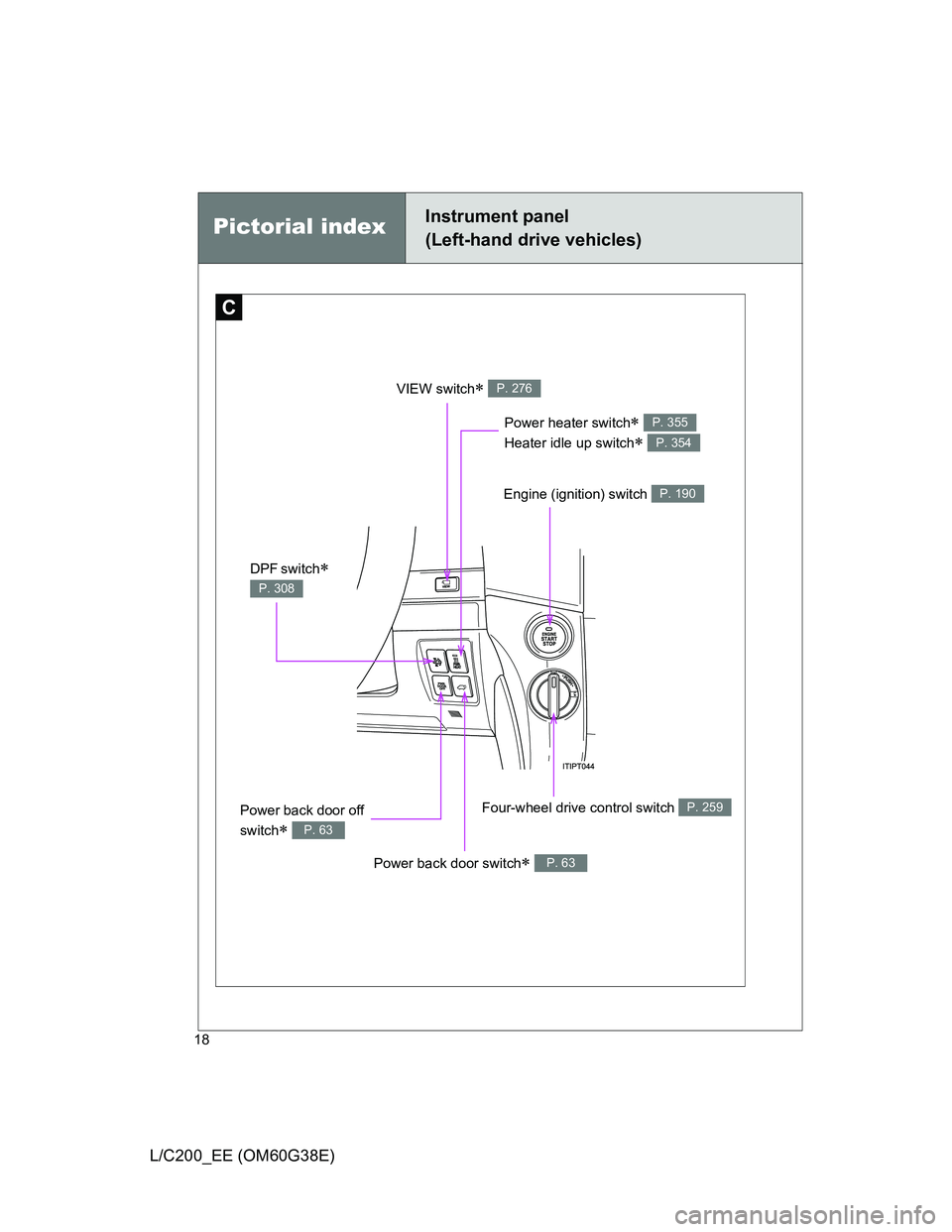
Pictorial indexInstrument panel
(Left-hand drive vehicles)
C
Engine (ignition) switch P. 190
Four-wheel drive control switch P. 259
Power heater switch
Heater idle up switch
P. 355
P. 354
Power back door off
switch
P. 63
VIEW switch P. 276
Power back door switch P. 63
DPF switch
P. 308
Page 28 of 692
28
L/C200_EE (OM60G38E)
H4
L4
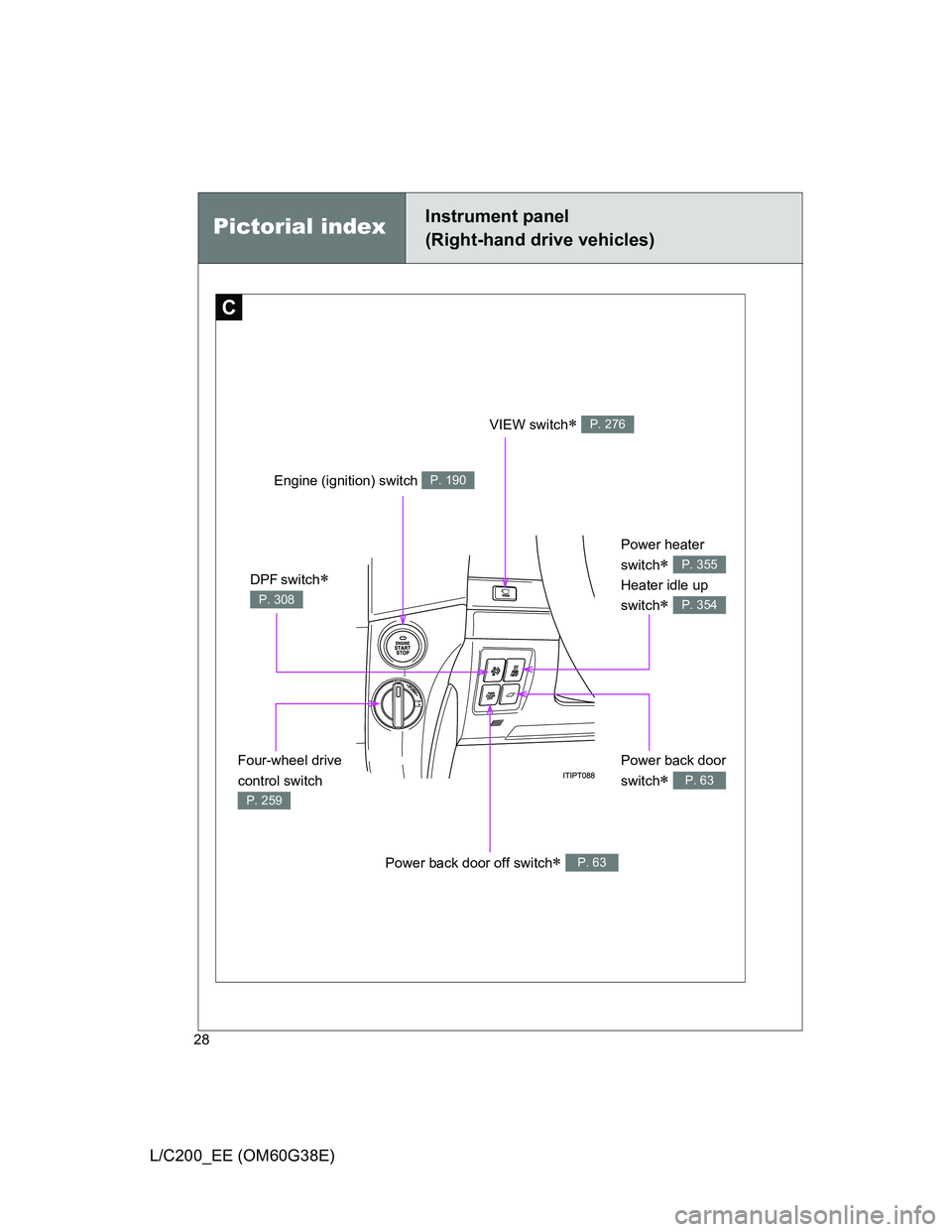
Pictorial indexInstrument panel
(Right-hand drive vehicles)
C
Engine (ignition) switch P. 190
Four-wheel drive
control switch
P. 259
Power heater
switch
Heater idle up
switch
P. 355
P. 354
VIEW switch P. 276
Power back door
switch
P. 63
Power back door off switch P. 63
DPF switch
P. 308
Page 50 of 692
50 1-2. Opening, closing and locking the doors
L/C200_EE (OM60G38E)
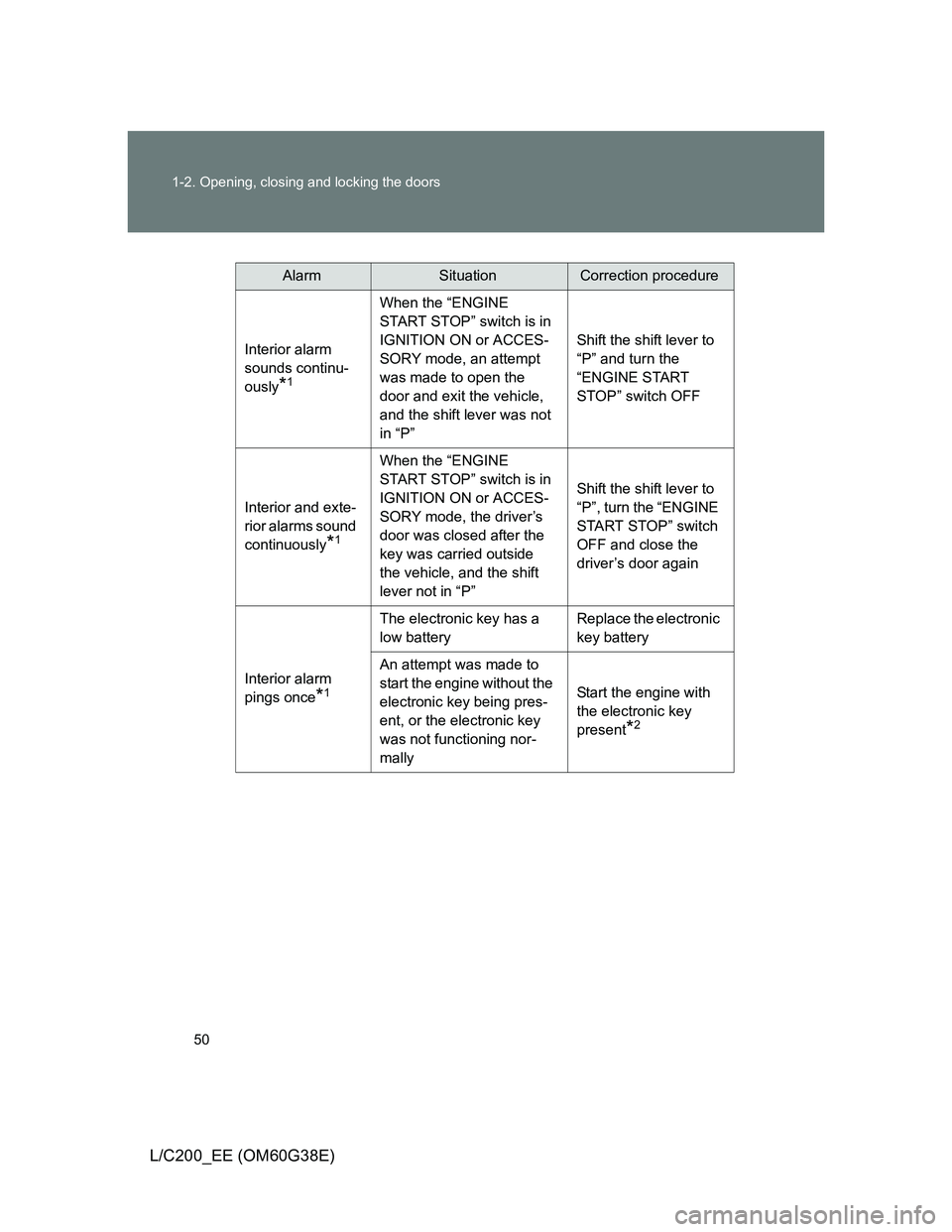
AlarmSituationCorrection procedure
Interior alarm
sounds continu-
ously
*1
When the “ENGINE
START STOP” switch is in
IGNITION ON or ACCES-
SORY mode, an attempt
was made to open the
door and exit the vehicle,
and the shift lever was not
in “P”Shift the shift lever to
“P” and turn the
“ENGINE START
STOP” switch OFF
Interior and exte-
rior alarms sound
continuously
*1
When the “ENGINE
START STOP” switch is in
IGNITION ON or ACCES-
SORY mode, the driver’s
door was closed after the
key was carried outside
the vehicle, and the shift
lever not in “P”Shift the shift lever to
“P”, turn the “ENGINE
START STOP” switch
OFF and close the
driver’s door again
Interior alarm
pings once
*1
The electronic key has a
low batteryReplace the electronic
key battery
An attempt was made to
start the engine without the
electronic key being pres-
ent, or the electronic key
was not functioning nor-
mallyStart the engine with
the electronic key
present
*2
Page 61 of 692
61 1-2. Opening, closing and locking the doors
1
Before driving
L/C200_EE (OM60G38E)
Locking the front doors from the outside without a key
Move the inside lock button to the lock position.
Close the door while pulling the door handle.
The door cannot be locked if the “ENGINE START STOP” switch is in
ACCESSORY or IGNITION ON mode, or the electronic key is left
inside the vehicle.
Depending on the position of the electronic key, the key may not be
detected correctly and the door may be locked.
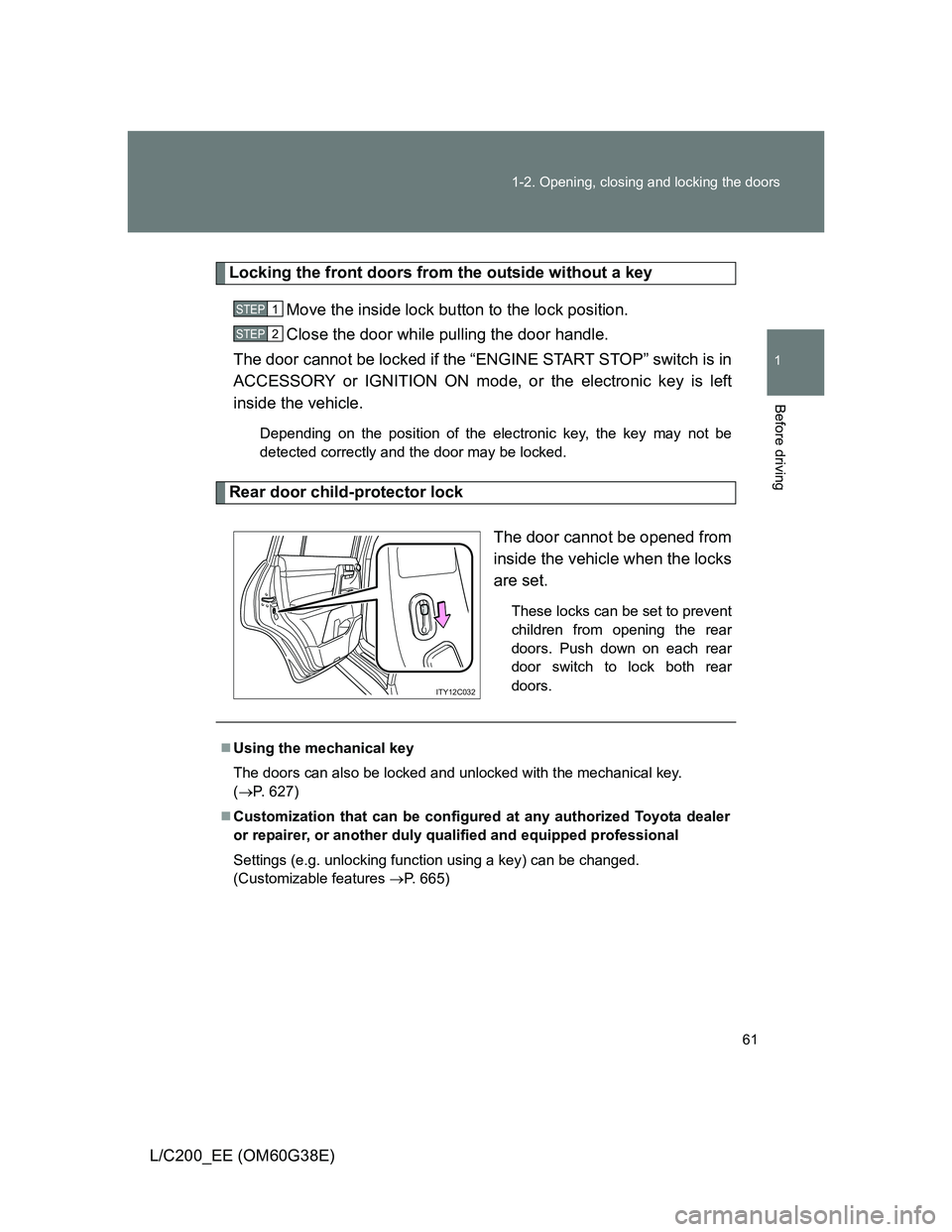
Rear door child-protector lock
The door cannot be opened from
inside the vehicle when the locks
are set.
These locks can be set to prevent
children from opening the rear
doors. Push down on each rear
door switch to lock both rear
doors.
STEP1
STEP2
ITY12C032
Using the mechanical key
The doors can also be locked and unlocked with the mechanical key.
(P. 627)
Customization that can be configured at any authorized Toyota dealer
or repairer, or another duly qualified and equipped professional
Settings (e.g. unlocking function using a key) can be changed.
(Customizable features P. 665)
Page 66 of 692

66 1-2. Opening, closing and locking the doors
L/C200_EE (OM60G38E)
The power back door can be opened/closed when
The back door can be opened automatically when the power back door main
switch is on, and the following conditions are met.
The power back door is unlocked (except closing operation)
The lower back door is closed (closing operation only)
To open the power back door when the “ENGINE START STOP” switch
is in IGNITION ON mode, the power back door is unlocked, the vehicle
speed must be lower than 3 km/h (1 mph) and the shift lever must be in
“P”.
Page 72 of 692
72 1-2. Opening, closing and locking the doors
L/C200_EE (OM60G38E)
CAUTION
Power back door (vehicles with power back door)
Observe the following precautions when operating the power back door.
Failure to do so may cause death or serious injury.
Check the safety of the surrounding area to make sure there are no obsta-
cles or anything that could cause any of your belongings to get caught.
If anyone is in the vicinity, make sure they are safe and let them know that
the back door is about to open or close.
If the power back door main switch is turned off while the back door is
operating during automatic operation, the back door stops operating. Take
extra care when on an incline, as the back door may open or close sud-
denly.
If the operating conditions of the power back door are no longer met, a
buzzer may sound and the back door may stop opening or closing. The
back door then has to be operated manually. Take extra care in this situa-
tion, as the back door may move abruptly.
On an incline, the back door may fall after it opens automatically. Make
sure the back door is fully open and secure.
In the following situations, the power back door may detect an abnormality
and automatic operation may be stopped. In this case, the back door has
to be operated manually. Take extra care in this situation, as the stopped
back door may suddenly fall, causing an accident.
• When the back door contacts an obstacle
• When the battery voltage suddenly drops, such as when the “ENGINE
START STOP” switch is turned to the IGNITION ON mode or the
engine is started during automatic operation
Do not attach any accessories other than genuine Toyota parts to the back
door. The power back door may not operate, causing itself to malfunction,
or the back door may fall closed again it is opened.
In cases such as when replacing tires, make sure to turn off the power
back door main switch. Failure to do so may cause the back door to oper-
ate unintentionally if the power back door switch is accidentally touched,
resulting in hands and fingers being caught and injured.
Page 86 of 692
86
1-3. Adjustable components (seats, mirrors, steering wheel)
L/C200_EE (OM60G38E)
Driving position memor y system
: If equipped
Your preferred driving position (the position of the driver’s seat,
steering wheel and outside rear view mirrors) can be entered into the
computer’s memory and recalled with the touch of a button. It is also
possible to set this function to activate automatically when the
doors are unlocked.
Three different driving positions can be entered into memory.
Entering a position to memory
Turn the “ENGINE START STOP” switch to IGNITION ON
mode.
Adjust the driver’s seat, steering wheel, and outside rear
view mirrors to the desired positions.
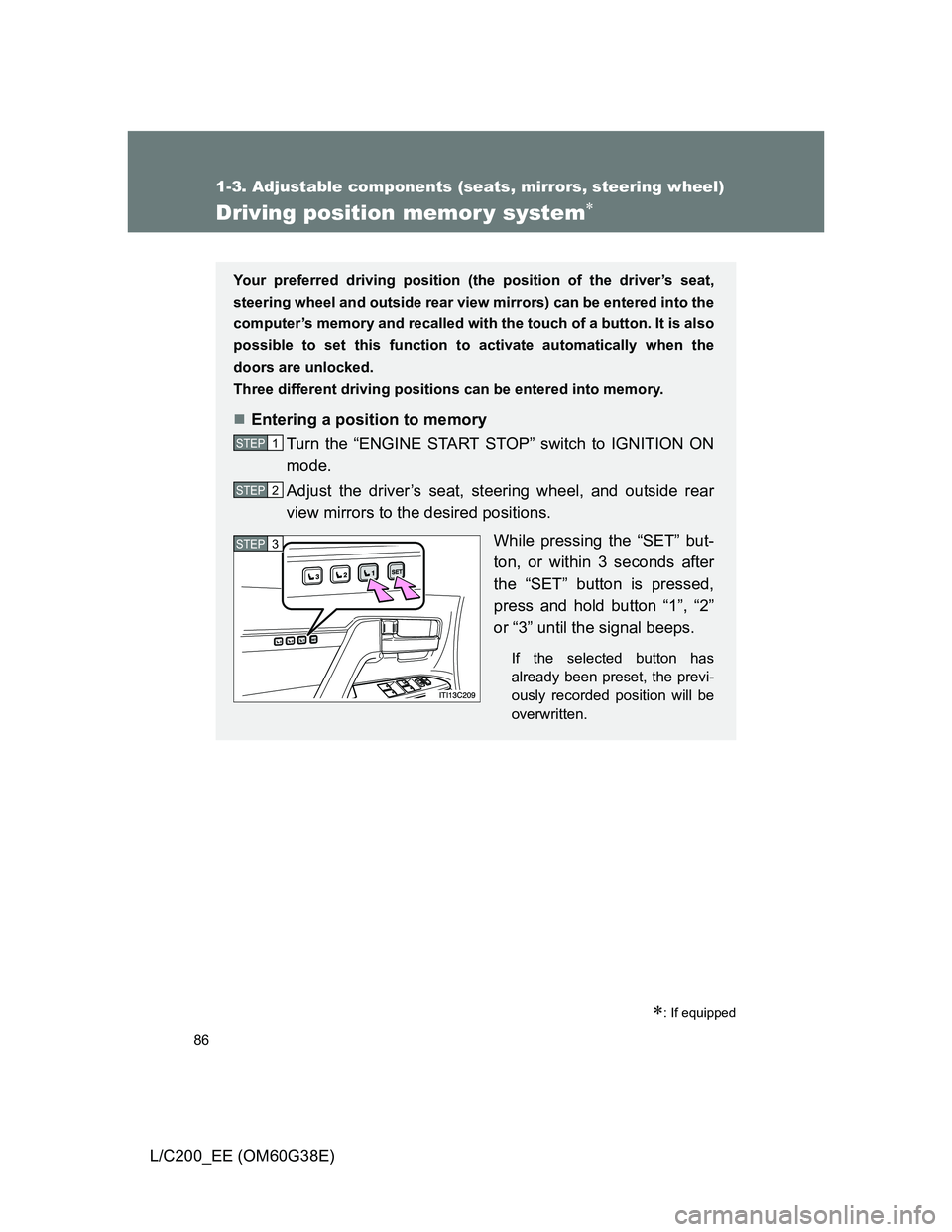
While pressing the “SET” but-
ton, or within 3 seconds after
the “SET” button is pressed,
press and hold button “1”, “2”
or “3” until the signal beeps.
If the selected button has
already been preset, the previ-
ously recorded position will be
overwritten.
STEP1
STEP2
STEP3
Page 87 of 692
87 1-3. Adjustable components (seats, mirrors, steering wheel)
1
Before driving
L/C200_EE (OM60G38E)
Recalling the memorized position
Check that the shift lever is set in “P”.
Turn the “ENGINE START STOP” switch to IGNITION ON
mode.
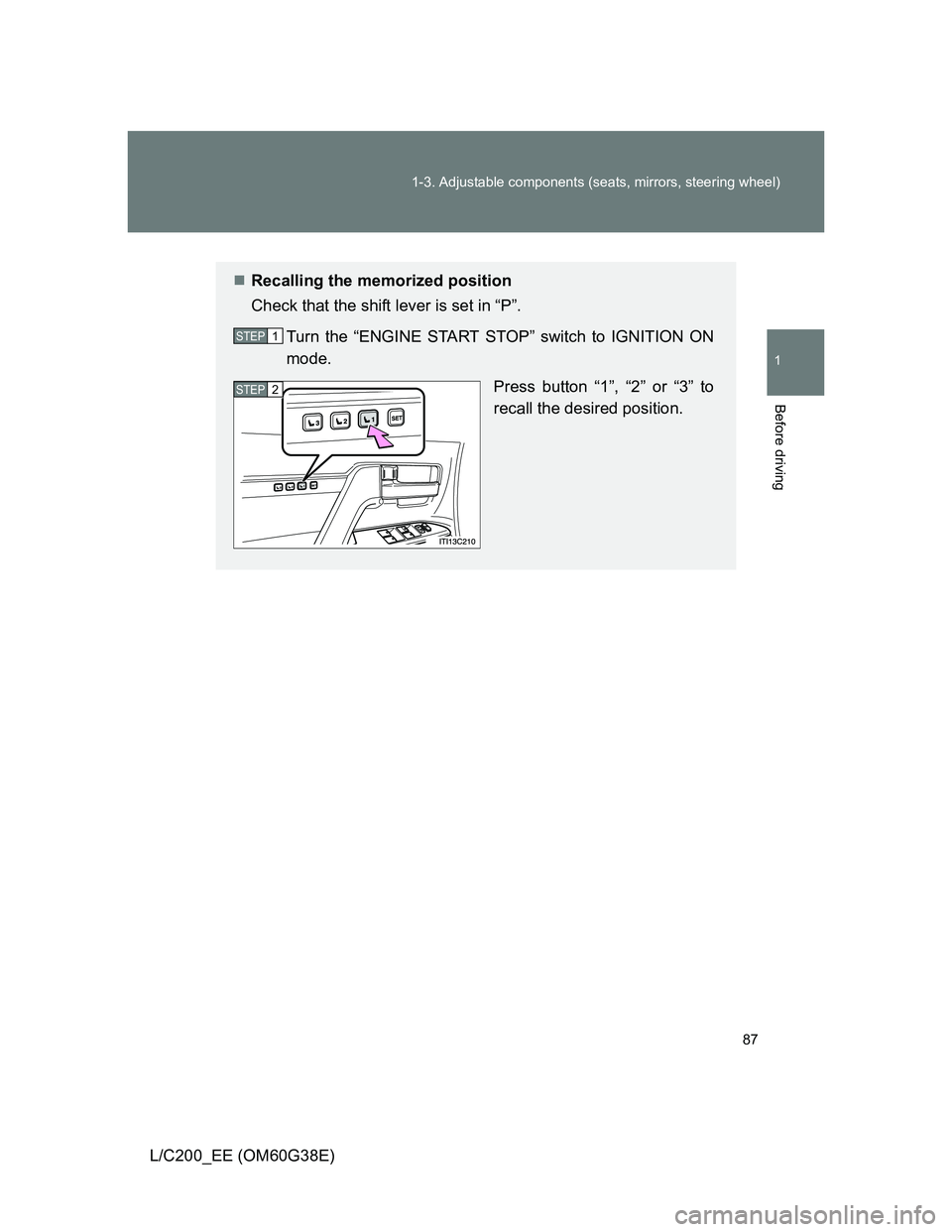
Press button “1”, “2” or “3” to
recall the desired position.
STEP1
STEP2
Page 102 of 692
102 1-3. Adjustable components (seats, mirrors, steering wheel)
L/C200_EE (OM60G38E)
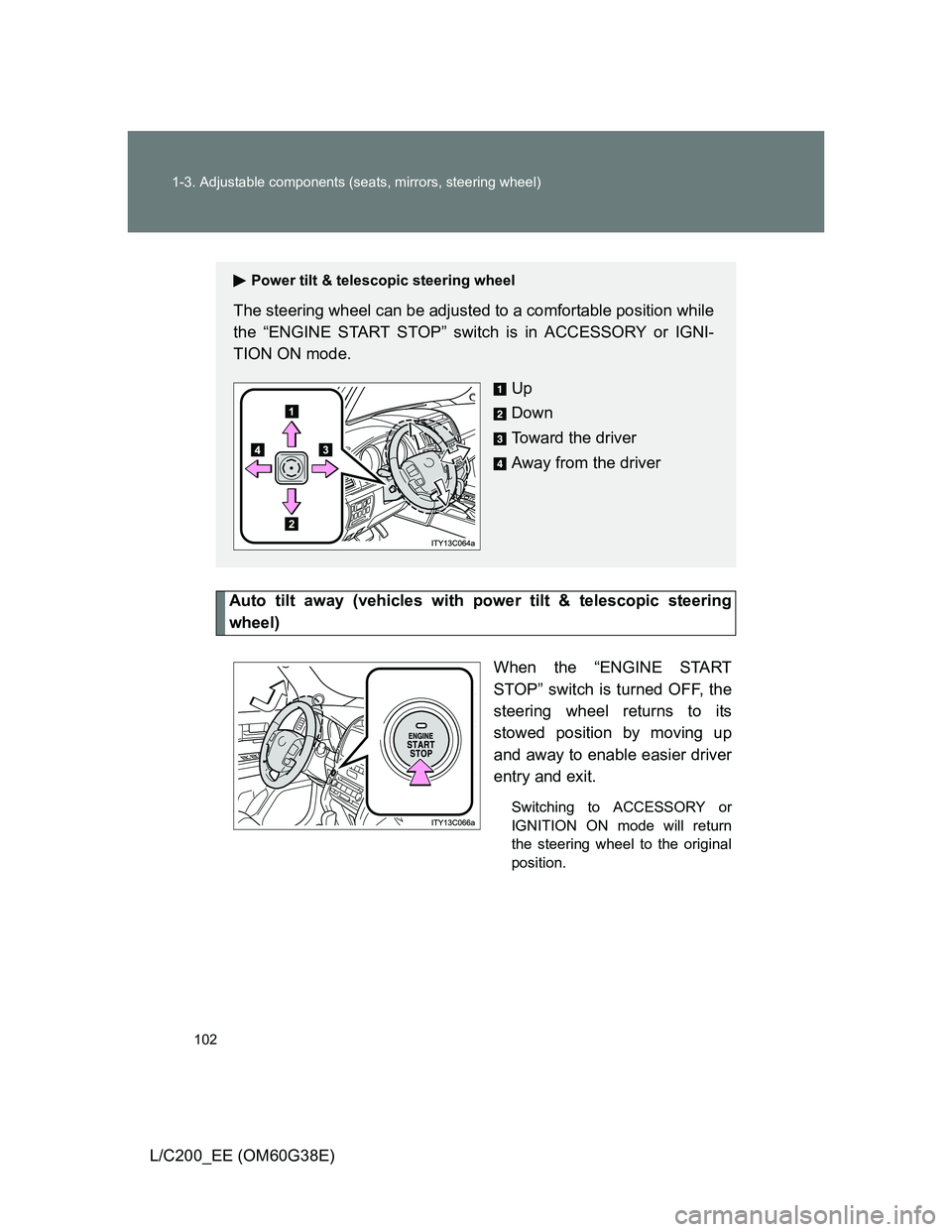
Auto tilt away (vehicles with power tilt & telescopic steering
wheel)
When the “ENGINE START
STOP” switch is turned OFF, the
steering wheel returns to its
stowed position by moving up
and away to enable easier driver
entry and exit.
Switching to ACCESSORY or
IGNITION ON mode will return
the steering wheel to the original
position.
Power tilt & telescopic steering wheel
The steering wheel can be adjusted to a comfortable position while
the “ENGINE START STOP” switch is in ACCESSORY or IGNI-
TION ON mode.
Up
Down
Toward the driver
Away from the driver