radio TOYOTA LAND CRUISER 2012 Owners Manual
[x] Cancel search | Manufacturer: TOYOTA, Model Year: 2012, Model line: LAND CRUISER, Model: TOYOTA LAND CRUISER 2012Pages: 692, PDF Size: 29.3 MB
Page 4 of 692
TABLE OF CONTENTSIndex
4
L/C200_EE (OM60G38E)
3-1. Using the air conditioning
system and defogger
Front air conditioning
system .............................. 336
Rear air conditioning
system .............................. 350
Heater idle up switch .......... 354
Power heater ...................... 355
Rear window and
outside rear view mirror
defoggers.......................... 356
Windshield wiper de-icer..... 358
3-2. Using the audio system
Audio system types............. 360
Using the radio.................... 362
Using the CD player............ 366
Playing back MP3 and
WMA discs........................ 373
Operating an iPod ............... 380
Operating
a USB memory ................. 388
Optimal use of
the audio system .............. 396
Using the AUX port ............. 398
Using the steering
switches ............................ 3993-3. Using the Bluetooth
® audio
system
Bluetooth
® audio system .... 402
Using the Bluetooth®
audio system .................... 407
Operating a Bluetooth
®
enabled portable
player ............................... 410
Setting up a Bluetooth
®
enabled portable
player ............................... 413
Bluetooth
® audio
system setup .................... 417
3-4. Using the hands-free system
(for cellular phone)
Hands-free system
(for cellular phone) ........... 418
Using the hands-free
system.............................. 423
Making a phone call ........... 430
Setting a cellular phone...... 434
Security and
system setup .................... 438
Using the phone book ........ 442
3Interior features
Page 39 of 692
39 1-1. Key information
1
Before driving
L/C200_EE (OM60G38E)
When required to leave the vehicle’s key with a parking attendant
Lock the glove box as circumstances demand. (P. 453)
Remove the mechanical key for your own use and provide the attendant with
the electronic key only.
Key number plate
Keep the plate in a safe place such as your wallet, not in the vehicle. In the
event that a key is lost, a new key can be made by any authorized Toyota
dealer or repairer, or another duly qualified and equipped professional, using
the key number plate. (P. 626)
When riding in an aircraft
When bringing an electronic key onto an aircraft, make sure you do not
press any buttons on the electronic key while inside the aircraft cabin. If you
are carrying an electronic key in your bag etc., ensure that the buttons are
not likely to be pressed accidentally. Pressing a button may cause the elec-
tronic key to emit radio waves that could interfere with the operation of the
aircraft.
NOTICE
To prevent key damage
Do not subject the keys to strong shocks, expose them to high tempera-
tures by placing them in direct sunlight, or get them wet.
Do not expose the keys to electromagnetic materials or attach any mate-
rial that blocks electromagnetic waves to the key surface.
Do not disassemble the electronic key.
Page 44 of 692
44 1-2. Opening, closing and locking the doors
L/C200_EE (OM60G38E)
Operation signals
The emergency flashers flash to indicate that the doors have been locked/
unlocked.
Conditions affecting operation
The smart entry & start system uses weak radio waves. In the following situ-
ations, the communication between the electronic key and the vehicle may
be affected, preventing the smart entry & start system and wireless remote
control from operating properly. (Ways of coping: P. 627)
When the electronic key battery is depleted
Near a TV tower, electric power plant, gas station, radio station, large dis-
play, airport or other facility that generates strong radio waves or electri-
cal noise
When carrying a portable radio, cellular phone, cordless phone or other
wireless communication devices
When the electronic key has come into contact with, or is covered by a
metallic object
When multiple electronic keys are in the vicinity
When carrying or using the electronic key together with the following
devices that emit radio waves
• Another vehicle’s electronic key
• A wireless key that emits radio waves
• Personal computer
If window tint with a metallic content or metallic objects are attached to
the rear window
Page 47 of 692
47 1-2. Opening, closing and locking the doors
1
Before driving
L/C200_EE (OM60G38E)
To operate the system properly
Make sure to carry the electronic key when operating the system. Do not get
the electronic key too close to the vehicle when operating the system from
the outside of the vehicle.
Depending on the position and holding condition of the electronic key, the
key may not be detected correctly and the system may not operate properly.
(The alarm may go off accidentally, or the door lock prevention may not func-
tion.)
Note for the entry function
Even when the electronic key is within the effective range (detection
areas), the system may not operate properly in the following cases.
• The electronic key is too close to the window or outside door handle,
near the ground, or in a high place when the doors are locked or
unlocked.
• The electronic key is near the ground or in a high place, or too close to
the rear bumper center when the back door is locked or unlocked.
• The electronic key is on the instrument panel, luggage cover, floor or in
the glove box when the engine is started or “ENGINE START STOP”
switch modes are changed.
Do not leave the electronic key on top of the instrument panel or near the
door pockets when exiting the vehicle. Depending on the radio wave
reception conditions, it may be detected by the antenna outside the cabin
and the door will become lockable from the outside, possibly trapping the
electronic key inside the vehicle.
As long as the electronic key is within the effective range, the doors may
be locked or unlocked by anyone.
Even if the electronic key is not inside the vehicle, it may be possible to
start the engine if the electronic key is near the window.
Page 54 of 692
54 1-2. Opening, closing and locking the doors
L/C200_EE (OM60G38E)
CAUTION
Caution regarding interference with electronic devices
People with implanted pacemakers or cardiac defibrillators should main-
tain a reasonable distance between themselves and the smart entry &
start system antennas. (P. 43) The radio waves may affect the operation
of such devices. If necessary, the entry function can be disabled. Ask any
authorized Toyota dealer or repairer, or another duly qualified and
equipped professional for details, such as the frequency of radio waves
and timing of emitting the radio waves. Then, consult your doctor to see if
you should disable the entry function.
Users of any electrical medical device other than implanted pacemakers
and implanted cardiac defibrillators should consult the manufacturer of the
device for information about its operation under the influence of radio
waves. Radio waves could have unexpected effects on the operation of
such medical devices.
Ask any authorized Toyota dealer or repairer, or another duly qualified and
equipped professional for details for disabling smart entry & start system.
Page 334 of 692
334
L/C200_EE (OM60G38E)
3-1. Using the air conditioning
system and defogger
Front air conditioning
system ............................ 336
Rear air conditioning
system ............................ 350
Heater idle up switch ........ 354
Power heater .................... 355
Rear window and
outside rear view mirror
defoggers........................ 356
Windshield wiper de-icer... 358
3-2. Using the audio system
Audio system types........... 360
Using the radio.................. 362
Using the CD player.......... 366
Playing back MP3 and
WMA discs...................... 373
Operating an iPod ............. 380
Operating
a USB memory ............... 388
Optimal use of
the audio system ............ 396
Using the AUX port ........... 398
Using the steering
switches .......................... 399
Page 360 of 692
360
L/C200_EE (OM60G38E)
3-2. Using the audio system
Audio system types
With navigation system
Owners of models equipped with a navigation system should
refer to the “Navigation System Owner’s Manual”.
Without navigation system
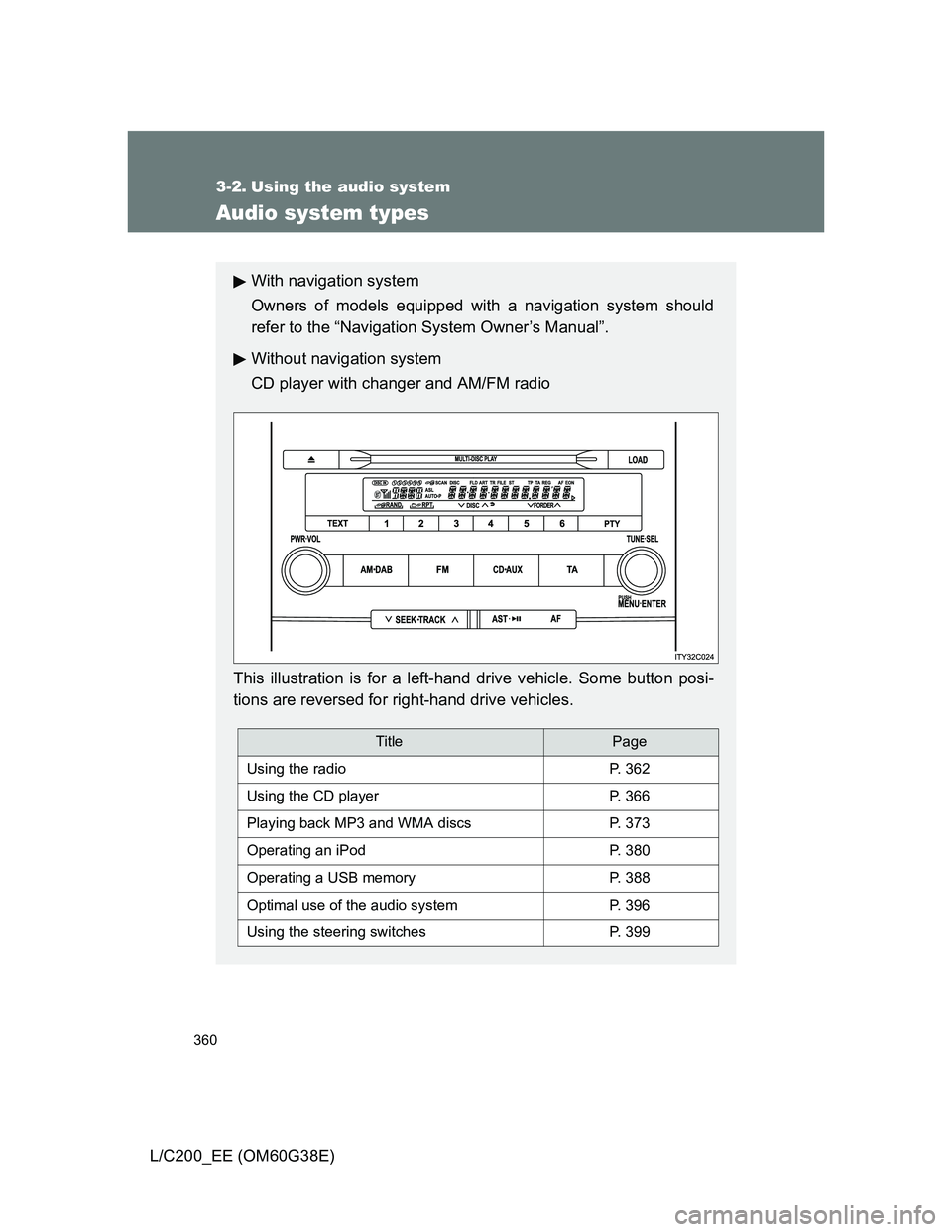
CD player with changer and AM/FM radio
This illustration is for a left-hand drive vehicle. Some button posi-
tions are reversed for right-hand drive vehicles.
TitlePage
Using the radioP. 362
Using the CD playerP. 366
Playing back MP3 and WMA discsP. 373
Operating an iPodP. 380
Operating a USB memoryP. 388
Optimal use of the audio systemP. 396
Using the steering switchesP. 399
Page 362 of 692
362
3-2. Using the audio system
L/C200_EE (OM60G38E)
Using the radio
Setting station presets
Manually
In AF-ON mode the radio changes frequency to the strongest sig-
nal of the selected station.
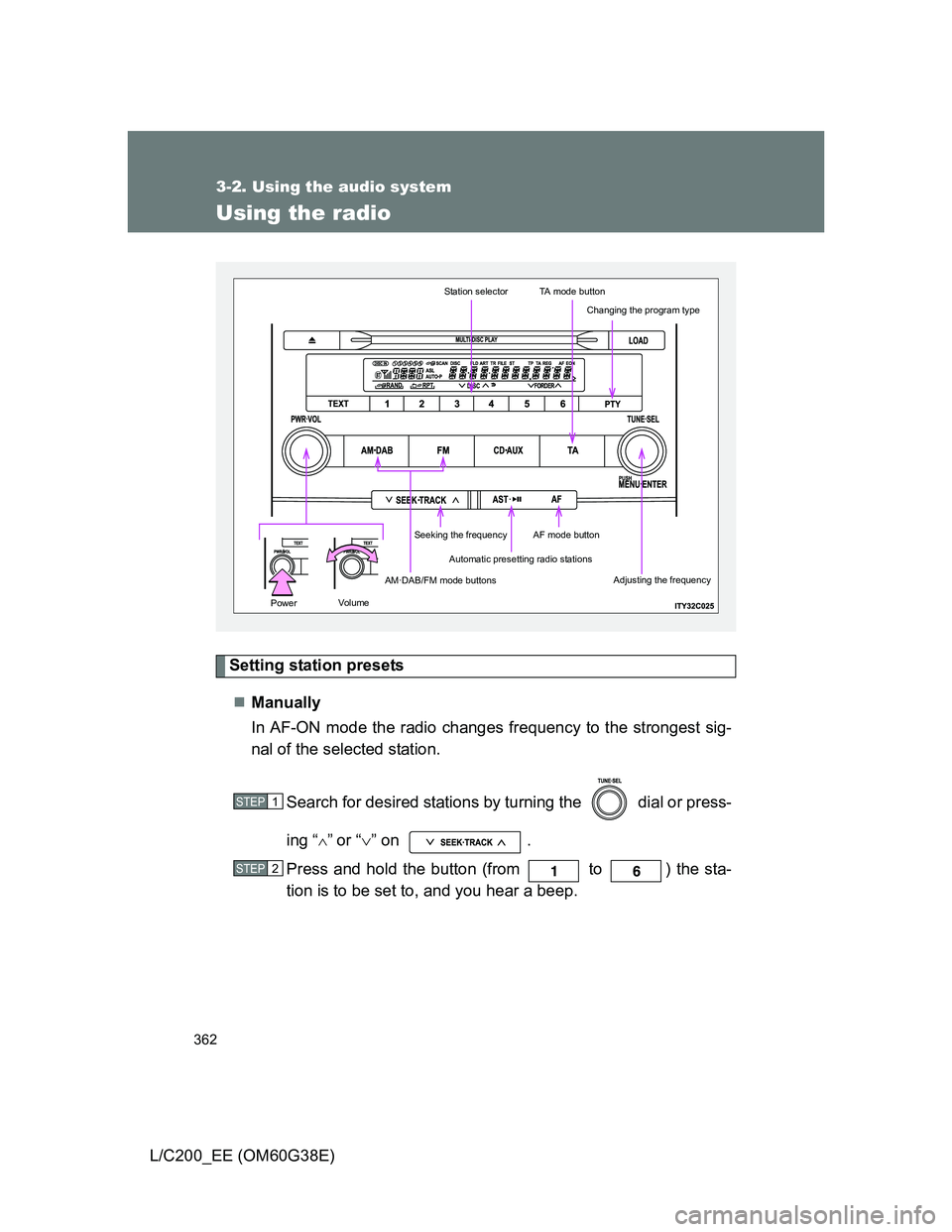
Search for desired stations by turning the dial or press-
ing “
”or “” on .
Press and hold the button (from to ) the sta-
tion is to be set to, and you hear a beep.
Automatic presetting radio stations
Station selectorTA mode button
AM·DAB/FM mode buttons
Seeking the frequencyAF mode button
Changing the program type
Adjusting the frequency
Volu mePower
STEP1
STEP2
Page 363 of 692
363 3-2. Using the audio system
3
Interior features
L/C200_EE (OM60G38E)Automatically
Press and hold until you hear a beep.
Up to 6 stations are set in order of reception quality. When the settings
are finished, 2 beeps will be heard.
In the FM1 or FM2 mode, the stations automatically set by the audio sys-
tem will be set in the FM3 presets.
RDS (Radio Data System)
This feature allows your radio to receive station and program informa-
tion (classical, news, etc.) from radio stations that broadcast this
information.
Listening to stations of the same network
Press .
AF-ON, REG-OFF modes: A station among those of the same net-
work with strong reception is selected.
Switching between different regional
programs of the same station might
occur.
AF-ON, REG-ON modes: A station among those of the same net-
work with strong reception and broad-
casting the same program is selected.
Each time is pressed, the mode changes in the order of AF-ON,
REG-OFF AF-ON, REG-ON AF-OFF, REG-OFF.
Specifying program type
Press .
Each time is pressed, the program type changes in the order of
“NEWS” “SPORTS” “TALK” “POP” “CLASSICS”.
Page 364 of 692
364 3-2. Using the audio system
L/C200_EE (OM60G38E)Traffic information
Press .
TP mode: The system automatically switches to traffic information
when a broadcast with a traffic information signal is
received.
The station returns to the previous one when the traffic infor-
mation ends.
TA mode: Traffic information can be heard only when a signal is
received. The system switches to the mute mode when
a signal is not received. In the CD or MP3/WMA mode,
the system automatically switches to traffic information
when a signal is received.
The audio system returns to the mute, CD or MP3/WMA
mode when the traffic information ends.
The audio system mode changes as follows each time is
pressed.
FM modes: TP TA OFF
Modes other than the radio modes: TA OFF
Emergency broadcast reception mode
“ALARM” appears in the display in the event that an emergency
broadcast is received, and the emergency broadcast is aired.