phone TOYOTA LAND CRUISER 2013 J200 Navigation Manual
[x] Cancel search | Manufacturer: TOYOTA, Model Year: 2013, Model line: LAND CRUISER, Model: TOYOTA LAND CRUISER 2013 J200Pages: 27, PDF Size: 2.22 MB
Page 2 of 27
1
TABLE OF CONTENTS
OVERVIEW 2
Limitations of the Quick Reference Guide 2
Basic Operation 2
CONNECT A BLUETOOTH PHONE 3
CALLING BY VOICE RECOGNITION 4
Dial by Number 4
Dial by Name 5
DESTINATION INPUT 6
By Address 6
Note on Voice Recognition 8
Tips for Using Voice Recognition 8
By Address - Voice Recognition 8
DESTINATION INPUT - POINT OF INTEREST (POI) 10
Point of Interest by Name 10
Point of Interest by Category 11
Point of Interest by Category - Voice Recognition 12
SET HOME 13
ADDITIONAL NAVIGATION FEATURES 15
Operation of Emergency Screen 15
Search Area 15
Route Preferences 15
3 Routes 15
Screen Configurations 15
Beep Setting 16
Voice Volume 16
Language 16
Clock 16
Auto Screen Change 16
Estimated Distance and Time 16
NAVTRAFFIC 17
Show Navtraffic Information 17
Automatically Avoid Traffic 18
Traffic Incident Warning 18
Show Free Flowing Traffic 19
NAVWEATHER, SPORTS, STOCKS AND FUEL 20
ENTUNE™ - INTRODUCTION 21
What is Entune? 21
Entune 21
Phone Compatibility 22
ENTUNE - HOW TO GET STARTED 23
Basic Overview 23
ENTUNE - NEW CUSTOMER REGISTRATION 24
Account Creation 24
Downloading Entune App to Your Phone 24
Launch App 24
Connect Phone 24
Accessing Entune Apps 24
Page 3 of 27
2
The Quick Reference Guide is designed to provide information on the basic operation and
key features of the navigation system and Entune
™ (apps and data services). The Quick
Reference Guide is not intended as a substitute for the Navigation Owner’s Manual. We strongly
encourage you to review the Navigation Owner’s Manual, the quick reference guide and visit
www.toyota.com/entune so you will have a better understanding of all your v\
ehicles features and
controls.
OVERVIEW
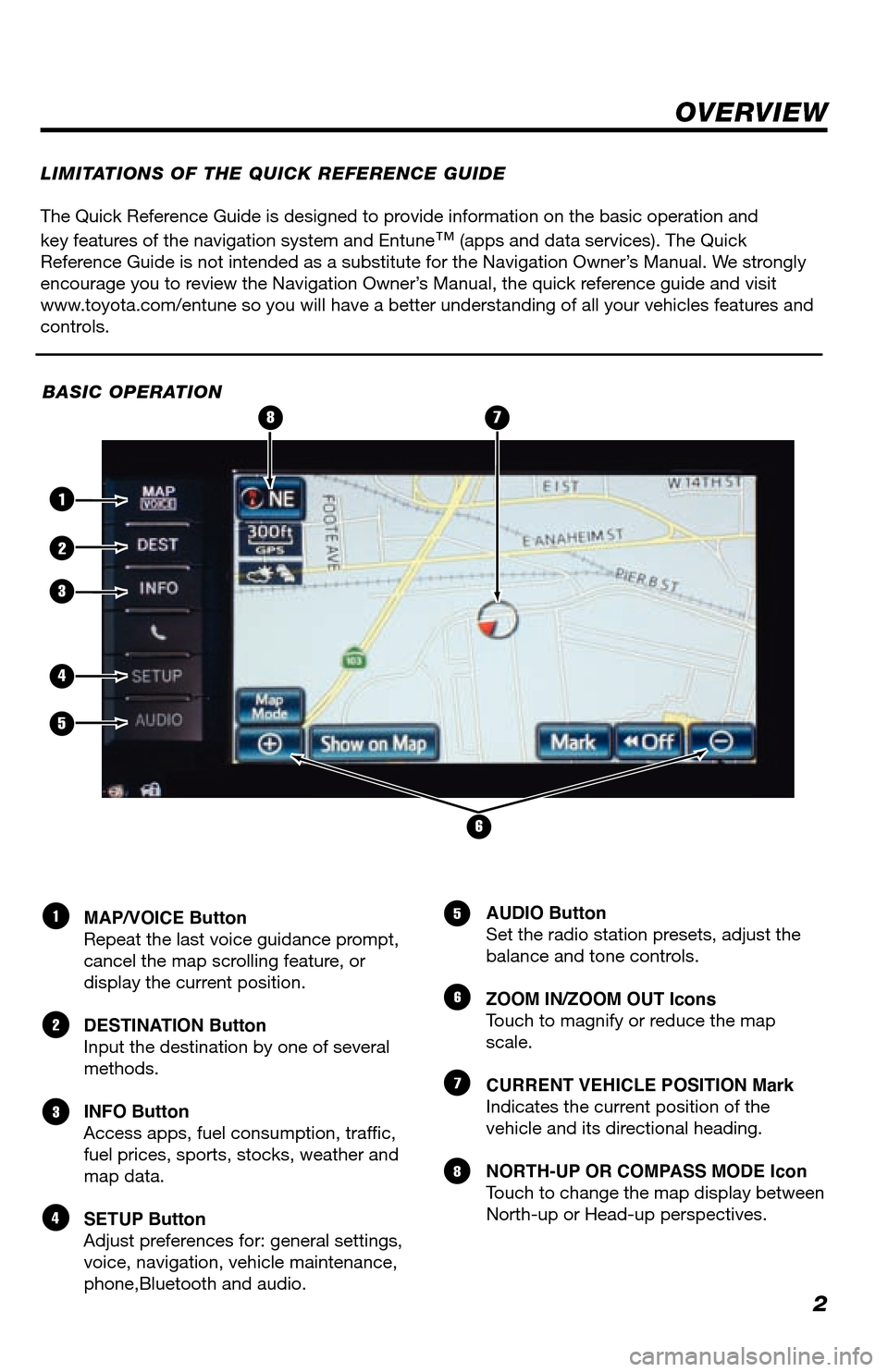
MAP/VOICE Button
Repeat the last voice guidance prompt,
cancel the map scrolling feature, or
display the current position.
DESTINATION Button
Input the destination by one of several
methods.
INFO Button
Access apps, fuel consumption, traffic,
fuel prices, sports, stocks, weather and
map data.
SETUP Button
Adjust preferences for: general settings,
voice, navigation, vehicle maintenance,
phone,Bluetooth and audio. AUDIO Button
Set the radio station presets, adjust the
balance and tone controls.
ZOOM IN/ZOOM OUT Icons
Touch to magnify or reduce the map
scale.
CURRENT VEHICLE POSITION Mark
Indicates the current position of the
vehicle and its directional heading.
NORTH-UP OR COMPASS MODE Icon
Touch to change the map display between
North-up or Head-up perspectives.1
2
3
4
5
6
7
8
LIMITATIONS OF THE QUICK REFERENCE GUIDE
BASIC OPERATION
2
5
6
4
1
3
87
Page 4 of 27
3
CONNECT A BLUETOOTH PHONE
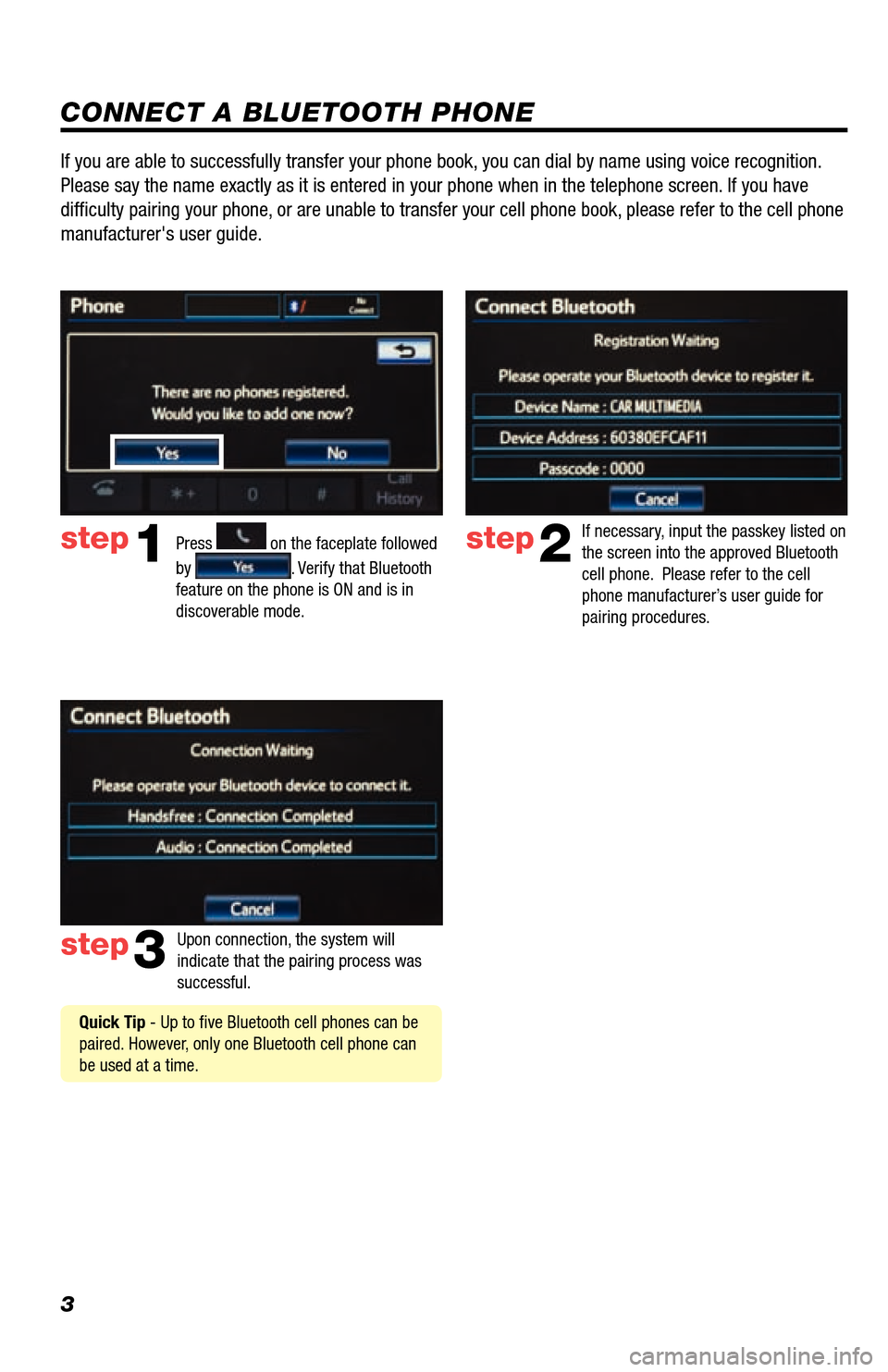
Press
1
2
3
6
7
5
4
APPS
on the faceplate followed
by
. Verify that Bluetooth
feature on the phone is ON and is in
discoverable mode.
step2
step3
step1
If necessary, input the passkey listed on
the screen into the approved Bluetooth
cell phone. Please refer to the cell
phone manufacturer’s user guide for
pairing procedures.
Upon connection, the system will
indicate that the pairing process was
successful.
Quick Tip - Up to five Bluetooth cell phones can be
paired. However, only one Bluetooth cell phone can
be used at a time.
If you are able to successfully transfer your phone book, you can dial by name using voice recognition.
Please say the name exactly as it is entered in your phone when in the t\
elephone screen. If you have
difficulty pairing your phone, or are unable to transfer your cell phone book, please refer to the cell phone
manufacturer's user guide.
Page 5 of 27
4
CALLING BY VOICE RECOGNITION
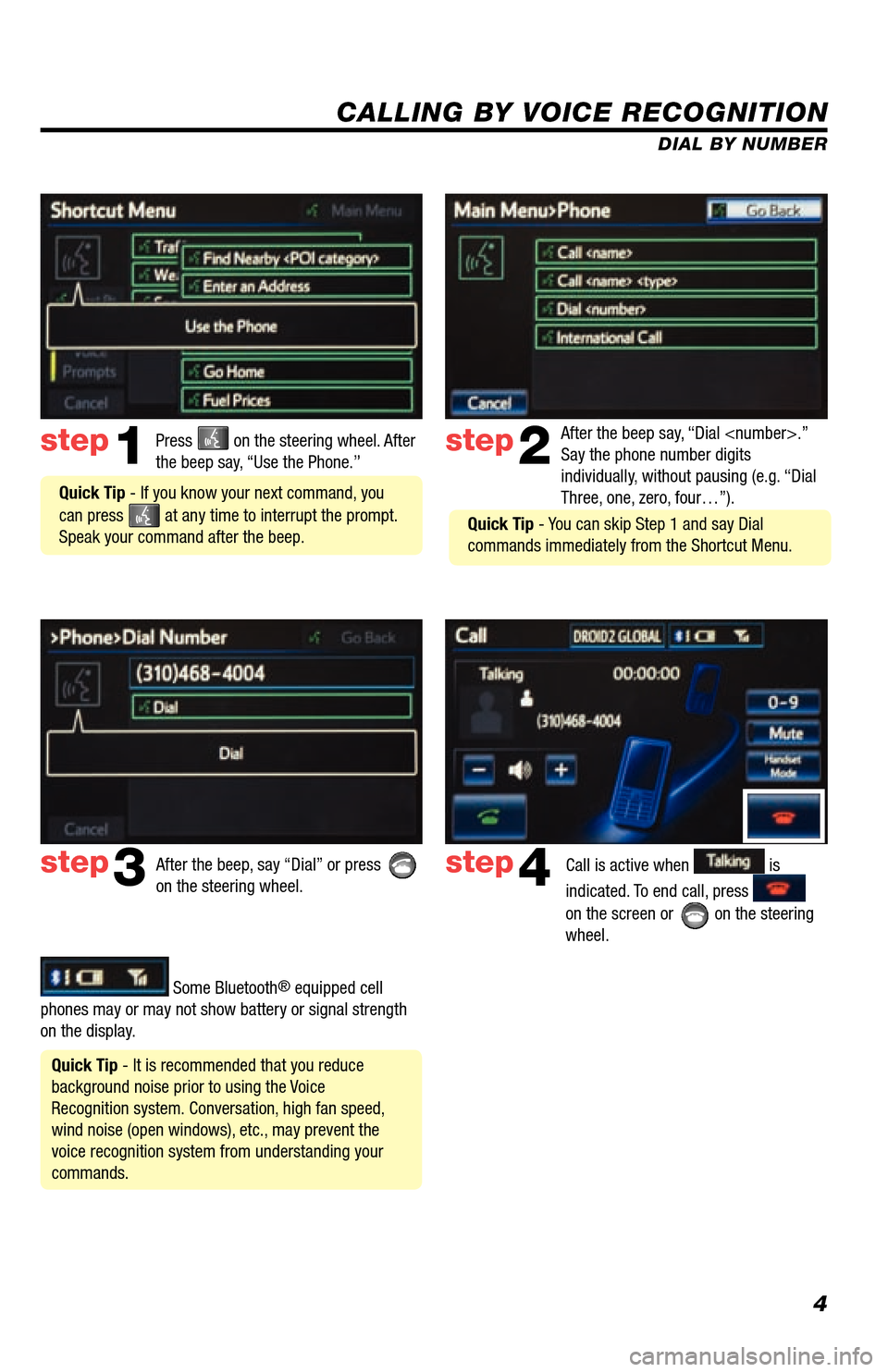
After the beep say, “Dial
Say the phone number digits
individually, without pausing (e.g. “Dial
Three, one, zero, four…”).step2
step3
Press on the steering wheel. After
the beep say, “Use the Phone.”step1
After the beep, say “Dial” or press
on the steering wheel. Call is active when is
indicated. To end call, press
on the screen or
on the steering
wheel.
step4
Quick Tip - It is recommended that you reduce
background noise prior to using the Voice
Recognition system. Conversation, high fan speed,
wind noise (open windows), etc., may prevent the
voice recognition system from understanding your
commands.
Quick Tip - If you know your next command, you
can press
at any time to interrupt the prompt.
Speak your command after the beep.
Some Bluetooth® equipped cell
phones may or may not show battery or signal strength
on the display. DIAL BY NUMBER
Quick Tip - You can skip Step 1 and say Dial
commands immediately from the Shortcut Menu.
Page 6 of 27
5
CALLING BY VOICE RECOGNITION
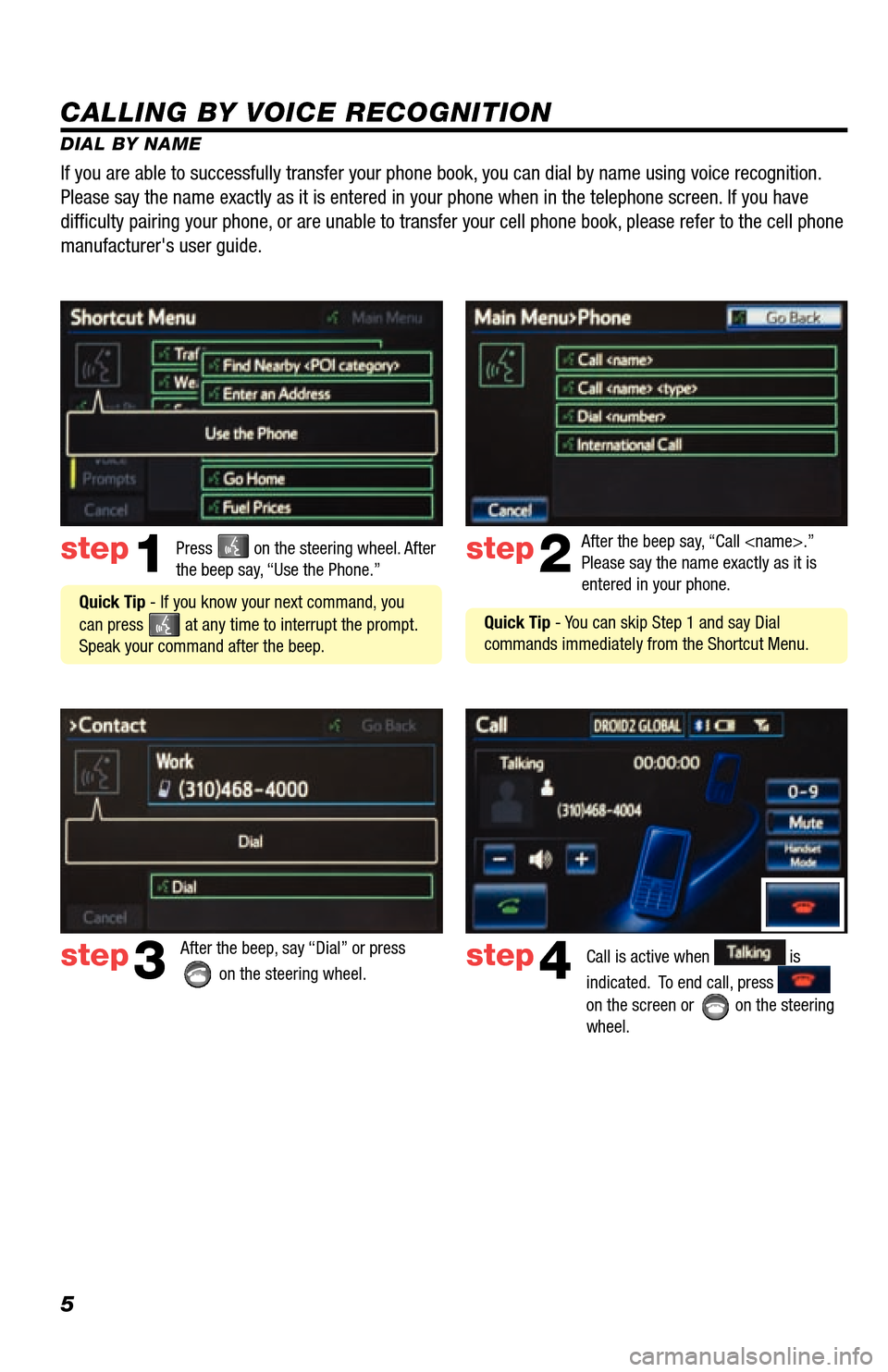
DIAL BY NAMEPress
on the steering wheel. After
the beep say, “Use the Phone.”step1
Quick Tip - If you know your next command, you
can press
at any time to interrupt the prompt.
Speak your command after the beep. After the beep say, “Call
Please say the name exactly as it is
entered in your phone.
step2
step3
After the beep, say “Dial” or press
on the steering wheel. step4Call is active when is
indicated. To end call, press
on the screen or
on the steering
wheel.
If you are able to successfully transfer your phone book, you can dial by name using voice recognition.
Please say the name exactly as it is entered in your phone when in the t\
elephone screen. If you have
diffi culty pairing your phone, or are unable to transfer your cell phone book, please refer to the cell phone
manufacturer's user guide.
Quick Tip - You can skip Step 1 and say Dial
commands immediately from the Shortcut Menu.
Page 21 of 27
20
NAVWEATHER
Get driver-friendly weather information for your area and along your route. See storms and severe weather, keep track
of weather warnings and see the current conditions and 3-day forecasts. For details visit siriusxm.com/navweather
INFOAPPS > >
SPORTS
See the schedules and scores of your favorite sports teams as they happen, and get reminders of where and when to
catch the game on satellite radio.
· You will need to add your desired teams to the navigation system before you can receive any available team data.
· You can save up to five teams in the system, and you can change your saved teams at any time.
INFOAPPS > > >
STOCKS*
Track prices and movements of up to ten stocks that you’ve selected from around 9,000 actively reported securities
traded on NYSE
®, AMEX® and NASDAQ®.
· You will need to add your desired stocks to the navigation system before you can receive any available data.
· You can save up to ten stocks in the system, and you can change your saved stocks at any time.
· You must know the symbol of the stock you wish to enter.
INFOAPPS > > >
FUEL
View up-to-date fuel prices for regular, mid-grade and premium gas in your area. Sort the results by price, distance or
brand. View station addresses and phone numbers. Select a station and navigate to it using the on-board navigation
system.
INFOAPPS >
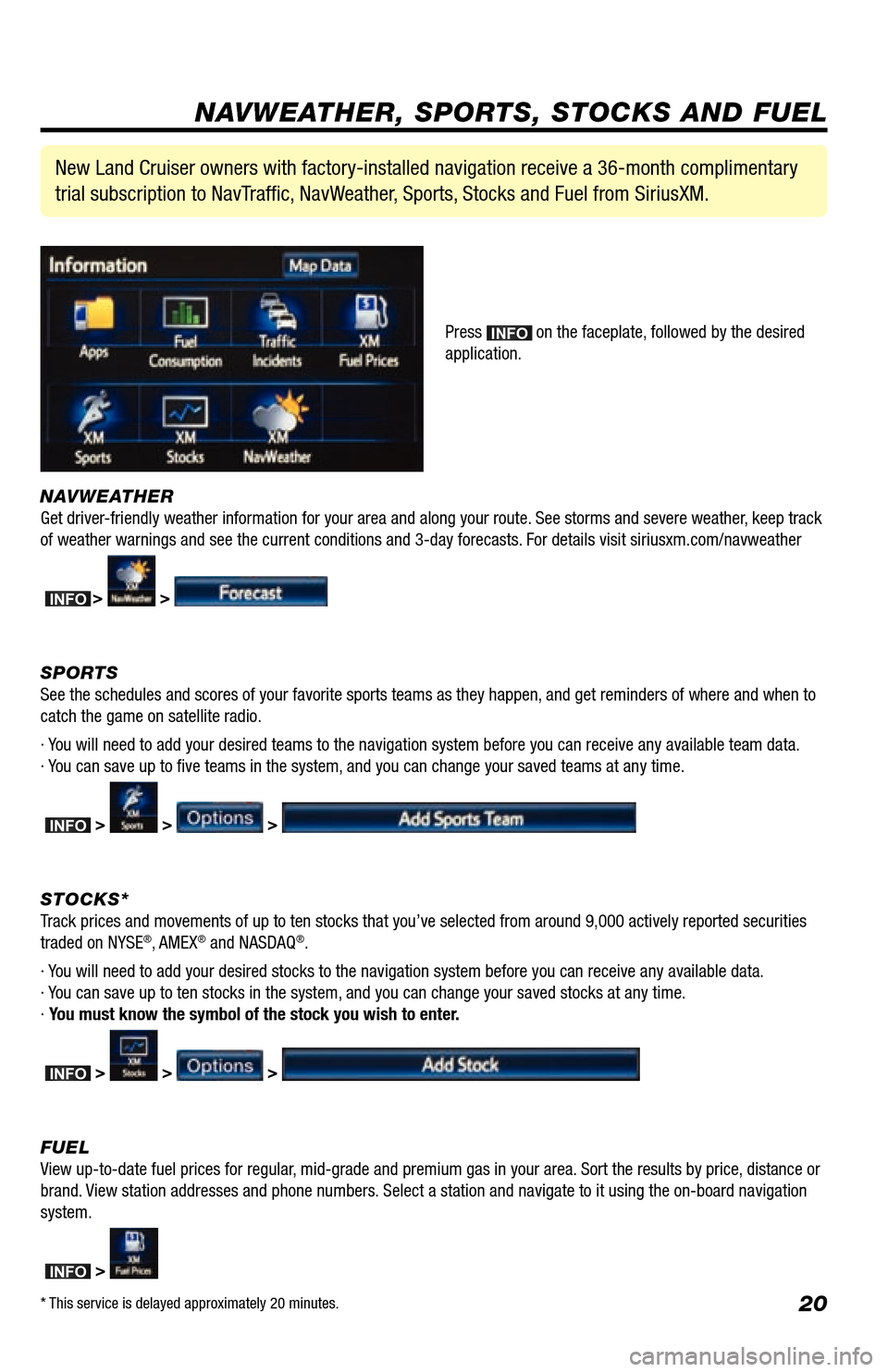
New Land Cruiser owners with factory-installed navigation receive a 36-month complimentary
trial subscription to NavTraffic, NavWeather, Sports, Stocks and Fuel from SiriusXM.
Press INFOAPPS on the faceplate, followed by the desired
application.
NAVWEATHER, SPORTS, STOCKS AND FUEL
* This service is delayed approximately 20 minutes.
INFOAPPS
Page 22 of 27
21
- INTRODUCTION
STOPPLEASE READ
WHAT IS ENTUNE?
The available Entune
™ system is a collection of popular mobile
applications and data services integrated with select 2013 Toyota
vehicles. Entune
™ includes three years of complimentary access to
apps and services delivered via most smartphones and some feature
phones (after three years, access charges will apply; excluding
Pandora
®).
Once the phone is connected to the vehicle using Bluetooth
®
wireless technology, Entune
™'s features are operated using the
vehicle's controls or, for some services, by voice recognition.
Entune
™ is scheduled to have mobile apps for Bing™, iHeartRadio,
MovieTickets.com, OpenTable
® and Pandora®.
See www.toyota.com/entune for availability of apps and services.
In order to access Entune applications from your vehicle’s touch
screen, an Entune capable phone is required and you must use a
computer to register for Entune. Visit www.toyota.com/entune to learn
all about Entune features and use the link to register. After you register,
use your cell phone to download the Entune app from the appropriate
app store.
For additional information on Entune and to check phone compatibility,
visit www.toyota.com/connect or call the Toyota Customer Experience
Center at 1-800-331-4331.
ENTUNE
*
Page 23 of 27
22
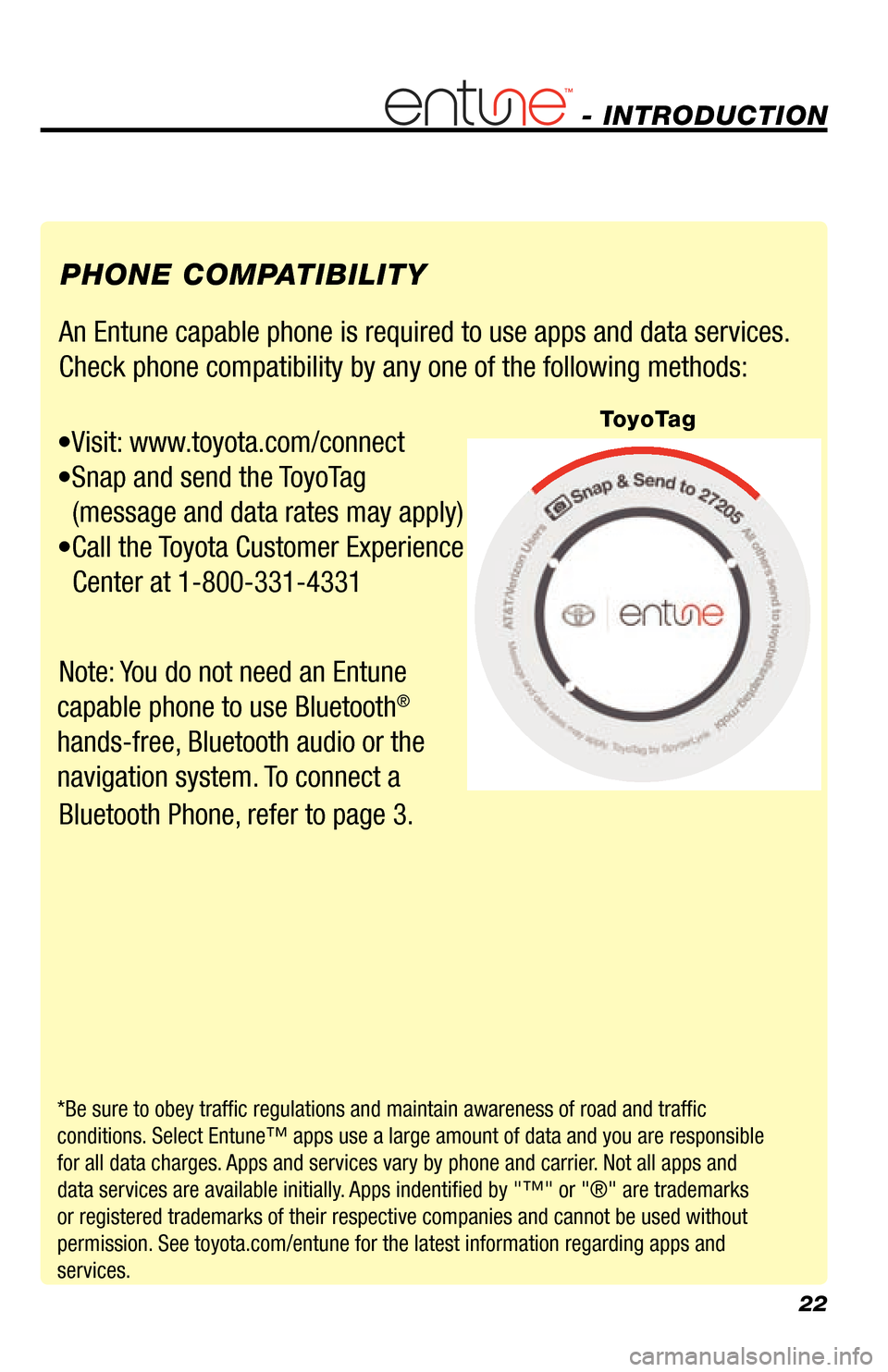
An Entune capable phone is required to use apps and data services.
Check phone compatibility by any one of the following methods:
•Visit: www.toyota.com/connect
•Snap and send the ToyoTag
(message and data rates may apply)
•Call the Toyota Customer Experience
Center at 1-800-331-4331
Note: You do not need an Entune
capable phone to use Bluetooth
®
hands-free, Bluetooth audio or the
navigation system. To connect a
Bluetooth Phone, refer to page 3. PHONE COMPATIBILITY
*Be sure to obey traffic regulations and maintain awareness of road and traffic
conditions. Select Entune™ apps use a large amount of data and you are responsible
for all data charges. Apps and services vary by phone and carrier. Not all apps and
data services are available initially. Apps indentified by "™" or "®" are trademarks
or registered trademarks of their respective companies and cannot be use\
d without
permission. See toyota.com/entune for the latest information regarding apps and
services.
- INTRODUCTION
ToyoTag
Page 24 of 27
23
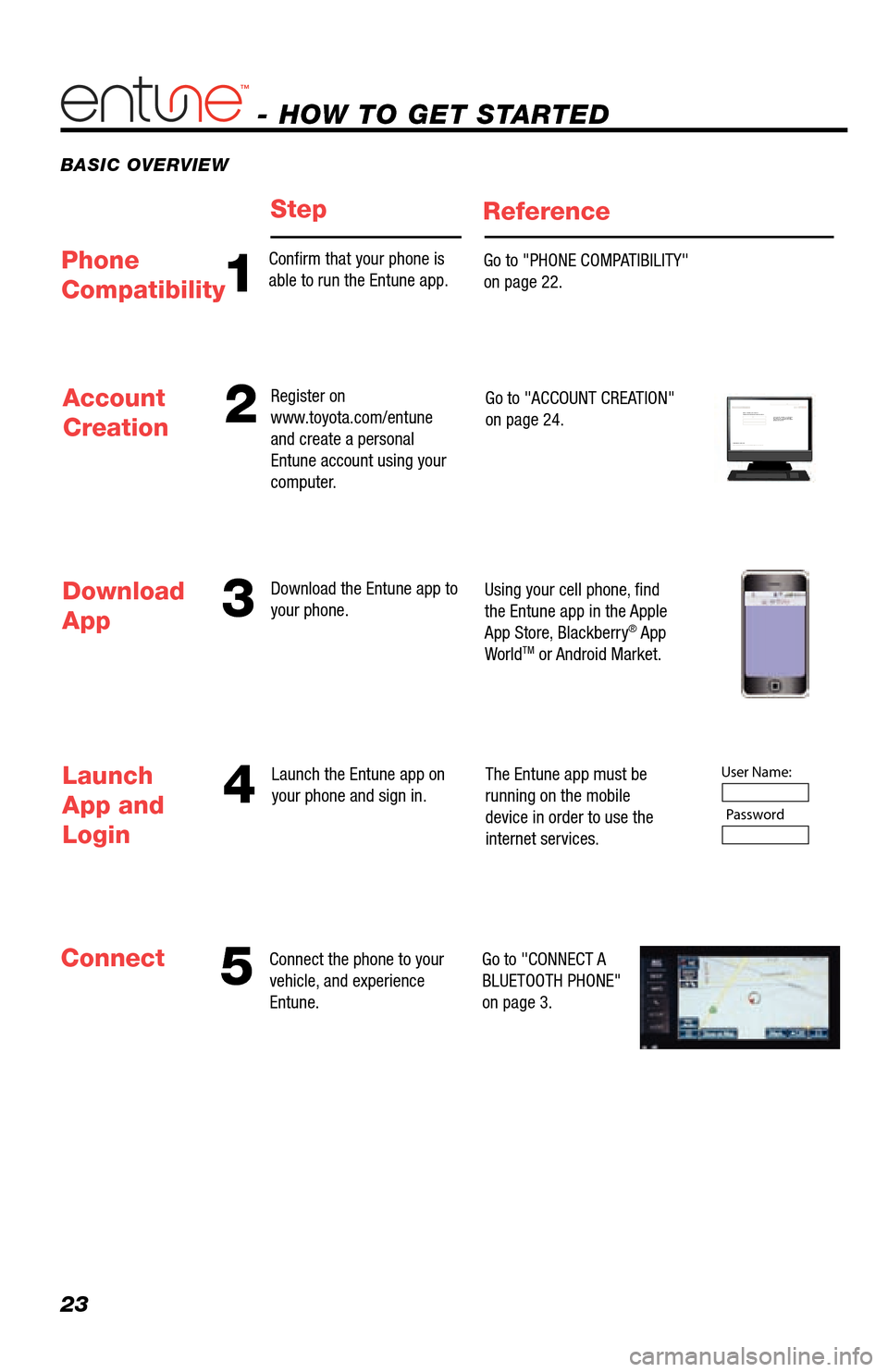
BASIC OVERVIEW
- HOW TO GET STARTED
StepReference
53
4
Account
Creation2
Connect the phone to your
vehicle, and experience
Entune. Register on
www.toyota.com/entune
and create a personal
Entune account using your
computer.
Download the Entune app to
your phone.
Launch the Entune app on
your phone and sign in. Go to "ACCOUNT CREATION"
on page 24.
Using your cell phone, fi nd
the Entune app in the Apple
App Store, Blackberry
® App
WorldTM or Android Market.
The Entune app must be
running on the mobile
device in order to use the
internet services.
Go to "CONNECT A
BLUETOOTH PHONE"
on page 3.
Download
App
Launch
App and
Login
Connect
Step 1: Register Your Account
Please provide all required information below.Once you click "register," you will receive
an e-mail to verify your e-mail address.
Click on the link embedded in the email to
activate your account.
Terms of Service | Privacy Policy
© 2011 Toyota Motor Sales, U.S.A., Inc. All information applies to U.\
S. vehicles only.
User Name: Password
1
Confi rm that your phone is
able to run the Entune app. Go to "PHONE COMPATIBILITY"
on page 22.Phone
Compatibility
Page 25 of 27
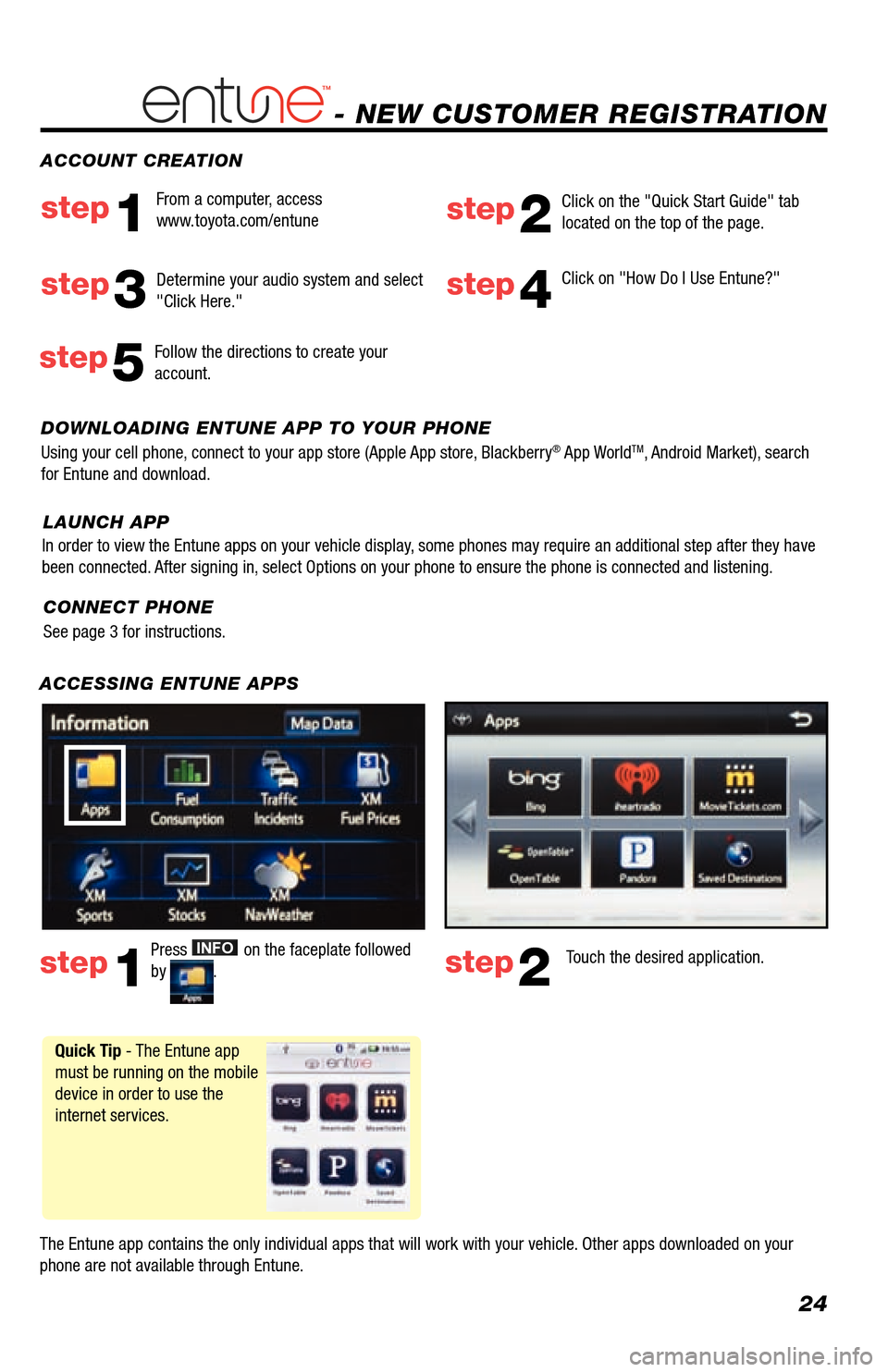
24
- NEW CUSTOMER REGISTRATION
ACCESSING ENTUNE APPS
The Entune app contains the only individual apps that will work with your vehicle. Other apps downloaded on your
phone are not available through Entune.Touch the desired application.
step2
Click on "How Do I Use Entune?"step4
DOWNLOADING ENTUNE APP TO YOUR PHONE
Using your cell phone, connect to your app store (Apple App store, Blackberry® App WorldTM, Android Market), search
for Entune and download. ACCOUNT CREATION
From a computer, access
www.toyota.com/entune
step1step2
Click on the "Quick Start Guide" tab
located on the top of the page.
step3
Press INFOAPPS on the faceplate followed
by .step1
Follow the directions to create your
account.step5
Quick Tip - The Entune app
must be running on the mobile
device in order to use the
internet services. Determine your audio system and select
"Click Here."
CONNECT PHONE
See page 3 for instructions.
In order to view the Entune apps on your vehicle display, some phones may require an additional step after they have
been connected. After signing in, select Options on your phone to ensure the phone is connected and liste\
ning.
LAUNCH APP