Ect TOYOTA LAND CRUISER 2013 J200 User Guide
[x] Cancel search | Manufacturer: TOYOTA, Model Year: 2013, Model line: LAND CRUISER, Model: TOYOTA LAND CRUISER 2013 J200Pages: 720, PDF Size: 21.46 MB
Page 24 of 720

24
LC200_OM_OM60F57U_(U)
Vehicle data recordings
Your Toyota is equipped with several sophisticated computers that will record
certain data, such as:
• Engine speed
• Accelerator status
• Brake status
• Vehicle speed
• Shift position
The recorded data varies according to the vehicle grade level and options
with which it is equipped. Furthermore, these computers do not record con-
versations, sounds or pictures.
●Data usage
Toyota may use the data recorded in these computers to diagnose malfunc-
tions, conduct research and development, and improve quality.
Toyota will not disclose the recorded data to a third party except:
• With the consent of the vehicle owner or with the consent of the lessee if
the vehicle is leased
• In response to an official request by the police, a court of law or a govern-
ment agency
• For use by Toyota in a lawsuit
• For research purposes where the data is not tied to a specific vehicle or
vehicle owner
●Usage of data collected through Safety Connect (U.S. mainland only)
If your Toyota has Safety Connect and if you have subscribed to those ser-
vices, please refer to the Safety Connect Telematics Subscription Service
Agreement for information on data collected and its usage.
Page 29 of 720
Before driving1
29
LC200_OM_OM60F57U_(U)
1-1. Key information
Keys ................................... 30
1-2. Opening, closing and
locking the doors
Smart key system .............. 32
Wireless remote control ..... 44
Side doors .......................... 46
Back door ........................... 51
1-3. Adjustable components
(seats, mirrors,
steering wheel)
Front seats ......................... 57
Rear seats.......................... 59
Driving position memory
system ............................. 68
Head restraints................... 72
Seat belts ........................... 76
Steering wheel ................... 86
Inside rear view mirror ....... 88
Outside rear view
mirrors.............................. 901-4. Opening and closing the
windows and moon roof
Power windows .................. 93
Moon roof ........................... 97
1-5. Refueling
Opening the fuel tank
cap ................................. 101
1-6. Theft deterrent system
Engine immobilizer
system ........................... 105
Alarm................................ 107
1-7. Safety information
Correct driving posture..... 111
SRS airbags ..................... 113
Front passenger occupant
classification system ...... 129
Child restraint systems..... 135
Installing child
restraints ........................ 140
Page 30 of 720
30
LC200_OM_OM60F57U_(U)
1-1. Key information
Keys
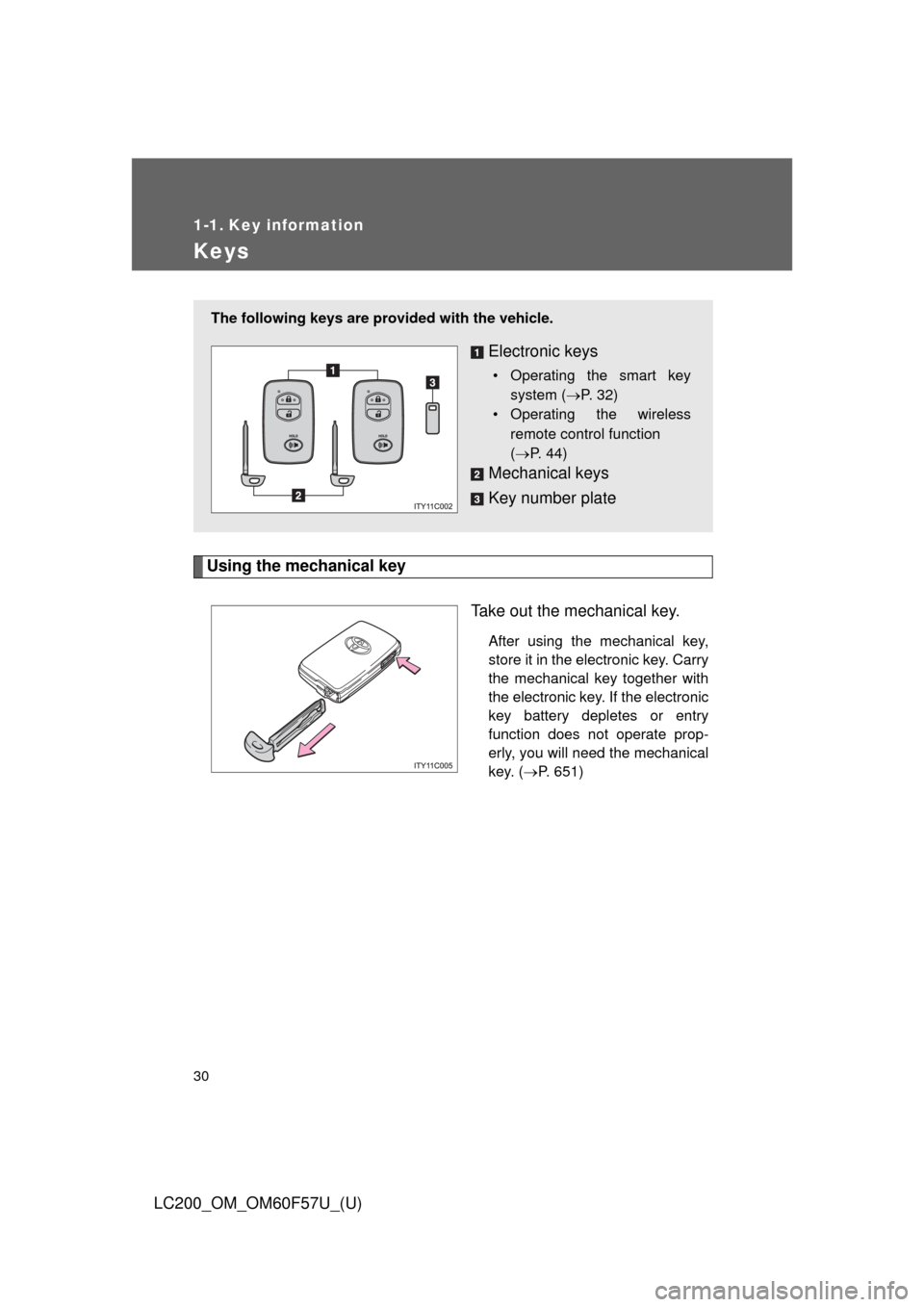
Using the mechanical key
Take out the mechanical key.
After using the mechanical key,
store it in the electronic key. Carry
the mechanical key together with
the electronic key. If the electronic
key battery depletes or entry
function does not operate prop-
erly, you will need the mechanical
key. (P. 651)
The following keys are provided with the vehicle.
Electronic keys
• Operating the smart key
system (P. 32)
• Operating the wireless
remote control function
(P. 44)
Mechanical keys
Key number plate
Page 31 of 720
31 1-1. Key information
1
Before driving
LC200_OM_OM60F57U_(U)
■When required to leave the vehicle’s key with a parking attendant
Lock the glove box as circumstances demand. (P. 467)
Remove the mechanical key for your own use and provide the attendant with
the electronic key only.
■Key number plate
Keep the plate in a safe place such as your wallet, not in the vehicle. In the
event that a key is lost, a new key can be made at your Toyota dealer using
the key number plate. (P. 650)
■When riding in an aircraft
When bringing an electronic key onto an aircraft, make sure you do not
press any buttons on the electronic key while inside the aircraft cabin. If you
are carrying an electronic key in your bag etc., ensure that the buttons are
not likely to be pressed accidentally. Pressing a button may cause the elec-
tronic key to emit radio waves that could interfere with the operation of the
aircraft.
NOTICE
■To prevent key damage
●Do not subject the keys to strong shocks, expose them to high tempera-
tures by placing them in direct sunlight, or get them wet.
●Do not expose the keys to electromagnetic materials or attach any mate-
rial that blocks electromagnetic waves to the key surface.
●Do not disassemble the electronic key.
Page 32 of 720
32
LC200_OM_OM60F57U_(U)
1-2. Opening, closing and locking the doors
Smart key system
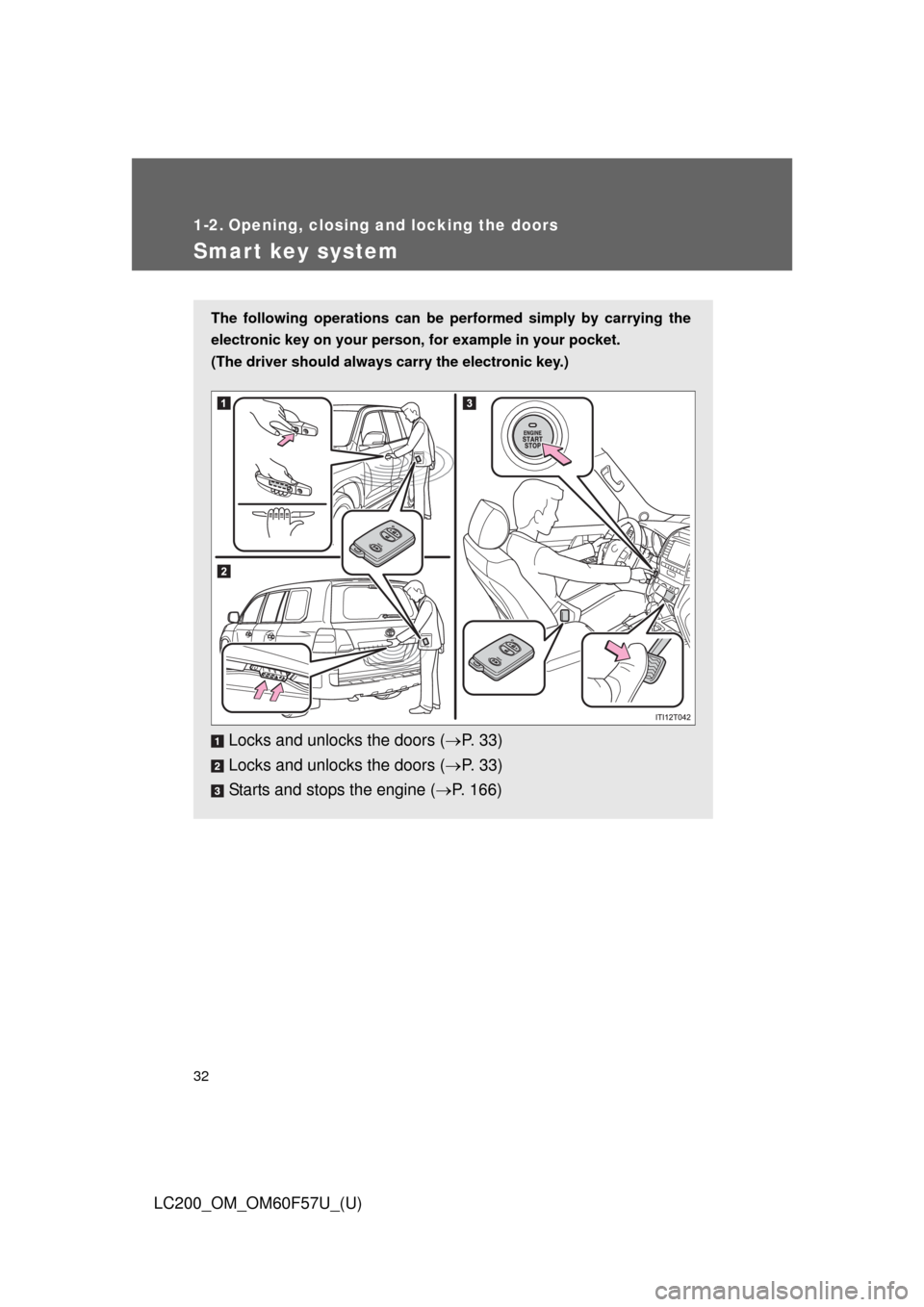
The following operations can be performed simply by carrying the
electronic key on your person, for example in your pocket.
(The driver should always carry the electronic key.)
Locks and unlocks the doors (P. 3 3 )
Locks and unlocks the doors (P. 3 3 )
Starts and stops the engine (P. 166)
Page 34 of 720
34 1-2. Opening, closing and locking the doors
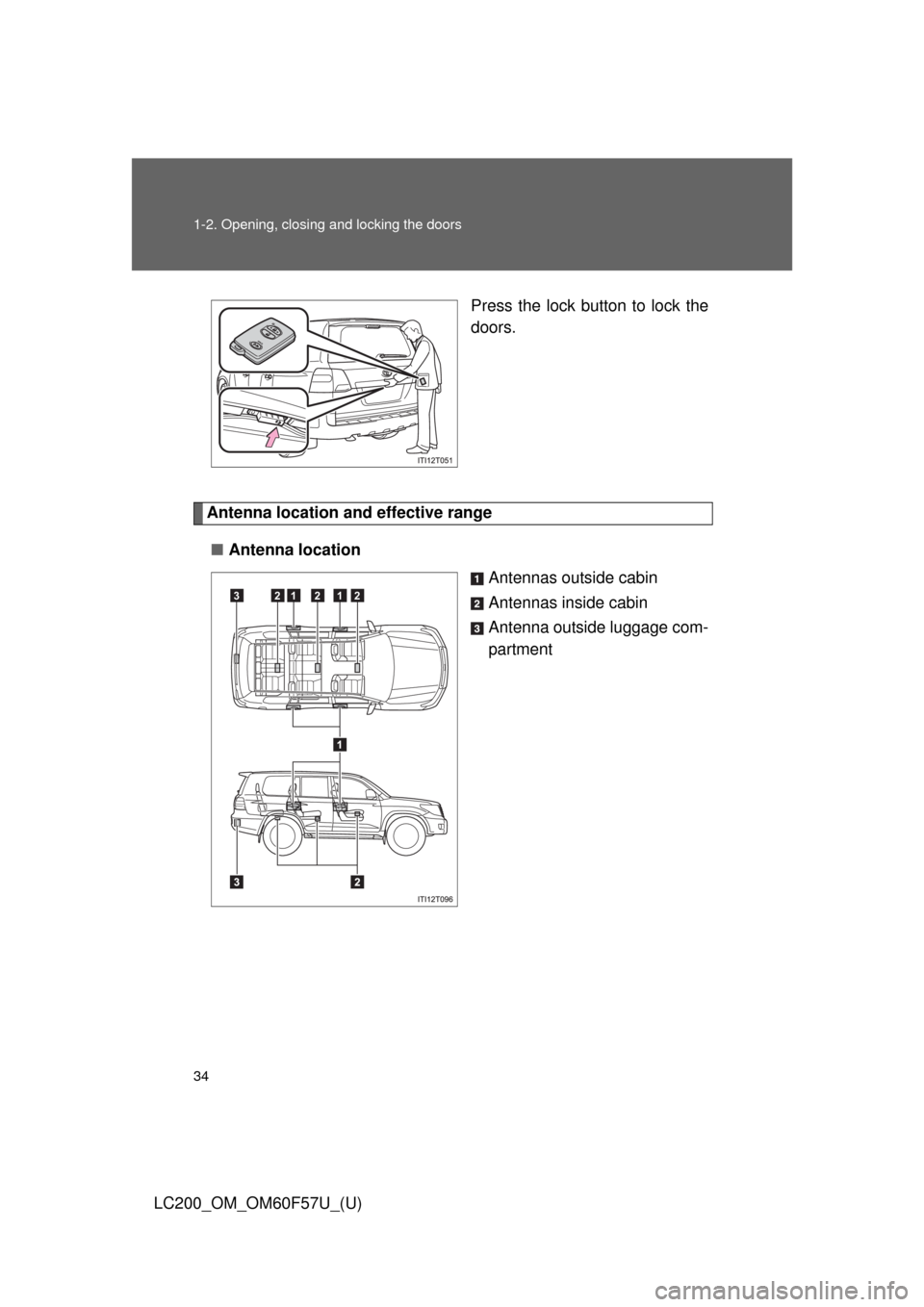
LC200_OM_OM60F57U_(U)Press the lock button to lock the
doors.
Antenna location and effective range
■Antenna location
Antennas outside cabin
Antennas inside cabin
Antenna outside luggage com-
partment
321212
Page 35 of 720
35 1-2. Opening, closing and locking the doors
1
Before driving
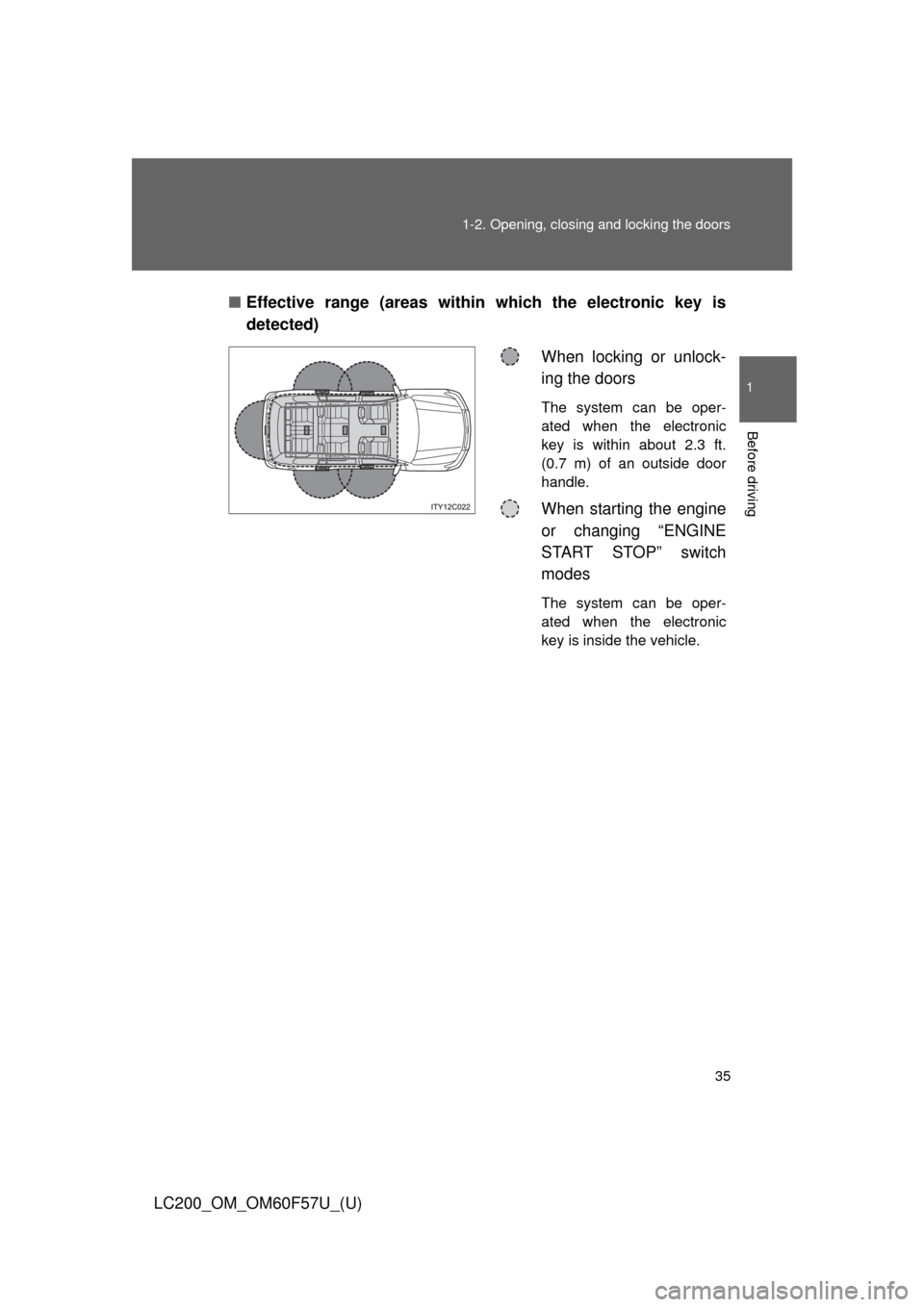
LC200_OM_OM60F57U_(U)■Effective range (areas within which the electronic key is
detected)
When locking or unlock-
ing the doors
The system can be oper-
ated when the electronic
key is within about 2.3 ft.
(0.7 m) of an outside door
handle.
When starting the engine
or changing “ENGINE
START STOP” switch
modes
The system can be oper-
ated when the electronic
key is inside the vehicle.
Page 36 of 720

36 1-2. Opening, closing and locking the doors
LC200_OM_OM60F57U_(U)
■Operation signals
A buzzer sounds and the emergency flashers flash to indicate that the doors
have been locked/unlocked. (Locked: Once; Unlocked: Twice)
■Conditions affecting operation
The smart key system uses weak radio waves. In the following situations,
the communication between the electronic key and the vehicle may be
affected, preventing the smart key system and wireless remote control from
operating properly. (Ways of coping P. 651)
●When the electronic key battery is depleted
●Near a TV tower, electric power plant, gas station, radio station, large dis-
play, airport or other facility that generates strong radio waves or electri-
cal noise
●When carrying a portable radio, cellular phone, cordless phone or other
wireless communication devices
●When the electronic key has come into contact with, or is covered by a
metallic object
●When multiple electronic keys are in the vicinity
●When carrying or using the electronic key together with the following
devices that emit radio waves
• Another vehicle’s electronic key
• A wireless key that emits radio waves
• Personal computer
●If window tint with a metallic content or metallic objects are attached to
the rear window
Page 38 of 720

38 1-2. Opening, closing and locking the doors
LC200_OM_OM60F57U_(U)
■Battery-saving function
In the following circumstances, the entry function is disabled in order to pre-
vent the vehicle and electronic key batteries from discharging.
●When the entry function has not been used for 2 weeks or more
●When the electronic key has been left within approximately 3 ft. (1 m) of
the vehicle for 10 minutes or more
The system will resume operation when...
●The vehicle is locked using the door handle lock switch.
●The vehicle is locked/unlocked using the wireless remote control function
(P. 44) or the mechanical key. (P. 651)
■Electronic key battery depletion
●The standard battery life is 1 to 2 years. (The battery becomes depleted
even if the electronic key is not used.) If the smart key system or the
wireless remote control function does not operate, or the detection area
becomes smaller, the battery may be depleted. Replace the battery when
necessary. (P. 563)
●If the battery becomes low, an alarm will sound in the cabin when the
engine stops. (P. 40)
●To avoid serious deterioration, do not leave the electronic key within 3 ft.
(1 m) of the following electrical appliances that produce a magnetic field.
•TVs
• Personal computers
• Recharging cellular phones or cordless phones
• Table lamps
■To operate the system properly
Make sure to carry the electronic key when operating the system. Do not get
the electronic key too close to the vehicle when operating the system from
the outside of the vehicle.
Depending on the position and holding condition of the electronic key, the
key may not be detected correctly and the system may not operate properly.
(The alarm may go off accidentally, or the door lock prevention may not func-
tion.)
Page 39 of 720

39 1-2. Opening, closing and locking the doors
1
Before driving
LC200_OM_OM60F57U_(U)
■Note for the smart key system
●Even when the electronic key is within the effective range (detection
areas), the system may not operate properly in the following cases:
• The electronic key is too close to the window or outside door handle,
near the ground, or in a high place when the doors are locked or
unlocked.
• The electronic key is near the ground or in a high place, or too close to
the rear bumper center when the back door is locked or unlocked.
• The electronic key is on the instrument panel, floor or in the glove box
when the engine is started or “ENGINE START STOP” switch modes
are changed.
●Do not leave the electronic key on top of the instrument panel or near the
door pockets when exiting the vehicle. Depending on the radio wave
reception conditions, it may be detected by the antenna outside the cabin
and the door will become lockable from the outside, possibly trapping the
electronic key inside the vehicle.
●As long as the electronic key is within the effective range, the doors may
be locked or unlocked by anyone.
●Even if the electronic key is not inside the vehicle, it may be possible to
start the engine if the electronic key is near the window.
●The doors may unlock if a large amount of water splashes on the door
handle, such as in the rain or in a car wash. (The doors will automatically
be locked after approximately 60 seconds if the doors are not opened
and closed.)
●Gripping the door handle when wearing a glove may not unlock the door.
●If the wireless remote control is used to lock the doors when the elec-
tronic key is near the vehicle, there is a possibility that the door may not
be unlocked by the smart key system. (Use the wireless remote control to
unlock the doors.)
●A sudden approach to the effective range or door handle operation may
prevent the doors from being unlocked. In this case, return the door han-
dle to the original position and check that the doors unlock before pulling
the door handle.
■When the vehicle is not driven for extended periods
To prevent theft of the vehicle, do not leave the electronic key within 6 ft. (2
m) of the vehicle.