air condition TOYOTA LAND CRUISER 2014 J200 Navigation Manual
[x] Cancel search | Manufacturer: TOYOTA, Model Year: 2014, Model line: LAND CRUISER, Model: TOYOTA LAND CRUISER 2014 J200Pages: 427, PDF Size: 25.75 MB
Page 299 of 427
299
1. AIR CONDITIONING SYSTEM OPERATION
6
AIR CONDITIONING
L/C200_Navi_OM60L27U_(U)
13.06.03 19:43
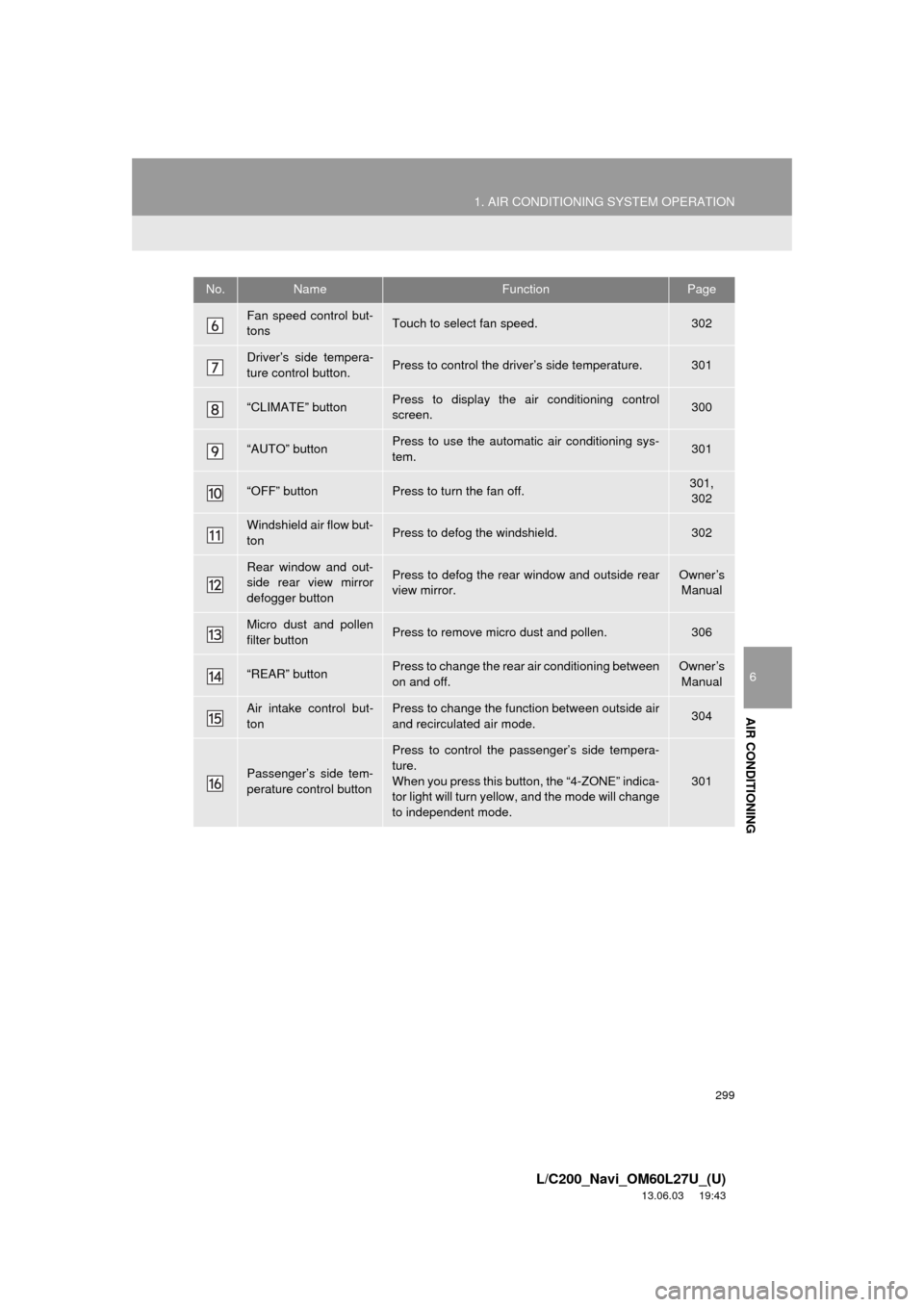
Fan speed control but-
tonsTouch to select fan speed.302
Driver’s side tempera-
ture control button.Press to control the driver’s side temperature.301
“CLIMATE” buttonPress to display the air conditioning control
screen.300
“AUTO” buttonPress to use the automatic air conditioning sys-
tem.301
“OFF” buttonPress to turn the fan off.301,
302
Windshield air flow but-
tonPress to defog the windshield.302
Rear window and out-
side rear view mirror
defogger buttonPress to defog the rear window and outside rear
view mirror.Owner’s
Manual
Micro dust and pollen
filter buttonPress to remove micro dust and pollen.306
“REAR” buttonPress to change the rear air conditioning between
on and off.Owner’s
Manual
Air intake control but-
tonPress to change the function between outside air
and recirculated air mode.304
Passenger’s side tem-
perature control button
Press to control the passenger’s side tempera-
ture.
When you press this button, the “4-ZONE” indica-
tor light will turn yellow, and the mode will change
to independent mode.
301
No.NameFunctionPage
Page 300 of 427
300
1. AIR CONDITIONING SYSTEM OPERATION
L/C200_Navi_OM60L27U_(U)
13.06.03 19:43
2. SOME BASICS
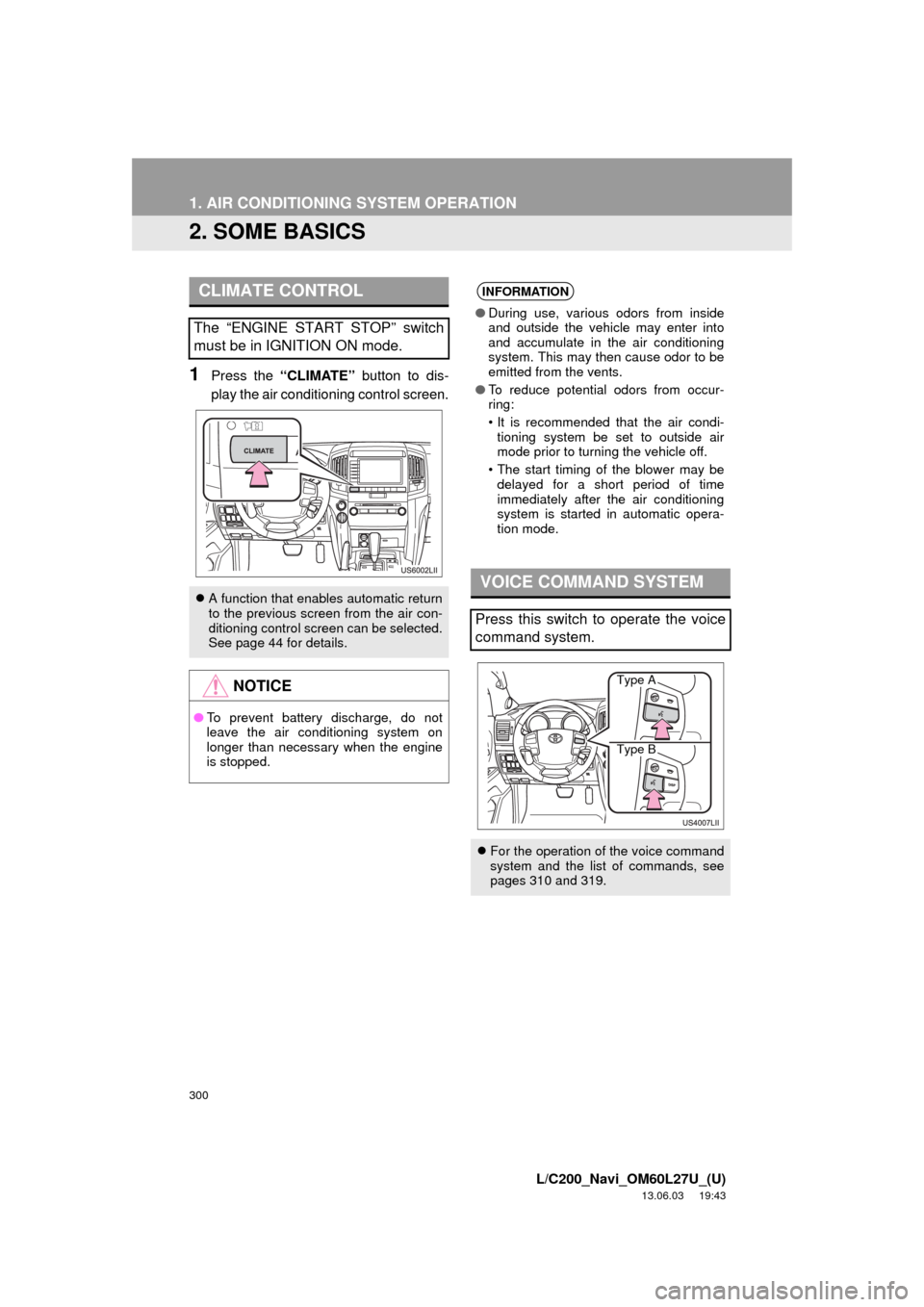
1Press the “CLIMATE” button to dis-
play the air conditioning control screen.
CLIMATE CONTROL
The “ENGINE START STOP” switch
must be in IGNITION ON mode.
A function that enables automatic return
to the previous screen from the air con-
ditioning control screen can be selected.
See page 44 for details.
NOTICE
●To prevent battery discharge, do not
leave the air conditioning system on
longer than necessary when the engine
is stopped.
INFORMATION
●During use, various odors from inside
and outside the vehicle may enter into
and accumulate in the air conditioning
system. This may then cause odor to be
emitted from the vents.
●To reduce potential odors from occur-
ring:
• It is recommended that the air condi-
tioning system be set to outside air
mode prior to turning the vehicle off.
• The start timing of the blower may be
delayed for a short period of time
immediately after the air conditioning
system is started in automatic opera-
tion mode.
VOICE COMMAND SYSTEM
Press this switch to operate the voice
command system.
For the operation of the voice command
system and the list of commands, see
pages 310 and 319.
Type A
Type B
Page 301 of 427
301
1. AIR CONDITIONING SYSTEM OPERATION
6
AIR CONDITIONING
L/C200_Navi_OM60L27U_(U)
13.06.03 19:43
3. FRONT AUTOMATIC AIR CONDITIONING SYSTEM
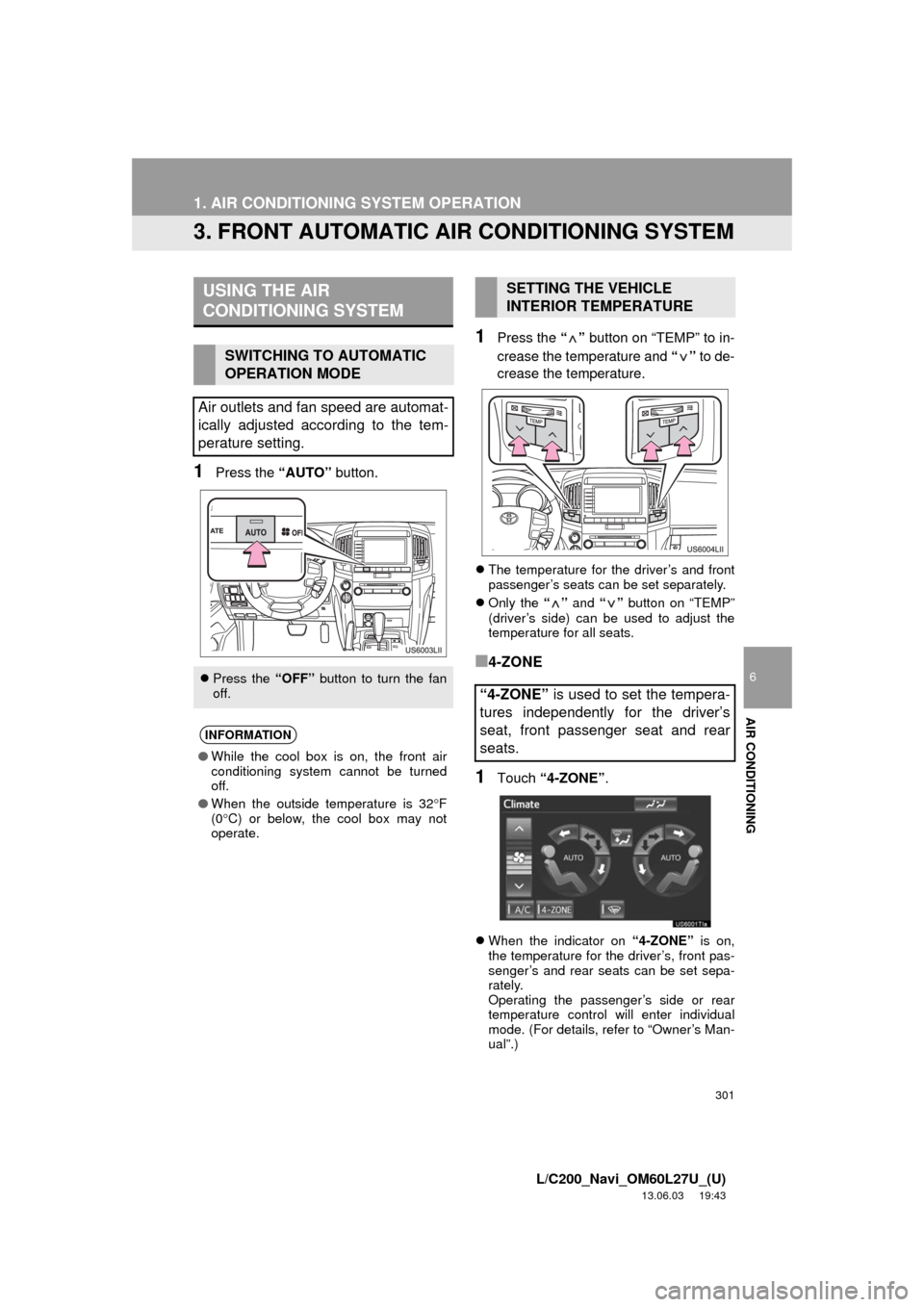
1Press the “AUTO” button.
1Press the “” button on “TEMP” to in-
crease the temperature and “” to de-
crease the temperature.
The temperature for the driver’s and front
passenger’s seats can be set separately.
Only the “” and “” button on “TEMP”
(driver’s side) can be used to adjust the
temperature for all seats.
■4-ZONE
1Touch “4-ZONE”.
When the indicator on “4-ZONE” is on,
the temperature for the driver’s, front pas-
senger’s and rear seats can be set sepa-
rately.
Operating the passenger’s side or rear
temperature control will enter individual
mode. (For details, refer to “Owner’s Man-
ual”.)
USING THE AIR
CONDITIONING SYSTEM
SWITCHING TO AUTOMATIC
OPERATION MODE
Air outlets and fan speed are automat-
ically adjusted according to the tem-
perature setting.
Press the “OFF” button to turn the fan
off.
INFORMATION
●While the cool box is on, the front air
conditioning system cannot be turned
off.
●When the outside temperature is 32F
(0C) or below, the cool box may not
operate.
SETTING THE VEHICLE
INTERIOR TEMPERATURE
“4-ZONE” is used to set the tempera-
tures independently for the driver’s
seat, front passenger seat and rear
seats.
Page 302 of 427
302
1. AIR CONDITIONING SYSTEM OPERATION
L/C200_Navi_OM60L27U_(U)
13.06.03 19:43
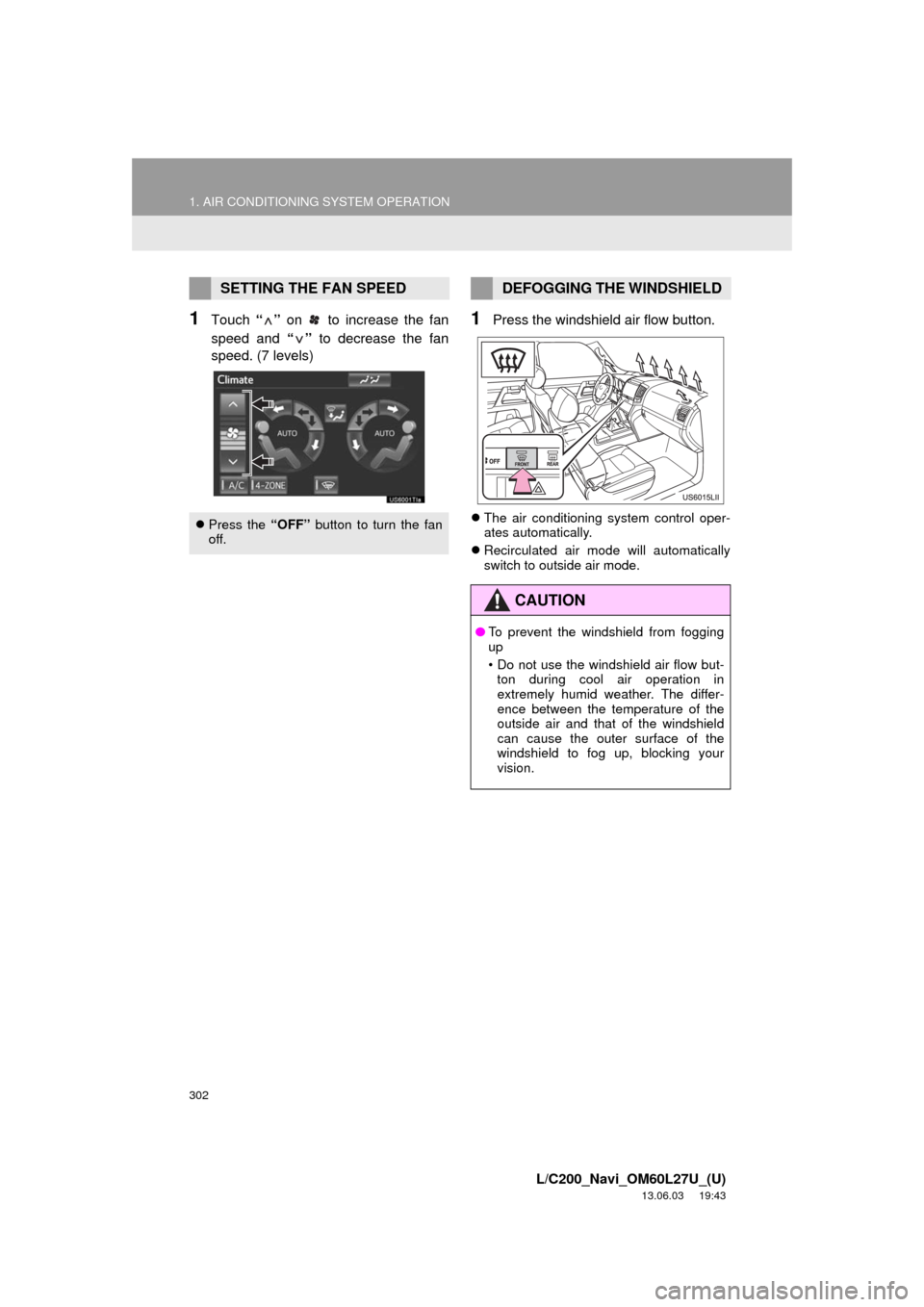
1Touch “” on to increase the fan
speed and “” to decrease the fan
speed. (7 levels)1Press the windshield air flow button.
The air conditioning system control oper-
ates automatically.
Recirculated air mode will automatically
switch to outside air mode.
SETTING THE FAN SPEED
Press the “OFF” button to turn the fan
off.
DEFOGGING THE WINDSHIELD
CAUTION
●To prevent the windshield from fogging
up
• Do not use the windshield air flow but-
ton during cool air operation in
extremely humid weather. The differ-
ence between the temperature of the
outside air and that of the windshield
can cause the outer surface of the
windshield to fog up, blocking your
vision.
Page 303 of 427
303
1. AIR CONDITIONING SYSTEM OPERATION
6
AIR CONDITIONING
L/C200_Navi_OM60L27U_(U)
13.06.03 19:43
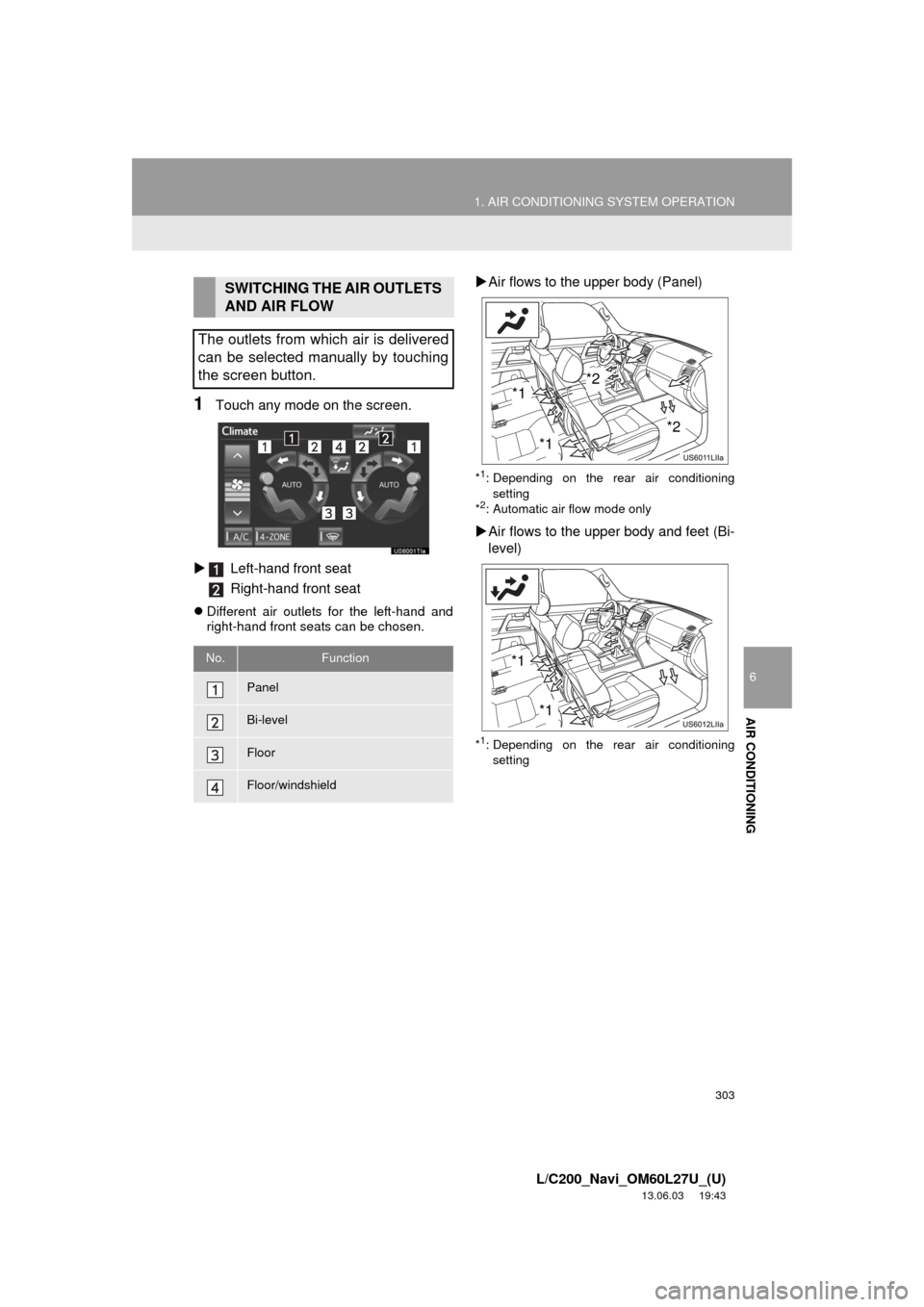
1Touch any mode on the screen.
Left-hand front seat
Right-hand front seat
Different air outlets for the left-hand and
right-hand front seats can be chosen.
Air flows to the upper body (Panel)
*1: Depending on the rear air conditioning
setting
*
2: Automatic air flow mode only
Air flows to the upper body and feet (Bi-
level)
*1: Depending on the rear air conditioning
setting
SWITCHING THE AIR OUTLETS
AND AIR FLOW
The outlets from which air is delivered
can be selected manually by touching
the screen button.
No.Function
Panel
Bi-level
Floor
Floor/windshield
*1
*1*2
*2
*1
*1
Page 304 of 427
304
1. AIR CONDITIONING SYSTEM OPERATION
L/C200_Navi_OM60L27U_(U)
13.06.03 19:43
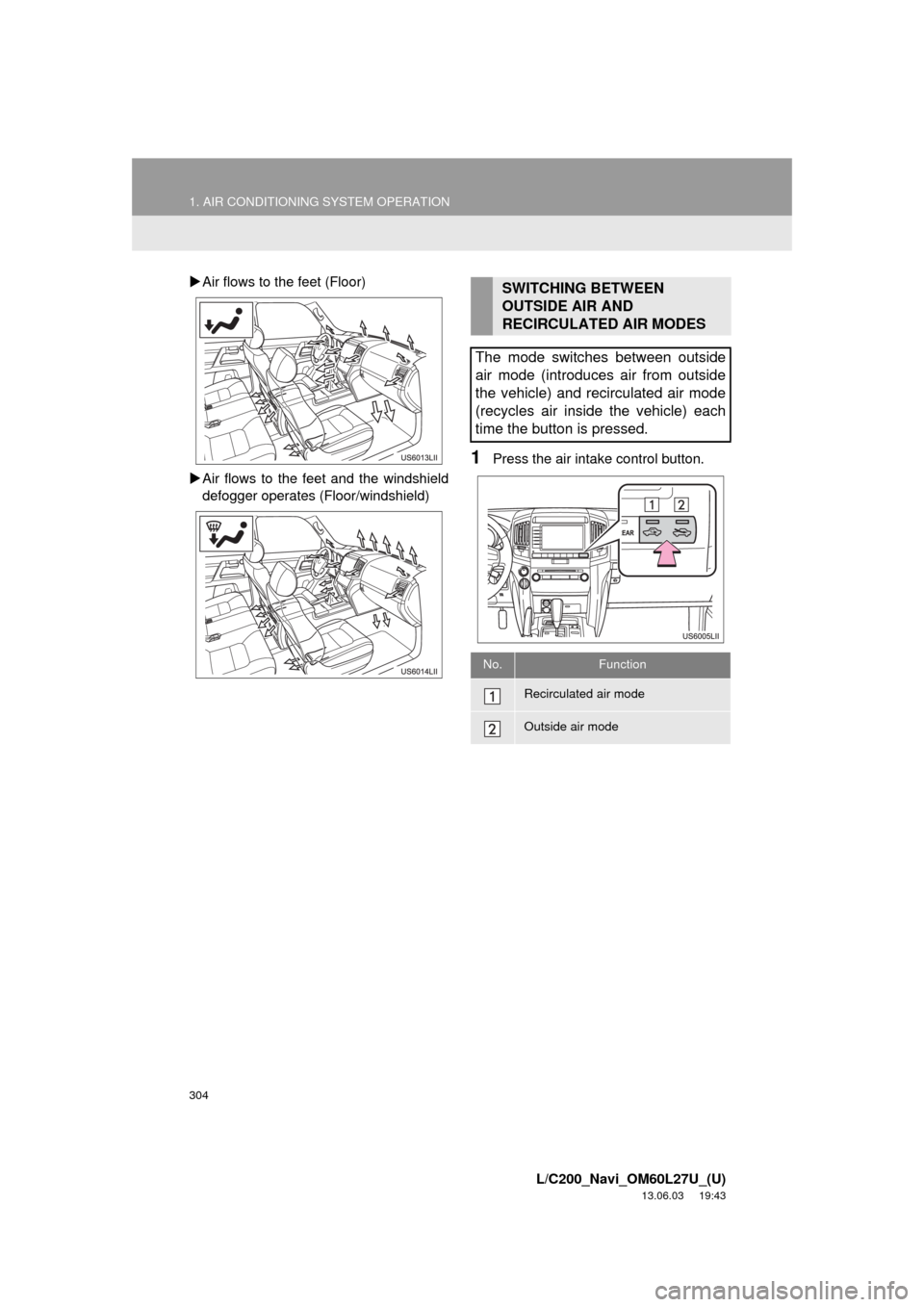
Air flows to the feet (Floor)
Air flows to the feet and the windshield
defogger operates (Floor/windshield)
1Press the air intake control button.
SWITCHING BETWEEN
OUTSIDE AIR AND
RECIRCULATED AIR MODES
The mode switches between outside
air mode (introduces air from outside
the vehicle) and recirculated air mode
(recycles air inside the vehicle) each
time the button is pressed.
No.Function
Recirculated air mode
Outside air mode
Page 305 of 427
305
1. AIR CONDITIONING SYSTEM OPERATION
6
AIR CONDITIONING
L/C200_Navi_OM60L27U_(U)
13.06.03 19:43
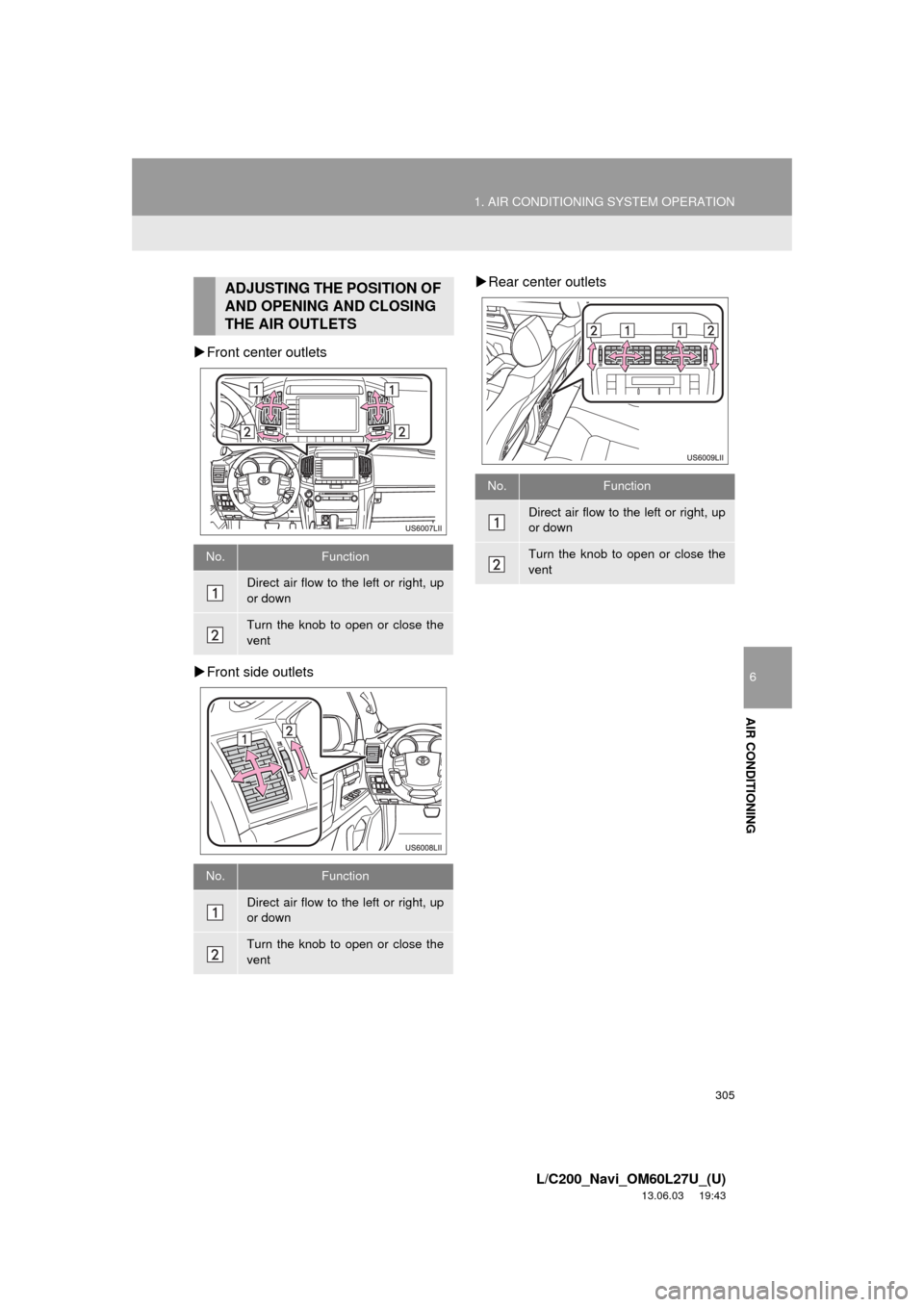
Front center outlets
Front side outletsRear center outlets
ADJUSTING THE POSITION OF
AND OPENING AND CLOSING
THE AIR OUTLETS
No.Function
Direct air flow to the left or right, up
or down
Turn the knob to open or close the
vent
No.Function
Direct air flow to the left or right, up
or down
Turn the knob to open or close the
vent
No.Function
Direct air flow to the left or right, up
or down
Turn the knob to open or close the
vent
Page 306 of 427
306
1. AIR CONDITIONING SYSTEM OPERATION
L/C200_Navi_OM60L27U_(U)
13.06.03 19:43
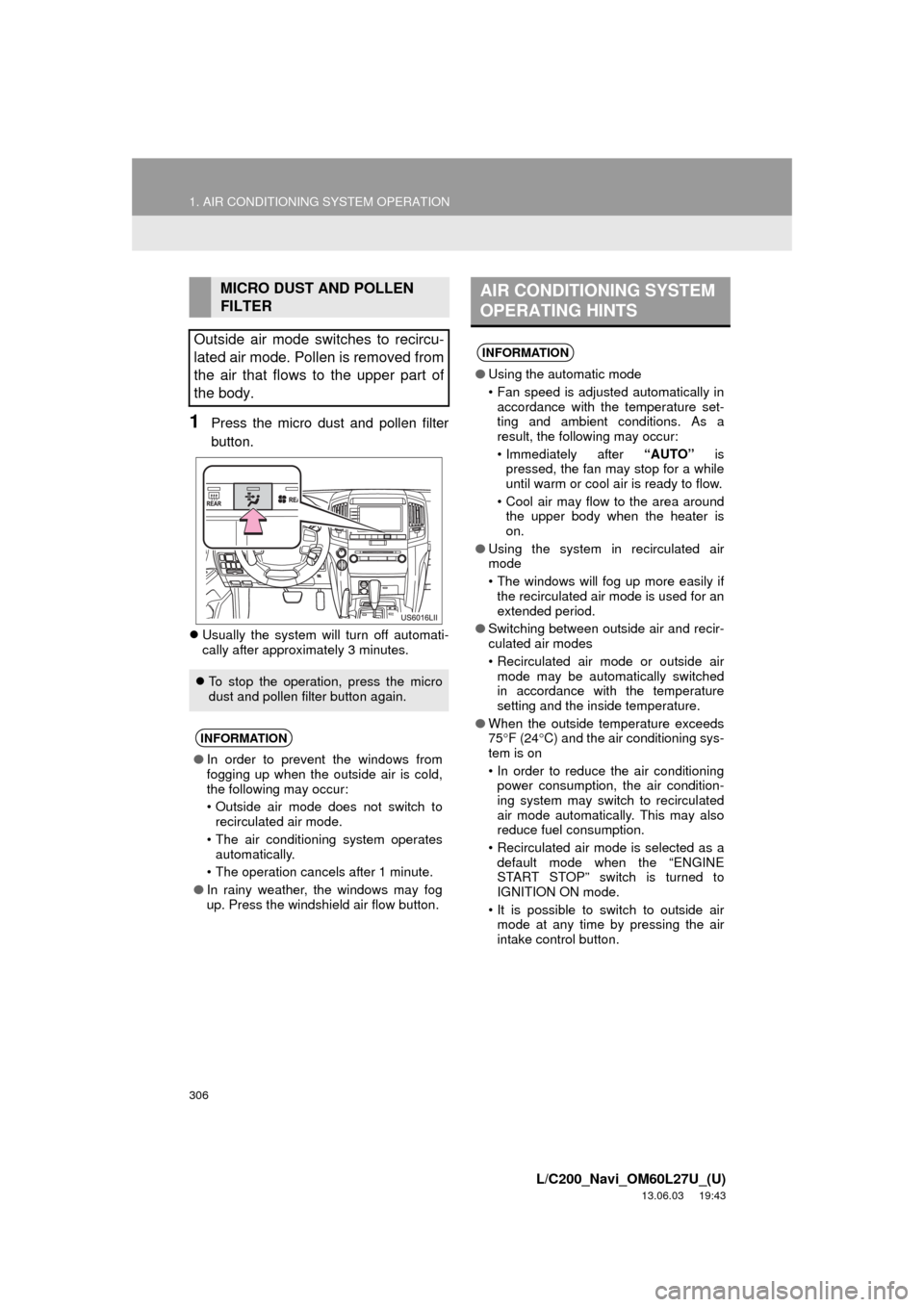
1Press the micro dust and pollen filter
button.
Usually the system will turn off automati-
cally after approximately 3 minutes.
MICRO DUST AND POLLEN
FILTER
Outside air mode switches to recircu-
lated air mode. Pollen is removed from
the air that flows to the upper part of
the body.
To stop the operation, press the micro
dust and pollen filter button again.
INFORMATION
●In order to prevent the windows from
fogging up when the outside air is cold,
the following may occur:
• Outside air mode does not switch to
recirculated air mode.
• The air conditioning system operates
automatically.
• The operation cancels after 1 minute.
●In rainy weather, the windows may fog
up. Press the windshield air flow button.
AIR CONDITIONING SYSTEM
OPERATING HINTS
INFORMATION
●Using the automatic mode
• Fan speed is adjusted automatically in
accordance with the temperature set-
ting and ambient conditions. As a
result, the following may occur:
• Immediately after “AUTO” is
pressed, the fan may stop for a while
until warm or cool air is ready to flow.
• Cool air may flow to the area around
the upper body when the heater is
on.
●Using the system in recirculated air
mode
• The windows will fog up more easily if
the recirculated air mode is used for an
extended period.
●Switching between outside air and recir-
culated air modes
• Recirculated air mode or outside air
mode may be automatically switched
in accordance with the temperature
setting and the inside temperature.
●When the outside temperature exceeds
75F (24C) and the air conditioning sys-
tem is on
• In order to reduce the air conditioning
power consumption, the air condition-
ing system may switch to recirculated
air mode automatically. This may also
reduce fuel consumption.
• Recirculated air mode is selected as a
default mode when the “ENGINE
START STOP” switch is turned to
IGNITION ON mode.
• It is possible to switch to outside air
mode at any time by pressing the air
intake control button.
Page 307 of 427
307
1. AIR CONDITIONING SYSTEM OPERATION
6
AIR CONDITIONING
L/C200_Navi_OM60L27U_(U)
13.06.03 19:43
INFORMATION
●Window defogger feature
• Recirculated air mode may automati-
cally switch to outside air mode in situ-
ations where the windows need to be
defogged.
●When driving on dusty roads
• Close all windows. If dust thrown up by
the vehicle is still drawn into the vehi-
cle after closing the windows, it is rec-
ommended that the air intake mode be
set to outside air mode and the fan
speed to any setting except off.
●When outside temperature approaches
32F (0C)
• The air conditioning system may not
operate even when “A/C” is touched.
●Air conditioning filter
• The air conditioning filter may clog
after long use. The filter may need to
be replaced if the air flow of the air
conditioner and heater experiences
extreme reductions in operating effi-
ciency, or if the windows become to fog
up easily. (For details, refer to the
“Owner’s Manual”.)
●Customization
• Settings can be changed.
(For details, refer to the “Owner’s Man-
ual”.)
Page 308 of 427
308
1. AIR CONDITIONING SYSTEM OPERATION
L/C200_Navi_OM60L27U_(U)
13.06.03 19:43
4. REAR AUTOMATIC AIR CONDITIONING SYSTEM
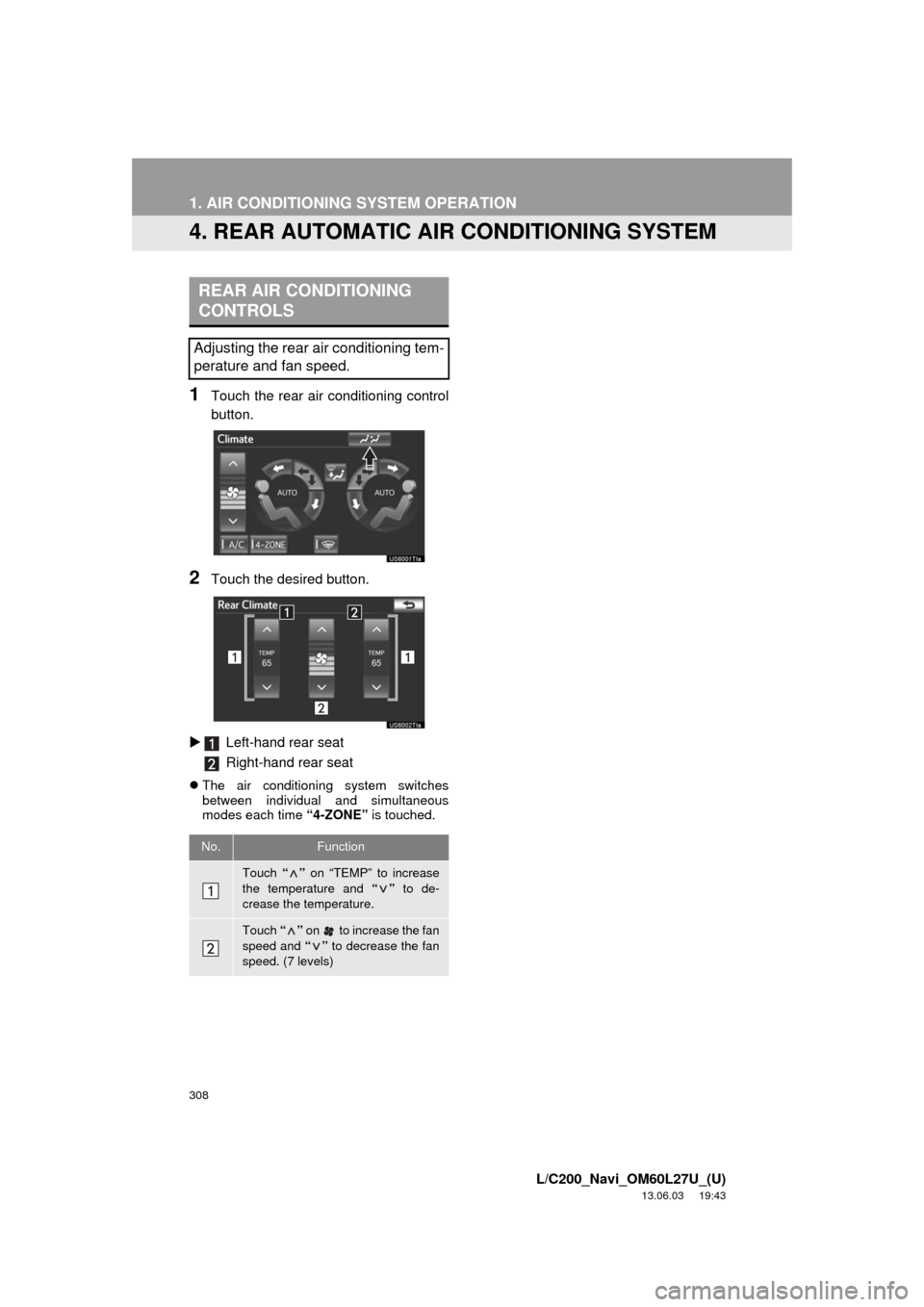
1Touch the rear air conditioning control
button.
2Touch the desired button.
Left-hand rear seat
Right-hand rear seat
The air conditioning system switches
between individual and simultaneous
modes each time “4-ZONE” is touched.
REAR AIR CONDITIONING
CONTROLS
Adjusting the rear air conditioning tem-
perature and fan speed.
No.Function
Touch “” on “TEMP” to increase
the temperature and “” to de-
crease the temperature.
Touch “” on to increase the fan
speed and “” to decrease the fan
speed. (7 levels)