wheel TOYOTA LAND CRUISER 2014 J200 Navigation Manual
[x] Cancel search | Manufacturer: TOYOTA, Model Year: 2014, Model line: LAND CRUISER, Model: TOYOTA LAND CRUISER 2014 J200Pages: 427, PDF Size: 25.75 MB
Page 365 of 427
365
10
L/C200_Navi_OM60L27U_(U)
13.06.03 20:34
PERIPHERAL MONITORING SYSTEM
2. TOYOTA PARKING ASSIST MONITOR
1. TOYOTA PARKING ASSIST MONITOR*
TOYOTA PARKING ASSIST
MONITOR
The parking assist monitor assists the
driver by displaying an image of the
view behind the vehicle while backing
up, for example while parking.
The parking assist monitor assists with
the following 2 backing-up operations:
(1) Perpendicular parking (parking in a
garage, etc.)
(2) Parallel parking (parking at the side
of the road, etc.)
INFORMATION
●The screen illustrations used in this text
are intended as examples, and may dif-
fer from the image that is actually dis-
played on the screen.
DRIVING PRECAUTIONS
The parking assist monitor is a supple-
mental device intended to assist the
driver when backing up. When backing
up, be sure to visually check all around
the vehicle both directly and using the
mirrors before proceeding. If you do
not, you may hit another vehicle, and
could possibly cause an accident.
Pay attention to the following precau-
tions when using the parking assist
monitor.
CAUTION
●Never depend on the parking assist
monitor entirely when backing up. The
image and the position of the guide lines
displayed on the screen may differ from
the actual state.
Use caution, just as you would when
backing up any vehicle.
●Be sure to back up slowly, depressing
the brake pedal to control vehicle speed.
●If you seem likely to hit nearby vehicles,
obstacles, people or mount the shoulder,
depress the brake pedal to stop the
vehicle, then disable the assist system
by
touching on the screen to can-
cel the system.
●The instructions given are only guide-
lines. When and how much to turn the
steering wheel will vary according to
traffic conditions, road surface condi-
tions, vehicle condition, etc. when park-
ing. It is necessary to be fully aware of
this before using the parking assist sys-
tem.
●When parking, be sure to check that the
parking space will accommodate your
vehicle before maneuvering into it.
*: If equipped
Page 368 of 427
368
2. TOYOTA PARKING ASSIST MONITOR
L/C200_Navi_OM60L27U_(U)
13.06.03 20:34
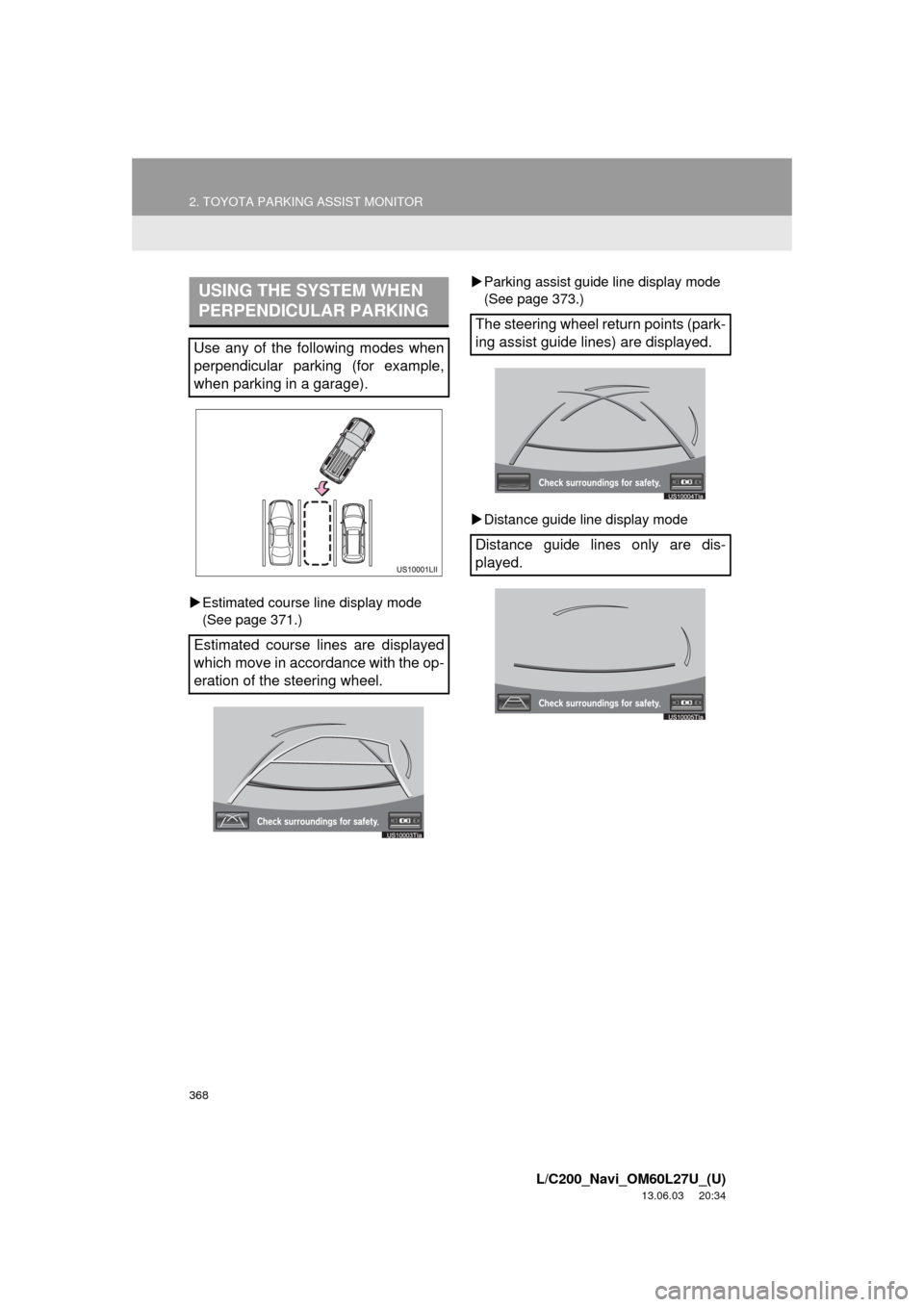
Estimated course line display mode
(See page 371.)Parking assist guide line display mode
(See page 373.)
Distance guide line display mode
USING THE SYSTEM WHEN
PERPENDICULAR PARKING
Use any of the following modes when
perpendicular parking (for example,
when parking in a garage).
Estimated course lines are displayed
which move in accordance with the op-
eration of the steering wheel.
The steering wheel return points (park-
ing assist guide lines) are displayed.
Distance guide lines only are dis-
played.
Page 369 of 427
369
2. TOYOTA PARKING ASSIST MONITOR
10
PERIPHERAL MONITORING SYSTEM
L/C200_Navi_OM60L27U_(U)
13.06.03 20:34
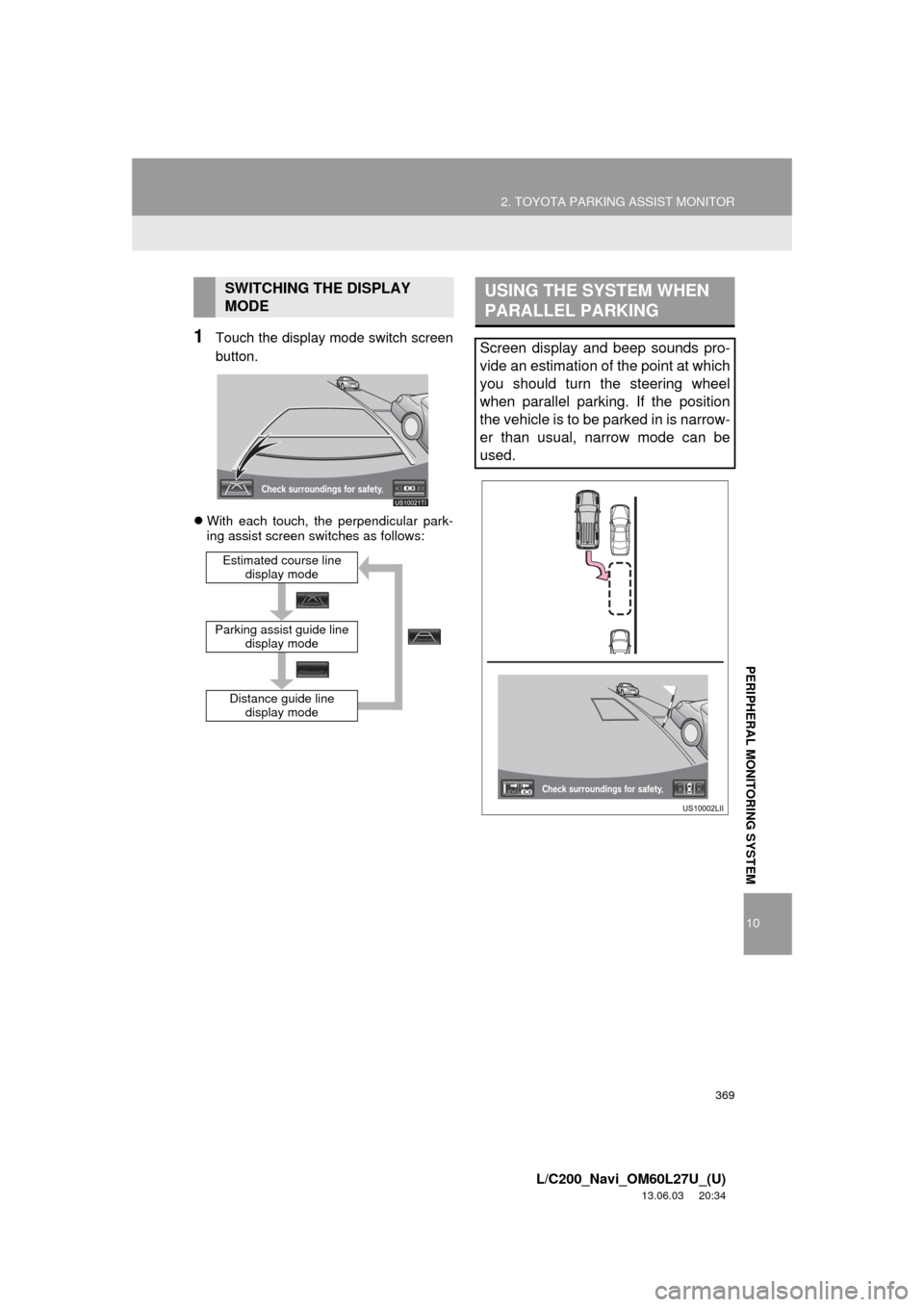
1Touch the display mode switch screen
button.
With each touch, the perpendicular park-
ing assist screen switches as follows:
SWITCHING THE DISPLAY
MODE
Distance guide line
display mode
Parking assist guide line
display mode
Estimated course line
display mode
USING THE SYSTEM WHEN
PARALLEL PARKING
Screen display and beep sounds pro-
vide an estimation of the point at which
you should turn the steering wheel
when parallel parking. If the position
the vehicle is to be parked in is narrow-
er than usual, narrow mode can be
used.
Page 371 of 427
371
2. TOYOTA PARKING ASSIST MONITOR
10
L/C200_Navi_OM60L27U_(U)
13.06.03 20:34
PERIPHERAL MONITORING SYSTEM
2. PERPENDICULAR PARKING (ESTIMATED COURSE LINE DISPLAY MODE)
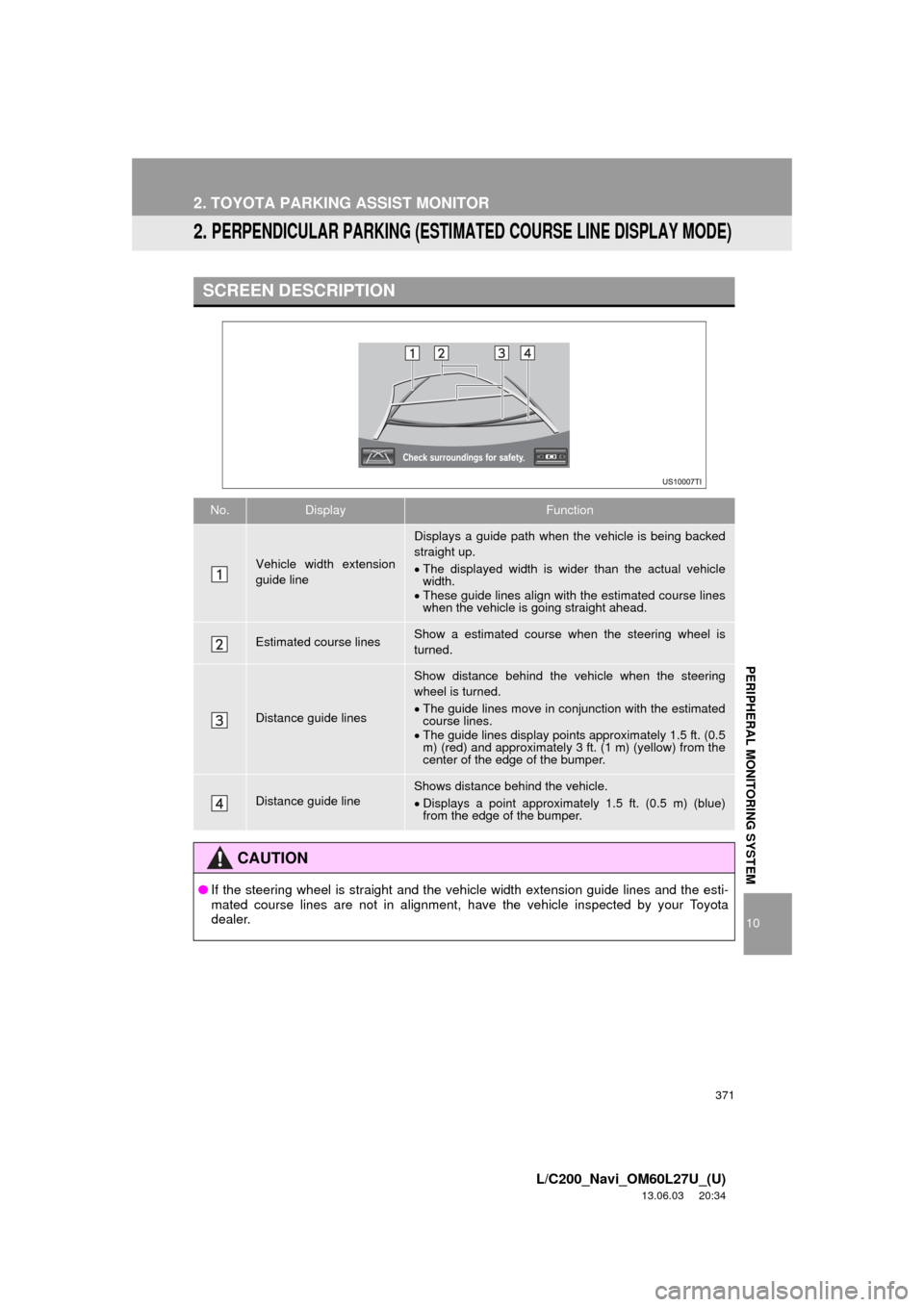
SCREEN DESCRIPTION
No.DisplayFunction
Vehicle width extension
guide line
Displays a guide path when the vehicle is being backed
straight up.
The displayed width is wider than the actual vehicle
width.
These guide lines align with the estimated course lines
when the vehicle is going straight ahead.
Estimated course linesShow a estimated course when the steering wheel is
turned.
Distance guide lines
Show distance behind the vehicle when the steering
wheel is turned.
The guide lines move in conjunction with the estimated
course lines.
The guide lines display points approximately 1.5 ft. (0.5
m) (red) and approximately 3 ft. (1 m) (yellow) from the
center of the edge of the bumper.
Distance guide lineShows distance behind the vehicle.
Displays a point approximately 1.5 ft. (0.5 m) (blue)
from the edge of the bumper.
CAUTION
●If the steering wheel is straight and the vehicle width extension guide lines and the esti-
mated course lines are not in alignment, have the vehicle inspected by your Toyota
dealer.
Page 372 of 427
372
2. TOYOTA PARKING ASSIST MONITOR
L/C200_Navi_OM60L27U_(U)
13.06.03 20:34
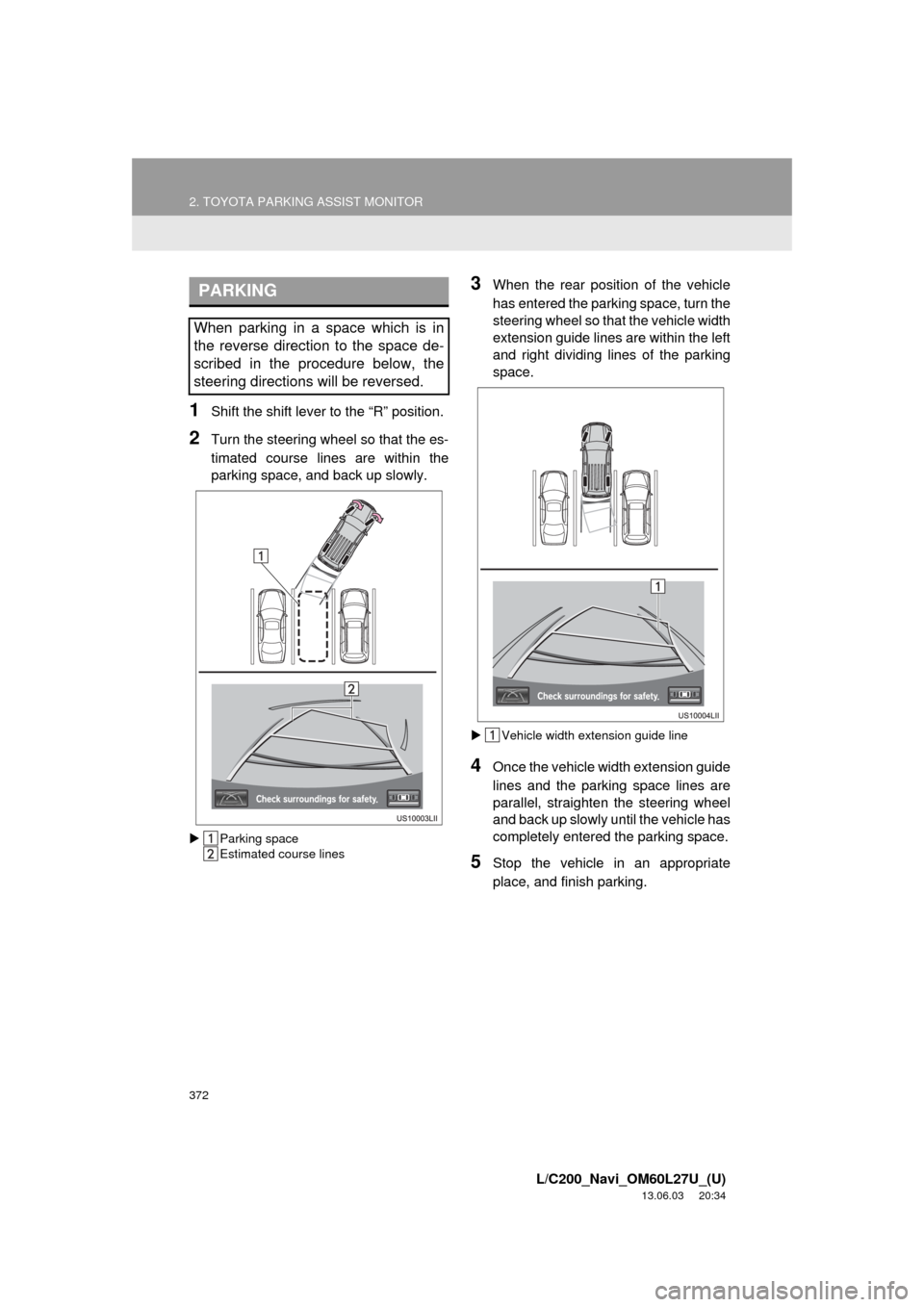
1Shift the shift lever to the “R” position.
2Turn the steering wheel so that the es-
timated course lines are within the
parking space, and back up slowly.
Parking space
Estimated course lines
3When the rear position of the vehicle
has entered the parking space, turn the
steering wheel so that the vehicle width
extension guide lines are within the left
and right dividing lines of the parking
space.
Vehicle width extension guide line
4Once the vehicle width extension guide
lines and the parking space lines are
parallel, straighten the steering wheel
and back up slowly until the vehicle has
completely entered the parking space.
5Stop the vehicle in an appropriate
place, and finish parking.
PARKING
When parking in a space which is in
the reverse direction to the space de-
scribed in the procedure below, the
steering directions will be reversed.
Page 373 of 427
373
2. TOYOTA PARKING ASSIST MONITOR
10
L/C200_Navi_OM60L27U_(U)
13.06.03 20:34
PERIPHERAL MONITORING SYSTEM
3. PERPENDICULAR PARKING (PARKING ASSIST GUIDE LINE DISPLAY MODE)
w
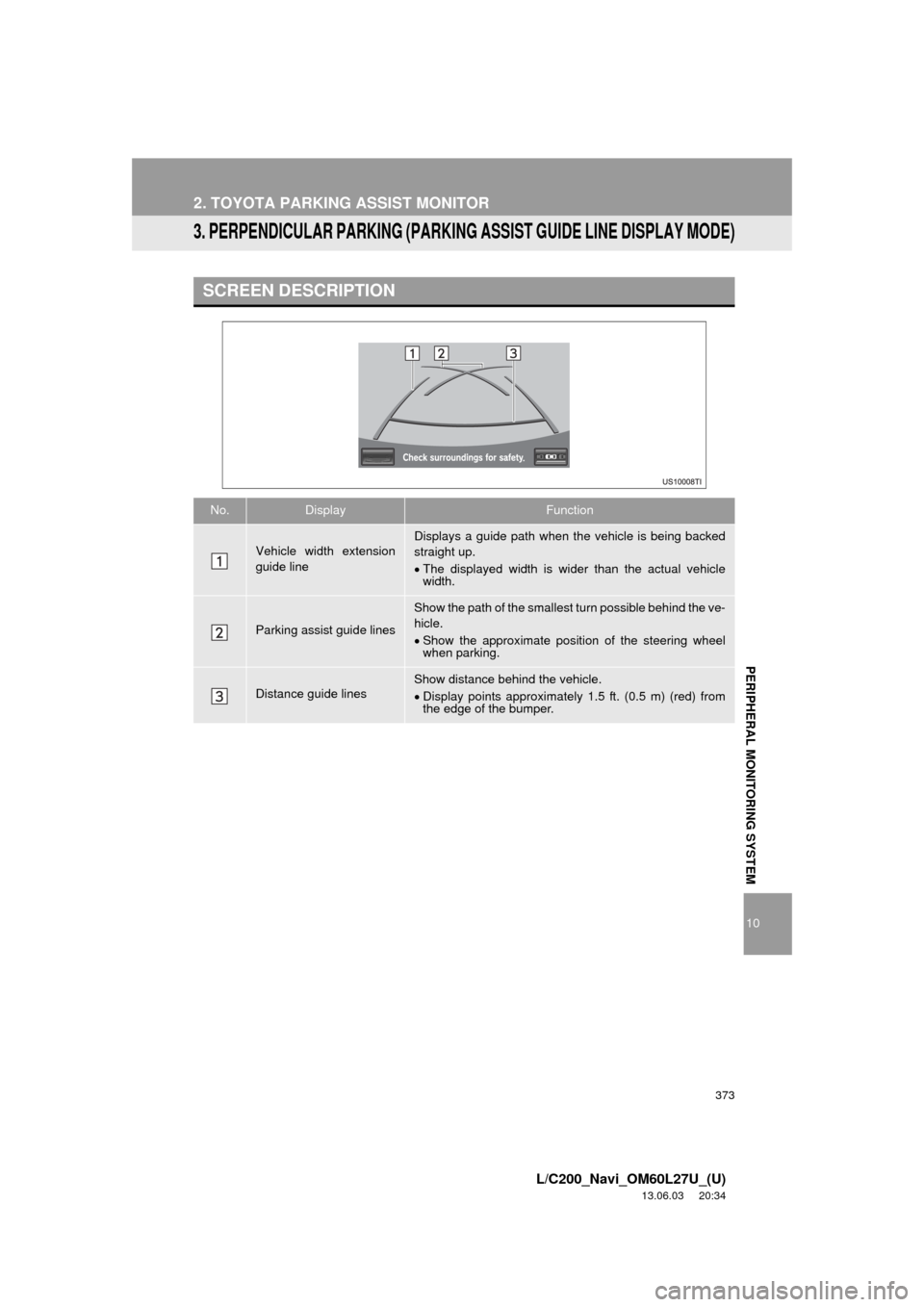
SCREEN DESCRIPTION
No.DisplayFunction
Vehicle width extension
guide lineDisplays a guide path when the vehicle is being backed
straight up.
The displayed width is wider than the actual vehicle
width.
Parking assist guide lines
Show the path of the smallest turn possible behind the ve-
hicle.
Show the approximate position of the steering wheel
when parking.
Distance guide linesShow distance behind the vehicle.
Display points approximately 1.5 ft. (0.5 m) (red) from
the edge of the bumper.
Page 374 of 427
374
2. TOYOTA PARKING ASSIST MONITOR
L/C200_Navi_OM60L27U_(U)
13.06.03 20:34
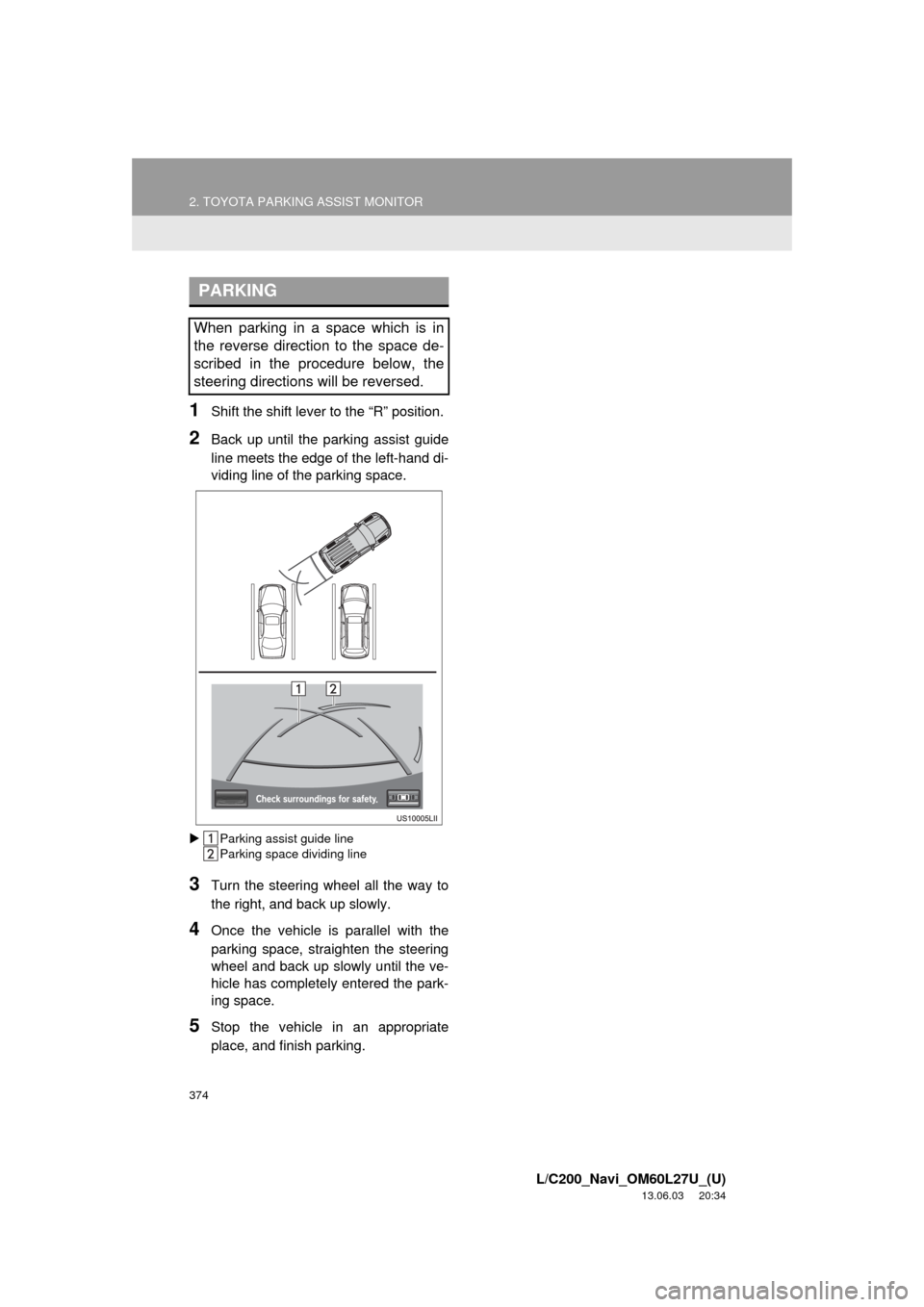
1Shift the shift lever to the “R” position.
2Back up until the parking assist guide
line meets the edge of the left-hand di-
viding line of the parking space.
Parking assist guide line
Parking space dividing line
3Turn the steering wheel all the way to
the right, and back up slowly.
4Once the vehicle is parallel with the
parking space, straighten the steering
wheel and back up slowly until the ve-
hicle has completely entered the park-
ing space.
5Stop the vehicle in an appropriate
place, and finish parking.
PARKING
When parking in a space which is in
the reverse direction to the space de-
scribed in the procedure below, the
steering directions will be reversed.
Page 375 of 427
375
2. TOYOTA PARKING ASSIST MONITOR
10
L/C200_Navi_OM60L27U_(U)
13.06.03 20:34
PERIPHERAL MONITORING SYSTEM
4. PARALLEL PARKING
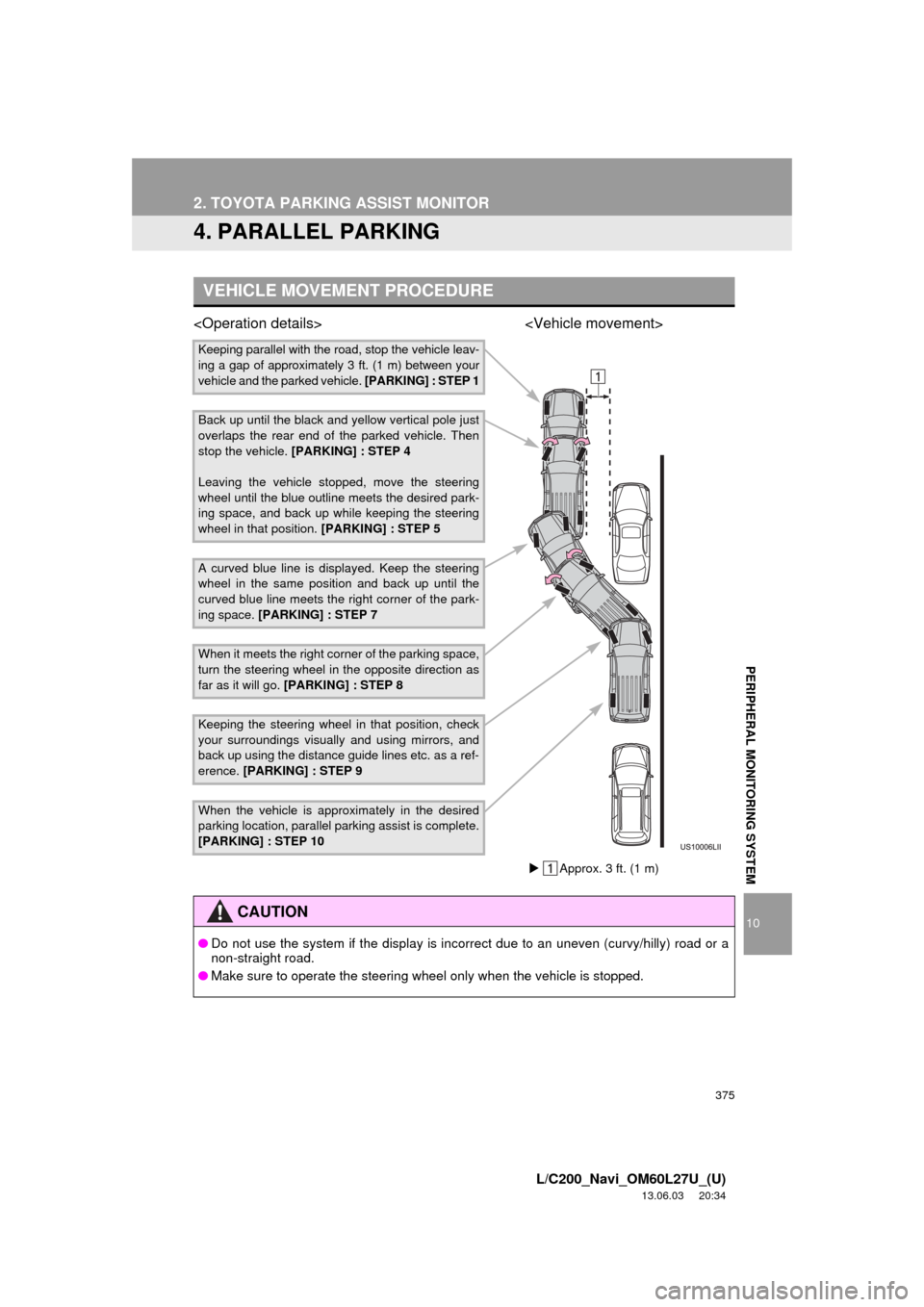
VEHICLE MOVEMENT PROCEDURE
Keeping parallel with the road, stop the vehicle leav-
ing a gap of approximately 3 ft. (1 m) between your
vehicle and the parked vehicle. [PARKING] : STEP 1
Back up until the black and yellow vertical pole just
overlaps the rear end of the parked vehicle. Then
stop the vehicle. [PARKING] : STEP 4
Leaving the vehicle stopped, move the steering
wheel until the blue outline meets the desired park-
ing space, and back up while keeping the steering
wheel in that position. [PARKING] : STEP 5
A curved blue line is displayed. Keep the steering
wheel in the same position and back up until the
curved blue line meets the right corner of the park-
ing space. [PARKING] : STEP 7
When it meets the right corner of the parking space,
turn the steering wheel in the opposite direction as
far as it will go. [PARKING] : STEP 8
Keeping the steering wheel in that position, check
your surroundings visually and using mirrors, and
back up using the distance guide lines etc. as a ref-
erence. [PARKING] : STEP 9
When the vehicle is approximately in the desired
parking location, parallel parking assist is complete.
[PARKING] : STEP 10
CAUTION
●Do not use the system if the display is incorrect due to an uneven (curvy/hilly) road or a
non-straight road.
●Make sure to operate the steering wheel only when the vehicle is stopped.
Approx. 3 ft. (1 m)
Page 376 of 427
376
2. TOYOTA PARKING ASSIST MONITOR
L/C200_Navi_OM60L27U_(U)
13.06.03 20:34
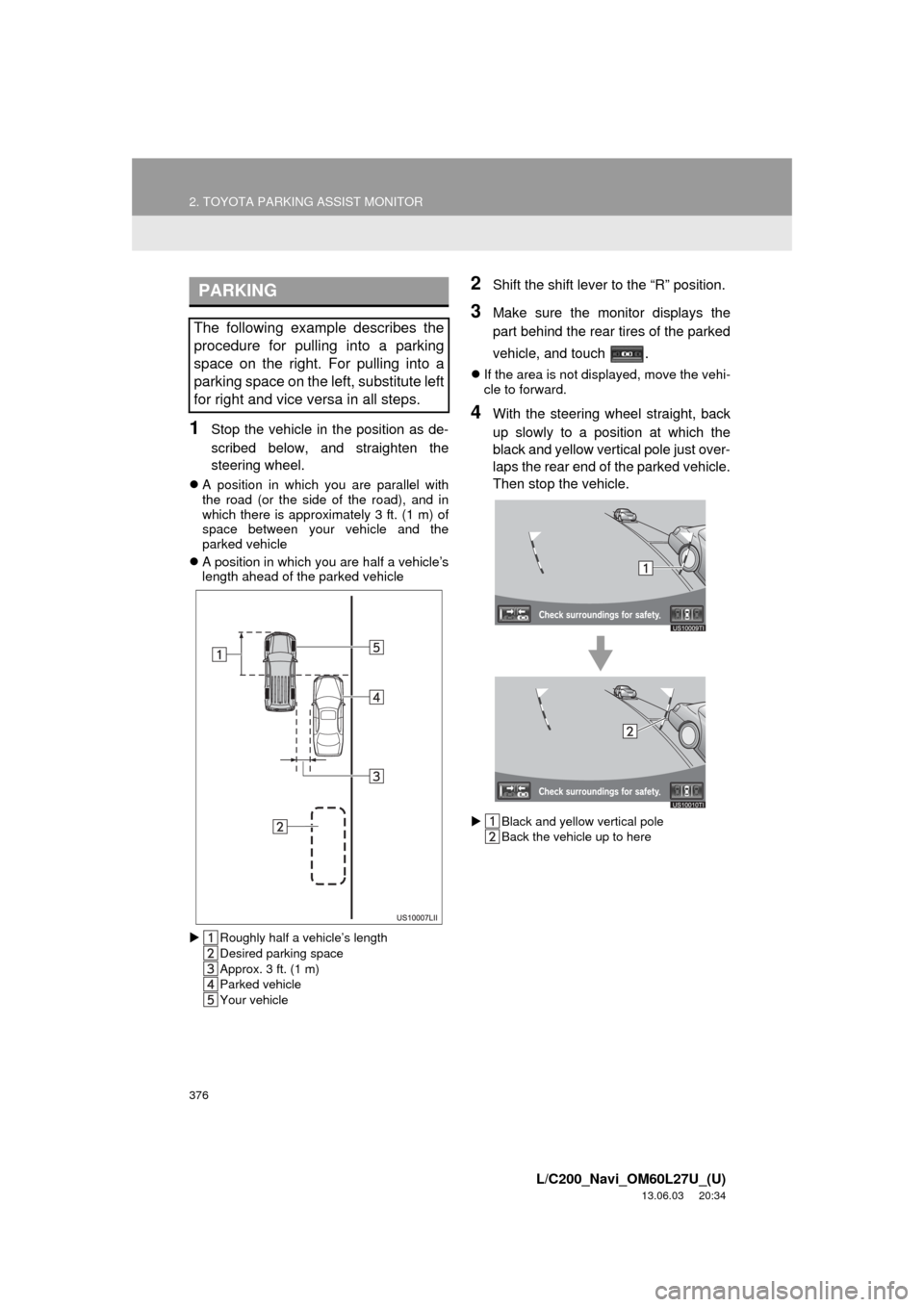
1Stop the vehicle in the position as de-
scribed below, and straighten the
steering wheel.
A position in which you are parallel with
the road (or the side of the road), and in
which there is approximately 3 ft. (1 m) of
space between your vehicle and the
parked vehicle
A position in which you are half a vehicle’s
length ahead of the parked vehicle
Roughly half a vehicle’s length
Desired parking space
Approx. 3 ft. (1 m)
Parked vehicle
Your vehicle
2Shift the shift lever to the “R” position.
3Make sure the monitor displays the
part behind the rear tires of the parked
vehicle, and touch .
If the area is not displayed, move the vehi-
cle to forward.
4With the steering wheel straight, back
up slowly to a position at which the
black and yellow vertical pole just over-
laps the rear end of the parked vehicle.
Then stop the vehicle.
Black and yellow vertical pole
Back the vehicle up to here
PARKING
The following example describes the
procedure for pulling into a parking
space on the right. For pulling into a
parking space on the left, substitute left
for right and vice versa in all steps.
Page 377 of 427
377
2. TOYOTA PARKING ASSIST MONITOR
10
PERIPHERAL MONITORING SYSTEM
L/C200_Navi_OM60L27U_(U)
13.06.03 20:34
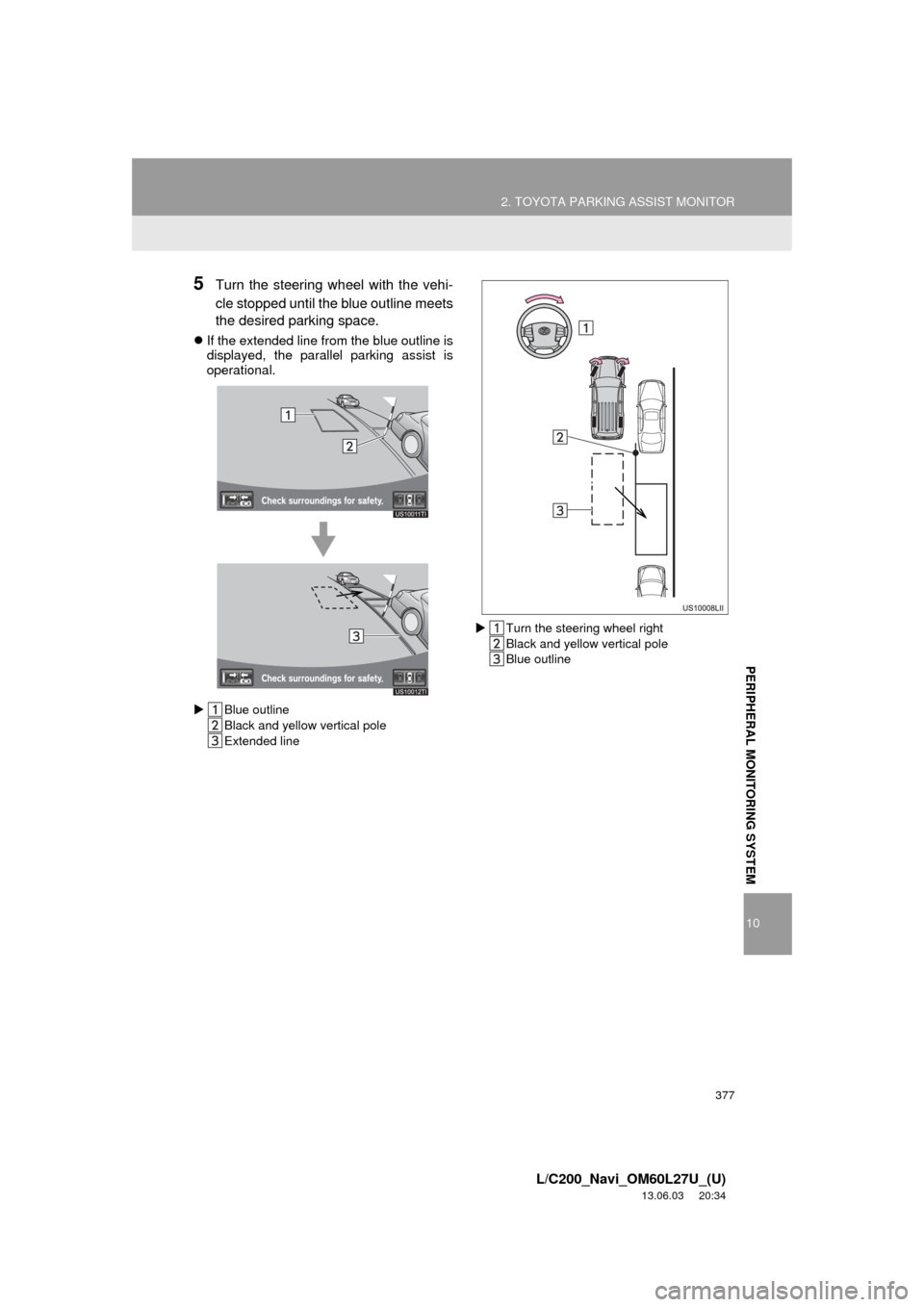
5Turn the steering wheel with the vehi-
cle stopped until the blue outline meets
the desired parking space.
If the extended line from the blue outline is
displayed, the parallel parking assist is
operational.
Blue outline
Black and yellow vertical pole
Extended lineTurn the steering wheel right
Black and yellow vertical pole
Blue outline