start TOYOTA LAND CRUISER 2014 J200 Navigation Manual
[x] Cancel search | Manufacturer: TOYOTA, Model Year: 2014, Model line: LAND CRUISER, Model: TOYOTA LAND CRUISER 2014 J200Pages: 427, PDF Size: 25.75 MB
Page 2 of 427

2
L/C200_Navi_OM60L27U_(U)
13.06.03 19:43
Introduction
This manual explains the operation of the Navigation System. Please read this
manual carefully to ensure proper use. Keep this manual in your vehicle at all
times.
The screen shots in this document and the actual screens of the navigation sys-
tem differ depending on whether the functions and/or a contract existed and the
map data available at the time of producing this document.
The Navigation System is one of the most technologically advanced vehicle ac-
cessories ever developed. The system receives satellite signals from the Global
Positioning System (GPS) operated by the U.S. Department of Defense. Using
these signals and other vehicle sensors, the system indicates your present po-
sition and assists in locating a desired destination.
The navigation system is designed to select efficient routes from your present
starting location to your destination. The system is also designed to direct you
to a destination that is unfamiliar to you in an efficient manner. The system uses
DENSO maps. The calculated routes may not be the shortest nor the least traf-
fic congested. Your own personal local knowledge or “short cut” may at times
be faster than the calculated routes.
The navigation system’s database includes Point of Interest categories to allow
you to easily select destinations such as restaurants and hotels. If a destination
is not in the database, you can enter the street address or a major intersection
close to it and the system will guide you there.
The system will provide both a visual map and audio instructions. The audio in-
structions will announce the distance remaining and the direction to turn in when
approaching an intersection. These voice instructions will help you keep your
eyes on the road and are timed to provide enough time to allow you to maneu-
ver, change lanes or slow down.
Please be aware that all current vehicle navigation systems have certain limita-
tions that may affect their ability to perform properly. The accuracy of the vehi-
cle’s position depends on satellite conditions, road configuration, vehicle
condition or other circumstances. For more information on the limitations of the
system, refer to pages 128 through 130.
NAVIGATION SYSTEM OWNER’S MANUAL
NAVIGATION SYSTEM
Page 6 of 427

TABLE OF CONTENTS
6
L/C200_Navi_OM60L27U_(U)
13.06.03 19:56
1. NAVIGATION OPERATION ............ 10
OVERVIEW BUTTON AND
GUIDANCE SCREEN ......................... 10
REGISTERING HOME .......................... 12
REGISTERING PRESET
DESTINATIONS .................................. 14
OPERATION FLOW:
GUIDING THE ROUTE ....................... 16
SETTING HOME
AS THE DESTINATION ...................... 17
2. FUNCTION INDEX ........................... 18
NAVIGATION SYSTEM FUNCTION
INDEX ................................................. 18
3. QUICK REFERENCE....................... 20
“Destination” SCREEN........................... 20
“Setup” SCREEN ................................... 22
“Information” SCREEN........................... 24
1. BASIC INFORMATION BEFORE
OPERATION .................................. 26
INITIAL SCREEN ................................... 26
TOUCH SCREEN OPERATION ............ 27
INPUTTING LETTERS AND
NUMBERS/LIST SCREEN
OPERATION ....................................... 28
SCREEN ADJUSTMENT ....................... 31
MAP SCREEN OPERATION ................. 33
2. SETUP ............................................. 44
GENERAL SETTINGS ........................... 44
VOICE SETTINGS ................................. 54
1. DESTINATION SEARCH ................ 58
DESTINATION SEARCH ....................... 58
STARTING ROUTE GUIDANCE............ 76
2. ROUTE GUIDANCE ........................ 80
ROUTE GUIDANCE SCREEN ............... 80
TYPICAL VOICE GUIDANCE
PROMPTS ........................................... 83
DISTANCE AND TIME
TO DESTINATION............................... 86
SETTING AND DELETING
DESTINATIONS .................................. 87
SETTING ROUTE .................................. 89
3. ADDRESS BOOK ........................... 98
NAVIGATION SETTINGS ...................... 98
4. SETUP ........................................... 114
DETAILED NAVIGATION
SETTINGS ......................................... 114
VEHICLE SETTINGS ........................... 122
5. GPS (GLOBAL POSITIONING
SYSTEM) ..................................... 128
LIMITATIONS OF THE
NAVIGATION SYSTEM ..................... 128
1QUICK GUIDE
2BASIC FUNCTION
3NAVIGATION SYSTEM
Page 11 of 427
11
1. NAVIGATION OPERATION
1
QUICK GUIDE
L/C200_Navi_OM60L27U_(U)
13.06.03 19:43
*: Press and hold the “PWR·VOL” knob for 3 seconds or more to turn off the screen and restart the
navigation system. Do this when the vehicle-mounted device response is extremely slow.
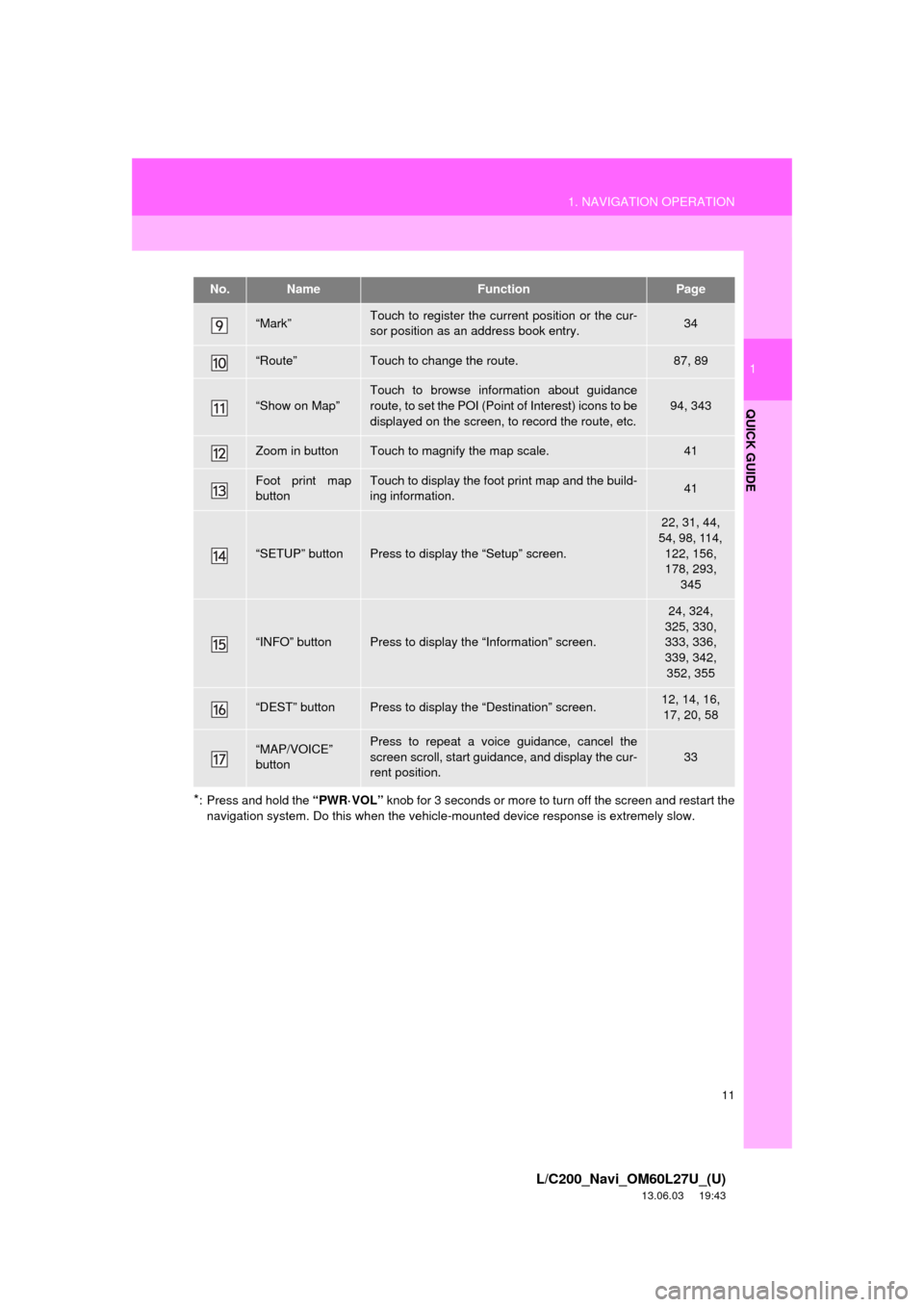
“Mark”Touch to register the current position or the cur-
sor position as an address book entry.34
“Route”Touch to change the route.87, 89
“Show on Map”
Touch to browse information about guidance
route, to set the POI (Point of Interest) icons to be
displayed on the screen, to record the route, etc.
94, 343
Zoom in buttonTouch to magnify the map scale.41
Foot print map
buttonTouch to display the foot print map and the build-
ing information.41
“SETUP” buttonPress to display the “Setup” screen.
22, 31, 44,
54, 98, 114,
122, 156,
178, 293,
345
“INFO” buttonPress to display the “Information” screen.
24, 324,
325, 330,
333, 336,
339, 342,
352, 355
“DEST” buttonPress to display the “Destination” screen.12, 14, 16,
17, 20, 58
“MAP/VOICE”
buttonPress to repeat a voice guidance, cancel the
screen scroll, start guidance, and display the cur-
rent position.
33
No.NameFunctionPage
Page 16 of 427
16
1. NAVIGATION OPERATION
L/C200_Navi_OM60L27U_(U)
13.06.03 19:43
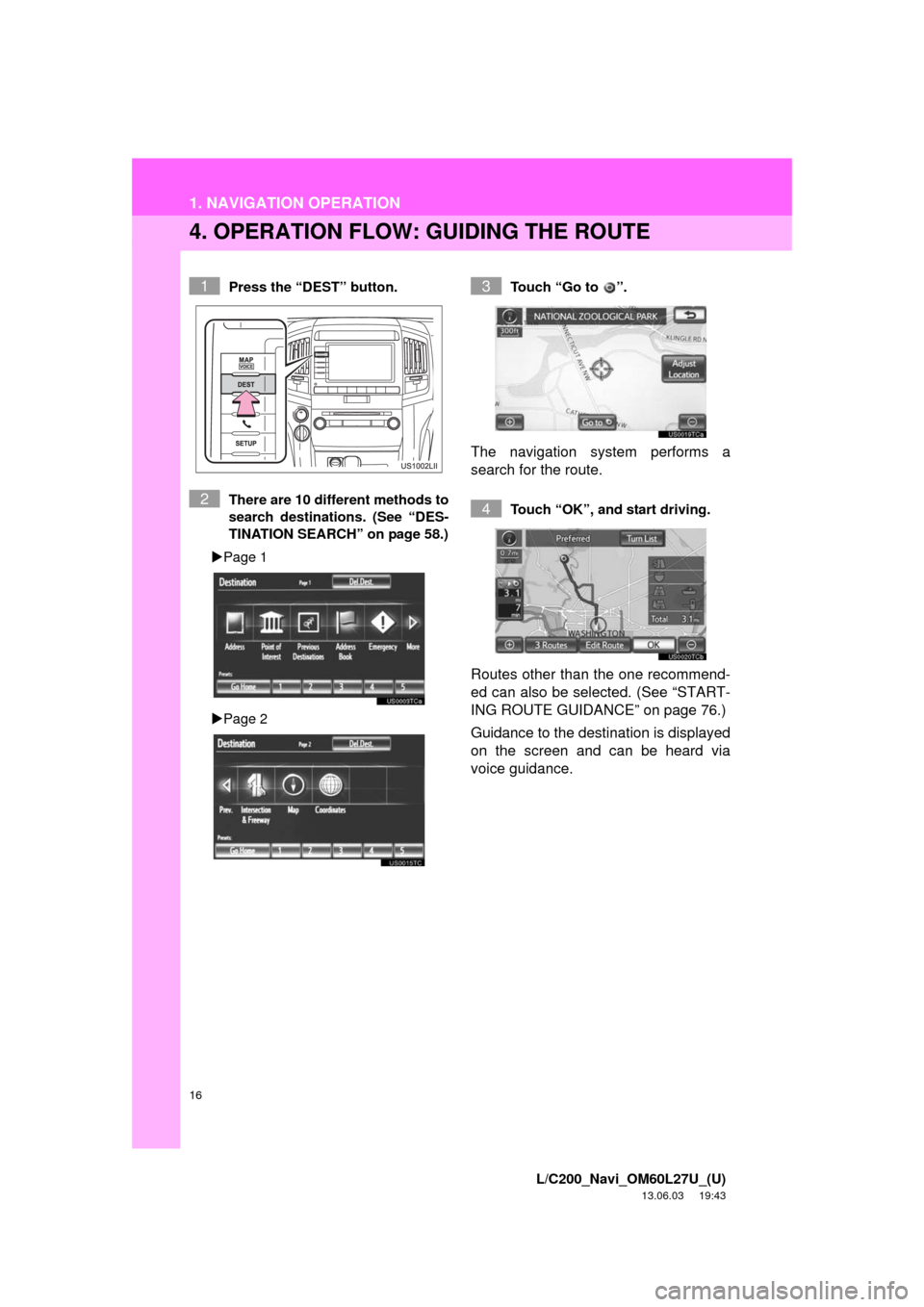
4. OPERATION FLOW: GUIDING THE ROUTE
Press the “DEST” button.
There are 10 different methods to
search destinations. (See “DES-
TINATION SEARCH” on page 58.)
Page 1
Page 2Touch “Go to ”.
The navigation system performs a
search for the route.
Touch “OK”, and start driving.
Routes other than the one recommend-
ed can also be selected. (See “START-
ING ROUTE GUIDANCE” on page 76.)
Guidance to the destination is displayed
on the screen and can be heard via
voice guidance.
1
2
3
4
Page 17 of 427
17
1. NAVIGATION OPERATION
1
QUICK GUIDE
L/C200_Navi_OM60L27U_(U)
13.06.03 19:43
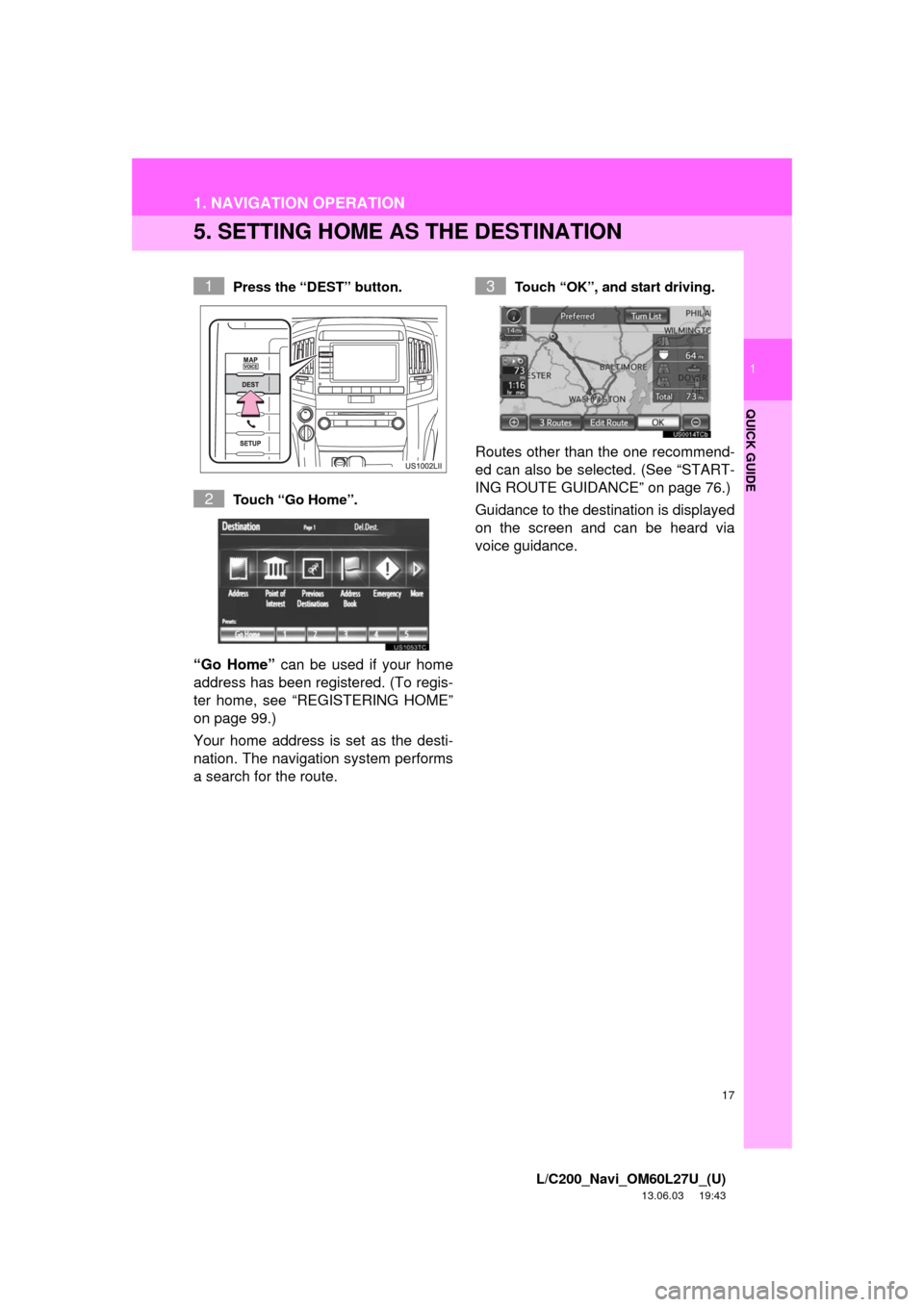
5. SETTING HOME AS THE DESTINATION
Press the “DEST” button.
Touch “Go Home”.
“Go Home” can be used if your home
address has been registered. (To regis-
ter home, see “REGISTERING HOME”
on page 99.)
Your home address is set as the desti-
nation. The navigation system performs
a search for the route.
Touch “OK”, and start driving.
Routes other than the one recommend-
ed can also be selected. (See “START-
ING ROUTE GUIDANCE” on page 76.)
Guidance to the destination is displayed
on the screen and can be heard via
voice guidance.
1
2
3
Page 18 of 427
18
L/C200_Navi_OM60L27U_(U)
13.06.03 19:43
2. FUNCTION INDEX
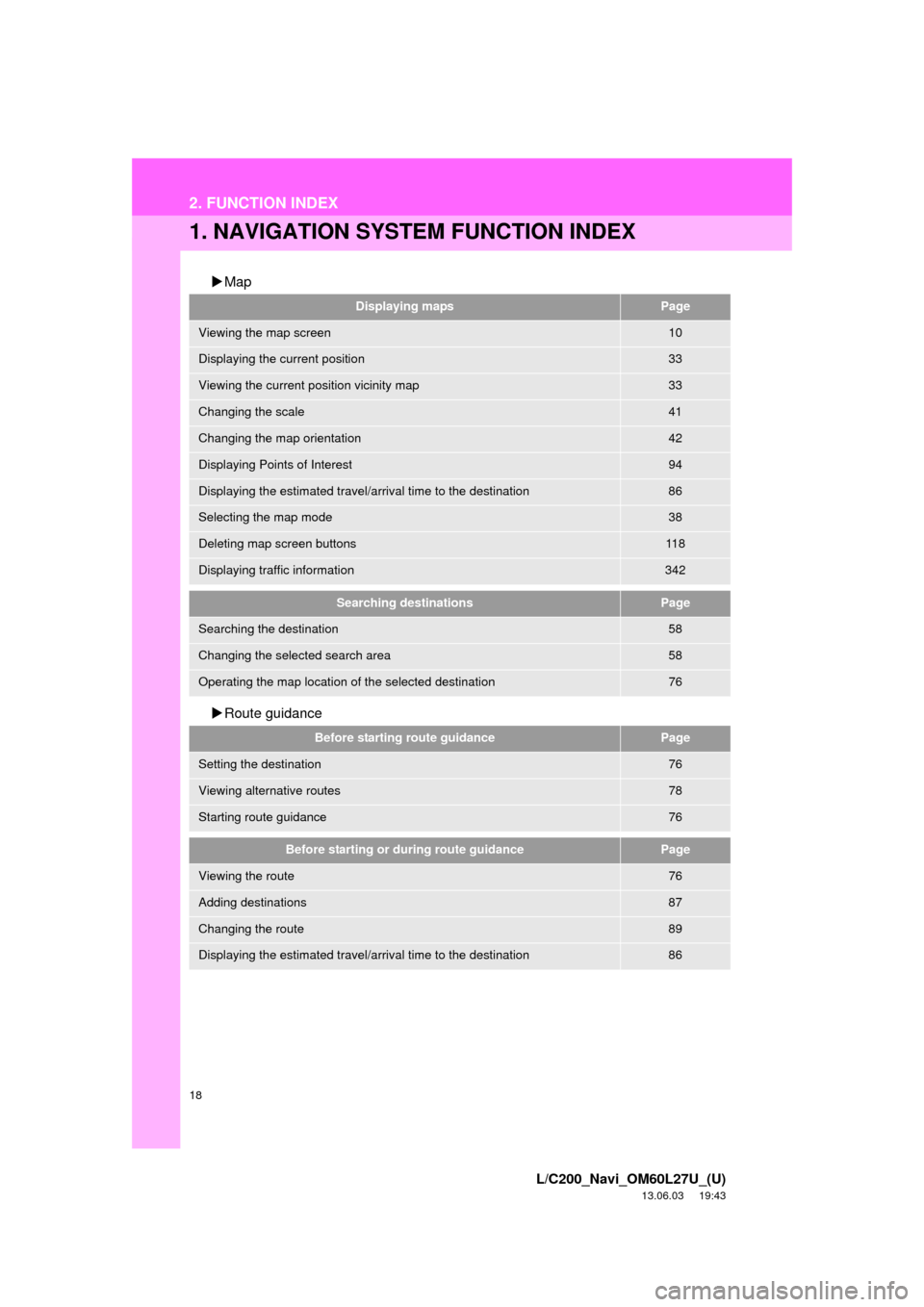
1. NAVIGATION SYSTEM FUNCTION INDEX
Map
Route guidance
Displaying mapsPage
Viewing the map screen10
Displaying the current position33
Viewing the current position vicinity map33
Changing the scale41
Changing the map orientation42
Displaying Points of Interest94
Displaying the estimated travel/arrival time to the destination86
Selecting the map mode38
Deleting map screen buttons11 8
Displaying traffic information342
Searching destinationsPage
Searching the destination58
Changing the selected search area58
Operating the map location of the selected destination76
Before starting route guidancePage
Setting the destination76
Viewing alternative routes78
Starting route guidance76
Before starting or during route guidancePage
Viewing the route76
Adding destinations87
Changing the route89
Displaying the estimated travel/arrival time to the destination86
Page 20 of 427
20
L/C200_Navi_OM60L27U_(U)
13.06.03 19:43
3. QUICK REFERENCE
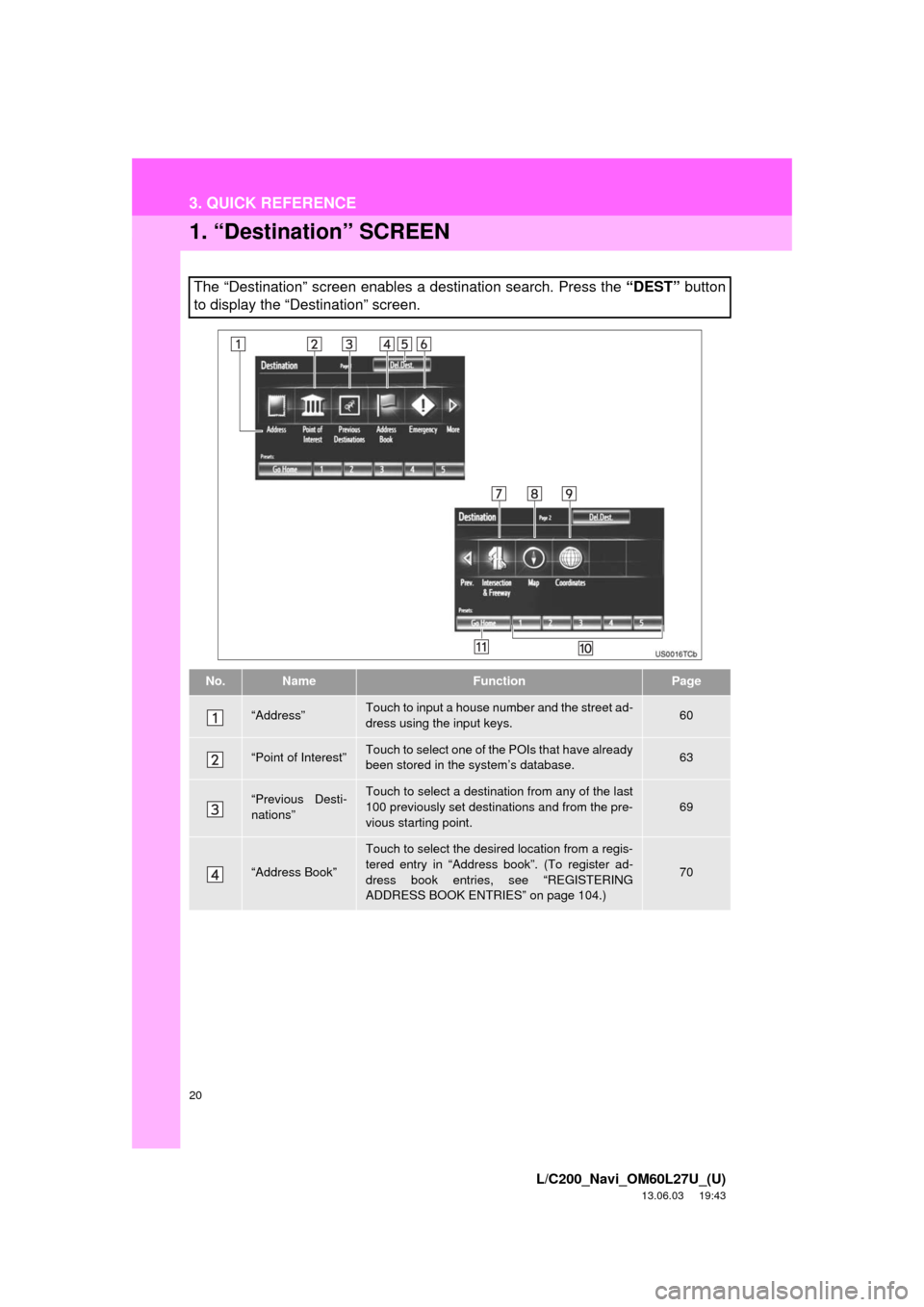
1. “Destination” SCREEN
The “Destination” screen enables a destination search. Press the “DEST” button
to display the “Destination” screen.
No.NameFunctionPage
“Address”Touch to input a house number and the street ad-
dress using the input keys.60
“Point of Interest”Touch to select one of the POIs that have already
been stored in the system’s database.63
“Previous Desti-
nations”Touch to select a destination from any of the last
100 previously set destinations and from the pre-
vious starting point.69
“Address Book”
Touch to select the desired location from a regis-
tered entry in “Address book”. (To register ad-
dress book entries, see “REGISTERING
ADDRESS BOOK ENTRIES” on page 104.)
70
Page 26 of 427
26
L/C200_Navi_OM60L27U_(U)
13.06.03 19:43
1. BASIC INFORMATION BEFORE OPERATION
1. INITIAL SCREEN
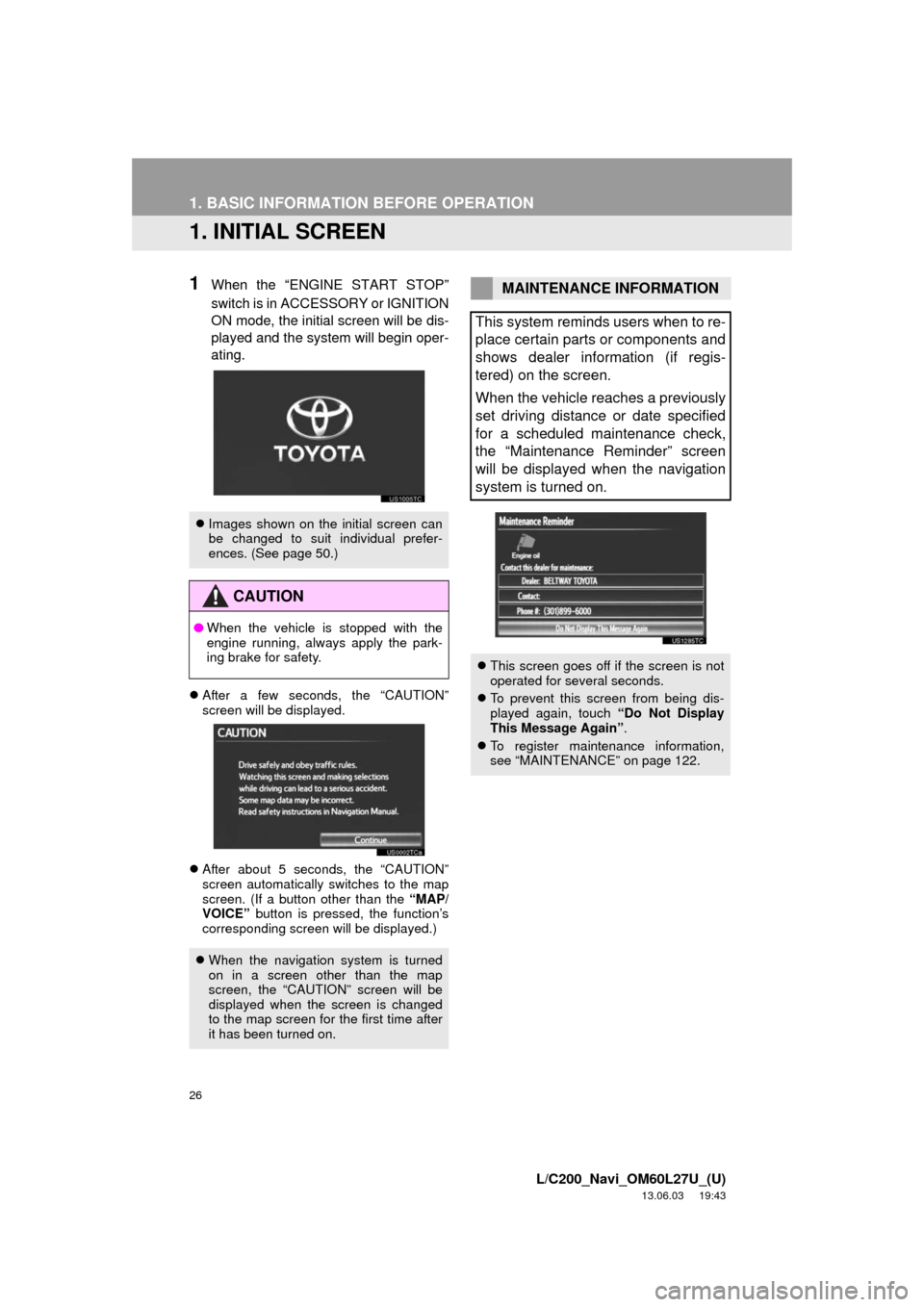
1When the “ENGINE START STOP”
switch is in ACCESSORY or IGNITION
ON mode, the initial screen will be dis-
played and the system will begin oper-
ating.
After a few seconds, the “CAUTION”
screen will be displayed.
After about 5 seconds, the “CAUTION”
screen automatically switches to the map
screen. (If a button other than the “MAP/
VOICE” button is pressed, the function’s
corresponding screen will be displayed.)
Images shown on the initial screen can
be changed to suit individual prefer-
ences. (See page 50.)
CAUTION
●When the vehicle is stopped with the
engine running, always apply the park-
ing brake for safety.
When the navigation system is turned
on in a screen other than the map
screen, the “CAUTION” screen will be
displayed when the screen is changed
to the map screen for the first time after
it has been turned on.
MAINTENANCE INFORMATION
This system reminds users when to re-
place certain parts or components and
shows dealer information (if regis-
tered) on the screen.
When the vehicle reaches a previously
set driving distance or date specified
for a scheduled maintenance check,
the “Maintenance Reminder” screen
will be displayed when the navigation
system is turned on.
This screen goes off if the screen is not
operated for several seconds.
To prevent this screen from being dis-
played again, touch “Do Not Display
This Message Again”.
To register maintenance information,
see “MAINTENANCE” on page 122.
Page 33 of 427
33
1. BASIC INFORMATION BEFORE OPERATION
2
BASIC FUNCTION
L/C200_Navi_OM60L27U_(U)
13.06.03 19:43
5. MAP SCREEN OPERATION
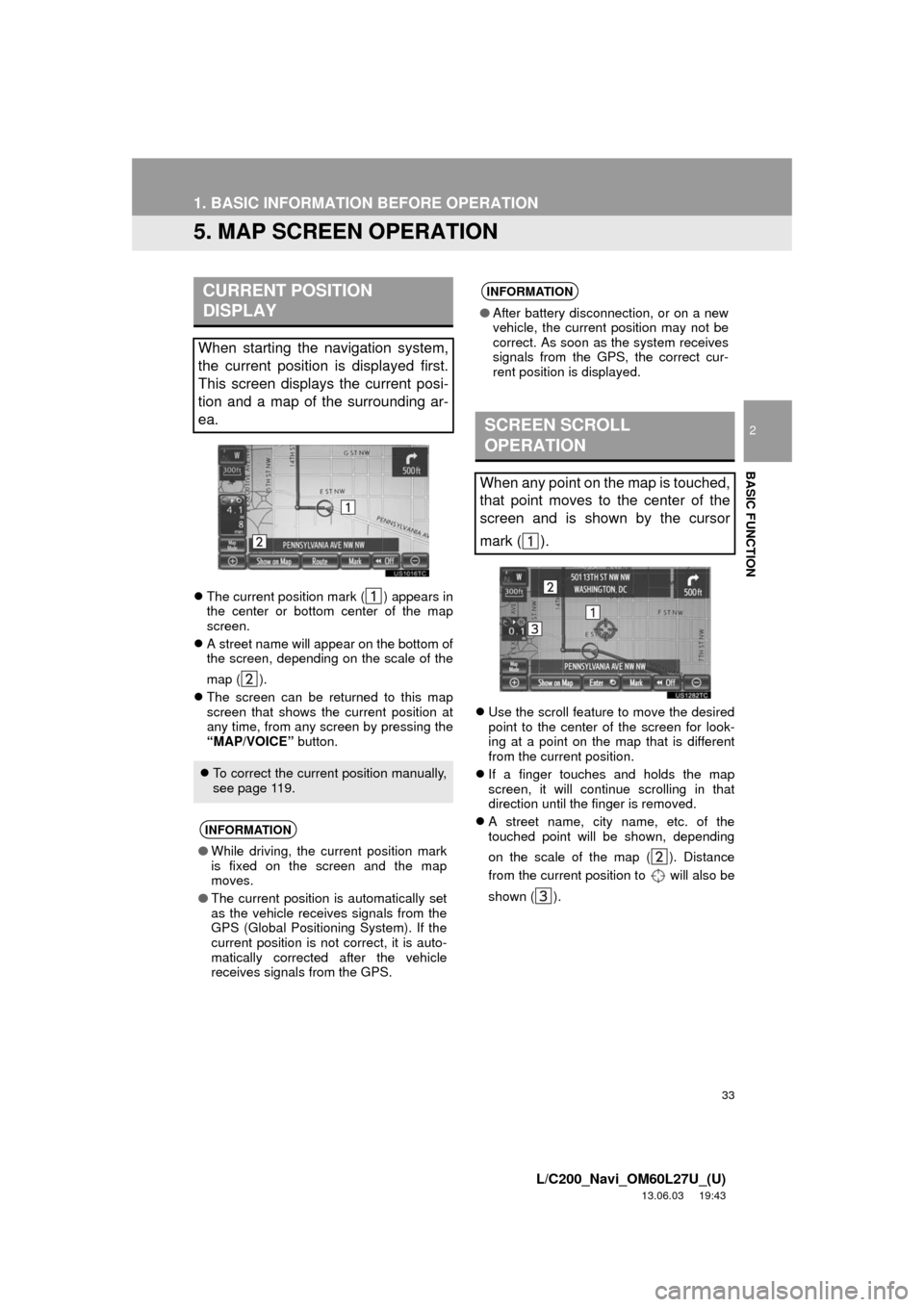
The current position mark ( ) appears in
the center or bottom center of the map
screen.
A street name will appear on the bottom of
the screen, depending on the scale of the
map ( ).
The screen can be returned to this map
screen that shows the current position at
any time, from any screen by pressing the
“MAP/VOICE” button.Use the scroll feature to move the desired
point to the center of the screen for look-
ing at a point on the map that is different
from the current position.
If a finger touches and holds the map
screen, it will continue scrolling in that
direction until the finger is removed.
A street name, city name, etc. of the
touched point will be shown, depending
on the scale of the map ( ). Distance
from the current position to will also be
shown ( ).
CURRENT POSITION
DISPLAY
When starting the navigation system,
the current position is displayed first.
This screen displays the current posi-
tion and a map of the surrounding ar-
ea.
To correct the current position manually,
see page 119.
INFORMATION
●While driving, the current position mark
is fixed on the screen and the map
moves.
●The current position is automatically set
as the vehicle receives signals from the
GPS (Global Positioning System). If the
current position is not correct, it is auto-
matically corrected after the vehicle
receives signals from the GPS.
INFORMATION
●After battery disconnection, or on a new
vehicle, the current position may not be
correct. As soon as the system receives
signals from the GPS, the correct cur-
rent position is displayed.
SCREEN SCROLL
OPERATION
When any point on the map is touched,
that point moves to the center of the
screen and is shown by the cursor
mark ( ).
Page 34 of 427
34
1. BASIC INFORMATION BEFORE OPERATION
L/C200_Navi_OM60L27U_(U)
13.06.03 19:43
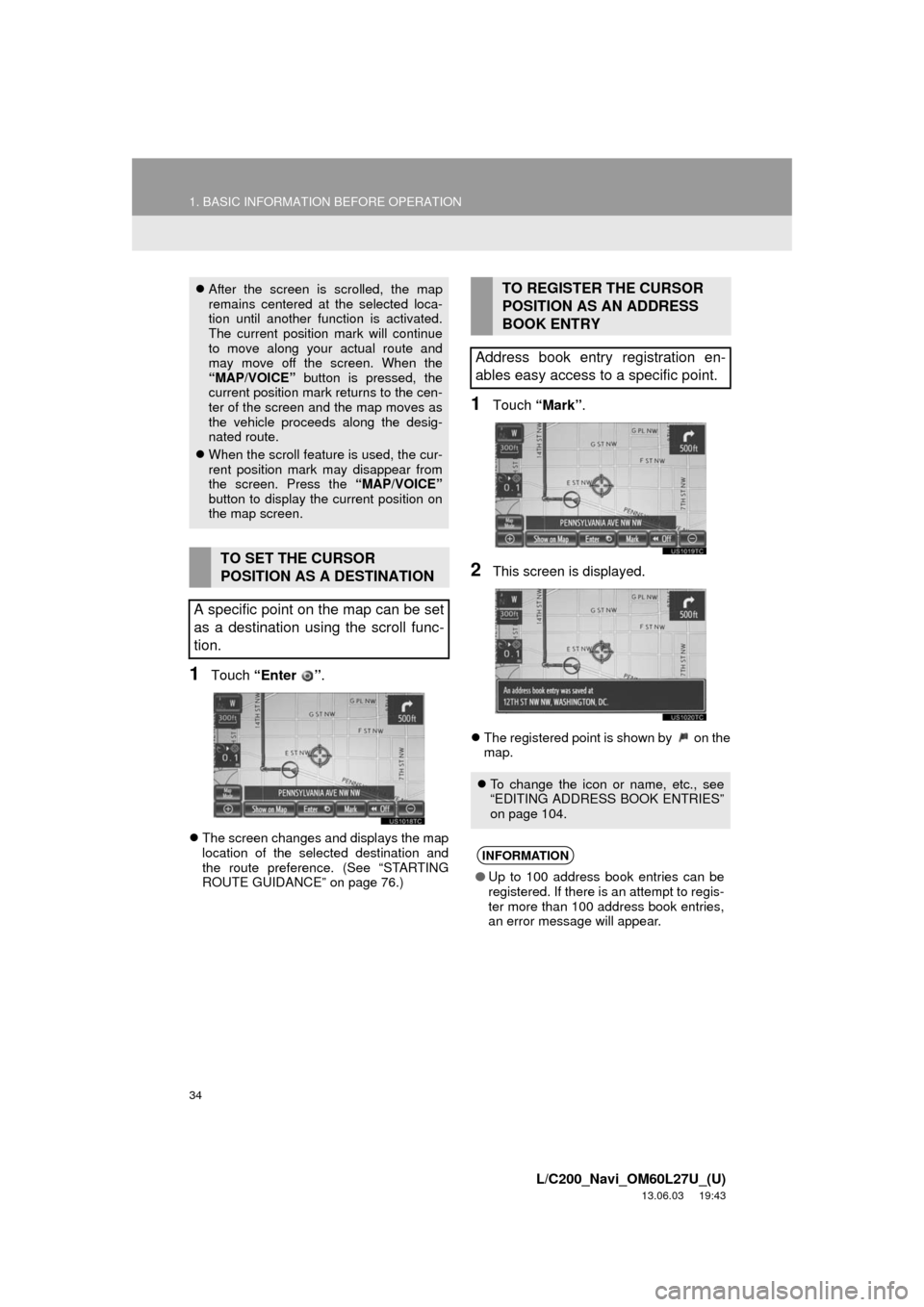
1Touch “Enter ”.
The screen changes and displays the map
location of the selected destination and
the route preference. (See “STARTING
ROUTE GUIDANCE” on page 76.)
1Touch “Mark”.
2This screen is displayed.
The registered point is shown by on the
map.
After the screen is scrolled, the map
remains centered at the selected loca-
tion until another function is activated.
The current position mark will continue
to move along your actual route and
may move off the screen. When the
“MAP/VOICE” button is pressed, the
current position mark returns to the cen-
ter of the screen and the map moves as
the vehicle proceeds along the desig-
nated route.
When the scroll feature is used, the cur-
rent position mark may disappear from
the screen. Press the “MAP/VOICE”
button to display the current position on
the map screen.
TO SET THE CURSOR
POSITION AS A DESTINATION
A specific point on the map can be set
as a destination using the scroll func-
tion.
TO REGISTER THE CURSOR
POSITION AS AN ADDRESS
BOOK ENTRY
Address book entry registration en-
ables easy access to a specific point.
To change the icon or name, etc., see
“EDITING ADDRESS BOOK ENTRIES”
on page 104.
INFORMATION
●Up to 100 address book entries can be
registered. If there is an attempt to regis-
ter more than 100 address book entries,
an error message will appear.