ad blue TOYOTA LAND CRUISER 2014 J200 User Guide
[x] Cancel search | Manufacturer: TOYOTA, Model Year: 2014, Model line: LAND CRUISER, Model: TOYOTA LAND CRUISER 2014 J200Pages: 724, PDF Size: 11 MB
Page 404 of 724

404 3-3. Using the Bluetooth
® audio system
LC200_OM_OM60L09U_(U)
CAUTION
■FCC WARNING
Changes or modifications not expressly approved by the party responsible
for compliance could void the user’s authority to operate the equipment.
Radio Frequency Radiation Exposure. This equipment complies with FCC
radiation exposure limits set forth for uncontrolled equipment and meets the
FCC radio frequency (RF) Exposure Gui delines in Supplement C to OET65.
This equipment has very low levels of RF energy that it deemed to comply
without maximum permissive exposure evaluation (MPE). But it is desirable
that it should be installed and operated with at least 7.9 in. (20 cm) and more
between the radiator and person’s body (excluding extremities: hands,
wrists, feet and legs).
This transmitter must not be co-located or operated in conjunction with any
other antenna or transmitter.
■ While driving
Do not connect portable players or operate the controls.
■ Caution regarding interfer ence with electronic devices
● Your audio unit is fitted with Bluetooth
® antennas. People with implantable
cardiac pacemakers, cardiac resynchronization therapy-pacemakers or
implantable cardioverter defibrillators should maintain a reasonable dis-
tance between themselves and the Bluetooth
® antennas. The radio waves
may affect the operation of such devices.
● Before using Bluetooth
® devices, users of any electrical medical device
other than implantable cardiac pacemakers, cardiac resynchronization
therapy-pacemakers or implantable cardioverter defibrillators should con-
sult the manufacturer of the device for information about its operation
under the influence of radio waves. Radio waves could have unexpected
effects on the operation of such medical devices.
Page 405 of 724

405
3-3. Using the Bluetooth
® audio system
3
Interior features
LC200_OM_OM60L09U_(U)
NOTICE
■
To prevent damage to portable players
Do not leave portable players in the vehicle. The temperature inside the
vehicle may become high, resulting in damage to the player.
Page 406 of 724
406
3-3. Using the Bluetooth® audio system
LC200_OM_OM60L09U_(U)
Using the Bluetooth® audio system
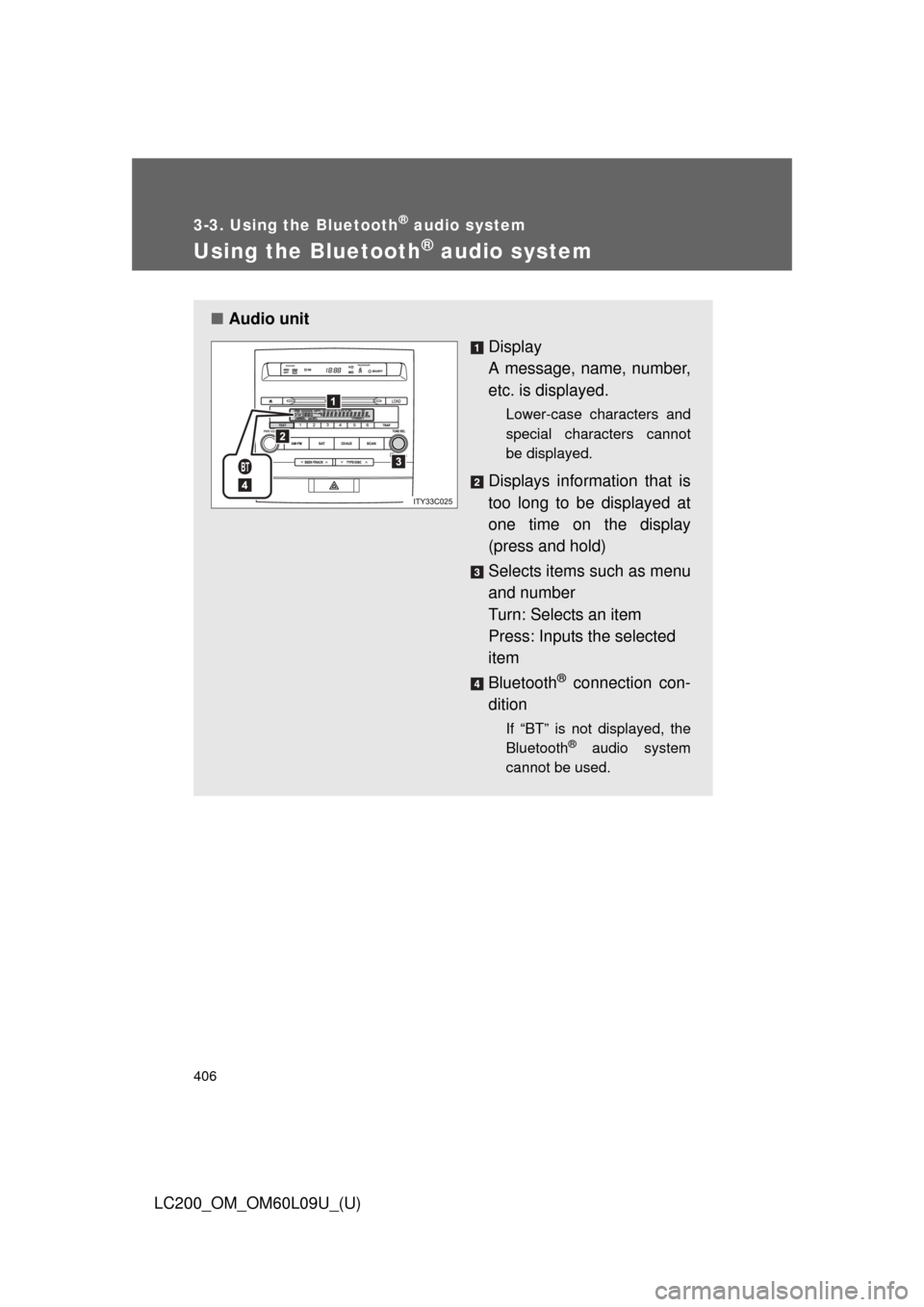
■Audio unit
Display
A message, name, number,
etc. is displayed.
Lower-case characters and
special characters cannot
be displayed.
Displays information that is
too long to be displayed at
one time on the display
(press and hold)
Selects items such as menu
and number
Turn: Selects an item
Press: Inputs the selected
item
Bluetooth
® connection con-
dition
If “BT” is not displayed, the
Bluetooth® audio system
cannot be used.
Page 407 of 724
407
3-3. Using the Bluetooth
® audio system
3
Interior features
LC200_OM_OM60L09U_(U)
Operating the system using voice commands
By following voice guidance inst ructions output from the speaker,
voice commands enable to th e operation of the Bluetooth
® audio sys-
tem without the need to check the display or operate .
■ Operation procedure when using voice commands
Press the talk switch and follo w voice guidance instructions.
■ Auxiliary commands when using voice commands
The following auxiliary commands can be used when operating the
system using a voice command:
Cancel: Exits the Bluetooth
® audio system
Repeat: Repeats the previous voice guidance instruction
Go back: Returns to the previous procedure
Help: Reads aloud the function summary if a help comment is
registered for the selected function
Page 408 of 724
408 3-3. Using the Bluetooth
® audio system
LC200_OM_OM60L09U_(U)
Using the Bluetooth® audio system for the first time
Before using the Bluetooth
® audio system, it is necessary to register
a Bluetooth
® enabled portable player in the system. Follow the proce-
dure below to register (pair) a portable player:
Press and select “BT•A MENU” using .
Press the talk switch or select “BT•A Setup” using .
The introductory guidance and port able player name registration
instructions are heard.
Select “Pair Audio Player (P air Audio)” using a voice com-
mand or .
Register a portable player nam e by either of the following
methods:
a. Select “Record Name” using , and say the name to
be registered.
b. Press the talk switch and say the name to be registered.
A voice guidance instruction to confirm the input is heard.
STEP1
STEP2
STEP3
STEP4
Page 409 of 724
409
3-3. Using the Bluetooth
® audio system
3
Interior features
LC200_OM_OM60L09U_(U)
Select “Confirm” using a voice command or .
A passkey is displayed and heard, and a voice guidance instruction
for inputting the passkey into the portable player is heard. Input the passkey into the portable player.
Refer to the manual that comes with the portable player for the oper-
ation of the portable player.
Guidance for registration completion is heard.
If the portable player has a Bluetooth
® phone, the phone can be reg-
istered at the same time. A voice guidance instruction to register a
Bluetooth
® phone is heard.
Select “Yes” or “No” using a voice command or .
(Bluetooth
® phone P. 423)
STEP5
STEP6
STEP7
Page 410 of 724
410 3-3. Using the Bluetooth
® audio system
LC200_OM_OM60L09U_(U)
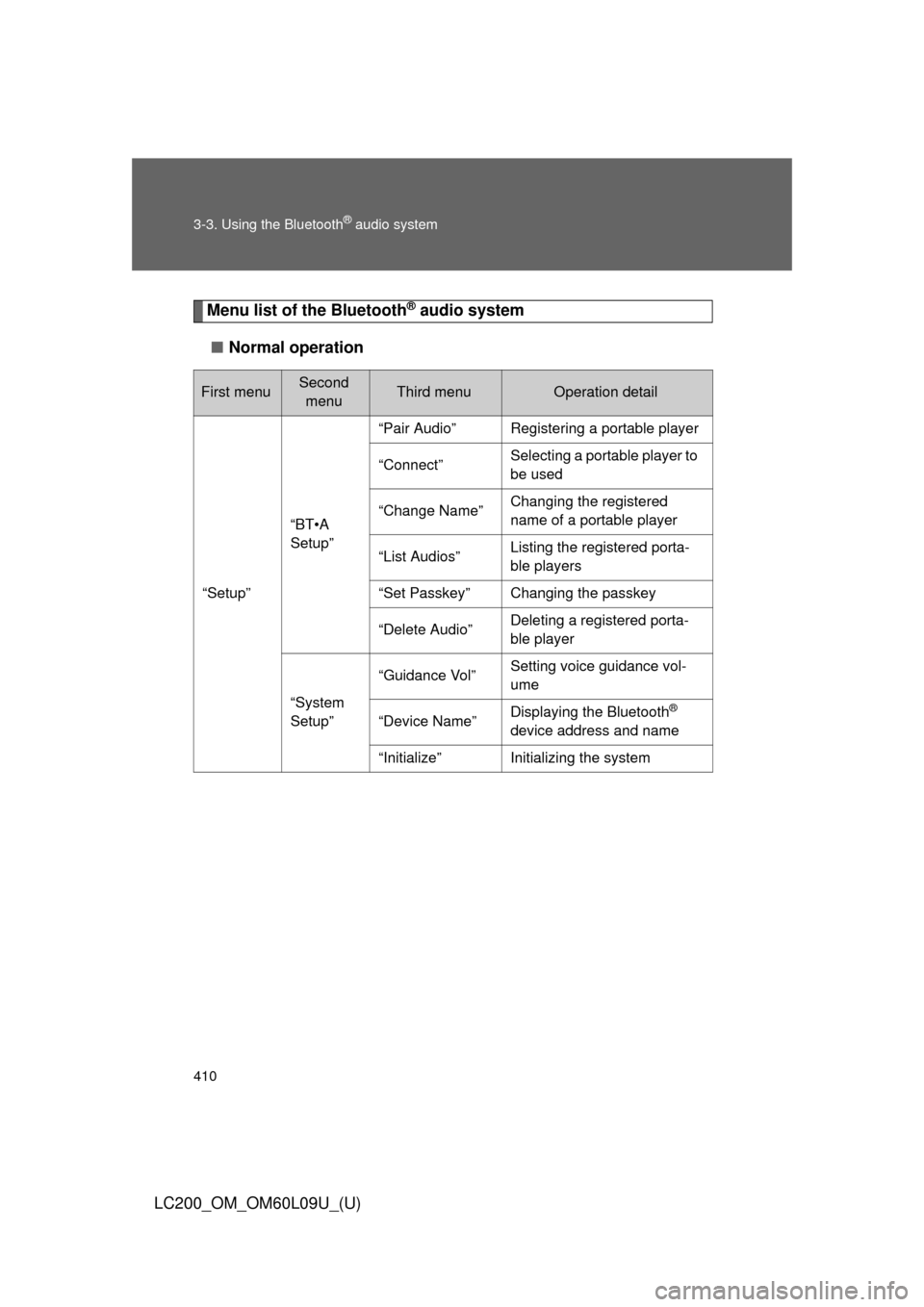
Menu list of the Bluetooth® audio system
■ Normal operation
First menuSecond
menuThird menuOperation detail
“Setup”
“BT•A
Setup”
“Pair Audio”Registering a portable player
“Connect”Selecting a portable player to
be used
“Change Name”Changing the registered
name of a portable player
“List Audios”Listing the registered porta-
ble players
“Set Passkey”Changing the passkey
“Delete Audio”Deleting a registered porta-
ble player
“System
Setup”
“Guidance Vol”Setting voice guidance vol-
ume
“Device Name”Displaying the Bluetooth®
device address and name
“Initialize”Initializing the system
Page 411 of 724
411
3-3. Using the Bluetooth
® audio system
3
Interior features
LC200_OM_OM60L09U_(U)
■
When using a voice command
For numbers, say a combination of single digits from zero to nine.
Say the command correctly and clearly.
■ Situations that the system ma y not recognize your voice
● When driving on rough roads
● When driving at high speeds
● When air is blowing out of the vents onto the microphone
● When the air conditioning fan emits a loud noise
■ Operations that cannot be performed while driving
●Operating the system with
● Registering a portable player to the system
■ Changing the passkey
P. 420
Page 412 of 724
412
3-3. Using the Bluetooth® audio system
LC200_OM_OM60L09U_(U)
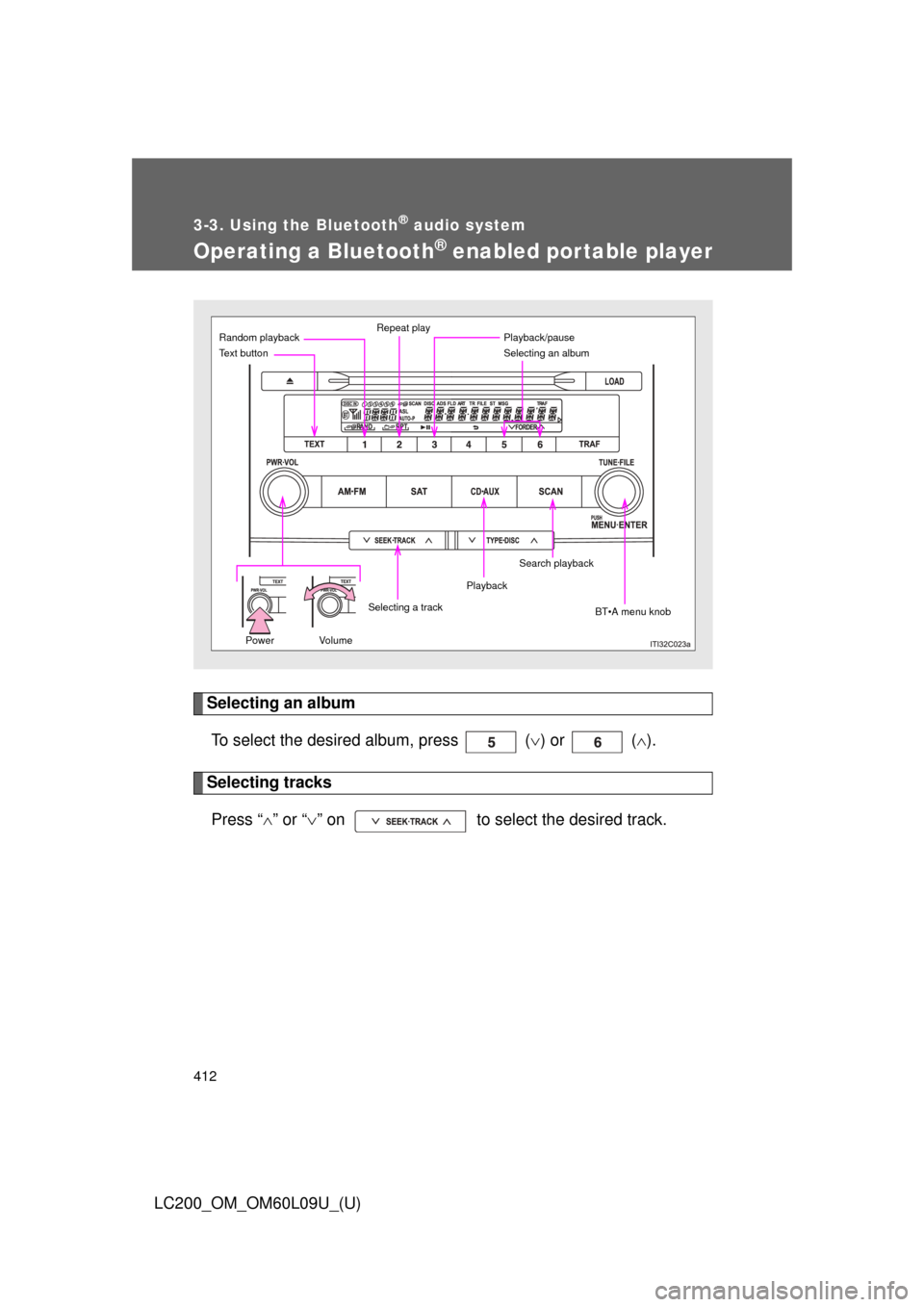
Operating a Bluetooth® enabled portable player
Selecting an albumTo select the desired album, press ( ) or ( ).
Selecting tracks
Press “ ” or “ ” on to select the desired track.
Power Volume
Random playback Repeat play
Selecting an album
BT•A menu knob
Text button
Playback
Selecting a trackPlayback/pause
Search playback
Page 413 of 724
413
3-3. Using the Bluetooth
® audio system
3
Interior features
LC200_OM_OM60L09U_(U)
Playing and pausing tracks
To play or pause a track, press ( ).
Fast-forwarding and rewinding tracksTo fast-forward or rewind, press and hold “
” or “ ” on
until you hear a beep.
Random playback
Press (RAND).
To cancel, press (RAND) again.
Repeat playPress (RPT).
To cancel, press (RPT) again.
Scanning tracksPress .
To cancel, press again.