TOYOTA LAND CRUISER 2015 J200 Navigation Manual
Manufacturer: TOYOTA, Model Year: 2015, Model line: LAND CRUISER, Model: TOYOTA LAND CRUISER 2015 J200Pages: 427, PDF Size: 7.69 MB
Page 251 of 427
251
1. AUDIO/VIDEO SYSTEM OPERATION
5
AUDIO/VIDEO SYSTEM
L/C200_Navi_OM60M04U_(U)
14.05.28 15:38
INFORMATION
●Remaining charge is not displayed while
the Bluetooth® device is connecting.
● The amount of charge left does not
always correspond correctly with your
portable player.
● This system does not have a charging
function.
● An antenna for Bluetooth
® connection is
built into the instrument panel. The con-
dition of the Bluetooth
® connection may
not be good and the system may not
function when using a Bluetooth
® porta-
ble player in the following conditions:
• The portable player is obstructed by certain objects (behind a seat or in the
glove box or console box).
• The portable player touches or is cov- ered with metal materials.
● Leave the Bluetooth
® portable player in
a place where the condition of
Bluetooth
® connection is good.
Portable player information is registered
when the portable player is connected
to the Bluetooth
® audio system. When
selling or disposing of the vehicle,
remove the Bluetooth
® audio informa-
tion from the system. (See “DELETING
A Bluetooth
® DEVICE” on page 180.)
FCC ID : AJDK041
This device complies with part 15 of the
FCC Rules. Operation is subject to the
following two conditions: (1) This device
may not cause harmful interference,
and (2) this device must accept any
interference received, including
interference that may cause undesired
operation.
CAUTION
●FCC WARNING: Changes or
modifications not expressly approved by
the party responsible for compliance
could void the user’s authority to operate
the equipment.
● CAUTION: This equipment complies
with FCC radiation exposure limits set
forth for an uncontrolled environment
and meets the FCC radio frequency
(RF) Exposure Guidelines in
Supplement C to OET65. This
equipment has very low levels of RF
energy that it deemed to comply without
maximum permissive exposure
evaluation (MPE). But it is desirable that
it should be installed and operated
keeping the radiator at least 20 cm or
more away from person’s body
(excluding extremities: hands, wrists,
feet and ankles).
● Co-location: This transmitter must not be
co-located or operated in conjunction
with any other antenna or transmitter.
Page 252 of 427
252
1. AUDIO/VIDEO SYSTEM OPERATION
L/C200_Navi_OM60M04U_(U)
14.05.28 15:38
The portable player will be automatically
connected under the following conditions:
• The “ENGINE START STOP” switch is in
either ACCESSORY or IGNITION ON
mode.
• When “Bluetooth* Power” is switched
from off to on.
• When the portable player is discon-
nected for some reason.
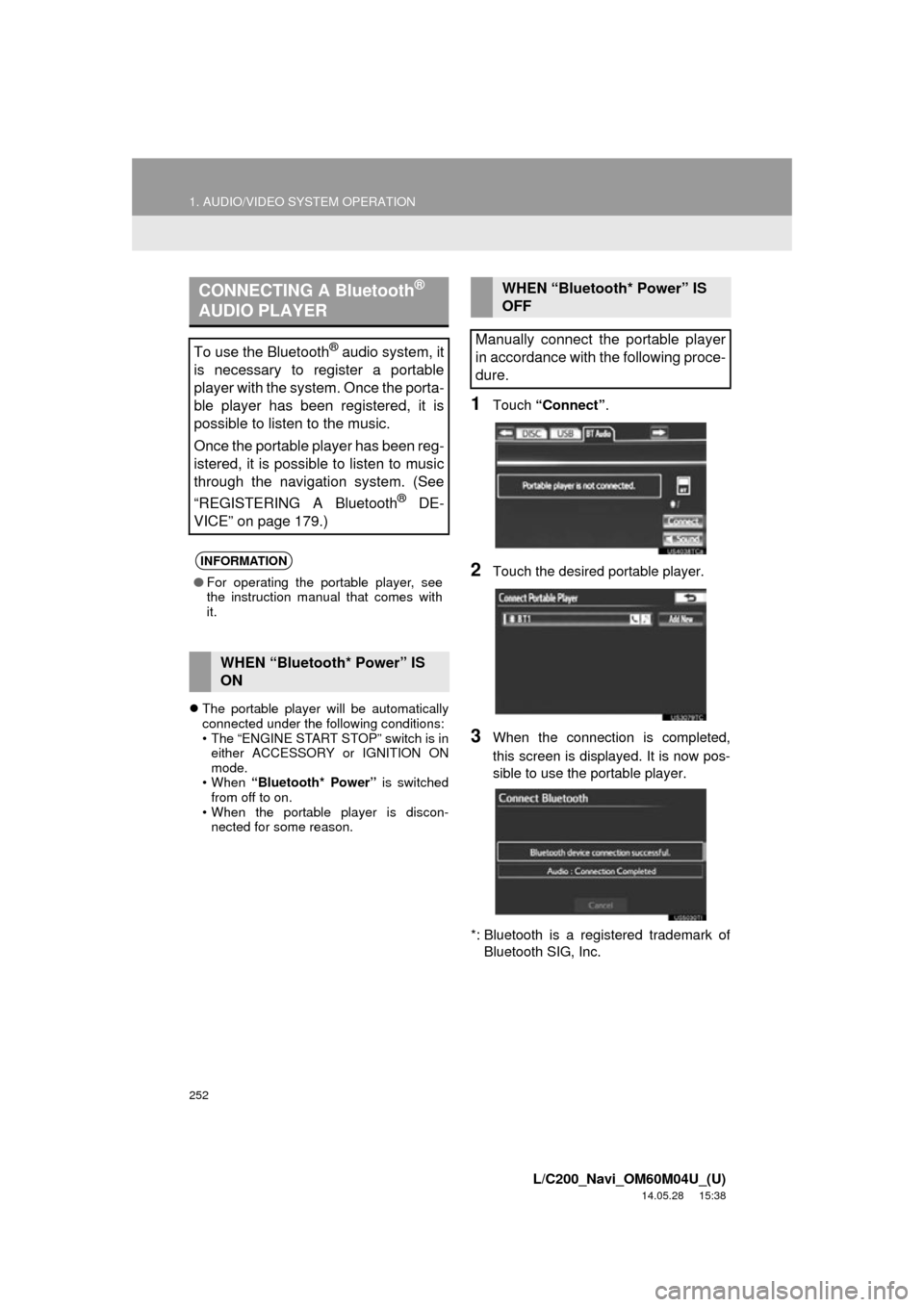
1Touch “Connect” .
2Touch the desired portable player.
3When the connection is completed,
this screen is displayed. It is now pos-
sible to use the portable player.
*: Bluetooth is a registered trademark of Bluetooth SIG, Inc.
CONNECTING A Bluetooth®
AUDIO PLAYER
To use the Bluetooth® audio system, it
is necessary to register a portable
player with the system. Once the porta-
ble player has been registered, it is
possible to listen to the music.
Once the portable player has been reg-
istered, it is possible to listen to music
through the navigation system. (See
“REGISTERING A Bluetooth
® DE-
VICE” on page 179.)
INFORMATION
● For operating the portable player, see
the instruction manual that comes with
it.
WHEN “Bluetooth* Power” IS
ON
WHEN “Bluetooth* Power” IS
OFF
Manually connect the portable player
in accordance with the following proce-
dure.
Page 253 of 427
253
1. AUDIO/VIDEO SYSTEM OPERATION
5
AUDIO/VIDEO SYSTEM
L/C200_Navi_OM60M04U_(U)
14.05.28 15:38
If the Bluetooth® device is disconnected
on purpose, such as it was turned off, this
does not happen. Reconnect the portable
player manually.
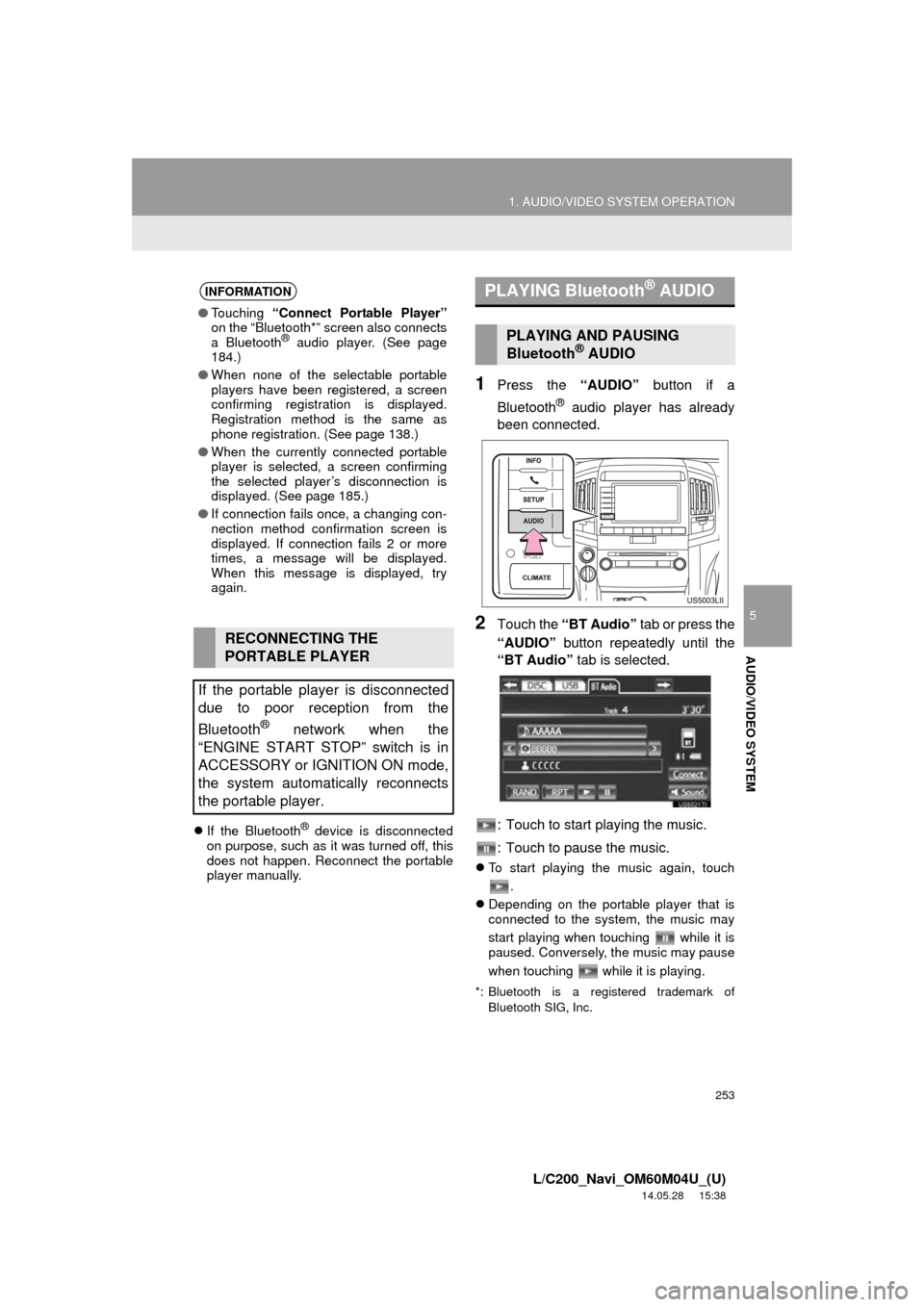
1Press the “AUDIO” button if a
Bluetooth
® audio player has already
been connected.
2Touch the “BT Audio” tab or press the
“AUDIO” button repeatedly until the
“BT Audio” tab is selected.
: Touch to start playing the music.
: Touch to pause the music.
To start playing the music again, touch
.
Depending on the portable player that is
connected to the system, the music may
start playing when touching while it is
paused. Conversely, the music may pause
when touching while it is playing.
*: Bluetooth is a registered trademark of
Bluetooth SIG, Inc.
INFORMATION
●Touching “Connect Portable Player”
on the “Bluetooth*” screen also connects
a Bluetooth
® audio player. (See page
184.)
● When none of the selectable portable
players have been registered, a screen
confirming registration is displayed.
Registration method is the same as
phone registration. (See page 138.)
● When the currently connected portable
player is selected, a screen confirming
the selected player’s disconnection is
displayed. (See page 185.)
● If connection fails once, a changing con-
nection method confirmation screen is
displayed. If connection fails 2 or more
times, a message will be displayed.
When this message is displayed, try
again.
RECONNECTING THE
PORTABLE PLAYER
If the portable player is disconnected
due to poor reception from the
Bluetooth
® network when the
“ENGINE START STOP” switch is in
ACCESSORY or IGNITION ON mode,
the system automatically reconnects
the portable player.
PLAYING Bluetooth® AUDIO
PLAYING AND PAUSING
Bluetooth® AUDIO
Page 254 of 427
254
1. AUDIO/VIDEO SYSTEM OPERATION
L/C200_Navi_OM60M04U_(U)
14.05.28 15:38
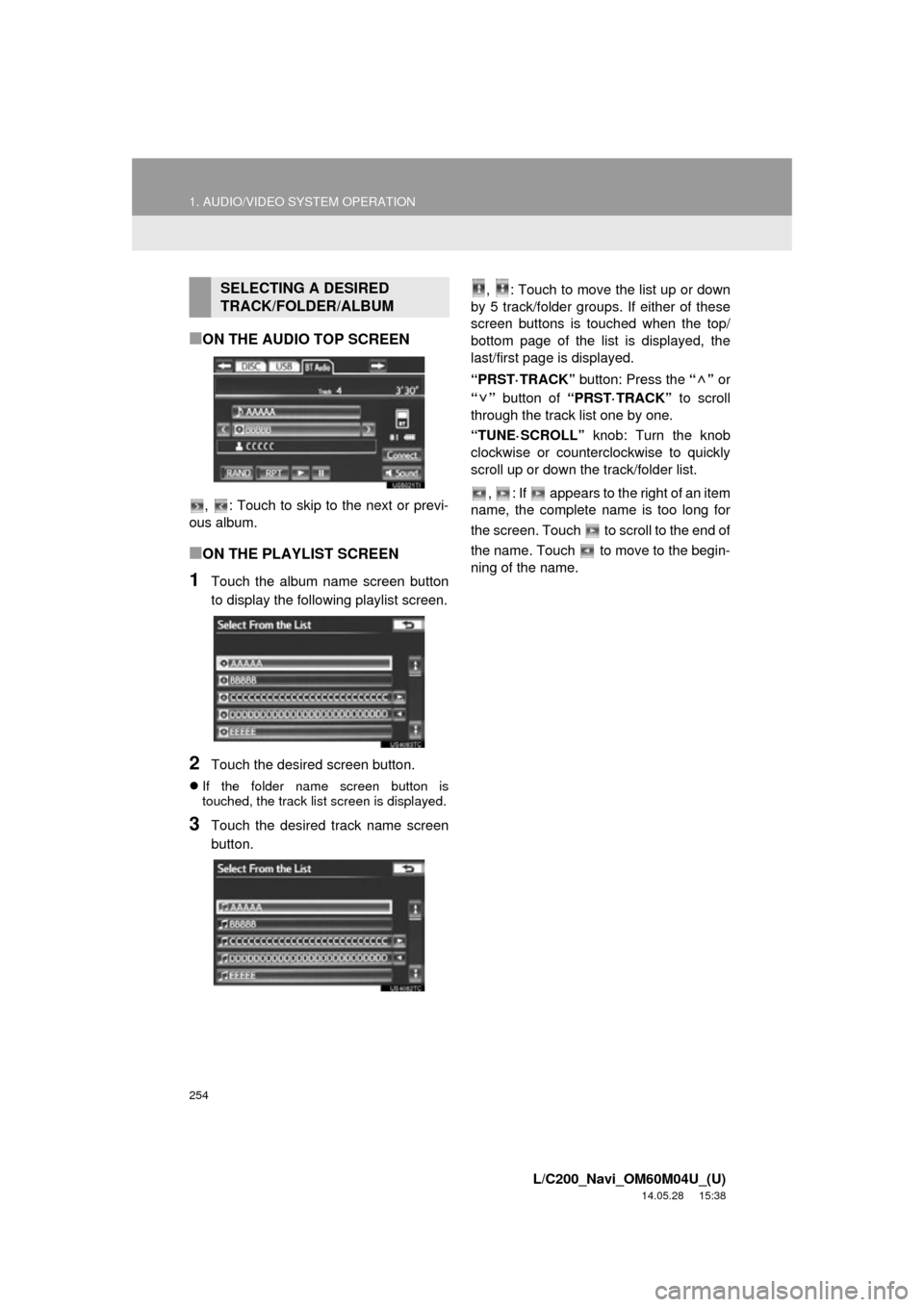
■ON THE AUDIO TOP SCREEN
, : Touch to skip to the next or previ-
ous album.
■ON THE PLAYLIST SCREEN
1Touch the album name screen button
to display the following playlist screen.
2Touch the desired screen button.
If the folder name screen button is
touched, the track list screen is displayed.
3Touch the desired track name screen
button. , : Touch to move the list up or down
by 5 track/folder groups. If either of these
screen buttons is t ouched when the top/
bottom page of the list is displayed, the
last/first page is displayed.
“PRST·TRACK” button: Press the “” or
“” button of “PRST·TRACK” to scroll
through the track list one by one.
“TUNE·SCROLL” knob: Turn the knob
clockwise or counterclockwise to quickly
scroll up or down the track/folder list.
, : If appears to the right of an item
name, the complete name is too long for
the screen. Touch to scroll to the end of
the name. Touch to move to the begin-
ning of the name.
SELECTING A DESIRED
TRACK/FOLDER/ALBUM
Page 255 of 427
255
1. AUDIO/VIDEO SYSTEM OPERATION
5
AUDIO/VIDEO SYSTEM
L/C200_Navi_OM60M04U_(U)
14.05.28 15:38
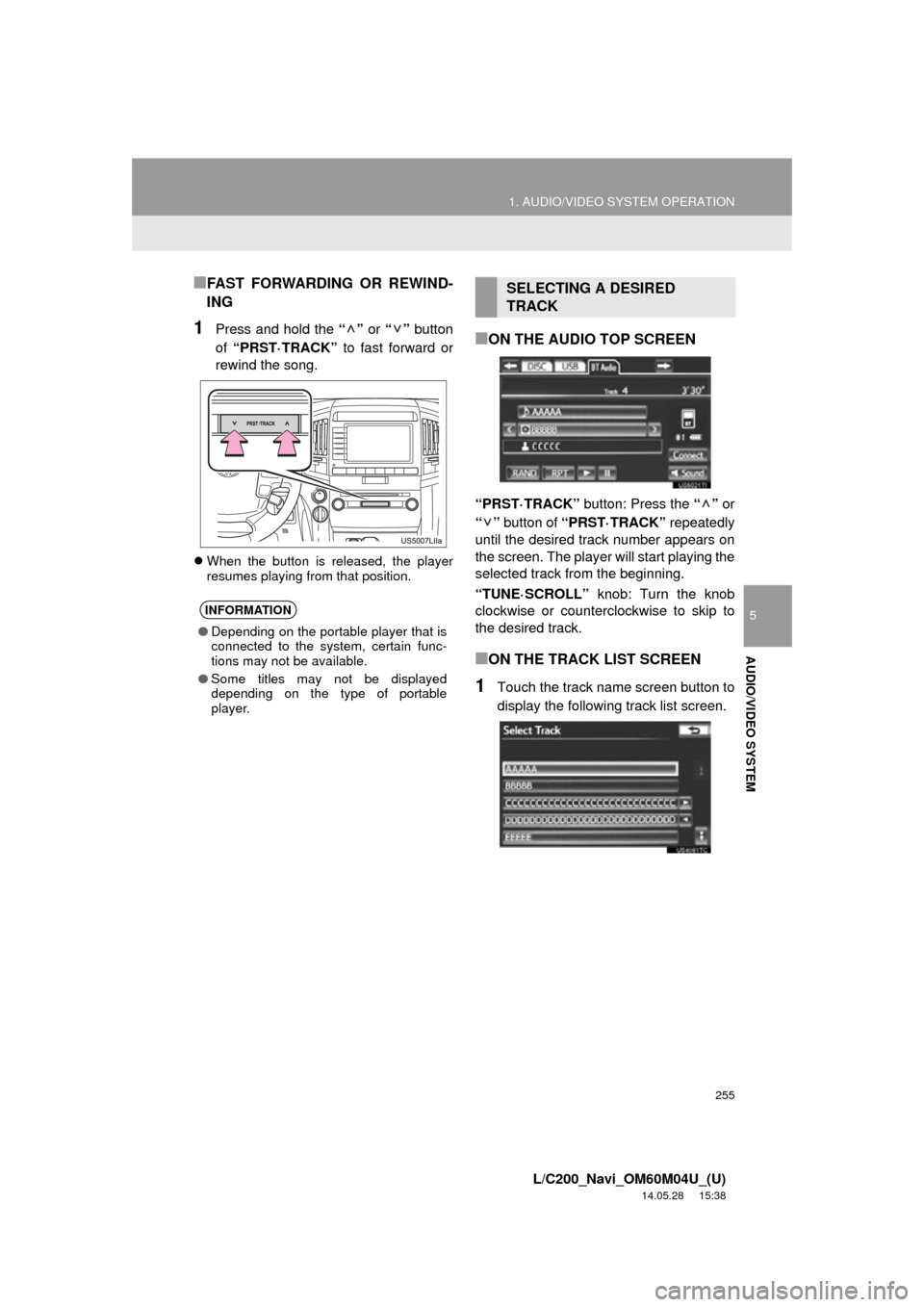
■FAST FORWARDING OR REWIND-
ING
1Press and hold the “” or “” button
of “PRST·TRACK” to fast forward or
rewind the song.
When the button is released, the player
resumes playing from that position.
■ON THE AUDIO TOP SCREEN
“PRST·TRACK” button: Press the “” or
“” button of “PRST·TRACK” repeatedly
until the desired track number appears on
the screen. The player will start playing the
selected track from the beginning.
“TUNE·SCROLL” knob: Turn the knob
clockwise or counterclockwise to skip to
the desired track.
■ON THE TRACK LIST SCREEN
1Touch the track name screen button to
display the following track list screen.
INFORMATION
● Depending on the portable player that is
connected to the system, certain func-
tions may not be available.
● Some titles may not be displayed
depending on the type of portable
player.
SELECTING A DESIRED
TRACK
Page 256 of 427
256
1. AUDIO/VIDEO SYSTEM OPERATION
L/C200_Navi_OM60M04U_(U)
14.05.28 15:38
2Touch the desired track number. The
player will start playing the selected
track from the beginning.
, : Touch to move the list up or down
by 5 track groups. If either of these screen
buttons is touched when the top/bottom
page of the list is displayed, the last/first
page is displayed.
“PRST·TRACK” button: Press the “” or
“” button of “PRST·TRACK” to scroll
through the track list one by one.
“TUNE·SCROLL” knob: Turn the knob
clockwise or counterclockwise to quickly
scroll up or down the track list.
, : If appears to the right of an item
name, the complete name is too long for
the screen. Touch to scroll to the end of
the name. Touch to move to the begin-
ning of the name.■FAST FORWARDING OR REWIND-
ING
1Press and hold the “” or “” button
of “PRST·TRACK” to fast forward or
rewind the track.
When the button is released, the player
resumes playing from that position.
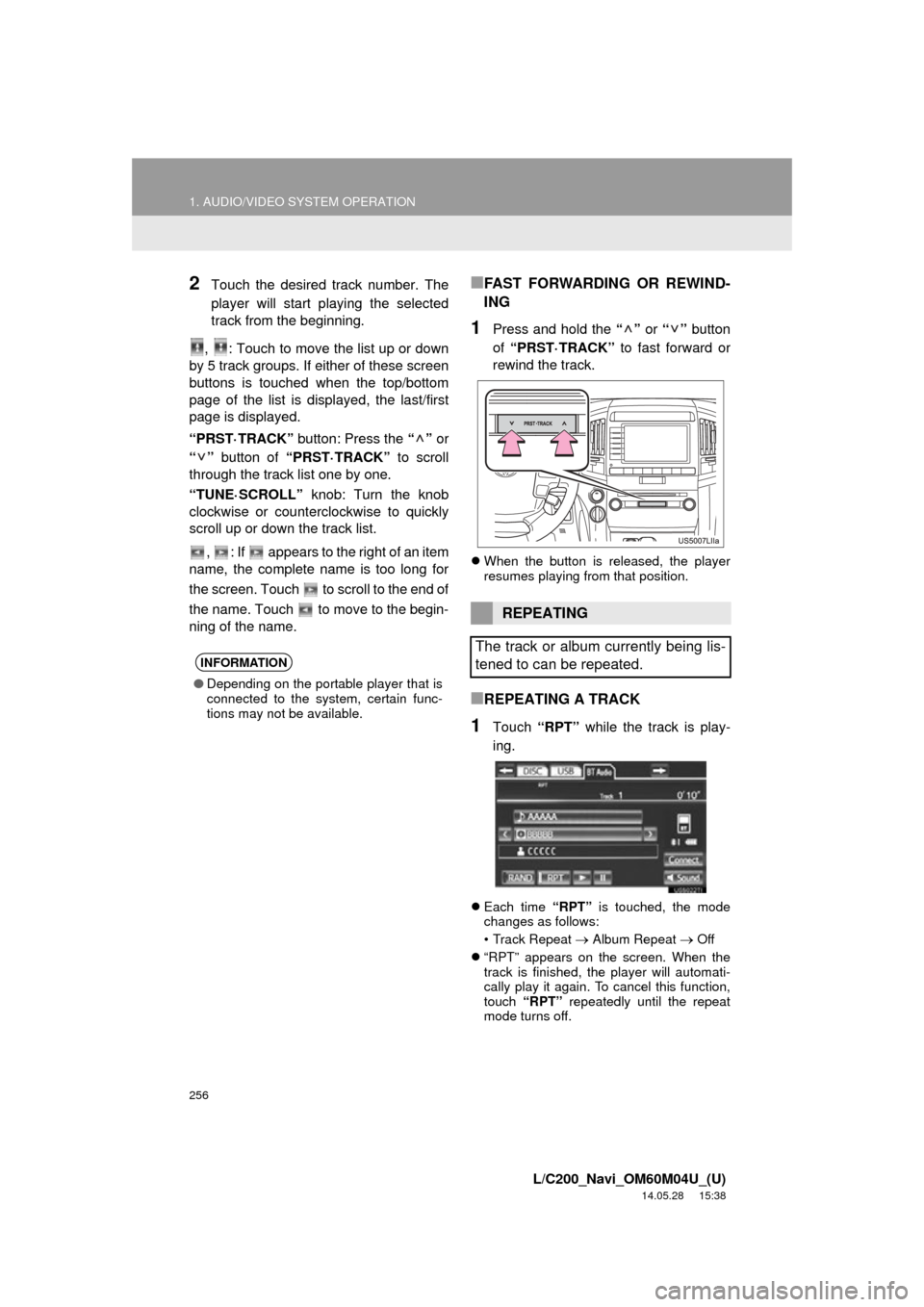
■REPEATING A TRACK
1Touch “RPT” while the track is play-
ing.
Each time “RPT” is touched, the mode
changes as follows:
• Track Repeat
Album Repeat Off
“RPT” appears on the screen. When the
track is finished, the player will automati-
cally play it again. To cancel this function,
touch “RPT” repeatedly until the repeat
mode turns off.
INFORMATION
● Depending on the portable player that is
connected to the system, certain func-
tions may not be available.
REPEATING
The track or album currently being lis-
tened to can be repeated.
Page 257 of 427
257
1. AUDIO/VIDEO SYSTEM OPERATION
5
AUDIO/VIDEO SYSTEM
L/C200_Navi_OM60M04U_(U)
14.05.28 15:38
■REPEATING AN ALBUM
1Touch “RPT” repeatedly until
“ALB.RPT” appears on the screen.
When the album is finished, the player will
automatically go back to the beginning of
the album and play it again. To cancel this
function, touch “RPT” again.
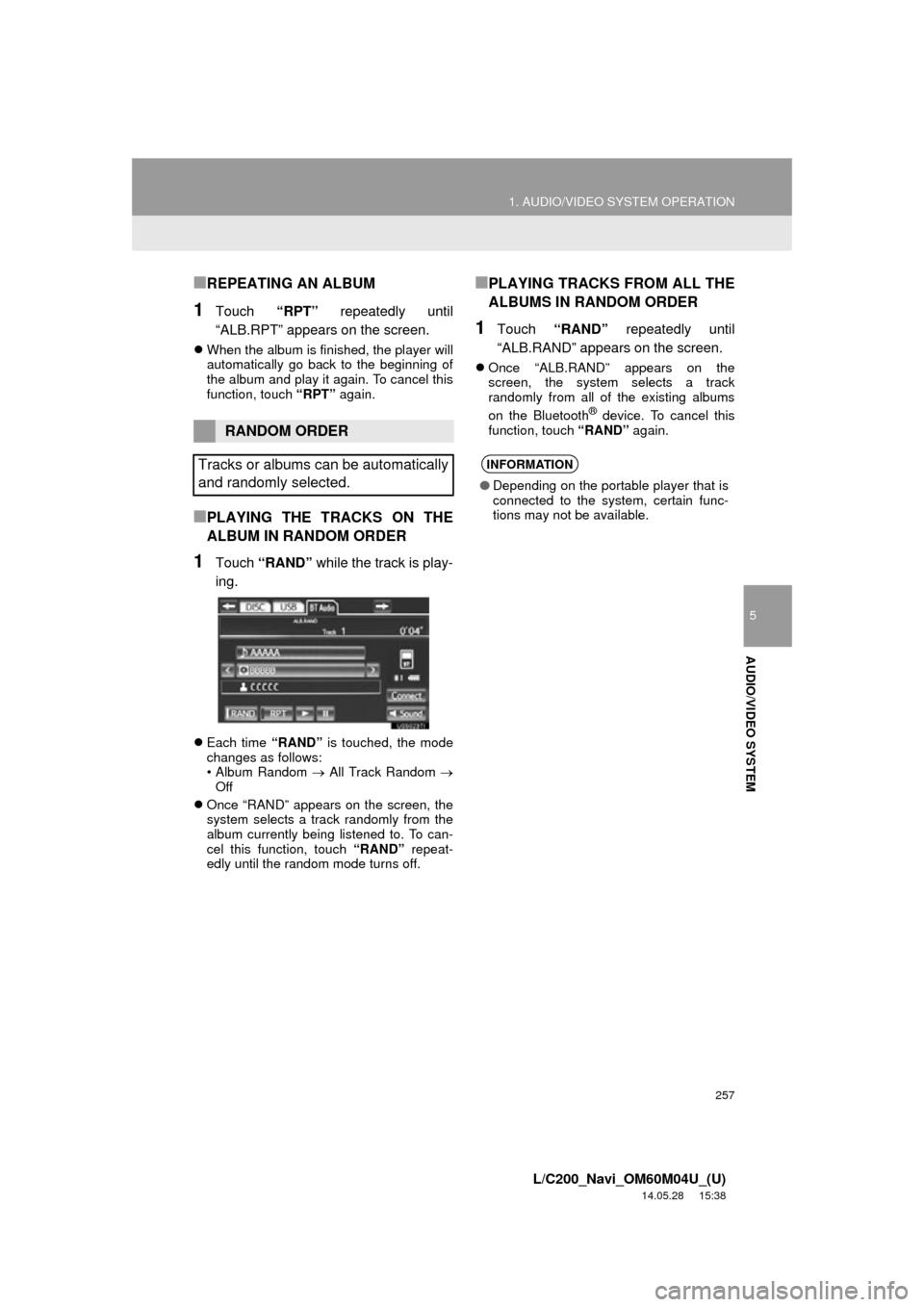
■PLAYING THE TRACKS ON THE
ALBUM IN RANDOM ORDER
1Touch “RAND” while the track is play-
ing.
Each time “RAND” is touched, the mode
changes as follows:
• Album Random All Track Random
Off
Once “RAND” appears on the screen, the
system selects a track randomly from the
album currently being listened to. To can-
cel this function, touch “RAND” repeat-
edly until the random mode turns off.
■PLAYING TRACKS FROM ALL THE
ALBUMS IN RANDOM ORDER
1Touch “RAND” repeatedly until
“ALB.RAND” appears on the screen.
Once “ALB.RAND” appears on the
screen, the system selects a track
randomly from all of the existing albums
on the Bluetooth
® device. To cancel this
function, touch “RAND” again.
RANDOM ORDER
Tracks or albums can be automatically
and randomly selected.
INFORMATION
● Depending on the portable player that is
connected to the system, certain func-
tions may not be available.
Page 258 of 427
258
1. AUDIO/VIDEO SYSTEM OPERATION
L/C200_Navi_OM60M04U_(U)
14.05.28 15:38
11. VTR OPERATION*
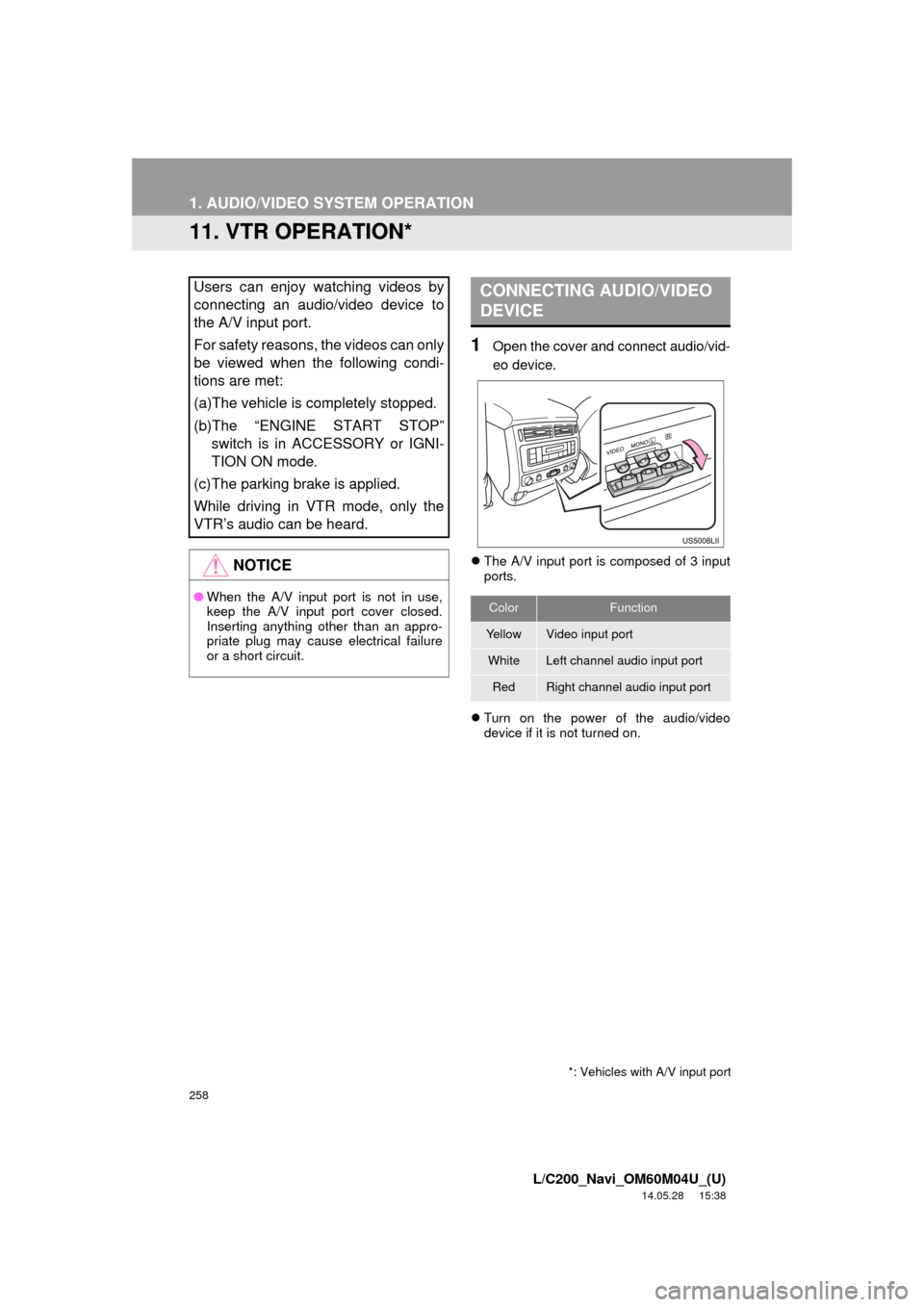
1Open the cover and connect audio/vid-
eo device.
The A/V input port is composed of 3 input
ports.
Turn on the power of the audio/video
device if it is not turned on.
Users can enjoy watching videos by
connecting an audio/video device to
the A/V input port.
For safety reasons, the videos can only
be viewed when the following condi-
tions are met:
(a)The vehicle is completely stopped.
(b)The “ENGINE START STOP”
switch is in ACCESSORY or IGNI-
TION ON mode.
(c)The parking brake is applied.
While driving in VTR mode, only the
VTR’s audio can be heard.
NOTICE
● When the A/V input port is not in use,
keep the A/V input port cover closed.
Inserting anything other than an appro-
priate plug may cause electrical failure
or a short circuit.
CONNECTING AUDIO/VIDEO
DEVICE
ColorFunction
YellowVideo input port
WhiteLeft channel audio input port
RedRight channel audio input port
*: Vehicles with A/V input port
Page 259 of 427
259
1. AUDIO/VIDEO SYSTEM OPERATION
5
AUDIO/VIDEO SYSTEM
L/C200_Navi_OM60M04U_(U)
14.05.28 15:38
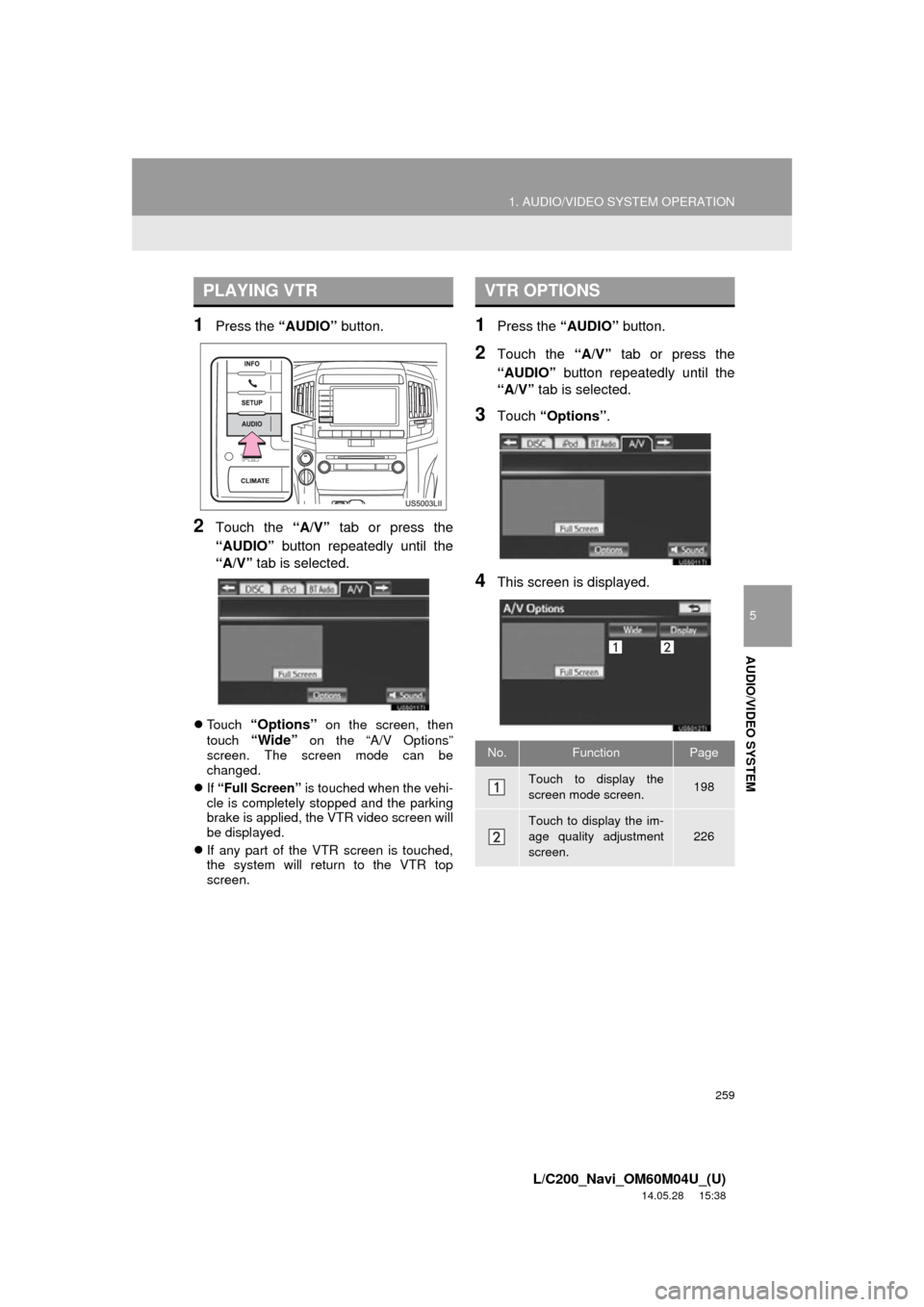
1Press the “AUDIO” button.
2Touch the “A/V” tab or press the
“AUDIO” button repeatedly until the
“A/V” tab is selected.
Touch “Options” on the screen, then
touch
“Wide” on the “A/V Options”
screen. The screen mode can be
changed.
If “Full Screen” is touched when the vehi-
cle is completely stopped and the parking
brake is applied, the VTR video screen will
be displayed.
If any part of the VTR screen is touched,
the system will return to the VTR top
screen.
1Press the “AUDIO” button.
2Touch the “A/V” tab or press the
“AUDIO” button repeatedly until the
“A/V” tab is selected.
3Touch “Options”.
4This screen is displayed.
PLAYING VTRVTR OPTIONS
No.FunctionPage
Touch to display the
screen mode screen. 198
Touch to display the im-
age quality adjustment
screen.
226
Page 260 of 427
260
1. AUDIO/VIDEO SYSTEM OPERATION
L/C200_Navi_OM60M04U_(U)
14.05.28 15:38
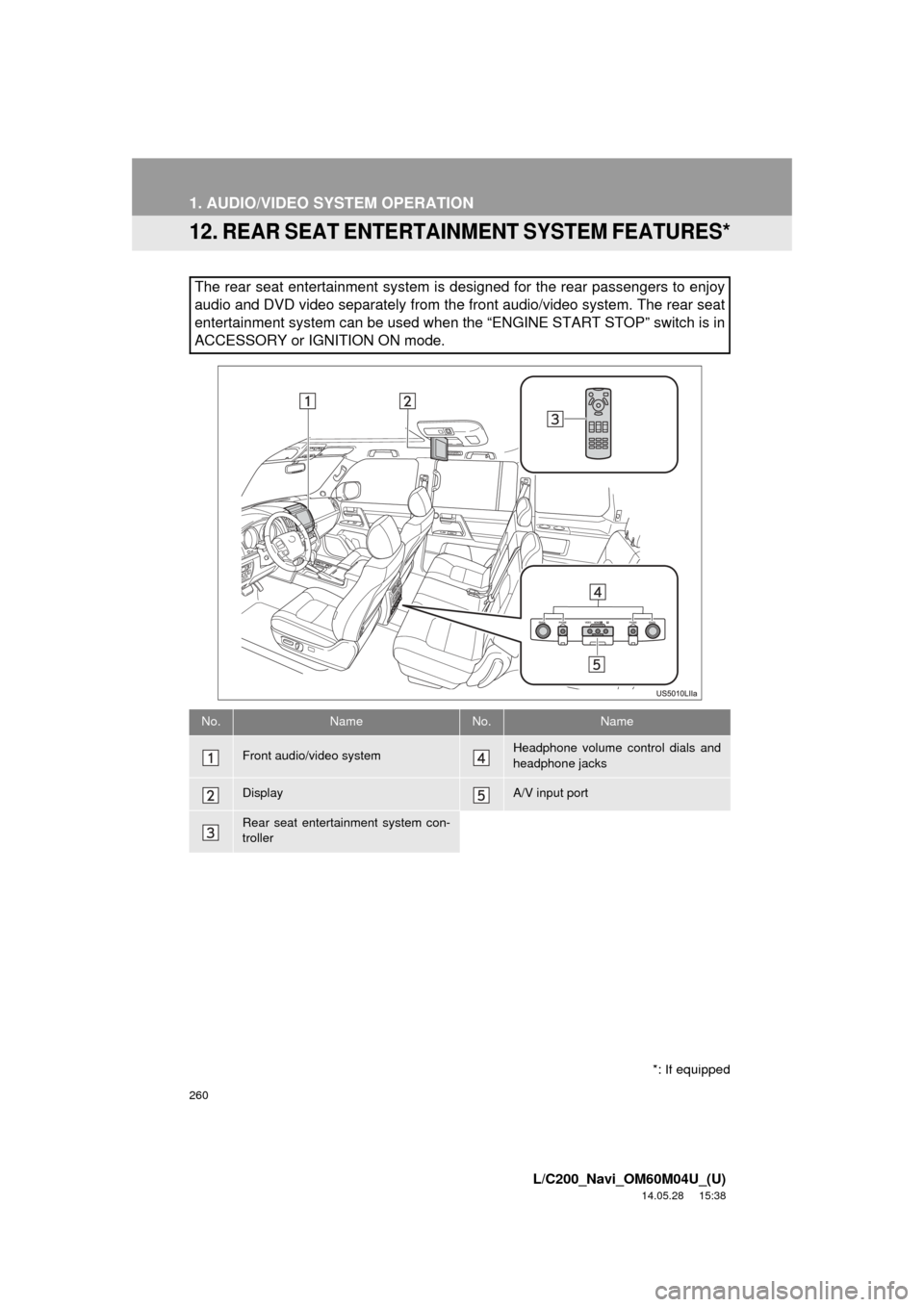
12. REAR SEAT ENTERTAINMENT SYSTEM FEATURES*
The rear seat entertainment system is designed for the rear passengers to enjoy
audio and DVD video separately from t he front audio/video system. The rear seat
entertainment system can be used when the “ENGINE START STOP” switch is in
ACCESSORY or IGNITION ON mode.
No.NameNo.Name
Front audio/video systemHeadphone volume control dials and
headphone jacks
DisplayA/V input port
Rear seat entertainment system con-
troller
*: If equipped