TOYOTA LAND CRUISER 2015 J200 Navigation Manual
Manufacturer: TOYOTA, Model Year: 2015, Model line: LAND CRUISER, Model: TOYOTA LAND CRUISER 2015 J200Pages: 427, PDF Size: 7.69 MB
Page 231 of 427
231
1. AUDIO/VIDEO SYSTEM OPERATION
5
AUDIO/VIDEO SYSTEM
L/C200_Navi_OM60M04U_(U)
14.05.28 15:38
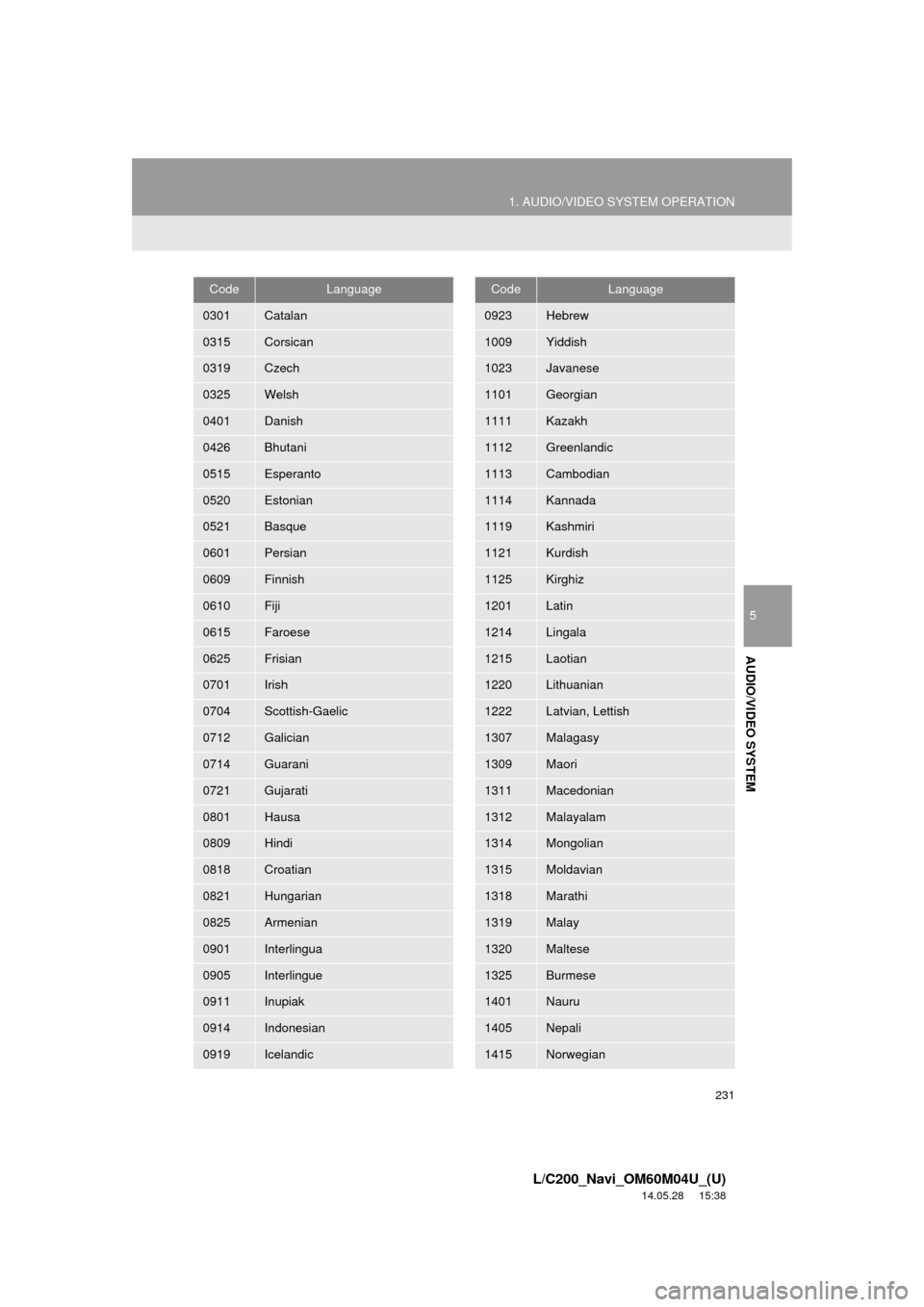
0301Catalan
0315Corsican
0319Czech
0325Welsh
0401Danish
0426Bhutani
0515Esperanto
0520Estonian
0521Basque
0601Persian
0609Finnish
0610Fiji
0615Faroese
0625Frisian
0701Irish
0704Scottish-Gaelic
0712Galician
0714Guarani
0721Gujarati
0801Hausa
0809Hindi
0818Croatian
0821Hungarian
0825Armenian
0901Interlingua
0905Interlingue
0911Inupiak
0914Indonesian
0919Icelandic
CodeLanguage
0923Hebrew
1009Yiddish
1023Javanese
1101Georgian
1111Kazakh
1112Greenlandic
1113Cambodian
1114Kannada
1119Kashmiri
1121Kurdish
1125Kirghiz
1201Latin
1214Lingala
1215Laotian
1220Lithuanian
1222Latvian, Lettish
1307Malagasy
1309Maori
1311Macedonian
1312Malayalam
1314Mongolian
1315Moldavian
1318Marathi
1319Malay
1320Maltese
1325Burmese
1401Nauru
1405Nepali
1415Norwegian
CodeLanguage
Page 232 of 427
232
1. AUDIO/VIDEO SYSTEM OPERATION
L/C200_Navi_OM60M04U_(U)
14.05.28 15:38
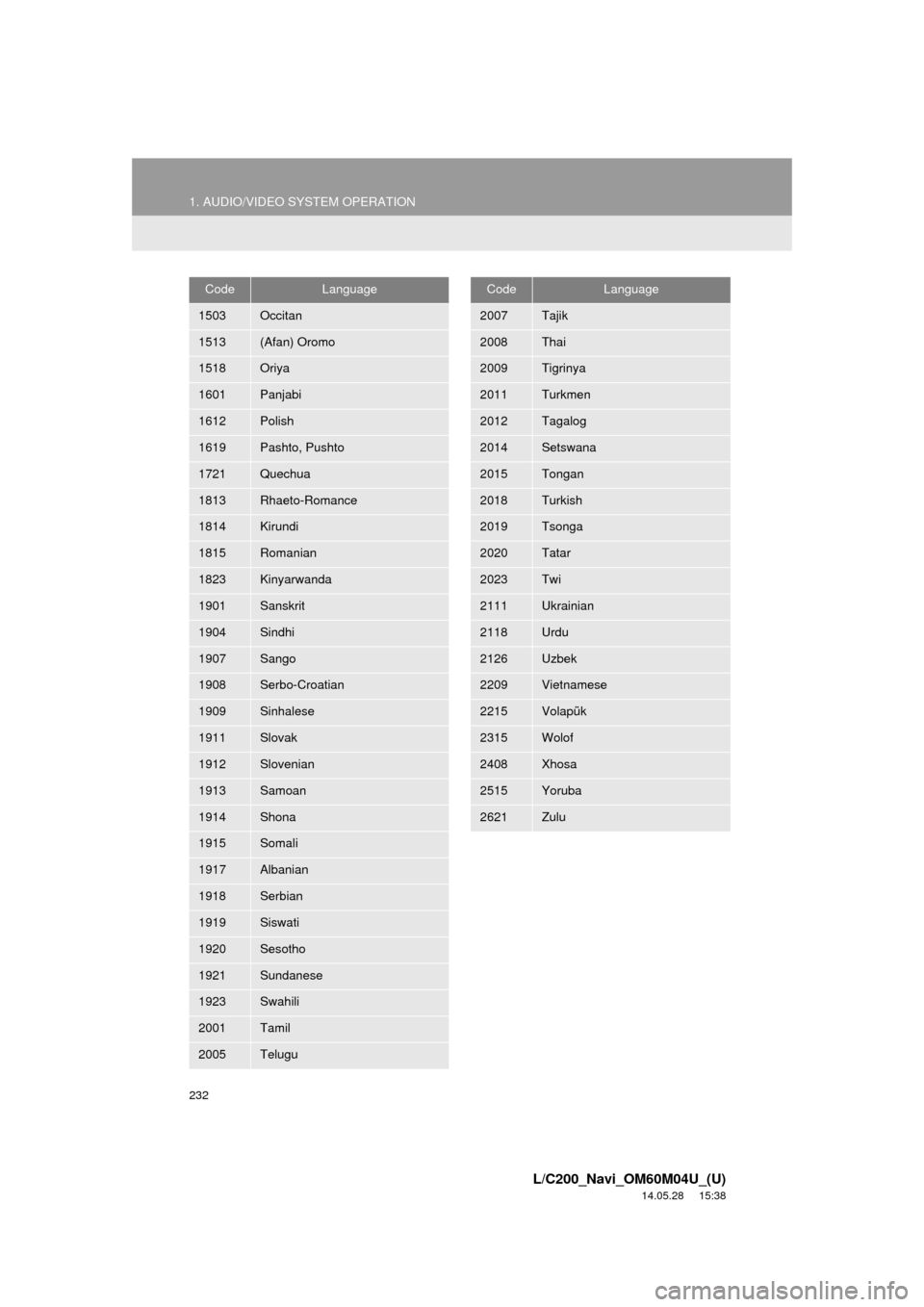
1503Occitan
1513(Afan) Oromo
1518Oriya
1601Panjabi
1612Polish
1619Pashto, Pushto
1721Quechua
1813Rhaeto-Romance
1814Kirundi
1815Romanian
1823Kinyarwanda
1901Sanskrit
1904Sindhi
1907Sango
1908Serbo-Croatian
1909Sinhalese
1911Slovak
1912Slovenian
1913Samoan
1914Shona
1915Somali
1917Albanian
1918Serbian
1919Siswati
1920Sesotho
1921Sundanese
1923Swahili
2001Tamil
2005Telugu
CodeLanguage
2007Tajik
2008Thai
2009Tigrinya
2011Turkmen
2012Tagalog
2014Setswana
2015Tongan
2018Turkish
2019Tsonga
2020Tatar
2023Twi
2111Ukrainian
2118Urdu
2126Uzbek
2209Vietnamese
2215Volapük
2315Wolof
2408Xhosa
2515Yoruba
2621Zulu
CodeLanguage
Page 233 of 427
233
1. AUDIO/VIDEO SYSTEM OPERATION
5
AUDIO/VIDEO SYSTEM
L/C200_Navi_OM60M04U_(U)
14.05.28 15:38
Vehicles with rear seat entertainment
system
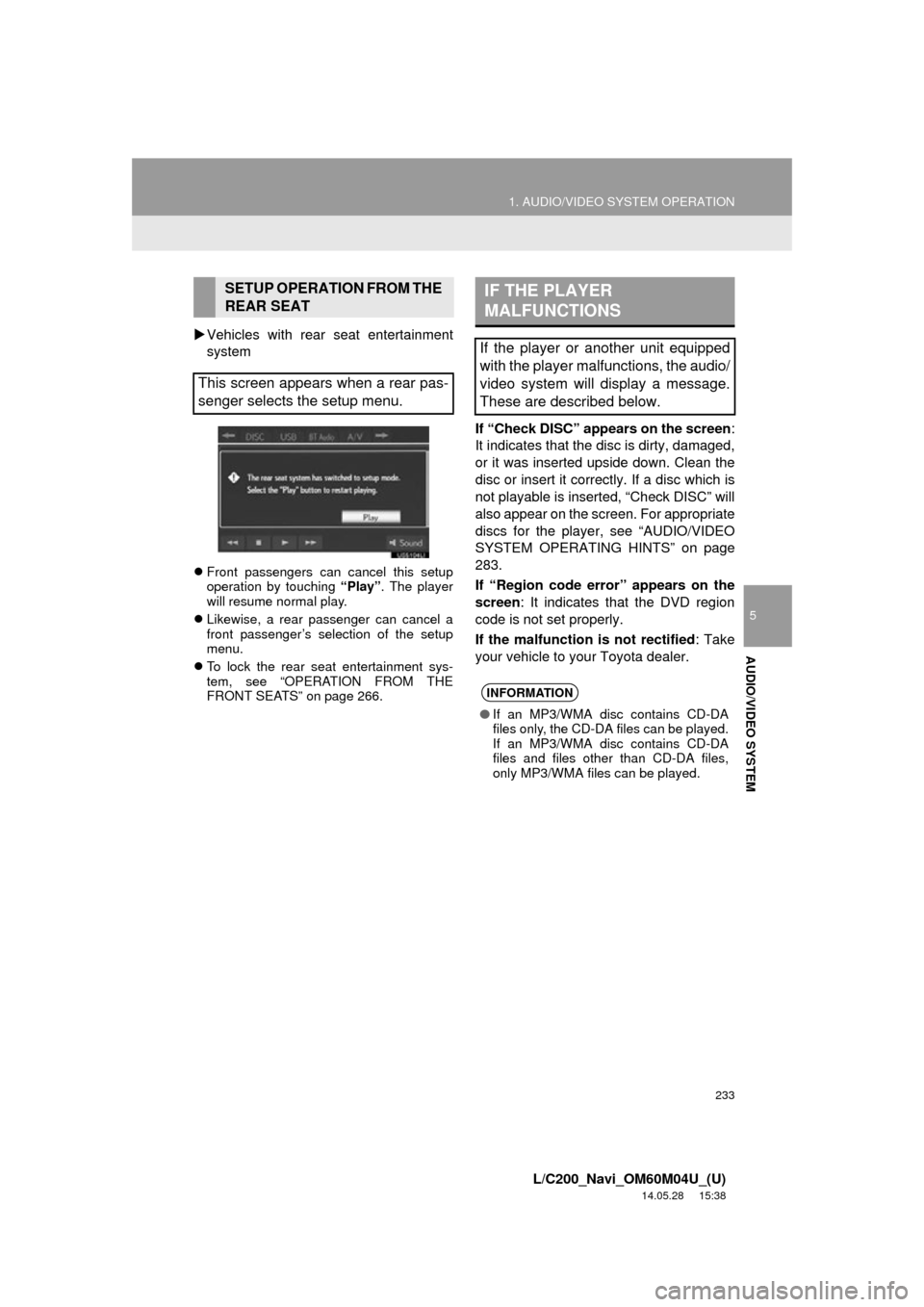
Front passengers can cancel this setup
operation by touching “Play”. The player
will resume normal play.
Likewise, a rear passenger can cancel a
front passenger’s selection of the setup
menu.
To lock the rear seat entertainment sys-
tem, see “OPERATION FROM THE
FRONT SEATS” on page 266.
If “Check DISC” appears on the screen :
It indicates that the disc is dirty, damaged,
or it was inserted upside down. Clean the
disc or insert it correctly. If a disc which is
not playable is inserted, “Check DISC” will
also appear on the screen. For appropriate
discs for the player , see “AUDIO/VIDEO
SYSTEM OPERATING HINTS” on page
283.
If “Region code error” appears on the
screen : It indicates that the DVD region
code is not set properly.
If the malfunction is not rectified: Take
your vehicle to your Toyota dealer.
SETUP OPERATION FROM THE
REAR SEAT
This screen appears when a rear pas-
senger selects the setup menu.IF THE PLAYER
MALFUNCTIONS
If the player or another unit equipped
with the player malfunctions, the audio/
video system will display a message.
These are described below.
INFORMATION
● If an MP3/WMA disc contains CD-DA
files only, the CD-DA files can be played.
If an MP3/WMA disc contains CD-DA
files and files other than CD-DA files,
only MP3/WMA files can be played.
Page 234 of 427
234
1. AUDIO/VIDEO SYSTEM OPERATION
L/C200_Navi_OM60M04U_(U)
14.05.28 15:38
Region codes: Some DVD video discs
have a region code indicating which coun-
tries the DVD video disc can be played in
on this DVD player. If the DVD video disc
is not labeled as “ALL” or “1”, you cannot
use it on this DVD player. If you attempt to
play an inappropriate DVD video disc on
this player, “Region code error” appears
on the screen. Even if the DVD video disc
does not have a region code, there are
cases when it cannot be used.
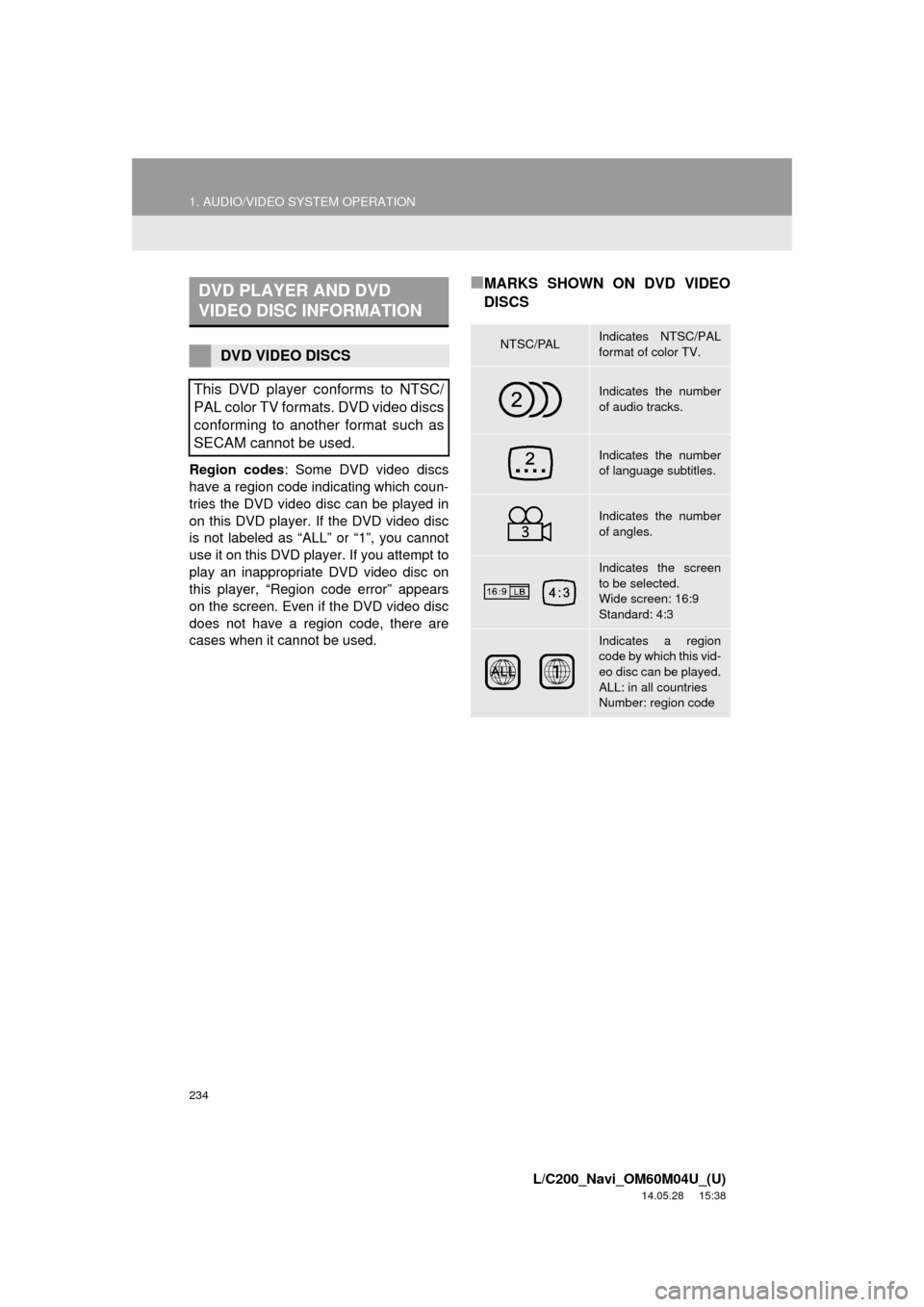
■MARKS SHOWN ON DVD VIDEO
DISCSDVD PLAYER AND DVD
VIDEO DISC INFORMATION
DVD VIDEO DISCS
This DVD player conforms to NTSC/
PAL color TV formats. DVD video discs
conforming to another format such as
SECAM cannot be used.NTSC/PALIndicates NTSC/PAL
format of color TV.
Indicates the number
of audio tracks.
Indicates the number
of language subtitles.
Indicates the number
of angles.
Indicates the screen
to be selected.
Wide screen: 16:9
Standard: 4:3
Indicates a region
code by which this vid-
eo disc can be played.
ALL: in all countries
Number: region code
Page 235 of 427
235
1. AUDIO/VIDEO SYSTEM OPERATION
5
AUDIO/VIDEO SYSTEM
L/C200_Navi_OM60M04U_(U)
14.05.28 15:38
DVD video discs: Digital Versatile Disc
that holds video. DVD video discs have
adopted “MPEG2”, one of the world stan-
dards of digital compression technologies.
The picture data is compressed by 1/40 on
average and stored. Variable rate encoded
technology in which the volume of data as-
signed to the picture is changed depend-
ing on the picture format has also been
adopted. Audio data is stored using PCM
and Dolby Digital, which enables higher
quality of sound. Furthermore, multi-angle
and multi-language features will also help
users enjoy the more advanced technolo-
gy of DVD video.
Viewer restrictions: This feature limits
what can be viewed in conformity with a
level of restrictions of the country. The lev-
el of restrictions varies depending on the
DVD video disc. Some DVD video discs
cannot be played at all, or violent scenes
are skipped or replaced with other scenes.
• Level 1: DVD video discs for children can be played.
• Level 2 - 7: DVD video discs for children and G-rated movie can be played.
• Level 8: All types of the DVD video discs can be played.
Multi-angle feature : The same scene can
be enjoyed from different angles.
Multi-language feature : The subtitle and
audio language can be selected.
Region codes : The region codes are pro-
vided on DVD players and DVD discs. If
the DVD video disc does not have the
same region code as the DVD player, you
cannot play the disc on the DVD player.
For region codes, see page 234.
Audio : This DVD player can play liner
PCM, Dolby Digital and MPEG audio for-
mat DVDs. Other decoded types cannot
be played.
Title and chapter : Video and audio pro-
grams stored in DVD video discs are divid-
ed into parts by title and chapter.
Title : The largest unit of the video and au-
dio programs stored on DVD video discs.
Usually, one movie, one album, or one au-
dio program is assigned as a title.
Chapter : A unit smaller than that of title. A
title comprises of several chapters.DVD VIDEO DISC GLOSSARY
Manufactured under license from Dolby
Laboratories. Dolby and the double-D
symbol are trademarks of Dolby
Laboratories.
Page 236 of 427
236
1. AUDIO/VIDEO SYSTEM OPERATION
L/C200_Navi_OM60M04U_(U)
14.05.28 15:38
8. USB MEMORY OPERATION
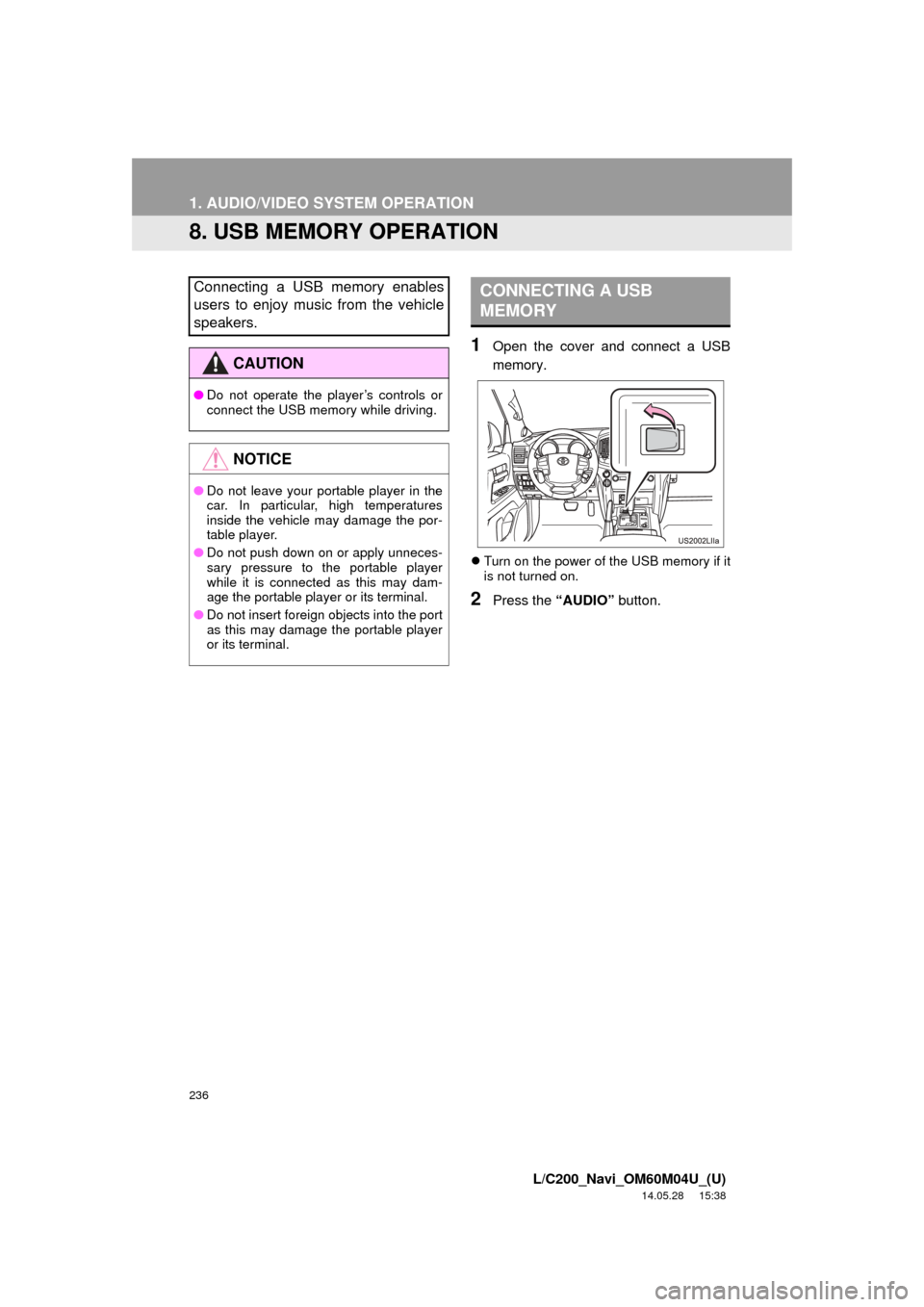
1Open the cover and connect a USB
memory.
Turn on the power of the USB memory if it
is not turned on.
2Press the “AUDIO” button.
Connecting a USB memory enables
users to enjoy music from the vehicle
speakers.
CAUTION
●Do not operate the player’s controls or
connect the USB memory while driving.
NOTICE
●Do not leave your portable player in the
car. In particular, high temperatures
inside the vehicle may damage the por-
table player.
● Do not push down on or apply unneces-
sary pressure to the portable player
while it is connected as this may dam-
age the portable player or its terminal.
● Do not insert foreign objects into the port
as this may damage the portable player
or its terminal.
CONNECTING A USB
MEMORY
Page 237 of 427
237
1. AUDIO/VIDEO SYSTEM OPERATION
5
AUDIO/VIDEO SYSTEM
L/C200_Navi_OM60M04U_(U)
14.05.28 15:38
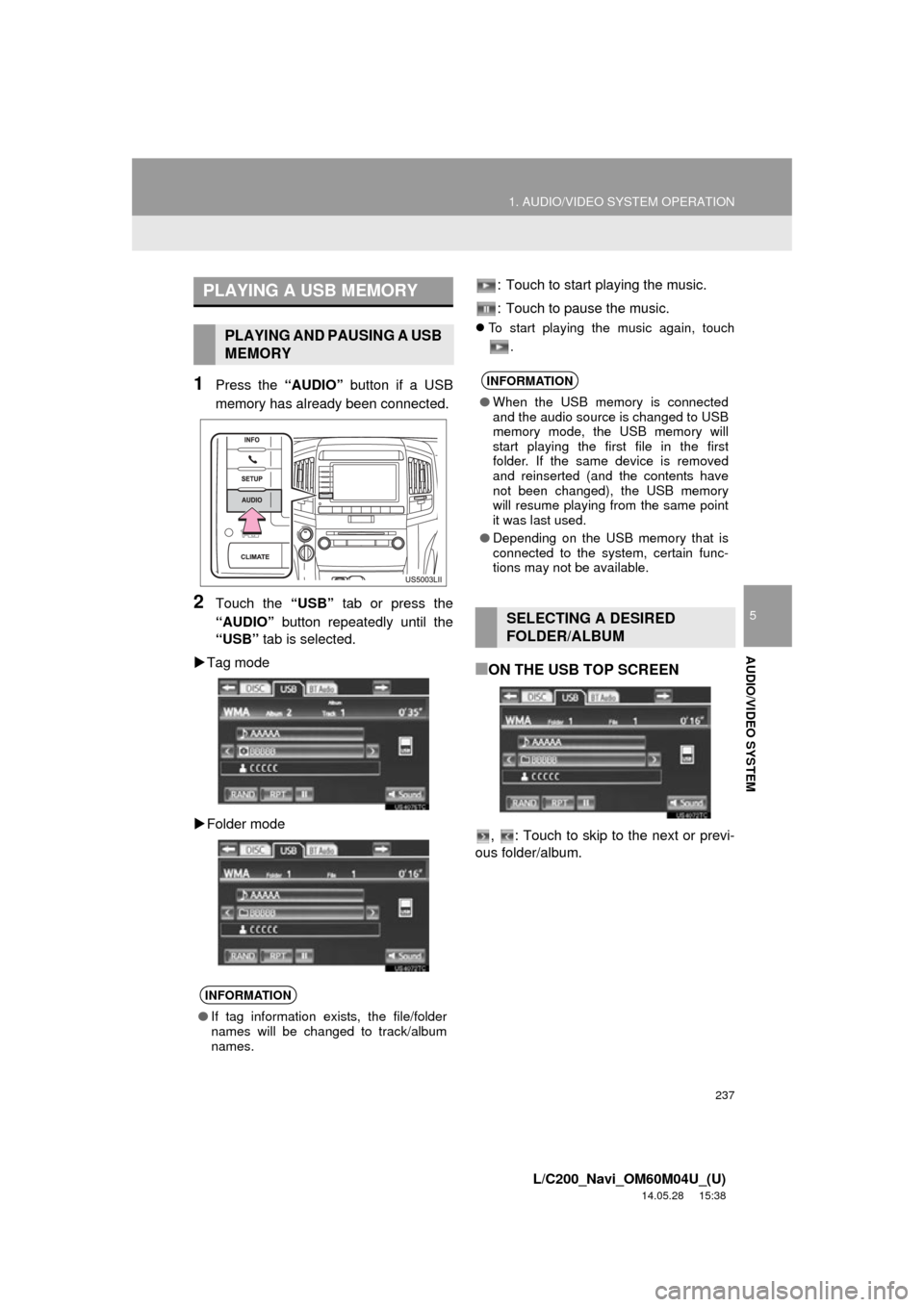
1Press the “AUDIO” button if a USB
memory has already been connected.
2Touch the “USB” tab or press the
“AUDIO” button repeatedly until the
“USB” tab is selected.
Tag mode
Folder mode : Touch to start playing the music.
: Touch to pause the music.
To start playing the music again, touch
.
■ON THE USB TOP SCREEN
, : Touch to skip to the next or previ-
ous folder/album.
PLAYING A USB MEMORY
PLAYING AND PAUSING A USB
MEMORY
INFORMATION
● If tag information exists, the file/folder
names will be changed to track/album
names.
INFORMATION
●When the USB memory is connected
and the audio source is changed to USB
memory mode, the USB memory will
start playing the first file in the first
folder. If the same device is removed
and reinserted (and the contents have
not been changed), the USB memory
will resume playing from the same point
it was last used.
● Depending on the USB memory that is
connected to the system, certain func-
tions may not be available.
SELECTING A DESIRED
FOLDER/ALBUM
Page 238 of 427
238
1. AUDIO/VIDEO SYSTEM OPERATION
L/C200_Navi_OM60M04U_(U)
14.05.28 15:38
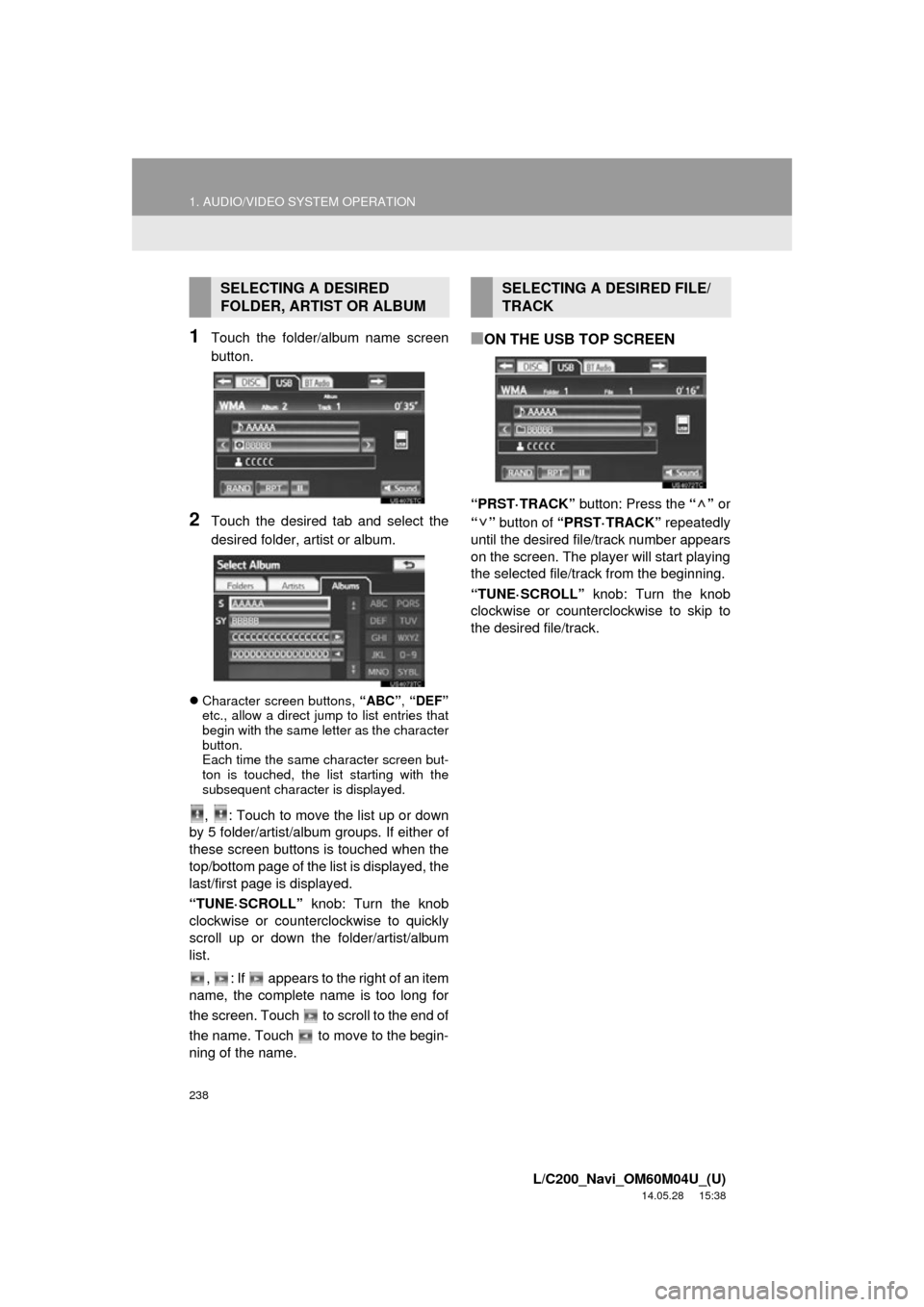
1Touch the folder/album name screen
button.
2Touch the desired tab and select the
desired folder, artist or album.
Character screen buttons, “ABC”, “DEF”
etc., allow a direct jump to list entries that
begin with the same letter as the character
button.
Each time the same character screen but-
ton is touched, the list starting with the
subsequent character is displayed.
, : Touch to move the list up or down
by 5 folder/artist/album groups. If either of
these screen buttons is touched when the
top/bottom page of the lis t is displayed, the
last/first page is displayed.
“TUNE·SCROLL” knob: Turn the knob
clockwise or counterclockwise to quickly
scroll up or down the folder/artist/album
list.
, : If appears to the right of an item
name, the complete name is too long for
the screen. Touch to scroll to the end of
the name. Touch to move to the begin-
ning of the name.
■ON THE USB TOP SCREEN
“PRST·TRACK” button: Press the “” or
“” button of “PRST·TRACK” repeatedly
until the desired file/track number appears
on the screen. The player will start playing
the selected file/track from the beginning.
“TUNE·SCROLL” knob: Turn the knob
clockwise or counterclockwise to skip to
the desired file/track.
SELECTING A DESIRED
FOLDER, ARTIST OR ALBUMSELECTING A DESIRED FILE/
TRACK
Page 239 of 427
239
1. AUDIO/VIDEO SYSTEM OPERATION
5
AUDIO/VIDEO SYSTEM
L/C200_Navi_OM60M04U_(U)
14.05.28 15:38
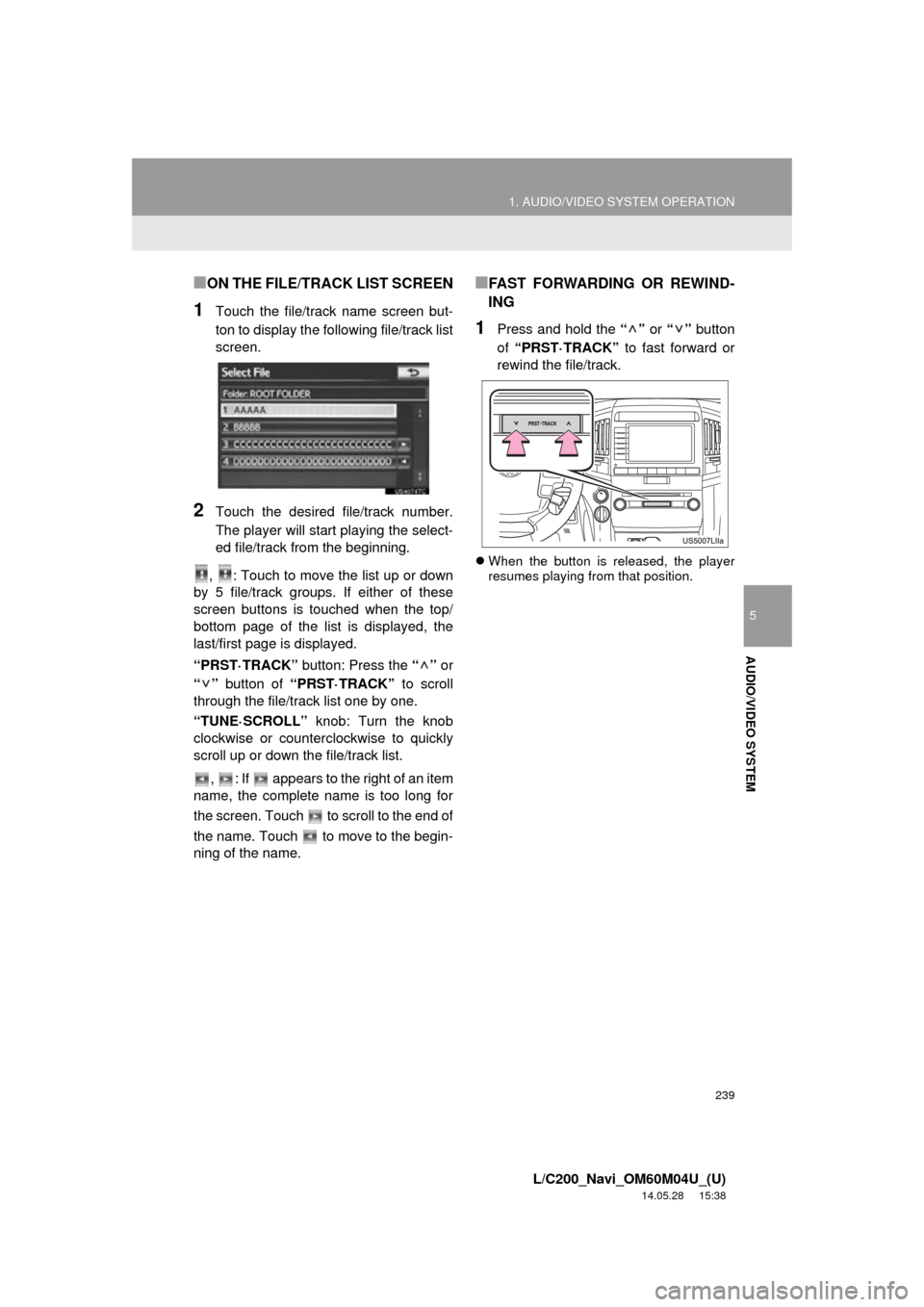
■ON THE FILE/TRACK LIST SCREEN
1Touch the file/track name screen but-
ton to display the following file/track list
screen.
2Touch the desired file/track number.
The player will start playing the select-
ed file/track from the beginning.
, : Touch to move the list up or down
by 5 file/track groups. If either of these
screen buttons is touched when the top/
bottom page of the list is displayed, the
last/first page is displayed.
“PRST·TRACK” button: Press the “” or
“” button of “PRST·TRACK” to scroll
through the file/track list one by one.
“TUNE·SCROLL” knob: Turn the knob
clockwise or counte rclockwise to quickly
scroll up or down the file/track list.
, : If appears to the right of an item
name, the complete name is too long for
the screen. Touch to scroll to the end of
the name. Touch to move to the begin-
ning of the name.
■FAST FORWARDING OR REWIND-
ING
1Press and hold the “” or “” button
of “PRST·TRACK” to fast forward or
rewind the file/track.
When the button is released, the player
resumes playing from that position.
Page 240 of 427
240
1. AUDIO/VIDEO SYSTEM OPERATION
L/C200_Navi_OM60M04U_(U)
14.05.28 15:38
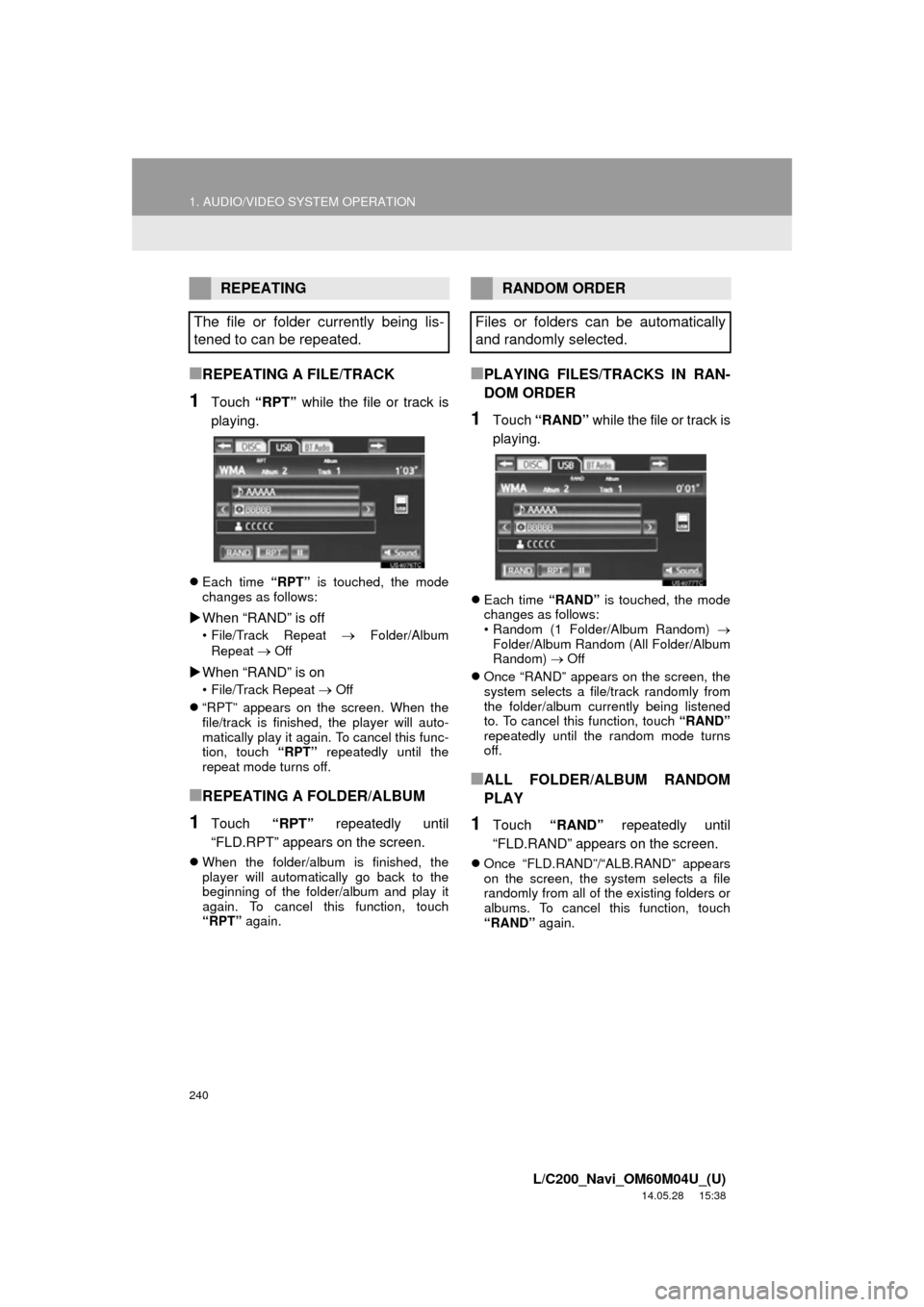
■REPEATING A FILE/TRACK
1Touch “RPT” while the file or track is
playing.
Each time “RPT” is touched, the mode
changes as follows:
When “RAND” is off
• File/Track Repeat Folder/Album
Repeat
Off
When “RAND” is on
• File/Track Repeat Off
“RPT” appears on the screen. When the
file/track is finished, the player will auto-
matically play it again. To cancel this func-
tion, touch “RPT” repeatedly until the
repeat mode turns off.
■REPEATING A FOLDER/ALBUM
1Touch “RPT” repeatedly until
“FLD.RPT” appears on the screen.
When the folder/album is finished, the
player will automatically go back to the
beginning of the folder/album and play it
again. To cancel this function, touch
“RPT” again.
■PLAYING FILES/TRACKS IN RAN-
DOM ORDER
1Touch “RAND” while the file or track is
playing.
Each time “RAND” is touched, the mode
changes as follows:
• Random (1 Folder/Album Random)
Folder/Album Random (All Folder/Album
Random) Off
Once “RAND” appears on the screen, the
system selects a file/track randomly from
the folder/album currently being listened
to. To cancel this function, touch “RAND”
repeatedly until the random mode turns
off.
■ALL FOLDER/ALBUM RANDOM
PLAY
1Touch “RAND” repeatedly until
“FLD.RAND” appears on the screen.
Once “FLD.RAND”/“ALB.RAND” appears
on the screen, the system selects a file
randomly from all of the existing folders or
albums. To cancel this function, touch
“RAND” again.
REPEATING
The file or folder currently being lis-
tened to can be repeated.RANDOM ORDER
Files or folders can be automatically
and randomly selected.