reset TOYOTA LAND CRUISER 2015 J200 User Guide
[x] Cancel search | Manufacturer: TOYOTA, Model Year: 2015, Model line: LAND CRUISER, Model: TOYOTA LAND CRUISER 2015 J200Pages: 728, PDF Size: 10.53 MB
Page 365 of 728
365
3-2. Using the audio system
3
Interior features
LC200_OM_OM60L83U_(U)
■
Displaying radio text messages
Press .
If MSG is shown on the display, a text message will be displayed.
If the text continues past the end of the display, is displayed. Press
and hold until you hear a beep.
■Traffic announcement
Press .
“TRAF SEEK” appears on the display, and the radio will start seeking
any station broadcasting traffic program information.
If no traffic program station is found, “NO TRAF INFO” appears on the
display.
■ When the battery is disconnected
All preset stations are erased.
■ Reception sensitivity
●Maintaining perfect radio reception at all times is difficult due to the con-
tinually changing position of the antenna, differences in signal strength
and surrounding objects, such as trains, transmitters, etc.
● The radio antenna is mounted inside the rear quarter window. To main-
tain clear radio reception, do not attach metallic window tinting or other
metallic objects to the antenna wire mounted inside the rear quarter win-
dow.
Page 389 of 728
389
3-2. Using the audio system
3
Interior features
LC200_OM_OM60L83U_(U)
■
iPod problems
To resolve most problems encountered when using your iPod, disconnect
your iPod from the vehicle iPod connection and reset it.
For instructions on how to reset your iPod, refer to your iPod Owner’s Man-
ual.
■ Display
P. 373
■ Error messages
“ERROR”:This indicates a problem in the iPod or its connection.
“NO MUSIC”:This indicates that there is no music data in the iPod.
“EMPTY”: This indicates that an empty playlist is selected.
“UPDATE”: This indicates that the version of the iPod is not compatible.
Upgrade your iPod software to the latest version.
■ Compatible models
Depending on differences between models or software version etc., some
models listed above might be incompatible with this system.
iPod 4th generation and earlier models are not compatible with this system.
iPhone, iPod mini, iPod shuffle and iPod photo are not compatible with this
system.
Items related to standards and limitations are as follows:
●Maximum number of lists in device: 9999
● Maximum number of songs in device: 65535
● Maximum number of songs per list: 65535
ModelGenerationSoftware version
iPod5th generationVer. 1.2.0 or higher
iPod nano
1st generationVer. 1.3.0 or higher
2nd generationVer. 1.1.2 or higher
3rd generationVer. 1.0.0 or higher
iPod touch1st generationVer. 1.1.0 or higher
iPod classic1st generationVer. 1.0.0 or higher
Page 442 of 728
442 3-4. Using the hands-free system (for cellular phone)
LC200_OM_OM60L83U_(U)
Speed dialingPress the off-hook switch.
Press the preset button in wh ich the desired number is regis-
tered.
Press the off-hook switch.
When receiving a phone call
■ Answering the phone
Press the off-hook switch.
■ Refusing the call
Press the on-hook switch.
Transferring a call
A call can be transferred between the cellular phone and system
while dialing, receiving a call, or during a call. Use one of the follow-
ing methods:
a. Operate the cellular phone.
Refer to the manual that comes with the cellular phone for the oper-
ation of the phone.
b. Press the off-hook switch*1.
c. Press the talk switch and say “Call Transfer”
*2.
*1:This operation can be performed only when transferring a call from the cellular phone to the system during a call.
*2:While the vehicle is in motion, a call cannot be transferred from
the system to the cellular phone.
STEP1
STEP2
STEP3
Page 463 of 728
463
3-4. Using the hands-free
system (for cellular phone)
3
Interior features
LC200_OM_OM60L83U_(U)Pattern A
Select the data to be registered as a speed dial by either of
the following methods, and select “Confirm” using a voice
command or .
a. Press the talk sw itch, say desired name.
b. Press the talk switch, and say “List names”. When the
desired name is read aloud, press the talk switch.
Pattern B
Select the desired data using .
Select the desired preset butt on, and register the data into
speed dial by either of the following methods:
a. Press the desired preset butto n, and select “Confirm” using
a voice command or .
b. Press and hold the desired preset button.
STEP2
STEP2
STEP3
Page 465 of 728
465
3-4. Using the hands-free
system (for cellular phone)
3
Interior features
LC200_OM_OM60L83U_(U)
Deleting speed dials
Select “Delete Speed Dial (Del Spd Dial)” using a voice com-
mand or .
Press the preset button in which the desired speed dial is reg-
istered, and select “Confirm” using a voice command or
.
■Limitation of number of digits
A phone number that exceeds 24 digits cannot be registered.
STEP1
STEP2
Page 523 of 728

523
4-2. Maintenance
4
Maintenance and care
LC200_OM_OM60L83U_(U)
■
Reset the message indicating maintenance is required
After the required maintenance is performed according to the maintenance
schedule, please reset the message.
To reset the data, follow the procedures described below:
Switch the display to the trip meter A when the engine is running.
(P. 184)
Turn the “ENGINE START STOP” switch OFF.
While pressing the trip meter reset button, set the “ENGINE START
STOP” switch to IGNITION ON mode (but do not start the engine
because otherwise the reset mode will be canceled). Continue to
press and hold the button until the multi-information display indi-
cates that the reset is complete.
■ Allow inspection and repairs to be performed by a Toyota dealer
● Toyota technicians are well-trained specialists and are kept up to date
with the latest service information. They are well informed about the
operations of all systems on your vehicle.
● Keep a copy of the repair order. It proves that the maintenance that has
been performed is under warranty coverage. If any problem should arise
while your vehicle is under warranty, your Toyota dealer will promptly
take care of it.
STEP1
STEP2
STEP3
Page 550 of 728
550 4-3. Do-it-yourself maintenance
LC200_OM_OM60L83U_(U)■
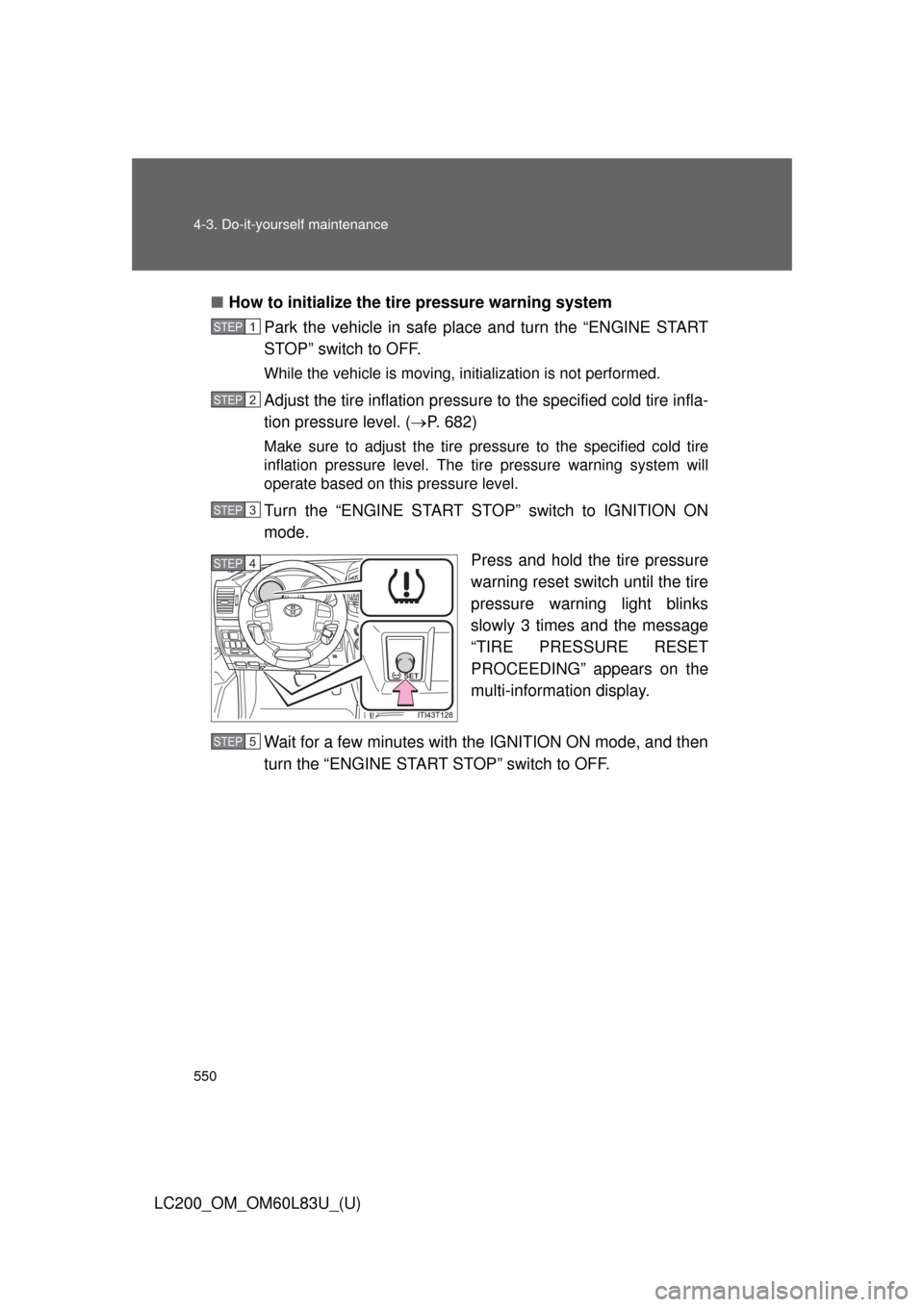
How to initialize the tire pressure warning system
Park the vehicle in safe place and turn the “ENGINE START
STOP” switch to OFF.
While the vehicle is moving, in itialization is not performed.
Adjust the tire inflation pressure to the specified cold tire infla-
tion pressure level. ( P. 682)
Make sure to adjust the tire pressure to the specified cold tire
inflation pressure level. The ti re pressure warning system will
operate based on this pressure level.
Turn the “ENGINE START STOP” switch to IGNITION ON
mode.
Press and hold the tire pressure
warning reset switch until the tire
pressure warning light blinks
slowly 3 times and the message
“TIRE PRESSURE RESET
PROCEEDING” appears on the
multi-information display.
Wait for a few minutes with the IGNITION ON mode, and then
turn the “ENGINE START STOP” switch to OFF.
STEP1
STEP2
STEP3
SET
STEP4
STEP5
Page 553 of 728
553
4-3. Do-it-yourself maintenance
4
Maintenance and care
LC200_OM_OM60L83U_(U)
■Initializing the tire pressure warning system
Initialize the tire pressure warning sy
stem with the tire inflation pressure
adjusted to the specified level.
■If you press the tire pressure reset switch accidentally
If initialization is performed, adjust t he tire inflation pressure to the speci-
fied level and initialize the tire pressure warning system again.
■When the initialization of the tire pressure warning system has
failed
Initialization can be completed in a few minutes. However, in the follow-
ing cases, the settings have not been recorded and the system will not
operate properly. If repeated attempts to record tire inflation pressure
settings are unsuccessful, have the vehicle inspected by your Toyota
dealer.
●When operating the tire pressure warning reset switch, the tire pres-
sure warning light does not blink 3 times and the setting message
does not appear on the multi-information display.
●After carrying out the initialization procedure, the tire pressure warn-
ing light blinks for 1 minute then stays on after driving for about 20
minutes.
■Routine tire inflation pressure checks
The tire pressure warning system doe s not replace routine tire inflation
pressure checks. Make su re to check tire inflation pressure as part of
your routine of daily vehicle checks.
Page 555 of 728
555
4-3. Do-it-yourself maintenance
4
Maintenance and care
LC200_OM_OM60L83U_(U)
CAUTION
■Tire pressure warning system operation
The tire pressure warning system may not provide warning immediately
if a tire bursts or if
sudden air leakage occurs.
■When inspecting or replacing tires
Observe the following precautions to prevent accidents.
Failure to do so may cause damage to parts of the drive train, as well as
dangerous handling characteristics, which may lead to an accident
resulting in death or serious injury.
●Do not mix tires of different ma kes, models or tread patterns.
Also, do not mix tires of remarkably different treadwear.
●Do not use tire sizes other than those recommended by Toyota.
●Do not mix differently constructed ti res (radial, bias-belted or bias-ply
tires).
●Do not mix summer, all season and snow tires.
●Do not use tire that have been used on another vehicle.
Do not use tires if you do not know they were used previously.
■When initializing the tire pressure warning system
Do not push the tire pressure warnin g reset switch without first adjusting
the tire inflation pressure to the spec ified level. Otherwise, the tire pres-
sure warning light may not come on ev en if the tire inflation pressure is
low, or it may come on when the tire inflation pressure is actually normal.
Page 620 of 728

620 5-2. Steps to take in an emergency
LC200_OM_OM60L83U_(U)
■SRS warning light
This warning light system monitors the following:
●The airbag sensor assembly
● Front impact sensors
● Side impact sensors (rear)
● Side impact sensors (front door)
● Safing sensor (rear)
● The driver’s seat belt buckle switch
● The driver’s seat position sensor
● Front passenger’s seat belt buckle switch
● The airbags
● The interconnecting wiring and power sources
● The front passenger occupant classification system
● “AIR BAG ON” and “AIR BA G OFF” indicator lights
● The seat belt pretensioners
● The “RSCA OFF” indicator light
■ Changing the engine oil
Make sure to reset oil change system
■
When the tire pressure warning light comes on
Check the tire inflation pressure and adjust to the appropriate level.
Pushing the tire pressure warning reset switch does not turn off the tire
pressure warning light.
■The tire pressure warning light ma y turn on due to natural causes
The tire pressure warning light may turn on due to natural causes such
as natural air leaks or tire inflation pressure changes caused by temper-
ature. In this case, adjusting the ti re inflation pressure will turn off the
warning light (after a few minutes).