lock TOYOTA LAND CRUISER 2015 J200 Service Manual
[x] Cancel search | Manufacturer: TOYOTA, Model Year: 2015, Model line: LAND CRUISER, Model: TOYOTA LAND CRUISER 2015 J200Pages: 728, PDF Size: 10.53 MB
Page 68 of 728
68 1-3. Adjustable components (seats, mirrors, steering wheel)
LC200_OM_OM60L83U_(U)
CAUTION
■Seat adjustment
Do not recline the seat more than necessary when the vehicle is in motion,
to reduce the risk of sliding under the lap belt.
If the seat is too reclined, during an accident the lap belt may slide past the
hips and apply restraint forces directly to the abdomen or your neck may
contact the shoulder belt, increasing the risk of death or serious injury.
■ When the seatback is folded
●Do not sit on or place anything on the seatback while driving.
● Be sure to install the seat hook covers on the seat hooks, or you may get
burned when they become hot.
■ When returning the seatbacks to their original position
Observe the following precautions. Failure to do so may result in death or
serious injury.
●Be careful not to get your hands or feet pinched in the seat.
● Make sure the seats are securely locked. Failure to do so will prevent the
seat belt from operating properly.
● Check that the seat belts are not twisted or caught under the seat.
● Arrange the seat belts in the proper positions for ready use.
■ Avoiding damage to seat components
Do not hang or attach anything on the seatback striker.
NOTICE
■Before tumbling, folding up the seats
The seat belts and buckles must be stowed.
■ After returning the third seat
Make sure that the handle on the rear of the seatback has been secured.
Page 69 of 728
69
1
1-3. Adjustable components (seats, mirrors, steering wheel)
Before driving
LC200_OM_OM60L83U_(U)
Driving position memor y system
Your preferred driving position (the position of the driver’s seat,
steering wheel and outside rear view mirrors) can be entered into the
computer’s memory and recalled with the touch of a button. It is also
possible to set this function to activate automatically when the
doors are unlocked.
Three different driving positions can be entered into memory.
■ Entering a position to memory
Turn the “ENGINE START STOP” switch to IGNITION ON
mode.
Adjust the driver’s seat, steering wheel, and outside rear
view mirrors to the desired positions.
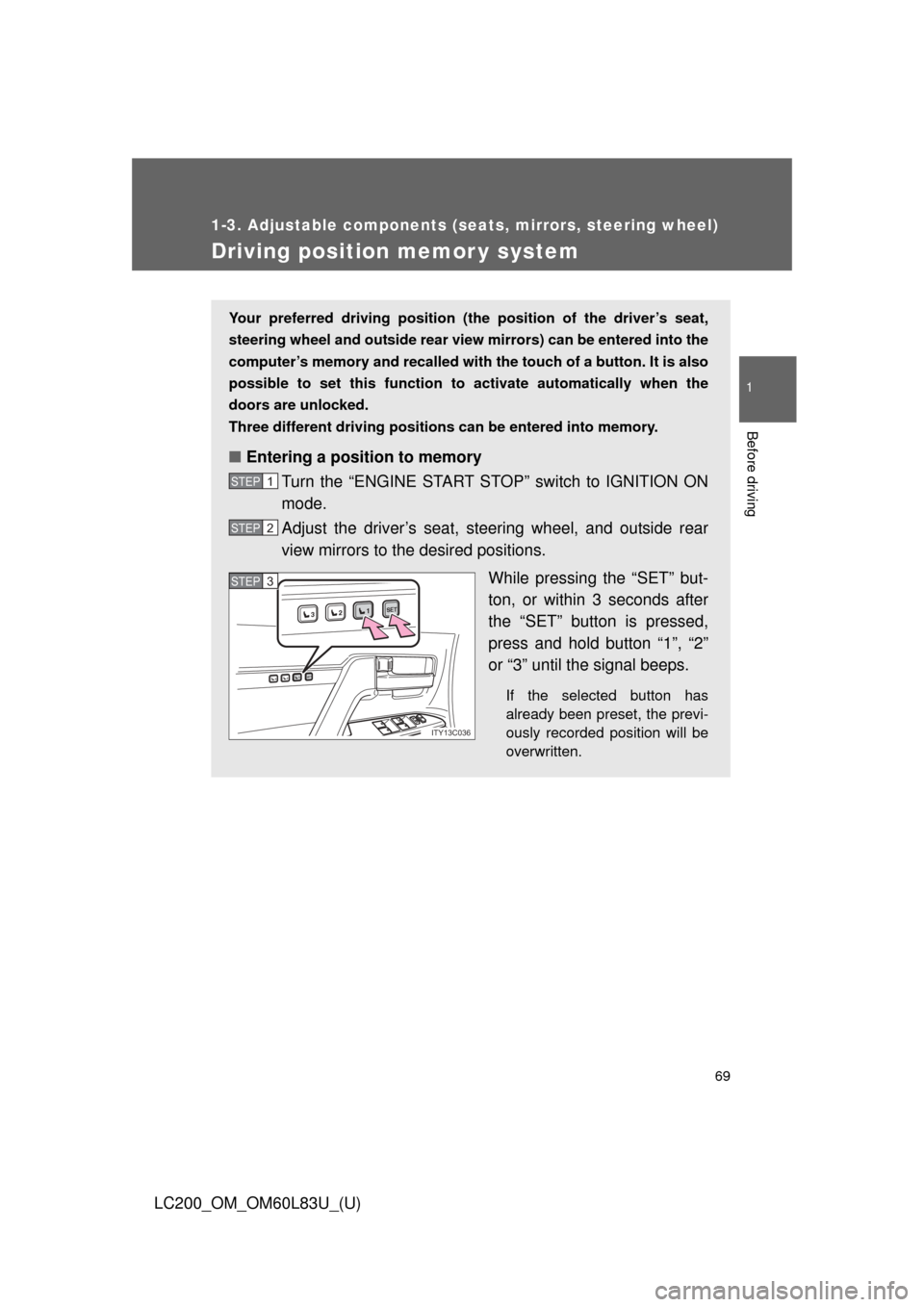
While pressing the “SET” but-
ton, or within 3 seconds after
the “SET” button is pressed,
press and hold button “1”, “2”
or “3” until the signal beeps.
If the selected button has
already been preset, the previ-
ously recorded position will be
overwritten.
STEP1
STEP2
1SET23
1SET23
ITY13C036
STEP3STEP3
Page 70 of 728
70 1-3. Adjustable components (seats, mirrors, steering wheel)
LC200_OM_OM60L83U_(U)
Linking driving position memory with door unlock operation
Record your driving position to button “1”, “2” or “3” before performing
the following: Using the wireless remote control Turn the “ENGINE START STOP” switch to OFF after closing
the driver’s door.
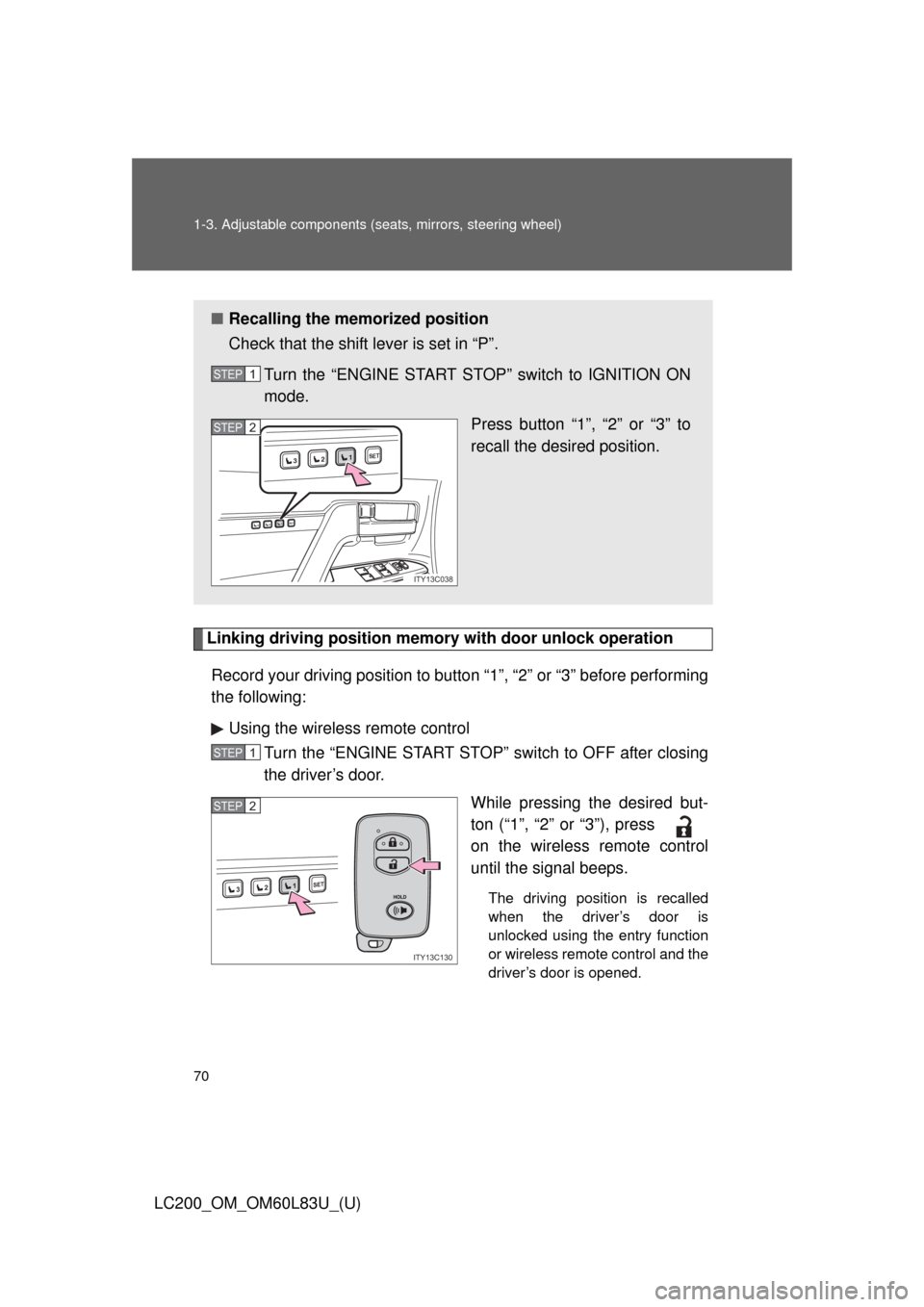
While pressing the desired but-
ton (“1”, “2” or “3”), press
on the wireless remote control
until the signal beeps.
The driving position is recalled
when the driver’s door is
unlocked using the entry function
or wireless remote control and the
driver’s door is opened.
■Recalling the memorized position
Check that the shift lever is set in “P”.
Turn the “ENGINE START STOP” switch to IGNITION ON
mode. Press button “1”, “2” or “3” to
recall the desired position.
STEP1
1SET23
1SET23
ITY13C038
STEP2
STEP1
1SET23
ITY13C130
STEP2
Page 71 of 728
71
1-3. Adjustable components (s
eats, mirrors, steering wheel)
1
Before driving
LC200_OM_OM60L83U_(U)To prevent unintended triggering of
the alarm, open and close a door
once after a driving position has been recorded. (If a door is not
opened within 60 seconds after is pressed, the doors will be
locked again and the alarm will automatically be set.)
In case that the alarm is trigge red, immediately stop the alarm.
( P. 110)
Using the door lock switch
Carry only the key to which you want to link the driving position. If 2
or more keys are in the vehicle, the driving position cannot be
linked properly.
Turn the “ENGINE START STOP” switch to OFF after closing
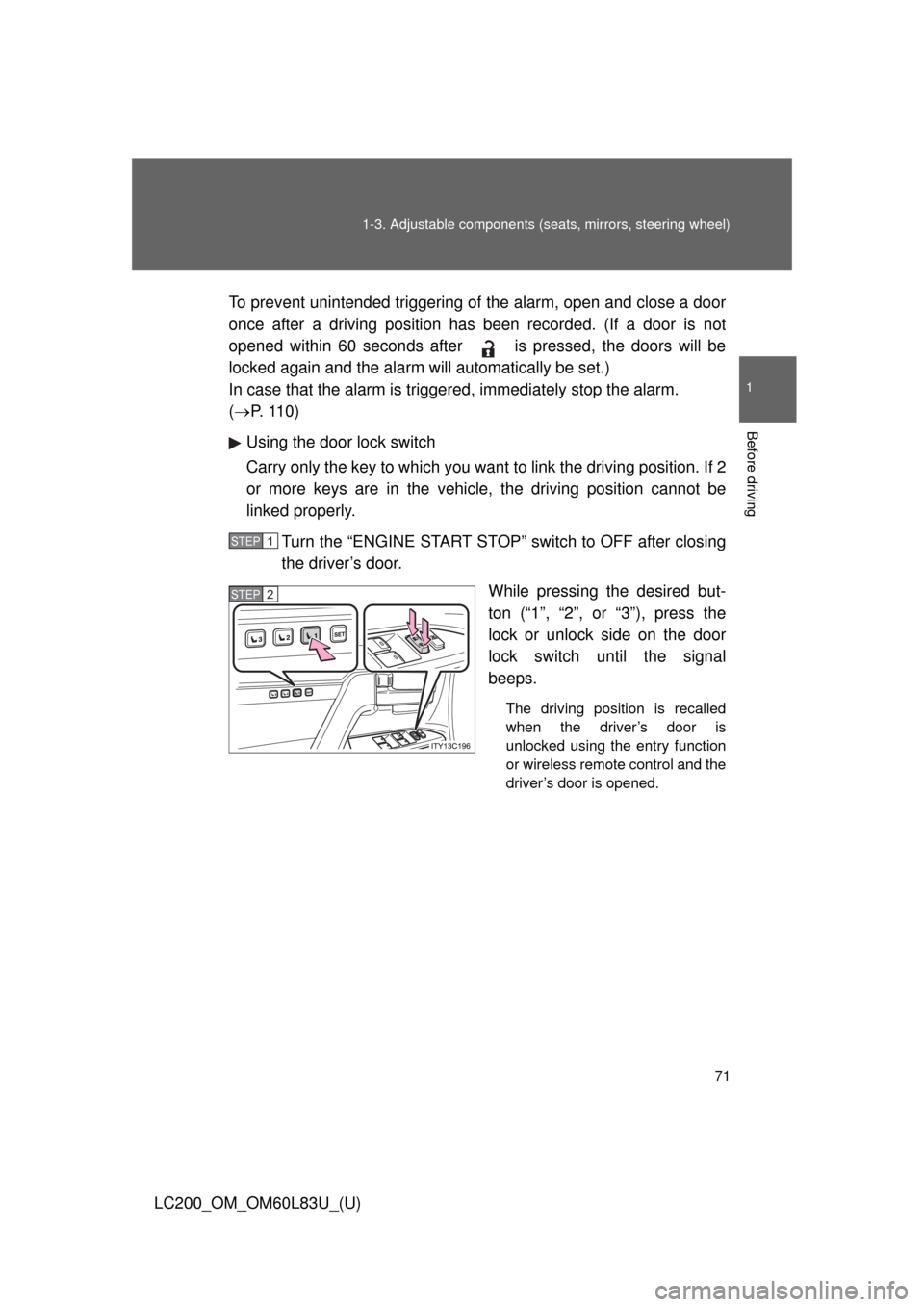
the driver’s door. While pressing the desired but-
ton (“1”, “2”, or “3”), press the
lock or unlock side on the door
lock switch until the signal
beeps.
The driving position is recalled
when the driver’s door is
unlocked using the entry function
or wireless remote control and the
driver’s door is opened.
STEP1
STEP2
Page 72 of 728
72 1-3. Adjustable components (seats, mirrors, steering wheel)
LC200_OM_OM60L83U_(U)
■Canceling the linked door unlock operation
Turn the “ENGINE START STOP” switch to OFF after closing the
driver’s door.
Using the wireless remote control: While pressing “SET” button,
press button on the wireless remote control until the signal
beeps.
Using the door lock switch: While pressing “SET” button, press the
lock or unlock side on the door lock switch until the signal beeps.
■ Retained accessory power
●Each memorized position (except for the steering wheel position) can be
activated within 3 minutes after the driver’s door is opened, even if the
“ENGINE START STOP” switch is turned off.
● Each memorized position (except for the steering wheel position) can be
activated within 60 seconds after the driver’s door is closed, even if the
“ENGINE START STOP” switch is turned off.
■ To cancel seat position recall
Perform any one of the following operations.
●Press the “SET” button
● Press button “1”, “2” or “3”.
● Adjust the seat using the switches (only cancels seat position recall)
● Adjust the steering wheel using the tilt and telescopic steering control
switch (only cancels steering wheel position recall)
■ If the battery is disconnected
The memorized positions must be reset because the computer’s memory is
erased when the battery is disconnected.
CAUTION
■Seat adjustment caution
Take care during seat adjustment that the seat does not strike the rear pas-
senger or squeeze your body against the steering wheel.
STEP1
STEP2
Page 73 of 728
73
1
1-3. Adjustable components (seats, mirrors, steering wheel)
Before driving
LC200_OM_OM60L83U_(U)
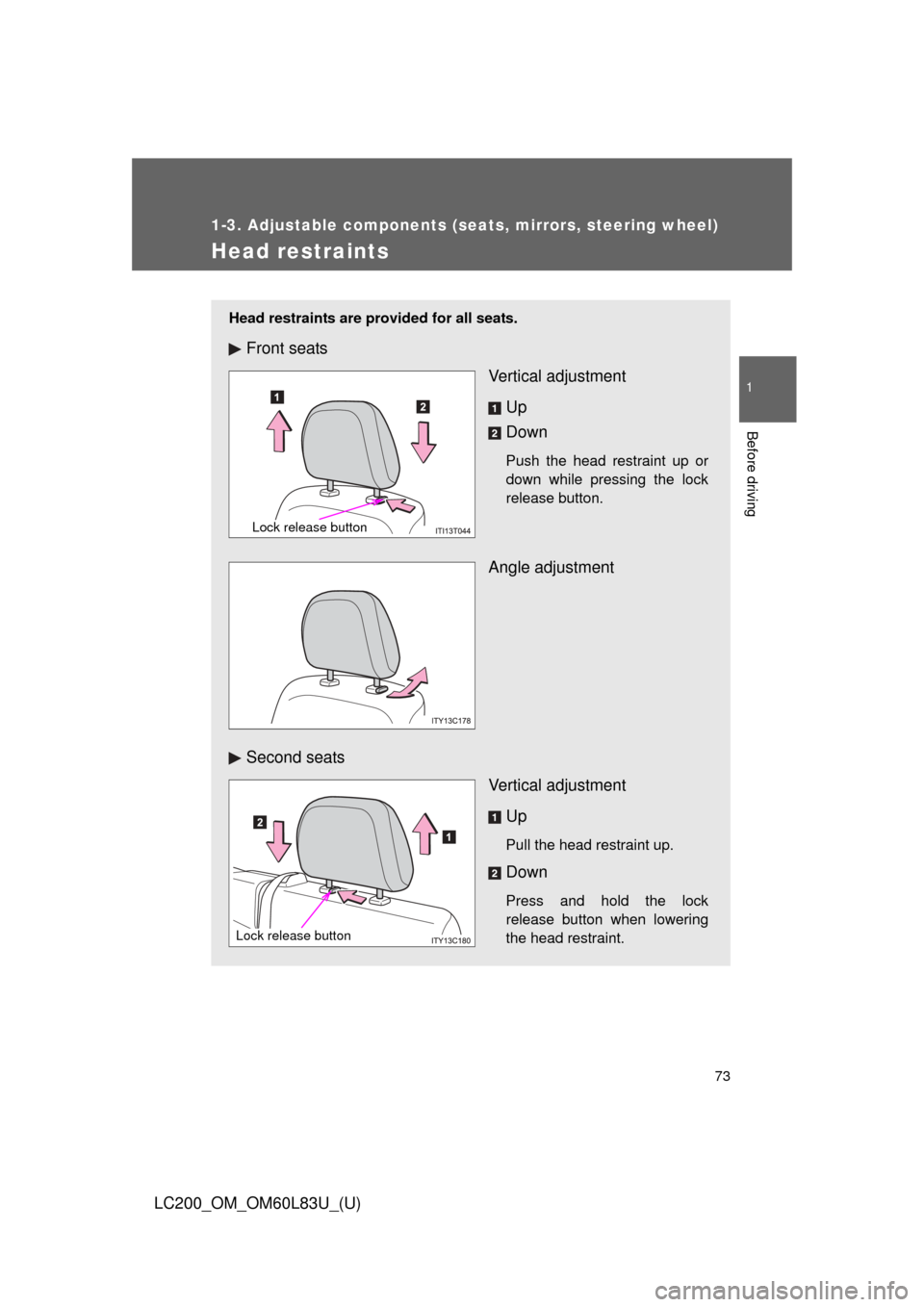
Head restraints
Head restraints are provided for all seats.
Front seatsVertical adjustment
Up
Down
Push the head restraint up or
down while pressing the lock
release button.
Angle adjustment
Second seats Vertical adjustment
Up
Pull the head restraint up.
Down
Press and hold the lock
release button when lowering
the head restraint.
Lock release button
Lock release button
Page 75 of 728
75
1-3. Adjustable components (s
eats, mirrors, steering wheel)
1
Before driving
LC200_OM_OM60L83U_(U)
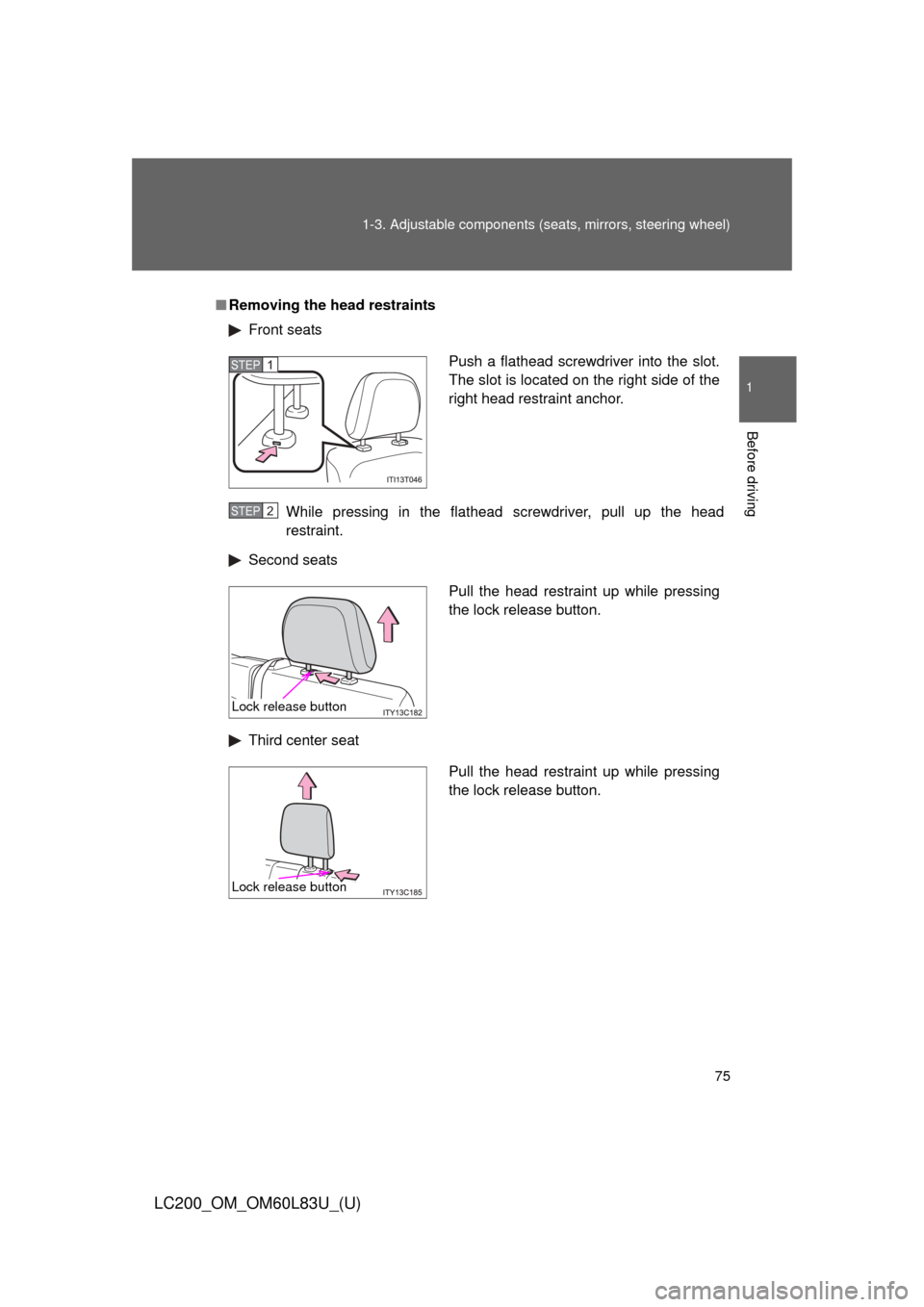
■Removing the head restraints
Front seats
While pressing in the flathead screwdriver, pull up the head
restraint.
Second seats
Third center seat
Push a flathead screwdriver into the slot.
The slot is located on the right side of the
right head restraint anchor.STEP1
STEP2
Pull the head restraint up while pressing
the lock release button.
Lock release button
Pull the head restraint up while pressing
the lock release button.
Lock release button
Page 76 of 728
76 1-3. Adjustable components (seats, mirrors, steering wheel)
LC200_OM_OM60L83U_(U)
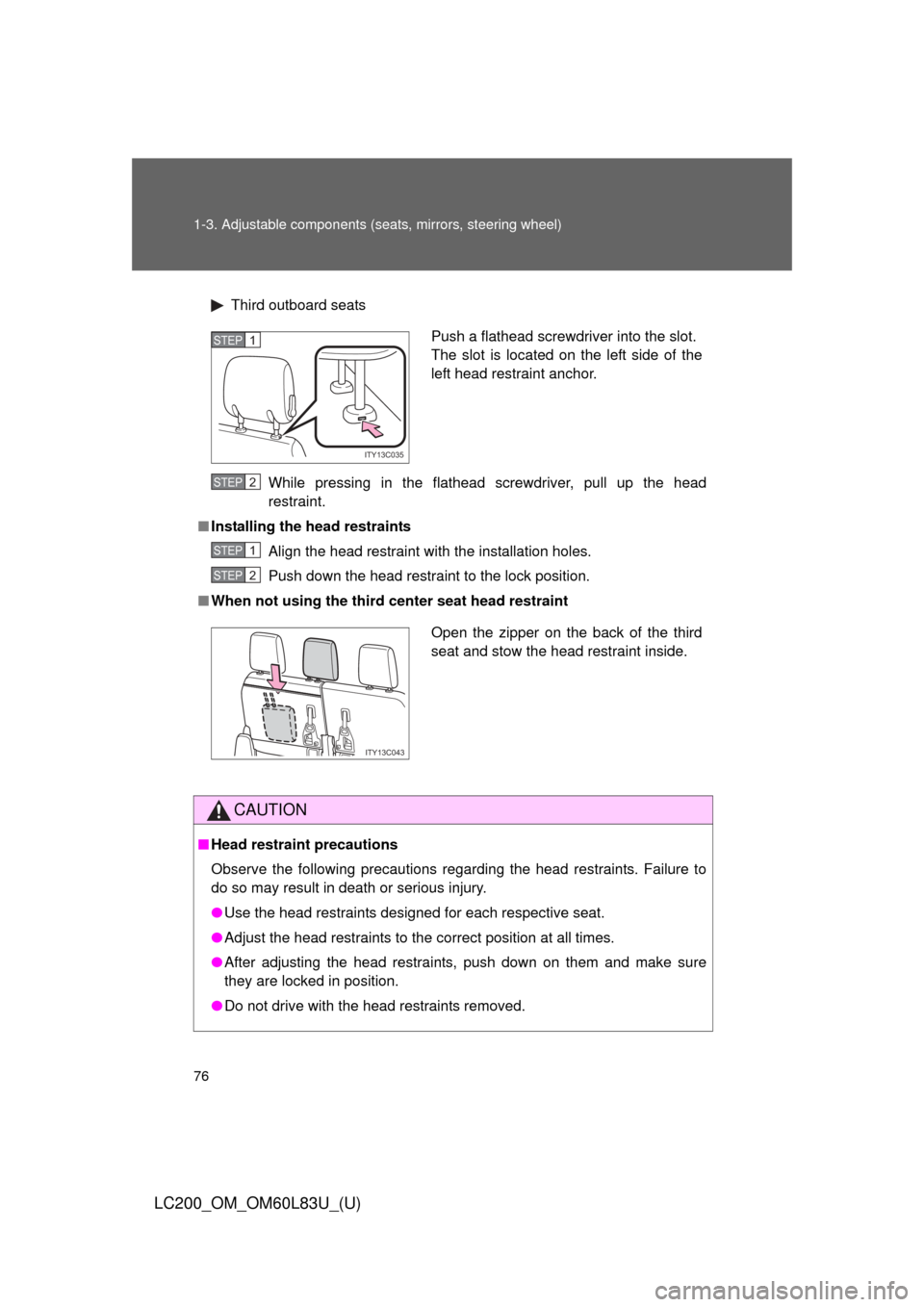
Third outboard seats
While pressing in the flathead screwdriver, pull up the head
restraint.
■ Installing the head restraints
Align the head restraint with the installation holes.
Push down the head restraint to the lock position.
■ When not using the third center seat head restraint
CAUTION
■Head restraint precautions
Observe the following precautions regarding the head restraints. Failure to
do so may result in death or serious injury.
●Use the head restraints designed for each respective seat.
● Adjust the head restraints to the correct position at all times.
● After adjusting the head restraints, push down on them and make sure
they are locked in position.
● Do not drive with the head restraints removed.
Push a flathead screwdriver into the slot.
The slot is located on the left side of the
left head restraint anchor.
ITY13C035
STEP1
STEP2
STEP1
STEP2
Open the zipper on the back of the third
seat and stow the head restraint inside.
ITY13C043
Page 81 of 728
81
1-3. Adjustable components (s
eats, mirrors, steering wheel)
1
Before driving
LC200_OM_OM60L83U_(U)
Pre-collision seat belts (front seats of vehicles with pre-collision
system)
Brake-linked pre-collision system
If the system determines that emergency braking is being per-
formed or the vehicle is out of c ontrol, the front seat belts will
retract. ( P. 293)
Radar type pre- collision system
If the system determines that a collision is unavoidable, the front
seat belts will retract before the collision. (P. 293)
■Emergency locking retractor (ELR)
The retractor will lock the belt during a sudden stop or on impact. It may also
lock if you lean forward too quickly. A slow, easy motion will allow the belt to
extend, and you can move around fully.
■ Automatic locking retractor (ALR)
When a passenger’s shoulder belt is completely extended and then
retracted even slightly, the belt is locked in that position and cannot be
extended. This feature is used to hold the child restraint system (CRS) firmly.
To free the belt again, fully retract the belt and then pull the belt out once
more. ( P. 143)
Page 82 of 728
82 1-3. Adjustable components (seats, mirrors, steering wheel)
LC200_OM_OM60L83U_(U)
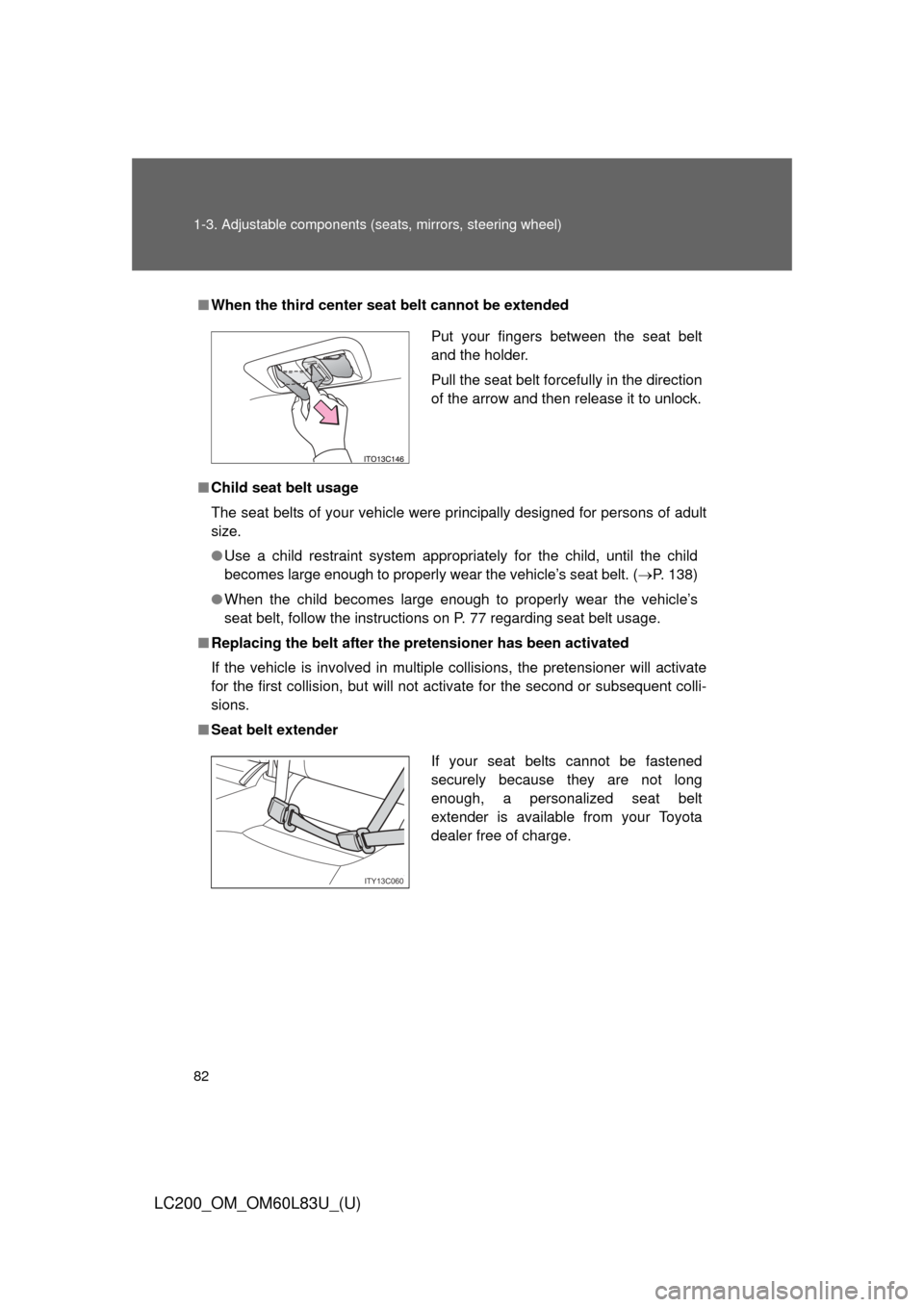
■When the third center seat belt cannot be extended
■ Child seat belt usage
The seat belts of your vehicle were principally designed for persons of adult
size.
●Use a child restraint system appropriately for the child, until the child
becomes large enough to properly wear the vehicle’s seat belt. ( P. 138)
● When the child becomes large enough to properly wear the vehicle’s
seat belt, follow the instructions on P. 77 regarding seat belt usage.
■ Replacing the belt after the pretensioner has been activated
If the vehicle is involved in multiple collisions, the pretensioner will activate
for the first collision, but will not activate for the second or subsequent colli-
sions.
■ Seat belt extender
Put your fingers between the seat belt
and the holder.
Pull the seat belt forcefully in the direction
of the arrow and then release it to unlock.
If your seat belts cannot be fastened
securely because they are not long
enough, a personalized seat belt
extender is available from your Toyota
dealer free of charge.
ITY13C060