display TOYOTA LAND CRUISER 2015 J200 Owners Manual
[x] Cancel search | Manufacturer: TOYOTA, Model Year: 2015, Model line: LAND CRUISER, Model: TOYOTA LAND CRUISER 2015 J200Pages: 728, PDF Size: 10.53 MB
Page 3 of 728

1
2
3
4
5
6
7
3
LC200_OM_OM60L83U_(U)
2-1. Driving proceduresDriving the vehicle............... 158
Engine (ignition) switch ....... 170
Automatic transmission ....... 175
Turn signal lever ................. 180
Parking brake ...................... 181
Horn .................................... 182
2-2. Instrument cluster Gauges and meters ............ 183
Indicators and warning lights ................................. 188
Multi-information display ..... 193
2-3. Operating the lights and wipers
Headlight switch .................. 200
Fog light switch ................... 205
Windshield wipers and washer ....................... 206
Rear window wiper and washer ....................... 212
Headlight cleaner switch ..... 213 2-4. Using other driving systems
Cruise control ..................... 214
Dynamic radar cruise control .............................. 218
Intuitive parking assist ........ 233
Four-wheel drive system .... 244
Crawl Control (with Turn Assist function) ................. 249
Multi-terrain Select ............. 255
Multi-terrain Monitor ........... 261
Driving assist systems ........ 285
Pre-Collision System .......... 293
2-5. Driving information Off-road precautions........... 300
Cargo and luggage ............. 305
Vehicle load limits............... 312
Winter driving tips ............... 313
Trailer towing ...................... 318
Dinghy towing ..................... 336
2When driving
Page 5 of 728

1
2
3
4
5
6
7
5
LC200_OM_OM60L83U_(U)
3-6. Using the storage featuresList of storage features ....... 470
• Glove box.......................... 471
• Console box ...................... 472
• Overhead console............. 473
• Cup holders ...................... 474
• Bottle holders .................... 476
• Card holders ..................... 478
• Auxiliary boxes.................. 478
3-7. Other interior features Cool box .............................. 479
Sun visors ........................... 481
Vanity mirror........................ 482
Clock ................................... 483
Outside temperature display............................... 484
Ashtrays .............................. 486
Cigarette lighter................... 488
Power outlets ...................... 489
Heated steering wheel ........ 491
Seat heaters and ventilators ......................... 493
Armrest ............................... 495
Assist grips.......................... 496
Floor mats ........................... 497
Luggage compartment features ............................. 499
Garage door opener............ 501
Safety Connect ................... 508 4-1. Maintenance and care
Cleaning and protecting the vehicle exterior ........... 516
Cleaning and protecting the vehicle interior ............ 519
4-2. Maintenance Maintenance requirements .................... 522
General maintenance ......... 525
Emission inspection and maintenance (I/M)
programs .......................... 528
4-3. Do-it-yourself maintenance Do-it-yourself service precautions....................... 529
Hood ................................... 532
Engine compartment .......... 533
Tires ................................... 548
Tire inflation pressure ......... 557
Wheels ............................... 561
Air conditioning filter ........... 564
Electronic key battery ......... 567
Checking and replacing fuses ................. 570
Headlight aim ..................... 584
Light bulbs .......................... 586
4Maintenance and care
Page 6 of 728

TABLE OF CONTENTSIndex
6
LC200_OM_OM60L83U_(U)
5-1. Essential informationEmergency flashers ........... 604
If your vehicle needs to be towed .......................... 605
If you think something is wrong ............................ 612
Fuel pump shut off system .............................. 613
5-2. Steps to take in an emergency
If a warning light turns on or a warning buzzer
sounds... ......................... 614
If a warning message is displayed ...................... 625
If you have a flat tire ........... 641
If the engine will not start ... 655
If the shift lever cannot be shifted from P ................... 657
If you lose your keys .......... 658
If the electronic key does not operate properly ......... 659
If the battery is discharged ....................... 662
If your vehicle overheats .... 665
If the vehicle becomes stuck................................. 668
If your vehicle has to be stopped in an
emergency ....................... 670 6-1. Specifications
Maintenance data (fuel, oil level, etc.) ........... 674
Fuel information .................. 684
Tire information................... 688
6-2. Customization Customizable features ........ 700
6-3. Initialization Items to initialize ................. 709
Reporting safety defects for U.S. owners ................. 712
Abbreviation list ............... 714
Alphabetical index ............ 716
What to do if... .................. 726
5When trouble arises6Vehicle specifications
7For U.S. owners
Index
Page 14 of 728
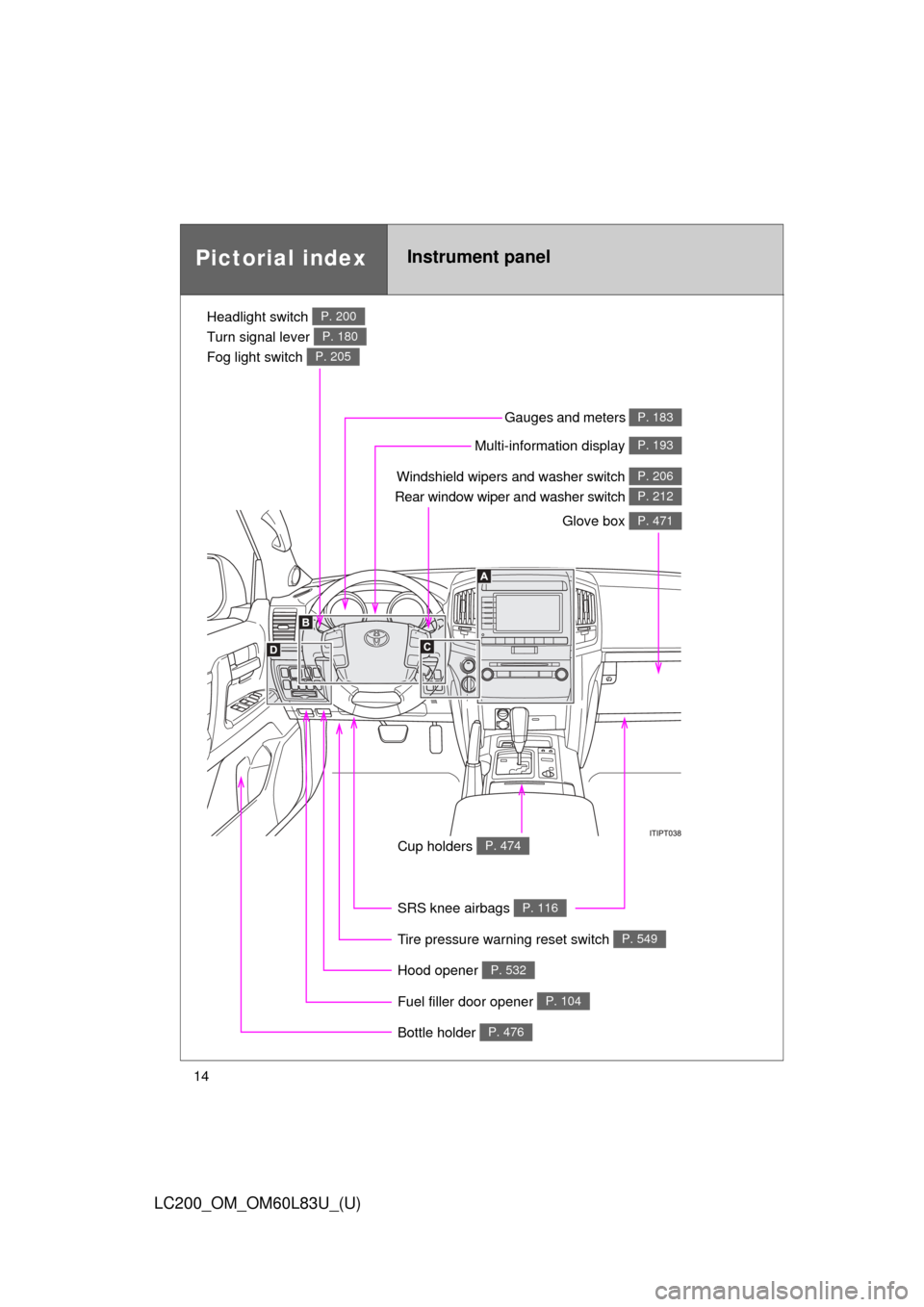
14
LC200_OM_OM60L83U_(U)
Pictorial indexInstrument panel
Headlight switch
Turn signal lever
Fog light switch P. 200
P. 180
P. 205
Windshield wipers and washer switch
Rear window wiper and washer switch P. 206
P. 212
Gauges and meters P. 183
Glove box P. 471
Fuel filler door opener P. 104
Hood opener P. 532
SRS knee airbags P. 116
Tire pressure warning reset switch P. 549
Cup holders P. 474
Multi-information display P. 193
Bottle holder P. 476
Page 15 of 728
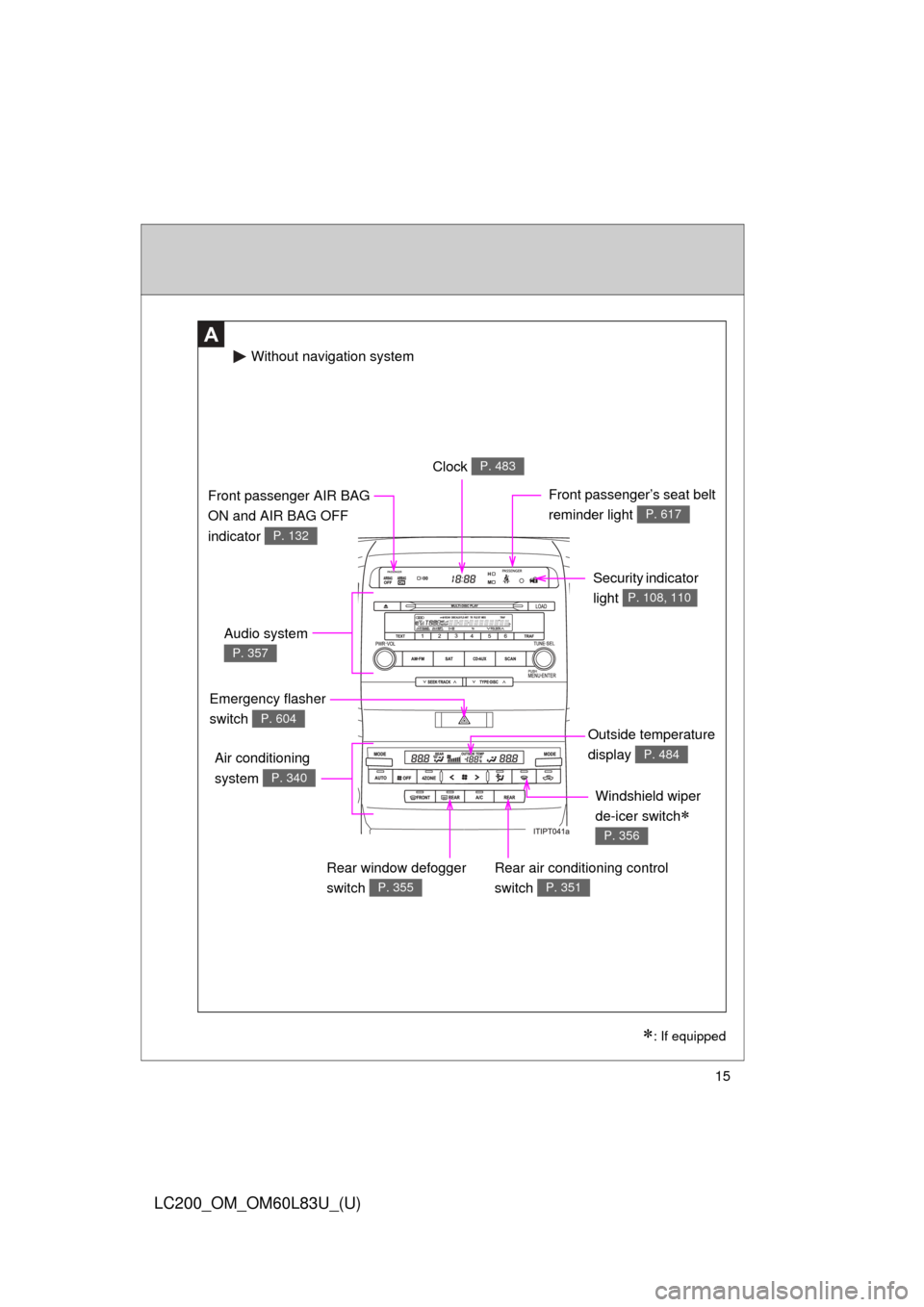
15
LC200_OM_OM60L83U_(U)
A
Windshield wiper
de-icer switch
P. 356
Clock P. 483
Security indicator
light
P. 108, 110
Audio system
P. 357
Front passenger AIR BAG
ON and AIR BAG OFF
indicator
P. 132
Front passenger’s seat belt
reminder light
P. 617
Air conditioning
system
P. 340
Rear air conditioning control
switch
P. 351
Emergency flasher
switch
P. 604
Rear window defogger
switch
P. 355
Without navigation system
: If equipped
Outside temperature
display
P. 484
Page 16 of 728
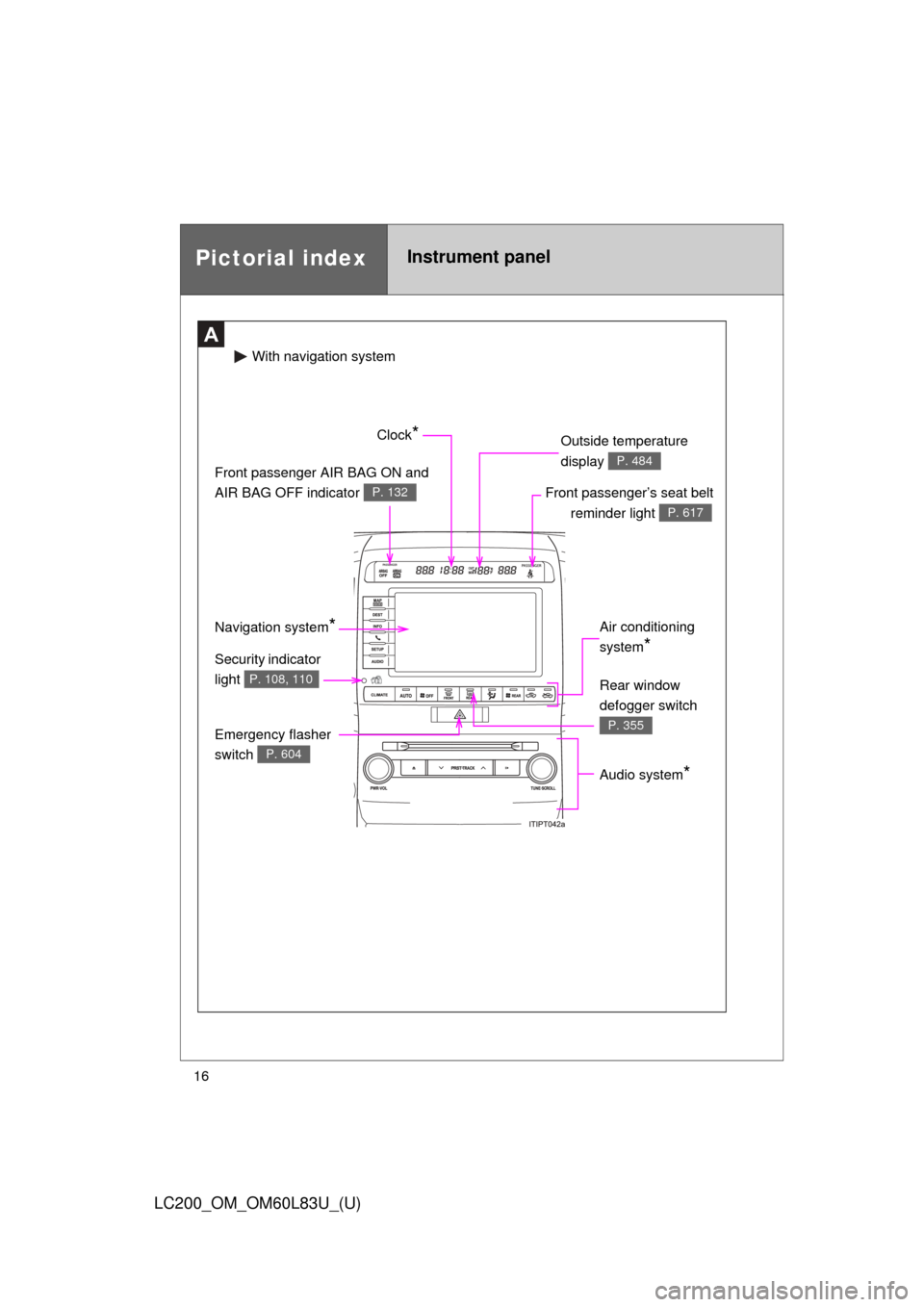
16
LC200_OM_OM60L83U_(U)
Pictorial indexInstrument panel
A
Audio system*
Front passenger’s seat belt reminder light
P. 617
Front passenger AIR BAG ON and
AIR BAG OFF indicator
P. 132
Clock* Outside temperature
display
P. 484
Air conditioning
system
*
Emergency flasher
switch
P. 604
Security indicator
light
P. 108, 110
With naviga tion system
Rear window
defogger switch
P. 355
Navigation system*
Page 19 of 728
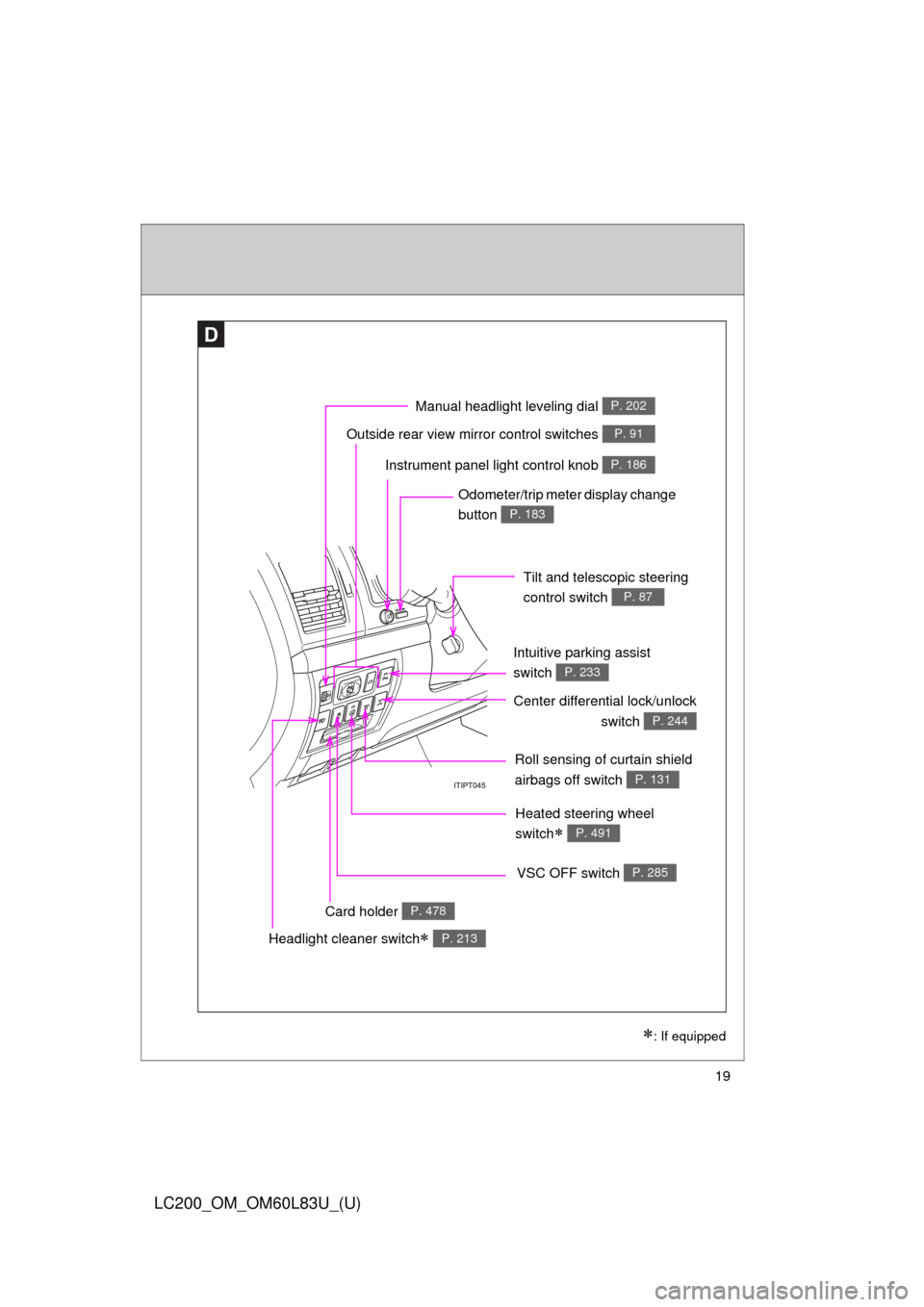
19
LC200_OM_OM60L83U_(U)
D
Roll sensing of curtain shield
airbags off switch
P. 131
Headlight cleaner switch P. 213
Outside rear view mirror control switches P. 91
Intuitive parking assist
switch
P. 233
: If equipped
Instrument panel light control knob P. 186
Odometer/trip meter display change
button
P. 183
Tilt and telescopic steering
control switch
P. 87
Card holder P. 478
VSC OFF switch P. 285
Center differential lock/unlockswitch
P. 244
Heated steering wheel
switch
P. 491
Manual headlight leveling dial P. 202
Page 37 of 728
37
1-2. Opening, closing and locking the doors
1
Before driving
LC200_OM_OM60L83U_(U)
■
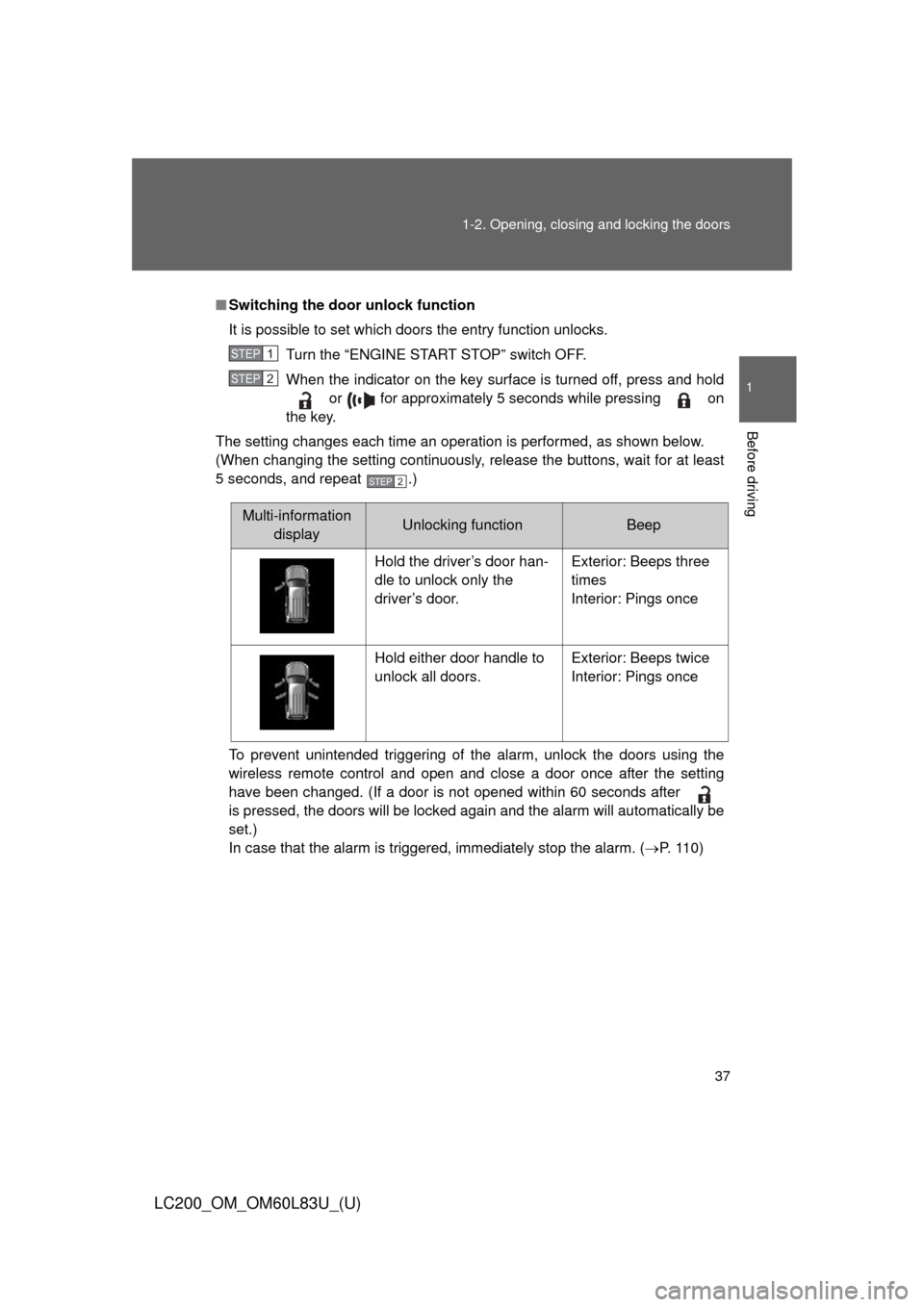
Switching the door unlock function
It is possible to set which doors the entry function unlocks.
Turn the “ENGINE START STOP” switch OFF.
When the indicator on the key surface is turned off, press and hold or for approximately 5 seconds while pressing on
the key.
The setting changes each time an operation is performed, as shown below.
(When changing the setting continuously, release the buttons, wait for at least
5 seconds, and repeat .)
To prevent unintended triggering of the alarm, unlock the doors using the
wireless remote control and open and close a door once after the setting
have been changed. (If a door is not opened within 60 seconds after
is pressed, the doors will be locked again and the alarm will automatically be
set.)
In case that the alarm is triggered, immediately stop the alarm. (P. 1 1 0 )
STEP1
STEP2
STEP2
Multi-information displayUnlocking functionBeep
Hold the driver’s door han-
dle to unlock only the
driver’s door. Exterior: Beeps three
times
Interior: Pings once
Hold either door handle to
unlock all doors. Exterior: Beeps twice
Interior: Pings once
Page 40 of 728

40 1-2. Opening, closing and locking the doors
LC200_OM_OM60L83U_(U)
■Security feature
If a door is not opened within approximately 60 seconds after the vehicle is
unlocked, the security feature automatically locks the vehicle again.
■ Alarms and warning indicators
A combination of exterior and interior alarms as well as warnings displayed
on the multi-information display are used to prevent theft of the vehicle and
unforeseeable accidents resulting from erroneous operation. Perform the
appropriate correction procedure de scribed in the following table.
AlarmSituationCorrection procedure
Exterior alarm
sounds once for
2 seconds An attempt was made to
lock the doors using the
entry function while the
electronic key was still
inside the passenger com-
partment Retrieve the elec-
tronic key from the
passenger compart-
ment and lock the
doors again
Exterior alarm
sounds once for
60 seconds An attempt was made to
exit the vehicle and lock
the doors without first turn-
ing the “ENGINE START
STOP” switch OFF Turn the “ENGINE
START STOP” switch
OFF and lock the
doors again
Exterior alarm
sounds once for
5 seconds An attempt was made to
lock the vehicle while a
door is open Close all of the doors
and lock the doors
again
Interior alarm
pings continu-
ously The “ENGINE START
STOP” switch was turned
to ACCESSORY mode
while the driver’s door was
open (or the driver’s door
was opened while the
“ENGINE START STOP”
switch was in ACCES-
SORY mode)
Turn the “ENGINE
START STOP” switch
OFF and close the
driver’s door
The “ENGINE START
STOP” switch was turned
OFF while the driver’s door
was open Close the driver’s
door
Page 42 of 728
42 1-2. Opening, closing and locking the doors
LC200_OM_OM60L83U_(U)
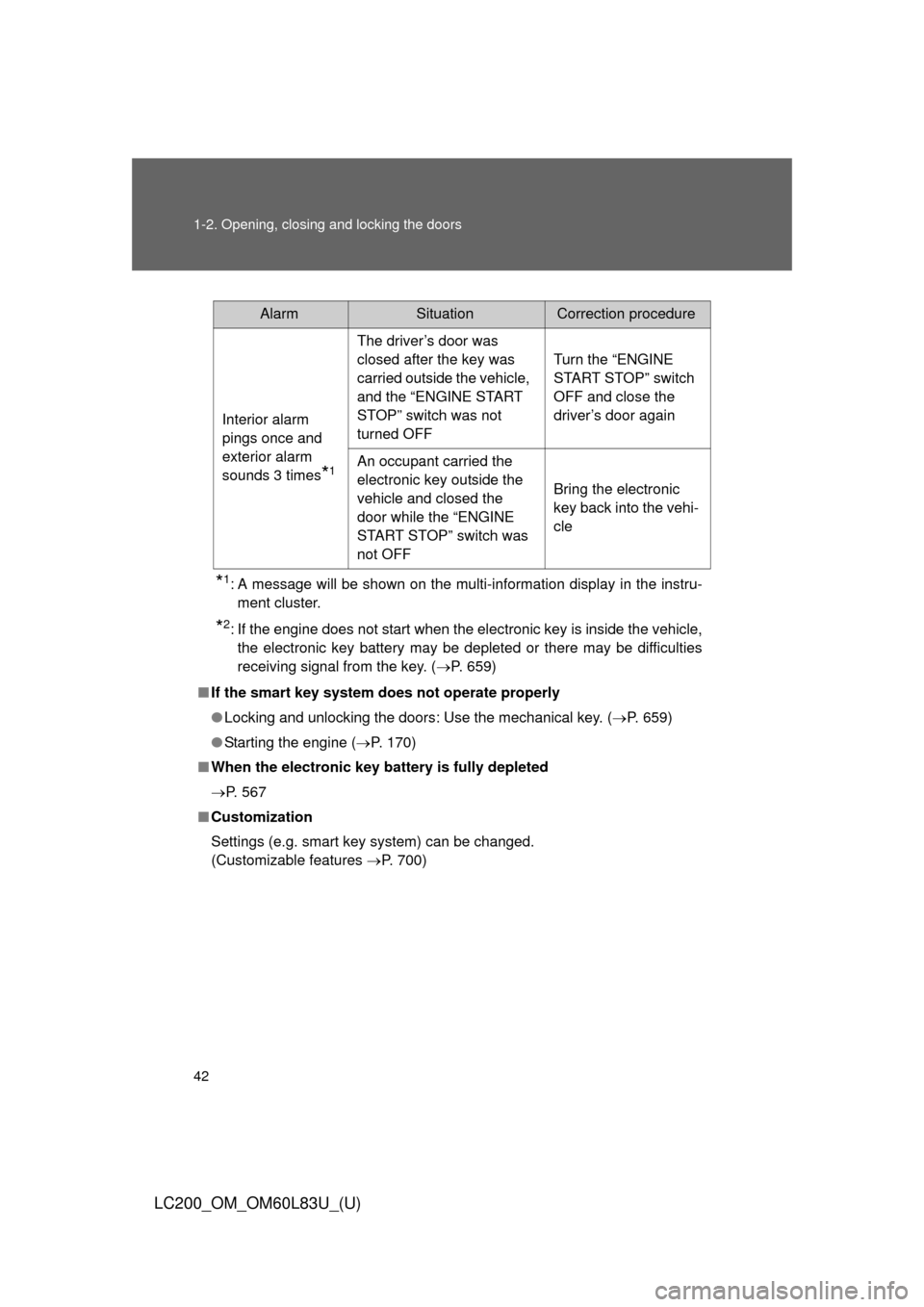
*1: A message will be shown on the multi-information display in the instru-ment cluster.
*2: If the engine does not start when the electronic key is inside the vehicle,the electronic key battery may be depleted or there may be difficulties
receiving signal from the key. ( P. 659)
■ If the smart key system does not operate properly
● Locking and unlocking the doors: Use the mechanical key. ( P. 659)
● Starting the engine ( P. 170)
■ When the electronic key battery is fully depleted
P. 567
■ Customization
Settings (e.g. smart key system) can be changed.
(Customizable features P. 700)
AlarmSituationCorrection procedure
Interior alarm
pings once and
exterior alarm
sounds 3 times
*1
The driver’s door was
closed after the key was
carried outside the vehicle,
and the “ENGINE START
STOP” switch was not
turned OFF Turn the “ENGINE
START STOP” switch
OFF and close the
driver’s door again
An occupant carried the
electronic key outside the
vehicle and closed the
door while the “ENGINE
START STOP” switch was
not OFF Bring the electronic
key back into the vehi-
cle