warning light TOYOTA LAND CRUISER 2016 J200 Owner's Manual
[x] Cancel search | Manufacturer: TOYOTA, Model Year: 2016, Model line: LAND CRUISER, Model: TOYOTA LAND CRUISER 2016 J200Pages: 608, PDF Size: 10.91 MB
Page 80 of 608
80
LC200_OM_OM60M88U_(U)
2. Instrument cluster
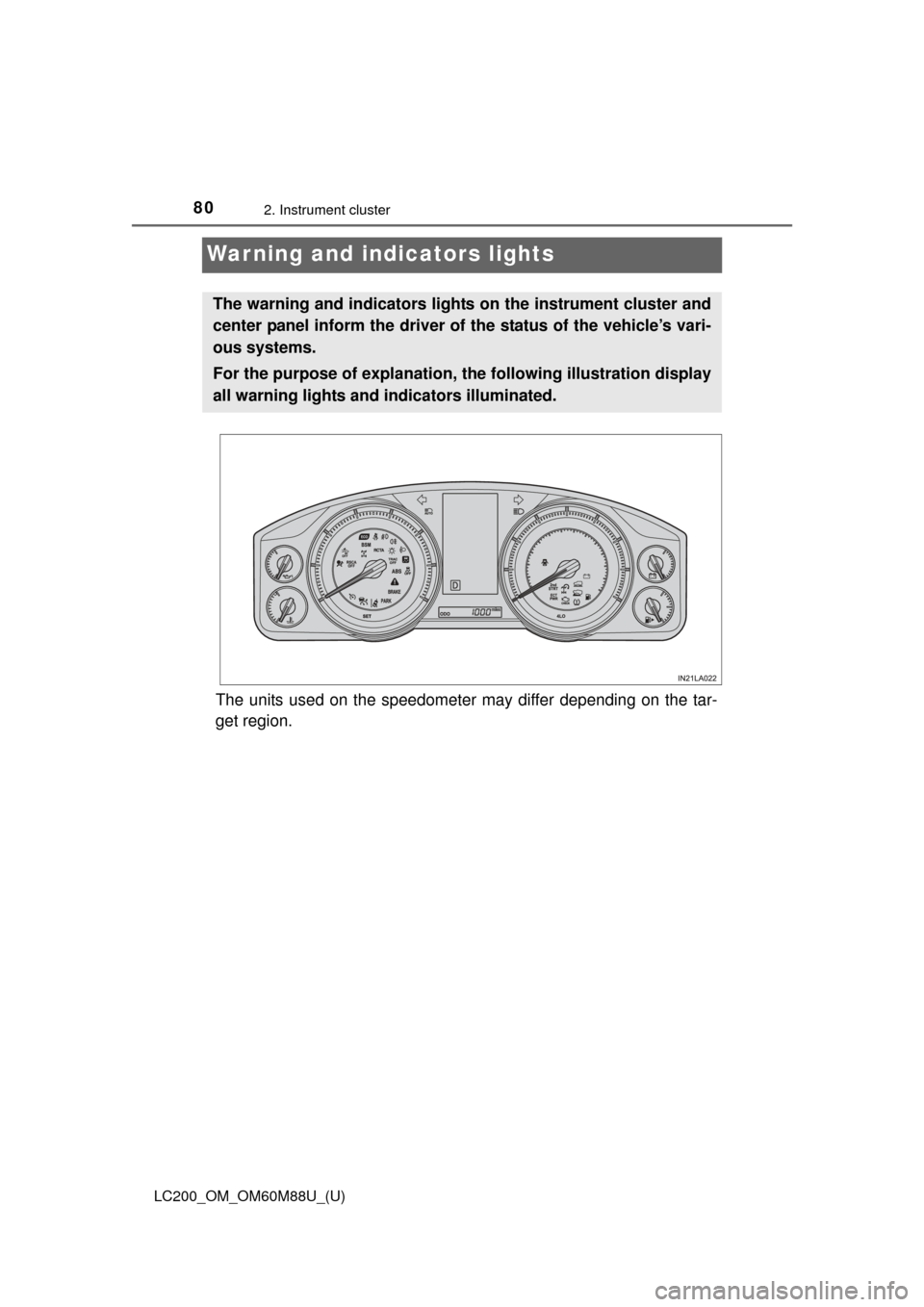
Warning and indicators lights
The units used on the speedometer may differ depending on the tar-
get region.
The warning and indicators lights on the instrument cluster and
center panel inform the driver of the status of the vehicle’s vari-
ous systems.
For the purpose of explanation, th e following illustration display
all warning lights and i ndicators illuminated.
Page 81 of 608
LC200_OM_OM60M88U_(U)
812. Instrument cluster
2
Instrument cluster
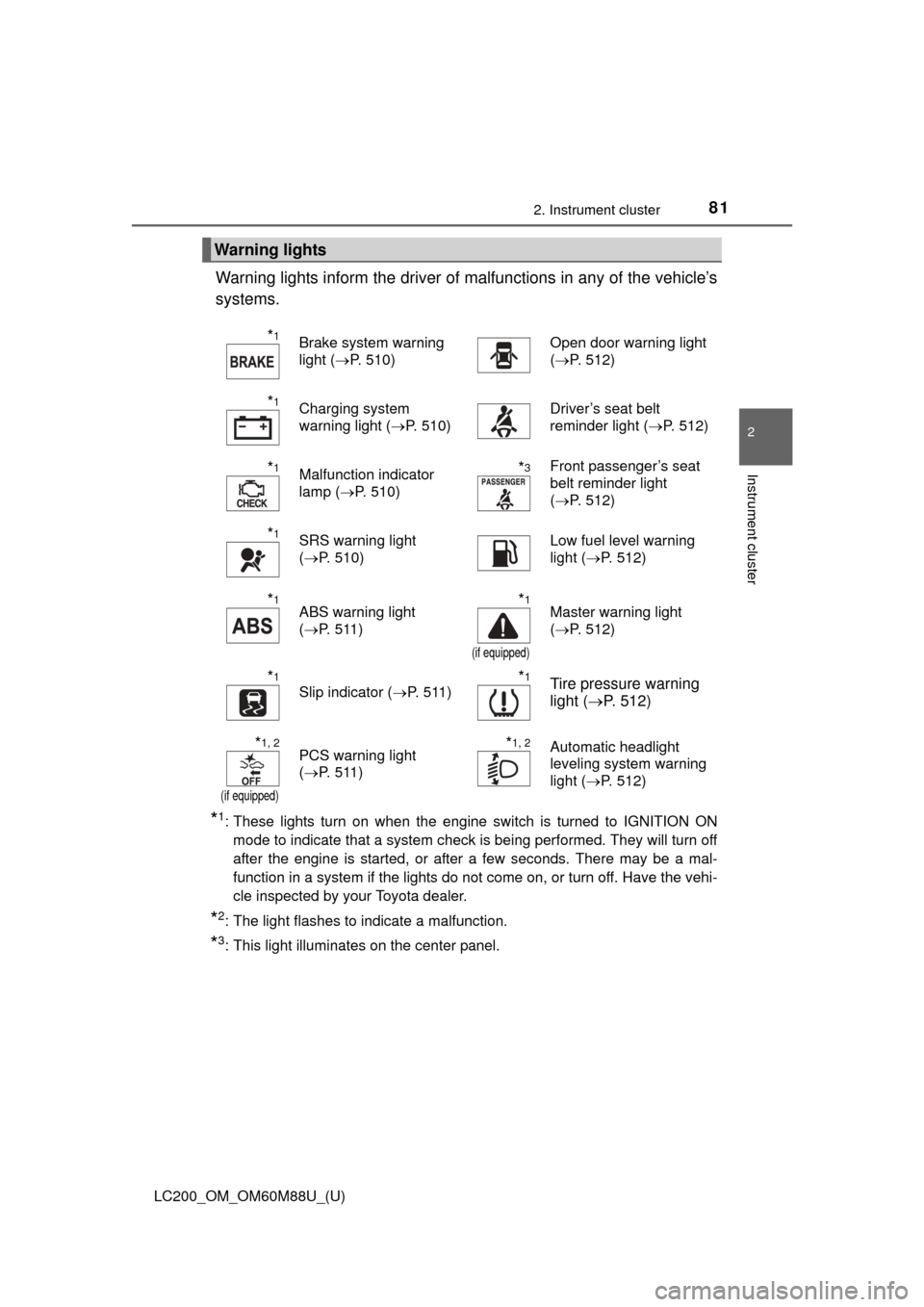
Warning lights inform the driver of malfunctions in any of the vehicle’s
systems.
*1: These lights turn on when the engine switch is turned to IGNITION ON mode to indicate that a system check is being performed. They will turn off
after the engine is started, or after a few seconds. There may be a mal-
function in a system if the lights do not come on, or turn off. Have the vehi-
cle inspected by your Toyota dealer.
*2: The light flashes to indicate a malfunction.
*3: This light illuminates on the center panel.
Warning lights
*1Brake system warning
light ( P. 510)Open door warning light
(P. 512)
*1Charging system
warning light ( P. 510)Driver’s seat belt
reminder light ( P. 512)
*1Malfunction indicator
lamp (P. 510)*3Front passenger’s seat
belt reminder light
(P. 512)
*1SRS warning light
(P. 510)Low fuel level warning
light ( P. 512)
*1ABS warning light
(P. 511)*1
(if equipped)
Master warning light
(P. 512)
*1
Slip indicator ( P. 511)*1Tire pressure warning
light (P. 512)
*1, 2
(if equipped)
PCS warning light
(P. 511)*1, 2Automatic headlight
leveling system warning
light ( P. 512)
Page 83 of 608
LC200_OM_OM60M88U_(U)
832. Instrument cluster
2
Instrument cluster
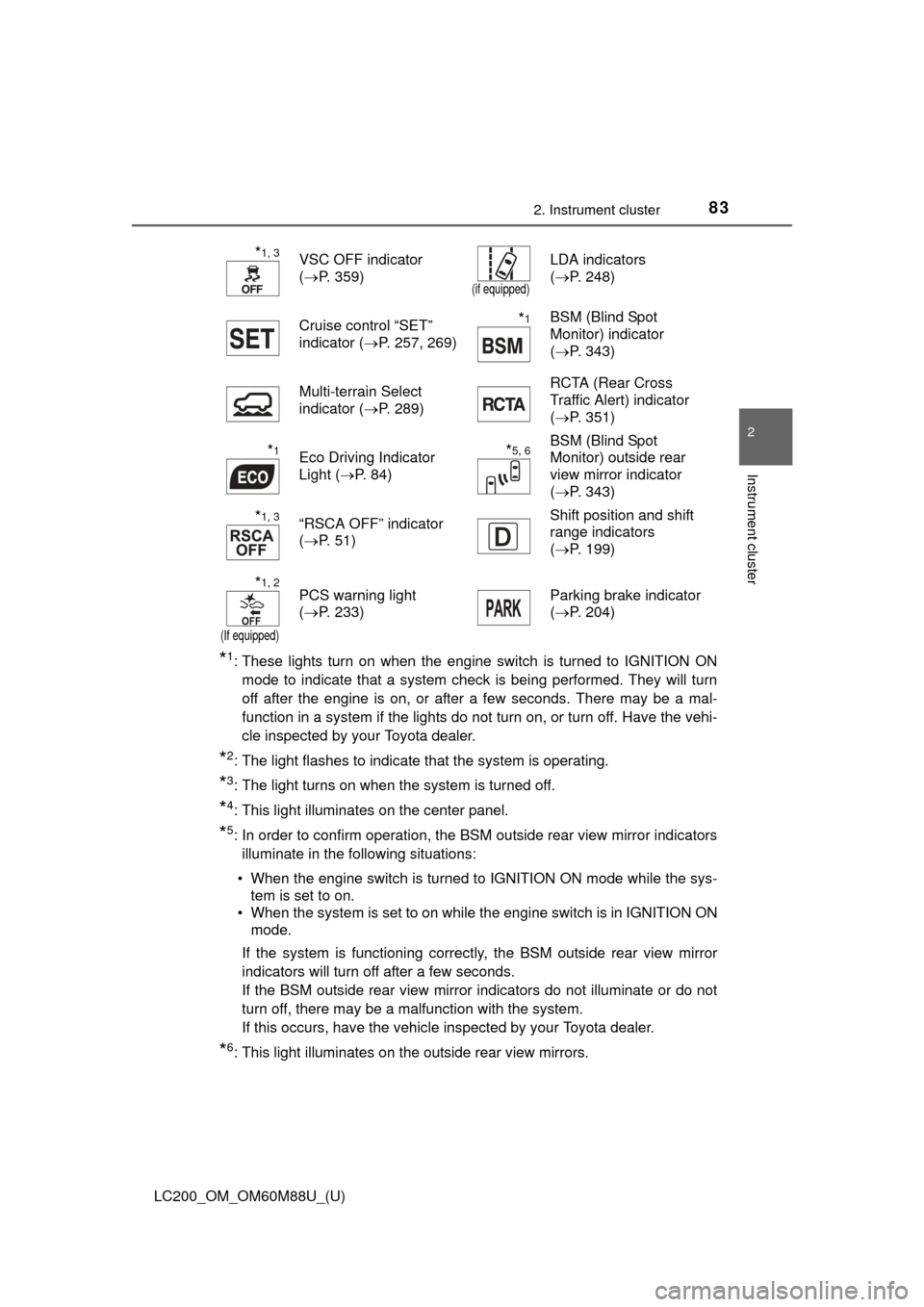
*1: These lights turn on when the engine switch is turned to IGNITION ONmode to indicate that a system check is being performed. They will turn
off after the engine is on, or after a few seconds. There may be a mal-
function in a system if the lights do not turn on, or turn off. Have the vehi-
cle inspected by your Toyota dealer.
*2: The light flashes to indicate that the system is operating.
*3: The light turns on when the system is turned off.
*4: This light illuminates on the center panel.
*5: In order to confirm operation, the BSM outside rear view mirror indicatorsilluminate in the following situations:
• When the engine switch is turned to IGNITION ON mode while the sys- tem is set to on.
• When the system is set to on while the engine switch is in IGNITION ON mode.
If the system is functioning correctly, the BSM outside rear view mirror
indicators will turn off after a few seconds.
If the BSM outside rear view mirror indicators do not illuminate or do not
turn off, there may be a malfunction with the system.
If this occurs, have the vehicle inspected by your Toyota dealer.
*6: This light illuminates on the outside rear view mirrors.
*1, 3VSC OFF indicator
( P. 359)
(if equipped)
LDA indicators
(P. 248)
Cruise control “SET”
indicator ( P. 257, 269)
*1BSM (Blind Spot
Monitor) indicator
(P. 343)
Multi-terrain Select
indicator ( P. 289) RCTA (Rear Cross
Traffic Alert) indicator
(
P. 351)
*1Eco Driving Indicator
Light ( P. 84)*5, 6BSM (Blind Spot
Monitor) outside rear
view mirror indicator
(P. 343)
*1, 3“RSCA OFF” indicator
(P. 51) Shift position and shift
range indicators
(
P. 199)
*1, 2
(If equipped)
PCS warning light
(P. 233) Parking brake indicator
(
P. 204)
Page 84 of 608
84
LC200_OM_OM60M88U_(U)
2. Instrument cluster
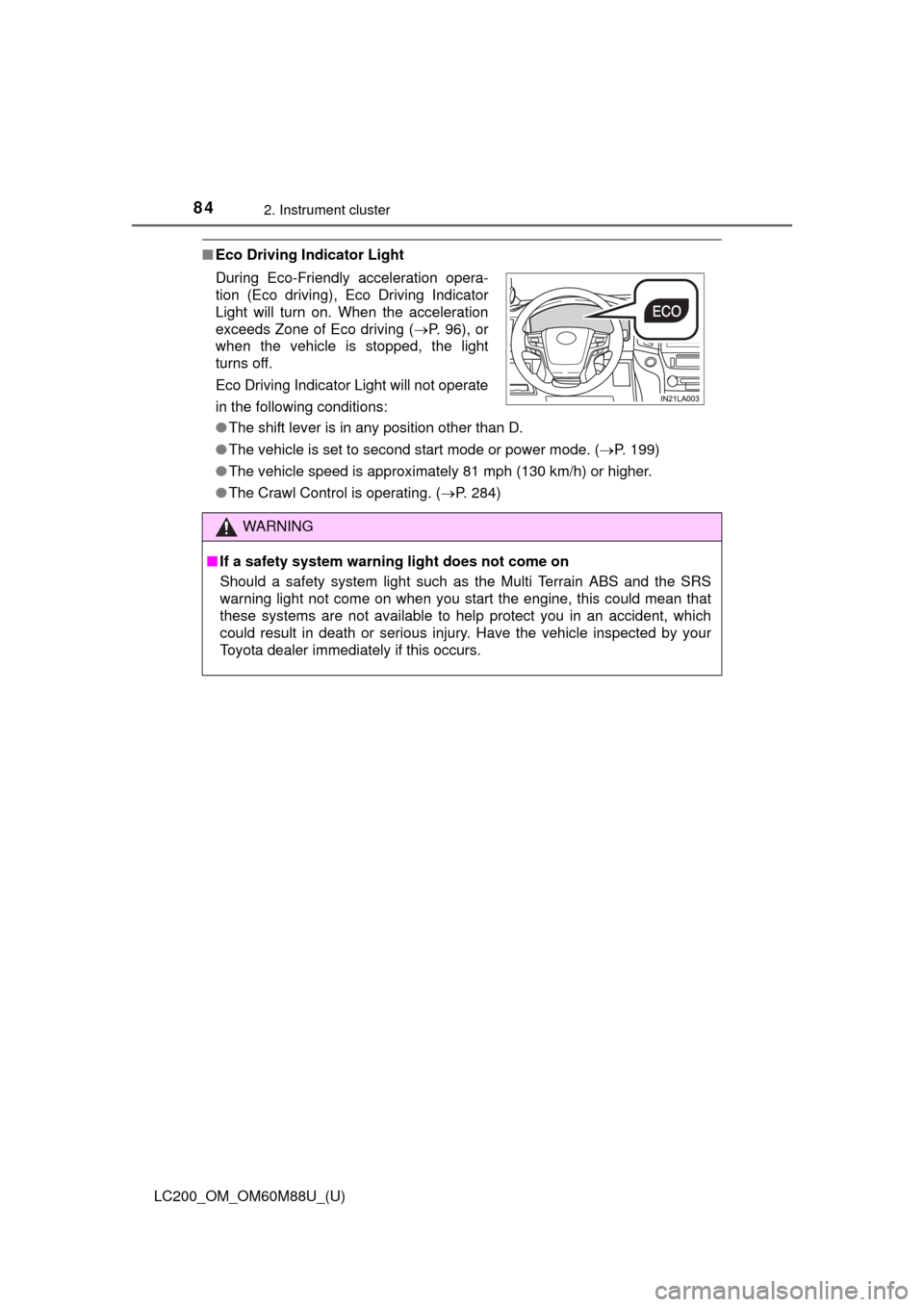
■Eco Driving Indicator Light
●The shift lever is in any position other than D.
● The vehicle is set to second start mode or power mode. ( P. 199)
● The vehicle speed is approximately 81 mph (130 km/h) or higher.
● The Crawl Control is operating. ( P. 284)
During Eco-Friendly acceleration opera-
tion (Eco driving), Eco Driving Indicator
Light will turn on. When the acceleration
exceeds Zone of Eco driving (
P. 96), or
when the vehicle is stopped, the light
turns off.
Eco Driving Indicator Light will not operate
in the following conditions:
WARNING
■ If a safety system warning light does not come on
Should a safety system light such as the Multi Terrain ABS and the SRS
warning light not come on when you start the engine, this could mean that
these systems are not available to help protect you in an accident, which
could result in death or serious injury. Have the vehicle inspected by your
Toyota dealer immediately if this occurs.
Page 87 of 608

LC200_OM_OM60M88U_(U)
872. Instrument cluster
2
Instrument cluster
■The meters and display illuminate when
The engine switch is in IGNITION ON mode.
■ The brightness of the in strument panel lights
When the tail lights are turned on, the meter’s brightness will be reduced
slightly unless the meter brightness level adjustment is set to the brightest
setting.
If the tail lights are turned on when the surroundings are dark, the meter’s
brightness will reduce slightly. Howe ver, when the surroundings are bright,
such as during the daytime, the meter’s brightness will not be reduced even if
the tail lights are turned on.
■ Customization
The meter display can be customized on the multi-information display.
(Customizable features: P. 574)
WARNING
■The information display at low temperatures
Allow the interior of the vehicle to warm up before using the liquid crystal
information display. At extremely low temperatures, the information display
monitor may respond slowly, and display changes may be delayed.
For example, there is a lag between the driver’s shifting and the new gear
number appearing on the display. This lag could cause the driver to down-
shift again, causing rapid and excessive engine braking and possibly an
accident resulting in death or injury.
Page 95 of 608
LC200_OM_OM60M88U_(U)
952. Instrument cluster
2
Instrument cluster
■Setting items
● LDA (Lane Departure Alert)
*
Select to set up LDA. ( P. 574)
• Alert sensitivity
• Sway warning
• Sway sensitivity
● BSM (Blind Spot Monitor)
*
Select to activate/deactivate BSM. ( P. 574)
• BSM on/off
• RCTA (Rear Cross Traffic Alert) on/off
● Scheduled maintenance
Select to reset the message indicating maintenance is required.
● Oil maintenance
Select to reset the engine oil maintenance information
● Meter settings
Select to set the following items.
• Language Select to change the language on the display.
•Units Select to change the unit for measure of the fuel consumption.
• Eco Driving Indicator Light (if equipped) Select to activate/deactivate th e Eco Driving Indicator Light.
(
P. 8 4 )
• switch settings You can register 1 screen as the top screen. To register, press
and hold while the desired screen is displayed.
• Drive information 1 and 2 Select to select up to 2 items th at will be displayed on a drive
information screen, up to 2 dr ive information screens can be
set.
• Pop-up display Select to set the following pop-up displays ( P. 9 6 ) , w h i c h
may appear in some situations, on/off.
Page 97 of 608
LC200_OM_OM60M88U_(U)
972. Instrument cluster
2
Instrument cluster
■Tire inflation pressure
●It may take a few minutes to display the tire inflation pressure after the
engine switch is turned to IGNITION ON mode. It may also take a few
minutes to display the tire inflation pressure after inflation pressure has
been adjusted.
●“---” may be displayed if the tire information cannot be determined due to
unfavorable radio wave conditions.
●Tire inflation pressure changes wit h temperature. The displayed values
may also be different from the values measured using a tire pressure
gauge.
■ When setting up the display
Stop the vehicle in a safe place, apply the parking brake, and shift the shift
lever to P
■ Suspension of the settings display
In the following situations, the settings display using the meter control
switches will be suspended.
●When a warning message appears on the multi-information display
● When the vehicle begins to move
■ Liquid crystal display
Small spots or light spots may appear on the display. This phenomenon is
characteristic of liquid crystal displays, and there is no problem continuing to
use the display.
WARNING
■Caution for use while driving
For safety, avoid operating the meter control switch while driving as much
as possible, and do not look continuously at the multi-information display
while driving. Stop the vehicle and operate the meter control switch. Failure
to do so may cause a steering wheel operation error, resulting in an unex-
pected accident.
■ Cautions while setting up the display
As the engine needs to be running during setting up the display, ensure that
the vehicle is parked in a place with adequate ventilation. In a closed area
such as a garage, exhaust gases including harmful carbon monoxide (CO)
may collect and enter the vehicle. This may lead to death or a serious
health hazard.
NOTICE
■While setting up the display
To prevent battery discharge, ensure that the engine is running while setting
up the display features.
Page 119 of 608
LC200_OM_OM60M88U_(U)
1193-2. Opening, closing and locking the doors
3
Operation of each component
WARNING
●Do not pull on the back door damper stay to close the back door, and do
not hang on the back door damper stay.
Doing so may cause hands to be caught or the back door damper stay to
break, causing an accident.
● If a bicycle carrier or similar heavy object is attached to the back door, it
may suddenly shut again after being opened, causing someone’s hands,
head or neck to be caught and injured. When installing an accessory part
to the back door, using a genuine Toyota part is recommended.
NOTICE
■Back door damper stays
The back door is equipped with damper stays that hold the back door in
place.
Observe the following precautions.
Failure to do so may cause damage to the back door damper stay, resulting
in malfunction.
●Do not place your hand on the damper stay or apply lateral forces to it.
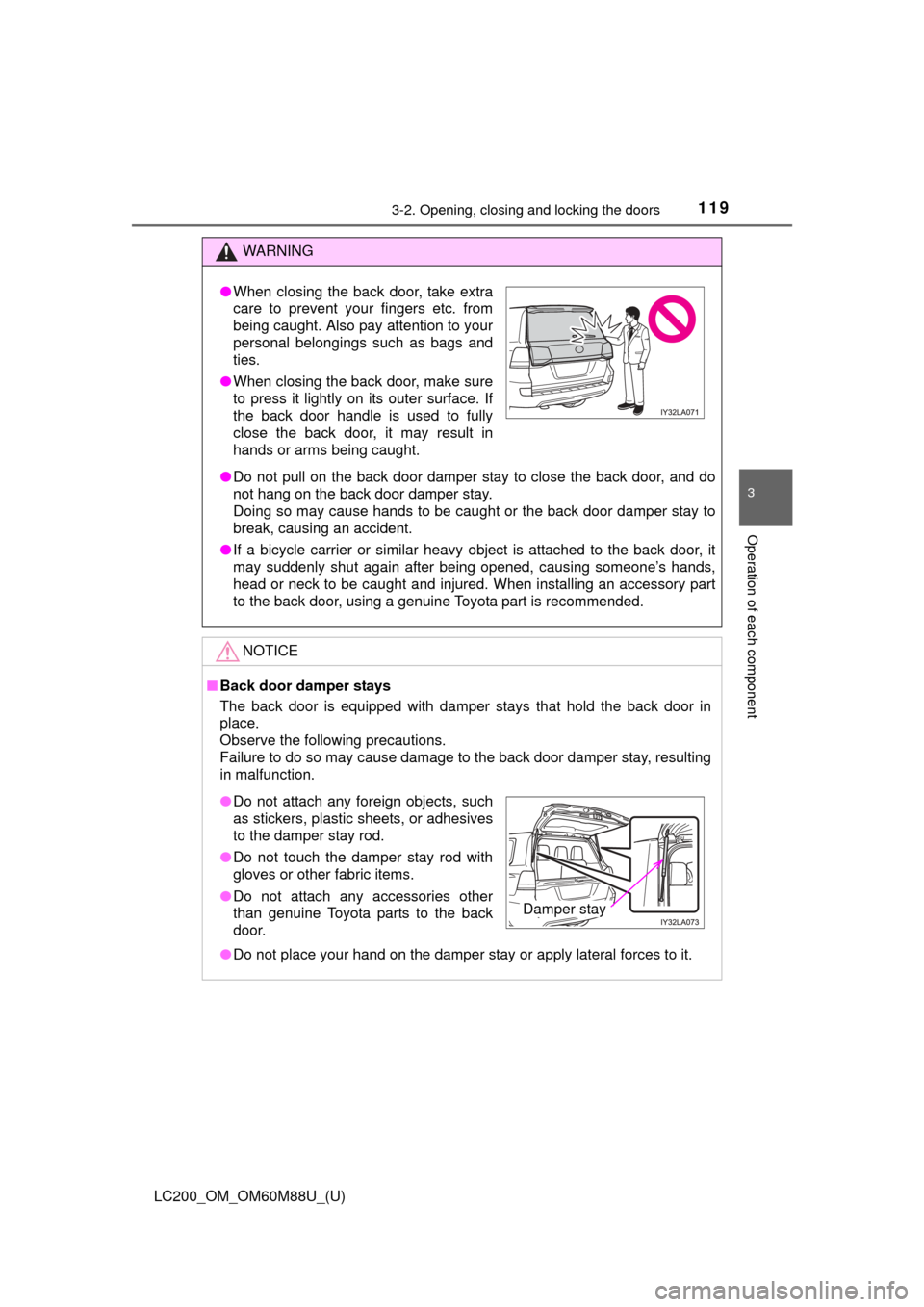
●When closing the back door, take extra
care to prevent your fingers etc. from
being caught. Also pay attention to your
personal belongings such as bags and
ties.
● When closing the back door, make sure
to press it lightly on its outer surface. If
the back door handle is used to fully
close the back door, it may result in
hands or arms being caught.
●Do not attach any foreign objects, such
as stickers, plastic sheets, or adhesives
to the damper stay rod.
● Do not touch the damper stay rod with
gloves or other fabric items.
● Do not attach any accessories other
than genuine Toyota parts to the back
door.
Damper stay
Page 163 of 608
LC200_OM_OM60M88U_(U)
1634-1. Before driving
4
Driving
WARNING
Observe the following precautions.
Failure to do so may result in death or serious injury.
■When starting the vehicle
Always keep your foot on the brake pedal while stopped with the engine
running. This prevents the vehicle from creeping.
■ When driving the vehicle
●Do not drive if you are unfamiliar with the location of the brake and ac\
cel-
erator pedals to avoid depressing the wrong pedal.
• Accidentally depressing the accelerator pedal instead of the brake
pedal will result in sudden acceleration that may lead to an accident.
• When backing up, you may twist your body around, leading to a diffi- culty in operating the pedals. Make sure to operate the pedals properly.
• Make sure to keep a correct driving posture even when moving the vehicle only slightly. This allows you to depress the brake and accelera-
tor pedals properly.
• Depress the brake pedal using your right foot. Depressing the brake pedal using your left foot may delay response in an emergency, result-
ing in an accident.
● Do not drive the vehicle over or stop the vehicle near flammable materials.
The exhaust system and exhaust gases can be extremely hot. These hot
parts may cause a fire if there is any flammable material nearby.
● During normal driving, do not turn off the engine. Turning the engine off
while driving will not cause loss of steering or braking control, but the
power assist to these systems will be lost. This will make it more difficult to
steer and brake, so you should pull over and stop the vehicle as soon as it
is safe to do so.
However, in the event of an emergency, such as if it becomes impossible
to stop the vehicle in the normal way: P. 501
● Use engine braking (downshift) to maintain a safe speed when driving
down a steep hill.
Using the brakes continuously may cause the brakes to overheat and lose
effectiveness. ( P. 199)
● Do not adjust the positions of the steering wheel, the seat, or the inside or
outside rear view mirrors while driving.
Doing so may result in a loss of vehicle control.
● Always check that all passengers’ arms, heads or other parts of their body
are not outside the vehicle.
● Do not drive in excess of the speed limit. Even if the legal speed limit per-
mits it, do not drive over 85 mph ( 140 km/h) unless your vehicle has high-
speed capability tires. Driving over 85 mph (140 km/h) may result in tire
failure, loss of control and possible injury. Be sure to consult a tire dealer
to determine whether the tires on y our vehicle are high-speed capability
tires or not before driving at such speeds.
Page 164 of 608

164
LC200_OM_OM60M88U_(U)
4-1. Before driving
WARNING
Observe the following precautions.
Failure to do so may result in death or serious injury.
■When driving on slippery road surfaces
●Sudden braking, acceleration and steering may cause tire slippage and
reduce your ability to control the vehicle.
● Sudden acceleration, engine braking due to shifting, or changes in engine
speed could cause the vehicle to skid.
● After driving through a puddle, lightly depress the brake pedal to make
sure that the brakes are functioning properly. Wet brake pads may prevent
the brakes from functioning properly. If the brakes on only one side are wet
and not functioning properly, steering control may be affected.
■ When shifting the shift lever
●Do not let the vehicle roll backwards while the shift lever is in a driving
position, or roll forward while the shift lever is in R.
Doing so may cause the engine to stall or lead to poor brake and steering
performance, resulting in an accident or damage to the vehicle.
● Do not shift the shift lever to P while the vehicle is moving.
Doing so can damage the transmission and may result in a loss of vehicle
control.
● Do not shift the shift lever to R while the vehicle is moving forward.
Doing so can damage the transmission and may result in a loss of vehicle
control.
● Do not shift the shift lever to a driving position while the vehicle is moving
backward.
Doing so can damage the transmission and may result in a loss of vehicle
control.
● Moving the shift lever to N while the vehicle is moving will disengage the
engine from the transmission. Engine braking is not available when N is
selected.
● Be careful not to shift the shift lever with the accelerator pedal depressed.
Shifting the shift lever to a gear other than P or N may lead to unexpected
rapid acceleration of the vehicle that may cause an accident.
■ If you hear a squealing or scraping noise (brake pad wear limit indica-
tors)
Have the brake pads checked and replaced by your Toyota dealer as soon
as possible.
Rotor damage may result if the pads are not replaced when needed.
It is dangerous to drive the vehicle when the wear limits of the brake pads
and/or those of the brake discs are exceeded.