warning light TOYOTA LAND CRUISER 2016 J200 Owner's Guide
[x] Cancel search | Manufacturer: TOYOTA, Model Year: 2016, Model line: LAND CRUISER, Model: TOYOTA LAND CRUISER 2016 J200Pages: 608, PDF Size: 10.91 MB
Page 165 of 608
LC200_OM_OM60M88U_(U)
1654-1. Before driving
4
Driving
WARNING
Observe the following precautions.
Failure to do so may result in death or serious injury.
■When the vehicle is stopped
●Do not race the engine.
If the vehicle is in any gear other than P or N, the vehicle may accelerate
suddenly and unexpectedly, causing an accident.
● In order to prevent accidents due to the vehicle rolling away, always keep
depressing the brake pedal while the engine is running, and apply the
parking brake as necessary.
● If the vehicle is stopped on an incline, in order to prevent accidents caused
by the vehicle rolling forward or backward, always depress the brake pedal
and securely apply the parking brake as needed.
● Avoid revving or racing the engine. Running the engine at high speed
while the vehicle is stopped may cause the exhaust system to overheat,
which could result in a fire if combustible material is nearby.
■ When the vehicle is parked
●Do not leave glasses, cigarette lighters, spray cans, or soft drink cans in
the vehicle when it is in the sun.
Doing so may result in the following:
• Gas may leak from a cigarette lighter or spray can, and may lead to a
fire.
• The temperature inside the vehicle may cause the plastic lenses and plastic material of glasses to deform or crack.
• Soft drink cans may fracture, causing the contents to spray over the
interior of the vehicle, and may also cause a short circuit in the vehicle’s
electrical components.
● Do not leave cigarette lighters in the vehicle. If a cigarette lighter is in a
place such as the glove box or on the floor, it may be lit accidentally when
luggage is loaded or the seat is adjusted, causing a fire.
● Do not attach adhesive discs to the windshield or windows. Do not place
containers such as air fresheners on the instrument panel or dashboard.
Adhesive discs or containers may act as lenses, causing a fire in the vehi-
cle.
● Do not leave a door or window open if the curved glass is coated with a
metallized film such as a silver-colored one. Reflected sunlight may cause
the glass to act as a lens, causing a fire.
Page 191 of 608

LC200_OM_OM60M88U_(U)
1914-1. Before driving
4
Driving
WARNING
■Hitch
Trailer hitch assemblies have different weight capacities established by the
hitch manufacturer. Even though the vehicle may be physically capable of
towing a higher weight, the operator must determine the maximum weight
rating of the particular hitch assembly and never exceed the maximum
weight rating specified for the trailer-hitch. Exceeding the maximum weight
rating set by the trailer-hitch manufacturer can cause an accident resulting
in death or serious personal injuries.
■ When towing a trailer
Toyota recommends trailers with brakes that conform to any applicable fed-
eral and state/provincial regulations.
●If the gross trailer weight exceeds unbraked TWR, trailer brakes are
required. Toyota recommends trailers with brakes that conform to all appli-
cable federal and state/provincial regulations.
● Never tap into your vehicle’s hydraulic system, as this will lower the vehi-
cle’s braking effectiveness.
● Never tow a trailer without using a safety chain securely attached to both
the trailer and the vehicle. If damage occurs to the coupling unit or hitch
ball, there is danger of the trailer wandering into another lane.
NOTICE
■When installing a trailer hitch
Use only the position recommended by your Toyota dealer. Do not install
the trailer hitch on the bumper; this may cause body damage.
■ Do not directly splice trailer lights
Do not directly splice trailer lights. Directly splicing trailer lights may damage
your vehicle’s electrical system and cause a malfunction.
Page 204 of 608
204
LC200_OM_OM60M88U_(U)
4-2. Driving procedures
Parking brake
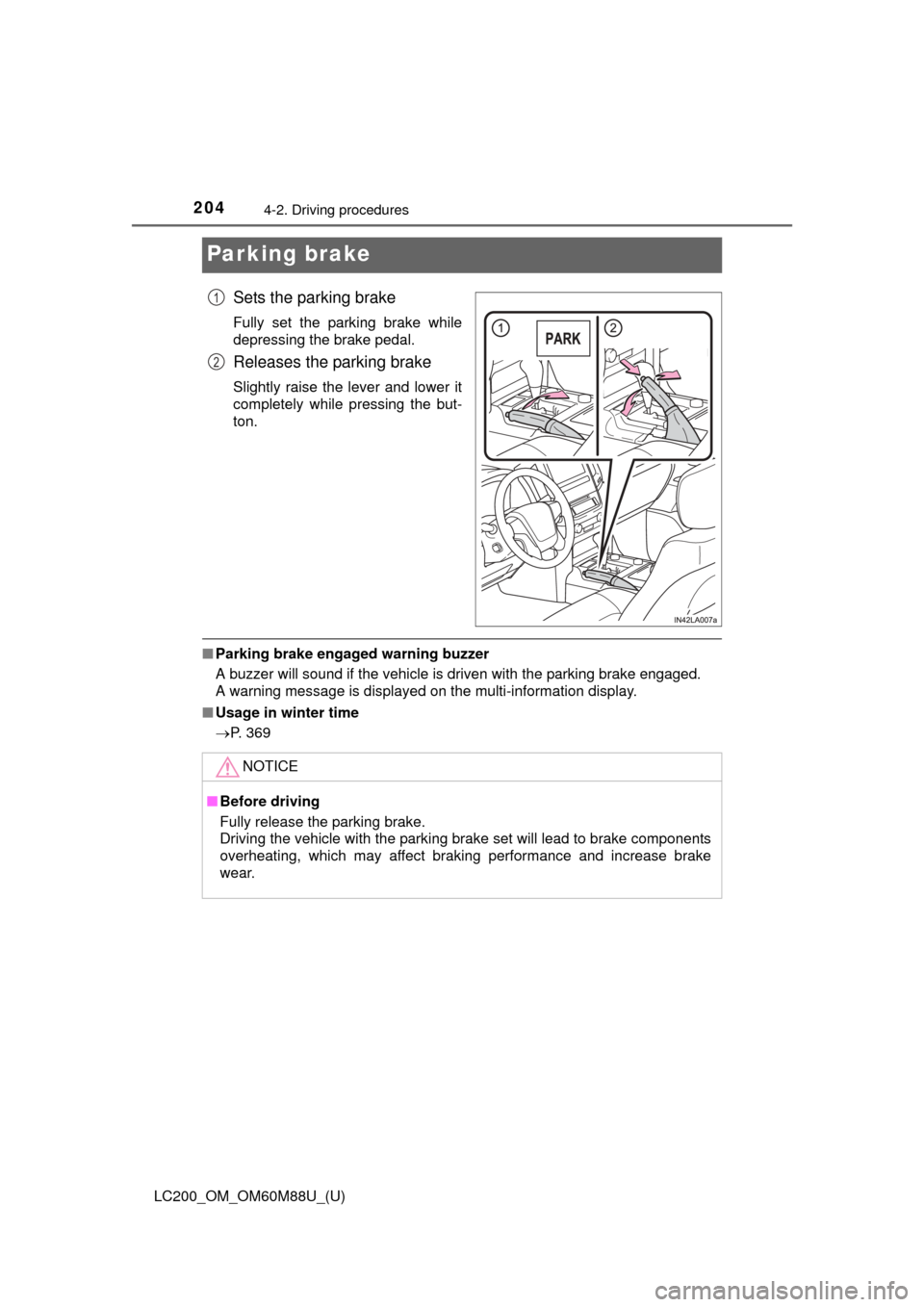
Sets the parking brake
Fully set the parking brake while
depressing the brake pedal.
Releases the parking brake
Slightly raise the lever and lower it
completely while pressing the but-
ton.
■Parking brake engaged warning buzzer
A buzzer will sound if the vehicle is driven with the parking brake engaged.
A warning message is displayed on the multi-information display.
■ Usage in winter time
P. 369
1
2
NOTICE
■Before driving
Fully release the parking brake.
Driving the vehicle with the parking brake set will lead to brake components
overheating, which may affect braking performance and increase brake
wear.
Page 207 of 608
LC200_OM_OM60M88U_(U)
2074-3. Operating the lights and wipers
4
Driving
■Daytime running light system
●To make your vehicle more visible to other drivers during daytime driving,
the daytime running lights turn on automatically (at a reduced intensity)
whenever the engine is started and the parking brake is released. Daytime
running lights are not designed for use at night.
For the U.S.A.: Daytime running lights can be turned off by operating the
switch.
● Compared to turning on the headlights, the daytime running light system
offers greater durability and consumes less electricity, so it can help improve
fuel economy.
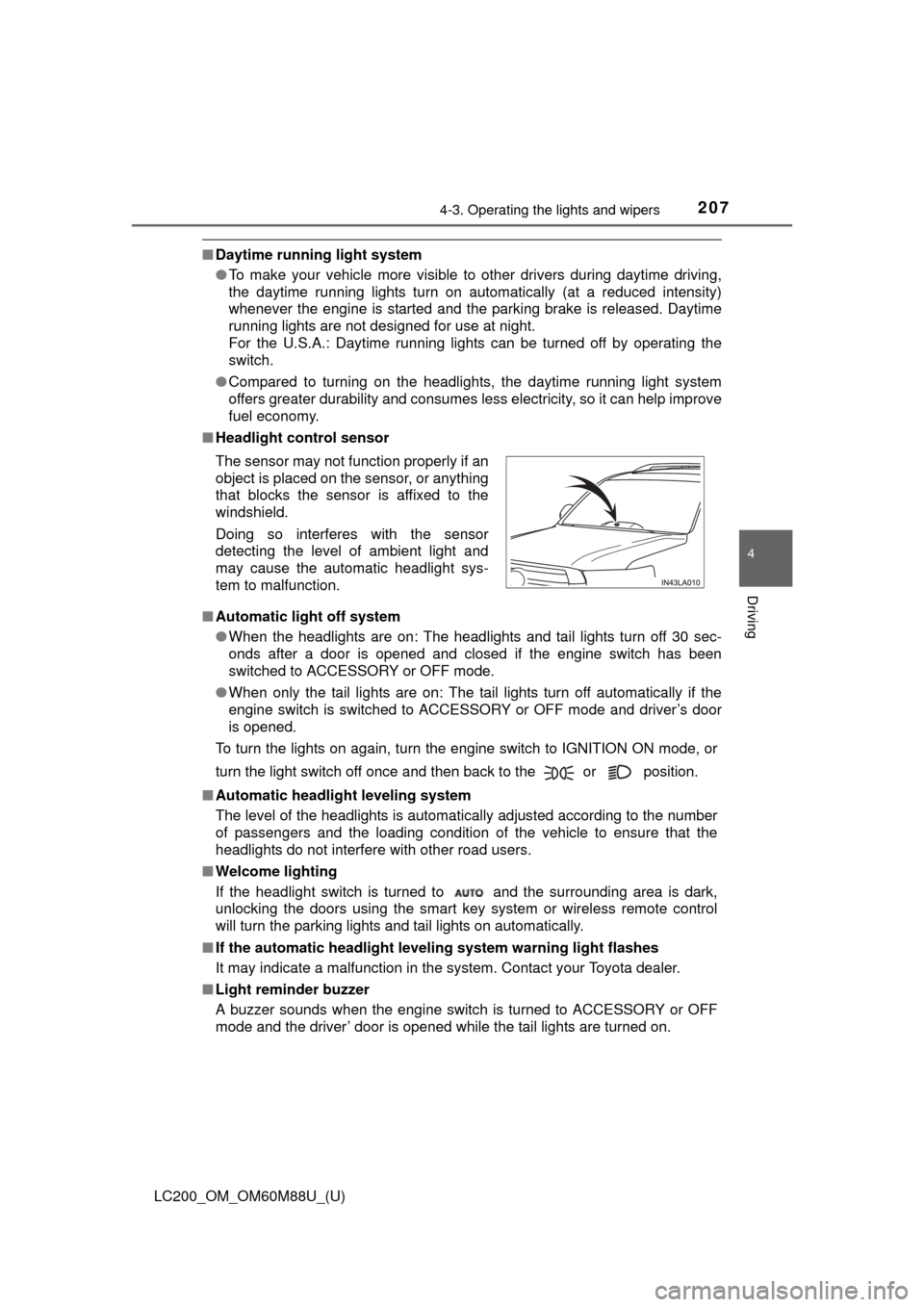
■ Headlight control sensor
■ Automatic light off system
●When the headlights are on: The headlights and tail lights turn off 30 sec-
onds after a door is opened and closed if the engine switch has been
switched to ACCESSORY or OFF mode.
● When only the tail lights are on: The tail lights turn off automatically if the
engine switch is switched to ACCESSORY or OFF mode and driver’s door
is opened.
To turn the lights on again, turn the engine switch to IGNITION ON mode, or
turn the light switch off once and then back to the or position.
■ Automatic headlight leveling system
The level of the headlights is automatically adjusted according to the number
of passengers and the loading condition of the vehicle to ensure that the
headlights do not interfere with other road users.
■ Welcome lighting
If the headlight switch is turned to and the surrounding area is dark,
unlocking the doors using the smart key system or wireless remote control
will turn the parking lights and tail lights on automatically.
■ If the automatic headlight level ing system warning light flashes
It may indicate a malfunction in the system. Contact your Toyota dealer.
■ Light reminder buzzer
A buzzer sounds when the engine switch is turned to ACCESSORY or OFF
mode and the driver’ door is opened while the tail lights are turned on. The sensor may not function properly if an
object is placed on the sensor, or anything
that blocks the sensor is affixed to the
windshield.
Doing so interferes with the sensor
detecting the level of ambient light and
may cause the automatic headlight sys-
tem to malfunction.
Page 209 of 608
209
LC200_OM_OM60M88U_(U)
4-3. Operating the lights and wipers
4
Driving
Automatic High Beam
The Automatic High Beam uses an in-vehicle camera sensor to
assess the brightness of streetlights, the lights of vehicles
ahead etc., and automatically turns the high beam on or off as
necessary.
WARNING
■Limitations of the Automatic High Beam
Do not rely on the Automatic High Beam. Always drive safely, taking care to
observe your surroundings and turning the high beam on or off manually if
necessary.
■ To prevent incorrect operation of the Automatic High Beam system
Do not overload the vehicle.
NOTICE
■ Notes when using the Au tomatic High Beam system
Vehicles without PCS (Pre-Collision System):
● Do not spill liquid onto the inside rear view mirror or the camera sensor.
● Do not apply window tinting or stickers to the camera sensor or the area\
of
windshield near the camera sensor.
● Do not place items on the dashboard. There is a possibility that the cam-
era sensor will mistake items reflected in the windshield for streetlights,
the headlights of other vehicles, etc.
● Do not install a parking tag or any other accessories near or around the
inside rear view mirror and the camera sensor.
● Do not modify the vehicle.
● Do not replace windshield with a non-genuine windshield.
Contact your Toyota dealer.
Vehicles with PCS (Pre-Collision System):
P. 230
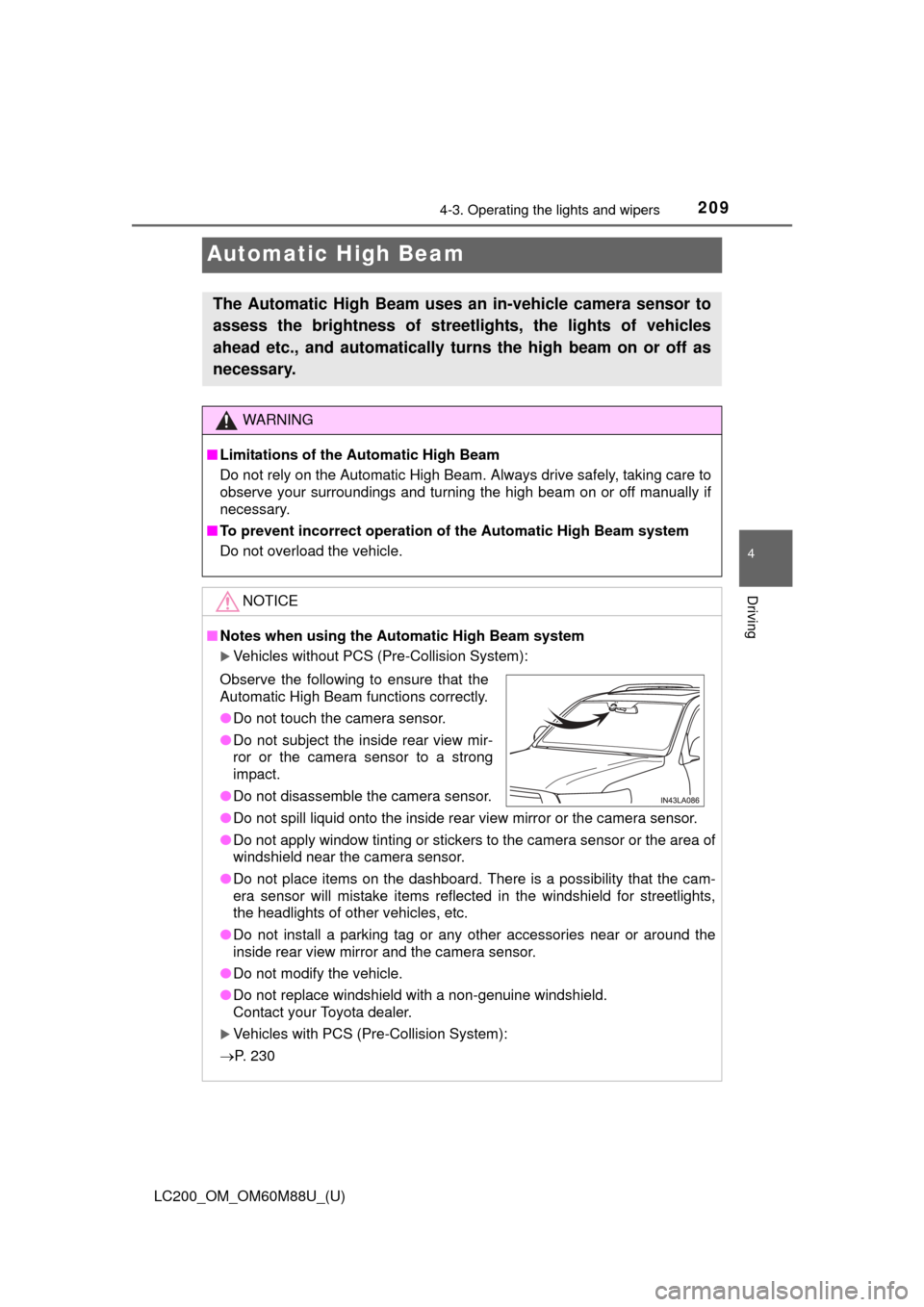
Observe the following to ensure that the
Automatic High Beam functions correctly.
● Do not touch the camera sensor.
● Do not subject the inside rear view mir-
ror or the camera sensor to a strong
impact.
● Do not disassemble the camera sensor.
Page 212 of 608

212
LC200_OM_OM60M88U_(U)
4-3. Operating the lights and wipers
●In the situations shown below, the system may not be able to accurately
detect surrounding brightness levels. This may cause the low beams to
remain on or the high beams to cause problems for pedestrians, vehicles
ahead or other parties. In these cases, manually switch between the high
and low beams.
• In bad weather (rain, snow, fog, sandstorms etc.)
• The windshield is obscured by fog, mist, ice, dirt etc.
• The windshield is cracked or damaged.
• The inside rear view mirror or ca mera sensor is deformed or dirty.
• The camera sensor temperature is extremely high.
• Surrounding brightness levels are equal to those of headlights, tail lights or fog lights.
• Vehicles ahead have headlights that are either switched off, dirty, are
changing color, or are not aimed properly.
• When driving through an area of in termittently changing brightness and
darkness
• When frequently and repeatedly driving ascending/descending roads, or roads with rough, bumpy or uneven surfaces (such as stone-paved
roads, gravel tracks etc.)
• When frequently and repeatedly taking curves or driving on a winding road
• There is a highly reflective object ahead of the vehicle, such as a sign or
a mirror.
• The back of a vehicle ahead is highly reflective, such as a container on a truck.
• The vehicle’s headlights are damaged or dirty.
• The vehicle is listing or tilting, due to a flat tire, a trailer being towed etc.
• The high beam and low beam are repeatedly being switched between in an abnormal manner.
• The driver believes that the high beam may be causing problems or dis-
tress to other drivers or pedestrians nearby.
■ If a warning message of the Auto matic High Beam is displayed...
It may indicate a malfunction in the system. Contact your Toyota dealer.
Page 218 of 608

218
LC200_OM_OM60M88U_(U)
4-3. Operating the lights and wipers
■Effects of vehicle speed on wiper operation (vehicles with rain-sensing
windshield wipers)
Vehicle speed affects the wiper operation when the washer is being used
(delay until drip prevention wiper sweep occurs) even when the wipers are
not in “AUTO” mode.
With the low speed operation selected, wiper operation will be switched from
low speed to intermittent wiper operation only when the vehicle is stationary.
(However, when the sensor sensitivity is adjusted to the highest level, the
mode cannot be switched.)
■ If no windshield washer fluid sprays
Check that the washer nozzles are not blocked if there is washer fluid in the
windshield washer fluid reservoir.
WARNING
■Caution regarding the use of windshie ld wipers in “AUTO” mode (vehi-
cles with rain-sensing windshield wipers)
The windshield wipers may operate unexpectedly if the sensor is touched or
the windshield is subject to vibration in “AUTO” mode. Take care that your
fingers etc. anything else does not become caught in the windshield wipers.
■ Caution regarding the use of washer fluid
When it is cold, do not use the washer fluid until the windshield becomes
warm. The fluid may freeze on the windshield and cause low visibility. This
may lead to an accident, resulting in death or serious injury.
NOTICE
■When the windshield is dry
Do not use the wipers, as they may damage the windshield.
■ When the washer fluid tank is empty
Do not operate the switch continually as the washer fluid pump may over-
heat.
■ When there is no washer fluid spray from the nozzle
Damage to the washer fluid pump may be caused if the lever is pulled
toward you and held continually.
■ When a nozzle becomes blocked
Do not try to clear it with a pin or other object. The nozzle will be damaged\
.
Page 230 of 608
230
LC200_OM_OM60M88U_(U)
4-5. Using the driving support systems
WARNING
■To avoid malfunction of the camera sensor
Observe the following precautions.
Otherwise, the camera sensor may not operate properly, possibly leading to
an accident resulting in death or serious injury.
●Keep the windshield clean at all times.
If the windshield is dirty or covered with an oily film, water droplets, snow,
etc., clear the windshield.
If the inner side of the windshield where the camera sensor is installed is
dirty, contact your Toyota dealer.
● If the part of the windshield in front of the camera sensor is fogged up or
covered with condensation or ice, use the windshield defogger to remove
the fog, condensation or ice. ( P. 374)
● Do not apply glass coating agents to the area of the windshield in front of
the camera sensor.
Glass coating agents can be applied to the windshield in areas other than
in front of the camera sensor. However, it will still be necessary to use the
wipers if the area of the windshield in front of the camera sensor is cov-
ered with water droplets.
● If water droplets cannot be properly removed from the area of the wind-
shield in front of the camera sensor by the windshield wipers, replace the
wiper insert or wiper blade.
If the wiper inserts or wiper blades need to be replaced, contact your
Toyota dealer.
● Do not attach window tinting to the windshield.
● Replace the windshield if it is damaged or cracked.
If the windshield needs to be replaced, contact your Toyota dealer.
● Do not get the camera sensor wet.
● Do not allow bright lights to shine into the camera sensor.
● Do not dirty or damage the camera sensor.
When cleaning the inside of the windshield, do not allow glass cleaner to
contact the lens. Also, do not touch the lens.
If the lens is dirty or damaged, contact your Toyota dealer.
● Do not subject the camera sensor to a strong impact.
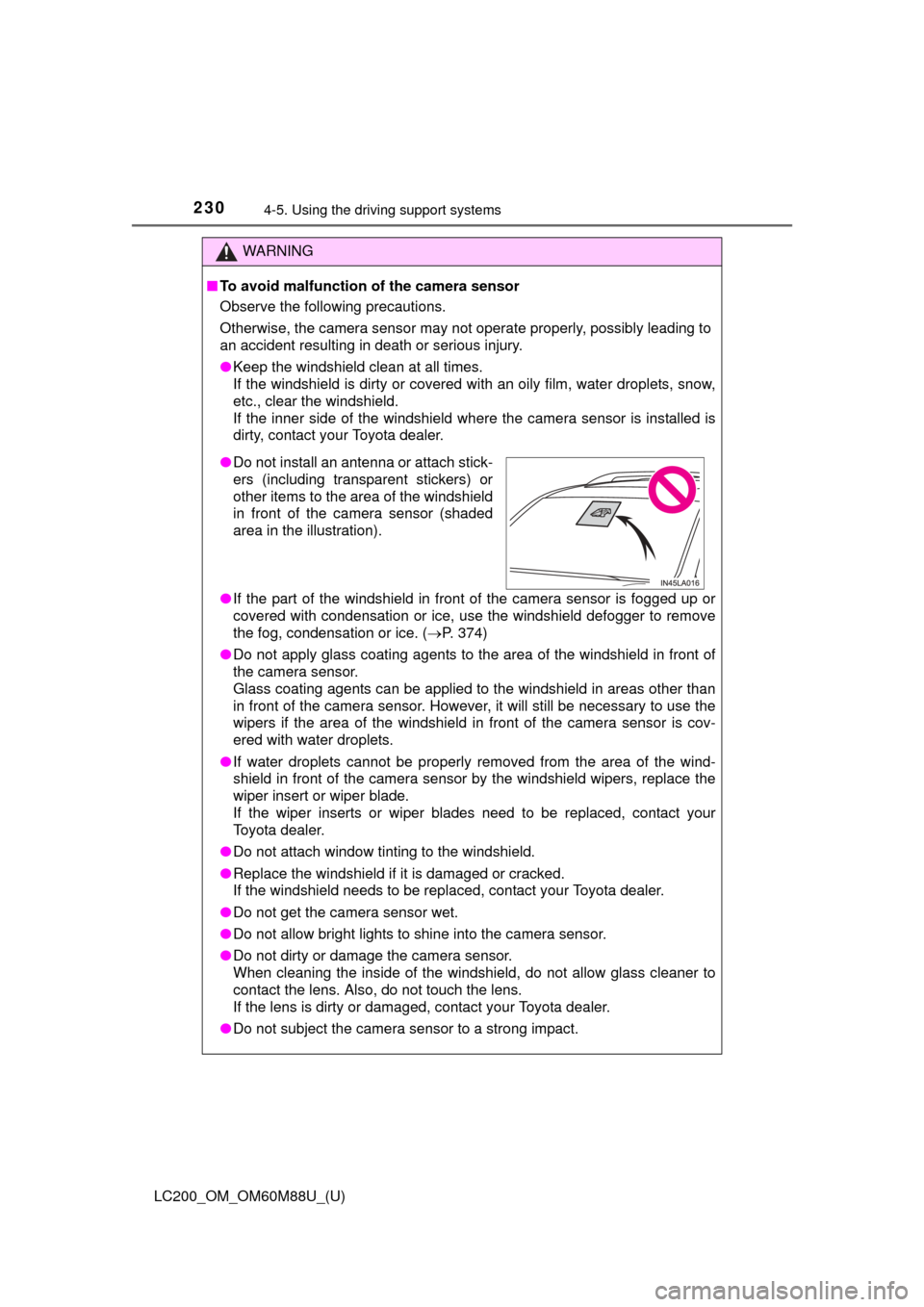
●Do not install an antenna or attach stick-
ers (including transparent stickers) or
other items to the area of the windshield
in front of the camera sensor (shaded
area in the illustration).
Page 231 of 608

LC200_OM_OM60M88U_(U)
2314-5. Using the driving support systems
4
Driving
WARNING
●Do not change the installation position or direction of the camera sensor or
remove it.
● Do not disassemble the camera sensor.
● Do not install an electronic device or device that emits strong electric
waves near the camera sensor.
● Do not modify any components of the vehicle around the camera sensor
(inside rear view mirror, sun visors, etc.) or ceiling.
● Do not attach any accessories that may obstruct the camera sensor to the
hood, front grille or front bumper. Contact your Toyota dealer for details.
● If a surfboard or other long object is to be mounted on the roof, make sure
that it will not obstruct the camera sensor.
● Do not modify the headlights or other lights.
Page 237 of 608
LC200_OM_OM60M88U_(U)
2374-5. Using the driving support systems
4
Driving
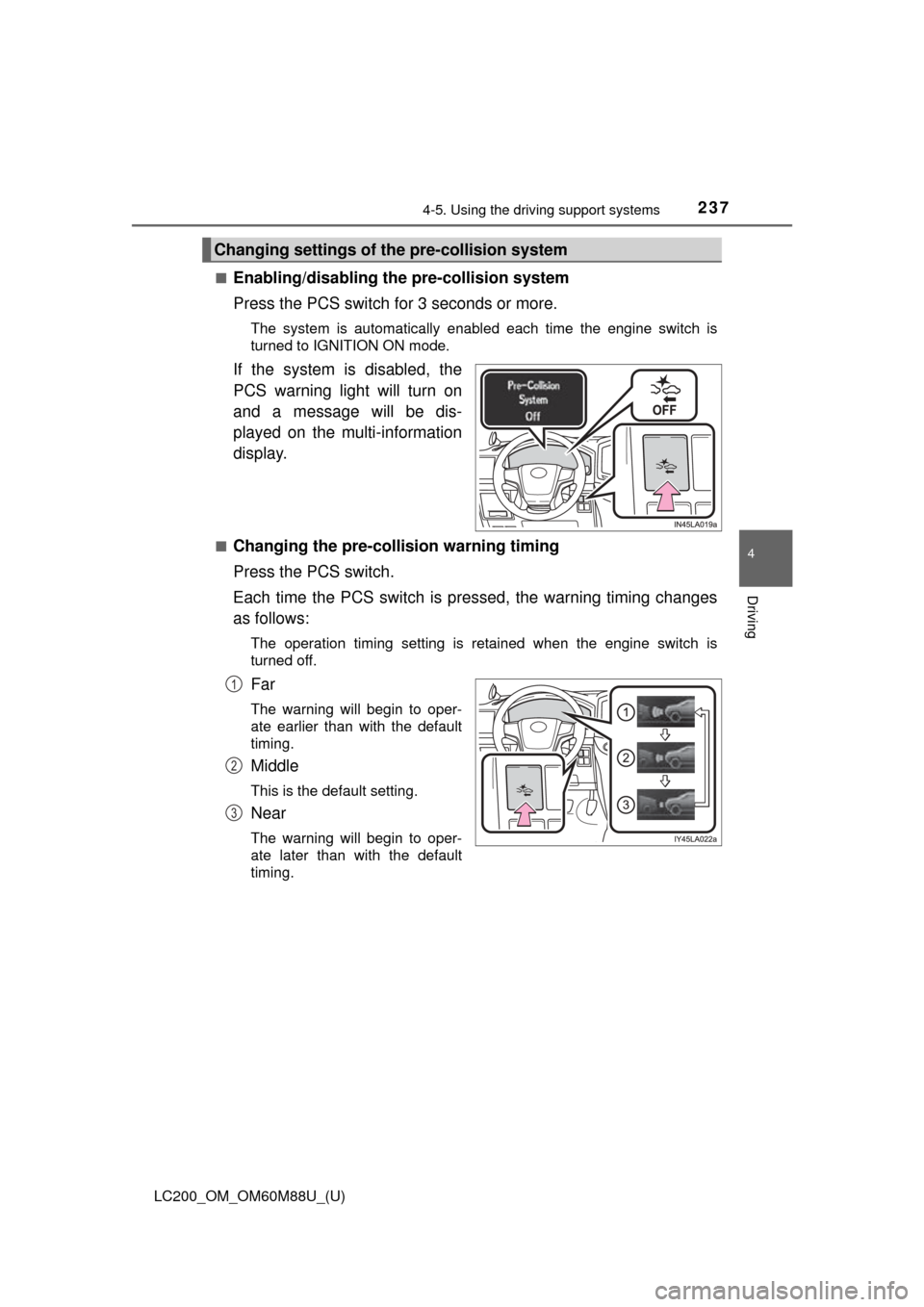
■Enabling/disabling th e pre-collision system
Press the PCS switch for 3 seconds or more.
The system is automatically enabled each time the engine switch is
turned to IGNITION ON mode.
If the system is disabled, the
PCS warning light will turn on
and a message will be dis-
played on the multi-information
display.
■Changing the pre-colli sion warning timing
Press the PCS switch.
Each time the PCS switch is pressed, the warning timing changes
as follows:
The operation timing setting is retained when the engine switch is
turned off.
Far
The warning will begin to oper-
ate earlier than with the default
timing.
Middle
This is the default setting.
Near
The warning will begin to oper-
ate later than with the default
timing.
Changing settings of th e pre-collision system
1
2
3