ignition TOYOTA LAND CRUISER 2017 J200 User Guide
[x] Cancel search | Manufacturer: TOYOTA, Model Year: 2017, Model line: LAND CRUISER, Model: TOYOTA LAND CRUISER 2017 J200Pages: 608, PDF Size: 15.88 MB
Page 136 of 608
136
LC200_OM_OM60P24U_(U)
3-3. Adjusting the seats
Driving position memory
Your preferred driving position (the position of the driver’s seat, steer-
ing wheel and outside rear view mirrors) can be recorded and recalled
by pressing a button.
Three different driving positions can be recorded into memory.
■Recording procedureCheck that the shift lever is in P.
Turn the engine switch to IGNITION ON mode.
Adjust the driver’s seat, steering wheel, and outside rear view
mirrors to the desired positions.
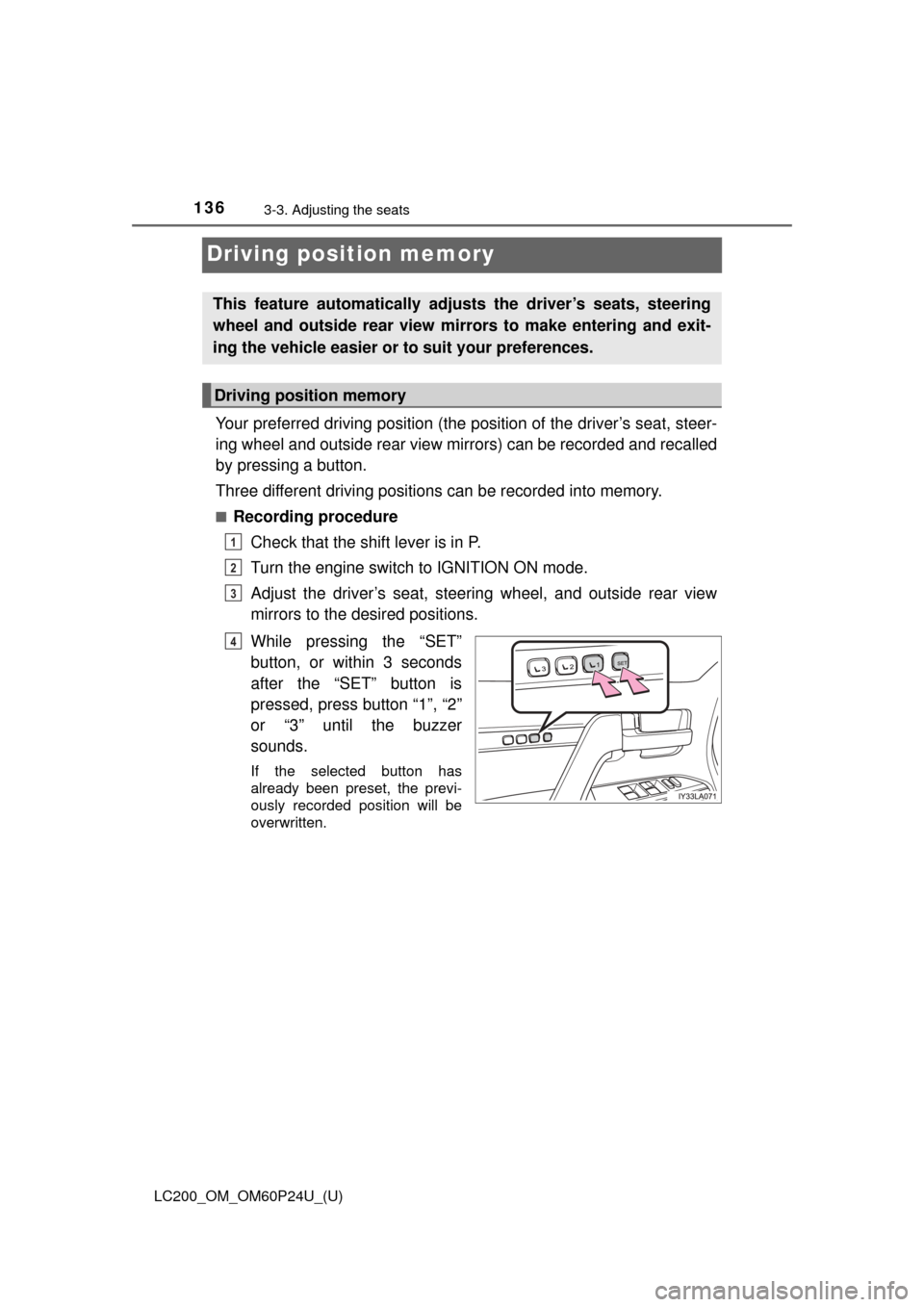
While pressing the “SET”
button, or within 3 seconds
after the “SET” button is
pressed, press button “1”, “2”
or “3” until the buzzer
sounds.
If the selected button has
already been preset, the previ-
ously recorded position will be
overwritten.
This feature automatically adjusts the driver’s seats, steering
wheel and outside rear view mirrors to make entering and exit-
ing the vehicle easier or to suit your preferences.
Driving position memory
1
2
3
4
Page 137 of 608
LC200_OM_OM60P24U_(U)
1373-3. Adjusting the seats
3
Operation of each component
■Recall procedureCheck that the shift lever is in P.
Turn the engine switch to IGNITION ON mode.
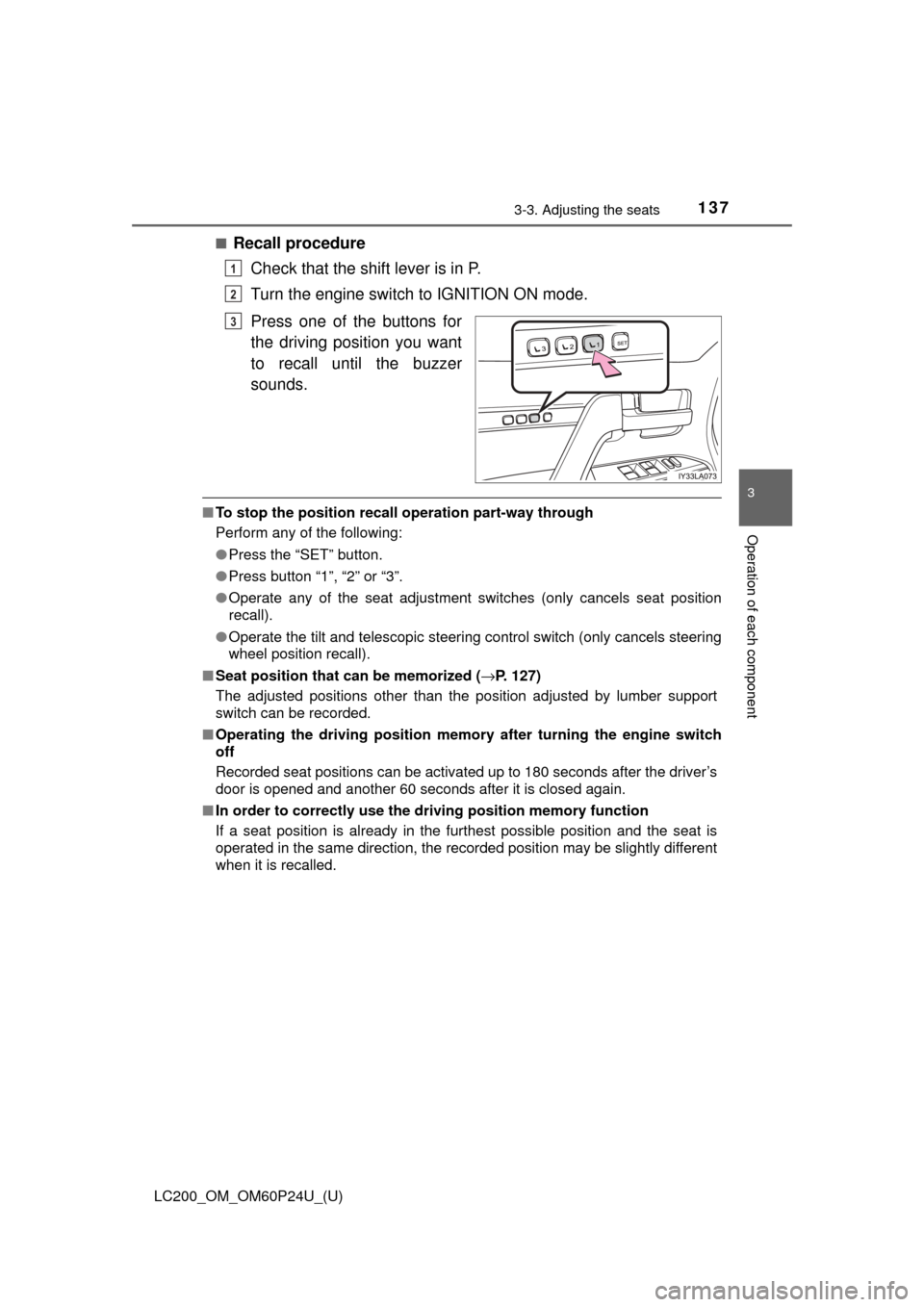
Press one of the buttons for
the driving position you want
to recall until the buzzer
sounds.
■To stop the position recall operation part-way through
Perform any of the following:
● Press the “SET” button.
● Press button “1”, “2” or “3”.
● Operate any of the seat adjustment switches (only cancels seat position
recall).
● Operate the tilt and telescopic steering control switch (only cancels steering
wheel position recall).
■ Seat position that can be memorized ( →P. 127)
The adjusted positions other than the position adjusted by lumber support
switch can be recorded.
■ Operating the driving position memo ry after turning the engine switch
off
Recorded seat positions can be activated up to 180 seconds after the driver’s
door is opened and another 60 seconds after it is closed again.
■ In order to correctly use the dr iving position memory function
If a seat position is already in the furthest possible position and the seat is
operated in the same direction, the recorded position may be slightly different
when it is recalled.
1
2
3
Page 138 of 608
138
LC200_OM_OM60P24U_(U)
3-3. Adjusting the seats
Each electronic key can be registered to recall your preferred driving
position.
■Registering procedure
Record your driving position to button “1”, “2” or “3” before perform-
ing the following:
Carry only the key you want to register, and then close the driver’s
door.
If 2 or more keys are in the vehicle, the driving position cannot be
recorded properly.
Check that the shift lever is in P.
Turn the engine switch to IGNITION ON mode.
Recall the driving position that you want to record.
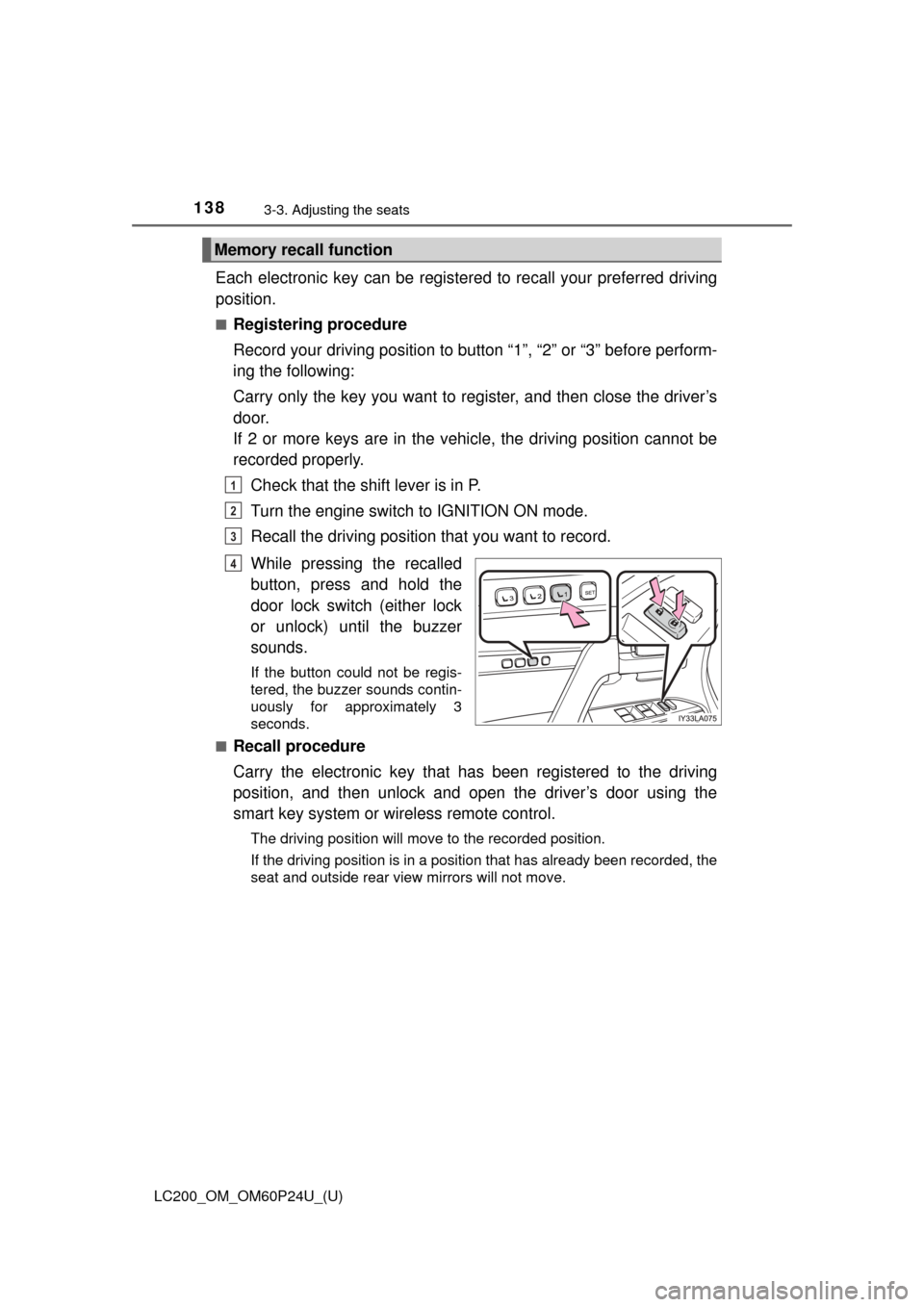
While pressing the recalled
button, press and hold the
door lock switch (either lock
or unlock) until the buzzer
sounds.
If the button could not be regis-
tered, the buzzer sounds contin-
uously for approximately 3
seconds.
■
Recall procedure
Carry the electronic key that has been registered to the driving
position, and then unlock and open the driver’s door using the
smart key system or wi reless remote control.
The driving position will move to the recorded position.
If the driving position is in a position that has already been recorded, the
seat and outside rear view mirrors will not move.
Memory recall function
1
2
3
4
Page 139 of 608
LC200_OM_OM60P24U_(U)
1393-3. Adjusting the seats
3
Operation of each component
■Cancelation procedure
Carry only the key you want to cancel and then close the driver’s
door.
If 2 or more keys are in the vehicle, the driving position cannot be
canceled properly.Turn the engine switch to IGNITION ON mode.
While pressing the “SET” button, press and hold the door lock
switch (either lock or unlock) until the buzzer sounds twice.
If the button could not be canceled, the buzzer sounds continuously for
approximately 3 seconds.
■Recalling the driving position us ing the memory recall function
● Different driving positions can be registered for each electronic key. There-
fore, the driving position that is recalled may be different depending on the
key being carried.
● If a door other than the driver’s door is unlocked with the smart key system,
the driving position cannot be recalled. In this case, press the driving posi-
tion button which has been set.
■ Customization
The unlock door settings of the memory recall function can be customized.
(Customizable features: →P. 574)
WARNING
■ Seat adjustment caution
Take care during seat adjustment so that the seat does not strike the rear
passenger or squeeze your body against the steering wheel.
1
2
Page 143 of 608
1433-4. Adjusting the steering wheel and mirrors
3
Operation of each component
LC200_OM_OM60P24U_(U)
Steering wheel
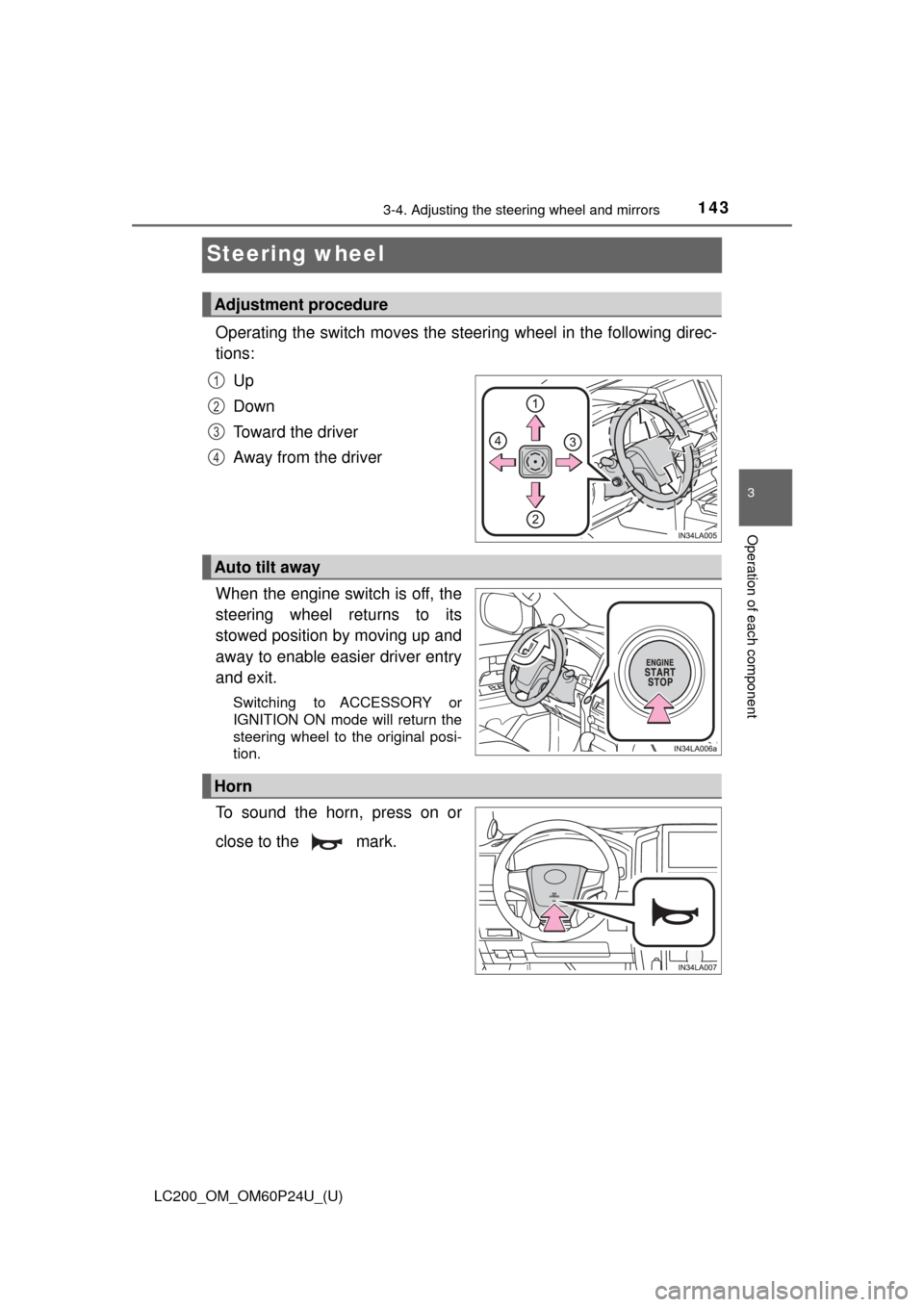
Operating the switch moves the steering wheel in the following direc-
tions:Up
Down
Toward the driver
Away from the driver
When the engine switch is off, the
steering wheel returns to its
stowed position by moving up and
away to enable easier driver entry
and exit.
Switching to ACCESSORY or
IGNITION ON mode will return the
steering wheel to the original posi-
tion.
To sound the horn, press on or
close to the mark.
Adjustment procedure
1
2
3
4
Auto tilt away
Horn
Page 144 of 608

1443-4. Adjusting the steering wheel and mirrors
LC200_OM_OM60P24U_(U)
■The steering wheel can be adjusted when
The engine switch is in ACCESSORY or IGNITION ON mode
*.
*: If the driver’s seat belt is fastened, the steering wheel can be adjusted
regardless of engine switch mode.
■ Automatic adjustment of the steering position
A desired steering position can be entered to memory and recalled automati-
cally by the driving position memory system. ( →P. 136)
WARNING
Do not adjust the steering wheel while driving.
Doing so may cause the driver to mishandle the vehicle and cause an acci-
dent, resulting in death or serious injury.
Page 145 of 608
1453-4. Adjusting the steering wheel and mirrors
3
Operation of each component
LC200_OM_OM60P24U_(U)
Inside rear view mirror
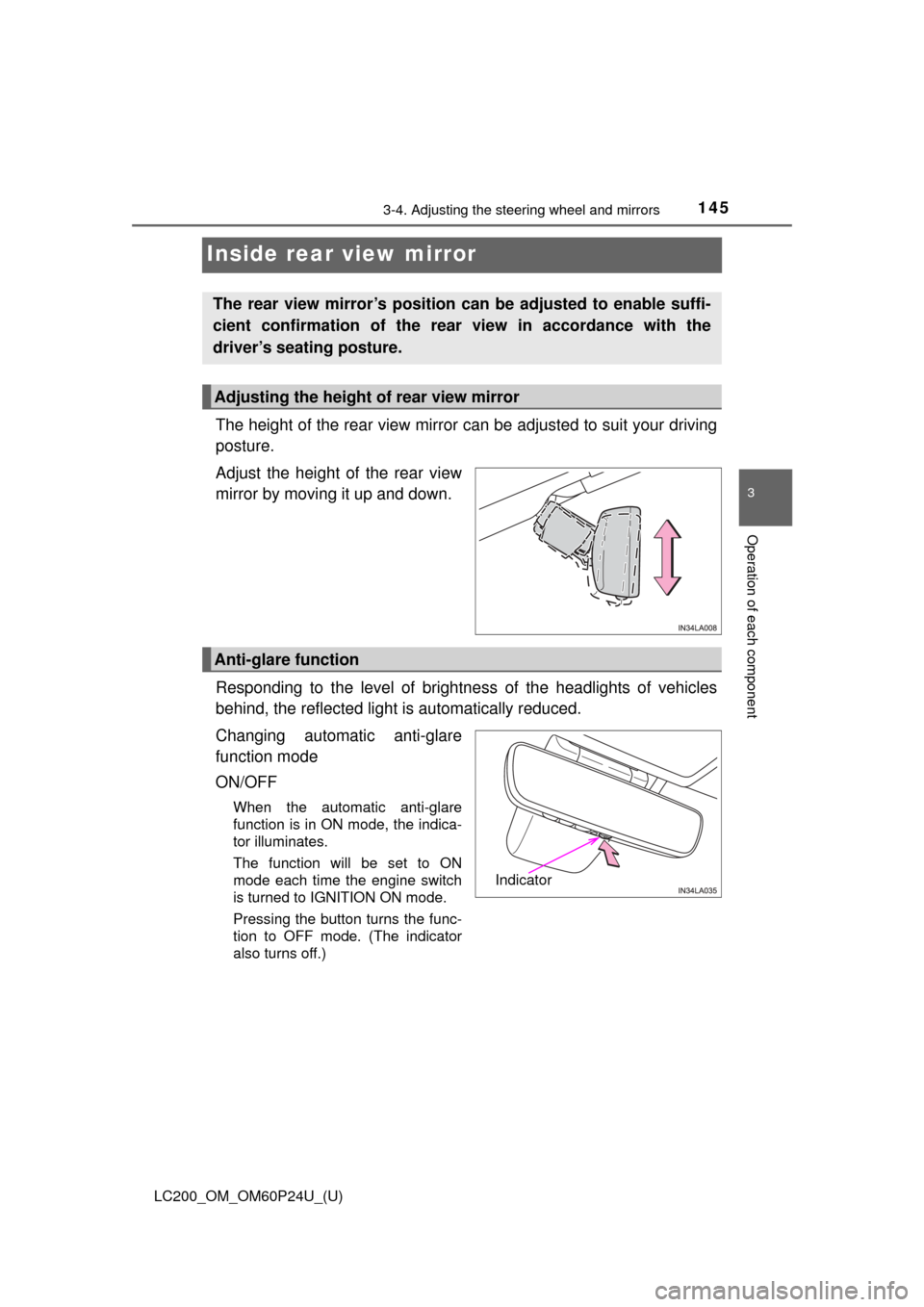
The height of the rear view mirror can be adjusted to suit your driving
posture.
Adjust the height of the rear view
mirror by moving it up and down.
Responding to the level of brightne ss of the headlights of vehicles
behind, the reflected light is automatically reduced.
Changing automatic anti-glare
function mode
ON/OFF
When the automatic anti-glare
function is in ON mode, the indica-
tor illuminates.
The function will be set to ON
mode each time the engine switch
is turned to IGNITION ON mode.
Pressing the button turns the func-
tion to OFF mode. (The indicator
also turns off.)
The rear view mirror’s position can be adjusted to enable suffi-
cient confirmation of the rear view in accordance with the
driver’s seating posture.
Adjusting the height of rear view mirror
Anti-glare function
Indicator
Page 148 of 608

1483-4. Adjusting the steering wheel and mirrors
LC200_OM_OM60P24U_(U)
When the mirror select switch is in the L or R position, the outside rear
view mirrors will automatically angle downwards when the vehicle is
reversing in order to give a better view of the ground.
To disable this function, move the mirror select switch to the neutral
position (between L and R).
■Adjusting the mirror angle when the vehicle is reversing
With the shift lever in R, adjust the mirror angle at a desired posi-
tion. The adjusted angle will be me morized and the mirror will auto-
matically tilt to the memorized angle whenever the shift lever is
shifted to R from next time.
The memorized downward tilt position of the mirror is linked to the nor-
mal position (angle adjusted with the shift lever in other than R). There-
fore, if the normal position is changed after adjustment, the tilt position
will also change.
When the normal position is changed, readjust the angle in reversing.
■ Mirror angle can be adjusted when
The engine switch is in ACCESSORY or IGNITION ON mode.
■ When the mirrors are fogged up
The outside rear view mirrors can be cleared using the mirror defoggers. Turn
on the rear window defogger to turn on the outside rear view mirror defog-
gers. ( →P. 380)
■ Auto anti-glare function
When the anti-glare inside rear view mirror is set to auto mode, the outside
rear view mirrors will activate in c onjunction with the anti-glare inside rear
view mirror to reduce reflected light. ( →P. 145)
■ Automatic adjustment of the mirror angle
A desired mirror face angle can be entered to memory and adjusted with th\
e
touch of a button. ( →P. 138)
Linked mirror function when reversing
Page 151 of 608

LC200_OM_OM60P24U_(U)
1513-5. Opening, closing the windows and moon roof
3
Operation of each component
■The power windows can be operated when
The engine switch is in IGNITION ON mode.
■ Operating the power windows a fter turning the engine off
The power windows can be operated for approximately 45 seconds even
after the engine switch is turned to ACCESSORY mode or turned off. They
cannot, however, be operated once either front door is opened.
■ Jam protection function
If an object becomes jammed between the window and the window frame
while the window is closing, window movement is stopped and the window is
opened slightly.
■ Catch protection function
If an object becomes caught between the door and window while the window
is opening, window movement is stopped.
Page 152 of 608

152
LC200_OM_OM60P24U_(U)
3-5. Opening, closing the windows and moon roof
■When the window cannot be opened or closed
When the jam protection function or catch protection function operates
unusually and the door window cannot be opened or closed, perform the fol-
lowing operations with the power window switch of that door.
●Stop the vehicle. With the engine switch in IGNITION ON mode, within 4
seconds of the jam protection function or catch protection function acti\
vat-
ing, continuously operate the power window switch in the one-touch closing
direction or one-touch opening direction so that the door window can be
opened and closed.
● If the door window cannot be opened and closed even when performing the
above operations, perform the following procedure for function initialization.
Turn the engine switch to IGNITION ON mode.
Pull and hold the power window switch in the one-touch closing direction
and completely close the door window.
Release the power window switch for a moment, resume pulling the
switch in the one-touch closing direction, and hold it there for approxi-
mately 6 seconds or more.
Press and hold the power window switch in the one-touch opening direc-
tion. After the door window is completely opened, continue holding the
switch for an additional 1 second or more.
Release the power window switch for a moment, resume pushing the
switch in the one-touch opening direction, and hold it there for approxi-
mately 4 seconds or more.
Pull and hold the power window switch in the one-touch closing direction
again. After the door window is completely closed, continue holding the
switch for a further 1 second or more.
If you release the switch while the window is moving, start again from t\
he
beginning.
If the window reverses and cannot be fully closed or opened, have the vehicle
inspected by your Toyota dealer.
■ Door lock linked window operation
●The power windows can be opened and closed using the mechanical key.
*
(→P. 540)
● The power windows can be opened using the wireless remote control.
*
( →P. 106)
*: The settings must be customized at your Toyota dealer.
■ Power windows open warning buzzer
The buzzer sounds and a message is shown on the multi-information display
in the instrument cluster when the engine switch is turned off and the driver’s
door is opened with the power windows open.
■ Customization
Settings (e.g. linked door lock operation) can be changed.
(Customizable features: →P. 574)
1
2
3
4
5
6