park assist TOYOTA LAND CRUISER 2017 J200 Owners Manual
[x] Cancel search | Manufacturer: TOYOTA, Model Year: 2017, Model line: LAND CRUISER, Model: TOYOTA LAND CRUISER 2017 J200Pages: 608, PDF Size: 15.88 MB
Page 3 of 608
3
1
8 7
6
5
4
3
2
LC200_OM_OM60P24U_(U)
9
4-1. Before drivingDriving the vehicle ............. 160
Cargo and luggage............ 169
Vehicle load limits ............. 175
Trailer towing..................... 176
Dinghy towing.................... 192
4-2. Driving procedures Engine (ignition) switch ..... 193
Automatic transmission ..... 199
Turn signal lever................ 205
Parking brake .................... 206
4-3. Operating the lights and wipers
Headlight switch ................ 207
Automatic High Beam ....... 211
Fog light switch ................. 216
Windshield wipers and washer ............................ 217
Rear window wiper and washer ............................ 221
Headlight cleaner switch .............................. 223
4-4. Refueling Opening the fuel tank cap .................................. 224 4-5. Using the driving support
systems
Toyota Safety Sense P ...... 228
PCS (Pre-Collision System)..... 235
LDA (Lane Departure Alert)..... 249
Dynamic radar cruise control.............................. 258
Cruise control .................... 270
Intuitive parking assist ....... 273
Four-wheel drive system ... 281
Crawl Control (with Turn Assist function) ................ 285
Multi-terrain Select............. 290
Multi-terrain Monitor........... 294
BSM (Blind Spot Monitor)......... 344
• BSM function ................. 348
• RCTA function ............... 352
Driving assist systems ....... 358
4-6. Driving tips Off-road precautions .......... 365
Winter driving tips .............. 370
4Driving
Page 15 of 608
15Pictorial index
LC200_OM_OM60P24U_(U)Windshield wipers . . . . . . . . . . . . . . . . . . . . . . . . . . . . . . . . . P. 217
Rear window wiper . . . . . . . . . . . . . . . . . . . . . . . . . . . . . . . . P. 221
Precautions against winter season . . . . . . . . . . . . . . . . . . . . . P. 370
To prevent freezing (windshield wiper de-icer
*). . . . . . . . . . . . P. 380
Precautions against car wash . . . . . . . . . . . . . . . . . . . . . . . . . P. 435
Fuel filler door . . . . . . . . . . . . . . . . . . . . . . . . . . . . . . . . . . . . P. 224
Refueling method . . . . . . . . . . . . . . . . . . . . . . . . . . . . . . . . . . . P. 224
Fuel type/fuel tank capacity . . . . . . . . . . . . . . . . . . . . . . . . . . . P. 554
Tires . . . . . . . . . . . . . . . . . . . . . . . . . . . . . . . . . . . . . . . . . . P. 463
Tire size/inflation pressure . . . . . . . . . . . . . . . . . . . . . . . . . P. 558
Winter tires/tire chain . . . . . . . . . . . . . . . . . . . . . . . . . . . . . P. 370
Checking/rotation/tire pressure warning system . . . . . . . . . P. 463
Coping with flat tires . . . . . . . . . . . . . . . . . . . . . . . . . . . . . . P. 524
Hood . . . . . . . . . . . . . . . . . . . . . . . . . . . . . . . . . . . . . . . . . . . . P. 449
Opening . . . . . . . . . . . . . . . . . . . . . . . . . . . . . . . . . . . . . . . . . . P. 449
Engine oil . . . . . . . . . . . . . . . . . . . . . . . . . . . . . . . . . . . . . . . . . P. 554
Coping with overheat . . . . . . . . . . . . . . . . . . . . . . . . . . . . . . . . P. 546
Camera
* . . . . . . . . . . . . . . . . . . . . . . . . . . . . . . . . . . . . . . . . . P. 294
Headlights/daytime running lights . . . . . . . . . . . . . . . . . . . . P. 207
Parking lights . . . . . . . . . . . . . . . . . . . . . . . . . . . . . . . . . . . . . P. 207
Fog lights . . . . . . . . . . . . . . . . . . . . . . . . . . . . . . . . . . . . . . . . P. 216
Turn signal lights . . . . . . . . . . . . . . . . . . . . . . . . . . . . . . . . . . P. 205
Stop/tail lights
Hill-start assist control . . . . . . . . . . . . . . . . . . . . . . . . . . . . . . . P. 358
License plate lights . . . . . . . . . . . . . . . . . . . . . . . . . . . . . . . . P. 207
Back-up lights
Shifting the shift lever to R . . . . . . . . . . . . . . . . . . . . . . . . . . . . P. 199
Side marker lights . . . . . . . . . . . . . . . . . . . . . . . . . . . . . . . . . P. 207
4
5
6
7
8
Light bulbs of the exter ior lights for driving
(Replacing method: P. 487, Watts: P. 552)
*: If equipped
9
10
11
12
13
14
15
16
Page 18 of 608
18Pictorial index
LC200_OM_OM60P24U_(U)
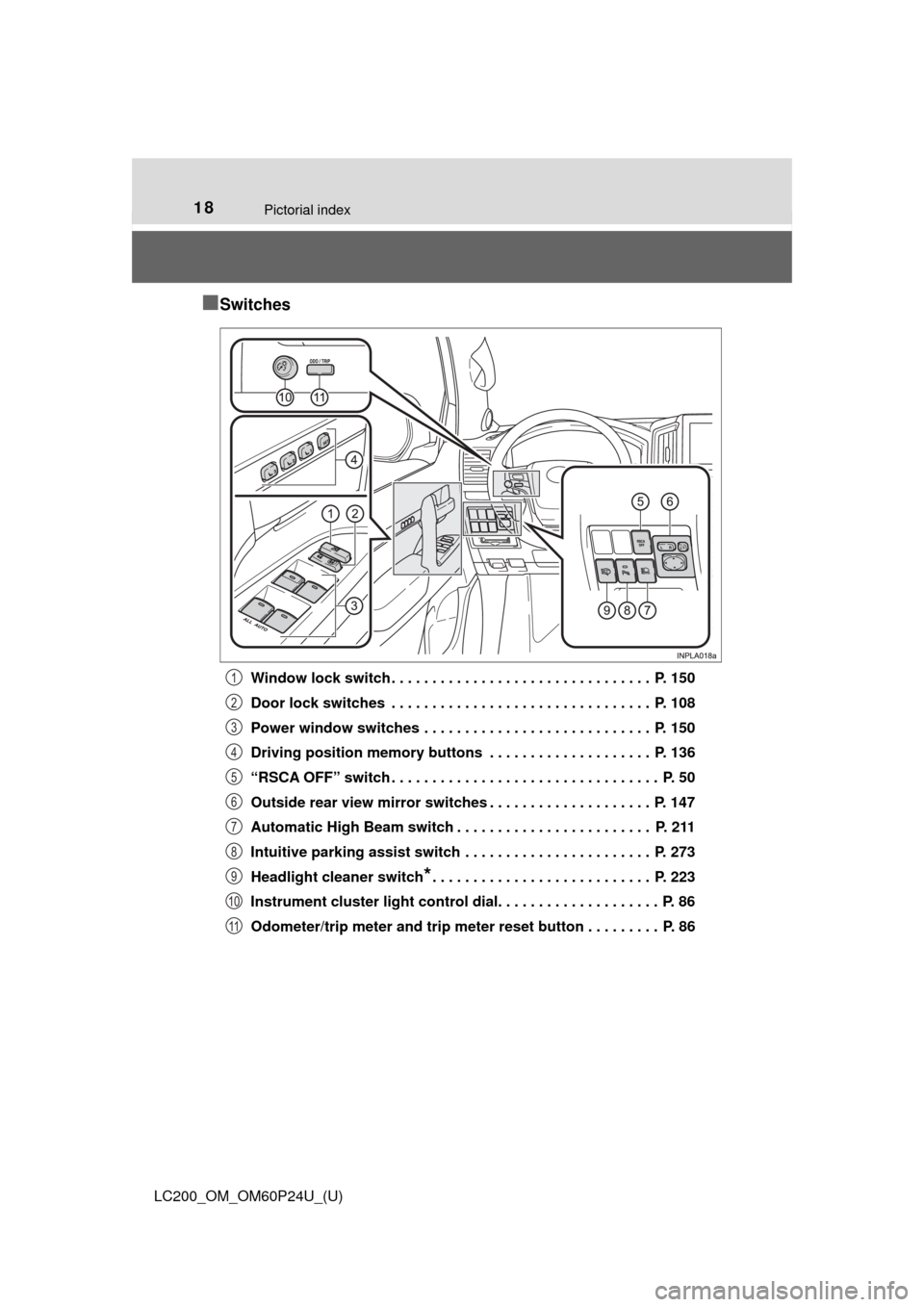
■Switches
Window lock switch . . . . . . . . . . . . . . . . . . . . . . . . . . . . . . . . P. 150
Door lock switches . . . . . . . . . . . . . . . . . . . . . . . . . . . . . . . . P. 108
Power window switches . . . . . . . . . . . . . . . . . . . . . . . . . . . . P. 150
Driving position memory buttons . . . . . . . . . . . . . . . . . . . . P. 136
“RSCA OFF” switch . . . . . . . . . . . . . . . . . . . . . . . . . . . . . . . . . P. 50
Outside rear view mirror switches . . . . . . . . . . . . . . . . . . . . P. 147
Automatic High Beam switch . . . . . . . . . . . . . . . . . . . . . . . . P. 211
Intuitive parking assist switch . . . . . . . . . . . . . . . . . . . . . . . P. 273
Headlight cleaner switch
*. . . . . . . . . . . . . . . . . . . . . . . . . . . P. 223
Instrument cluster light control dial. . . . . . . . . . . . . . . . . . . . P. 86
Odometer/trip meter and trip meter reset button . . . . . . . . . P. 86
1
2
3
4
5
6
7
8
9
10
11
Page 159 of 608

159
LC200_OM_OM60P24U_(U)
4Driving
4-1. Before drivingDriving the vehicle ............. 160
Cargo and luggage ........... 169
Vehicle load limits ............. 175
Trailer towing..................... 176
Dinghy towing ................... 192
4-2. Driving procedures Engine (ignition) switch ..... 193
Automatic transmission ..... 199
Turn signal lever................ 205
Parking brake .................... 206
4-3. Operating the lights and wipers
Headlight switch ................ 207
Automatic High Beam ....... 211
Fog light switch ................. 216
Windshield wipers and washer ............................ 217
Rear window wiper and washer ............................ 221
Headlight cleaner switch .............................. 223 4-4. Refueling
Opening the fuel tank cap .................................. 224
4-5. Using the driving support systems
Toyota Safety Sense P ..... 228
PCS (Pre-Collision System) .... 235
LDA (Lane Departure Alert) .... 249
Dynamic radar cruise control ............................. 258
Cruise control .................... 270
Intuitive parking assist....... 273
Four-wheel drive system ... 281
Crawl Control (with Turn Assist function) ............... 285
Multi-terrain Select ............ 290
Multi-terrain Monitor .......... 294
BSM (Blind Spot Monitor) ........ 344
• BSM function ................ 348
• RCTA function .............. 352
Driving assist systems ...... 358
4-6. Driving tips Off-road precautions ......... 365
Winter driving tips ............. 370
Page 166 of 608

166
LC200_OM_OM60P24U_(U)
4-1. Before driving
WARNING
Observe the following precautions.
Failure to do so may result in death or serious injury.
■When the vehicle is parked
● Always apply the parking brake, shift the shift lever to P, stop the engine
and lock the vehicle.
Do not leave the vehicle unattended while the engine is running.
If the vehicle is parked with the shift lever in P but the parking brake is not
set, the vehicle may start to move, possibly leading to an accident.
● If the shift lever is moved before the low speed four-wheel drive indicator
turns on/off, the transfer mode may not be shifted completely. The transfer
mode disengages both the front and rear driveshafts from the powertrain
and allows the vehicle to move regardless of the shift position. (At this
time, the indicator blinks and the buzzer sounds.)
Therefore, the vehicle is free to roll even if the automatic transmission is in
P. You or someone else could be seriously injured. You must complete the
shifting of the transfer mode. ( →P. 281)
● Do not touch the exhaust pipes while the engine is running or immediately
after turning the engine off.
Doing so may cause burns.
■ When taking a nap in the vehicle
Always turn the engine off. Otherwise, if you accidentally move the shift
lever or depress the accelerator pedal, this could cause an accident or fire
due to engine overheating. Additionally, if the vehicle is parked in a poorly
ventilated area, exhaust gases may collect and enter the vehicle, leading to
death or a serious health hazard.
■ When braking
● When the brakes are wet, drive more cautiously.
Braking distance increases when the brakes are wet, and this may cause
one side of the vehicle to brake differently than the other side. Also, the
parking brake may not securely hold the vehicle.
● If the power brake assist function does not operate, do not follow other
vehicles closely and avoid hills or sharp turns that require braking. In this
case, braking is still possible, but the brake pedal should be depressed
more firmly than usual. Also, the braking distance will increase. Have your
brakes fixed immediately.
● Do not pump the brake pedal if the engine stalls.
Each push on the brake pedal uses up the reserve for the power-assisted
brakes.
● The brake system consists of 2 individual hydraulic systems: If one of the
systems fails, the other will still operate. In this case, the brake pedal
should be depressed more firmly than usual and the braking distance will
increase.
Have your brakes fixed immediately.
Page 273 of 608
273
LC200_OM_OM60P24U_(U)
4-5. Using the driving support systems
4
Driving
Intuitive parking assist
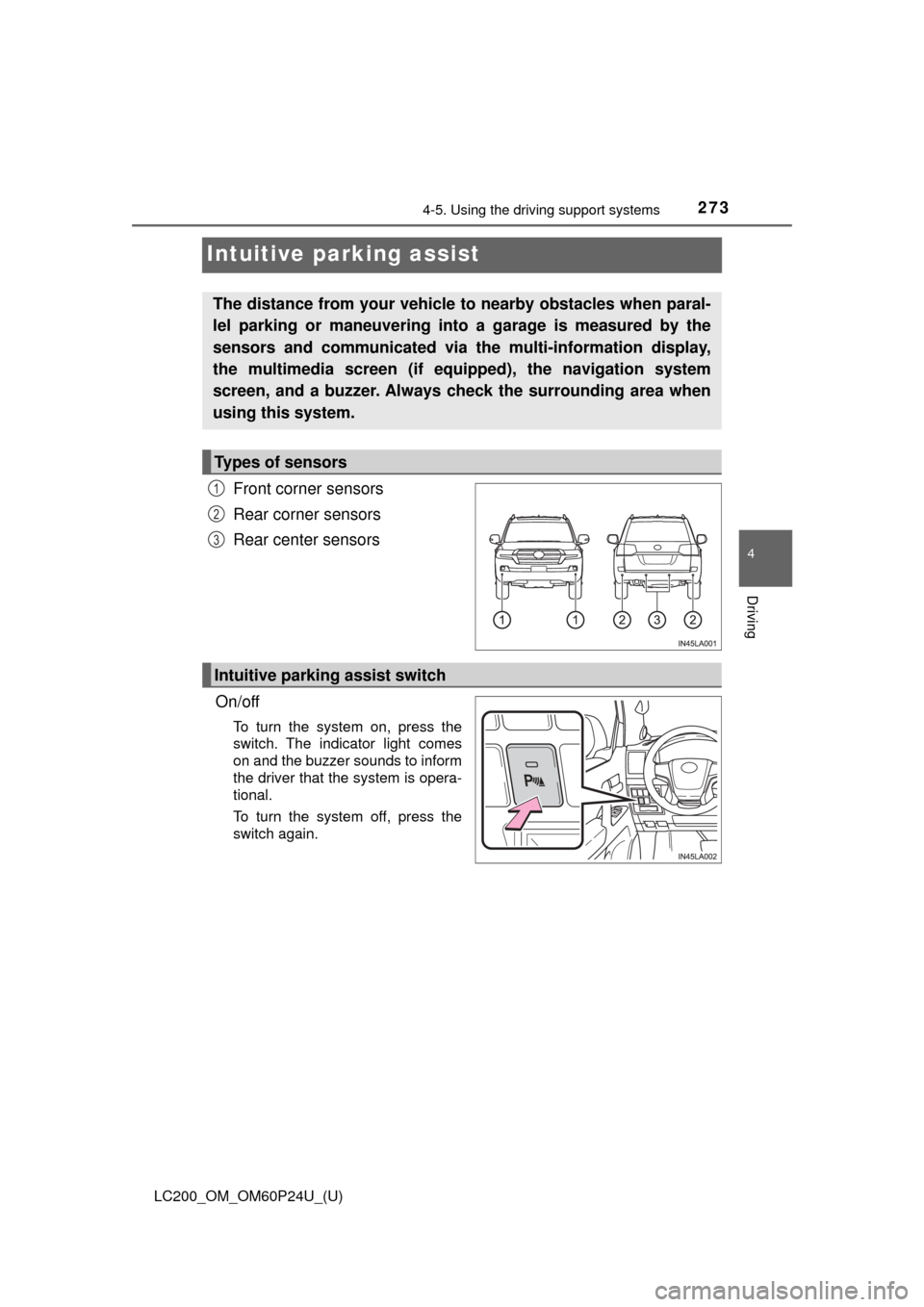
Front corner sensors
Rear corner sensors
Rear center sensors
On/off
To turn the system on, press the
switch. The indicator light comes
on and the buzzer sounds to inform
the driver that the system is opera-
tional.
To turn the system off, press the
switch again.
The distance from your vehicle to nearby obstacles when paral-
lel parking or maneuvering into a garage is measured by the
sensors and communicated via the multi-information display,
the multimedia screen (if equipped), the navigation system
screen, and a buzzer. Always check the surrounding area when
using this system.
Types of sensors
1
2
3
Intuitive parking assist switch
Page 274 of 608
274
LC200_OM_OM60P24U_(U)
4-5. Using the driving support systems
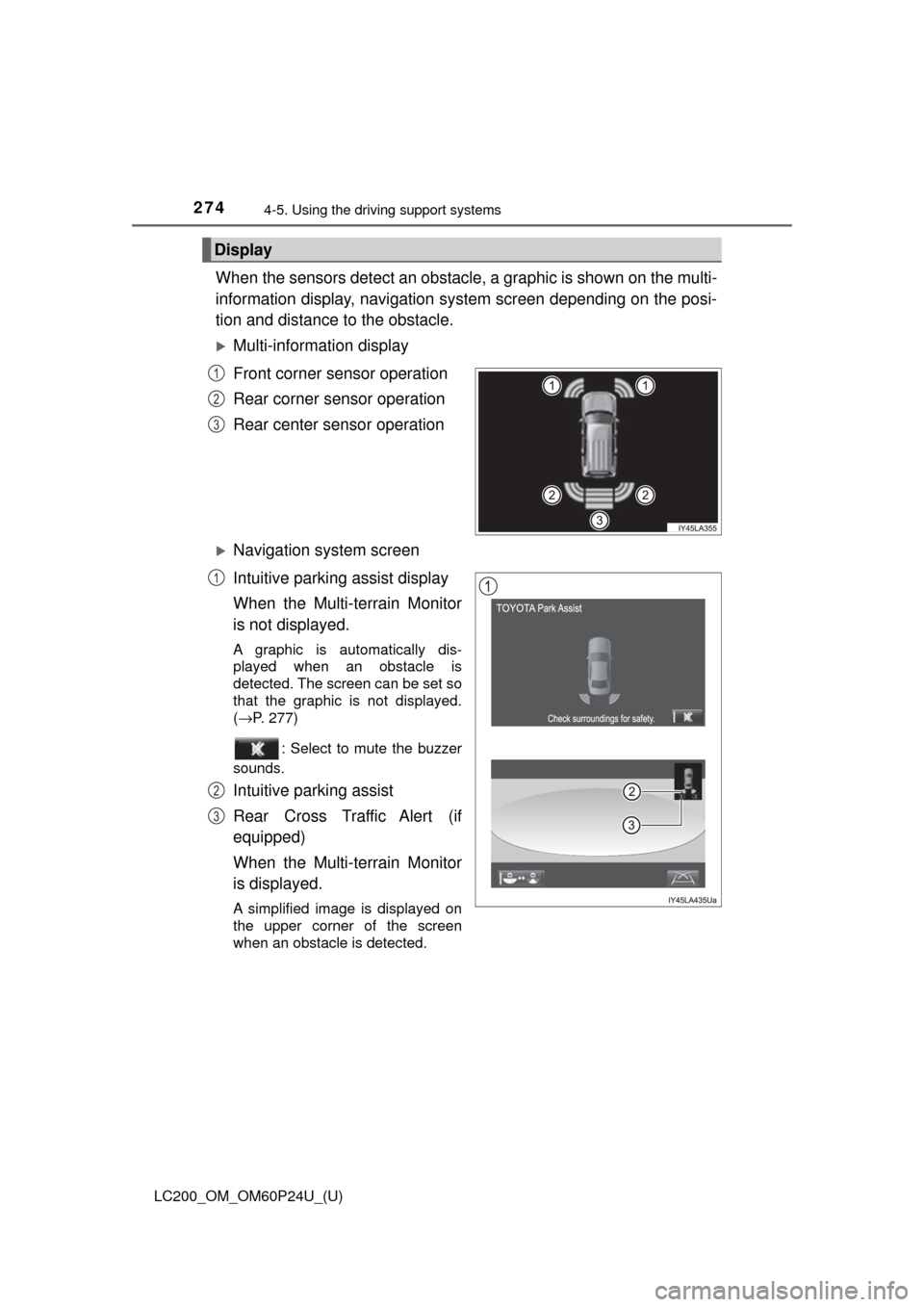
When the sensors detect an obstacle , a graphic is shown on the multi-
information display, navigation system screen depending on the posi-
tion and distance to the obstacle.
Multi-information display
Front corner sensor operation
Rear corner sensor operation
Rear center sensor operation
Navigation system screen
Intuitive parking assist display
When the Multi-terrain Monitor
is not displayed.
A graphic is automatically dis-
played when an obstacle is
detected. The screen can be set so
that the graphic is not displayed.
(→P. 277)
: Select to mute the buzzer
sounds.
Intuitive parking assist
Rear Cross Traffic Alert (if
equipped)
When the Multi-terrain Monitor
is displayed.
A simplified image is displayed on
the upper corner of the screen
when an obstacle is detected.
Display
1
2
3
1
2
3
Page 277 of 608
LC200_OM_OM60P24U_(U)
2774-5. Using the driving support systems
4
Driving
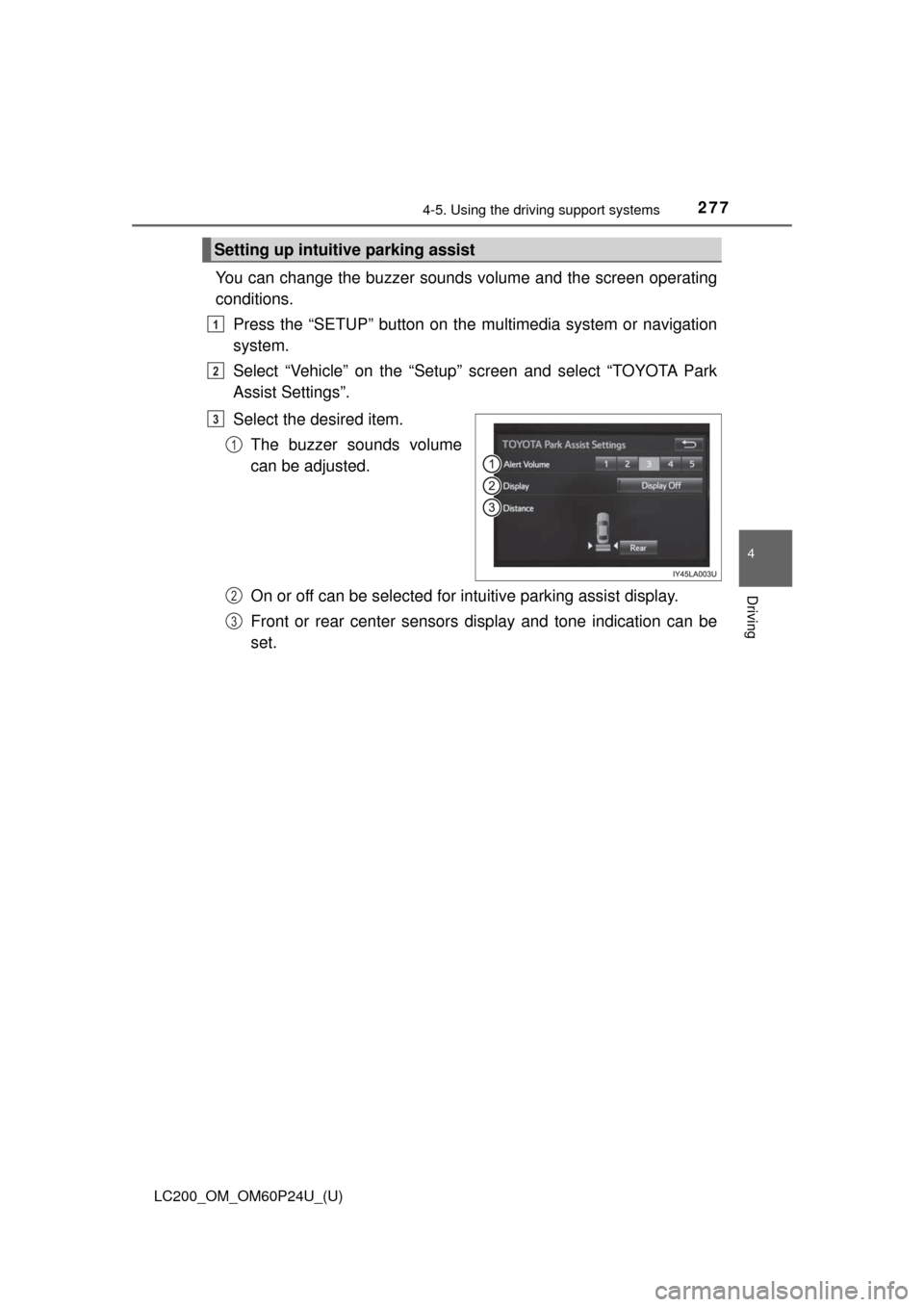
You can change the buzzer sounds volume and the screen operating
conditions.
Press the “SETUP” button on the multimedia system or navigation
system.
Select “Vehicle” on the “Setup” screen and select “TOYOTA Park
Assist Settings”.
Select the desired item.
The buzzer sounds volume
can be adjusted.
On or off can be selected for intuitive parking assist display.
Front or rear center sensors display and tone indication can be
set.
Setting up intuitive parking assist
1
2
3
1
2
3
Page 278 of 608

278
LC200_OM_OM60P24U_(U)
4-5. Using the driving support systems
■The intuitive parking assist can be operated when
●Front corner sensors:
• The engine switch is in IGNITION ON mode.
• The shift lever is in a position other than P.
• The vehicle speed is less than approximately 6 mph (10 km/h).
● Rear corner and rear center sensors:
• The engine switch is in IGNITION ON mode.
• The shift lever is in R.
■ Intuitive parking assist display
When an obstacle is detected while the rear view monitor system, Multi-ter-
rain Monitor is in use, the warning indicator will appear in the upper corner of
the screen even if the display setting has been set to off.
■ Sensor detection information
●The sensor’s detection areas are limited to the areas around the vehicle’s
bumper.
● Certain vehicle conditions and the surrounding environment may affect the
ability of a sensor to correctly detect an obstacle. Particular instances where
this may occur are listed below.
• There is dirt, snow or ice on the sensor. (Wiping the sensors will resolve
this problem.)
• The sensor is frozen. (Thawing the area will resolve this problem.) In especially cold weather, if a sensor is frozen the screen may show an
abnormal display, or obstacles may not be detected.
• The sensor is covered in any way.
• The vehicle is leaning considerably to one side.
• On an extremely bumpy road, on an incline, on gravel, or on grass.
• The vicinity of the vehicle is noisy due to vehicle horns, motorcycle engines, air brakes of large vehicles, or other loud noises producing ultra-
sonic waves.
• There is another vehicle equipped with parking assist sensors in the vicinity.
• The sensor is coated with a sheet of spray or heavy rain.
• The vehicle is equipped with a fender pole or wireless antenna.
• The bumper or sensor receives a strong impact.
• The vehicle is approaching a tall or curved curb.
• In harsh sunlight or intense cold weather.
• The area directly under the bumpers is not detected.
• If obstacles draw too close to the sensor.
• A non-genuine Toyota suspension (lowered suspension etc.) is installed.
• People may not be detected if they are wearing certain types of clothing.
In addition to the examples above, there are instances in which, because of
their shape, signs and other objects may be judged by a sensor to be closer
than they are.
Page 279 of 608

LC200_OM_OM60P24U_(U)
2794-5. Using the driving support systems
4
Driving
●The shape of the obstacle may prevent a sensor from detecting it. Pay par-
ticular attention to the following obstacles:
• Wires, fences, ropes, etc.
• Cotton, snow and other materials that absorb sound waves
• Sharply-angled objects
• Low obstacles
• Tall obstacles with upper sections projecting outwards in the direction of
your vehicle
● The following situations may occur during use.
• Depending on the shape of the obstacle and other factors, the detection
distance may shorten, or detection may be impossible.
• Obstacles may not be detected if they are too close to the sensor.
• There will be a short delay between obstacle detection and display. Even at slow speeds, there is a possibility that the obstacle will come within the
sensor’s detection areas before the display is shown and the buzzer
sounds.
• Thin posts or objects lower than the sensor may not be detected when
approached, even if they have been detected once.
• It might be difficult to hear beeps due to the volume of audio system or air flow noise of the air conditioning system.
■ If “Clean Parking Assist Sensor” is displayed on the multi-information
display
A sensor may be dirty or covered with snow or ice. In such cases, if it is
removed from the sensor, the system should return to normal.
Also, due to the sensor being frozen at low temperatures, a malfunction dis-
play may appear or an obstacle may not be detected. If the sensor thaws out,
the system should return to normal.
■ If “Parking Assist Malfunction” is di splayed on the multi-information dis-
play
Depending on the malfunction of the sensor, the device may not be working
normally. Have the vehicle inspected by your Toyota dealer.
■ Customization
Settings (e.g. buzzer sounds volume) can be changed.
(Customizable features: →P. 574)