language TOYOTA LAND CRUISER 2018 Accessories, Audio & Navigation (in English)
[x] Cancel search | Manufacturer: TOYOTA, Model Year: 2018, Model line: LAND CRUISER, Model: TOYOTA LAND CRUISER 2018Pages: 276, PDF Size: 7.11 MB
Page 13 of 276
LC200_Navi_OM60Q52U_(U)
17.06.09 10:34
13
Quick guide
1
2. Quick reference
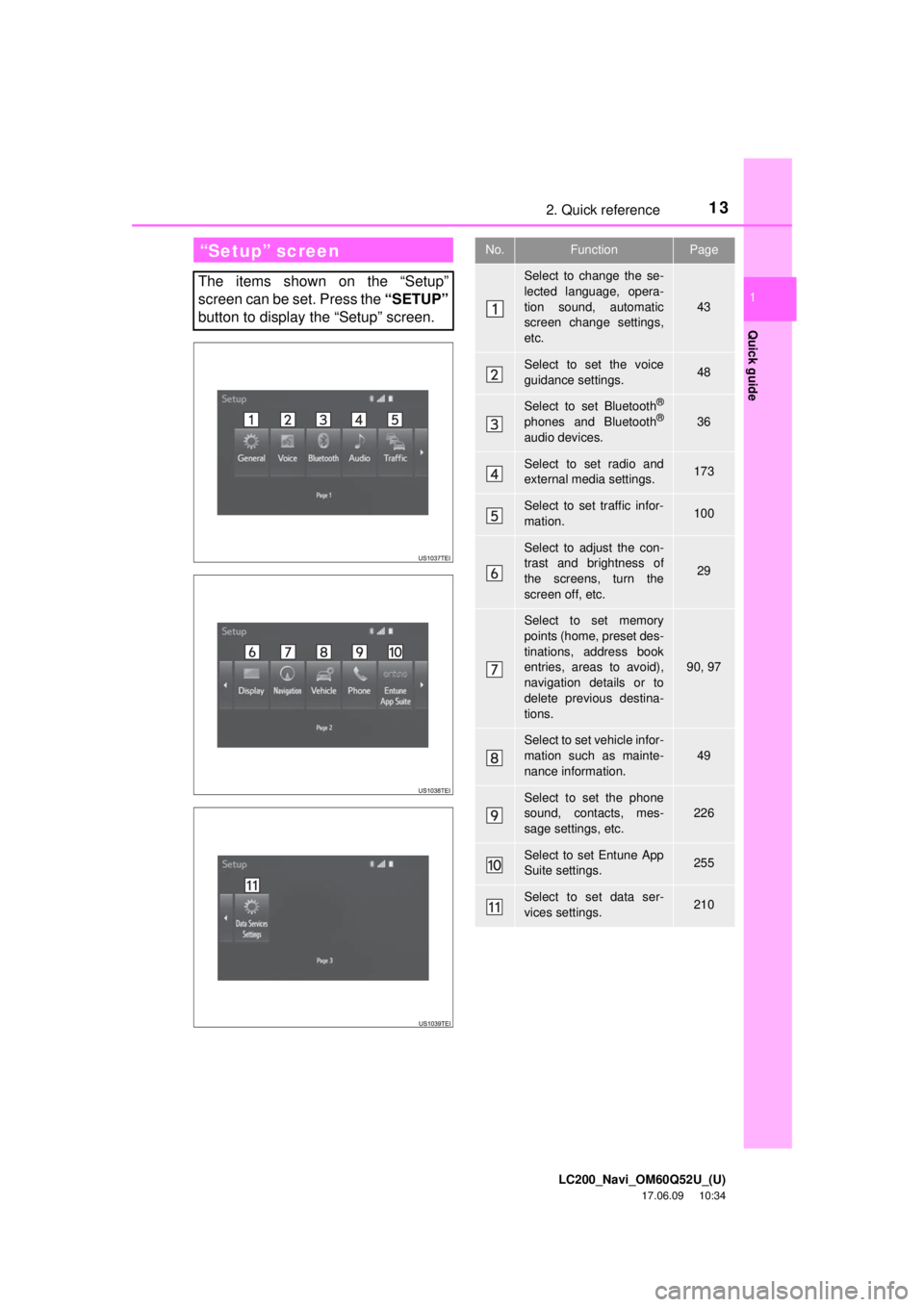
“Setup” screen
The items shown on the “Setup”
screen can be set. Press the “SETUP”
button to display the “Setup” screen.
No.FunctionPage
Select to change the se-
lected language, opera-
tion sound, automatic
screen change settings,
etc.
43
Select to set the voice
guidance settings.48
Select to set Bluetooth®
phones and Bluetooth®
audio devices.
36
Select to set radio and
external media settings.173
Select to set traffic infor-
mation.100
Select to adjust the con-
trast and brightness of
the screens, turn the
screen off, etc.
29
Select to set memory
points (home, preset des-
tinations, address book
entries, areas to avoid),
navigation details or to
delete previous destina-
tions.
90, 97
Select to set vehicle infor-
mation such as mainte-
nance information.
49
Select to set the phone
sound, contacts, mes-
sage settings, etc.226
Select to set Entune App
Suite settings.255
Select to set data ser-
vices settings.210
Page 44 of 276
LC200_Navi_OM60Q52U_(U)
17.06.09 10:34
443. Other settings
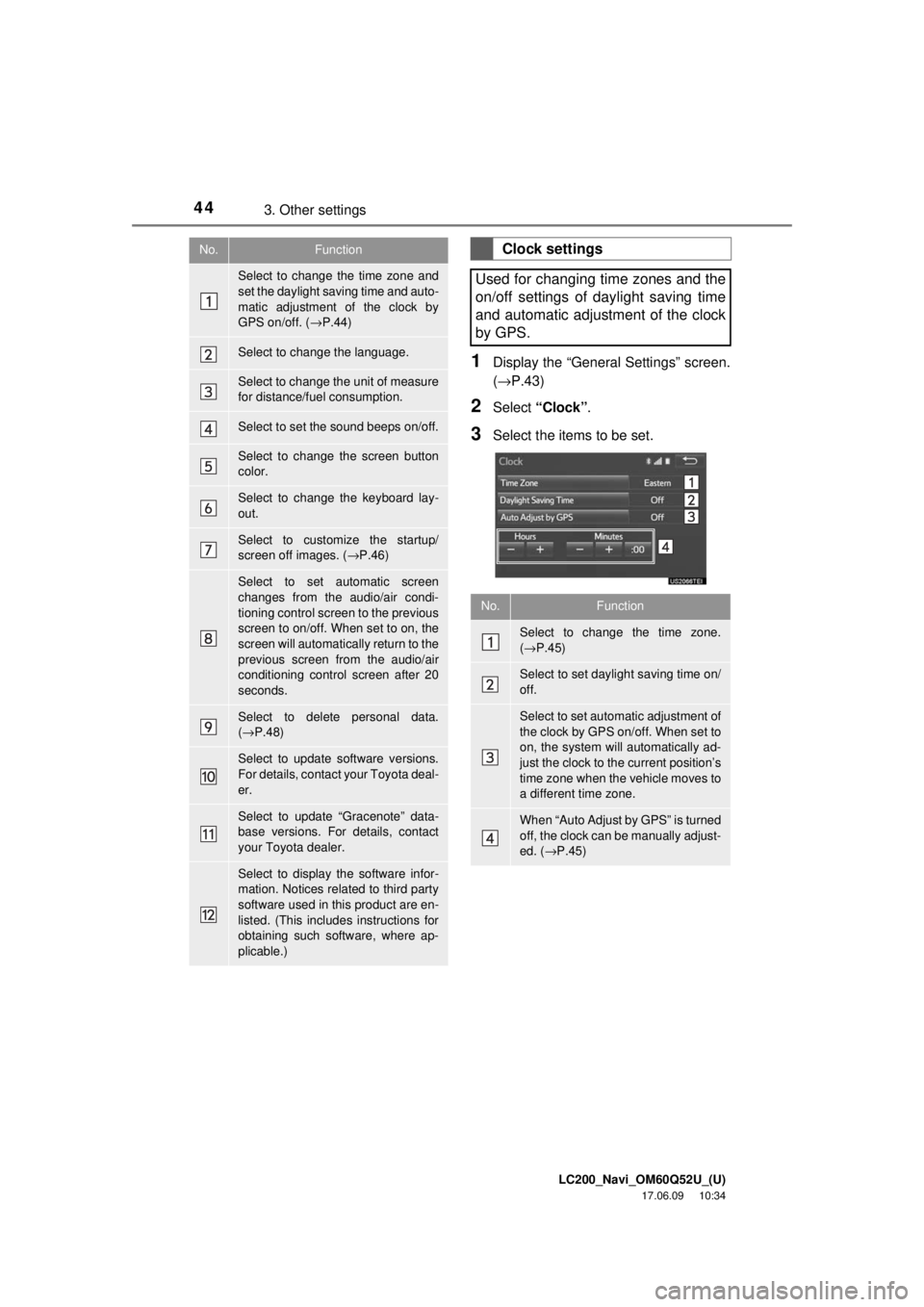
1Display the “General Settings” screen.
(→P.43)
2Select “Clock” .
3Select the items to be set.
No.Function
Select to change the time zone and
set the daylight saving time and auto-
matic adjustment of the clock by
GPS on/off. ( →P.44)
Select to change the language.
Select to change the unit of measure
for distance/fuel consumption.
Select to set the sound beeps on/off.
Select to change the screen button
color.
Select to change the keyboard lay-
out.
Select to customize the startup/
screen off images. ( →P.46)
Select to set automatic screen
changes from the audio/air condi-
tioning control screen to the previous
screen to on/off. When set to on, the
screen will automatically return to the
previous screen from the audio/air
conditioning control screen after 20
seconds.
Select to delete personal data.
(→ P.48)
Select to update software versions.
For details, contact your Toyota deal-
er.
Select to update “Gracenote” data-
base versions. For details, contact
your Toyota dealer.
Select to display the software infor-
mation. Notices related to third party
software used in this product are en-
listed. (This includes instructions for
obtaining such software, where ap-
plicable.)
Clock settings
Used for changing time zones and the
on/off settings of daylight saving time
and automatic adjustment of the clock
by GPS.
No.Function
Select to change the time zone.
( → P.45)
Select to set daylight saving time on/
off.
Select to set automatic adjustment of
the clock by GPS on/off. When set to
on, the system will automatically ad-
just the clock to the current position’s
time zone when the vehicle moves to
a different time zone.
When “Auto Adjust by GPS” is turned
off, the clock can be manually adjust-
ed. ( →P.45)
Page 126 of 276
LC200_Navi_OM60Q52U_(U)
17.06.09 10:34
1262. Radio operation
How to subscribe to an XM Satellite
Radio
To listen to a satellite radio broadcast
in the vehicle, a subscription to the XM
Satellite Radio service is necessary.
An XM Satellite Radio is a tuner de-
signed exclusively to receive broad-
casts provided under a separate
subscription. Availability is limited to
the 48 contiguous U.S. states and
some Canadian provinces.
How to subscribe
It is necessary to enter into a separate
service agreement with XM Satellite
Radio in order to receive satellite
broadcast programming in the vehicle.
Additional activation and service sub-
scription fees apply that are not includ-
ed in the purchase price of the vehicle
and digital satellite tuner.
For complete information on subscrip-
tion rates and terms, or to subscribe to
XM Satellite Radio:
U.S.A.
Refer to www.siriusxm.com
or call
1-877-447-0011.
NOTICE
● XM Radio Services ⎯Legal Disclaimers
and Warnings
• Fees and Taxes ⎯Subscription fee,
taxes, one time activation fee, and
other fees may apply. Subscription fee
is consumer only. All fees and
programming subject to change.
Subscriptions subject to Customer
Agreement available at
www.siriusxm.com
. XM service only
available in the 48 contiguous United
States and Canada.
Explicit Language Notice ⎯Channels
with frequent explicit language are
indicated with an “XL” preceding the
channel name. Channel blocking is
available for XM Satellite Radio
receivers by notifying XM at;
U.S.A. Customers ⎯
Visit www.siriusxm.com
Or calling
1-877-447-0011
● It is prohibited to copy, decompile,
disassemble, reverse engineer, hack,
manipulate, or otherwise make available
any technology or software incorporated
in receivers compatible with the XM
Satellite Radio System or that support
the XM website, the Online Service or
any of its content. Furthermore, the
AMBE
® voice compression software
included in this product is protected by
intellectual property rights including
patent rights, copyrights, and trade
secrets of Digital Voice Systems, Inc.
● Note: this applies to XM receivers only
and not XM Ready devices.
Page 137 of 276
LC200_Navi_OM60Q52U_(U)
17.06.09 10:34
Audio/visual system
4
1373. Media operation
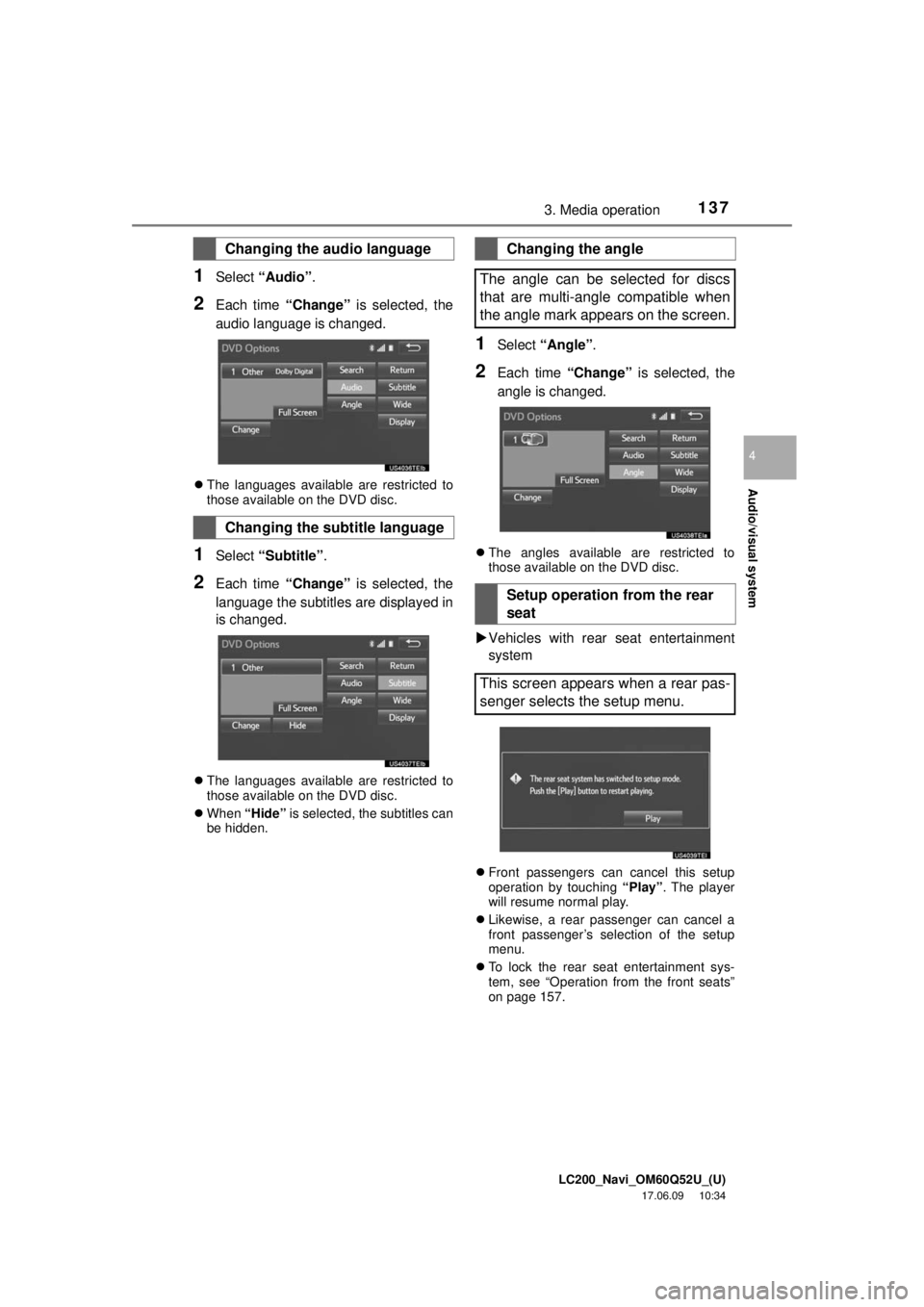
1Select “Audio” .
2Each time “Change” is selected, the
audio language is changed.
The languages available are restricted to
those available on the DVD disc.
1Select “Subtitle” .
2Each time “Change” is selected, the
language the subtitles are displayed in
is changed.
The languages available are restricted to
those available on the DVD disc.
When “Hide” is selected, the subtitles can
be hidden.
1Select “Angle” .
2Each time “Change” is selected, the
angle is changed.
The angles available are restricted to
those available on the DVD disc.
Vehicles with rear seat entertainment
system
Front passengers can cancel this setup
operation by touching “Play” . The player
will resume normal play.
Likewise, a rear passenger can cancel a
front passenger’s selection of the setup
menu.
To lock the rear seat entertainment sys-
tem, see “Operation from the front seats”
on page 157.
Changing the audio language
Changing the subtitle language
Changing the angle
The angle can be selected for discs
that are multi-angle compatible when
the angle mark appears on the screen.
Setup operation from the rear
seat
This screen appears when a rear pas-
senger selects the setup menu.
Page 162 of 276
LC200_Navi_OM60Q52U_(U)
17.06.09 10:34
1624. Rear seat entertainment system operation
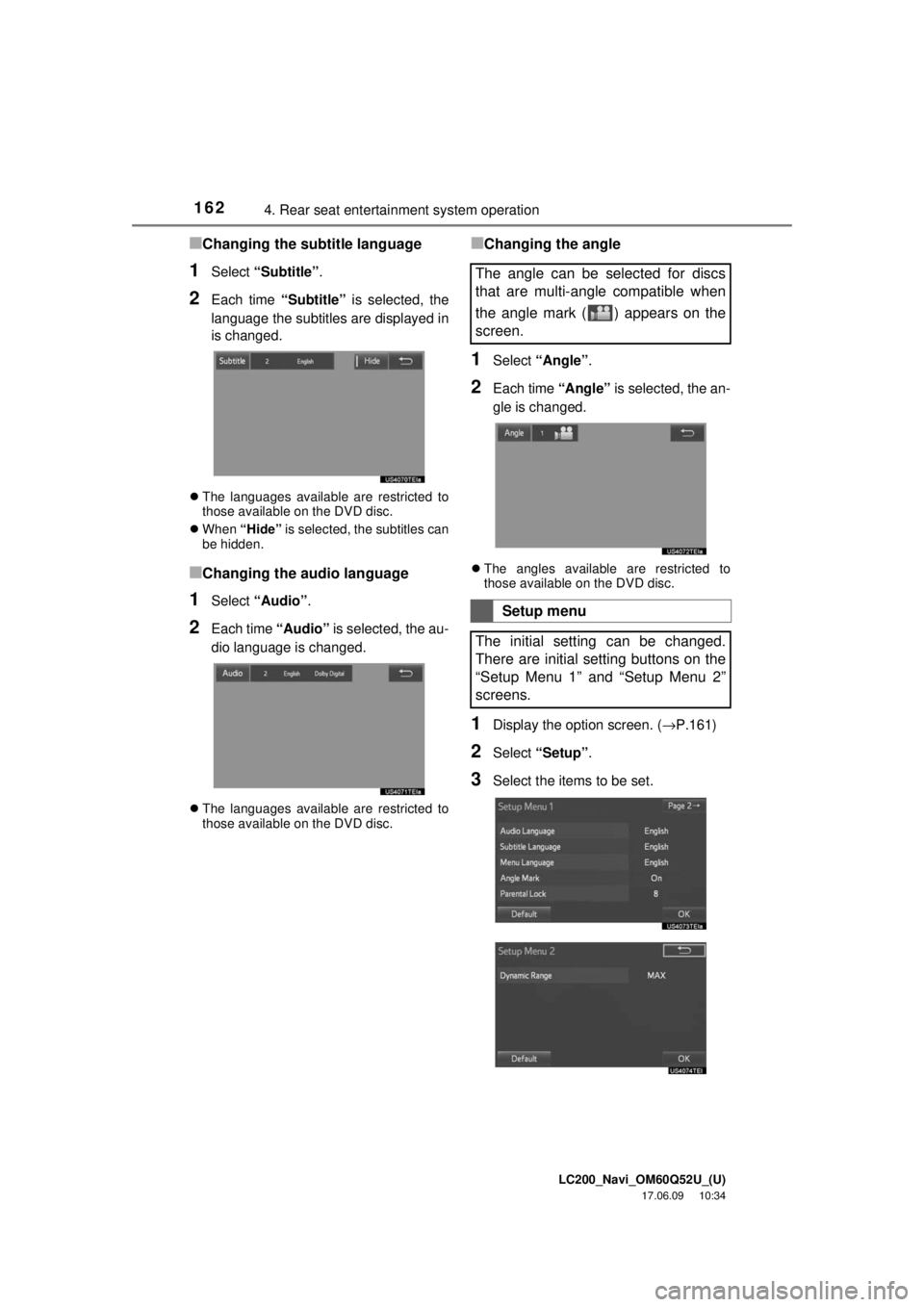
■Changing the subtitle language
1Select “Subtitle” .
2Each time “Subtitle” is selected, the
language the subtitles are displayed in
is changed.
The languages available are restricted to
those available on the DVD disc.
When “Hide” is selected, the subtitles can
be hidden.
■Changing the audio language
1Select “Audio” .
2Each time “Audio” is selected, the au-
dio language is changed.
The languages available are restricted to
those available on the DVD disc.
■Changing the angle
1Select “Angle” .
2Each time “Angle” is selected, the an-
gle is changed.
The angles available are restricted to
those available on the DVD disc.
1Display the option screen. ( →P.161)
2Select “Setup”.
3Select the items to be set.
The angle can be selected for discs
that are multi-angle compatible when
the angle mark ( ) appears on the
screen.
Setup menu
The initial setting can be changed.
There are initial setting buttons on the
“Setup Menu 1” and “Setup Menu 2”
screens.
Page 163 of 276
LC200_Navi_OM60Q52U_(U)
17.06.09 10:34
Audio/visual system
4
1634. Rear seat entertainment system operation
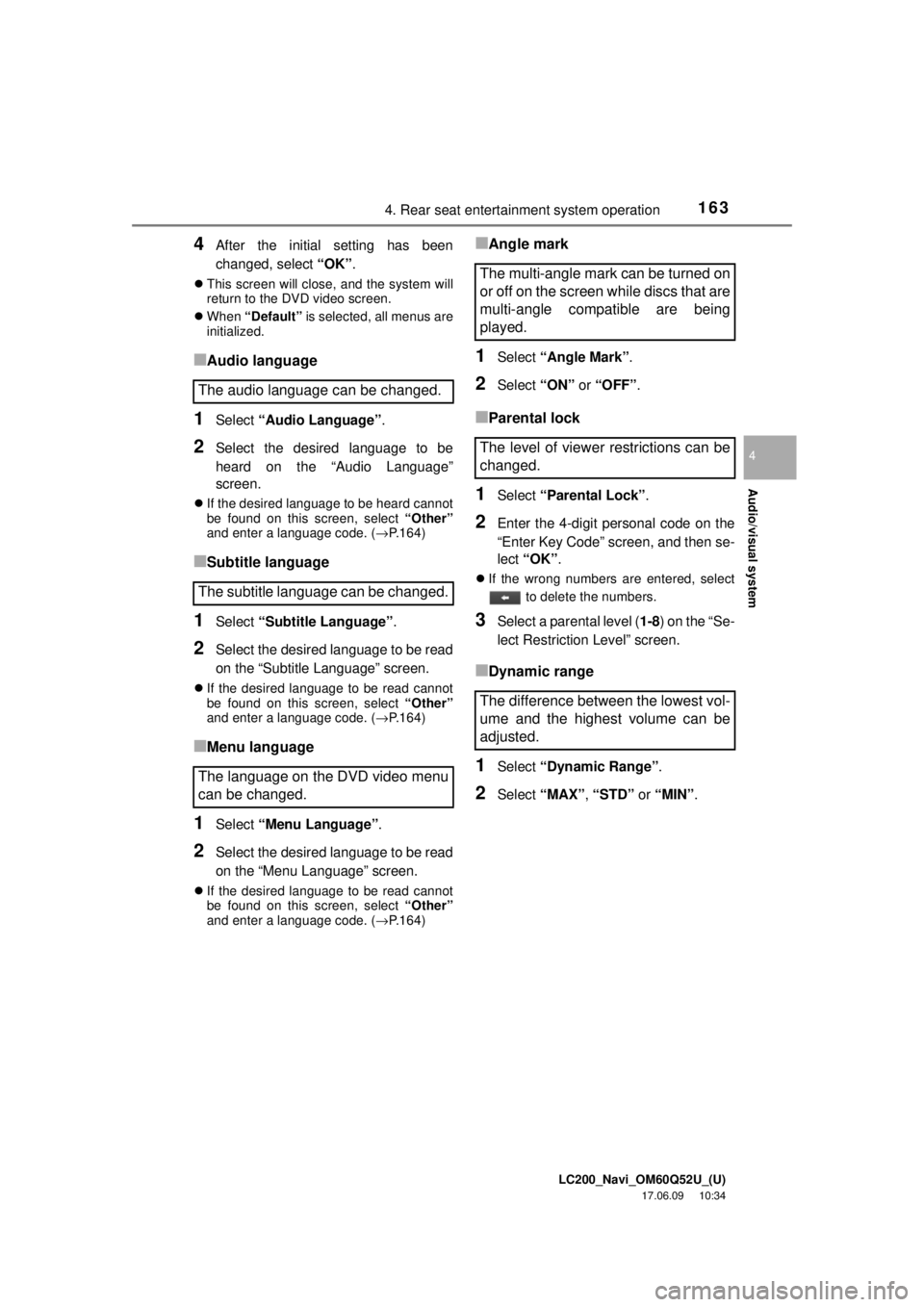
4After the initial setting has been
changed, select “OK”.
This screen will close, and the system will
return to the DVD video screen.
When “Default” is selected, all menus are
initialized.
■Audio language
1Select “Audio Language” .
2Select the desired language to be
heard on the “Audio Language”
screen.
If the desired language to be heard cannot
be found on this screen, select “Other”
and enter a language code. ( →P.164)
■Subtitle language
1Select “Subtitle Language” .
2Select the desired language to be read
on the “Subtitle Language” screen.
If the desired language to be read cannot
be found on this screen, select “Other”
and enter a language code. ( →P.164)
■Menu language
1Select “Menu Language” .
2Select the desired language to be read
on the “Menu Language” screen.
If the desired language to be read cannot
be found on this screen, select “Other”
and enter a language code. ( →P.164)
■Angle mark
1Select “Angle Mark” .
2Select “ON” or “OFF” .
■Parental lock
1Select “Parental Lock” .
2Enter the 4-digit personal code on the
“Enter Key Code” screen, and then se-
lect “OK” .
If the wrong numbers are entered, select
to delete the numbers.
3Select a parental level ( 1-8) on the “Se-
lect Restriction Level” screen.
■Dynamic range
1Select “Dynamic Range” .
2Select “MAX” , “STD” or “MIN” .
The audio language can be changed.
The subtitle language can be changed.
The language on the DVD video menu
can be changed.
The multi-angle mark can be turned on
or off on the screen while discs that are
multi-angle compatible are being
played.
The level of viewer restrictions can be
changed.
The difference between the lowest vol-
ume and the highest volume can be
adjusted.
Page 164 of 276
LC200_Navi_OM60Q52U_(U)
17.06.09 10:34
1644. Rear seat entertainment system operation
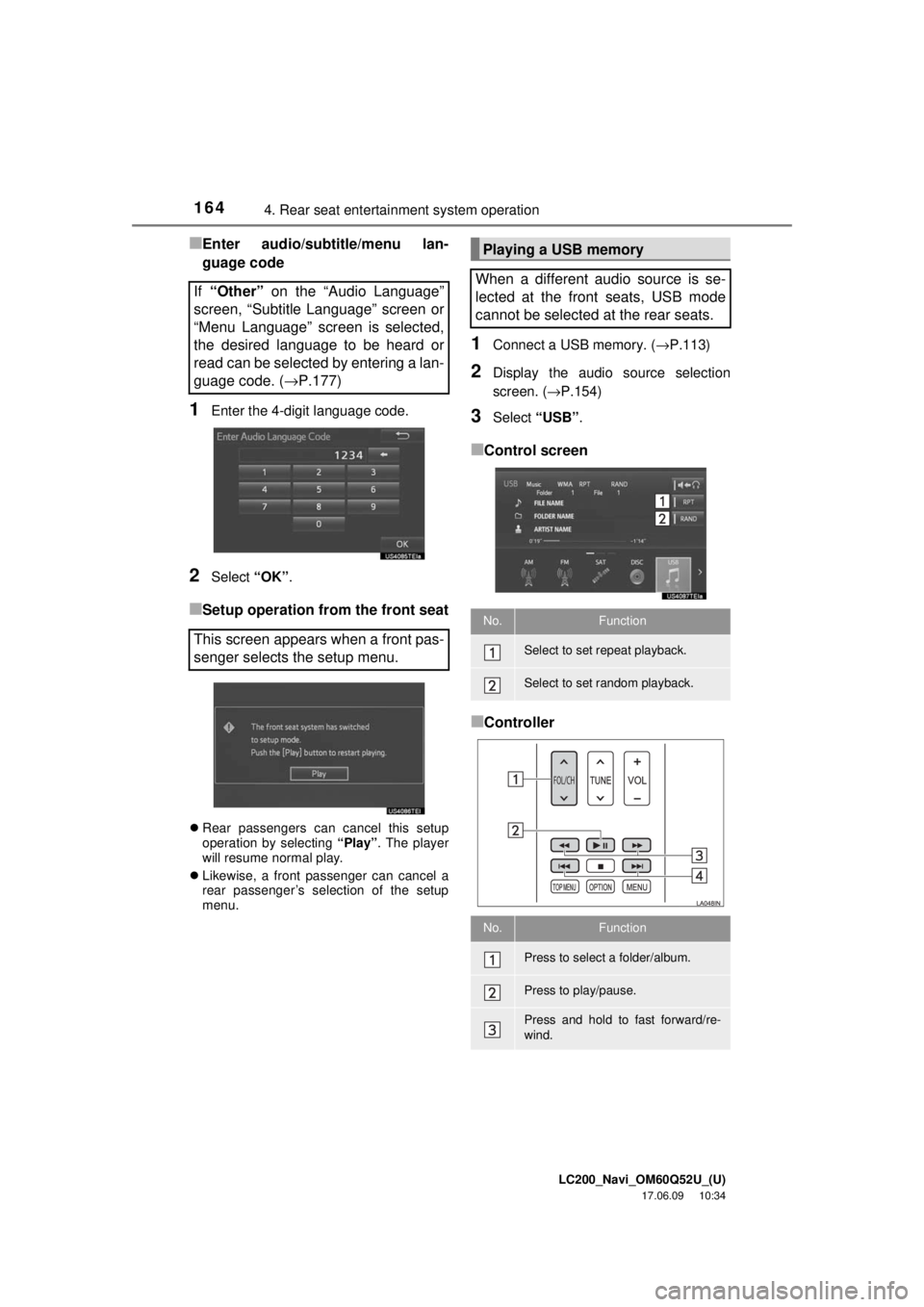
■Enter audio/subtitle/menu lan-
guage code
1Enter the 4-digit language code.
2Select “OK”.
■Setup operation from the front seat
Rear passengers can cancel this setup
operation by selecting “Play”. The player
will resume normal play.
Likewise, a front passenger can cancel a
rear passenger’s selection of the setup
menu.
1Connect a USB memory. ( →P.113)
2Display the audio source selection
screen. (→P.154)
3Select “USB” .
■Control screen
■Controller
If
“Other” on the “Audio Language”
screen, “Subtitle Language” screen or
“Menu Language” screen is selected,
the desired language to be heard or
read can be selected by entering a lan-
guage code. ( →P.177)
This screen appears when a front pas-
senger selects the setup menu.
Playing a USB memory
When a different audio source is se-
lected at the front seats, USB mode
cannot be selected at the rear seats.
No.Function
Select to set repeat playback.
Select to set random playback.
No.Function
Press to select a folder/album.
Press to play/pause.
Press and hold to fast forward/re-
wind.
Page 175 of 276
LC200_Navi_OM60Q52U_(U)
17.06.09 10:34
Audio/visual system
4
1756. Setup
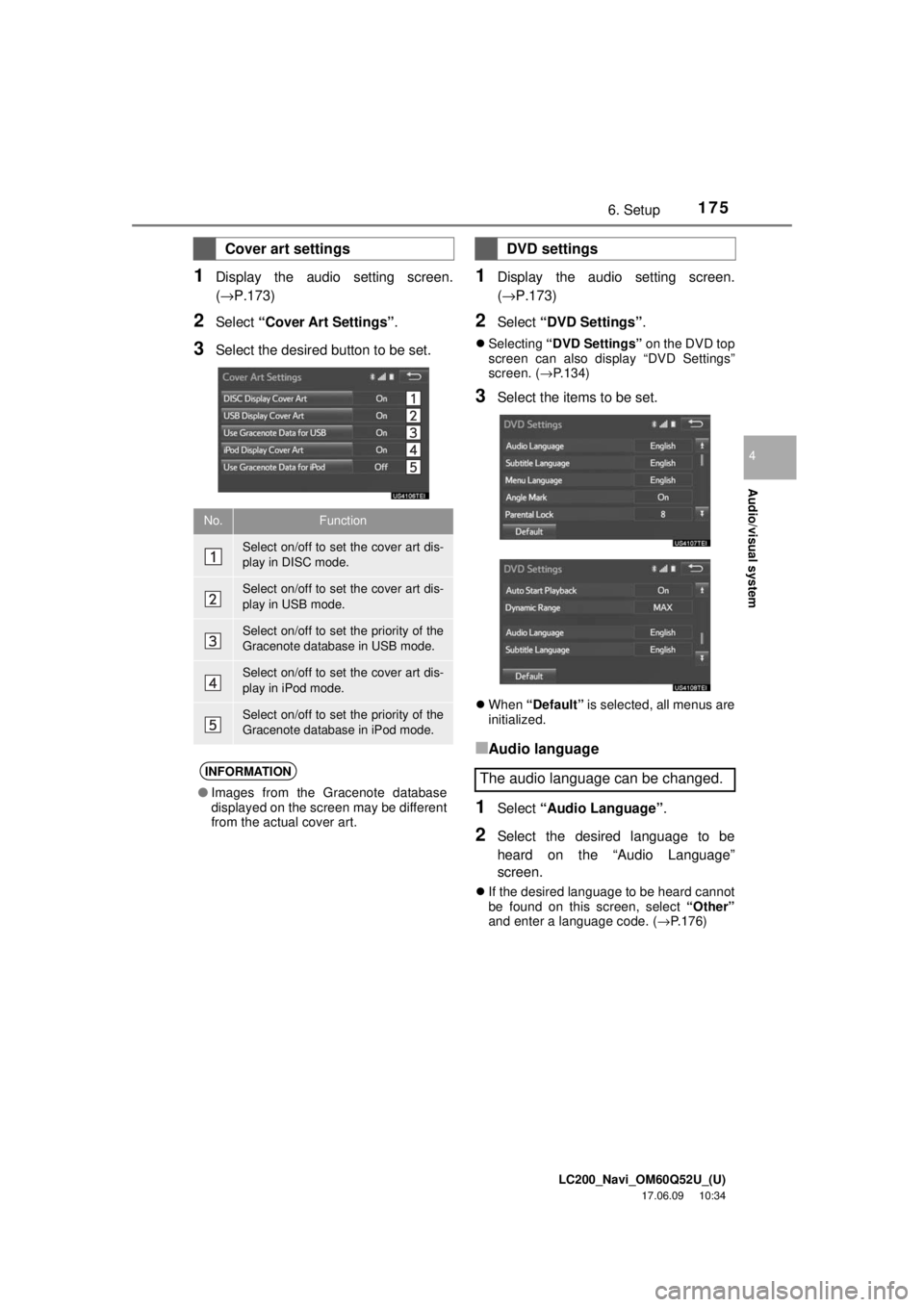
1Display the audio setting screen.
(→P.173)
2Select “Cover Art Settings” .
3Select the desired button to be set.
1Display the audio setting screen.
(→P.173)
2Select “DVD Settings” .
Selecting “DVD Settings” on the DVD top
screen can also display “DVD Settings”
screen. ( →P.134)
3Select the items to be set.
When “Default” is selected, all menus are
initialized.
■Audio language
1Select “Audio Language” .
2Select the desired language to be
heard on the “Audio Language”
screen.
If the desired language to be heard cannot
be found on this screen, select “Other”
and enter a language code. ( →P.176)
Cover art settings
No.Function
Select on/off to set the cover art dis-
play in DISC mode.
Select on/off to set the cover art dis-
play in USB mode.
Select on/off to set the priority of the
Gracenote database in USB mode.
Select on/off to set the cover art dis-
play in iPod mode.
Select on/off to set the priority of the
Gracenote database in iPod mode.
INFORMATION
● Images from the Gracenote database
displayed on the screen may be different
from the actual cover art.
DVD settings
The audio language can be changed.
Page 176 of 276
LC200_Navi_OM60Q52U_(U)
17.06.09 10:34
1766. Setup
■Subtitle language
1Select “Subtitle Language” .
2Select the desired language to be read
on the “Subtitle Language” screen.
If the desired language to be read cannot
be found on this screen, select “Other”
and enter a language code. ( →P.176)
■Menu language
1Select “Menu Language” .
2Select the desired language to be read
on the “Menu Language” screen.
If the desired language to be read cannot
be found on this screen, select “Other”
and enter a language code. ( →P.176)
■Angle mark
1Select “Angle Mark” .
2Select “On” or “Off” .
■Parental lock
1Select “Parental Lock” .
2Enter the 4-digit personal code on the
“Key Code” screen.
3Select a parental level ( 1-8) on the
“Select Restriction Level” screen.
■Auto start
1Select “Auto Start Playback” .
2Select “On” or “Off” .
■Sound dynamic range
1Select “Dynamic Range” .
2Select “MAX”, “STD” or “MIN”.
■Enter audio/subtitle/menu lan-
guage code
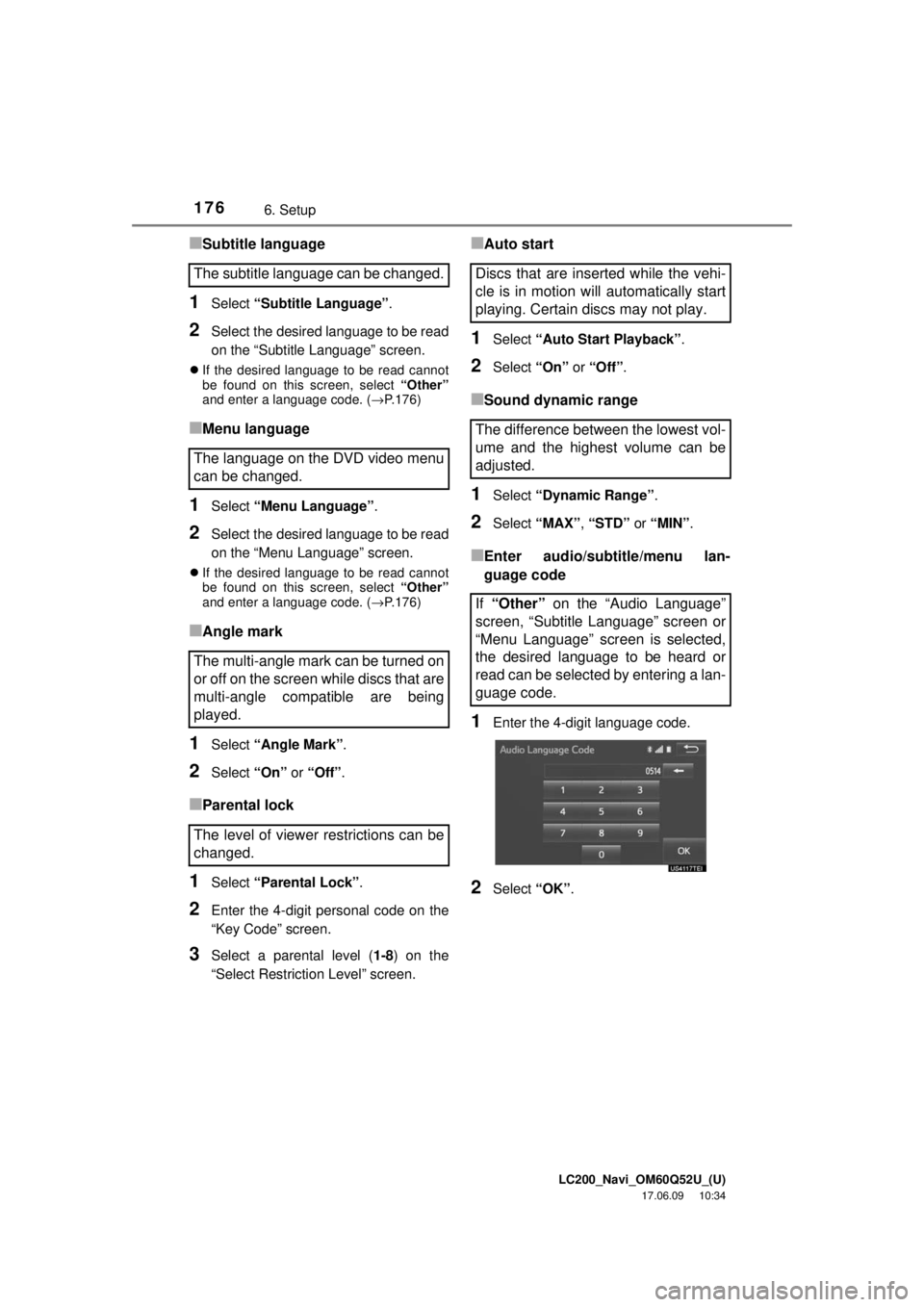
1Enter the 4-digit language code.
2Select “OK”.
The subtitle language can be changed.
The language on the DVD video menu
can be changed.
The multi-angle mark can be turned on
or off on the screen while discs that are
multi-angle compatible are being
played.
The level of viewer restrictions can be
changed.Discs that are inserted while the vehi-
cle is in motion will automatically start
playing. Certain discs may not play.
The difference between the lowest vol-
ume and the highest volume can be
adjusted.
If “Other” on the “Audio Language”
screen, “Subtitle Language” screen or
“Menu Language” screen is selected,
the desired language to be heard or
read can be selected by entering a lan-
guage code.
Page 177 of 276
LC200_Navi_OM60Q52U_(U)
17.06.09 10:34
Audio/visual system
4
1776. Setup
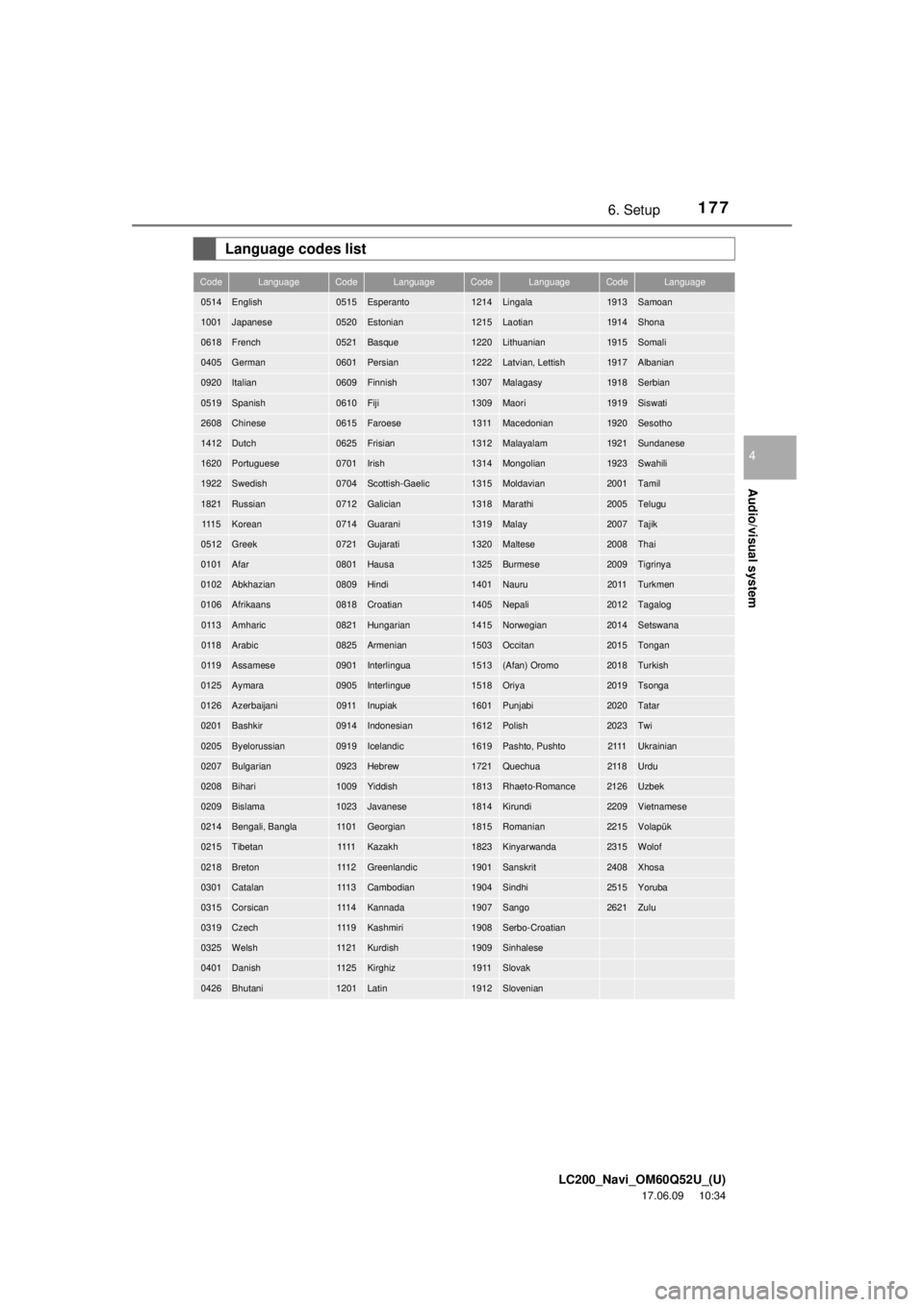
Language codes list
CodeLanguageCodeLanguageCodeLanguageCodeLanguage
0514English0515Esperanto1214Lingala1913Samoan
1001Japanese0520Estonian1215Laotian1914Shona
0618French0521Basque1220Lithuanian1915Somali
0405German0601Persian1222Latvian, Lettish1917Albanian
0920Italian0609Finnish1307Malagasy1918Serbian
0519Spanish0610Fiji1309Maori1919Siswati
2608Chinese0615Faroese1311Macedonian1920Sesotho
1412Dutch0625Frisian1312Malayalam1921Sundanese
1620Portuguese0701Irish1314Mongolian1923Swahili
1922Swedish0704Scottish-Gaelic1315Moldavian2001Tamil
1821Russian0712Galician1318Marathi2005Telugu
111 5Korean0714Guarani1319Malay2007Tajik
0512Greek0721Gujarati1320Maltese2008Thai
0101Afar0801Hausa1325Burmese2009Tigrinya
0102Abkhazian0809Hindi1401Nauru2011Turkmen
0106Afrikaans0818Croatian1405Nepali2012Tagalog
0113Amharic0821Hungarian1415Norwegian2014Setswana
0118Arabic0825Armenian1503Occitan2015Tongan
0119Assamese0901Interlingua1513(Afan) Oromo2018Turkish
0125Aymara0905Interlingue1518Oriya2019Tsonga
0126Azerbaijani0911Inupiak1601Punjabi2020Tatar
0201Bashkir0914Indonesian1612Polish2023Twi
0205Byelorussian0919Icelandic1619Pashto, Pushto2111Ukrainian
0207Bulgarian0923Hebrew1721Quechua2118Urdu
0208Bihari1009Yiddish1813Rhaeto-Romance2126Uzbek
0209Bislama1023Javanese1814Kirundi2209Vietnamese
0214Bengali, Bangla1101Georgian1815Romanian2215Volapük
0215Tibetan1111Kazakh1823Kinyarwanda2315Wolof
0218Breton111 2Greenlandic1901Sanskrit2408Xhosa
0301Catalan111 3Cambodian1904Sindhi2515Yoruba
0315Corsican111 4Kannada1907Sango2621Zulu
0319Czech111 9Kashmiri1908Serbo-Croatian
0325Welsh1121Kurdish1909Sinhalese
0401Danish1125Kirghiz1911Slovak
0426Bhutani1201Latin1912Slovenian