sensor TOYOTA LAND CRUISER 2019 Owners Manual (in English)
[x] Cancel search | Manufacturer: TOYOTA, Model Year: 2019, Model line: LAND CRUISER, Model: TOYOTA LAND CRUISER 2019Pages: 624, PDF Size: 12.58 MB
Page 38 of 624
381-1. For safe use
LC200_OM_OM60Q99U_(U)
WARNING
■When the children are in the vehicle
Do not allow children to play with the seat belt. If the seat belt becomes
twisted around a child’s neck, it may lead to choking or other serious injuries
that could result in death.
If this occurs and the buckle cannot be unfastened, scissors sh ould be used
to cut the belt.
■ Seat belt pretensioners
● Do not place anything, such as a cushion, on the front passenger’s seat.
Doing so will disperse the passenger’s weight, which prevents t he sensor
from detecting the passenger’s weight properly. As a result, th e seat belt
pretensioner for the front passenger’s seat may not activate in the event of
a collision.
● If the pretensioner has activated, the SRS warning light will c ome on. In
that case, the seat belt cannot be used again and must be replaced at
your Toyota dealer.
■ Adjustable shoulder anchor
Always make sure the shoulder belt is positioned across the cen ter of your
shoulder. The belt should be kept away from your neck, but not falling off
your shoulder. Failure to do so could reduce the amount of prot ection in an
accident and cause death or serious injuries in the event of a sudden stop,
sudden swerve or accident. ( P. 35)
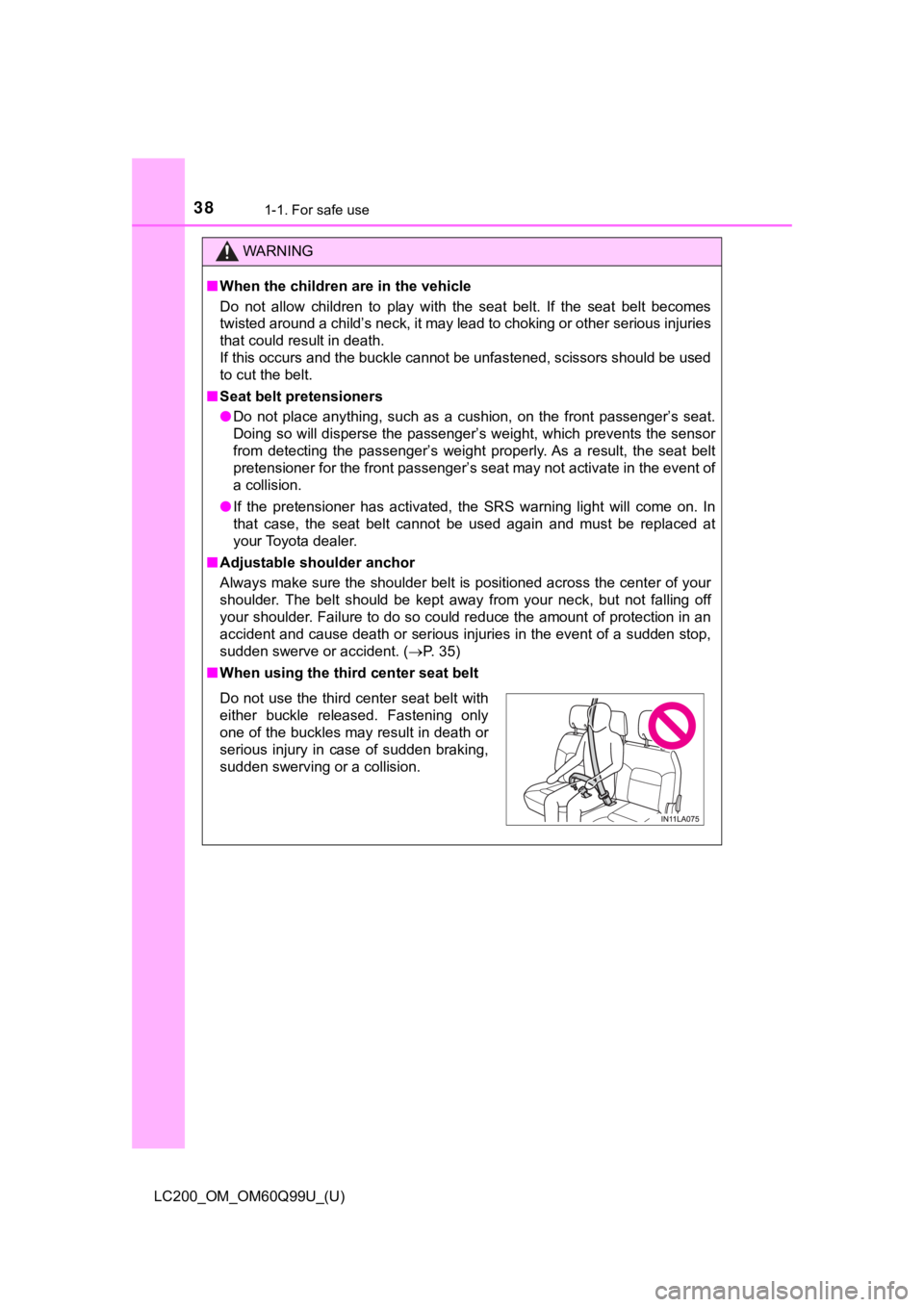
■ When using the third center seat belt
Do not use the third center seat belt with
either buckle released. Fastening only
one of the buckles may result in death or
serious injury in case of sudden braking,
sudden swerving or a collision.
Page 42 of 624
421-1. For safe use
LC200_OM_OM60Q99U_(U)
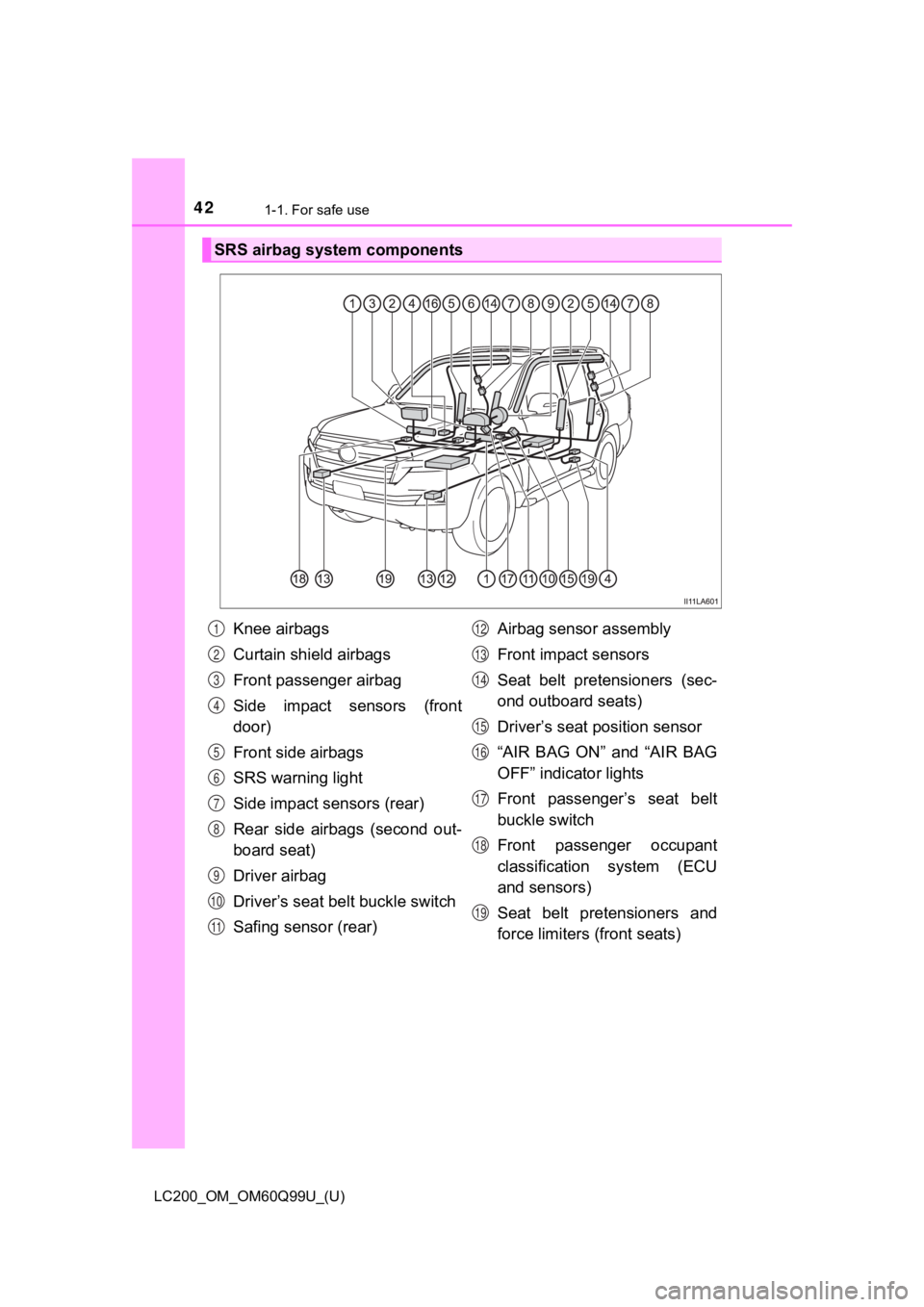
SRS airbag system components
Knee airbags
Curtain shield airbags
Front passenger airbag
Side impact sensors (front
door)
Front side airbags
SRS warning light
Side impact sensors (rear)
Rear side airbags (second out-
board seat)
Driver airbag
Driver’s seat belt buckle switch
Safing sensor (rear)Airbag sensor assembly
Front impact sensors
Seat belt pretensioners (sec-
ond outboard seats)
Driver’s seat position sensor
“AIR BAG ON” and “AIR BAG
OFF” indicator lights
Front passenger’s seat belt
buckle switch
Front passenger occupant
classification system (ECU
and sensors)
Seat belt pretensioners and
force limiters (front seats)1
2
3
4
5
6
7
8
9
10
11
12
13
14
15
16
17
18
19
Page 43 of 624

431-1. For safe use
LC200_OM_OM60Q99U_(U)
1
For safety and security
Your vehicle is equipped with ADVANCED AIRBAGS designed based
on the US motor vehicle safety standards (FMVSS208). The airbag
sensor assembly (ECU) controls airbag deployment based on infor-
mation obtained from the sensors etc. shown in the system compo -
nents diagram above. This informat ion includes crash severity and
occupant information. As the airbags deploy, a chemical reactio n in
the inflators quickly fills the airbags with non-toxic gas to h elp restrain
the motion of t he occupants.
WARNING
■SRS airbag precautions
Observe the following precautions regarding the SRS airbags.
Failure to do so may cause death or serious injury.
● The driver and all passengers in the vehicle must wear their se at belts
properly.
The SRS airbags are supplemental devices to be used with the se at belts.
● The SRS driver airbag deploys with considerable force, and can cause
death or serious injury especially if the driver is very close to the airbag.
The National Highway Traffic Safety Administration (NHTSA) advi ses:
Since the risk zone for the driver’s airbag is the first 2 - 3 in. (50 - 75 mm)
of inflation, placing yourself 10 in. (250 mm) from your driver airbag pro-
vides you with a clear margin of safety. This distance is measured from
the center of the steering wheel to your breastbone. If you sit less than 10
in. (250 mm) away now, you can change your driving position in several
ways:
• Move your seat to the rear as far as you can while still reach ing the ped-
als comfortably.
• Slightly recline the back of the seat. Although vehicle design s vary,
many drivers can achieve the 10 in. (250 mm) distance, even wit h the
driver seat all the way forward, simply by reclining the back o f the seat
somewhat. If reclining the back of your seat makes it hard to s ee the
road, raise yourself by using a firm, non-slippery cushion, or raise the
seat if your vehicle has that feature.
• If your steering wheel is adjustable, tilt it downward. This points the air-
bag toward your chest instead of your head and neck.
The seat should be adjusted as recommended by NHTSA above, whil e
still maintaining control of the foot pedals, steering wheel, and your view
of the instrument panel controls.
Page 46 of 624

461-1. For safe use
LC200_OM_OM60Q99U_(U)
WARNING
■SRS airbag precautions
● Do not hang coat hangers or other hard objects on the coat hook s. All of
these items could become projectiles and may cause death or ser ious
injury, should the SRS curtain shield airbags deploy.
● If the vinyl cover is put on the area where the SRS knee airbag will deploy,
be sure to remove it.
● Do not use seat accessories which cover the parts where the SRS side
airbags inflate as they may interfere with inflation of the air bags. Such
accessories may prevent the side airbags from activating correc tly, disable
the system or cause the side airbags to inflate accidentally, r esulting in
death or serious injury.
● Do not strike or apply significant levels of force to the area of the SRS air-
bag components.
Doing so can cause the SRS airbags to malfunction.
● Do not touch any of the component parts immediately after the S RS air-
bags have deployed (inflated) as they may be hot.
● If breathing becomes difficult after the SRS airbags have deplo yed, open a
door or window to allow fresh air in, or leave the vehicle if i t is safe to do
so. Wash off any residue as soon as possible to prevent skin ir ritation.
● If the areas where the SRS airbags are stored, such as the steering wheel
pad and front and rear pillar garnishes, are damaged or cracked , have
them replaced by your Toyota dealer.
● Do not place anything, such as a cushion, on the front passenger’s seat.
Doing so will disperse the passenger’s weight, which prevents t he sensor
from detecting the passenger’s weight properly. As a result, th e SRS front
airbags for the front passenger may not deploy in the event of a collision.
●Do not attach anything to areas such as
a door, windshield glass, side door
glass, front or rear pillars, roof side rail
and assist grip.
Page 114 of 624
114
LC200_OM_OM60Q99U_(U)
3-2. Opening, closing and locking the doors
Side doors
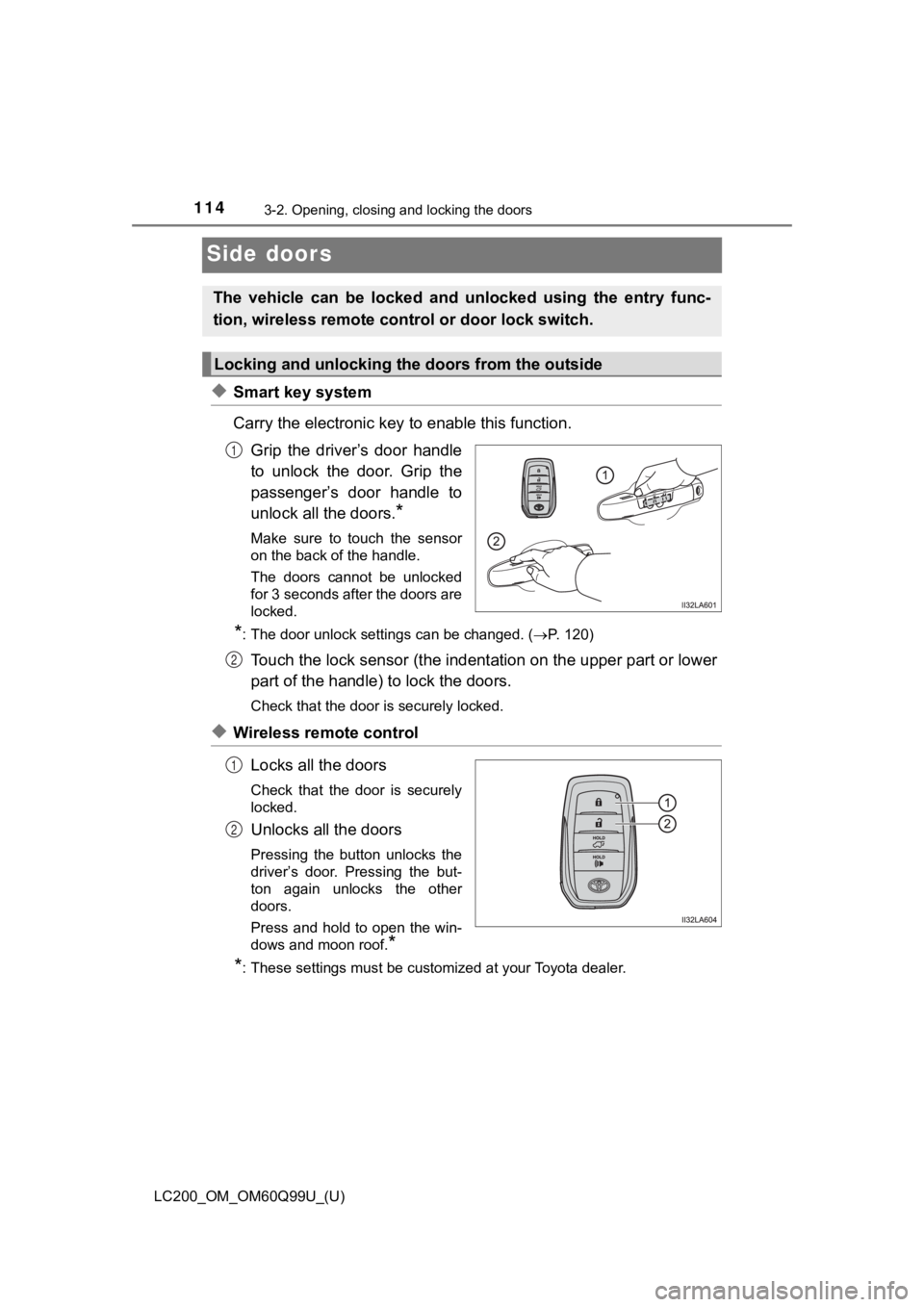
◆Smart key system
Carry the electronic key to enable this function.
Grip the driver’s door handle
to unlock the door. Grip the
passenger’s door handle to
unlock all the doors.
*
Make sure to touch the sensor
on the back of the handle.
The doors cannot be unlocked
for 3 seconds after the doors are
locked.
*: The door unlock settings can be changed. ( P. 120)
Touch the lock sensor (the indentation on the upper part or lower
part of the handle) to lock the doors.
Check that the door is securely locked.
◆Wireless remote control
Locks all the doors
Check that the door is securely
locked.
Unlocks all the doors
Pressing the button unlocks the
driver’s door. Pressing the but-
ton again unlocks the other
doors.
Press and hold to open the win-
dows and moon roof.
*
*
: These settings must be customized at your Toyota dealer.
The vehicle can be locked and unlocked using the entry func-
tion, wireless remote cont rol or door lock switch.
Locking and unlocking the doors from the outside
1
2
1
2
Page 115 of 624
LC200_OM_OM60Q99U_(U)
1153-2. Opening, closing and locking the doors
3
Operation of each component
■Operation signals
Doors: A buzzer sounds and the emergency flashers flash to indi cate that the
doors have been locked/unlocked. (Locked: once; Unlocked: twice)
Windows and moon roof: A buzzer sounds to indicate that the win dows and
moon roof are operating.
■ Security feature
If a door is not opened within approximately 60 seconds after t he vehicle is
unlocked, the security feature automatically locks the vehicle again.
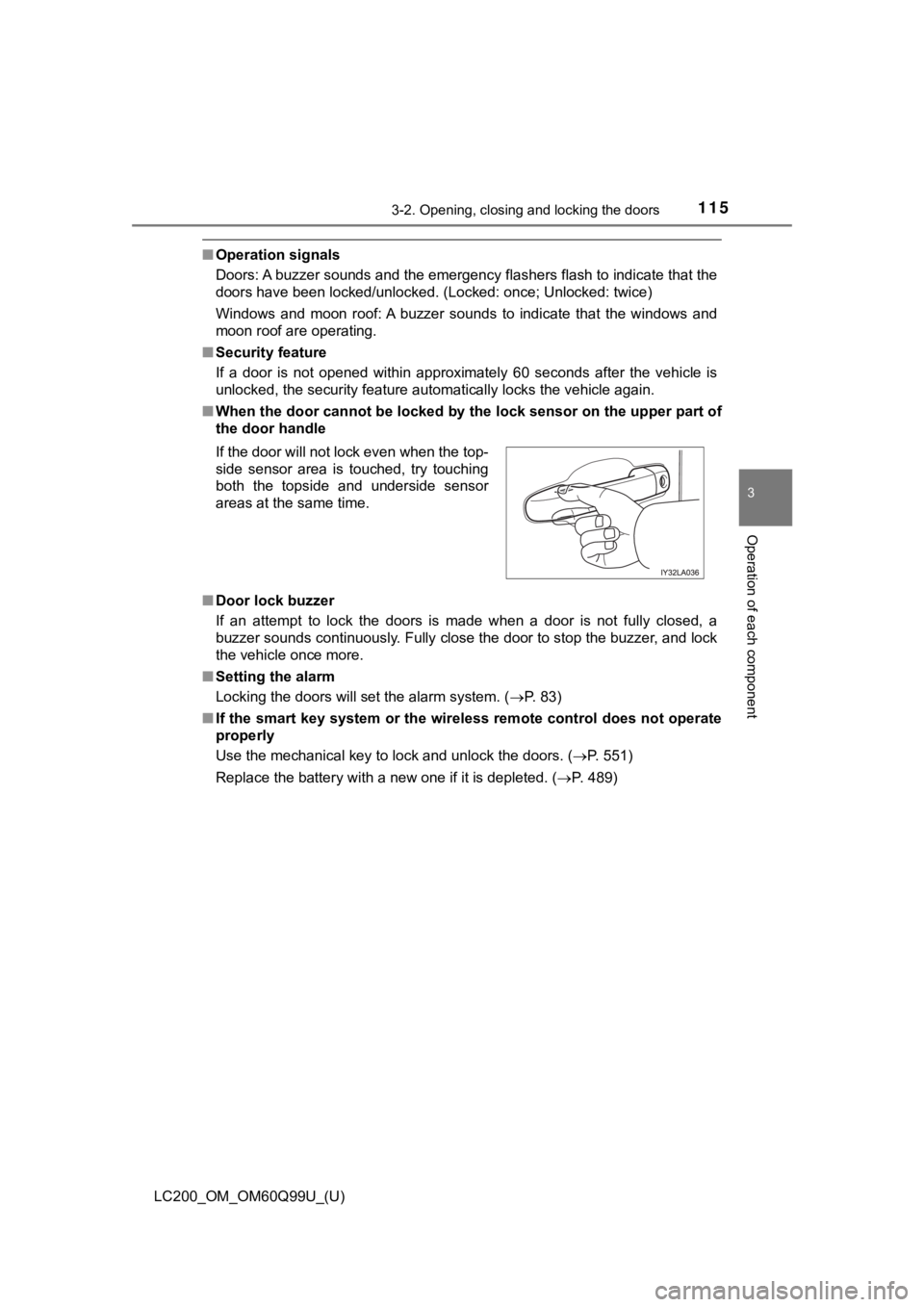
■ When the door cannot be locked by the lock sensor on the upper part of
the door handle
■ Door lock buzzer
If an attempt to lock the doors is made when a door is not full y closed, a
buzzer sounds continuously. Fully close the door to stop the bu zzer, and lock
the vehicle once more.
■ Setting the alarm
Locking the doors will set the alarm system. ( P. 83)
■ If the smart key system or the wireless remote control does not operate
properly
Use the mechanical key to lock and unlock the doors. ( P. 551)
Replace the battery with a new one if it is depleted. ( P. 489)
If the door will not lock even when the top-
side sensor area is touched, try touching
both the topside and underside sensor
areas at the same time.
Page 128 of 624

128
LC200_OM_OM60Q99U_(U)
3-2. Opening, closing and locking the doors
■Back door reserve lock function ( vehicles with power back door)
This function is a function which reserves locking of all doors , beforehand,
when the back door is open. When the following procedure is per formed, all
the doors except the back door are locked and then back door wi ll also be
locked at the same time it is closed.
Close all doors, except the back door.
Perform any of the following during the automatic closing opera tion of the
back door.
• Press the lock button on the wireless remote control. ( P. 110)
• Touch the lock sensor on the side door handle with carrying th e electronic
key on your person. ( P. 114)
Also, if the back door does not fully close due to the operatio n of the jam
protection function, etc., while the back door is automatically closing after a
reserve lock operation is performed, the reserve lock function is canceled
and all the doors will unlock.
■ Customization
Settings (e.g. switch operation) can be changed.
(Customizable features P. 586)
WARNING
■While driving
● Keep the back door closed while driving.
If the back door is left open, it may hit near-by objects while driving or lug-
gage may be unexpectedly thrown out, causing an accident.
In addition, exhaust gases may enter the vehicle, causing death or a seri-
ous health hazard. Make sure to close the back door before driv ing.
● Before driving the vehicle, make sure that the back door is fully closed. If
the back door is not fully closed, it may open unexpectedly whi le driving,
causing an accident.
● Never let anyone sit in the luggage compartment. In the event o f sudden
braking, sudden swerving or a collision, they are susceptible t o death or
serious injury.
■ When children are in the vehicle
Observe the following precautions.
Failure to do so may result in death or serious injury.
● Do not allow children to play in the luggage compartment.
If a child is accidentally locked in the luggage compartment, they could
have heat exhaustion or other injuries.
● Do not allow a child to open or close the back door.
Doing so may cause the back door to move unexpectedly, or cause the
child’s hands, head, or neck to be caught by the closing back d oor.
1
2
Page 133 of 624
LC200_OM_OM60Q99U_(U)
1333-2. Opening, closing and locking the doors
3
Operation of each component
NOTICE
■Back door damper stays
The back door is equipped with damper stays that hold the back door in
place.
Observe the following precautions.
Failure to do so may cause damage to the back door damper stay, resulting
in malfunction.
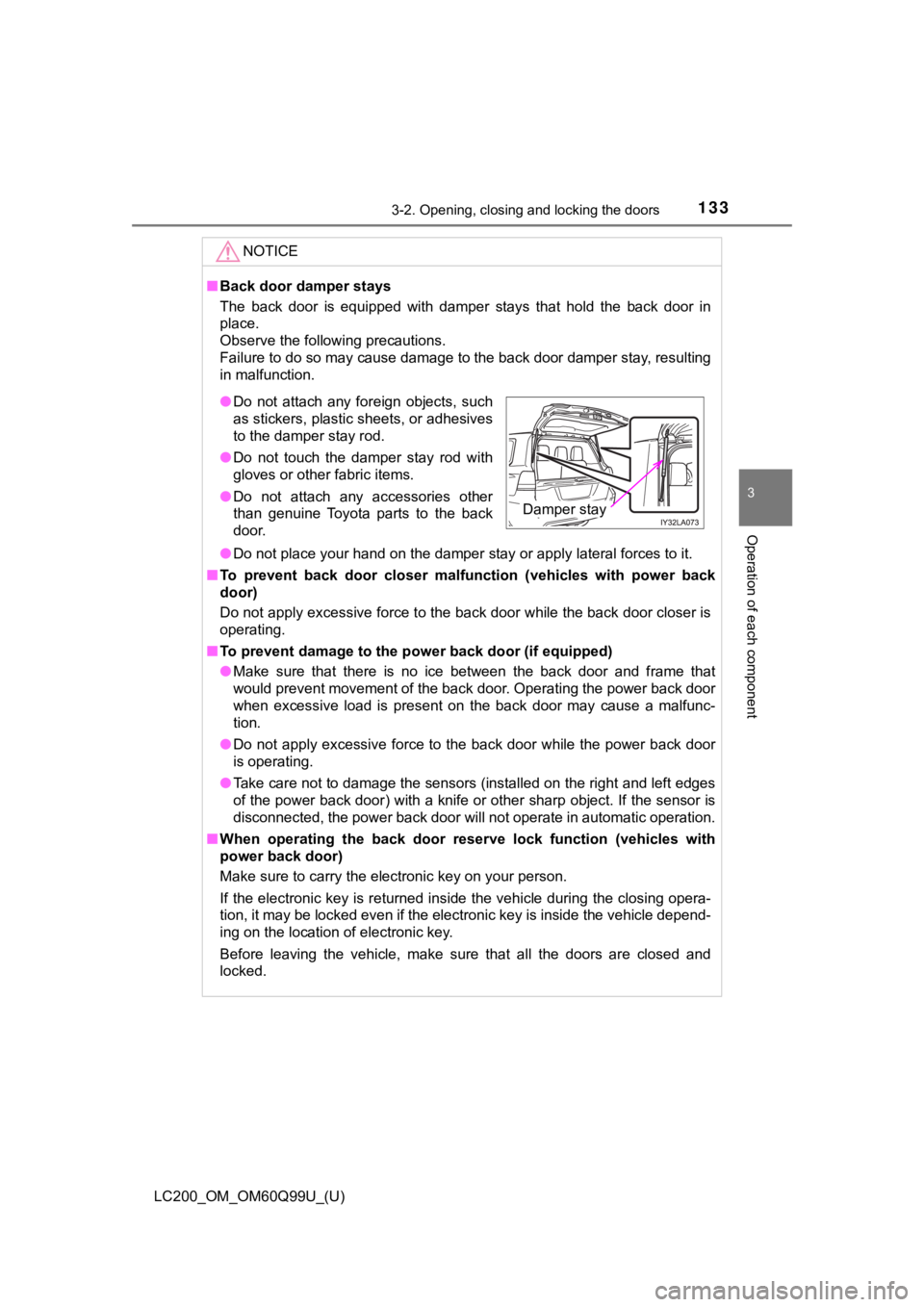
● Do not place your hand on the damper stay or apply lateral forc es to it.
■ To prevent back door closer malfu nction (vehicles with power back
door)
Do not apply excessive force to the back door while the back door closer is
operating.
■ To prevent damage to the po wer back door (if equipped)
● Make sure that there is no ice between the back door and frame that
would prevent movement of the back door. Operating the power ba ck door
when excessive load is present on the back door may cause a mal func-
tion.
● Do not apply excessive force to the back door while the power b ack door
is operating.
● Take care not to damage the sensors (installed on the right and left edges
of the power back door) with a knife or other sharp object. If the sensor is
disconnected, the power back door will not operate in automatic operation.
■ When operating the back door r eserve lock function (vehicles wi th
power back door)
Make sure to carry the electronic key on your person.
If the electronic key is returned inside the vehicle during the closing opera-
tion, it may be locked even if the electronic key is inside the vehicle depend-
ing on the location of electronic key.
Before leaving the vehicle, make sure that all the doors are closed and
locked.
● Do not attach any foreign objects, such
as stickers, plastic sheets, or adhesives
to the damper stay rod.
● Do not touch the damper stay rod with
gloves or other fabric items.
● Do not attach any accessories other
than genuine Toyota parts to the back
door.
Damper stay
Page 137 of 624
LC200_OM_OM60Q99U_(U)
1373-2. Opening, closing and locking the doors
3
Operation of each component
●When carrying the electronic key together with the following devices that
emit radio waves
• When carrying a portable radio, cellular phone, cordless phone or other
wireless communication device
• Another vehicle’s electronic key or a wireless key that emits radio waves
• Personal computers or personal digital assistants (PDAs)
• Digital audio players
• Portable game systems
● If window tint with a metallic content or metallic objects are attached to the
rear window
● When the electronic key is placed near a battery charger or ele ctronic
devices
■ Note for the entry function
●Even when the electronic key is within the effective range (det ection areas),
the system may not operate properly in the following cases:
• The electronic key is too close to the window or outside door handle, near
the ground, or in a high place when the doors are locked or unl ocked.
• The electronic key is on the instrument panel or floor, or in the door pock-
ets or glove box when the engine is started or engine switch mo des are
changed.
● Do not leave the electronic key on top of the instrument panel or near the
door pockets when exiting the vehicle. Depending on the radio w ave recep-
tion conditions, it may be detected by the antenna outside the cabin and the
doors will become lockable from the outside, possibly trapping the electronic
key inside the vehicle.
● As long as the electronic key is within the effective range, th e doors may be
locked or unlocked by anyone. However, only the doors detecting the elec-
tronic key can be used to unlock the vehicle.
● Even if the electronic key is not inside the vehicle, it may be possible to start
the engine if the electronic key is near the window.
● The doors may unlock or lock if a large amount of water splashe s on the
door handle, such as in the rain or in a car wash, when the electronic key is
within the effective range. (The doors will automatically be lo cked after
approximately 60 seconds if the doors are not opened and closed.)
● Touching the door lock or unlock sensor while wearing gloves ma y prevent
lock or unlock operation.
● If the wireless remote control is used to lock the doors when t he electronic
key is near the vehicle, there is a possibility that the door m ay not be
unlocked by the entry function. (Use the wireless remote contro l to unlock
the doors.)
● When the lock operation is performed using the lock sensor, rec ognition sig-
nals will be shown up to two consecutive times. After this, no recognition
signals will be given.
Page 138 of 624

138
LC200_OM_OM60Q99U_(U)
3-2. Opening, closing and locking the doors
●If the door handle becomes wet while the electronic key is with in the effec-
tive range, the door may lock and unlock repeatedly. In this ca se, follow the
following correction procedures to wash the vehicle.
• Place the electronic key in a location 6 ft. (2 m) or more awa y from the
vehicle. (Take care to ensure that the key is not stolen.)
• Set electronic key to battery-saving mode to disable the smart key sys-
tem. ( P. 136)
● If the electronic key is inside the vehicle and a door handle b ecomes wet
during a car wash, a message may be shown on the multi-informat ion dis-
play and a buzzer will sound outside the vehicle. To turn off t he alarm, lock
all the doors.
● The lock sensor may not work properly if it comes into contact with ice,
snow, mud, etc. Clean the lock sensor and attempt to operate it again, or
use the lock sensor on the lower part of the door handle.
● If there is another electronic key in the detection area, it ma y take slightly
longer to unlock the doors after the door handle is gripped or back door
unlock switch is pressed.
● A sudden approach to the effective range or door handle may prevent the
doors from being unlocked. In this case, return the door handle to the origi-
nal position and check that the doors unlock before pulling the door handle
again.
■ When the vehicle is not driven for extended periods
●To prevent theft of the vehicle, do not leave the electronic ke y within 6 ft.
(2 m) of the vehicle.
● The smart key system can be deactivated in advance. ( P. 586)
■ To operate the system properly
Make sure to carry the electronic key when operating the system. Do not get
the electronic key too close to the vehicle when operating the system from the
outside of the vehicle.
Depending on the position and holding condition of the electron ic key, the key
may not be detected correctly and the system may not operate pr operly. (The
alarm may go off accidentally, or the door lock prevention func tion may not
operate.)