air condition TOYOTA LAND CRUISER 2020 Owners Manual (in English)
[x] Cancel search | Manufacturer: TOYOTA, Model Year: 2020, Model line: LAND CRUISER, Model: TOYOTA LAND CRUISER 2020Pages: 628, PDF Size: 13.41 MB
Page 4 of 628

TABLE OF CONTENTS4
LC200_OM_OM60R53U_(U)5-1. Using the air conditioning
system and defogger
Front automatic air conditioning system ........ 390
Rear air conditioning system............................. 401
Heated steering wheel/ seat heaters/
seat ventilators ................ 405
5-2. Using the interior lights Interior lights list ................ 409• Interior lights ................. 410
• Personal lights .............. 411
5-3. Using the storage features List of storage features...... 412• Glove box...................... 413
• Console box .................. 414
• Overhead console ......... 415
• Cup holders .................. 416
• Bottle holders ................ 418
• Card holders ................. 419
• Auxiliary boxes .............. 419
Luggage compartment features ........................... 420 5-4. Using the other interior
features
Other interior features........ 423 • Cool box ........................ 423
• Sun visors ..................... 425
• Vanity mirror .................. 425
• Clock ............................. 426
• Outside temperature
display ........................... 426
• Power outlets ................ 427
• Wireless charger ........... 429
• Armrest.......................... 437
• Coat hooks .................... 437
• Assist grips .................... 438
Garage door opener .......... 439
5Interior features
Page 5 of 628
5
1
8 7
6
5
4
3
2
LC200_OM_OM60R53U_(U)
9
6-1. Maintenance and careCleaning and protecting the vehicle exterior .......... 448
Cleaning and protecting the vehicle interior ........... 452
6-2. Maintenance Maintenance requirements ................... 455
General maintenance ........ 458
Emission inspection and maintenance (I/M)
programs ......................... 461
6-3. Do-it-yourself maintenance Do-it-yourself service precautions ..................... 462
Hood.................................. 464
Engine compartment ......... 465
Tires .................................. 478
Tire inflation pressure........ 487
Wheels .............................. 490
Air conditioning filter .......... 492
Electronic key battery ........ 494
Checking and replacing fuses ............................... 496
Headlight aim .................... 500
Light bulbs ......................... 502 7-1. Essential information
Emergency flashers ........... 514
If your vehicle has to be stopped in
an emergency.................. 515
If the vehicle is trapped in rising water .................. 516
7-2. Steps to take in an emergency
If your vehicle needs to be towed ...................... 517
If you think something is wrong............................... 523
Fuel pump shut off system ............................. 524
If a warning light turns on or a warning buzzer
sounds ............................. 525
If a warning message is displayed ......................... 534
If you have a flat tire .......... 539
If the engine will not start ................................. 553
If the electronic key does not operate properly ........ 555
If the vehicle battery is discharged ....................... 558
If your vehicle overheats.... 561
If the vehicle becomes stuck ................................ 564
6Maintenance and care7When trouble arises
Page 19 of 628
19Pictorial index
LC200_OM_OM60R53U_(U)Multi-information display . . . . . . . . . . . . . . . . . . . . . . . . . . . . P. 97
Display . . . . . . . . . . . . . . . . . . . . . . . . . . . . . . . . . . . . . . . . . . . . P. 97
When the warning messages are displayed . . . . . . . . . . . . . . P. 534
Parking brake . . . . . . . . . . . . . . . . . . . . . . . . . . . . . . . . . . . . . P. 221
Applying/releasing . . . . . . . . . . . . . . . . . . . . . . . . . . . . . . . . . . P. 221
Precautions against winter season . . . . . . . . . . . . . . . . . . . . . P. 386
Warning buzzer/message . . . . . . . . . . . . . . . . . . . . . . . . P. 221, 534
Turn signal lever . . . . . . . . . . . . . . . . . . . . . . . . . . . . . . . . . . P. 220
Headlight switch . . . . . . . . . . . . . . . . . . . . . . . . . . . . . . . . . . P. 222
Headlights/parking lights/tail lights/daytime running lights . .
. . P. 222
Fog lights . . . . . . . . . . . . . . . . . . . . . . . . . . . . . . . . . . . . . . . . . P. 231
Windshield wiper and washer switch . . . . . . . . . . . . . . . . . P. 232
Rear window wiper and washer switch . . . . . . . . . . . . . . . . P. 236
Usage . . . . . . . . . . . . . . . . . . . . . . . . . . . . . . . . . . . . . . . P. 232, 236
Adding washer fluid . . . . . . . . . . . . . . . . . . . . . . . . . . . . . . . . . P. 477
Emergency flasher switch . . . . . . . . . . . . . . . . . . . . . . . . . . P. 514
Fuel filler door opener . . . . . . . . . . . . . . . . . . . . . . . . . . . . . . P. 241
Hood lock release lever. . . . . . . . . . . . . . . . . . . . . . . . . . . . . P. 464
Tilt and telescopic steering control switch . . . . . . . . . . . . . P. 157
Adjustment . . . . . . . . . . . . . . . . . . . . . . . . . . . . . . . . . . . . . . . . P. 157
Driving position memory . . . . . . . . . . . . . . . . . . . . . . . . . . . . . P. 150
Air conditioning system . . . . . . . . . . . . . . . . . . . . . . . . . . . . P. 390
Usage . . . . . . . . . . . . . . . . . . . . . . . . . . . . . . . . . . . . . . . . . . . P. 390
Rear window defogger . . . . . . . . . . . . . . . . . . . . . . . . . . . . . . . P. 396
Audio system
*
Navigation system*
*
: Refer to “NAVIGATION S YSTEM OWNER’S MANUAL”.
4
5
6
7
8
9
10
11
12
13
Page 24 of 628
24Pictorial index
LC200_OM_OM60R53U_(U)
■Interior
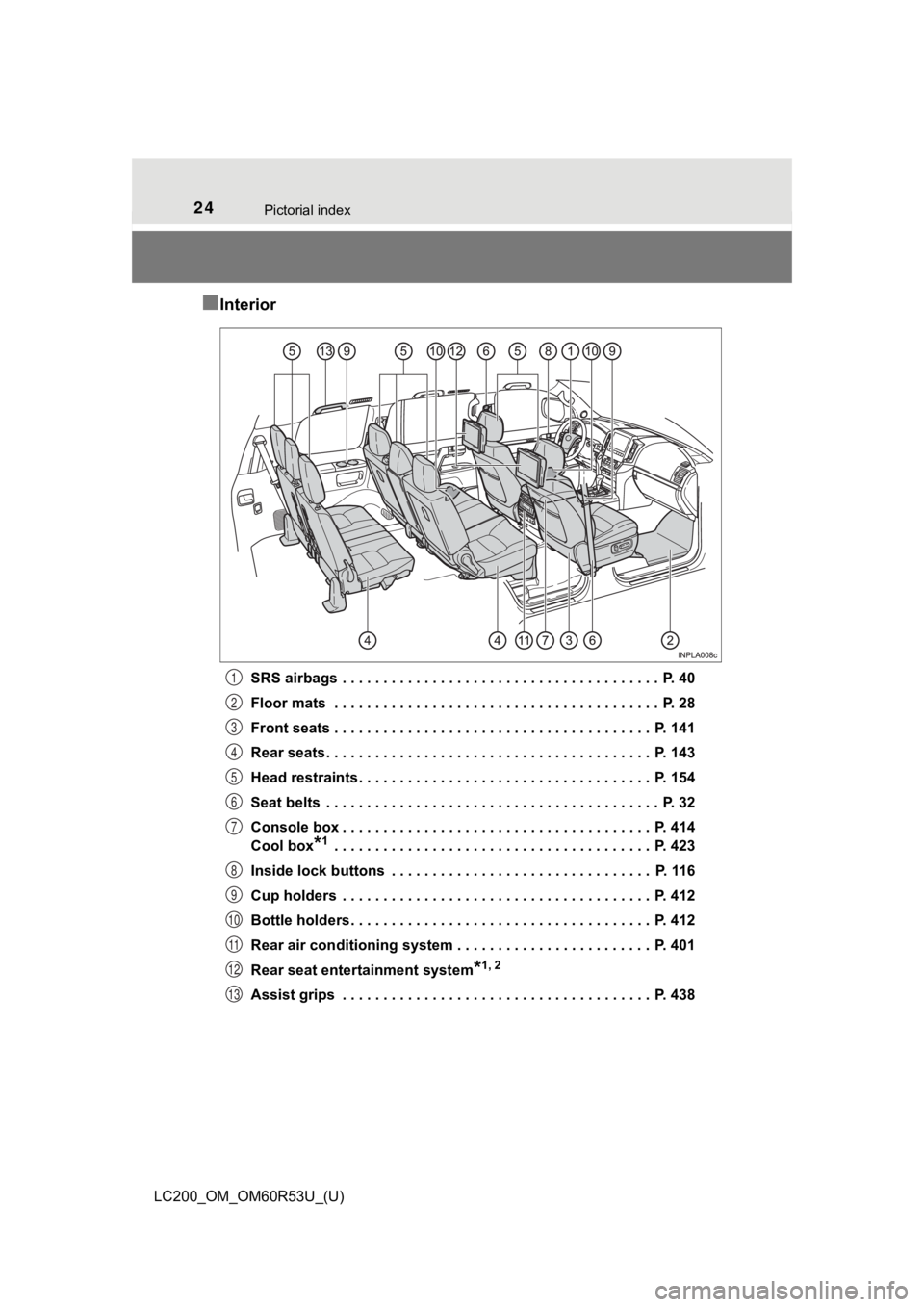
SRS airbags . . . . . . . . . . . . . . . . . . . . . . . . . . . . . . . . . . . . . . . P. 40
Floor mats . . . . . . . . . . . . . . . . . . . . . . . . . . . . . . . . . . . . . . . . P. 28
Front seats . . . . . . . . . . . . . . . . . . . . . . . . . . . . . . . . . . . . . . . P. 141
Rear seats . . . . . . . . . . . . . . . . . . . . . . . . . . . . . . . . . . . . . . . . P. 143
Head restraints . . . . . . . . . . . . . . . . . . . . . . . . . . . . . . . . . . . . P. 154
Seat belts . . . . . . . . . . . . . . . . . . . . . . . . . . . . . . . . . . . . . . . . . P. 32
Console box . . . . . . . . . . . . . . . . . . . . . . . . . . . . . . . . . . . . . . P. 414
Cool box
*1 . . . . . . . . . . . . . . . . . . . . . . . . . . . . . . . . . . . . . . . P. 423
Inside lock buttons . . . . . . . . . . . . . . . . . . . . . . . . . . . . . . . . P. 116
Cup holders . . . . . . . . . . . . . . . . . . . . . . . . . . . . . . . . . . . . . . P. 412
Bottle holders . . . . . . . . . . . . . . . . . . . . . . . . . . . . . . . . . . . . . P. 412
Rear air conditioning system . . . . . . . . . . . . . . . . . . . . . . . . P. 401
Rear seat entertainment system
*1, 2
Assist grips . . . . . . . . . . . . . . . . . . . . . . . . . . . . . . . . . . . . . . P. 438
1
2
3
4
5
6
7
8
9
10
11
12
13
Page 48 of 628
481-1. For safe use
LC200_OM_OM60R53U_(U)■
SRS airbag deployment condi tions (SRS front airbags)
● The SRS front airbags will deploy in the event of an impact tha t exceeds the
set threshold level (the level of force corresponding to an approximately 12 -
18 mph [20 - 30 km/h] frontal collision with a fixed wall that does not move or
deform).
However, this threshold velocity will be considerably higher in the following
situations:
• If the vehicle strikes an object, such as a parked vehicle or sign pole,
which can move or deform on impact
• If the vehicle is involved in an underride collision, such as a collision in
which the front of the vehicle “underrides”, or goes under, the bed of a
truck
● Depending on the type of collision, it is possible that only th e seat belt pre-
tensioners will activate.
● The SRS front airbags for the front passenger will not activate if there is no
passenger sitting in the front passenger seat. However, the SRS front air-
bags for the front passenger may deploy if luggage is put in the seat, even if
the seat is unoccupied.
■ SRS airbag deployment conditions (SRS side and curtain shield a irbags)
● The SRS side and curtain shield airbags will deploy in the even t of an
impact that exceeds the set threshold level (the level of force corresponding
to the impact force produced by an approximately 3300 lb. [1500 kg] vehicle
colliding with the vehicle cabin from a direction perpendicular to the vehicle
orientation at an approximate speed of 12 - 18 mph [20 - 30 km/ h]).
● The SRS curtain shield airbags will deploy in the event of vehi cle rollover.
● The SRS side and curtain shield airbags will deploy in the even t of a severe
frontal collision.
■ Conditions under which the SRS ai rbags may deploy (inflate), other than
a collision
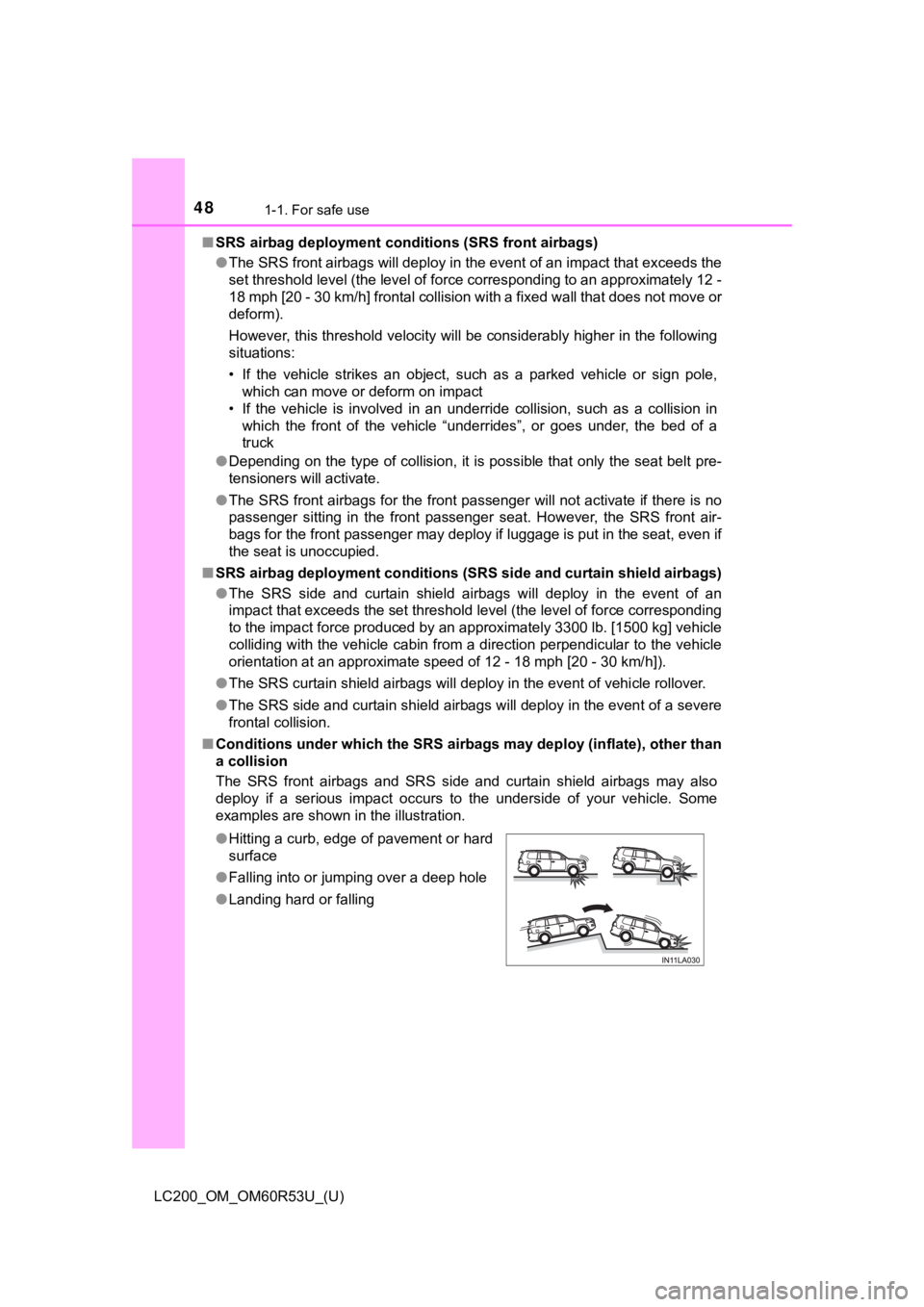
The SRS front airbags and SRS side and curtain shield airbags m ay also
deploy if a serious impact occurs to the underside of your vehi cle. Some
examples are shown in the illustration.
● Hitting a curb, edge of pavement or hard
surface
● Falling into or jumping over a deep hole
● Landing hard or falling
Page 52 of 628
521-1. For safe use
LC200_OM_OM60R53U_(U)
Front passenger occupant classification
system
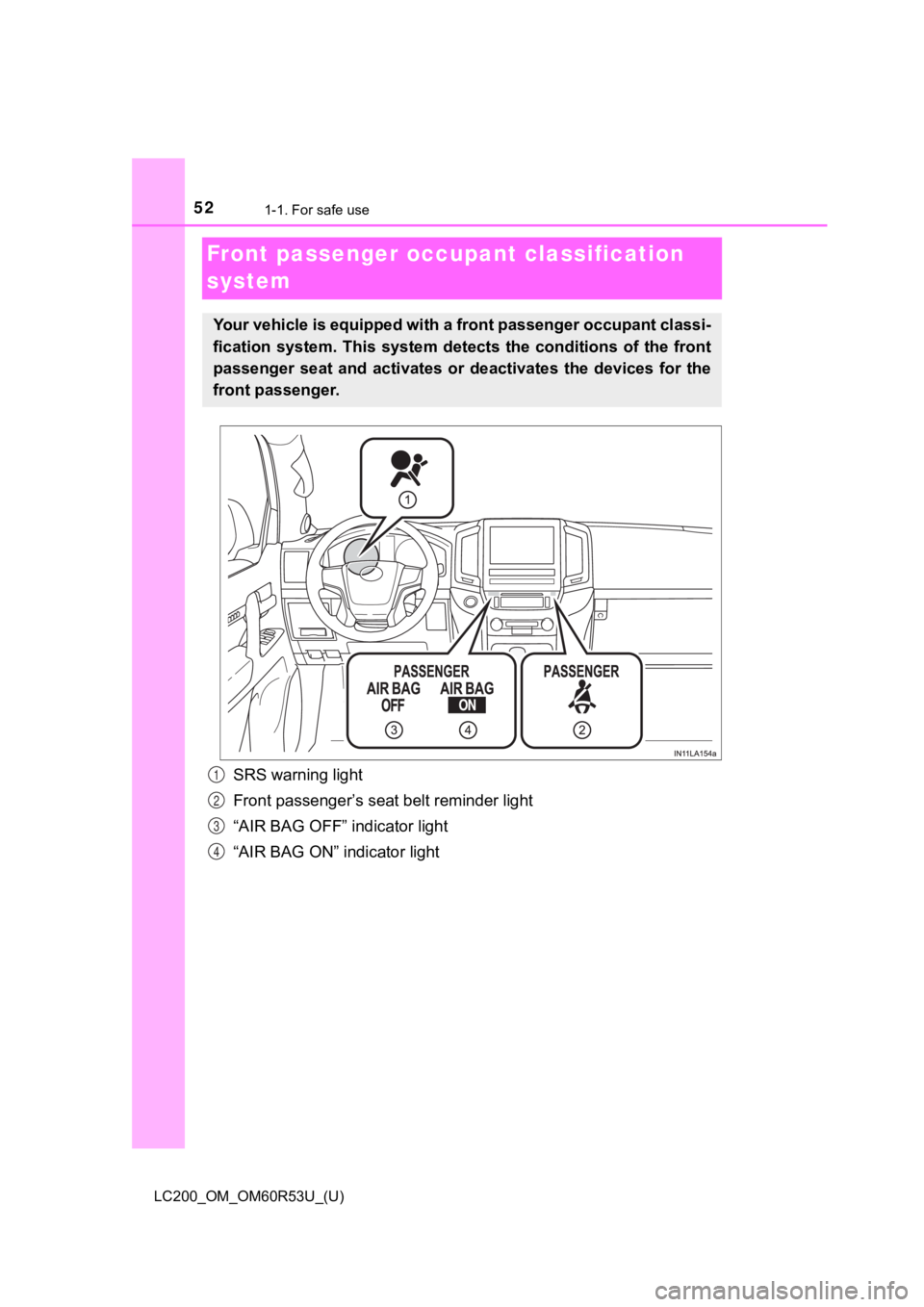
SRS warning light
Front passenger’s seat belt reminder light
“AIR BAG OFF” indicator light
“AIR BAG ON” indicator light
Your vehicle is equipped with a front passenger occupant classi -
fication system. This system det ects the conditions of the front
passenger seat and activates or deactivates the devices for the
front passenger.
1
2
3
4
Page 53 of 628
531-1. For safe use
LC200_OM_OM60R53U_(U)
1
For safety and security
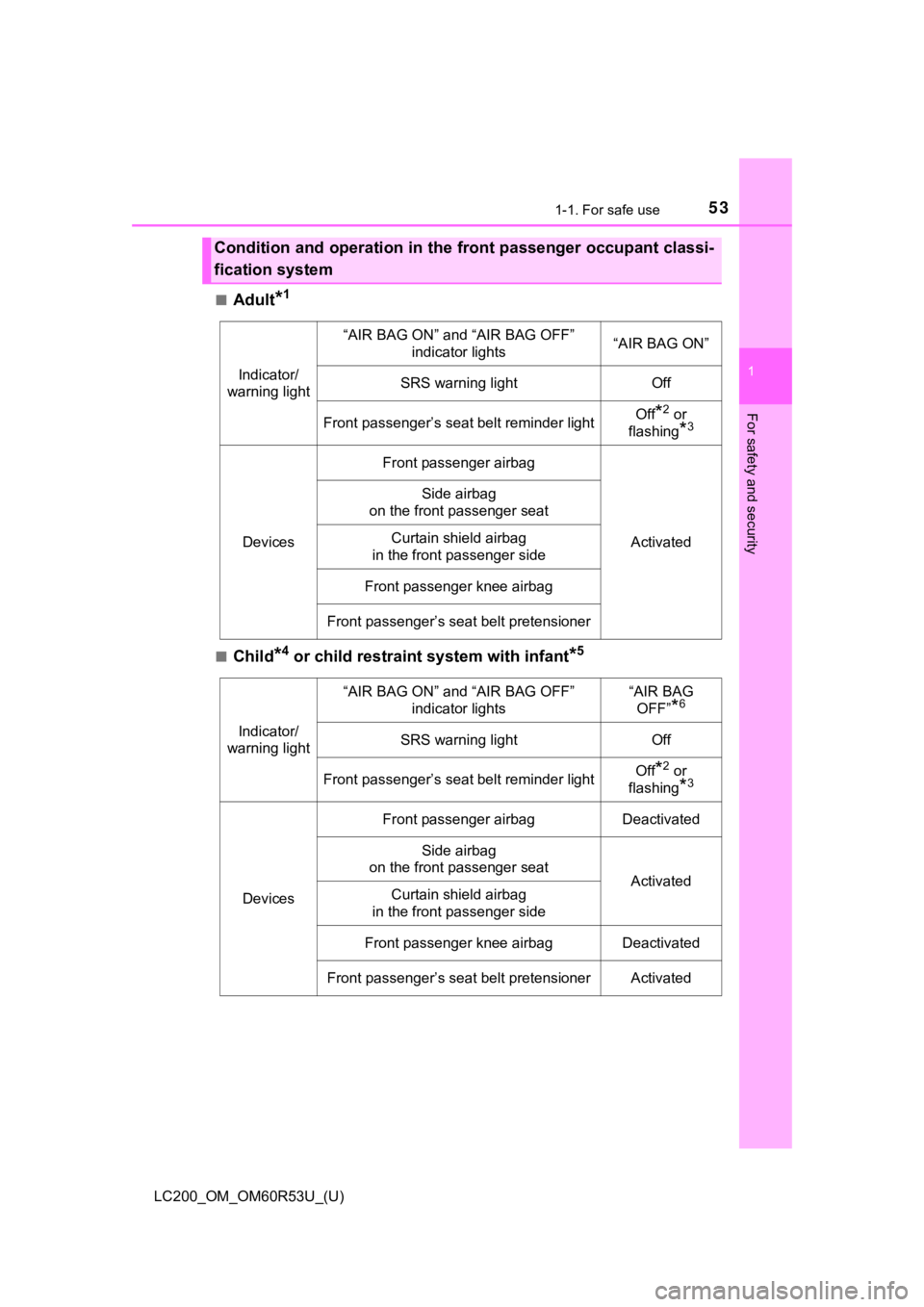
■Adult*1
■Child*4 or child restraint system with infant*5
Condition and operation in the front passenger occupant classi-
fication system
Indicator/
warning light
“AIR BAG ON” and “AIR BAG OFF” indicator lights“AIR BAG ON”
SRS warning lightOff
Front passenger’s seat belt reminder lightOff*2 or
flashing
*3
Devices
Front passenger airbag
Activated
Side airbag
on the front passenger seat
Curtain shield airbag
in the front passenger side
Front passenger knee airbag
Front passenger’s seat belt pretensioner
Indicator/
warning light
“AIR BAG ON” and “AIR BAG OFF” indicator lights“AIR BAG OFF”
*6
SRS warning lightOff
Front passenger’s seat belt reminder lightOff*2 or
flashing
*3
Devices
Front passenger airbagDeactivated
Side airbag
on the front passenger seat
ActivatedCurtain shield airbag
in the front passenger side
Front passenger knee airbagDeactivated
Front passenger’s seat belt pretensionerActivated
Page 77 of 628
771-2. Emergency assistance
LC200_OM_OM60R53U_(U)
1
For safety and security
●Automatic Collision Notification, Emergency Assistance and Stolen Vehicle
Location are available in the United States, including Hawaii a nd Alaska,
Puerto Rico and Canada, and Enhanced Roadside Assistance are av ailable
in the United States, Puerto Rico and Canada.
● Automatic Collision Notification, Emergency Assistance, Stolen Vehicle and
Enhanced Road Assistance are not available in the U.S. Virgin I slands.
For vehicles first sold in the U.S. Virgin Islands, no Safety Connect services will
function in or outside the U.S. Virgin Islands.
● Safety Connect services are not subject to section 255 of the T elecommuni-
cations Act and the device is not TTY compatible.
■ Languages
The Safety Connect response center will offer support in multip le languages.
The Safety Connect system will offer voice prompts in English, Spanish, and
French. Please indicate your language of choice when enrolling.
■ When contacting the response center
You may be unable to contact the response center if the network is busy.
■ Safety Connect backup battery depletion
An exclusive backup battery is built in to assist the Automatic Collision Notifi-
cation, which is activated when impact above a certain level is applied to the
vehicle, or when the airbags operate. This battery is a primary battery, and
cannot be recharged. The red LED indicator will flash to indica te that the bat-
tery should be replaced.
The backup battery will need to be replaced if the Automatic Co llision Notifi-
cation operates for 60 seconds or more. For replacement, consul t your Toy-
ota dealer.
When the engine switch is turned to IGNITION ON mode, the red i ndi-
cator light comes on for 2 seconds then turns off. Afterward, t he green
indicator light comes on, indicat ing that the service is active.
The following indicator light patterns indicate specific system usage
conditions:
● Green indicator light on = Active service
● Green indicator light flashing = Safety Connect call in process
● Red indicator light (except at vehicle start-up) = System malfunction
(contact your Toyota dealer)
● No indicator light (off) = Saf ety Connect service not active
Safety Connect LED light Indicators
Page 78 of 628

781-2. Emergency assistance
LC200_OM_OM60R53U_(U)■
Automatic Collision Notification
In case of either airbag deployme
nt or severe rear-end collision, the
system is designed to automatically call the response center. T he
responding agent receives the v ehicle’s location and attempts to
speak with the vehicl e occupants to assess the level of emergency.
If the occupants are unable to communicate, the agent automati-
cally treats the call as an emergency, contacts the nearest eme r-
gency services provider to descr ibe the situation, and requests that
assistance be sent to the location.
■Stolen Vehicle Location
If your vehicle is stolen, Safety Connect can work with local author-
ities to assist them in locating and recovering the vehicle. Af ter filing
a police report, call the Customer Experience Center at 1-800-3 31-
4331 in the United States, 1-877-8 55-8377 in Puerto Rico or 1-888-
869-6828 in Canada, and follow the prompts for Safety Connect t o
initiate this service.
In addition to assisting law enforcement with recovery of a sto len
vehicle, Safety-Connect-equipped vehicle location data may, und er
certain circumstances, be shared with third parties to locate y our
vehicle. Further information is a vailable at Toyota.com in the United
States, Toyotapr.com in Puerto Rico and Toyota.ca in Canada.
■Emergency Assistance Button (“SOS”)
In the event of an emergency on t he road, push the “SOS” button to
reach the Safety Connect respons e center. The answering agent
will determine your vehicle’s loca tion, assess the emergency, and
dispatch the necessary assistanc e required.
If you accidentally press the “SOS” button, tell the response-c enter
agent that you are not experiencing an emergency.
■
Roadside Assistance
Subscribers can press the “SOS” button to reach a Safety Connec t
response-center agent, who can he lp with a wide range of needs,
such as: towing, flat tire, fuel delivery, etc. For a description of the
Roadside Assistance services an d their limitations, please see the
Safety Connect Terms and Conditions, which are available at Toy -
ota.com in the United States, Toy otapr.com in Puerto Rico and Toy-
ota.ca in Canada.
Safety Connect services
Page 136 of 628
136
LC200_OM_OM60R53U_(U)
3-2. Opening, closing and locking the doors
■Battery-saving function
The battery-saving function will be activated in order to preve nt the electronic
key battery and the battery from being discharged while the veh icle is not in
operation for a long time.
● In the following situations, the smart key system may take some time to
unlock the doors.
• The electronic key has been left in an area of approximately 6 ft. (2 m) of
the outside of the vehicle for 10 minutes or longer.
• The smart key system has not been used for 5 days or longer.
● If the smart key system has not been used for 14 days or longer , the doors
cannot be unlocked at any doors except the driver’s door. In th is case, take
hold of the driver’s door handle, or use the wireless remote co ntrol or the
mechanical key, to unlock the doors.
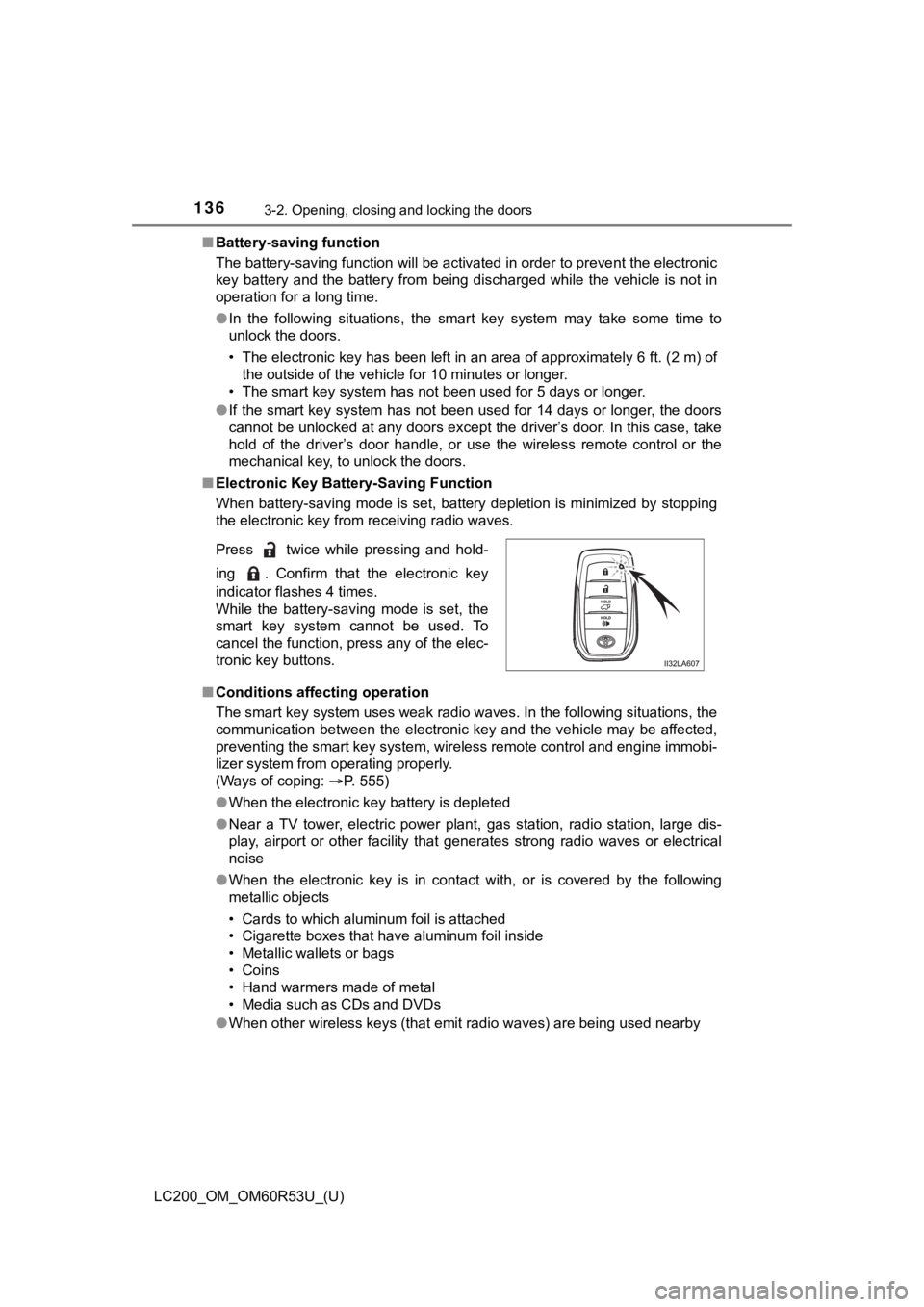
■ Electronic Key Battery-Saving Function
When battery-saving mode is set, battery depletion is minimized by stopping
the electronic key from receiving radio waves.
■ Conditions affecting operation
The smart key system uses weak radio waves. In the following si tuations, the
communication between the electronic key and the vehicle may be affected,
preventing the smart key system, wireless remote control and en gine immobi-
lizer system from operating properly.
(Ways of coping: P. 555)
● When the electronic key battery is depleted
● Near a TV tower, electric power plant, gas station, radio stati on, large dis-
play, airport or other facility that generates strong radio wav es or electrical
noise
● When the electronic key is in contact with, or is covered by the following
metallic objects
• Cards to which aluminum foil is attached
• Cigarette boxes that have aluminum foil inside
• Metallic wallets or bags
• Coins
• Hand warmers made of metal
• Media such as CDs and DVDs
● When other wireless keys (that emit radio waves) are being used nearby
Press twice while pressing and hold-
ing . Confirm that the electronic key
indicator flashes 4 times.
While the battery-saving mode is set, the
smart key system cannot be used. To
cancel the function, press any of the elec-
tronic key buttons.