change time TOYOTA LAND CRUISER 2021 Owners Manual (in English)
[x] Cancel search | Manufacturer: TOYOTA, Model Year: 2021, Model line: LAND CRUISER, Model: TOYOTA LAND CRUISER 2021Pages: 56, PDF Size: 3.5 MB
Page 2 of 56
LAND CRUISER 2021
This Quick Reference Guide is a summary of basic vehicle
operations. It contains brief descriptions of fundamental
operations so you can locate and use the vehicle’s main
equipment quickly and easily.
The Quick Reference Guide is not intended as a substitute for
the Owner’s Manual located in your vehicle’s glove box. We
strongly encourage you to review the Owner’s Manual and
supplementary manuals so you will have a better understanding
of your vehicle’s capabilities and limitations.
Your dealership and the entire staff of Toyota Motor North
America, Inc. wish you many years of satisfied driving in your
new Land Cruiser.
A word about safe vehicle operations
This Quick Reference Guide is not a full description of Land Cruiser
operations. Every Land Cruiser owner should review the Owner’s Manual\
that
accompanies this vehicle.
Pay special attention to the boxed information highlighted in color throughout
the Owner’s Manual. Each box contains safe operating instructions to \
help you
avoid injury or equipment malfunction.
All information in this Quick Reference Guide is current at the time of \
printing.
Toyota reserves the right to make changes at any time without notice.
Page 19 of 56
17
OVERVIEW
FEATURES & OPERATIONS
TOYOTA SAFETY SENSE
SAFETY & EMERGENCY FEATURES
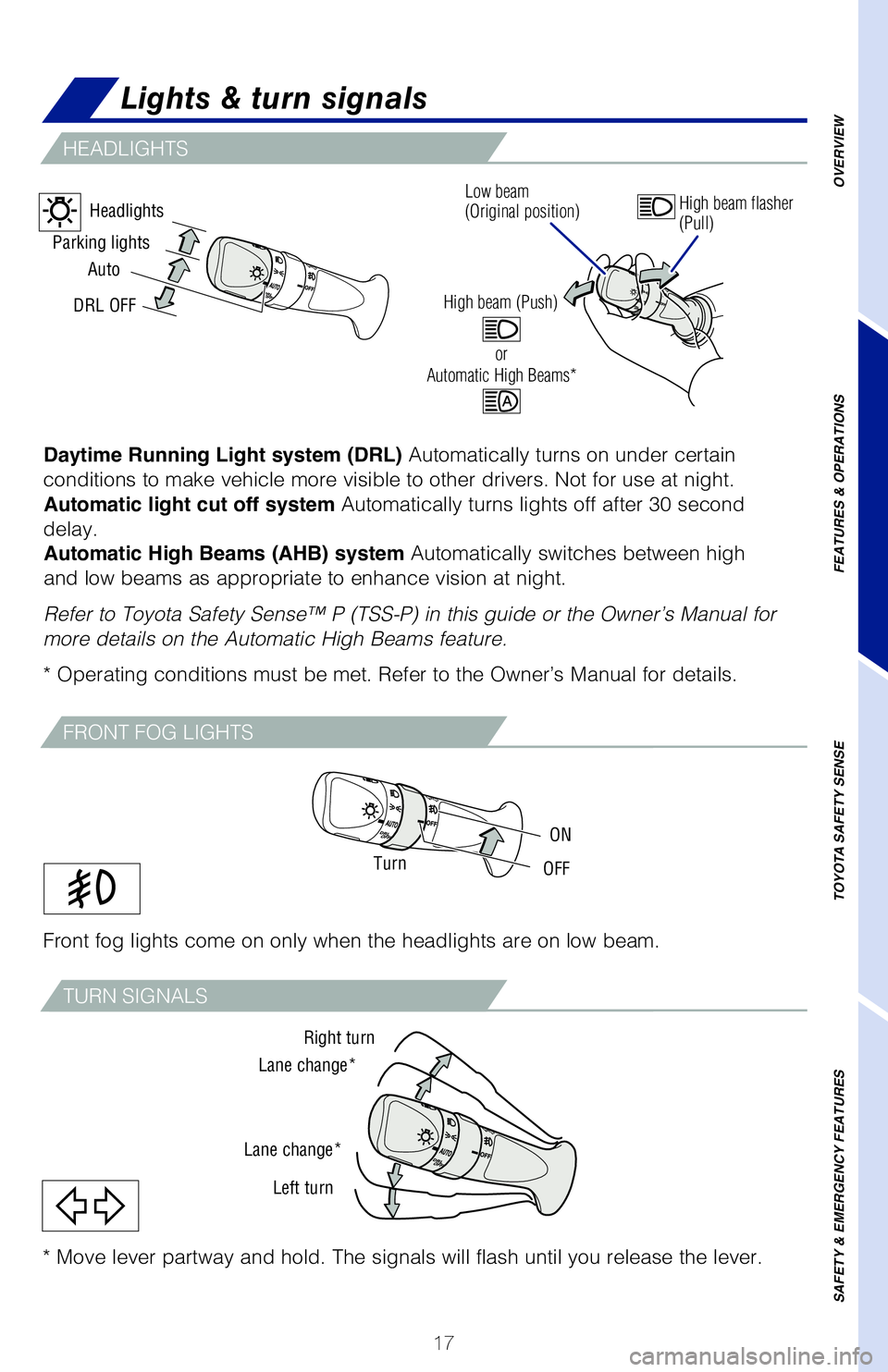
Daytime Running Light system (DRL) Automatically turns on under certain
conditions to make vehicle more visible to other drivers. Not for use at\
night. Automatic light cut off system Automatically turns lights off after 30 second
delay. Automatic High Beams (AHB) system Automatically switches between high
and low beams as appropriate to enhance vision at night.
Refer to Toyota Safety Sense™ P (TSS-P) in this guide or the Owner’\
s Manual for
more details on the Automatic High Beams feature.
* Operating conditions must be met. Refer to the Owner’s Manual for d\
etails.
Right turn
Lane change*
Lane change* Left turn
Auto
DRL OFF
Parking lights
Headlights
TurnOFF
ON
Front fog lights come on only when the headlights are on low beam.
Lights & turn signals
HEADLIGHTS
FRONT FOG LIGHTS
TURN SIGNALS
Low beam
(Original position)
High beam flasher
(Pull)
or
High beam (Push)Automatic High Beams*
* Move lever partway and hold. The signals will flash until you release \
the lever.
Page 23 of 56
 21
USB media port
Connecting a compatible device and cable into the USB media port will su\
pport
charging and music playback through the audio multimedia system.
AUX port
By inserting an AUX cable i")
21
USB media port
Connecting a compatible device and cable into the USB media port will su\
pport
charging and music playback through the audio multimedia system.
AUX port
By inserting an AUX cable into the AUX port, you can listen to music fro\
m a
portable audio device through the vehicle’s speaker system while in A\
UX mode.
OVERVIEW
FEATURES & OPERATIONS
TOYOTA SAFETY SENSE
SAFETY & EMERGENCY FEATURES
USB media/AUX port
Clock
1) Push “SETUP” button next to the screen.
2) Select “General” in the touch screen to access the general settings screen.
3) Select “Clock.”
4) Then select desired items to be reset.
Refer to the “Navigation System Owner’s Manual” for more detail\
s.
Select to change the time zone.
Select to set daylight saving
time ON/OFF/AUTO.
Select to set to automatic GPS
adjustment of clock.
Page 29 of 56
27
OVERVIEW
FEATURES & OPERATIONS
TOYOTA SAFETY SENSE
SAFETY & EMERGENCY FEATURES
Multi-terrain Select
Multi-terrain Monitor
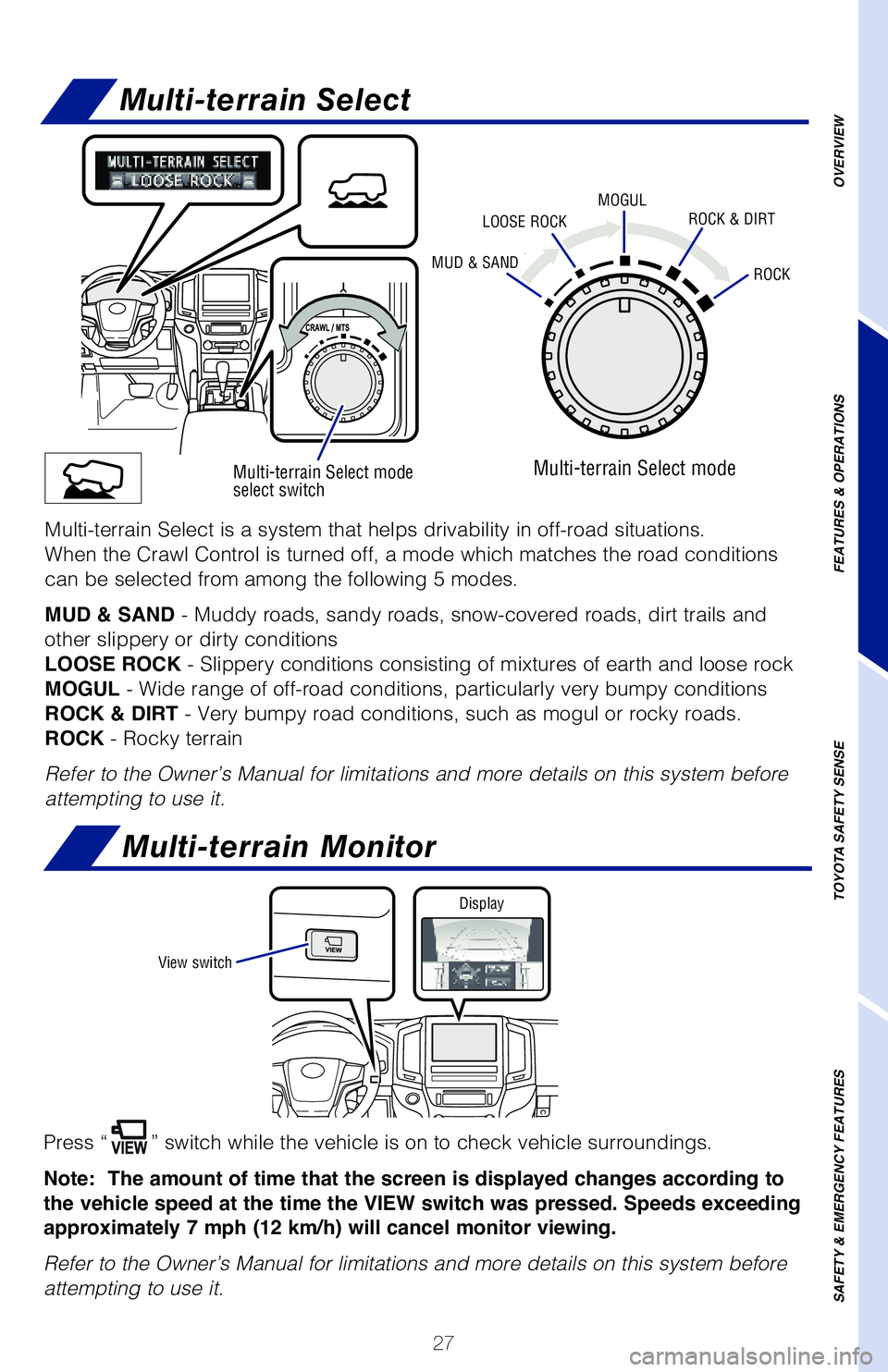
Press “” switch while the vehicle is on to check vehicle surroundings.
Note: The amount of time that the screen is displayed changes according to
the vehicle speed at the time the VIEW switch was pressed. Speeds exceeding
approximately 7 mph (12 km/h) will cancel monitor viewing.
Refer to the Owner’s Manual for limitations and more details on this \
system before
attempting to use it.
Multi-terrain Select mode
select switch
MUD & SANDROCK
MOGULLOOSE ROCKROCK & DIRT
Multi-terrain Select mode
Multi-terrain Select is a system that helps drivability in off-road situ\
ations.
When the Crawl Control is turned off, a mode which matches the road cond\
itions
can be selected from among the following 5 modes.
MUD & SAND - Muddy roads, sandy roads, snow-covered roads, dirt trails and
other slippery or dirty conditions
LOOSE ROCK - Slippery conditions consisting of mixtures of earth and loose rock
MOGUL - Wide range of off-road conditions, particularly very bumpy conditions\
ROCK & DIRT - Very bumpy road conditions, such as mogul or rocky roads.
ROCK - Rocky terrain
Refer to the Owner’s Manual for limitations and more details on this \
system before
attempting to use it.
View switch Display
Page 38 of 56
 36
TOYOTA SAFETY SENSE™
CHANGING PCS ALERT TIMING
Each time the Pre-Collision System switch is pressed, the response to th\
e warning
distance changes.Far
Middle
Near
Monocular camera sensor
Millim")
36
TOYOTA SAFETY SENSE™
CHANGING PCS ALERT TIMING
Each time the Pre-Collision System switch is pressed, the response to th\
e warning
distance changes.Far
Middle
Near
Monocular camera sensor
Millimeter
wave radar
As part of the Pre-Collision System, this function is also designed to f\
irst provide an
alert and then automatic braking if needed.
Refer to the Toyota Owner’s Manual for additional limitations and inf\
ormation.Under certain conditions, the PCS system included with the TSS-P package\
may
also help to detect a pedestrian in front of your vehicle using the forw\
ard-facing
camera and front grille-mounted radar. The forward-facing camera of PCS \
detects a
potential pedestrian based on size, profile, and motion of the detected \
pedestrian.
However, a pedestrian may not be detected depending on the conditions, i\
ncluding
the surrounding brightness and the motion, posture, size, and angle of t\
he potential
detected pedestrian, preventing the system from operating or engaging.
PCS PEDESTRIAN DETECTION
Page 44 of 56
42
LONG
(default setting) MIDDLESHORT
ADJUSTING DISTANCE
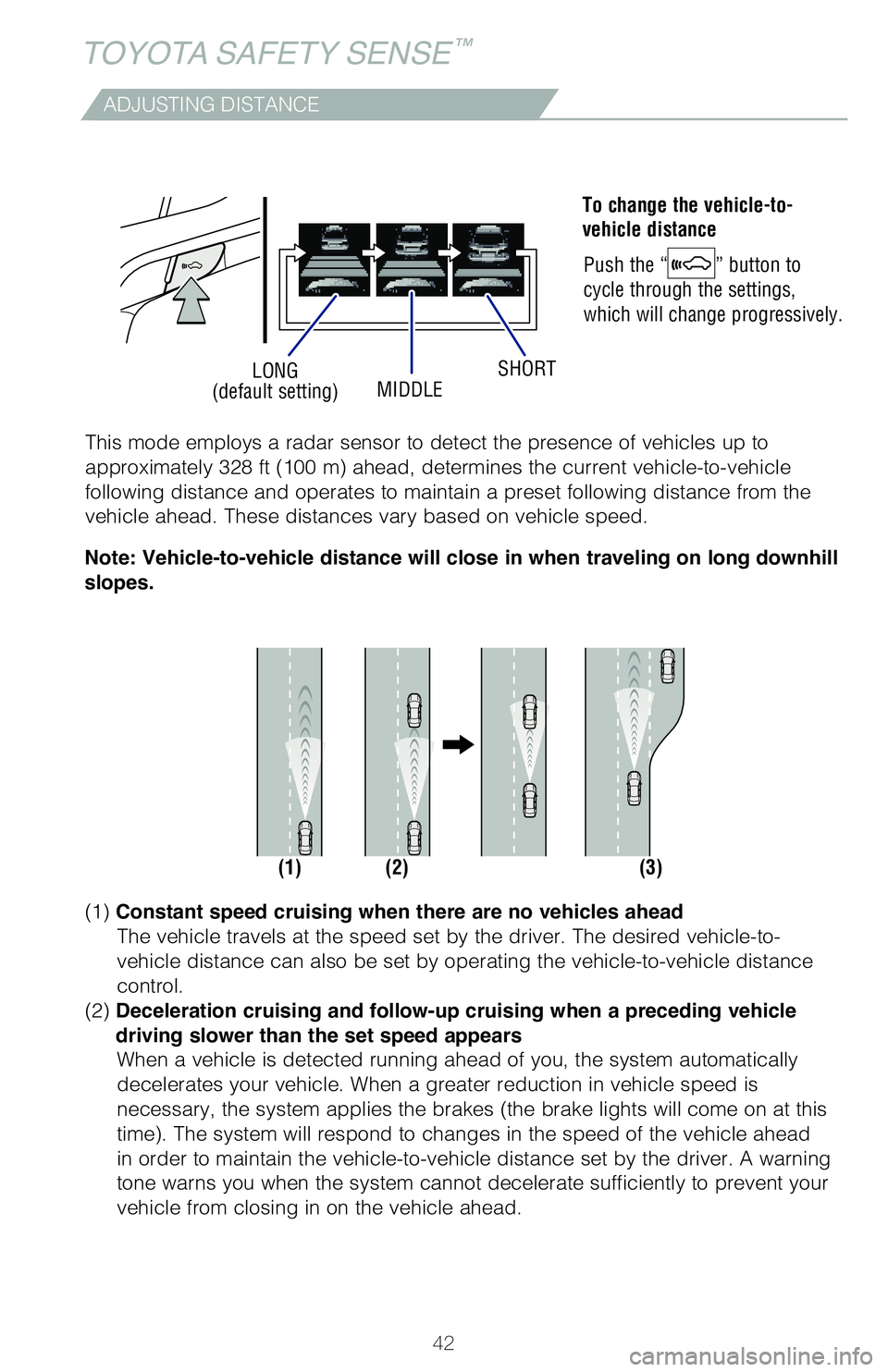
To change the vehicle-to-
vehicle distance
Push the “
” button to
cycle through the settings,
which will change progressively.
(1) (2) (3)
This mode employs a radar sensor to detect the presence of vehicles up t\
o
approximately 328 ft (100 m) ahead, determines the current vehicle-to-vehicle
following distance and operates to maintain a preset following distance \
from the
vehicle ahead. These distances vary based on vehicle speed.
(1)
Constant speed cruising when there are no vehicles ahead
The vehicle travels at the speed set by the driver. The desired vehicle-\
to-
vehicle distance can also be set by operating the vehicle-to-vehicle dis\
tance
control.
(2) Deceleration cruising and follow-up cruising when a preceding vehicle
driving slower than the set speed appears When a vehicle is detected running ahead of you, the system automaticall\
y
decelerates your vehicle. When a greater reduction in vehicle speed is
necessary, the system applies the brakes (the brake lights will come on at this
time). The system will respond to changes in the speed of the vehicle ahead
in order to maintain the vehicle-to-vehicle distance set by the driver. \
A warning
tone warns you when the system cannot decelerate sufficiently to prevent\
your
vehicle from closing in on the vehicle ahead.
Note: Vehicle-to-vehicle distance will close in when traveling on long downhill
slopes.
TOYOTA SAFETY SENSE™
Page 49 of 56
 47
Safety Connect®
Safety Connect is a subscription-based telematics service that uses Glob\
al
Positioning System (GPS) data and embedded cellular technology to provide safety
and security featur")
47
Safety Connect®
Safety Connect is a subscription-based telematics service that uses Glob\
al
Positioning System (GPS) data and embedded cellular technology to provide safety
and security features to subscribers. Safety Connect is staffed with liv\
e agents at
the Toyota response center, which operates 24 hours per day, 7 days per \
week.
Services for subscribers include:
• Automatic collision notification
• Stolen vehicle locator
• Emergency assistance (“SOS” button)
• Enhanced roadside assistance
Microphone
LED light indicators
(Green is Active)
“SOS” button
For additional information, refer to the “Owner’s Manual” or vi\
sit www.Toyota.com/
connected-services.
Tire Pressure Monitoring (warning) System (TPMS)
System reset initialization
1. Push and hold “
SET” button until
the indicator blinks three times.
2. Wait several minutes to allow initialization to complete.
After adjusting tire pressures, or after tires have been rotated or repl\
aced, turn the
ignition switch to “ON” and press and hold the “
SET” button until indicator blinks
three times. Let the vehicle sit for a few minutes to allow initializati\
on to complete.
Refer to the load label on the door jamb or the Owner’s Manual for ti\
re inflation
specifications.
If the tire pressure indicator flashes for 1 minute and then remains on,\
take the
vehicle to your local Toyota dealer.
NOTE: The warning light may come on due to temperature changes or
changes in tire pressure from natural air leakage. If the system has not\
been
initialized recently, setting the tire pressures to factory specificatio\
ns should
turn off the light.
OVERVIEW
FEATURES & OPERATIONS
TOYOTA SAFETY SENSE
SAFETY & EMERGENCY FEATURES