engine TOYOTA LAND CRUISER 2021 Owners Manual (in English)
[x] Cancel search | Manufacturer: TOYOTA, Model Year: 2021, Model line: LAND CRUISER, Model: TOYOTA LAND CRUISER 2021Pages: 56, PDF Size: 3.5 MB
Page 3 of 56
1
OVERVIEW
FEATURES & OPERATIONS
TOYOTA SAFETY SENSE
SAFETY &
EMERGENCY FEATURES
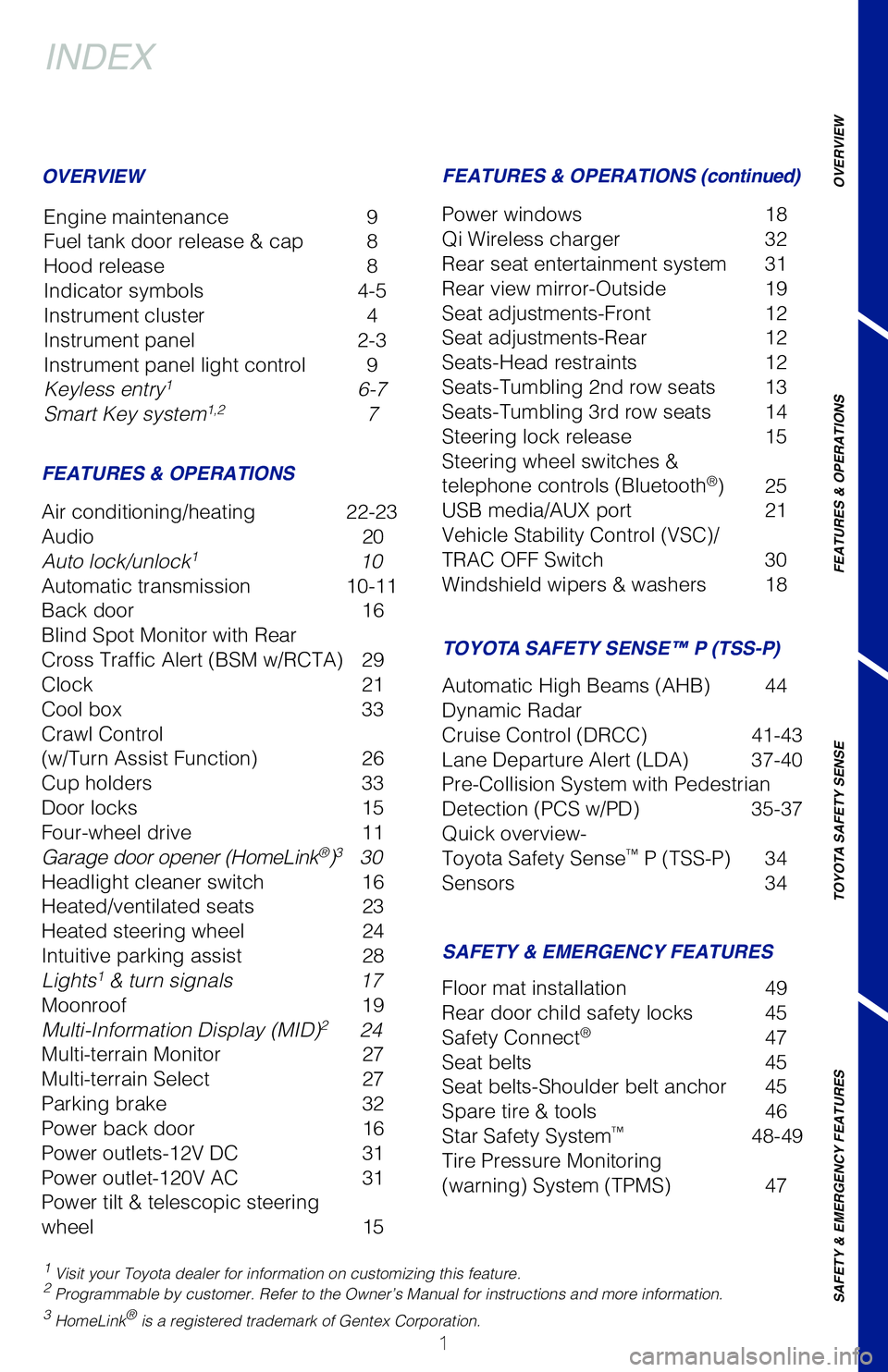
INDEX
Engine maintenance 9
Fuel tank door release & cap 8
Hood release 8
Indicator symbols 4-5
Instrument cluster 4
Instrument panel 2-3
Instrument panel light control 9
Keyless entry
1 6-7
Smart Key system1,2 7
1 Visit your Toyota dealer for information on customizing this feature.2 Programmable by customer. Refer to the Owner’s Manual for instructio\
ns and more information.3 HomeLink® is a registered trademark of Gentex Corporation.
OVERVIEW
FEATURES & OPERATIONS FEATURES & OPERATIONS (continued)
SAFETY & EMERGENCY FEATURES TOYOTA SAFETY SENSE™ P (TSS-P)
Air conditioning/heating 22-23
Audio
20
Auto lock/unlock
1 10
Automatic transmission 10-11
Back door 16
Blind Spot Monitor with Rear
Cross Traffic Alert (BSM w/RCTA) 29
Clock 21
Cool box 33
Crawl Control
(w/Turn Assist Function) 26
Cup holders 33
Door locks 15
Four-wheel drive 11
Garage door opener (HomeLink
®)3 30
Headlight cleaner switch 16
Heated/ventilated seats 23
Heated steering wheel 24
Intuitive parking assist 28
Lights
1 & turn signals 17
Moonroof 19
Multi-Information Display (MID)
2 24
Multi-terrain Monitor 27
Multi-terrain Select 27
Parking brake 32
Power back door 16
Power outlets-12V DC 31
Power outlet-120V AC 31
Power tilt & telescopic steering
wheel 15Power windows
18
Qi Wireless charger 32
Rear seat entertainment system 31
Rear view mirror-Outside 19
Seat adjustments-Front 12
Seat adjustments-Rear 12
Seats-Head restraints 12
Seats-Tumbling 2nd row seats 13
Seats-Tumbling 3rd row seats 14
Steering lock release 15
Steering wheel switches &
telephone controls (Bluetooth
®) 25
USB media/AUX port 21
Vehicle Stability Control (VSC)/
TRAC OFF Switch 30
Windshield wipers & washers 18
Floor mat installation 49
Rear door child safety locks 45
Safety Connect
® 47
Seat belts 45
Seat belts-Shoulder belt anchor 45
Spare tire & tools 46
Star Safety System
™ 48-49
Tire Pressure Monitoring
(warning) System (TPMS) 47
Automatic High Beams (AHB) 44
Dynamic Radar
Cruise Control (DRCC) 41-43
Lane Departure Alert (LDA) 37-40
Pre-Collision System with Pedestrian
Detection (PCS w/PD) 35-37
Quick overview-
Toyota Safety Sense
™ P (TSS-P) 34
Sensors 34
Page 6 of 56
 4
OVERVIEWInstrument cluster
For details, refer to “Warning lights and indicators,” Section 2, \
2021 Owner’s
Manual.
Engine oil pressure gauge Tachometer
Multi-Information Display (MID)
Speedo")
4
OVERVIEWInstrument cluster
For details, refer to “Warning lights and indicators,” Section 2, \
2021 Owner’s
Manual.
Engine oil pressure gauge Tachometer
Multi-Information Display (MID)
Speedometer
Voltmeter
Fuel gauge
Odometer and trip meter display
Shift position and range display
Odometer/trip meter display change button
Instrument panel light control dial
Engine coolant temperature gauge
Vehicles with a monochrome display
Arrow direction indicates fuel
tank door position
Brake system warning1
Anti-lock Brake System (ABS)
warning1
Charging system warning1
Center differential lock indicator
Crawl Control indicator1
Automatic headlight leveling system
warning1,2
AIR BAG ON-OFF indicator1
Airbag SRS warning1
Constant speed cruise control
indicator/Constant speed
cruise control SET indicator
Auto High Beams (AHB) indicator Blind Spot Monitor (BSM)
indicator
1
BSM outside rear view mirror
indicators
BSM w/Rear Cross Traffic Alert
(RCTA) Indicator
Indicator symbols
Service indicators and warning lights
Page 7 of 56
5
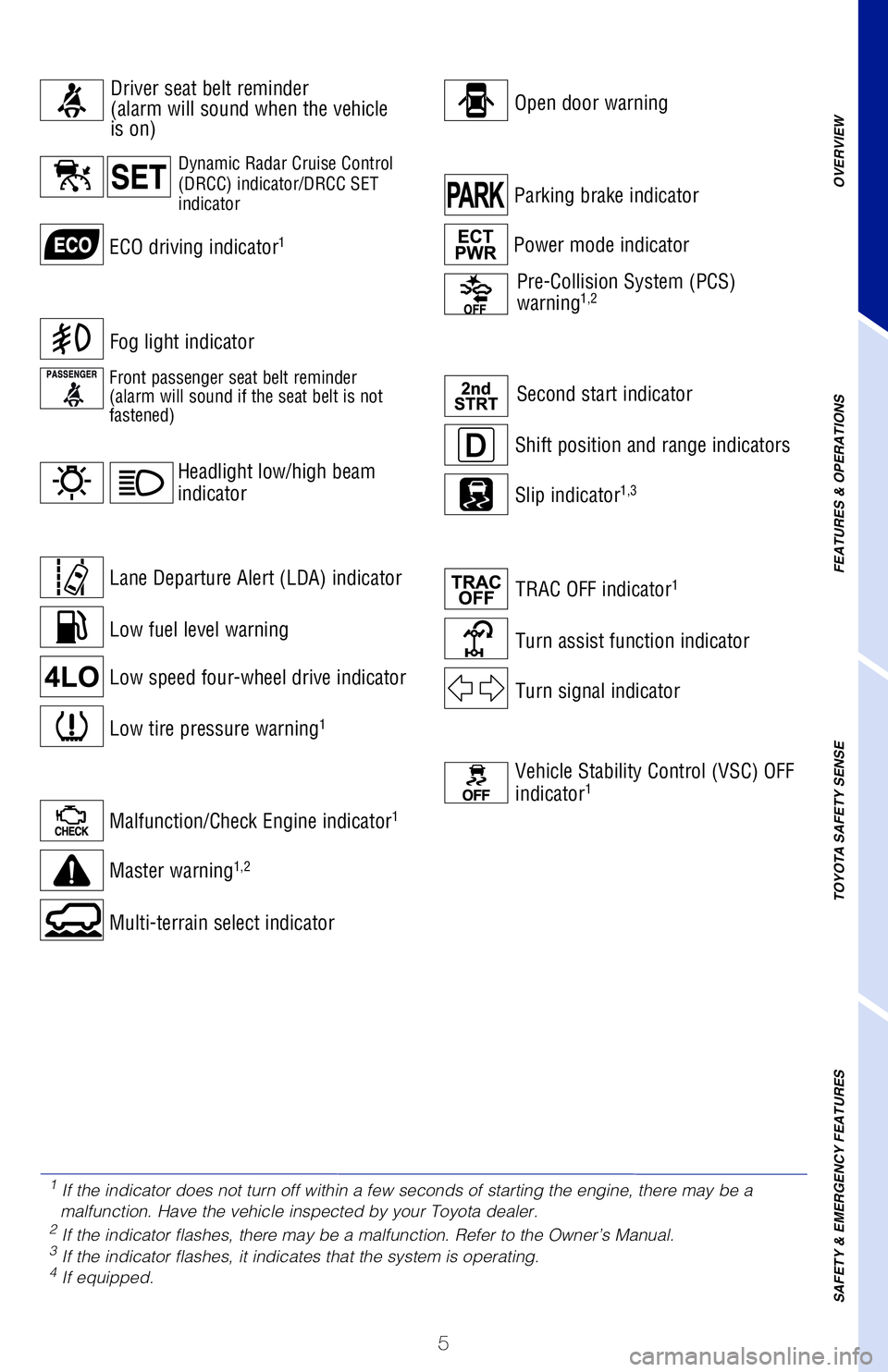
Low fuel level warning
Parking brake indicatorShift position and range indicators
Low tire pressure warning1
Malfunction/Check Engine indicator1
Master warning1,2
Second start indicator
Power mode indicator
Slip indicator1,3
Low speed four-wheel drive indicatorMulti-terrain select indicator
ECO driving indicator1
Turn assist function indicator
TRAC OFF indicator1
Turn signal indicator
Fog light indicator
Open door warning Pre-Collision System (PCS)
warning
1,2
Lane Departure Alert (LDA) indicator
Headlight low/high beam
indicator
Vehicle Stability Control (VSC) OFF
indicator1
OVERVIEW
FEATURES & OPERATIONS
TOYOTA SAFETY SENSE
SAFETY & EMERGENCY FEATURESDynamic Radar Cruise Control
(DRCC) indicator/DRCC SET
indicator
Driver seat belt reminder
(alarm will sound when the vehicle
is on)
Front passenger seat belt reminder
(alarm will sound if the seat belt is not
fastened)
1
If the indicator does not turn off within a few seconds of starting the \
engine, there may be a
malfunction. Have the vehicle inspected by your Toyota dealer.
2 If the indicator flashes, there may be a malfunction. Refer to the Owne\
r’s Manual.3 If the indicator flashes, it indicates that the system is operating.4 If equipped.
Page 9 of 56
7
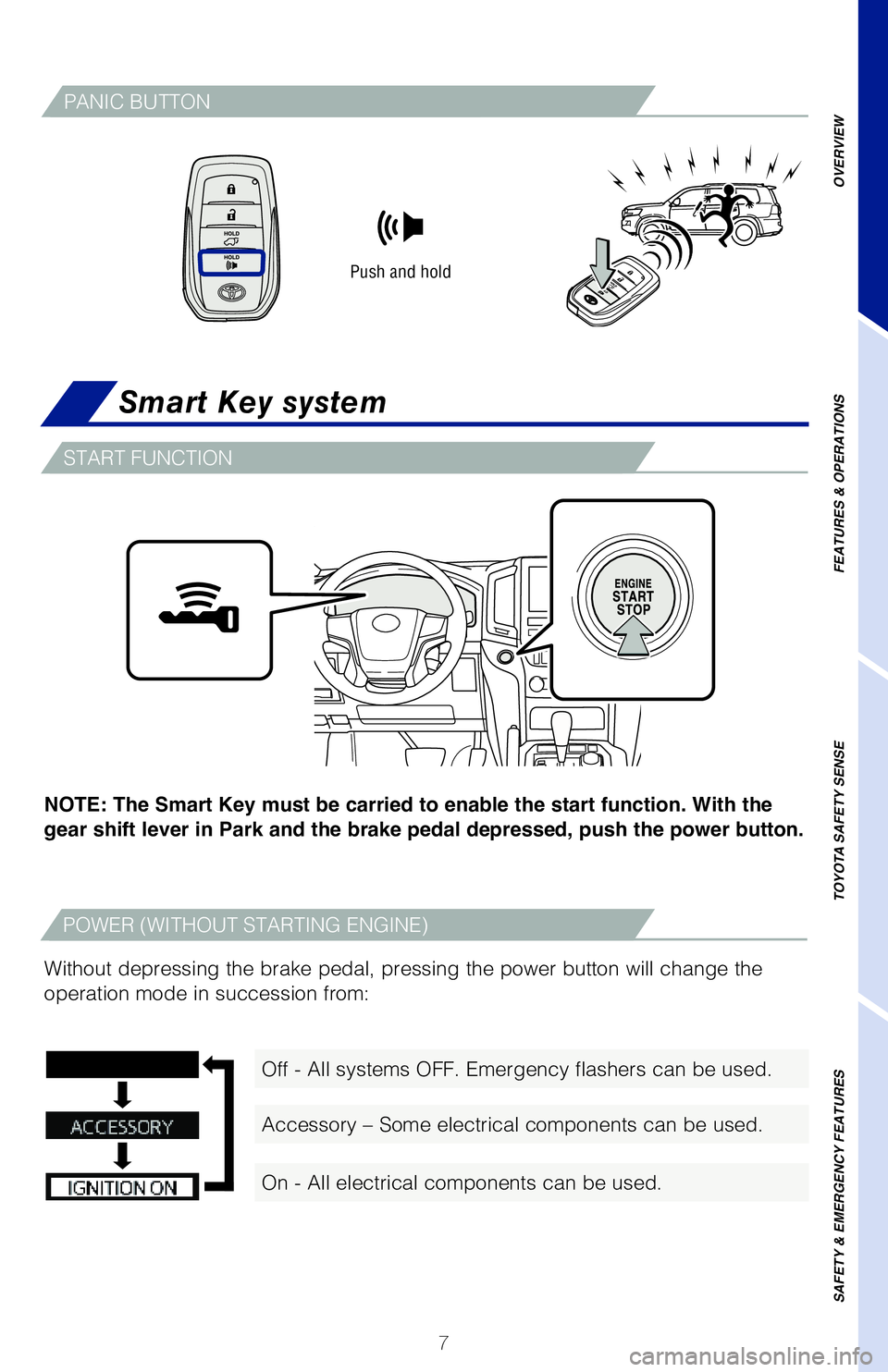
Smart Key system
NOTE: The Smart Key must be carried to enable the start function. With the
gear shift lever in Park and the brake pedal depressed, push the power button.
Without depressing the brake pedal, pressing the power button will chang\
e the
operation mode in succession from:
Push and hold
PANIC BUTTON
OVERVIEW
FEATURES & OPERATIONS
TOYOTA SAFETY SENSE
SAFETY & EMERGENCY FEATURES
Off - All systems OFF. Emergency flashers can be used.
Accessory – Some electrical components can be used.
On - All electrical components can be used.
START FUNCTION
POWER (WITHOUT STARTING ENGINE)
Page 10 of 56
8
OVERVIEW
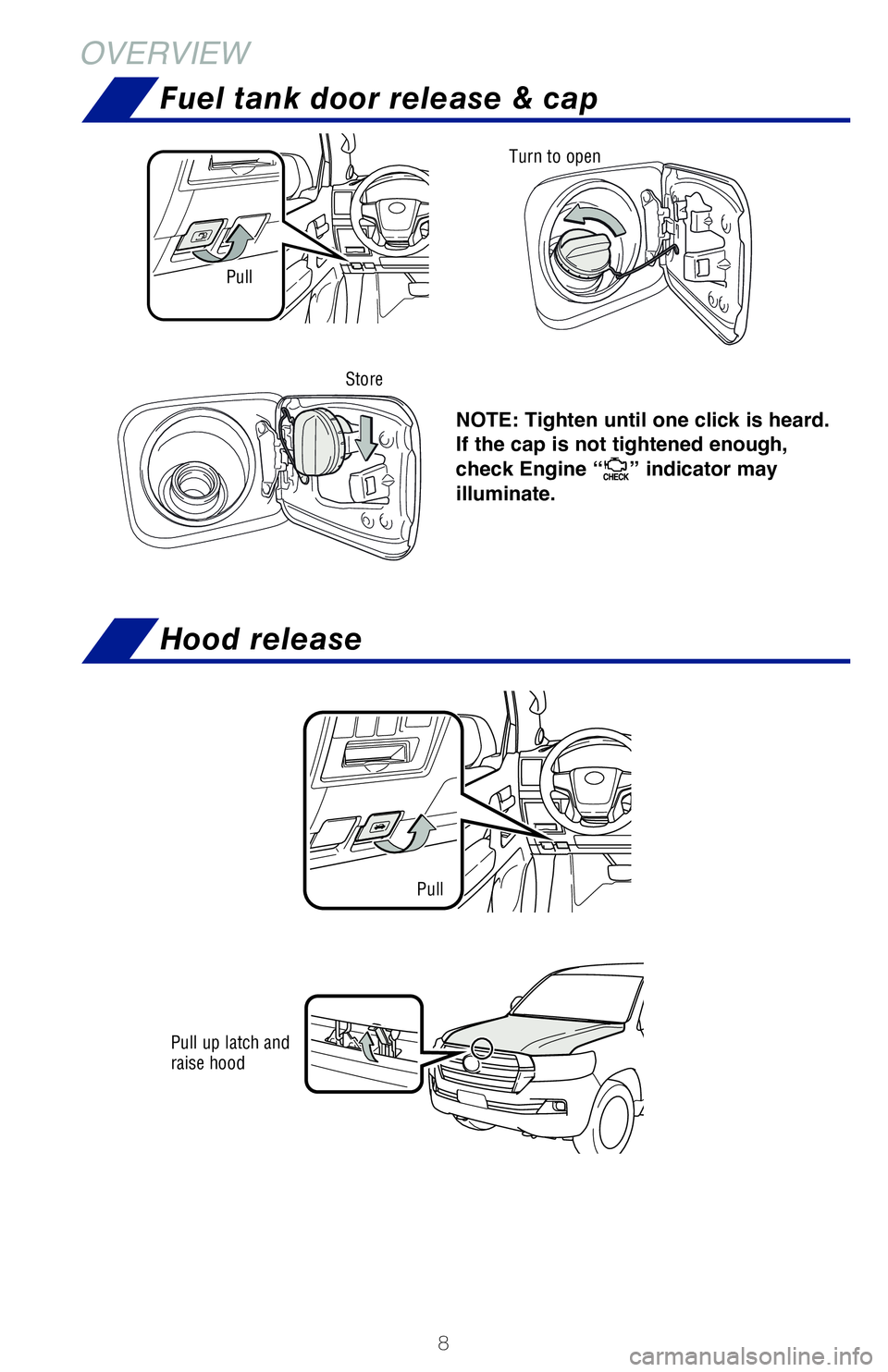
NOTE: Tighten until one click is heard.
If the cap is not tightened enough,
check Engine “
” indicator may
illuminate.
Pull Turn to open
Store
Pull up latch and
raise hood
Pull
Fuel tank door release & cap
Hood release
Page 11 of 56
9
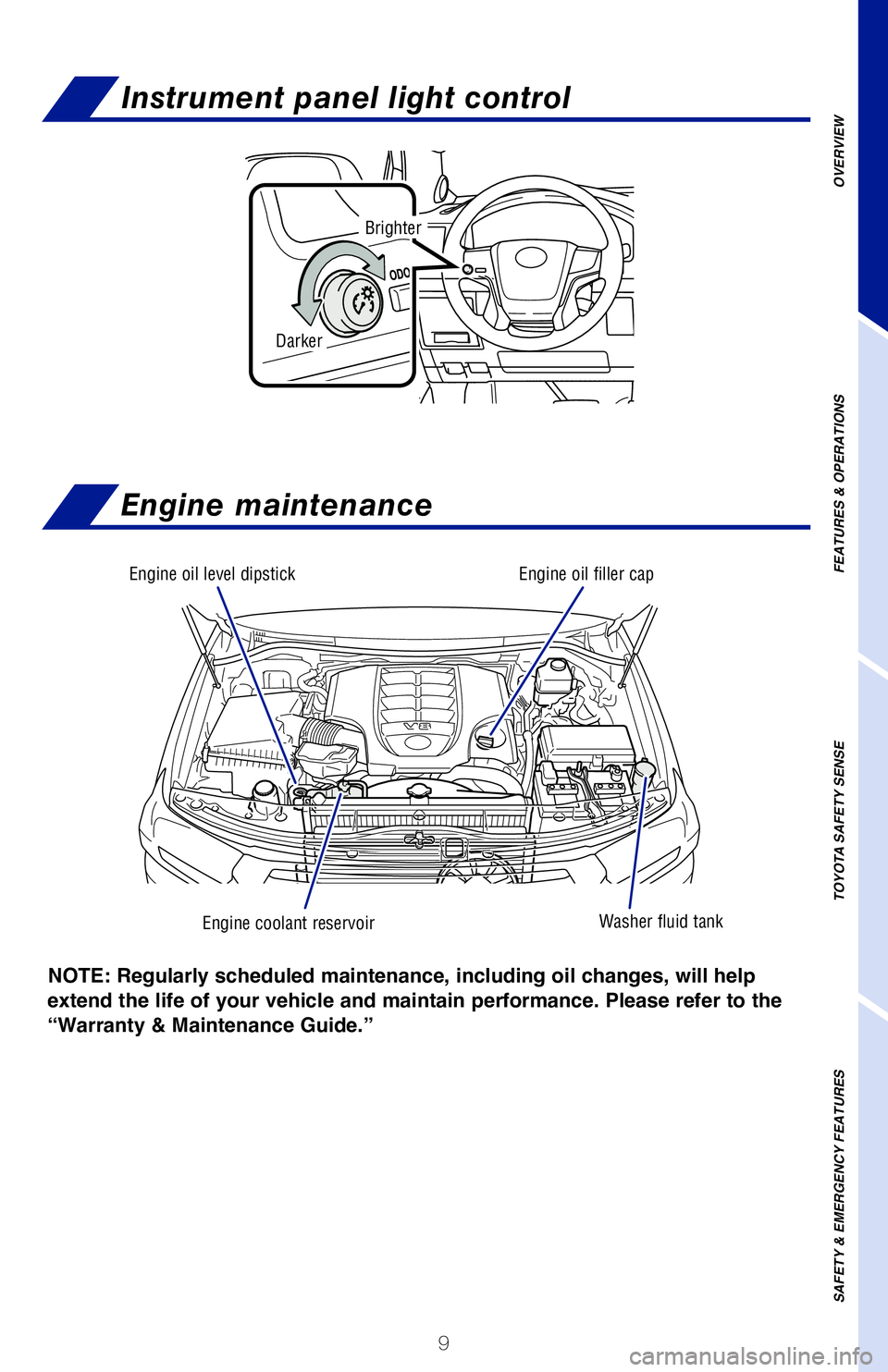
Engine oil level dipstick
Engine coolant reservoirWasher fluid tank
Engine oil filler cap
NOTE: Regularly scheduled maintenance, including oil changes, will help
extend the life of your vehicle and maintain performance. Please refer to the
“Warranty & Maintenance Guide.”
Darker
Brighter
OVERVIEW
FEATURES & OPERATIONS
TOYOTA SAFETY SENSE
SAFETY & EMERGENCY FEATURES
Instrument panel light control
Engine maintenance
Page 12 of 56
 10
Auto lock/unlock
Automatic transmission
* The vehicle must be on and the brake pedal depressed to shift from Par\
k.
Shift the shift lever to “S” position from “D” position.
+ : Upshift (")
10
Auto lock/unlock
Automatic transmission
* The vehicle must be on and the brake pedal depressed to shift from Par\
k.
Shift the shift lever to “S” position from “D” position.
+ : Upshift (push and release)
- : Downshift (pull and release)
Downshifting increases power going uphill, or provides engine braking do\
wnhill. For
best fuel economy during normal driving conditions, always drive with th\
e shift lever
in the “D” position.
Refer to the Owner’s Manual for more details.
Park*
Reverse
Neutral
Drive
P
R
N
D
S“S” mode
Automatic door locks can be programmed to operate in different modes, or\
turned
OFF.
Shift position linked door locking/unlocking function
-Doors lock when shifting from Park.
-Doors unlock when shifting into Park.
Speed linked door locking function
-Doors lock when the vehicle speed is approximately 12 mph (20 km/h) or higher.
Driver’s door linked door unlocking function
-Doors unlock when the driver’s door is opened approximately 45 secon\
ds after turning the vehicle OFF.
Refer to the Owner’s Manual for more details.
DEFAULT SETTING
CUSTOMIZED SETTING
+ (“S” mode)
- (“S” mode)
FEATURES & OPERATIONS
“S” (SEQUENTIAL) MODE
Page 34 of 56
 32
Qi Wireless charger
Parking brake
FEATURES & OPERATIONS
(2) Push
SetRelease
(1) Pull slightly
(3) Lower
Pull
A mobile device can be charged wirelessly on the tray. After press the l\
id to open,")
32
Qi Wireless charger
Parking brake
FEATURES & OPERATIONS
(2) Push
SetRelease
(1) Pull slightly
(3) Lower
Pull
A mobile device can be charged wirelessly on the tray. After press the l\
id to open,
(1) Press the wireless charger power switch and the green operation indicat\
or
light turns on. (2) Place a compatible mobile device on the tray as shown in the
illustration. An amber indicator illuminates while charging is in progre\
ss. When
charging is complete, the indicator illuminates green. Some phones, case\
s or cover
type wireless chargers may not cause the green indicator to illuminate e\
ven though
it is fully charged.
The vehicle must be in “ACCESSORY” or “IGNITION ON” mode for\
use.
Refer to the Owner’s Manual for limitations and more details on this \
system before
attempting to use it.
Power switch
Charge area
Operation indicator
light
Press (1)
When the engine is turned off, the last state (ON/
OFF) of the charger is memorized.
Place device nearest the center of charging area for
best results. Moving device may result in stopping
or restarting the charging process.
Place (2)
Page 39 of 56
 37
DISABLING PRE-COLLISION SYSTEM (PCS)
To disable the system
Press the PCS switch for 3 seconds or more.
The PCS warning light will turn on and a message will be displayed on th\
e Multi-
Information")
37
DISABLING PRE-COLLISION SYSTEM (PCS)
To disable the system
Press the PCS switch for 3 seconds or more.
The PCS warning light will turn on and a message will be displayed on th\
e Multi-
Information Display (MID).
To enable the system
Press the PCS switch again.
The system is enabled each time the vehicle is turned on.
Lane Departure Alert (LDA)
TURNING THE LDA SYSTEM ON/OFF
Press the LDA switch to turn the LDA system on. Depress again to turn it\
off.
Note: The system will continue in the last state it was in (ON or OFF) when the
engine is started again.
Refer to the Owner’s Manual for limitations and more details on this \
system before
attempting to use it.
By detecting visible white/yellow lane markings at speeds above 32 mph, \
Lane
Departure Alert (LDA) is designed to issue an audio/visual alert if an inadvertent
lane departure is detected.
* See Toyota.com/safety-sense for model applicability.
Refer to the Toyota Owner’s Manual for a list of additional situation\
s in which the
system operation may be limited.
OVERVIEW
FEATURES & OPERATIONS
TOYOTA SAFETY SENSE
SAFETY & EMERGENCY FEATURES
Page 45 of 56
43
OVERVIEW
FEATURES & OPERATIONS
TOYOTA SAFETY SENSE
SAFETY & EMERGENCY FEATURES
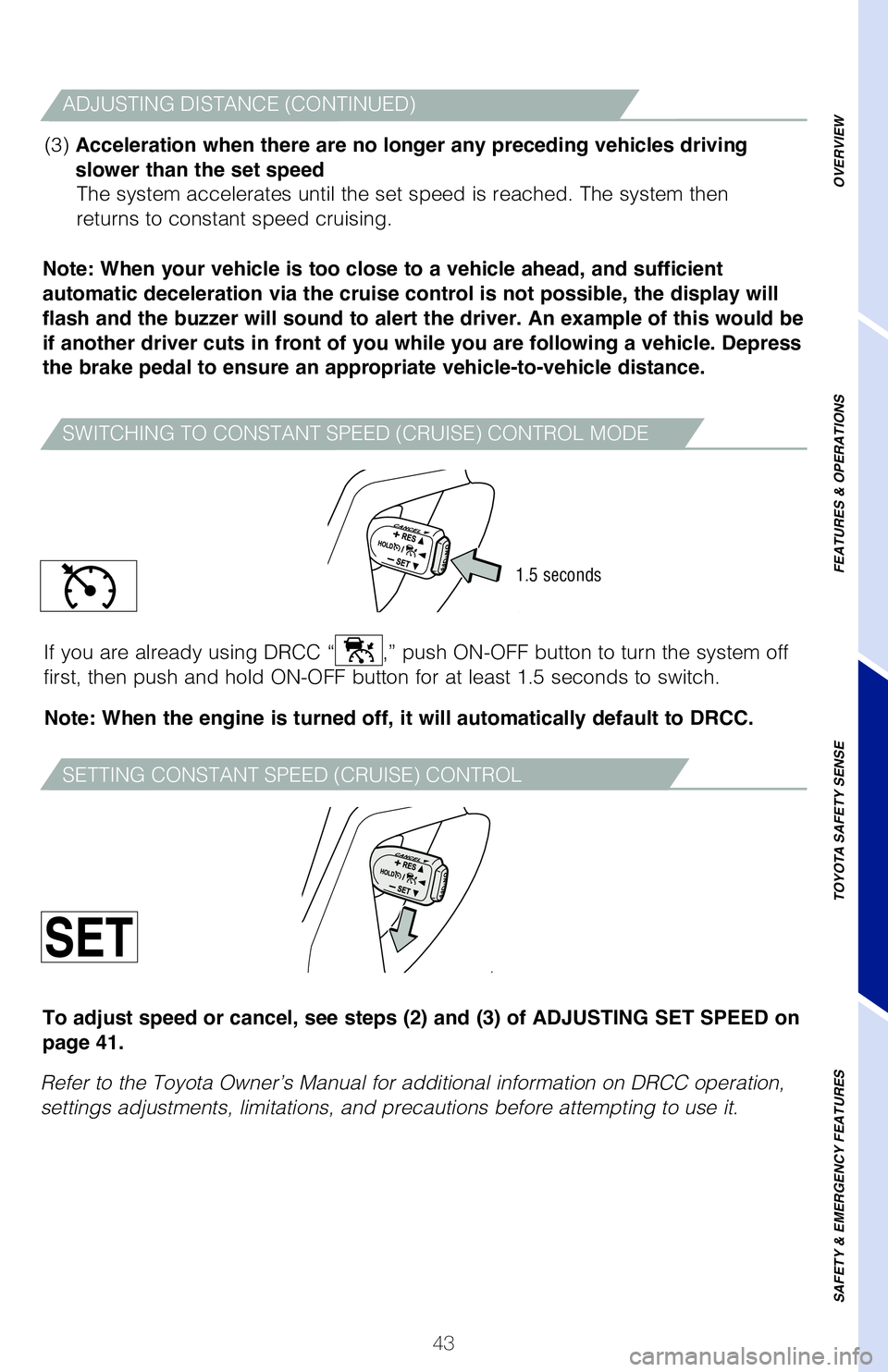
SWITCHING TO CONSTANT SPEED (CRUISE) CONTROL MODE
ADJUSTING DISTANCE (CONTINUED)
(3) Acceleration when there are no longer any preceding vehicles driving
slower than the set speed The system accelerates until the set speed is reached. The system then
returns to constant speed cruising.
Note: When your vehicle is too close to a vehicle ahead, and sufficient
automatic deceleration via the cruise control is not possible, the display will
flash and the buzzer will sound to alert the driver. An example of this would be
if another driver cuts in front of you while you are following a vehicle. Depress
the brake pedal to ensure an appropriate vehicle-to-vehicle distance.
Note: When the engine is turned off, it will automatically default to DRCC.
If you are already using DRCC “
,” push ON-OFF button to turn the system off
first, then push and hold ON-OFF button for at least 1.5 seconds to swit\
ch.
SETTING CONSTANT SPEED (CRUISE) CONTROL
Refer to the Toyota Owner’s Manual for additional information on DRCC\
operation,
settings adjustments, limitations, and precautions before attempting to \
use it. To adjust speed or cancel, see steps (2) and (3) of ADJUSTING SET SPEED on
page 41.
1.5 seconds