steering TOYOTA MATRIX 2009 E140 / 2.G Owner's Guide
[x] Cancel search | Manufacturer: TOYOTA, Model Year: 2009, Model line: MATRIX, Model: TOYOTA MATRIX 2009 E140 / 2.GPages: 440, PDF Size: 9.39 MB
Page 104 of 440

104 2-1. Driving procedures
NOTICE
■When driving the vehicle
Manual transmission
●Do not shift gears unless the clutch pedal is fully depressed. After shifting,
do not release the clutch abruptly. Doing so may damage the clutch, tran-
saxle and gears.
●Do not rest your foot on the clutch pedal while driving.
Doing so may cause clutch trouble.
●Do not use any gears other than the first gear when starting off and mov-
ing forward.
Doing so may damage the clutch.
●Do not use the clutch to hold the vehicle when stopping on an uphill grade.
Doing so may damage the clutch.
●Do not shift into reverse when the vehicle is still moving. Doing so may
damage the clutch, transaxle and gears.
Automatic transmission
Do not use the accelerator pedal or depress the accelerator and brake ped-
als together to hold the vehicle on a hill.
■When parking the vehicle (vehicles with an automatic transmission)
Always put the shift lever in P. Failure to do so may cause the vehicle to
move or the vehicle may accelerate suddenly if the accelerator pedal is acci-
dentally depressed.
■Avoiding damage to vehicle parts
●Do not turn the steering wheel fully in either direction and hold it there for a
long time. Doing so may damage the power steering motor.
●When driving over bumps in the road, drive as slowly as possible to avoid
damaging the wheels, underside of the vehicle, etc.
Page 105 of 440

105 2-1. Driving procedures
2
When driving
NOTICE
■If you hear a squealing or scraping noise (brake pad wear limit indica-
tors)
Have the brake pads checked and replaced by your Toyota dealer as soon
as possible.
Rotor damage can result if the pads are not replaced when needed.
It is dangerous to drive the vehicle when the wear limits of the brake pads
and/or those of the brake discs are exceeded.
■If you get a flat tire while driving
A flat or damaged tire may cause the following situations. Hold the steering
wheel firmly and gradually press the brake pedal to slow down the vehicle.
●It may be difficult to control your vehicle.
●The vehicle will make abnormal sounds.
●The vehicle will behave abnormally.
Replace a flat tire with a new one. (→P. 365)
■When encountering flooded roads
Do not drive on a road that has flooded after heavy rain etc. Doing so may
cause the following serious damage to the vehicle.
●Engine stalling
●Short in electrical components
●Engine damage caused by water immersion
In the event that you drive on a flooded road and the vehicle is flooded, be
sure to have your Toyota dealer check the following.
●Brake function
●Changes in quantity and quality of engine oil, and transaxle fluid etc.
●Lubricant condition for the bearings and suspension joints (where possi-
ble) and the function of all joints, bearings, etc.
Page 107 of 440
107 2-1. Driving procedures
2
When driving
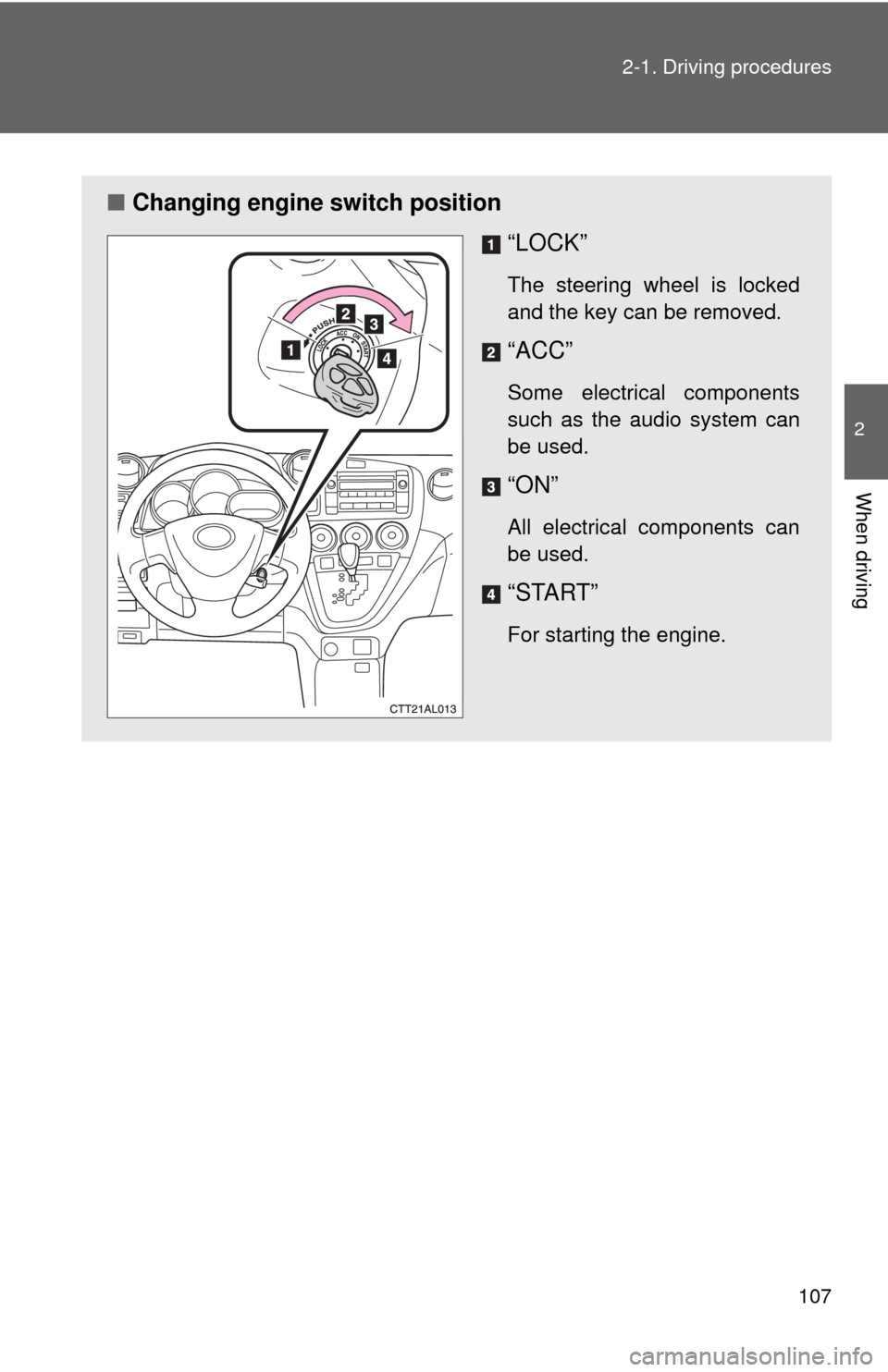
■Changing engine switch position
“LOCK”
The steering wheel is locked
and the key can be removed.
“ACC”
Some electrical components
such as the audio system can
be used.
“ON”
All electrical components can
be used.
“START”
For starting the engine.
Page 108 of 440
108 2-1. Driving procedures
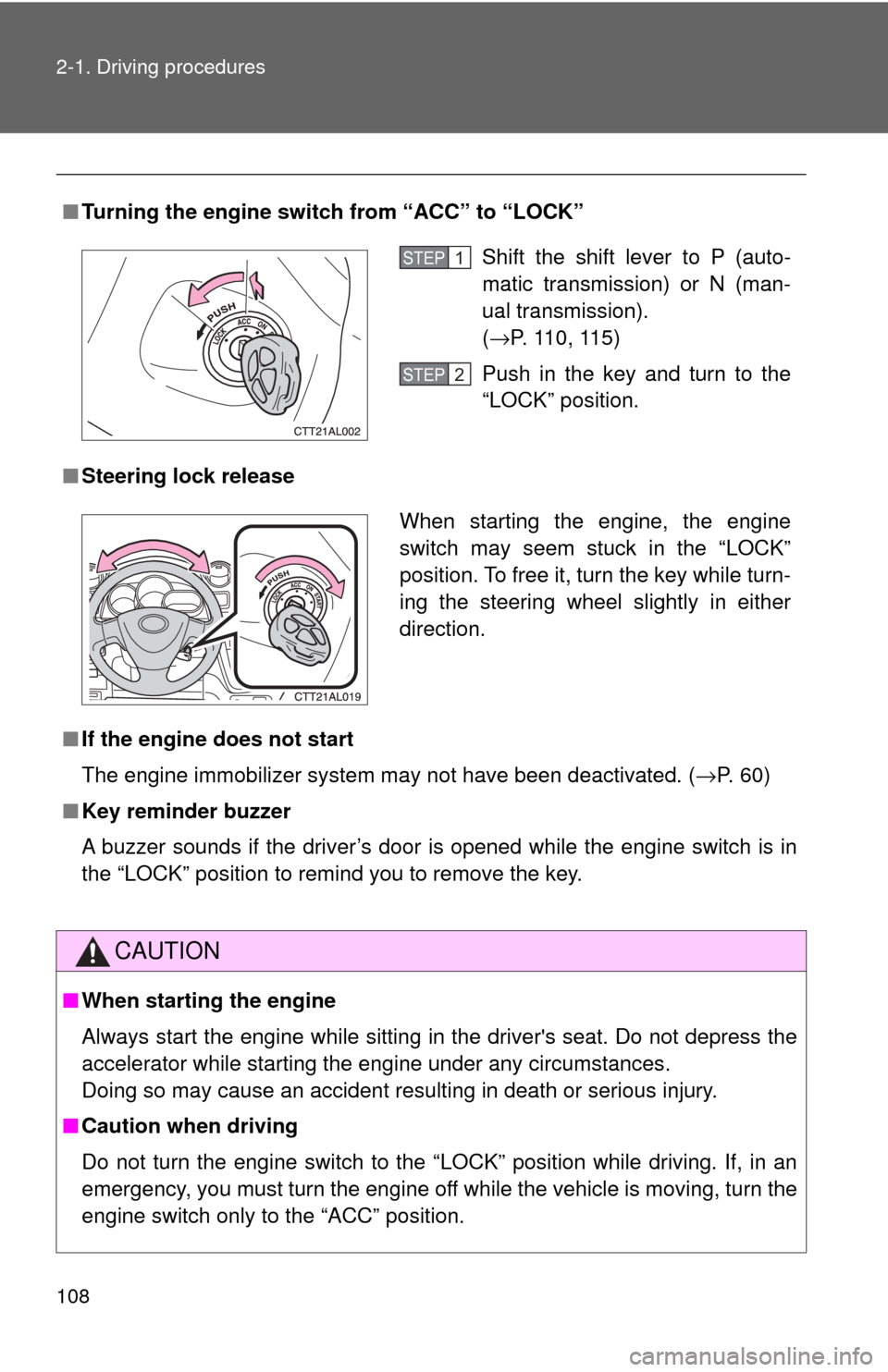
■Turning the engine switch from “ACC” to “LOCK”
■Steering lock release
■If the engine does not start
The engine immobilizer system may not have been deactivated. (→P. 60)
■Key reminder buzzer
A buzzer sounds if the driver’s door is opened while the engine switch is in
the “LOCK” position to remind you to remove the key.
CAUTION
■When starting the engine
Always start the engine while sitting in the driver's seat. Do not depress the
accelerator while starting the engine under any circumstances.
Doing so may cause an accident resulting in death or serious injury.
■Caution when driving
Do not turn the engine switch to the “LOCK” position while driving. If, in an
emergency, you must turn the engine off while the vehicle is moving, turn the
engine switch only to the “ACC” position.
Shift the shift lever to P (auto-
matic transmission) or N (man-
ual transmission).
(→P. 110, 115)
Push in the key and turn to the
“LOCK” position.STEP1
STEP2
When starting the engine, the engine
switch may seem stuck in the “LOCK”
position. To free it, turn the key while turn-
ing the steering wheel slightly in either
direction.
Page 135 of 440
135
2-4. Using other driving systems
2
When driving
Driving assist systems
To help enhance driving safety and performance, the following sys-
tems operate automatically in response to various driving situations.
Be aware, however, that these systems are supplementary and
should not be relied upon too heavily when operating the vehicle.
■ABS (Anti-lock Brake System)
Restrains the vehicle from slipping when driving on slick road surfaces
or in the event of sudden braking.
■Brake assist
Generates an increased level of braking force after the brake pedal is
depressed, when the system detects a panic stop situation.
■VSC (Vehicle Stability Control) (if equipped)
Helps the driver to control skidding when swerving suddenly or turning
on slippery road surfaces.
■TRAC (Traction Control) (if equipped)
Maintains drive power and prevents the front wheels from spinning
when starting the vehicle or accelerating on slippery roads.
■EPS (Electric Power Steering)
Employs an electric motor to reduce the amount of effort needed to turn
the steering wheel.
■Active torque control 4WD system (if equipped)
Automatically switches from front-wheel drive to AWD (All-Wheel Drive)
according to driving conditions, helping to ensure reliable handling and
stability. Examples of conditions where the system will switch to AWD
are when cornering, going uphill, starting off or accelerating, and when
the road surface is slippery due to snow or rain etc.
Page 137 of 440
137 2-4. Using other driving systems
2
When driving
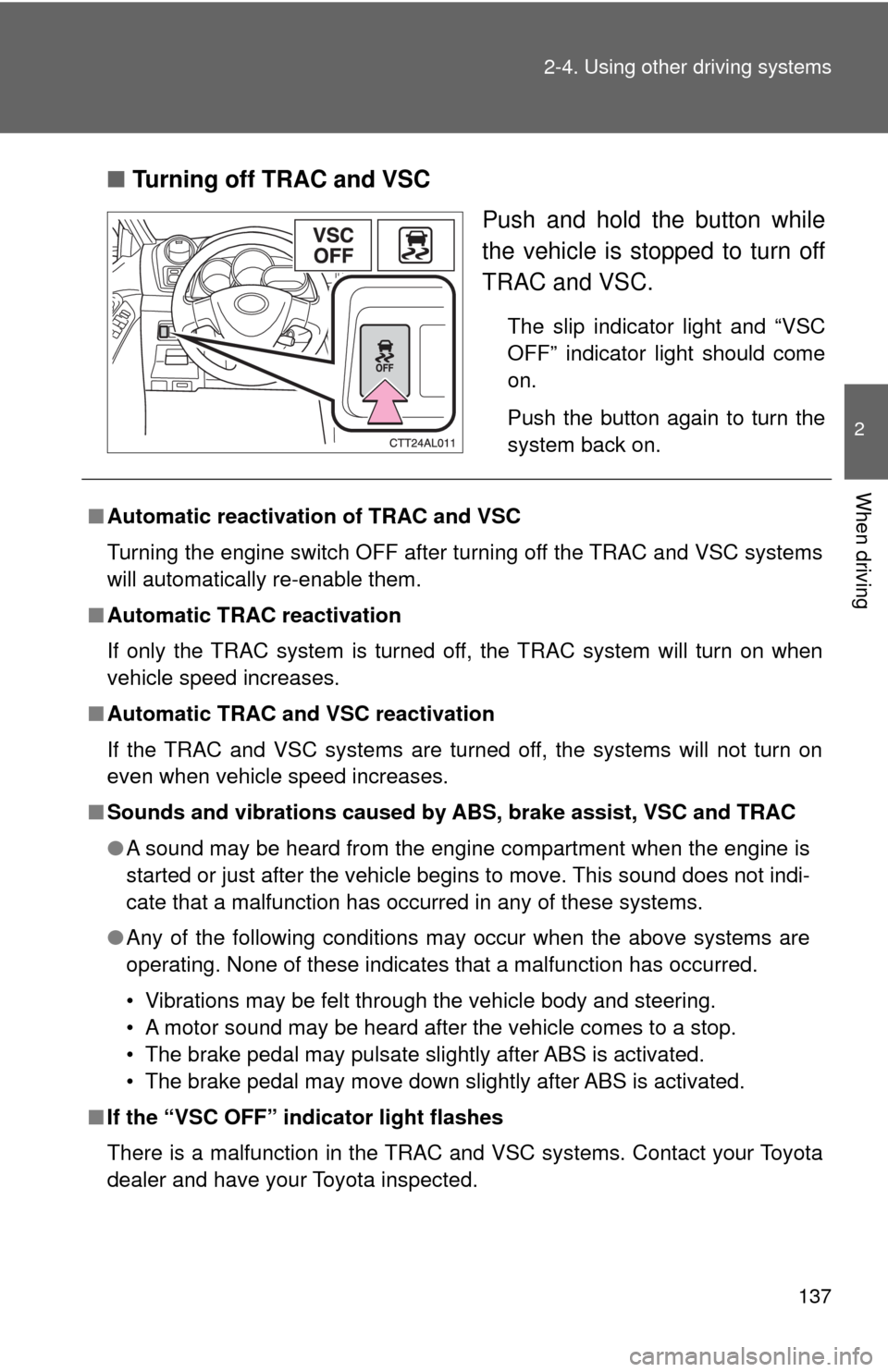
■Turning off TRAC and VSC
Push and hold the button while
the vehicle is stopped to turn off
TRAC and VSC.
The slip indicator light and “VSC
OFF” indicator light should come
on.
Push the button again to turn the
system back on.
■Automatic reactivation of TRAC and VSC
Turning the engine switch OFF after turning off the TRAC and VSC systems
will automatically re-enable them.
■Automatic TRAC reactivation
If only the TRAC system is turned off, the TRAC system will turn on when
vehicle speed increases.
■Automatic TRAC and VSC reactivation
If the TRAC and VSC systems are turned off, the systems will not turn on
even when vehicle speed increases.
■Sounds and vibrations caused by ABS, brake assist, VSC and TRAC
●A sound may be heard from the engine compartment when the engine is
started or just after the vehicle begins to move. This sound does not indi-
cate that a malfunction has occurred in any of these systems.
●Any of the following conditions may occur when the above systems are
operating. None of these indicates that a malfunction has occurred.
• Vibrations may be felt through the vehicle body and steering.
• A motor sound may be heard after the vehicle comes to a stop.
• The brake pedal may pulsate slightly after ABS is activated.
• The brake pedal may move down slightly after ABS is activated.
■If the “VSC OFF” indicator light flashes
There is a malfunction in the TRAC and VSC systems. Contact your Toyota
dealer and have your Toyota inspected.
Page 138 of 440
138 2-4. Using other driving systems
■EPS operation sound
When the steering wheel operates, a motor sound (whirring sound) may be
heard.
This does not indicate a malfunction.
■Reduced effectiveness of EPS
The effectiveness of EPS is reduced to prevent the system from overheating
when there is frequent steering input over an extended period of time. The
steering wheel may feel heavy as a result. Should this occur, refrain from
excessive steering input or stop the vehicle and turn the engine off. The sys-
tem should return to normal within 10 minutes.
CAUTION
■ABS does not operate effectively when
●Tires with inadequate gripping ability are used (such as excessively worn
tires on a snow covered road).
●The vehicle hydroplanes while driving at high speed on the wet or slick
road.
■Stopping distance when ABS is operating on the wet or slick roads
ABS is not designed to shorten the vehicle's stopping distance. Always
maintain a safe distance from the vehicle in front of you in the following situ-
ations.
●When driving on dirt, gravel or snow-covered roads
●When driving with tire chains
●When driving over bumps in the road
●When driving over roads with potholes or uneven roads
■TRAC may not operate effectively when
Directional control and power may not be achievable while driving on slip-
pery road surfaces, even if the TRAC system is operating.
Do not drive the vehicle in conditions where stability and power may be lost.
Page 142 of 440
142 2-5. Driving information
CAUTION
■Storage precautions
●To prevent cargo and luggage from sliding forward during braking, do
not stack anything in the luggage compartment. Keep cargo and lug-
gage low, as close to the floor as possible.
●Never allow anyone to ride in the luggage compartment. It is not
designed for passengers. They should ride in their seats with their seat
belts properly fastened. Otherwise, they are much more likely to suffer
death or serious bodily injury, in the event of sudden braking or a colli-
sion.
●Vehicles with the tonneau cover: Do not place anything on the tonneau
cover behind the rear seatback.
Such items may be thrown about and possibly injure people in the
vehicle during sudden braking or in an accident.
●Do not drive with objects on top of the instrument panel.
They may interfere with the driver’s field of view or move during sharp
acceleration or turning, thus impairing the driver’s control of the vehi-
cle. In an accident they may injure the vehicle occupants.
●Secure all items in the occupant compartment, as they may shift and
injure someone during an accident or sudden braking.
■Capacity and distribution
●Do not exceed the maximum axle weight rating or the total vehicle
weight rating.
●Even if the total load of occupant's weight and the cargo load is less
than the total load capacity, do not apply the load unevenly.
Improper loading may cause deterioration of steering or braking con-
trol which may cause death or serious injury.
Page 143 of 440
143
2-5. Driving information
2
When driving
Vehicle load limits
■Total load capacity and seating capacity
These details are also described on the tire and loading information
label. (→P. 312)
CAUTION
■Overloading the vehicle
Do not overload the vehicle.
It may not only cause damage to the tires, but also degrade steering and
braking ability, resulting in an accident.
Vehicle load limits include total load capacity, seating capacity,
towing capacity and cargo capacity.
■Total load capacity: 850 lb. (385 kg)
Total load capacity means the combined weight of occupants, cargo
and luggage.
■Seating capacity: 5 occupants (Front 2, Rear 3)
Seating capacity means the maximum number of occupants whose
estimated average weight is 150 lb. (68 kg) per person.
■Towing capacity: 1500 lb. (680 kg)
■Cargo capacity
Cargo capacity may increase or decrease depending on the weight
and the number of occupants.
Page 153 of 440

153 2-5. Driving information
2
When driving
●Reversing with a trailer attached is difficult and requires practice.
Grip the bottom of the steering wheel and move your hand to the
left to move the trailer to the left. Move your hand to the right to
move the trailer to right. (This is generally opposite to reversing
without a trailer attached.) Avoid sharp or prolonged turning. Have
someone guide you when reversing to reduce the risk of an acci-
dent.
●As stopping distance is increased when towing a trailer, vehicle-to-
vehicle distance should be increased. For each 10 mph (16 km/h)
of speed, allow at least one vehicle and trailer length.
●Avoid sudden braking as you may skid, resulting in jackknifing and
loss of control. This is especially true on wet or slippery surfaces.
●Avoid jerky starts or sudden acceleration.
●Avoid jerky steering and sharp turns, and slow down before mak-
ing turns.
●Note that when making a turn, the trailer wheels will be closer than
the vehicle wheels to the inside of the turn. Compensate by making
a larger than normal turning radius.
●Crosswinds and rough roads will adversely affect handling of your
vehicle and trailer, causing sway. Periodically check the rear to
prepare for being passed by large trucks or buses, which may
cause your vehicle and trailer to sway. If swaying occurs, firmly grip
the steering wheel, reduce speed immediately but gradually, and
steer straight ahead. Never increase speed. If you make no
extreme correction with the steering or brakes, your vehicle and
trailer will stabilize.
●Take care when passing other vehicles. Passing requires consider-
able distance. After passing a vehicle, do not forget the length of
your trailer, and be sure you have plenty of room before changing
lanes.