audio TOYOTA MATRIX 2010 E140 / 2.G Owner's Guide
[x] Cancel search | Manufacturer: TOYOTA, Model Year: 2010, Model line: MATRIX, Model: TOYOTA MATRIX 2010 E140 / 2.GPages: 448, PDF Size: 9.74 MB
Page 198 of 448

198 3-2. Using the audio system
NOTICE
■CDs that cannot be used (P. 189)
■CD player precautions (P. 190)
Page 199 of 448
199
3-2. Using the audio system
3
Interior features
Optimal use of the audio system
Using the AUDIO CONTROL function
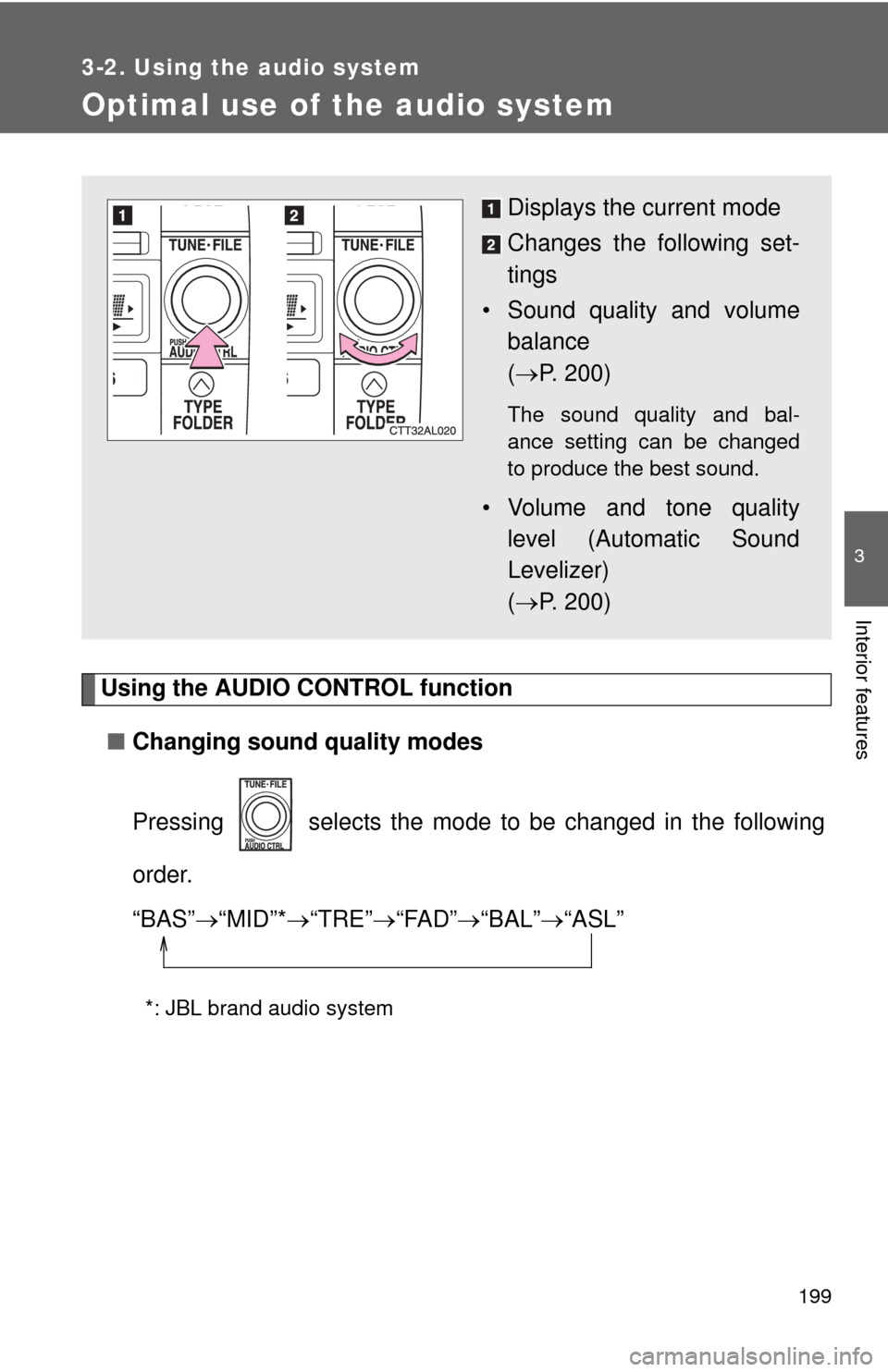
■Changing sound quality modes
Pressing selects the mode to be changed in the following
order.
“BAS”“MID”*“TRE”“FAD”“BAL”“ASL”
*: JBL brand audio system
Displays the current mode
Changes the following set-
tings
• Sound quality and volume
balance
(P. 200)
The sound quality and bal-
ance setting can be changed
to produce the best sound.
• Volume and tone quality
level (Automatic Sound
Levelizer)
(P. 200)
Page 200 of 448
200 3-2. Using the audio system
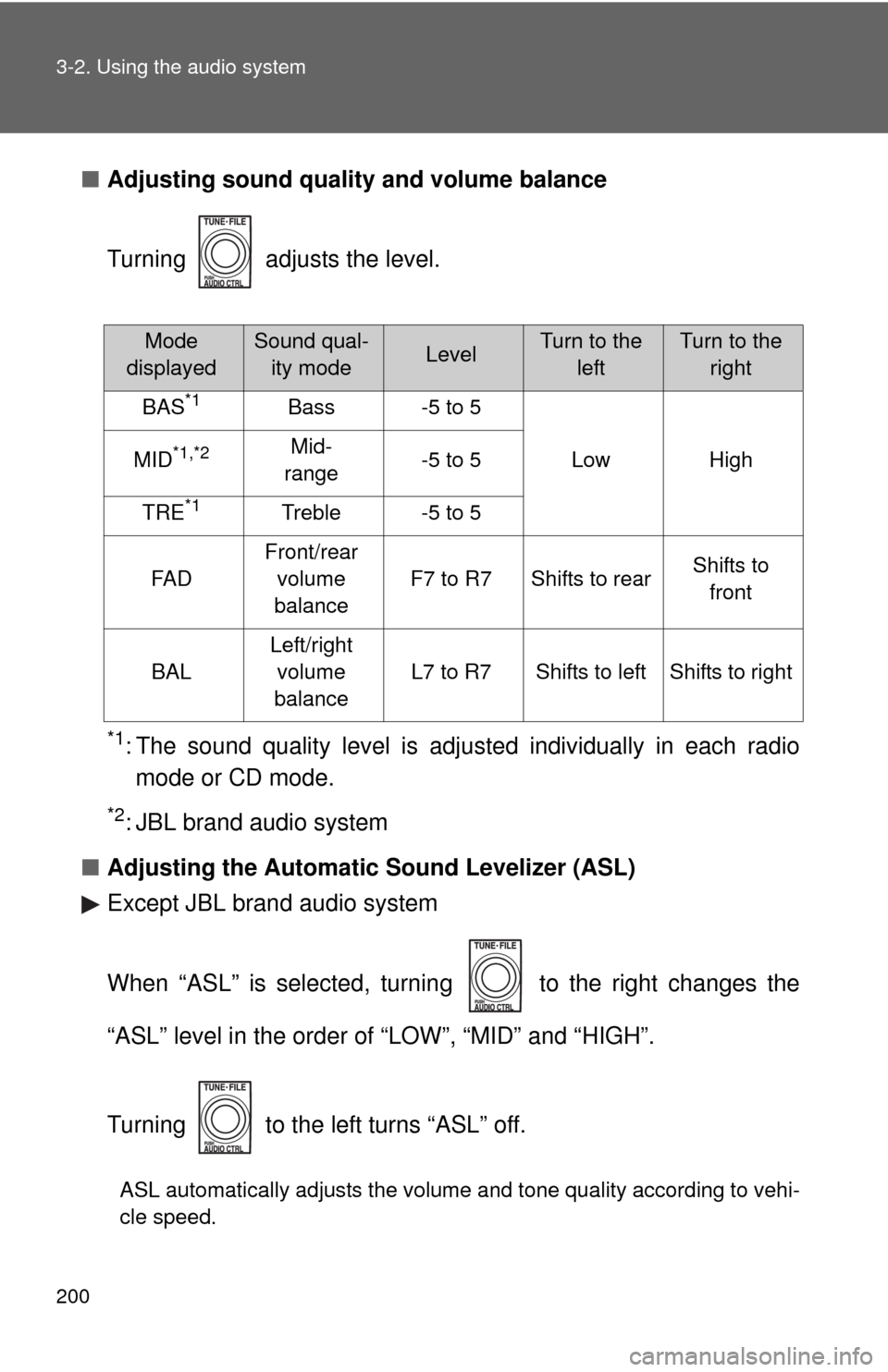
■Adjusting sound quality and volume balance
Turning adjusts the level.
*1: The sound quality level is adjusted individually in each radio
mode or CD mode.
*2: JBL brand audio system
■Adjusting the Automatic Sound Levelizer (ASL)
Except JBL brand audio system
When “ASL” is selected, turning to the right changes the
“ASL” level in the order of “LOW”, “MID” and “HIGH”.
Turning to the left turns “ASL” off.
ASL automatically adjusts the volume and tone quality according to vehi-
cle speed.
Mode
displayedSound qual-
ity modeLevelTurn to the
leftTurn to the
right
BAS*1Bass-5 to 5
LowHighMID*1,*2Mid-
range-5 to 5
TRE*1Treble-5 to 5
FA D
Front/rear
volume
balance
F7 to R7Shifts to rearShifts to
front
BAL
Left/right
volume
balance
L7 to R7Shifts to leftShifts to right
Page 201 of 448
201 3-2. Using the audio system
3
Interior features
JBL brand audio system
When “ASL” is selected, turning to the right turns “ASL” on,
and turning to the left turns “ASL” off.
ASL automatically adjusts the volume and tone quality according to vehi-
cle speed.
■Trademark owned by SRS Labs, Inc. (except JBL brand audio system)
The audio systems utilize SRS FOCUS
and SRS TruBass audio
enhancement technologies, under license from SRS Labs, Inc., in all modes
except AM radio mode.
FOCUS, TruBass, SRS and
symbols are trademarks of SRS Labs,
Inc.
FOCUS and TruBass technologies are incorporated under license from
SRS Labs, Inc.
Page 202 of 448
202
3-2. Using the audio system
Using the AUX adapter
■Operating portable audio devices connected to the audio system
The volume can be adjusted using the vehicle's audio controls. All other
adjustments must be made on the portable audio device itself.
■When using a portable audio device connected to the power outlet
Noise may occur during playback. Use the power source of the portable
audio device.
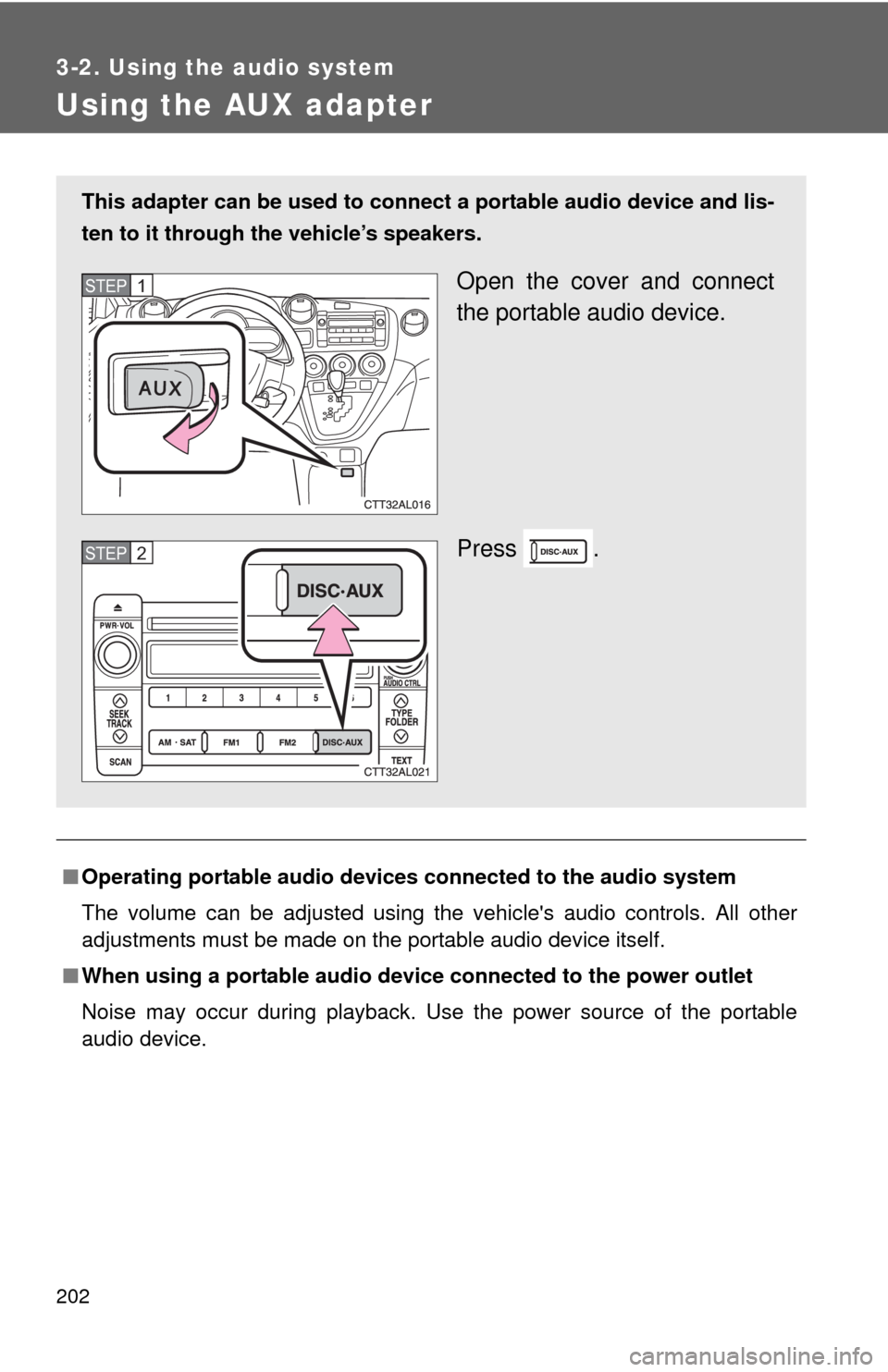
This adapter can be used to connect a portable audio device and lis-
ten to it through the vehicle’s speakers.
Open the cover and connect
the portable audio device.
Press .STEP1
STEP2
Page 203 of 448
203
3-2. Using the audio system
3
Interior features
Using the steering wheel audio switches
Turning on the power
Press when the audio system is turned off.
The audio system can be turned off by holding down until you
hear a beep.
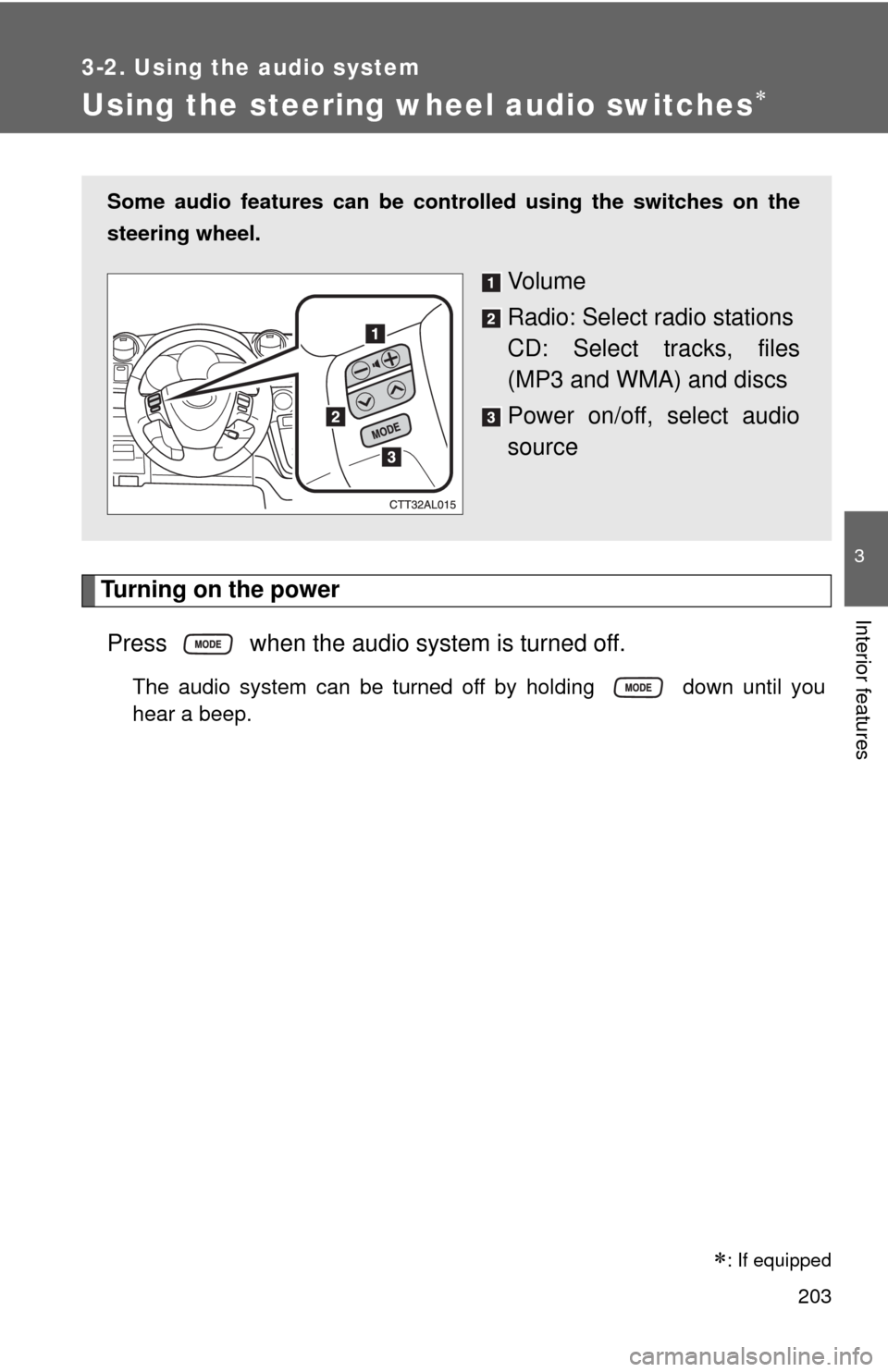
Some audio features can be controlled using the switches on the
steering wheel.
Vo l u m e
Radio: Select radio stations
CD: Select tracks, files
(MP3 and WMA) and discs
Power on/off, select audio
source
: If equipped
Page 204 of 448
204 3-2. Using the audio system
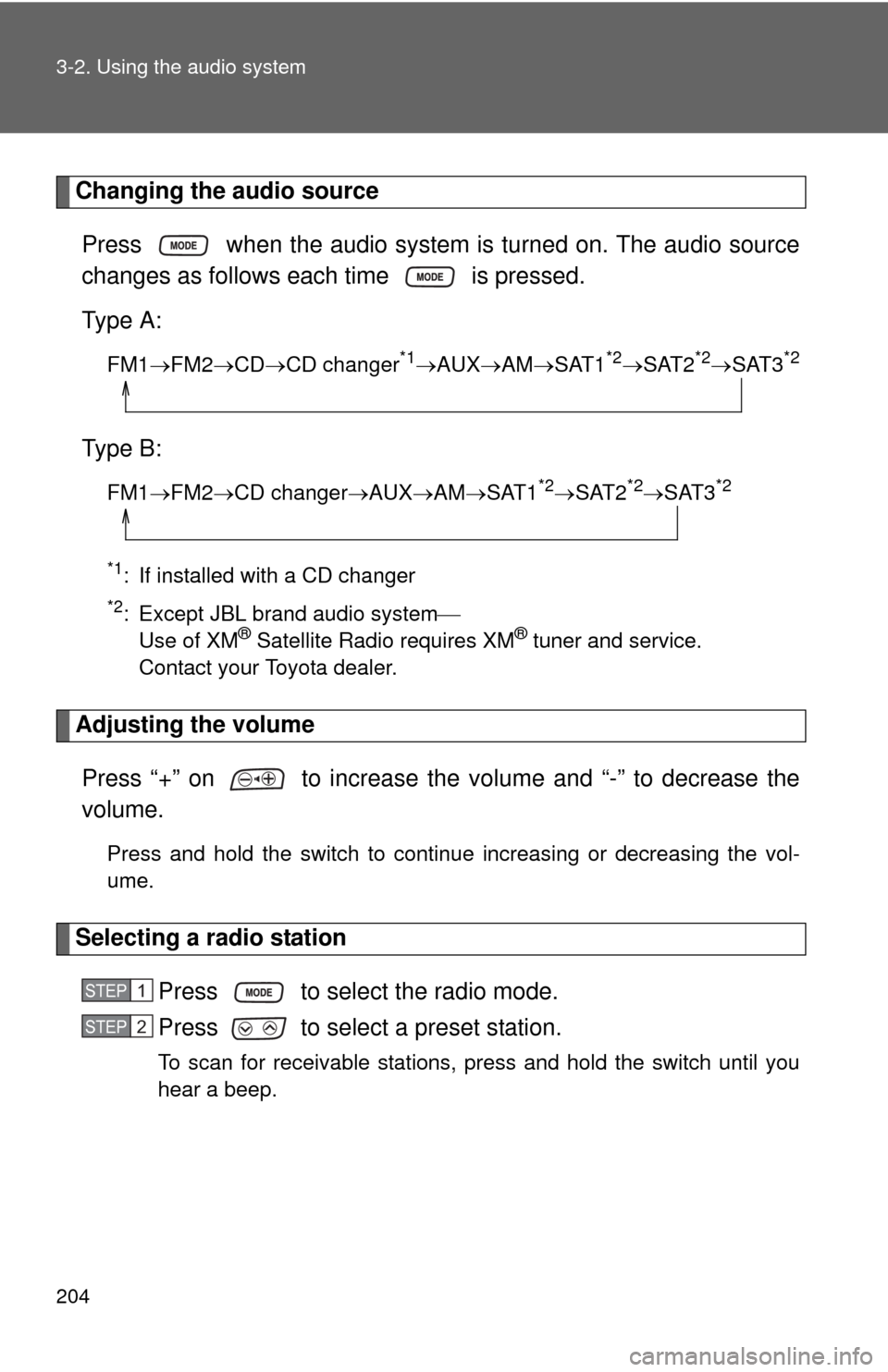
Changing the audio source
Press when the audio system is turned on. The audio source
changes as follows each time is pressed.
Type A:
FM1FM2CDCD changer*1AUXAMSAT1*2SAT2*2SAT3*2
Type B:
FM1FM2CD changerAUXAMSAT1*2SAT2*2SAT3*2
*1
: If installed with a CD changer
*2: Except JBL brand audio system
Use of XM® Satellite Radio requires XM® tuner and service.
Contact your Toyota dealer.
Adjusting the volume
Press “+” on to increase the volume and “-” to decrease the
volume.
Press and hold the switch to continue increasing or decreasing the vol-
ume.
Selecting a radio station
Press to select the radio mode.
Press to select a preset station.
To scan for receivable stations, press and hold the switch until you
hear a beep.
STEP1
STEP2
Page 205 of 448
205 3-2. Using the audio system
3
Interior features
Selecting a track/file
Press to select the CD mode.
Press to select the desired track/file.
Selecting a folder (type A)
Press to select the CD mode.
Press and hold until you hear a beep.
Selecting a disc (type A with a CD changer and type B)
Press to select the CD mode.
Press and hold until you hear a beep.
CAUTION
■To reduce the risk of an accident
Exercise care when operating the audio switches on the steering wheel.
STEP1
STEP2
STEP1
STEP2
STEP1
STEP2
Page 209 of 448
209
3-3. Using the hands-free phone system (for cellular phone)
3
Interior features
Using the hands-free phone system (for cellular phone)
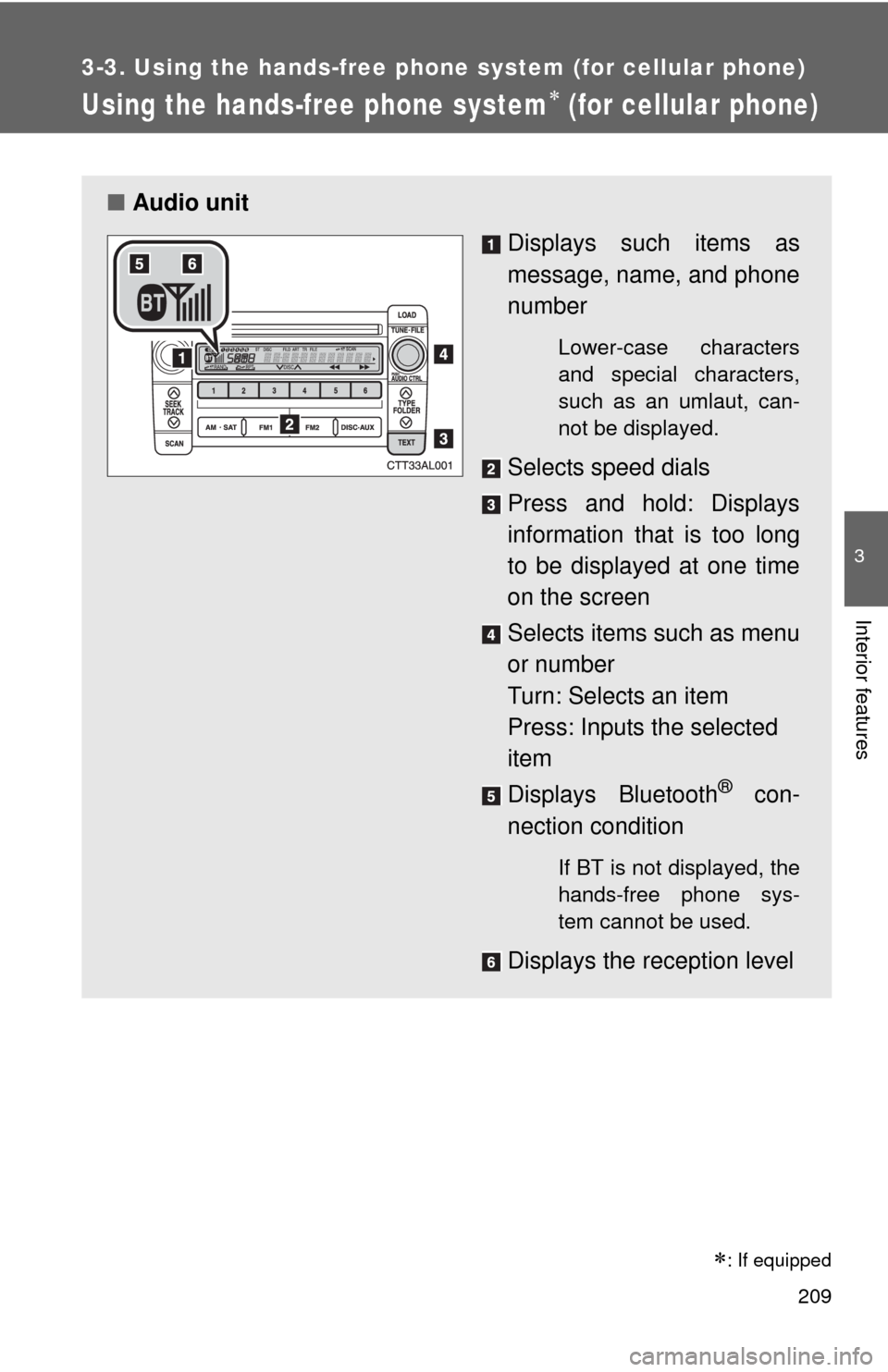
■Audio unit
Displays such items as
message, name, and phone
number
Lower-case characters
and special characters,
such as an umlaut, can-
not be displayed.
Selects speed dials
Press and hold: Displays
information that is too long
to be displayed at one time
on the screen
Selects items such as menu
or number
Turn: Selects an item
Press: Inputs the selected
item
Displays Bluetooth
® con-
nection condition
If BT is not displayed, the
hands-free phone sys-
tem cannot be used.
Displays the reception level
: If equipped
Page 278 of 448

278 4-1. Maintenance and care
NOTICE
■Cleaning detergents
Do not use organic substances such as benzene or gasoline, acidic or alka-
line solutions, dye, bleach or other detergent. Doing so may discolor the
vehicle interior or cause streaks or damage to painted surfaces.
■Preventing damage to leather surfaces
Observe the following precautions to avoid damage to and deterioration of
leather surfaces.
●Remove any dust or dirt on leather surfaces immediately.
●Do not expose the vehicle to direct sunlight for extended periods of time.
Park the vehicle in the shade, especially during summer.
●Do not place items made of vinyl, plastic, or that contain wax, on the
upholstery, as they may stick to the leather surface if the vehicle interior
heats up significantly.
■Water on the floor
Do not wash the vehicle floor with water.
Vehicle systems such as the audio system may be damaged if water comes
into contact with electrical components under the floor of the vehicle, and
may also cause the body to rust.
■Cleaning the inside of the rear window
●Do not use glass cleaner to clean the rear window, as this may cause
damage to the rear window defogger heater wires. Use a cloth dampened
with lukewarm water to gently wipe the window clean. Wipe the window in
strokes running parallel to the heater wires.
●Be careful not to scratch or damage the heater wires.