lock TOYOTA MATRIX 2010 E140 / 2.G Workshop Manual
[x] Cancel search | Manufacturer: TOYOTA, Model Year: 2010, Model line: MATRIX, Model: TOYOTA MATRIX 2010 E140 / 2.GPages: 448, PDF Size: 9.74 MB
Page 142 of 448
142
2-4. Using other driving systems
Driving assist systems
To help enhance driving safety and performance, the following sys-
tems operate automatically in response to various driving situations.
Be aware, however, that these systems are supplementary and
should not be relied upon too heavily when operating the vehicle.
■ABS (Anti-lock Brake System)
Helps to prevent wheel lock when the brakes are applied suddenly, or if
the brakes are applied while driving on a slippery road surface.
■Brake assist
Generates an increased level of braking force after the brake pedal is
depressed, when the system detects a panic stop situation.
■VSC (Vehicle Stability Control) (if equipped)
Helps the driver to control skidding when swerving suddenly or turning
on slippery road surfaces.
■TRAC (Traction Control) (if equipped)
Maintains drive power and prevents the front wheels from spinning
when starting the vehicle or accelerating on slippery roads.
■EPS (Electric Power Steering)
Employs an electric motor to reduce the amount of effort needed to turn
the steering wheel.
■Active torque control 4WD system (if equipped)
Automatically switches from front-wheel drive to AWD (All-Wheel Drive)
according to driving conditions, helping to ensure reliable handling and
stability. Examples of conditions where the system will switch to AWD
are when cornering, going uphill, starting off or accelerating, and when
the road surface is slippery due to snow or rain etc.
Page 149 of 448

149 2-5. Driving information
2
When driving
CAUTION
■Storage precautions
Observe the following precautions.
Failing to do so may result in death or serious injury.
●To prevent cargo and luggage from sliding forward during braking, do
not stack anything in the luggage compartment. Keep cargo and lug-
gage low, as close to the floor as possible.
●Never allow anyone to ride in the luggage compartment. It is not
designed for passengers. They should ride in their seats with their seat
belts properly fastened. Otherwise, they are much more likely to suffer
death or serious bodily injury, in the event of sudden braking or an
accident.
●Do not place cargo or luggage in or on the following locations as the
item may get under the clutch, brake or accelerator pedal and prevent
the pedals from being depressed properly, block the driver’s vision, or
hit the driver or passengers, causing an accident.
• Driver’s feet
• Front passenger or rear seats (when stacking items)
• Instrument panel
• Dashboard
• Tonneau cover (if equipped)
●Secure all items in the occupant compartment, as they may shift and
injure someone during an accident or sudden braking.
■Capacity and distribution
●Do not exceed the maximum axle weight rating or the total vehicle
weight rating.
●Even if the total load of occupant's weight and the cargo load is less
than the total load capacity, do not apply the load unevenly.
Improper loading may cause deterioration of steering or braking con-
trol which may cause death or serious injury.
Page 161 of 448
161 2-5. Driving information
2
When driving
●In order to maintain efficient engine braking and electrical charging
performance, do not use “D” (automatic transmission) or the 5th
gear (manual transmission).
●Due to the added load of the trailer, your vehicle's engine may
overheat on hot days (at temperatures over 85°F [30°C]) when
driving up a long or steep grade. If the engine coolant temperature
gauge indicates overheating, immediately turn off the air condition-
ing (if in use), pull your vehicle off the road and stop in a safe spot.
(P. 391)
●Always place wheel blocks under both the vehicle and the trailer
wheels when parking. Apply the parking brake firmly, and put the
transmission in P (automatic transmission) or in 1 or R (manual
transmission). Avoid parking on a slope, but if unavoidable, do so
only after performing the following:
Apply the brakes and keep them applied.
Have someone place wheel blocks under both the vehicle and
trailer wheels.
When the wheel blocks are in place, release the brakes slowly
until the blocks absorb the load.
Apply the parking brake firmly.
Shift into 1 or R (manual transmission) or P (automatic trans-
mission) and turn off the engine.
●When restarting after parking on a slope:
With the transmission in the P position (automatic transmis-
sion) or the clutch pedal (manual transmission) depressed,
start the engine. On vehicles with an automatic transmission,
be sure to keep the brake pedal pressed.
Shift into a forward gear. If reversing, shift into the R position.
Release the parking brake (also brake pedal on vehicles with
an automatic transmission), and slowly pull or back away from
the wheel blocks. Stop and apply the brakes.
Have someone retrieve the blocks.
STEP1
STEP2
STEP3
STEP4
STEP5
STEP1
STEP2
STEP3
STEP4
Page 165 of 448
165 2-5. Driving information
2
When driving
NOTICE
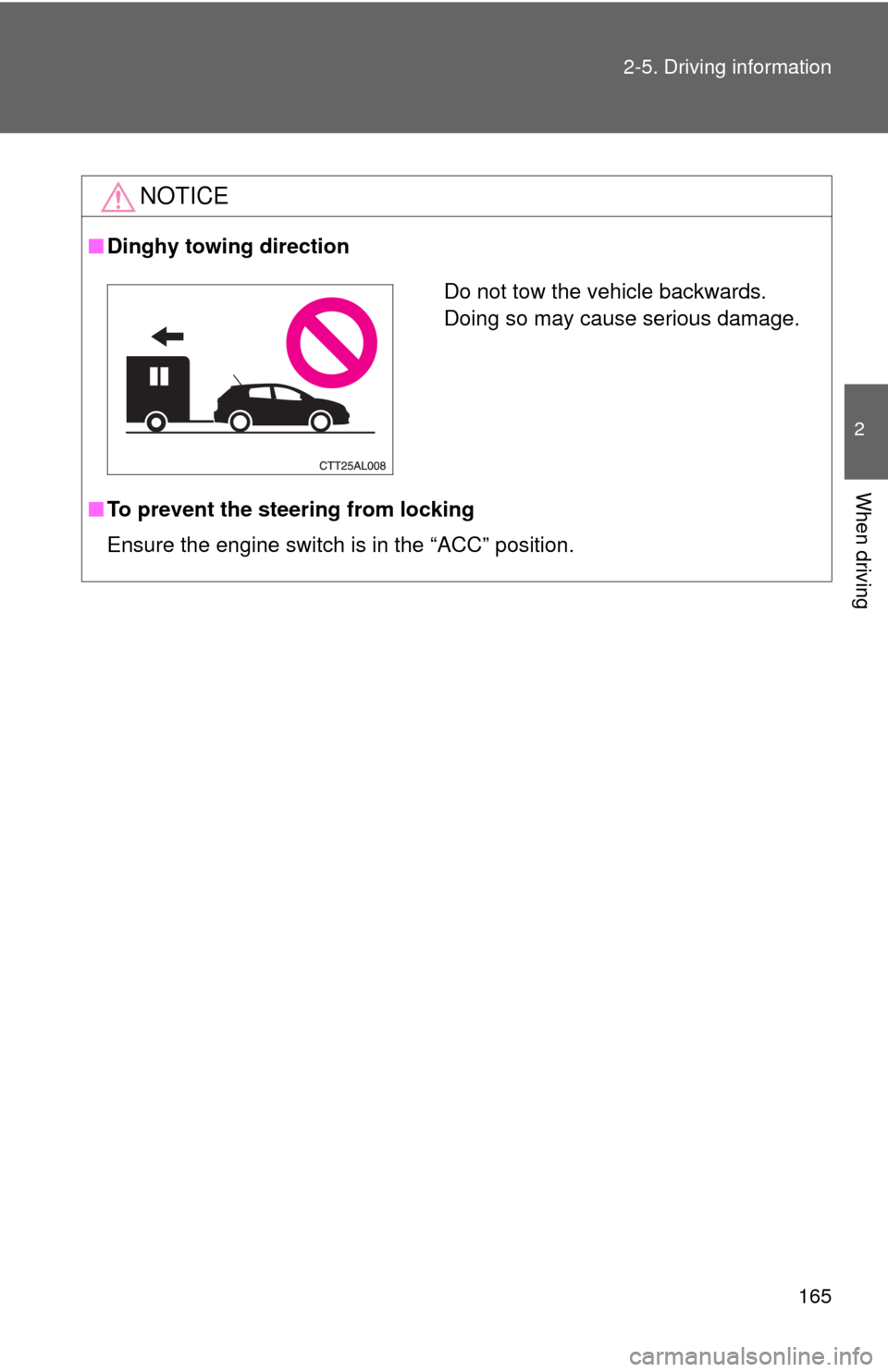
■Dinghy towing direction
■To prevent the steering from locking
Ensure the engine switch is in the “ACC” position.
Do not tow the vehicle backwards.
Doing so may cause serious damage.
Page 167 of 448
Interior features3
167
3-3. Using the hands-free phone
system (for cellular phone)
Hands-free phone system
(for cellular phone)
features .......................... 206
Using the hands-free
phone system
(for cellular phone) ......... 209
Making a phone call ......... 218
Setting a cellular phone ... 222
Security and system
setup .............................. 227
Using the phone book ...... 231
3-4. Using the interior lights
Interior lights list ............... 238
• Interior light ..................... 239
• Personal/interior lights .... 240
• Personal lights ................ 2413-5. Using the storage features
List of storage features .... 242
• Glove box........................ 243
• Console box .................... 243
• Cup holders .................... 245
• Bottle holders .................. 247
• Auxiliary boxes................ 248
3-6. Other interior features
Sun visors ........................ 250
Vanity mirrors ................... 251
Clock ................................ 252
Ashtrays ........................... 253
Cigarette lighter................ 254
Power outlet ..................... 255
Grocery bag hook ............ 257
Seatback table ................. 259
Floor mat .......................... 260
Luggage compartment
feature............................ 261
Compass .......................... 268
Page 169 of 448
169 3-1. Using the air conditioning system and defogger
3
Interior features
Adjusting the settings
■Adjusting the temperature setting (heater)
Turn the temperature control dial clockwise to increase the temper-
ature.
■Adjusting the temperature setting (air conditioning system)
Turn the temperature control dial clockwise (warm) or counter-
clockwise (cool).
If is not pressed, the system will blow ambient temperature air or
heated air.
■Adjusting the fan speed
Turn the fan speed control dial clockwise (increase) or counter-
clockwise (decrease).
Set the dial to “0” to turn the fan off.
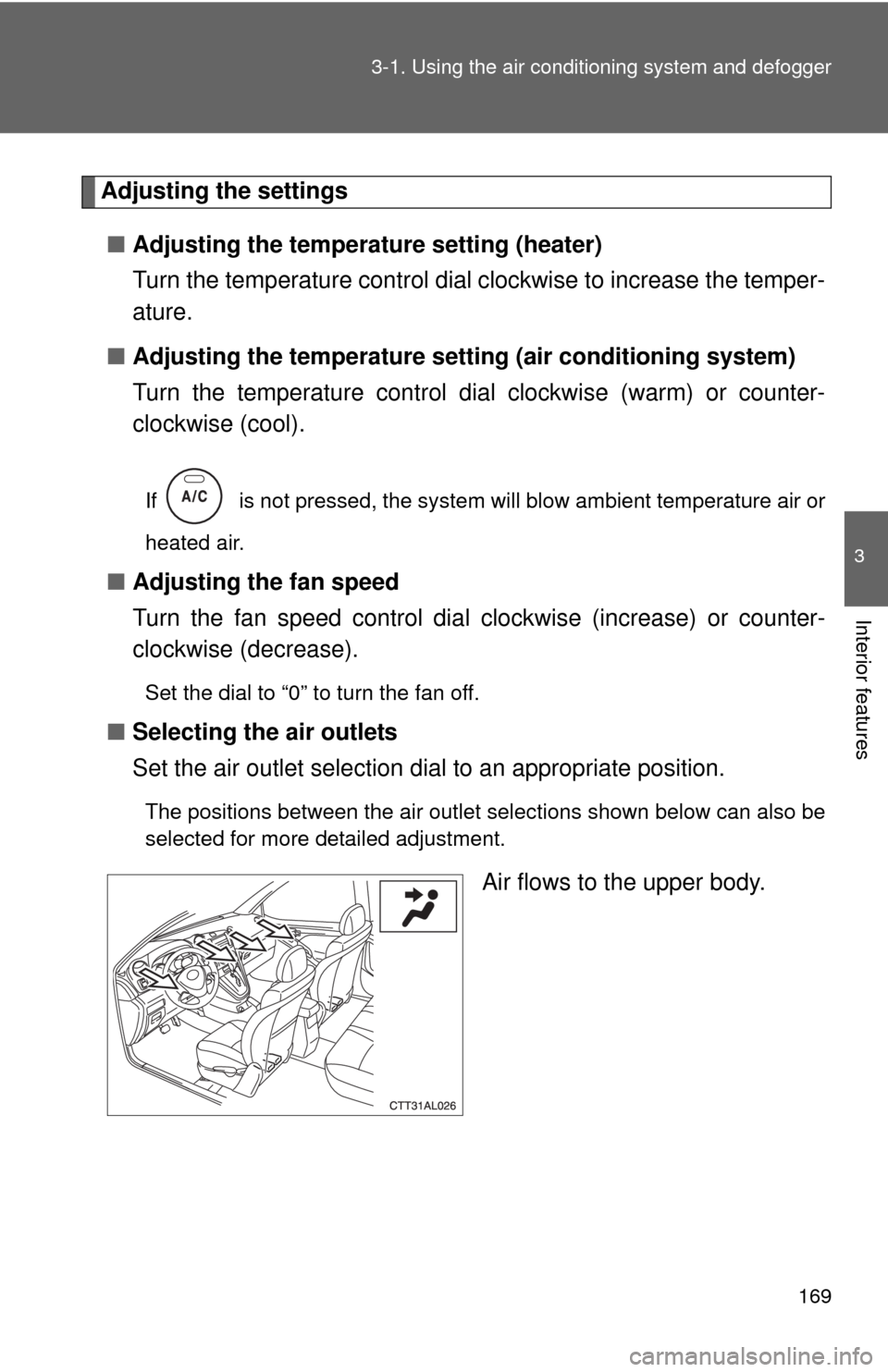
■Selecting the air outlets
Set the air outlet selection dial to an appropriate position.
The positions between the air outlet selections shown below can also be
selected for more detailed adjustment.
Air flows to the upper body.
Page 173 of 448
173 3-1. Using the air conditioning system and defogger
3
Interior features
■Using the recirculated air mode
The windows will fog up more easily if the recirculated air mode is used for an
extended period.
■When outside air temperature approaches 32°F (0°C) (vehicles with air
conditioning system)
The air conditioning system may not operate even when
is pressed.
■When
is selected for the air outlets used
For your driving comfort, air flowing to the feet may be warmer than air flowing
to the upper body depending on the position of the temperature adjustment
dial.
■Air conditioning odors
●During use, various odors from inside and outside the vehicle may enter
into and accumulate in the air conditioning system. This may then cause
odor to be emitted from the vents.
●To reduce potential odors from occurring:
It is recommended that the air conditioning system be set to outside air
mode prior to turning the vehicle off.
CAUTION
■To prevent the windshield from fogging up
Do not set the air outlet selection dial to during cool air operation in
extremely humid weather. The difference between the temperature of the
outside air and that of the windshield can cause the outer surface of the
windshield to fog up, blocking your vision.
NOTICE
■To prevent battery discharge
Do not leave the air conditioning system on longer than necessary when the
engine is stopped.
Page 215 of 448
215 3-3. Using the hands-free phone system (for cellular phone)
3
Interior features
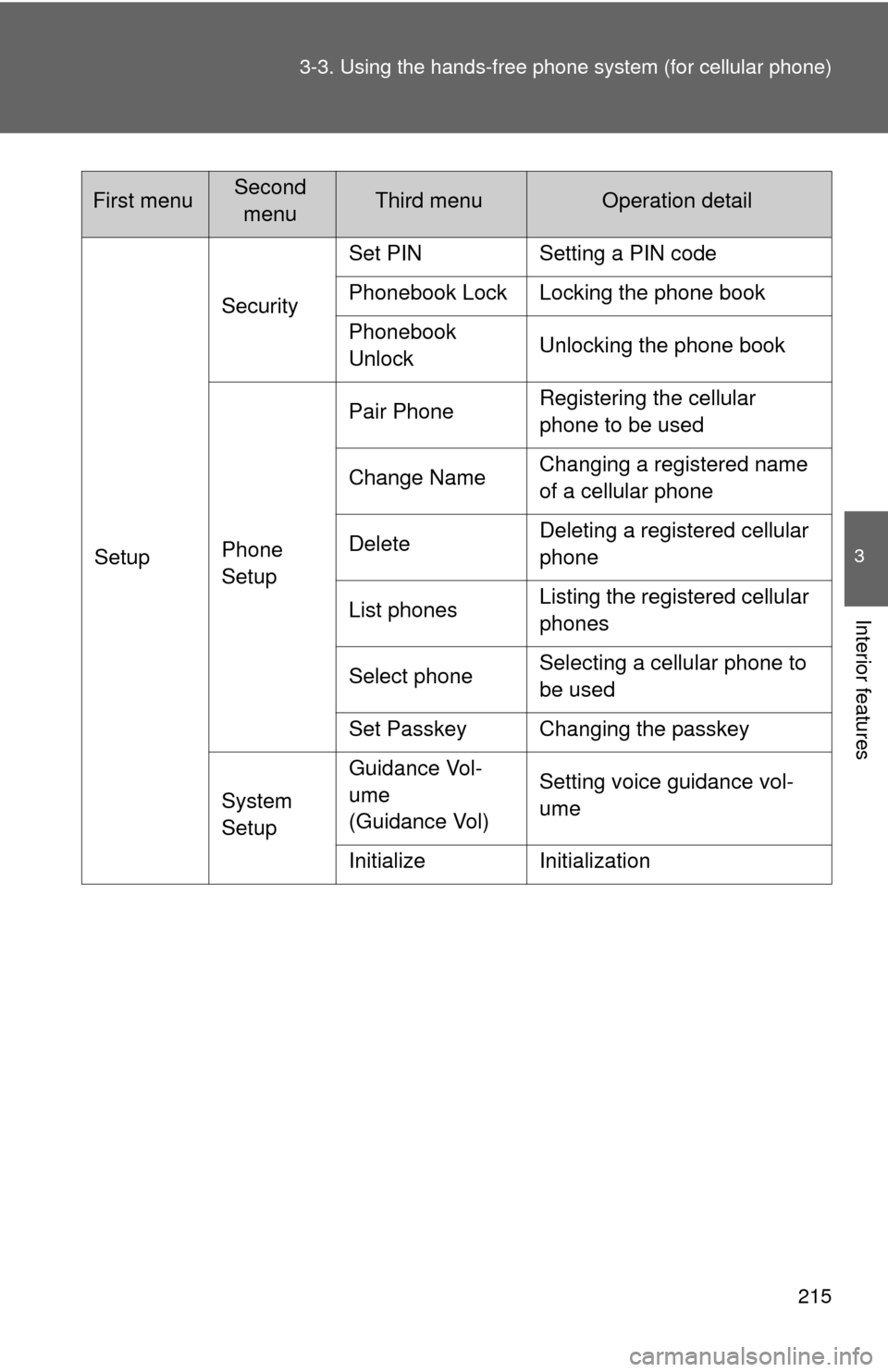
SetupSecuritySet PIN Setting a PIN code
Phonebook Lock Locking the phone book
Phonebook
UnlockUnlocking the phone book
Phone
SetupPair PhoneRegistering the cellular
phone to be used
Change NameChanging a registered name
of a cellular phone
DeleteDeleting a registered cellular
phone
List phonesListing the registered cellular
phones
Select phoneSelecting a cellular phone to
be used
Set Passkey Changing the passkey
System
SetupGuidance Vol-
ume
(Guidance Vol)Setting voice guidance vol-
ume
Initialize Initialization
First menuSecond
menuThird menuOperation detail
Page 216 of 448
216 3-3. Using the hands-free phone system (for cellular phone)
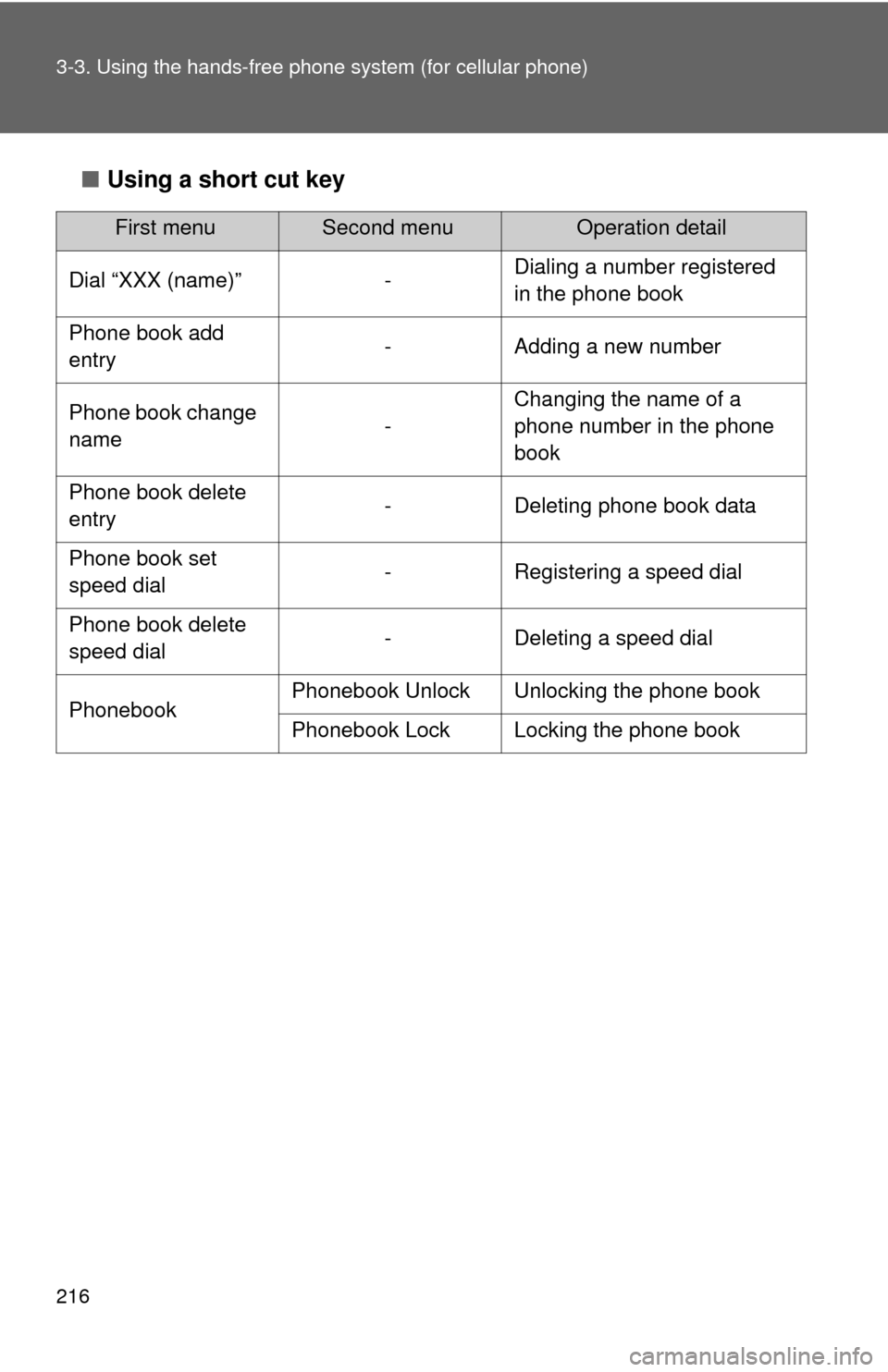
■Using a short cut key
First menuSecond menuOperation detail
Dial “XXX (name)” -Dialing a number registered
in the phone book
Phone book add
entry- Adding a new number
Phone book change
name-Changing the name of a
phone number in the phone
book
Phone book delete
entry- Deleting phone book data
Phone book set
speed dial- Registering a speed dial
Phone book delete
speed dial- Deleting a speed dial
PhonebookPhonebook Unlock Unlocking the phone book
Phonebook Lock Locking the phone book
Page 227 of 448
227
3-3. Using the hands-free phone system (for cellular phone)
3
Interior features
Security and system setup
Setting or changing the PIN
■Setting a PIN
Select “Set PIN” by using a voice command or .
Enter a PIN by using a voice command or .
When using , input the code 1 digit at a time.
To enter the menu of each setting, follow the steps below:
■Security setting items and operation procedure
●Setting or changing the PIN (Personal Identification Number)
1. “Setup” 2. “Security” 3. “Set PIN”
●Locking the phone book
1. “Setup” 2. “Security” 3. “Phonebook Lock”
●Unlocking the phone book
1. “Setup” 2. “Security” 3. “Phonebook Unlock”
■System setup items and operation procedure
●Setting voice guidance volume
1. “Setup” 2. “System Setup” 3. “Guidance Vol”
●Initialization
1. “Setup” 2. “System Setup” 3. “Initialize”
can only be used for system setup operation.
STEP1
STEP2