Mount TOYOTA MATRIX 2010 E140 / 2.G Owners Manual
[x] Cancel search | Manufacturer: TOYOTA, Model Year: 2010, Model line: MATRIX, Model: TOYOTA MATRIX 2010 E140 / 2.GPages: 448, PDF Size: 9.74 MB
Page 48 of 448
48 1-3. Adjustable components (seats, mirrors, steering wheel)
CAUTION
Observe the following precautions to reduce the risk of injury in the event of
sudden braking, sudden swerving or an accident.
Failing to do so may cause death or severe injury.
■Wearing a seat belt
●Ensure that all passengers wear a seat belt.
●Always wear a seat belt properly.
●Each seat belt should be used by one person only. Do not use a seat belt
for more than one person at once, including children.
●Toyota recommends that children be seated in the rear seat and always
use a seat belt and/or an appropriate child restraint system.
●Do not recline the seat any more than necessary to achieve a proper seat-
ing position. The seat belt is most effective when the occupants are sitting
up straight and well back in the seats.
●Do not wear the shoulder belt under your arm.
●Always wear your seat belt low and snug across your hips.
■Adjustable shoulder anchor
Always make sure the shoulder belt is positioned across the center of your
shoulder. The belt should be kept away from your neck, but not falling off
your shoulder. Failure to do so could reduce the amount of protection in an
accident and cause death or serious injuries in the event of a sudden stop,
sudden swerve or collision. (P. 46)
■Child restraint lock function belt
Do not allow children to play with the child restraint lock function belt. If the
belt becomes twisted around a child’s neck, it will not be possible to pull the
belt out leading to choking or other serious injuries that could result in death.
If this occurs and the buckle cannot be unfastened, scissors should be used
to cut the belt.
Page 106 of 448
106 2-1. Driving procedures
CAUTION
●If the smell of exhaust is noticed inside the vehicle, open the windows and
check that the back door is closed. Large amounts of exhaust in the vehi-
cle can cause driver drowsiness and an accident, resulting in death or a
serious health hazard. Have the vehicle inspected by your Toyota dealer
immediately.
●On vehicles with an automatic transmission, do not shift the shift lever to P
while the vehicle is moving.
Doing so can damage the transmission and may result in a loss of vehicle
control.
●Do not shift the shift lever to R while the vehicle is moving forward.
Doing so can damage the transmission and may result in a loss of vehicle
control.
●Do not shift the shift lever to D (vehicles with an automatic transmission) or
1 (vehicles with a manual transmission) while the vehicle is moving back-
ward.
Doing so can damage the transmission and may result in a loss of vehicle
control.
●Moving the shift lever to N while the vehicle is moving will disengage the
engine from the transmission. Engine braking is not available when N is
selected.
●During normal driving, do not turn off the engine. Turning the engine off
while driving will not cause loss of steering or braking control, but the
power assist to these systems will be lost. This will make it more difficult to
steer and brake, so you should pull over and stop the vehicle as soon as it
is safe to do so.
However, in the event of an emergency, such as if it becomes impossible
to stop the vehicle in the normal way: P. 359
●Use engine braking (downshift) to maintain a safe speed when driving
down a steep hill. Using the brakes continuously may cause the brakes to
overheat and lose effectiveness. (P. 1 1 7 )
●When stopped on an inclined surface, use the brake pedal and parking
brake to prevent the vehicle from rolling backward or forward and causing
an accident.
Page 142 of 448
142
2-4. Using other driving systems
Driving assist systems
To help enhance driving safety and performance, the following sys-
tems operate automatically in response to various driving situations.
Be aware, however, that these systems are supplementary and
should not be relied upon too heavily when operating the vehicle.
■ABS (Anti-lock Brake System)
Helps to prevent wheel lock when the brakes are applied suddenly, or if
the brakes are applied while driving on a slippery road surface.
■Brake assist
Generates an increased level of braking force after the brake pedal is
depressed, when the system detects a panic stop situation.
■VSC (Vehicle Stability Control) (if equipped)
Helps the driver to control skidding when swerving suddenly or turning
on slippery road surfaces.
■TRAC (Traction Control) (if equipped)
Maintains drive power and prevents the front wheels from spinning
when starting the vehicle or accelerating on slippery roads.
■EPS (Electric Power Steering)
Employs an electric motor to reduce the amount of effort needed to turn
the steering wheel.
■Active torque control 4WD system (if equipped)
Automatically switches from front-wheel drive to AWD (All-Wheel Drive)
according to driving conditions, helping to ensure reliable handling and
stability. Examples of conditions where the system will switch to AWD
are when cornering, going uphill, starting off or accelerating, and when
the road surface is slippery due to snow or rain etc.
Page 147 of 448
147
2
When driving
2-5. Driving information
Cargo and luggage
Capacity and distribution
Cargo capacity depends on the total weight of the occupants.
(Cargo capacity) = (Total load capacity) - (Total weight of occupants)
Steps for Determining Correct Load Limit
(1) Locate the statement “The combined weight of occupants and
cargo should never exceed XXX kg or XXX lbs.” on your vehi-
cle’s placard.
(2) Determine the combined weight of the driver and passengers
that will be riding in your vehicle.
(3) Subtract the combined weight of the driver and passengers from
XXX kg or XXX lbs.
(4) The resulting figure equals the available amount of cargo and
luggage load capacity.
For example, if the “XXX” amount equals 1400 lbs. and there will
be five 150 lb passengers in your vehicle, the amount of avail-
able cargo and luggage load capacity is 650 lbs. (1400 - 750 (5
150) = 650 lbs.)
(5) Determine the combined weight of luggage and cargo being
loaded on the vehicle. That weight may not safely exceed the
available cargo and luggage load capacity calculated in Step 4.
Take notice of the following information about storage precau-
tions, cargo capacity and load.
●Stow cargo and luggage in the luggage compartment whenever
possible. Be sure all items are secured in place.
●Be careful to keep the vehicle level. Placing the weight as far for-
ward as possible helps maintain vehicle balance.
●For better fuel economy, do not carry unnecessary weight.
Page 148 of 448
148 2-5. Driving information
(6) If your vehicle will be towing a trailer, load from your trailer will be
transferred to your vehicle. Consult this manual to determine how
this reduces the available cargo and luggage load capacity of
your vehicle. (P. 155)
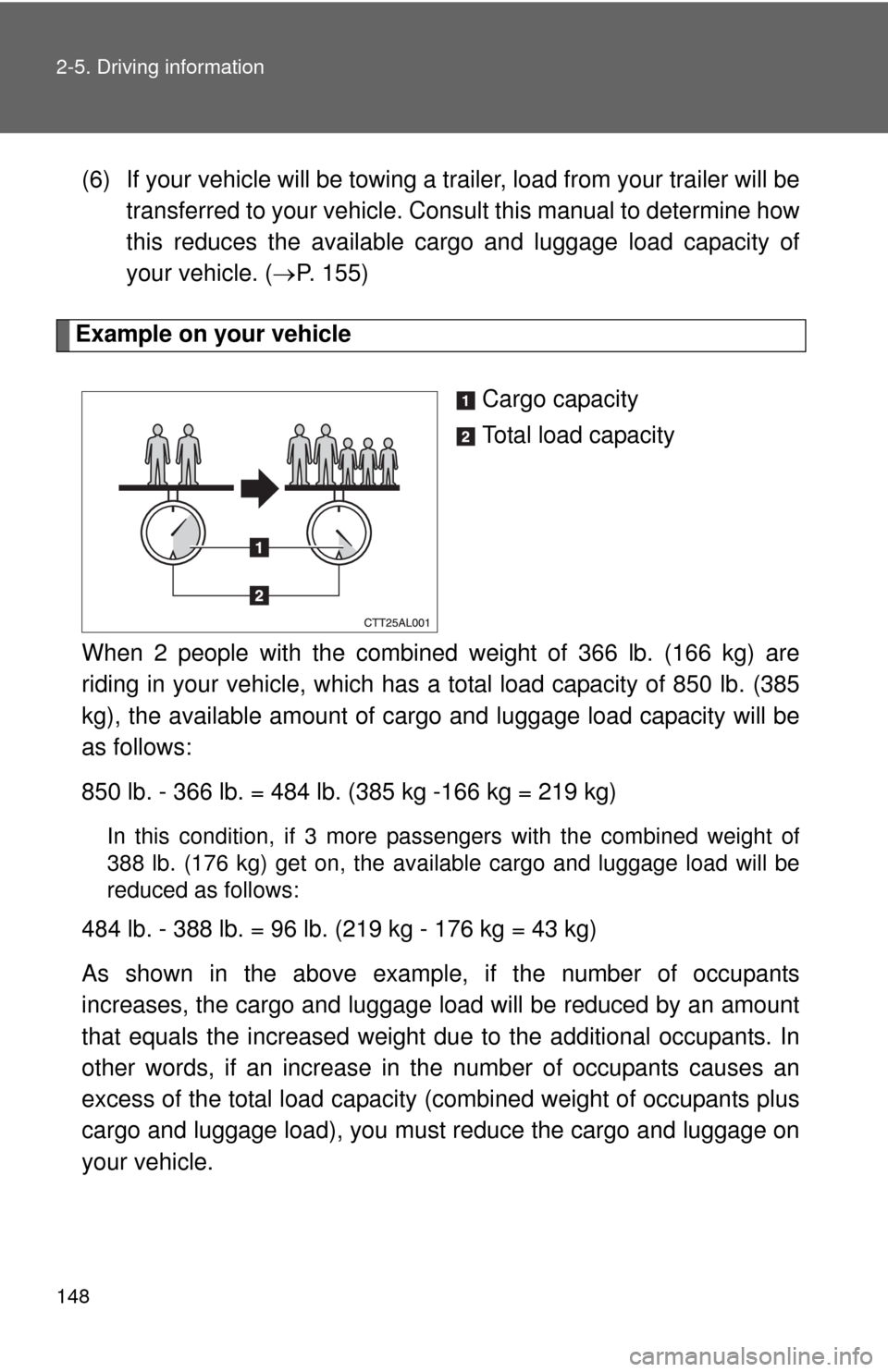
Example on your vehicle
Cargo capacity
Total load capacity
When 2 people with the combined weight of 366 lb. (166 kg) are
riding in your vehicle, which has a total load capacity of 850 lb. (385
kg), the available amount of cargo and luggage load capacity will be
as follows:
850 lb. - 366 lb. = 484 lb. (385 kg -166 kg = 219 kg)
In this condition, if 3 more passengers with the combined weight of
388 lb. (176 kg) get on, the available cargo and luggage load will be
reduced as follows:
484 lb. - 388 lb. = 96 lb. (219 kg - 176 kg = 43 kg)
As shown in the above example, if the number of occupants
increases, the cargo and luggage load will be reduced by an amount
that equals the increased weight due to the additional occupants. In
other words, if an increase in the number of occupants causes an
excess of the total load capacity (combined weight of occupants plus
cargo and luggage load), you must reduce the cargo and luggage on
your vehicle.
Page 152 of 448
152 2-5. Driving information
Selecting tire chains
Snow chains can be mounted on 16- and 17-inch tires. They cannot
be mounted on 18-inch tires. Use the correct snow chain size when
mounting the snow chains. Chain size is regulated for each tire size.
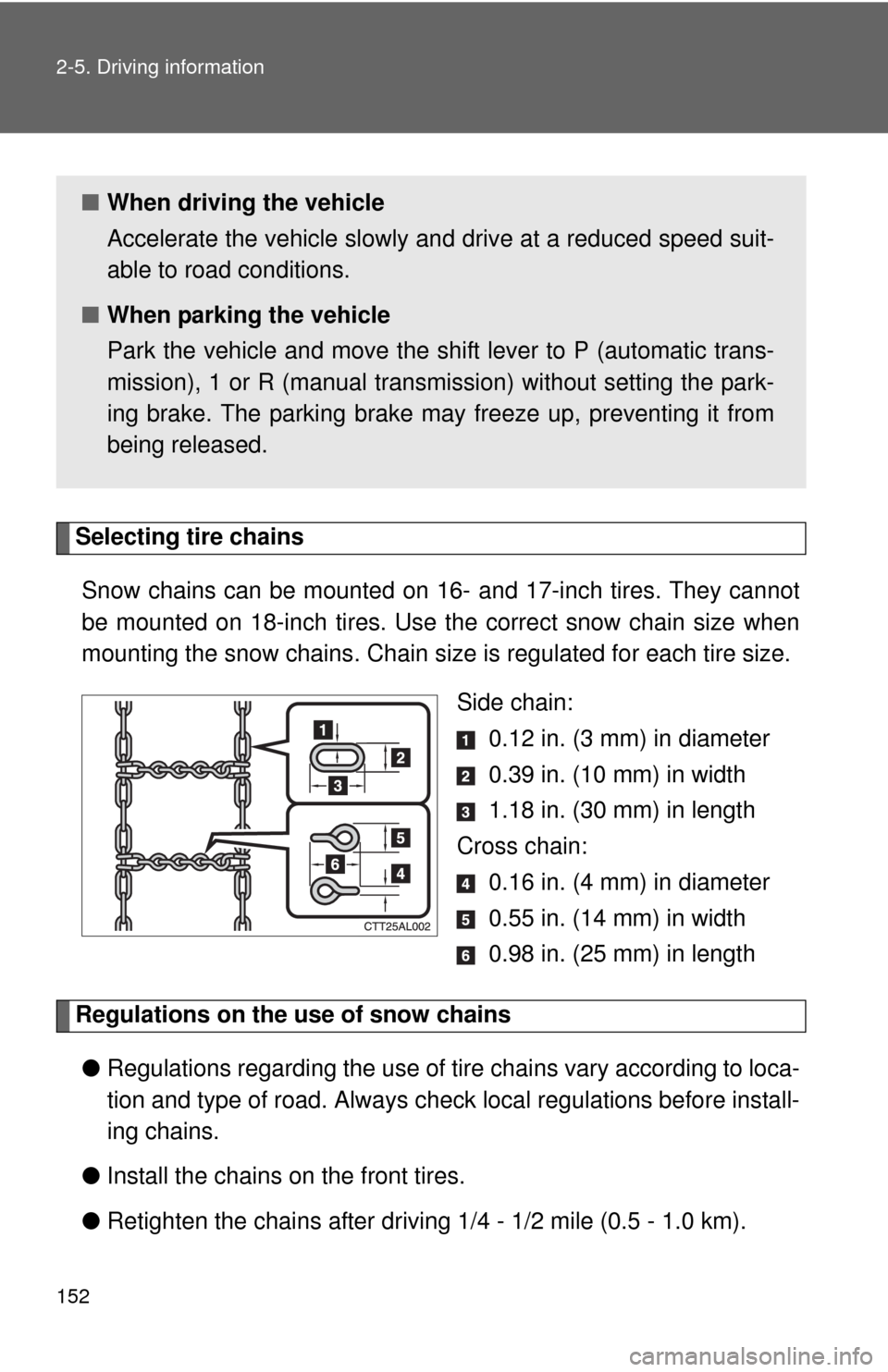
Side chain:
0.12 in. (3 mm) in diameter
0.39 in. (10 mm) in width
1.18 in. (30 mm) in length
Cross chain:
0.16 in. (4 mm) in diameter
0.55 in. (14 mm) in width
0.98 in. (25 mm) in length
Regulations on the use of snow chains
●Regulations regarding the use of tire chains vary according to loca-
tion and type of road. Always check local regulations before install-
ing chains.
●Install the chains on the front tires.
●Retighten the chains after driving 1/4 - 1/2 mile (0.5 - 1.0 km).
■When driving the vehicle
Accelerate the vehicle slowly and drive at a reduced speed suit-
able to road conditions.
■When parking the vehicle
Park the vehicle and move the shift lever to P (automatic trans-
mission), 1 or R (manual transmission) without setting the park-
ing brake. The parking brake may freeze up, preventing it from
being released.
Page 158 of 448
158 2-5. Driving information
CAUTION
■To avoid accident or injury
●Do not exceed the trailer hitch assembly weight, gross vehicle weight,
gross axle weight and trailer tongue load capacities.
●Never load more weight in the back than in the front of the trailer. About
60% of the load should be in the front half of the trailer, and the remaining
40% in the rear.
■Hitches
●Use only a hitch that conforms to the total trailer weight requirement.
●Follow the directions supplied by the hitch manufacturer.
●Lubricate the hitch ball with a light coat of grease.
●Remove the trailer hitch whenever you are not towing a trailer. After
removing the hitch, seal any mounting hole in the vehicle body to prevent
entry of any substances into the vehicle.
■When towing a trailer
●If the gross trailer weight exceeds 1000 lb. (453 kg), trailer brakes are
required. Toyota recommends trailers with brakes that conform to all appli-
cable federal and state/provincial regulations.
●Never tap into your vehicle's hydraulic system, as this will lower the vehi-
cle's braking effectiveness.
●Never tow a trailer without using a safety chain securely attached to both
the trailer and the vehicle. If damage occurs to the coupling unit or hitch
ball, there is danger of the trailer wandering into another lane.
Page 159 of 448

159 2-5. Driving information
2
When driving
Trailer towing tips
Your vehicle will handle differently when towing a trailer. The 3 main
causes of vehicle-trailer accidents are driver error, excessive speed
and improper trailer loading. Keep the following in mind when towing.
●Before starting out, check the trailer lights and the vehicle-trailer
connections. Recheck after driving a short distance.
●Practice turning, stopping and reversing with the trailer attached in
an area away from traffic until you become accustomed to the feel
of the vehicle.
NOTICE
■When installing a trailer hitch
●Use only the position recommended by your Toyota dealer. Do not install
the trailer hitch on the bumper; this may cause body damage.
●Do not use axle-mounted hitches, as they can cause damage to the axle
housing, wheel bearings, wheels or tires.
■Brakes
Toyota recommends trailers with brakes that conform to all applicable fed-
eral and state/provincial regulations.
■Safety chain
A safety chain must always be used between the towing vehicle and the
trailer. Leave sufficient slack in the chain for turns. The chain should cross
under the trailer tongue to prevent the tongue from dropping to the ground in
the case that it becomes damaged or separated. For the correct safety chain
installation procedure, ask your Toyota dealer.
■Do not directly splice trailer lights
Directly splicing trailer lights may damage your vehicle's electrical system
and cause a malfunction.
Page 181 of 448
181 3-2. Using the audio system
3
Interior features
■When the battery is disconnected
Station presets are erased.
■Reception sensitivity
●Cargo loaded on the roof luggage carrier, especially metal objects, may
adversely affect the reception of XM
® Satellite Radio.
●Maintaining perfect radio reception at all times is difficult due to the con-
tinually changing position of the antenna, differences in signal strength
and surrounding objects, such as trains, transmitters, etc.
●The radio antenna is mounted on the rear roof. The antenna can be
removed from the base by turning it.
■XM
® Satellite Radio
An XM
® Satellite Radio is a tuner designed exclusively to receive broadcasts
provided under a separate subscription. Availability is limited to the 48 con-
tiguous states and 10 Canadian provinces.
●XM
® subscriptions
For detailed information about XM® Satellite Radio or to subscribe:
U.S.A.
Visit on the web at www.xmradio.com
or call 1-800-967-2346.
Canada
Visit on the web at www.xmradio.ca
or call 1-877-438-9677.
●Radio ID
You will need the radio ID when activating XM
® service or reporting a
problem. Select “CH000” using , and the receiver's 8-character ID
number will appear.
●Satellite tuner
The tuner supports only Audio Services (Music and Talk) and the accom-
panying Text Information of XM
® Satellite Radio.
Page 197 of 448
197 3-2. Using the audio system
3
Interior features
●ID3 and WMA tags
ID3 tags can be added to MP3 files, making it possible to record the track
title and artist name, etc.
The system is compatible with ID3 Ver. 1.0, 1.1, and Ver. 2.2, 2.3 ID3 tags.
(The number of characters is based on ID3 Ver. 1.0 and 1.1.)
WMA tags can be added to WMA files, making it possible to record the
track title and artist name in the same way as with ID3 tags.
●MP3 and WMA playback
When a disc containing MP3 or WMA files is inserted, all files on the disc
are first checked. Once the file check is finished, the first MP3 or WMA file
is played. To make the file check finish more quickly, we recommend you
do not write in any files other than MP3 or WMA files or create any unnec-
essary folders.
If the discs contain a mixture of music data and MP3 or WMA format data,
only music data can be played.
●Extensions
If the file extensions .mp3 and .wma are used for files other than MP3 and
WMA files, they will be mistakenly recognized and played as MP3 and
WMA files. This may result in large amounts of interference and damage
to the speakers.
●Playback
• To play MP3 files with steady sound quality, we recommend a fixed bit
rate of 128 kbps and a sampling frequency of 44.1 kHz.
• CD-R or CD-RW playback may not be possible in some instances,
depending on the characteristics of the disc.
• There is a wide variety of freeware and other encoding software for
MP3 and WMA files on the market, and depending on the status of the
encoding and the file format, poor sound quality or noise at the start of
playback may result. In some cases, playback may not be possible at
all.
• When files other than MP3 or WMA files are recorded on a disc, it may
take more time to recognize the disc. In some cases, playback may not
be possible at all.
• Microsoft, Windows, and Windows Media are the registered trade-
marks of Microsoft Corporation in the U.S. and other countries.