instrument cluster TOYOTA MATRIX 2010 E140 / 2.G Owners Manual
[x] Cancel search | Manufacturer: TOYOTA, Model Year: 2010, Model line: MATRIX, Model: TOYOTA MATRIX 2010 E140 / 2.GPages: 448, PDF Size: 9.74 MB
Page 2 of 448

TABLE OF CONTENTSIndex
2
1-1. Key informationKeys ..................................... 24
1-2. Opening, closing
and
locking the
doors
Wireless remote control ....... 26
Doors.................................... 29
Back door ............................. 33
1-3.
Adjustable components
(seats, mirrors,
steering wheel)
Front seats
........................... 37
Rear seats ............................ 41
Head restraints ..................... 43
Seat belts ............................. 45
Steering wheel ..................... 51
Anti-glare inside rear view mirror .................................. 52
Outside rear view mirrors ..... 54
1-4. Opening a
nd closing the
windo
ws
Power windows .................... 56
Moon roof ............................. 58
1-5. Refueling Opening the fuel tank cap .... 61
1-6. Theft deterrent system Engine immobilizer system ................................ 65
Theft prevention labels (for U.S.A.) ......................... 67 1-7. Safety information
Correct driving posture ......... 68
SRS airbags ......................... 70
Front passenger occupant classification system ........... 82
Child restraint systems ......... 87
Installing child restraints ....... 91
2-1. Driving procedures Driving the vehicle .............. 102
Engine (ignition) switch....... 112
Automatic transmission ...... 116
Manual transmission........... 121
Turn signal lever ................. 123
Parking brake ..................... 124
Horn .................................... 125
2-2. Instrument cluster Gauges and meters ............ 126
Indicators and warning lights ................................. 129
2-3. Operating the li
ghts and
wipers
Headlight switch
................. 132
Fog light switch ................... 135
Windshield wipers and washer .............................. 136
Rear window wiper and washer .............................. 138
2-4. Using other driving systems Cruise control ..................... 139
Driving assist systems ........ 142
1Before driving
2When driving
Page 101 of 448
When driving2
101
2-1. Driving procedures
Driving the vehicle............ 102
Engine (ignition) switch .... 112
Automatic transmission .... 116
Manual transmission ........ 121
Turn signal lever .............. 123
Parking brake ................... 124
Horn ................................. 125
2-2. Instrument cluster
Gauges and meters ......... 126
Indicators and warning
lights .............................. 1292-3. Operating the lights and
wipers
Headlight switch ............... 132
Fog light switch ................ 135
Windshield wipers and
washer ........................... 136
Rear window wiper and
washer ........................... 138
2-4. Using other driving
systems
Cruise control ................... 139
Driving assist systems ..... 142
2-5. Driving information
Cargo and luggage .......... 147
Vehicle load limits ............ 150
Winter driving tips ............ 151
Trailer towing ................... 155
Dinghy towing
(automatic
transmission) ................. 163
Dinghy towing
(manual transmission) ... 164
Page 126 of 448
126
2-2. Instrument cluster
Gauges and meters
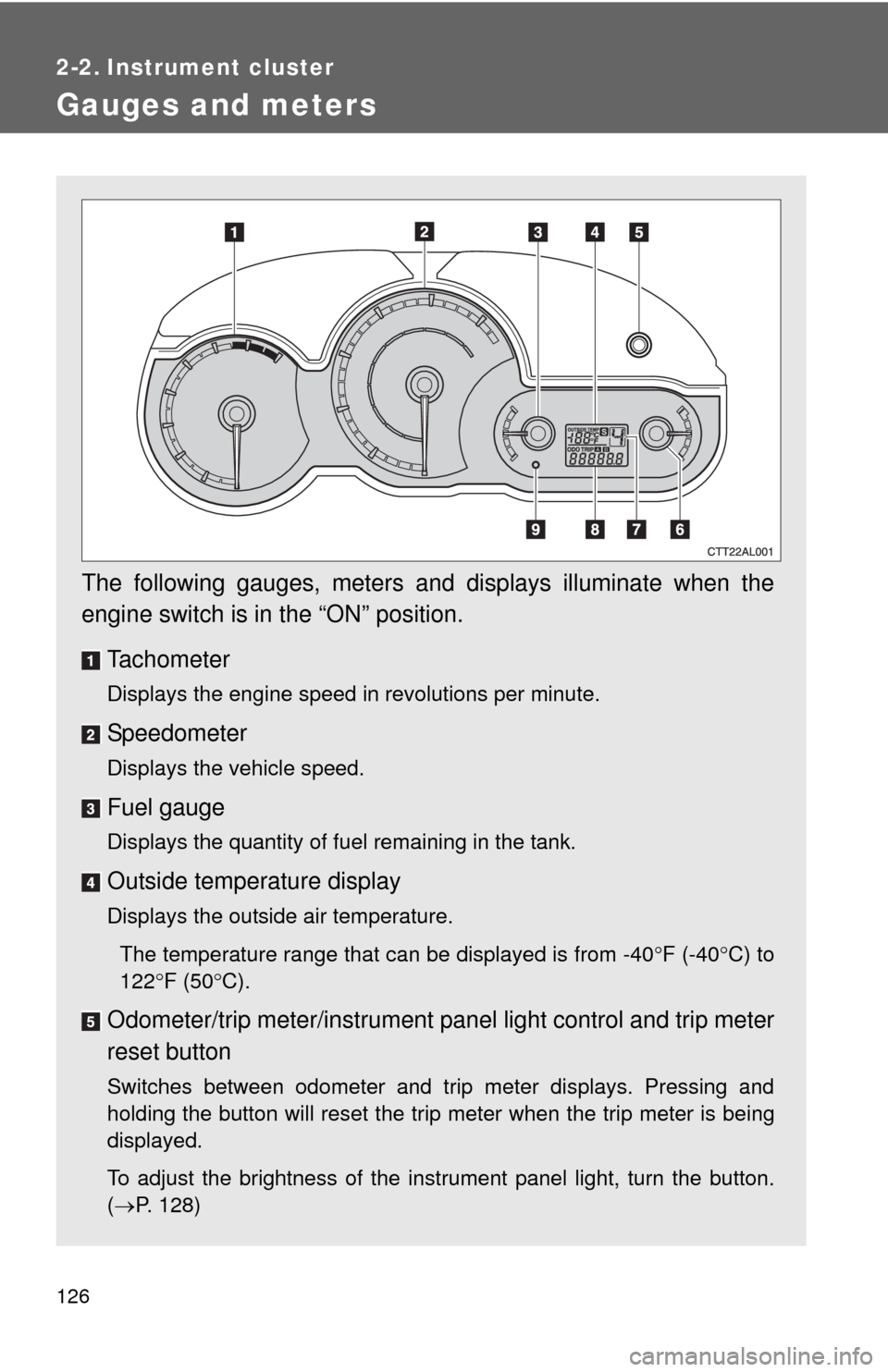
The following gauges, meters and displays illuminate when the
engine switch is in the “ON” position.
Tachometer
Displays the engine speed in revolutions per minute.
Speedometer
Displays the vehicle speed.
Fuel gauge
Displays the quantity of fuel remaining in the tank.
Outside temperature display
Displays the outside air temperature.
The temperature range that can be displayed is from -40F (-40C) to
122F (50C).
Odometer/trip meter/instrument panel light control and trip meter
reset button
Switches between odometer and trip meter displays. Pressing and
holding the button will reset the trip meter when the trip meter is being
displayed.
To adjust the brightness of the instrument panel light, turn the button.
(P. 128)
Page 127 of 448
127 2-2. Instrument cluster
2
When driving
Engine coolant temperature gauge
Displays the engine coolant temperature.
Automatic transmission shift position indicator lights (if
equipped)
P. 1 1 6
Odometer and trip meter
Odometer: Displays the total distance the vehicle has been driven.
Trip meter: Displays the distance the vehicle has been driven since the
meter was last reset. Trip meters A and B can be used to record and
display different distances independently.
Low fuel level warning light
P. 362
Page 128 of 448
128 2-2. Instrument cluster
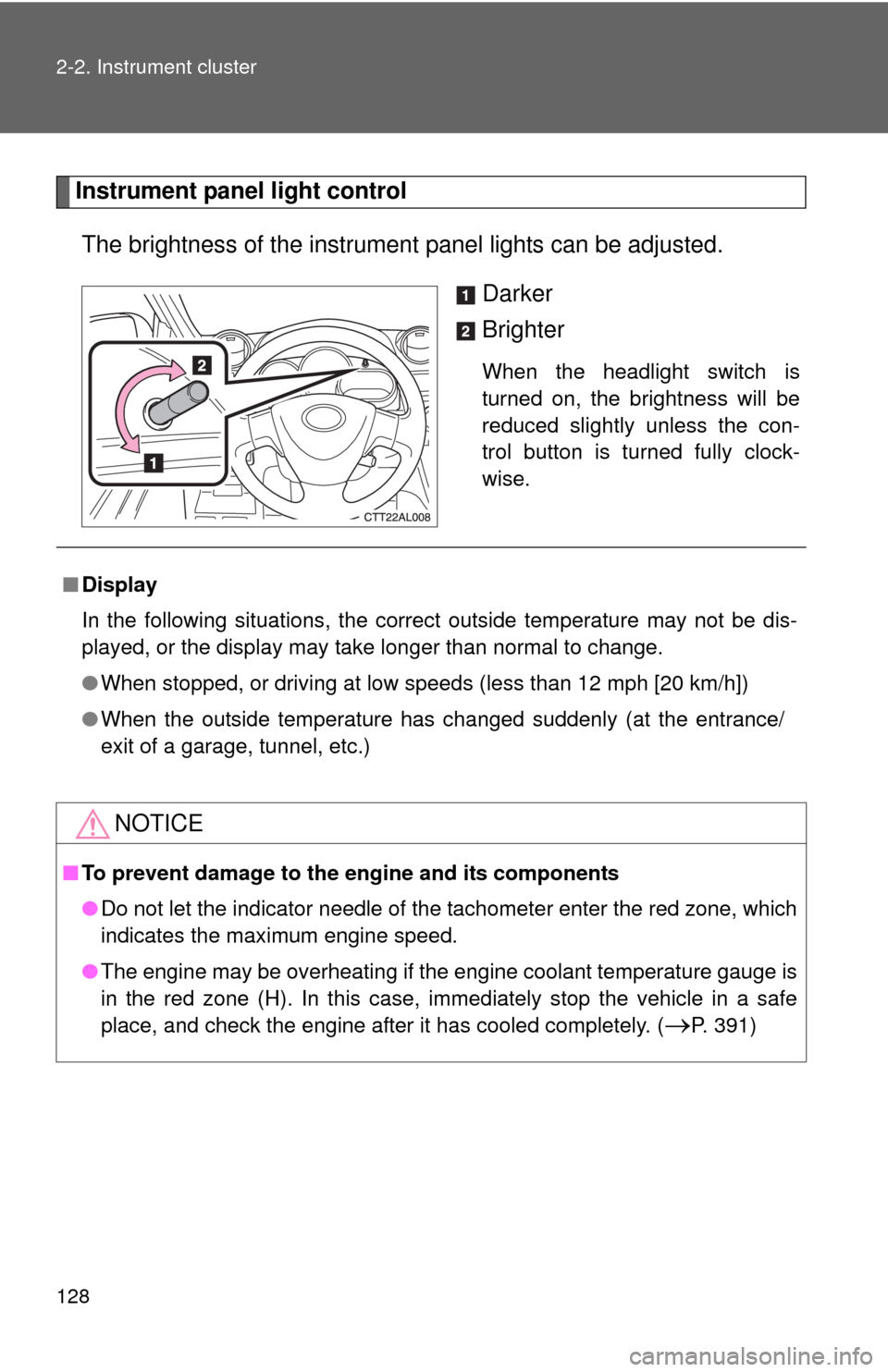
Instrument panel light control
The brightness of the instrument panel lights can be adjusted.
Darker
Brighter
When the headlight switch is
turned on, the brightness will be
reduced slightly unless the con-
trol button is turned fully clock-
wise.
■Display
In the following situations, the correct outside temperature may not be dis-
played, or the display may take longer than normal to change.
●When stopped, or driving at low speeds (less than 12 mph [20 km/h])
●When the outside temperature has changed suddenly (at the entrance/
exit of a garage, tunnel, etc.)
NOTICE
■To prevent damage to the engine and its components
●Do not let the indicator needle of the tachometer enter the red zone, which
indicates the maximum engine speed.
●The engine may be overheating if the engine coolant temperature gauge is
in the red zone (H). In this case, immediately stop the vehicle in a safe
place, and check the engine after it has cooled completely. (
P. 391)
Page 129 of 448
129
2-2. Instrument cluster
2
When driving
Indicators and warning lights
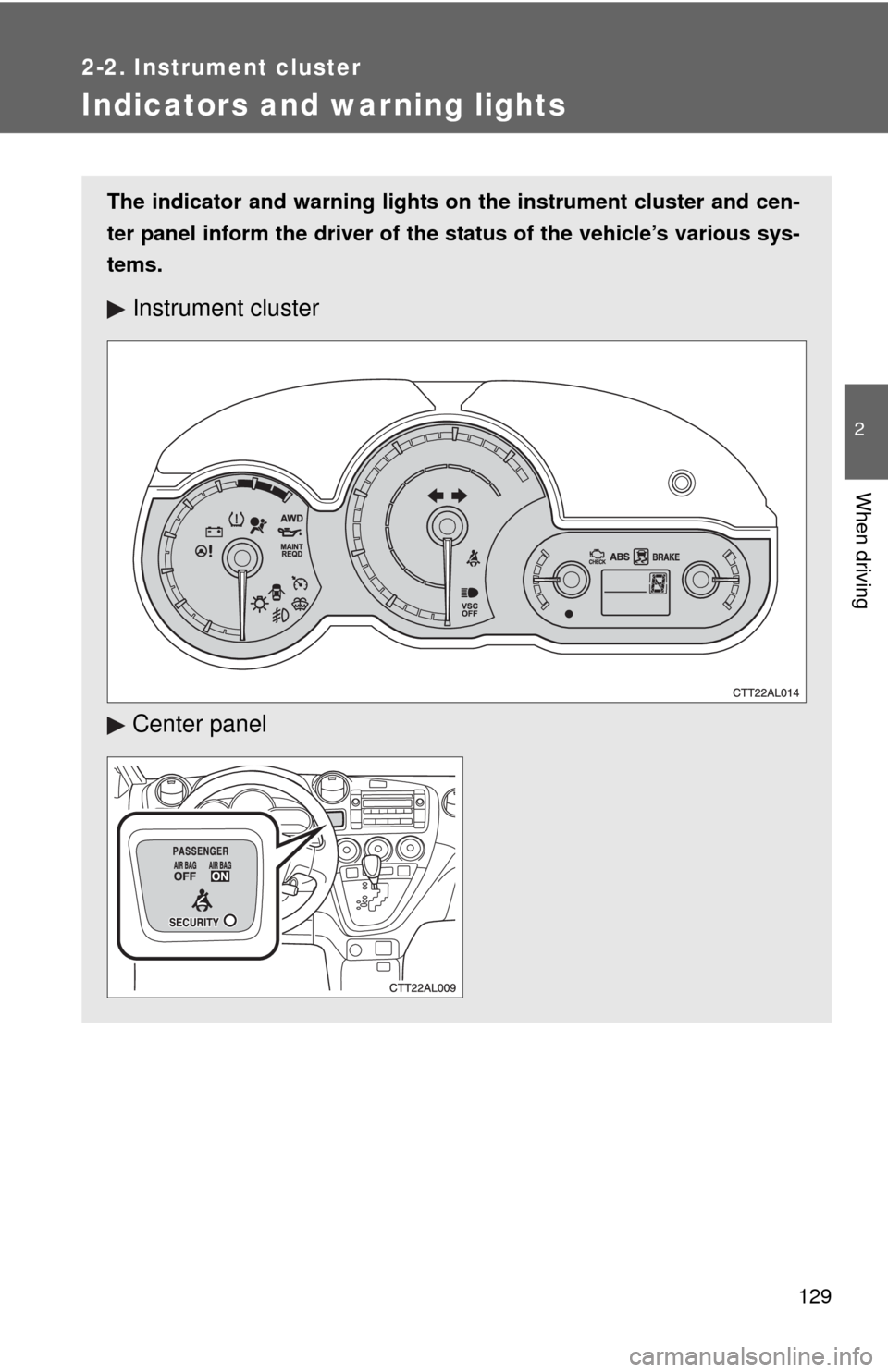
The indicator and warning lights on the instrument cluster and cen-
ter panel inform the driver of the status of the vehicle’s various sys-
tems.
Instrument cluster
Center panel
Page 130 of 448
130 2-2. Instrument cluster
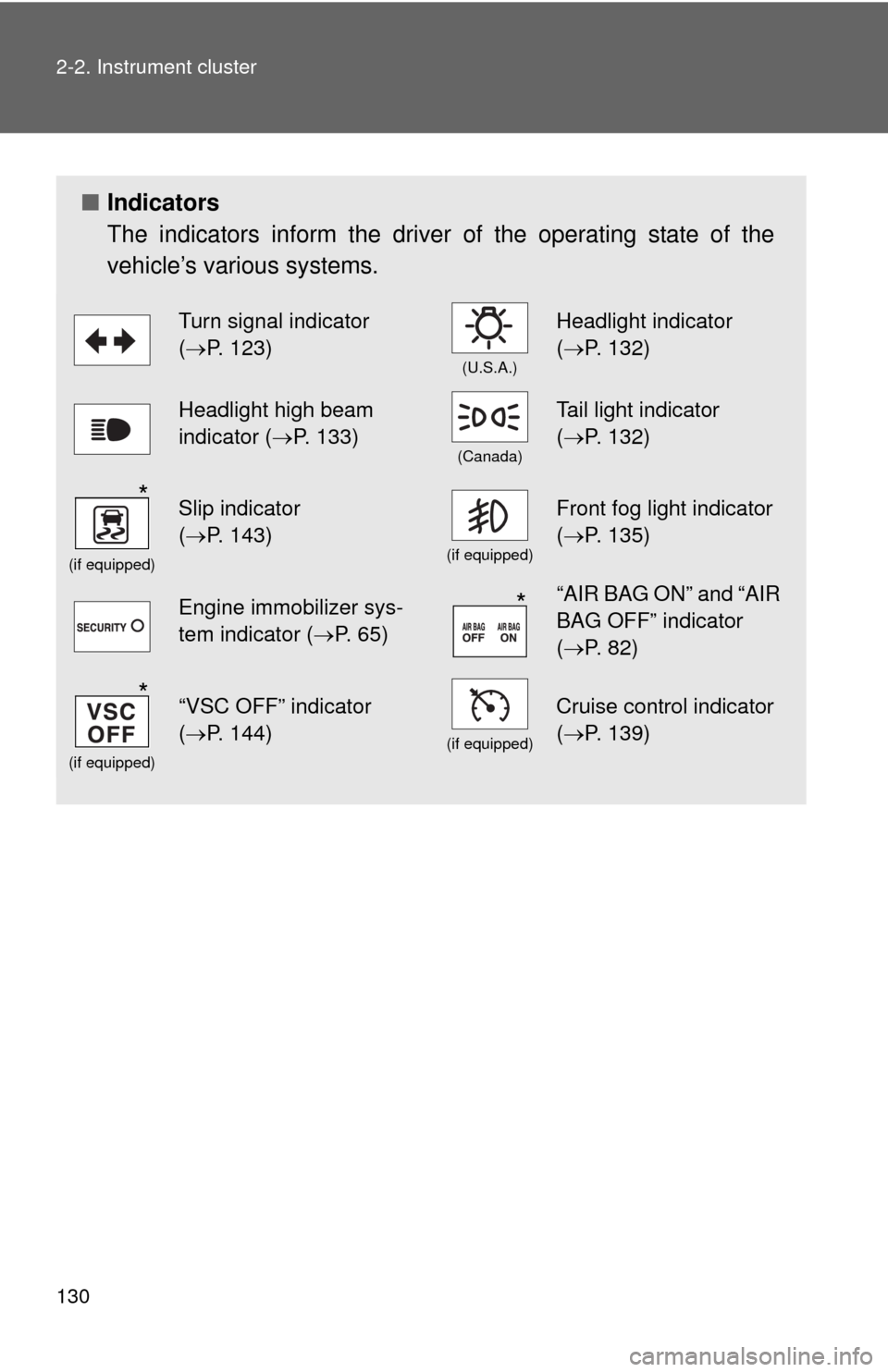
■Indicators
The indicators inform the driver of the operating state of the
vehicle’s various systems.
Turn signal indicator
(P. 123)
(U.S.A.)
Headlight indicator
(P. 132)
Headlight high beam
indicator (P. 133)
(Canada)
Tail light indicator
(P. 132)
(if equipped)
Slip indicator
(P. 143)
(if equipped)
Front fog light indicator
(P. 135)
Engine immobilizer sys-
tem indicator (P. 65)“AIR BAG ON” and “AIR
BAG OFF” indicator
(P. 82)
(if equipped)
“VSC OFF” indicator
(P. 144)
(if equipped)
Cruise control indicator
(P. 139)
*
*
*
Page 131 of 448
131 2-2. Instrument cluster
2
When driving
CAUTION
■If a safety system warning light does not come on
Should a safety system light such as the ABS or the SRS airbag warning
light not come on when you start the engine, this could mean that these sys-
tems are not available to help protect you in an accident, which could result
in death or serious injury. Have the vehicle inspected by your Toyota dealer
immediately if this occurs.
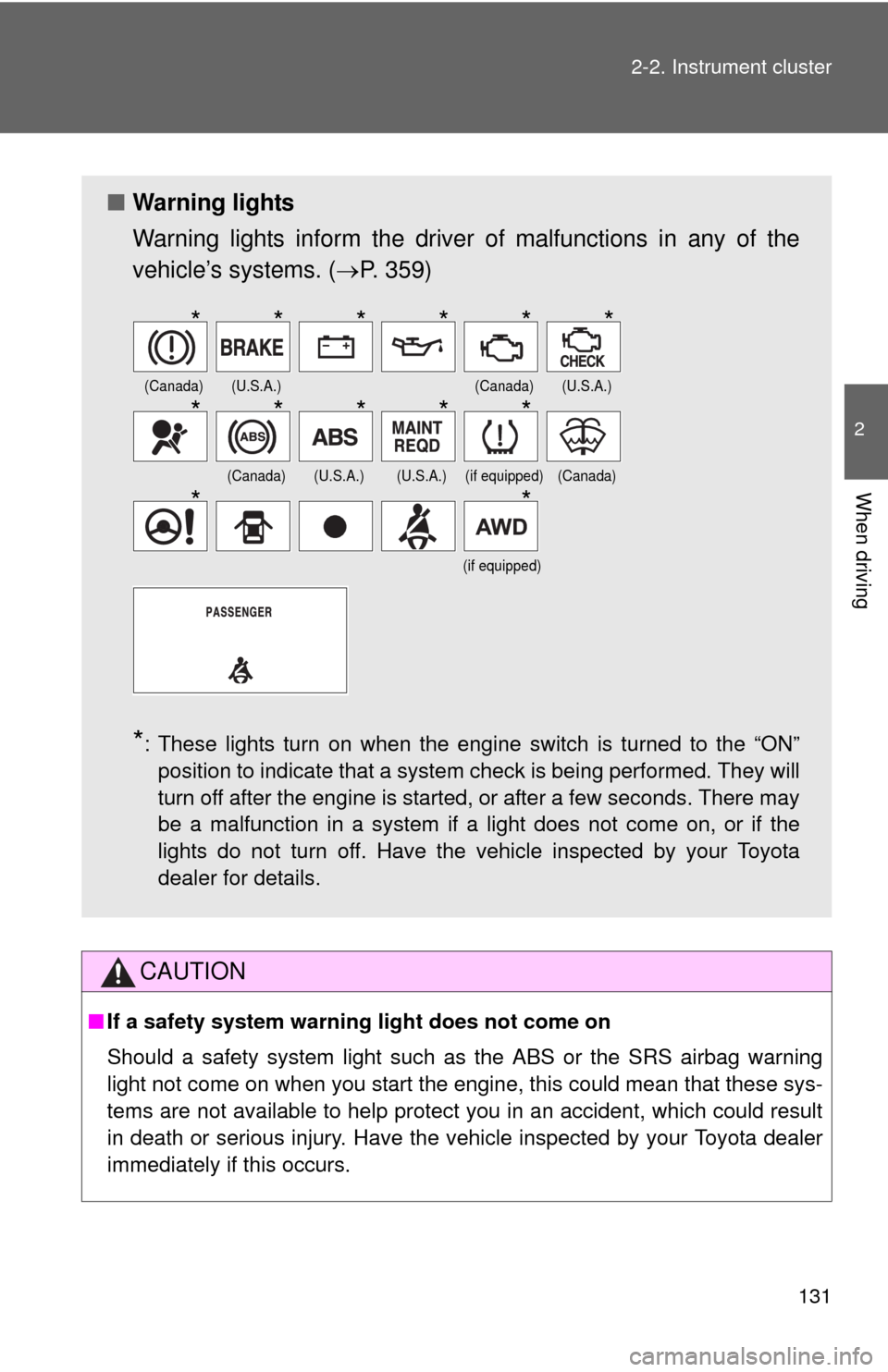
■Warning lights
Warning lights inform the driver of malfunctions in any of the
vehicle’s systems. (P. 359)
*: These lights turn on when the engine switch is turned to the “ON”
position to indicate that a system check is being performed. They will
turn off after the engine is started, or after a few seconds. There may
be a malfunction in a system if a light does not come on, or if the
lights do not turn off. Have the vehicle inspected by your Toyota
dealer for details.
(Canada)(U.S.A.)(Canada)(U.S.A.)
(Canada)(U.S.A.)(U.S.A.)(if equipped)(Canada)
(if equipped)
******
*****
**
Page 334 of 448
334 4-3. Do-it-yourself maintenance
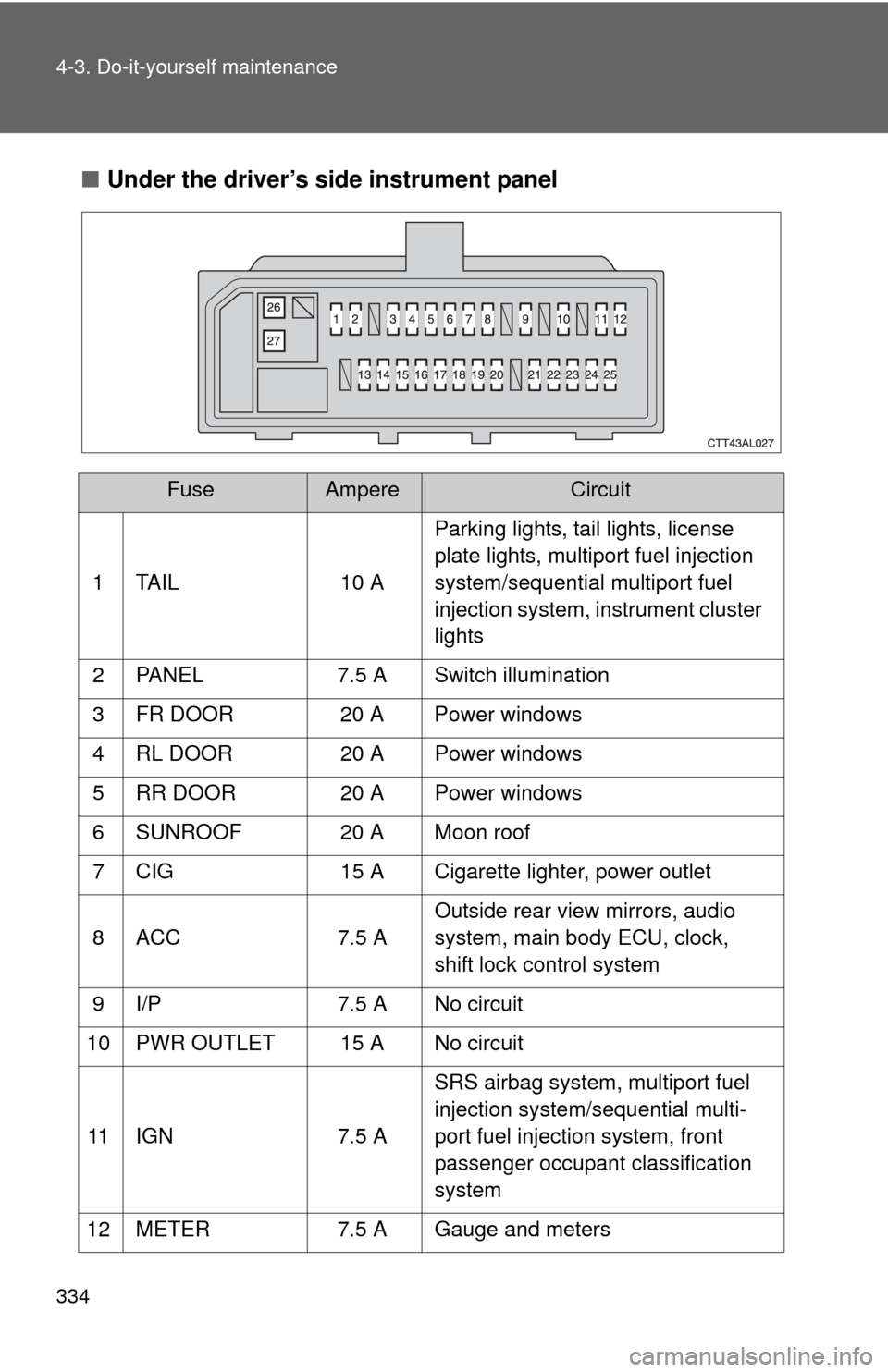
■Under the driver’s side instrument panel
FuseAmpereCircuit
1 TAIL 10 AParking lights, tail lights, license
plate lights, multiport fuel injection
system/sequential multiport fuel
injection system, instrument cluster
lights
2 PANEL 7.5 A Switch illumination
3 FR DOOR 20 A Power windows
4 RL DOOR 20 A Power windows
5 RR DOOR 20 A Power windows
6 SUNROOF 20 A Moon roof
7 CIG 15 A Cigarette lighter, power outlet
8 ACC 7.5 AOutside rear view mirrors, audio
system, main body ECU, clock,
shift lock control system
9 I/P 7.5 A No circuit
10 PWR OUTLET 15 A No circuit
11 IGN 7.5 ASRS airbag system, multiport fuel
injection system/sequential multi-
port fuel injection system, front
passenger occupant classification
system
12 METER 7.5 A Gauge and meters
Page 391 of 448
5
When trouble arises
391
5-2. Steps to take in an emergency
If your vehicle overheats
If your engine overheats:
Stop the vehicle in a safe place and turn off the air condi-
tioning system.
Check to see if steam is coming out from under the hood.
If you see steam:
Stop the engine. Carefully lift the hood after the steam
subsides and then restart the engine.
If you do not see steam:
Leave the engine running and carefully lift the hood.
Check to see if the cooling fans are operating.
If the fans are operating:
Wait until the temperature of the engine (shown on the
instrument cluster) begins to fall and then stop the
engine.
If the fans are not operating:
Stop the engine and call your Toyota dealer.
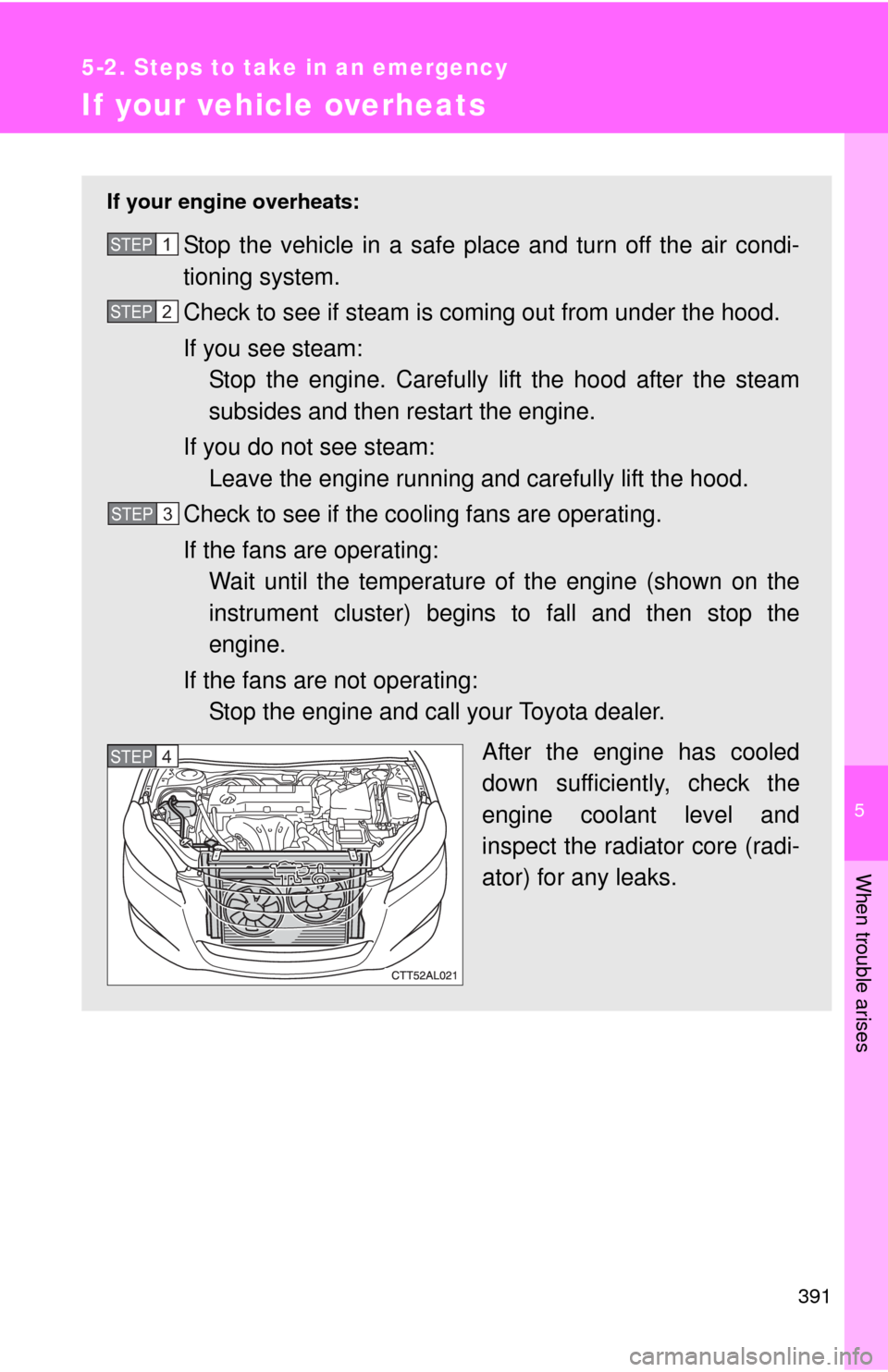
After the engine has cooled
down sufficiently, check the
engine coolant level and
inspect the radiator core (radi-
ator) for any leaks.STEP1
STEP2
STEP3
STEP5STEP4