brake light TOYOTA MATRIX 2011 E140 / 2.G User Guide
[x] Cancel search | Manufacturer: TOYOTA, Model Year: 2011, Model line: MATRIX, Model: TOYOTA MATRIX 2011 E140 / 2.GPages: 501, PDF Size: 11.47 MB
Page 162 of 501
162 2-5. Driving information
CAUTION
■To avoid accident or injury
●Do not exceed the trailer hitch assembly weight, gross vehicle weight,
gross axle weight and trailer tongue load capacities.
●Never load more weight in the back than in the front of the trailer. About
60% of the load should be in the front half of the trailer, and the remaining
40% in the rear.
■Hitches
●If you wish to install a trailer hitch, contact your Toyota dealer.
●Use only a hitch that conforms to the total trailer weight requirement.
●Follow the directions supplied by the hitch manufacturer.
●Lubricate the hitch ball with a light coat of grease.
●Remove the trailer hitch whenever you are not towing a trailer. After
removing the hitch, seal any mounting hole in the vehicle body to prevent
entry of any substances into the vehicle.
■When towing a trailer
●If the gross trailer weight exceeds 1000 lb. (453 kg), trailer brakes are
required. Toyota recommends trailers with brakes that conform to all appli-
cable federal and state/provincial regulations.
●Never tap into your vehicle's hydraulic system, as this will lower the vehi-
cle's braking effectiveness.
●Never tow a trailer without using a safety chain securely attached to both
the trailer and the vehicle. If damage occurs to the coupling unit or hitch
ball, there is danger of the trailer wandering into another lane.
Page 163 of 501
163 2-5. Driving information
2
When driving
Trailer towing tips
Your vehicle will handle differently when towing a trailer. In order to
avoid accident, death or serious injury, keep the following in mind
when towing:
●Before starting out, check the trailer lights and the vehicle-trailer
connections. Recheck after driving a short distance.
●Practice turning, stopping and reversing with the trailer attached in
an area away from traffic until you become accustomed to the feel
of the vehicle.
NOTICE
■When installing a trailer hitch
●Use only the position recommended by your Toyota dealer. Do not install
the trailer hitch on the bumper; this may cause body damage.
●Do not use axle-mounted hitches, as they can cause damage to the axle
housing, wheel bearings, wheels or tires.
■Brakes
Toyota recommends trailers with brakes that conform to all applicable fed-
eral and state/provincial regulations.
■Safety chain
A safety chain must always be used between the towing vehicle and the
trailer. Leave sufficient slack in the chain for turns. The chain should cross
under the trailer tongue to prevent the tongue from dropping to the ground in
the case that it becomes damaged or separated. For the correct safety chain
installation procedure, ask your Toyota dealer.
■Do not directly splice trailer lights
Directly splicing trailer lights may damage your vehicle's electrical system
and cause a malfunction.
Page 326 of 501
326 4-2. Maintenance
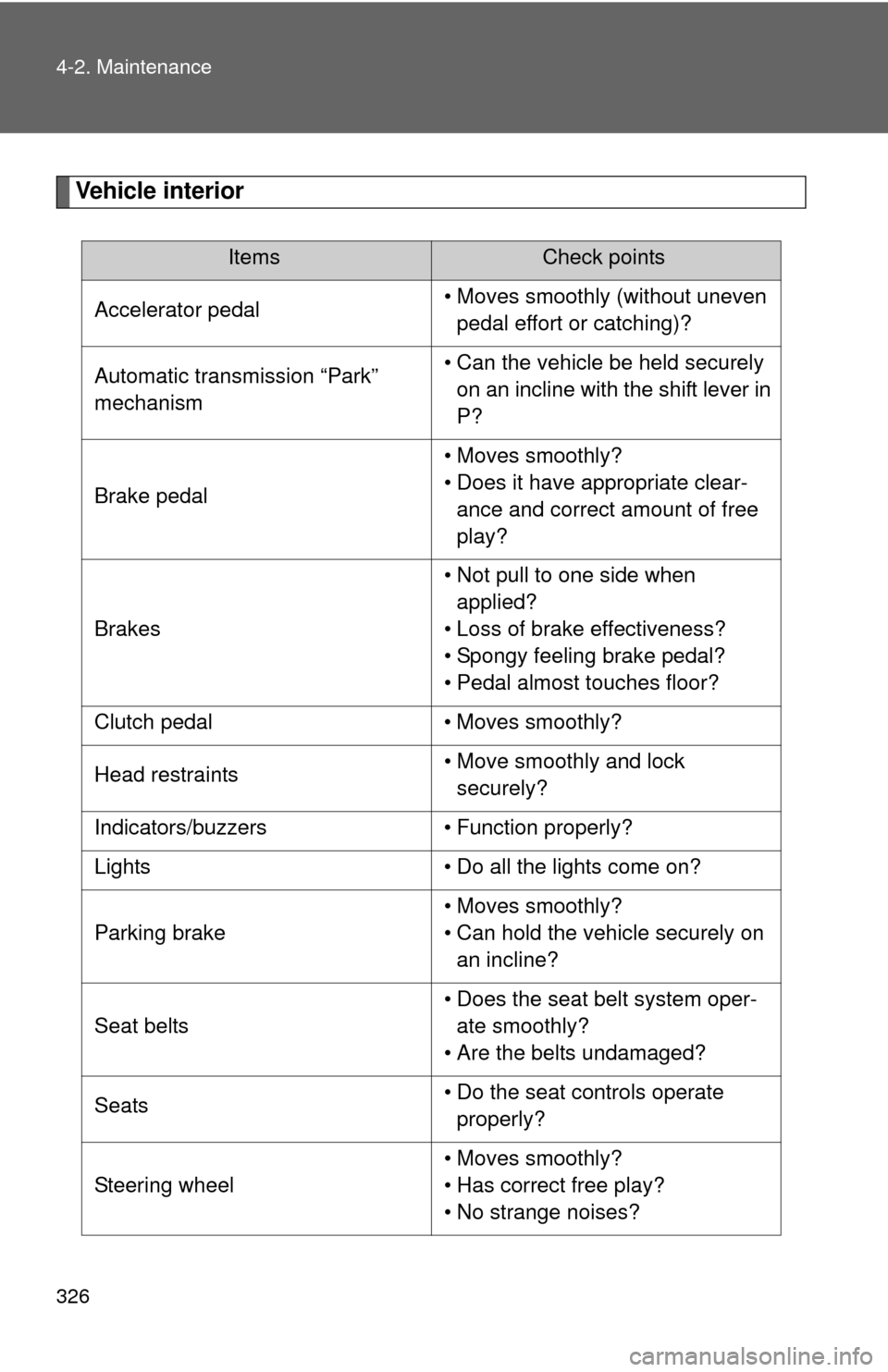
Vehicle interior
ItemsCheck points
Accelerator pedal• Moves smoothly (without uneven
pedal effort or catching)?
Automatic transmission “Park”
mechanism• Can the vehicle be held securely
on an incline with the shift lever in
P?
Brake pedal• Moves smoothly?
• Does it have appropriate clear-
ance and correct amount of free
play?
Brakes• Not pull to one side when
applied?
• Loss of brake effectiveness?
• Spongy feeling brake pedal?
• Pedal almost touches floor?
Clutch pedal • Moves smoothly?
Head restraints• Move smoothly and lock
securely?
Indicators/buzzers • Function properly?
Lights • Do all the lights come on?
Parking brake• Moves smoothly?
• Can hold the vehicle securely on
an incline?
Seat belts• Does the seat belt system oper-
ate smoothly?
• Are the belts undamaged?
Seats• Do the seat controls operate
properly?
Steering wheel• Moves smoothly?
• Has correct free play?
• No strange noises?
Page 348 of 501
347 4-3. Do-it-yourself maintenance
4
Maintenance and care
Battery
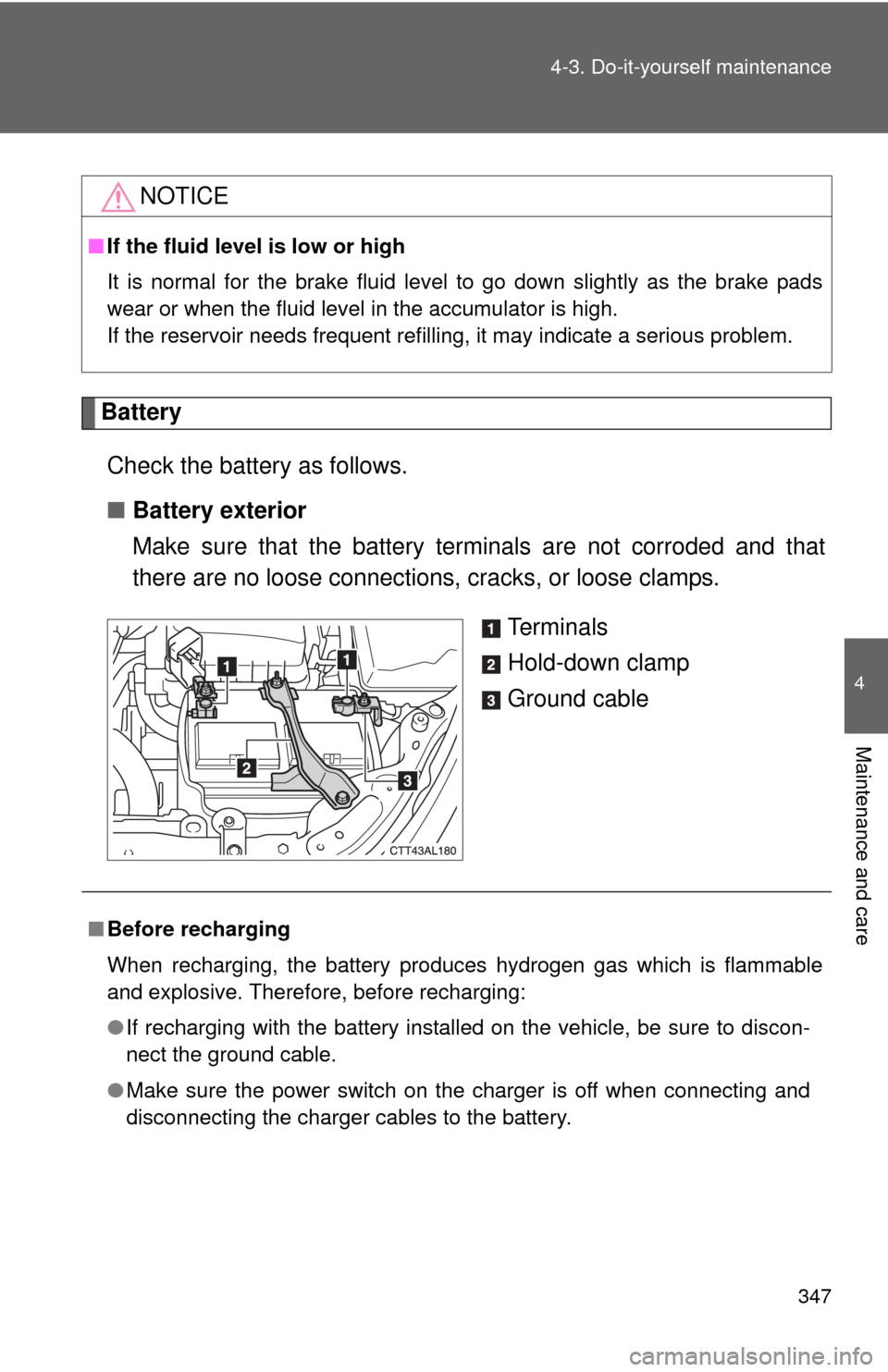
Check the battery as follows.
■Battery exterior
Make sure that the battery terminals are not corroded and that
there are no loose connections, cracks, or loose clamps.
Te r m i n a l s
Hold-down clamp
Ground cable
NOTICE
■If the fluid level is low or high
It is normal for the brake fluid level to go down slightly as the brake pads
wear or when the fluid level in the accumulator is high.
If the reservoir needs frequent refilling, it may indicate a serious problem.
■Before recharging
When recharging, the battery produces hydrogen gas which is flammable
and explosive. Therefore, before recharging:
●If recharging with the battery installed on the vehicle, be sure to discon-
nect the ground cable.
●Make sure the power switch on the charger is off when connecting and
disconnecting the charger cables to the battery.
Page 379 of 501
378 4-3. Do-it-yourself maintenance
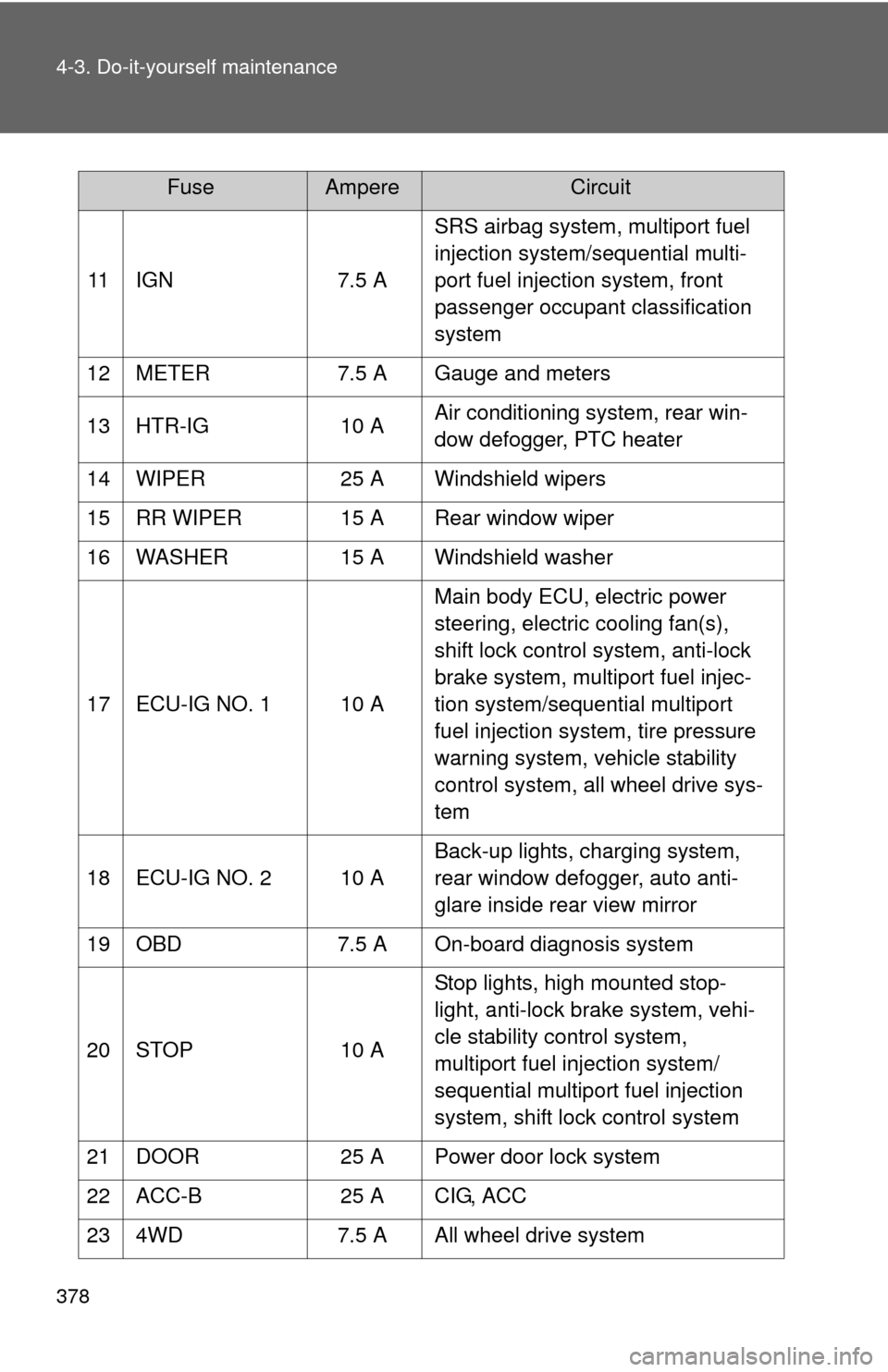
11 IGN 7.5 ASRS airbag system, multiport fuel
injection system/sequential multi-
port fuel injection system, front
passenger occupant classification
system
12 METER 7.5 A Gauge and meters
13 HTR-IG 10 AAir conditioning system, rear win-
dow defogger, PTC heater
14 WIPER 25 A Windshield wipers
15 RR WIPER 15 A Rear window wiper
16 WASHER 15 A Windshield washer
17 ECU-IG NO. 1 10 AMain body ECU, electric power
steering, electric cooling fan(s),
shift lock control system, anti-lock
brake system, multiport fuel injec-
tion system/sequential multiport
fuel injection system, tire pressure
warning system, vehicle stability
control system, all wheel drive sys-
tem
18 ECU-IG NO. 2 10 ABack-up lights, charging system,
rear window defogger, auto anti-
glare inside rear view mirror
19 OBD 7.5 A On-board diagnosis system
20 STOP 10 AStop lights, high mounted stop-
light, anti-lock brake system, vehi-
cle stability control system,
multiport fuel injection system/
sequential multiport fuel injection
system, shift lock control system
21 DOOR 25 A Power door lock system
22 ACC-B 25 A CIG, ACC
23 4WD 7.5 A All wheel drive system
FuseAmpereCircuit
Page 402 of 501
5
When trouble arises
401
5-2. Steps to take in an emergency
If a war ning light turns on or a war ning buzzer sounds...
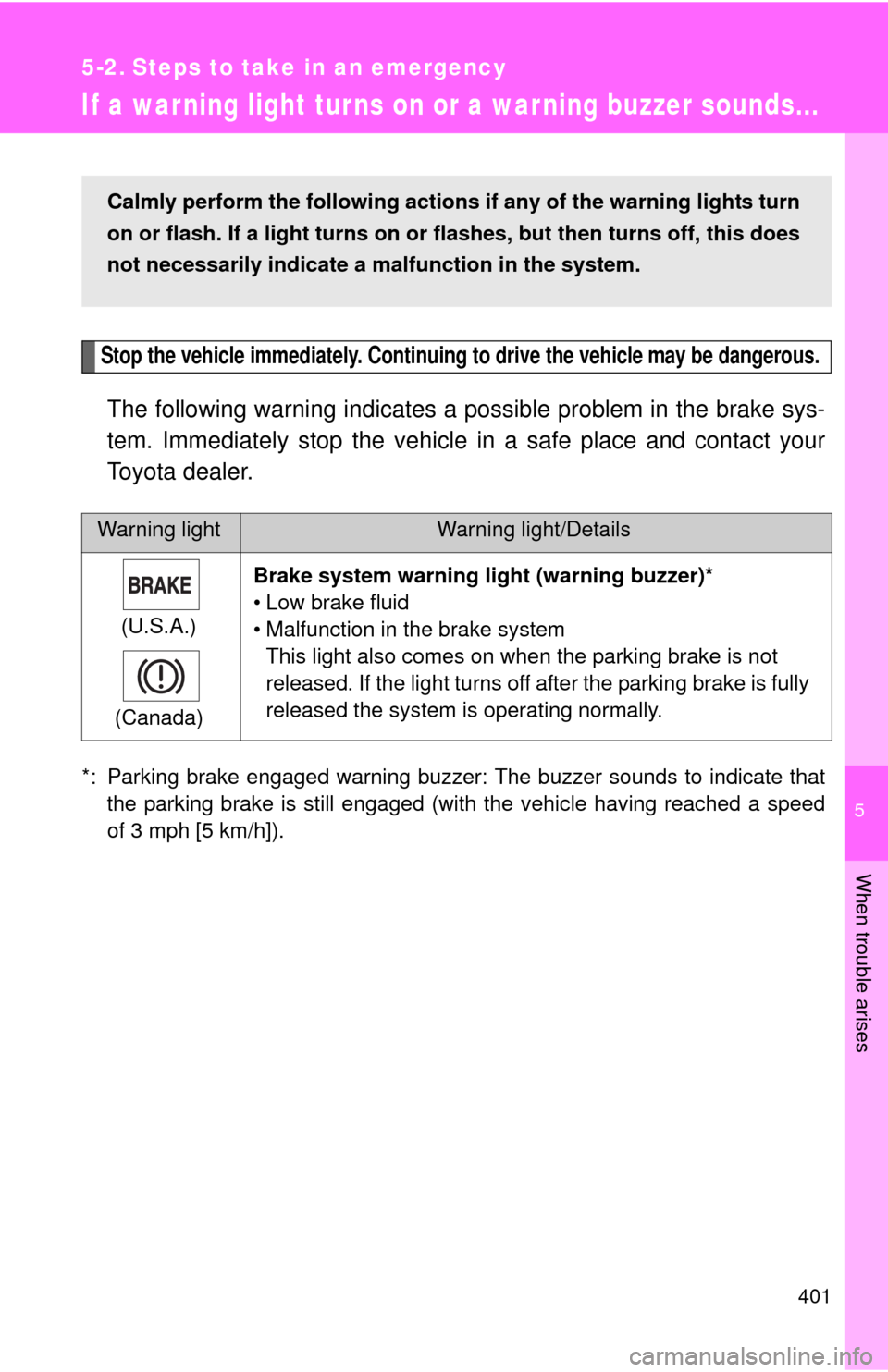
Stop the vehicle immediately. Continuing to drive the vehicle may be dangerous.
The following warning indicates a possible problem in the brake sys-
tem. Immediately stop the vehicle in a safe place and contact your
Toyota dealer.
*: Parking brake engaged warning buzzer: The buzzer sounds to indicate that
the parking brake is still engaged (with the vehicle having reached a speed
of 3 mph [5 km/h]).
Warning lightWarning light/Details
(U.S.A.)
(Canada)Brake system warning light (warning buzzer)*
• Low brake fluid
• Malfunction in the brake system
This light also comes on when the parking brake is not
released. If the light turns off after the parking brake is fully
released the system is operating normally.
Calmly perform the following actions if any of the warning lights turn
on or flash. If a light turns on or flashes, but then turns off, this does
not necessarily indicate a malfunction in the system.
Page 404 of 501
5
When trouble arises
403 5-2. Steps to take in an emergency
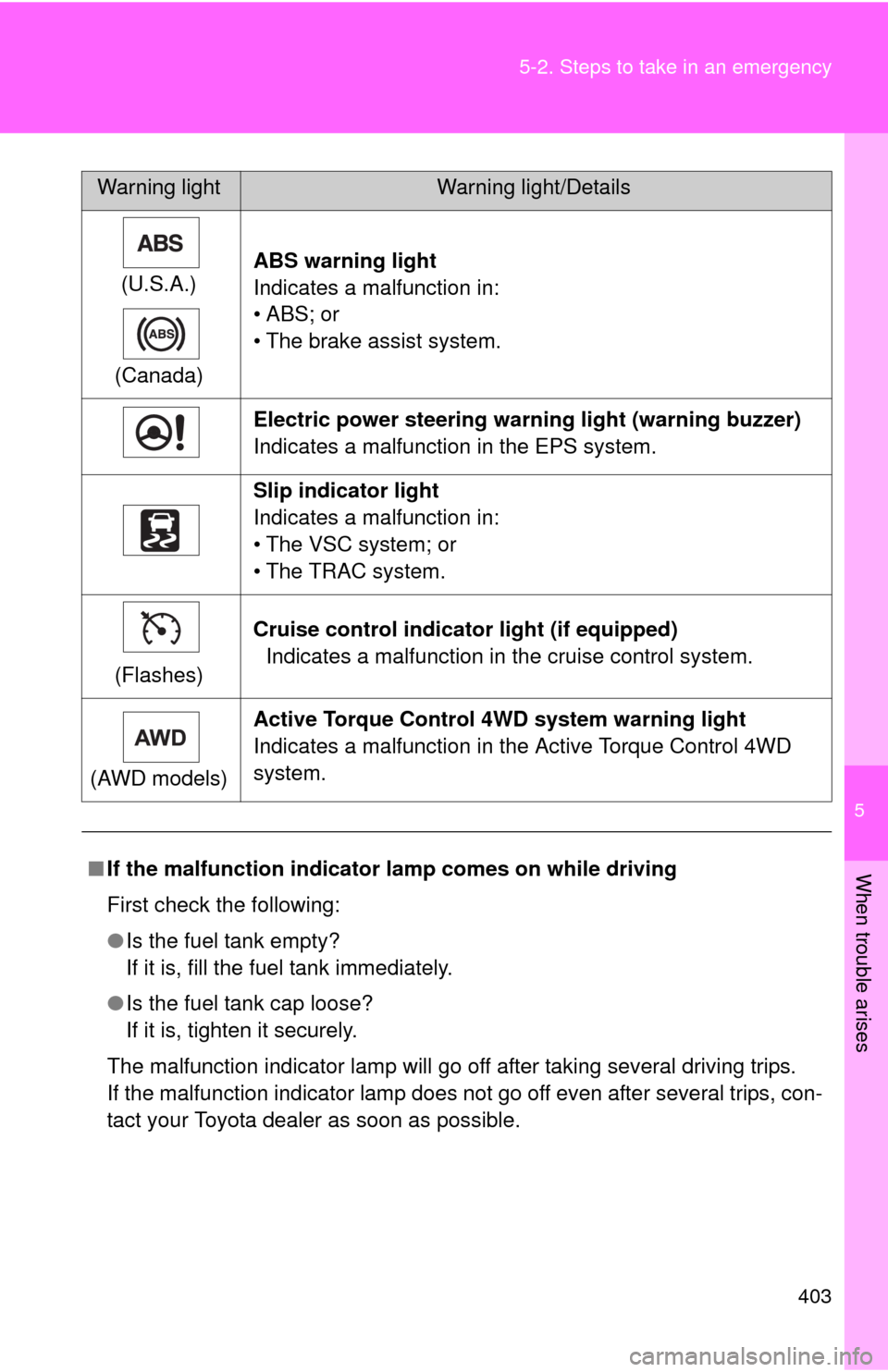
(U.S.A.)
(Canada)ABS warning light
Indicates a malfunction in:
•ABS; or
• The brake assist system.
Electric power steering warning light (warning buzzer)
Indicates a malfunction in the EPS system.
Slip indicator light
Indicates a malfunction in:
• The VSC system; or
• The TRAC system.
(Flashes)Cruise control indicator light (if equipped)
Indicates a malfunction in the cruise control system.
(AWD models)Active Torque Control 4WD system warning light
Indicates a malfunction in the Active Torque Control 4WD
system.
■If the malfunction indicator lamp comes on while driving
First check the following:
●Is the fuel tank empty?
If it is, fill the fuel tank immediately.
●Is the fuel tank cap loose?
If it is, tighten it securely.
The malfunction indicator lamp will go off after taking several driving trips.
If the malfunction indicator lamp does not go off even after several trips, con-
tact your Toyota dealer as soon as possible.
Warning lightWarning light/Details
Page 409 of 501
408 5-2. Steps to take in an emergency
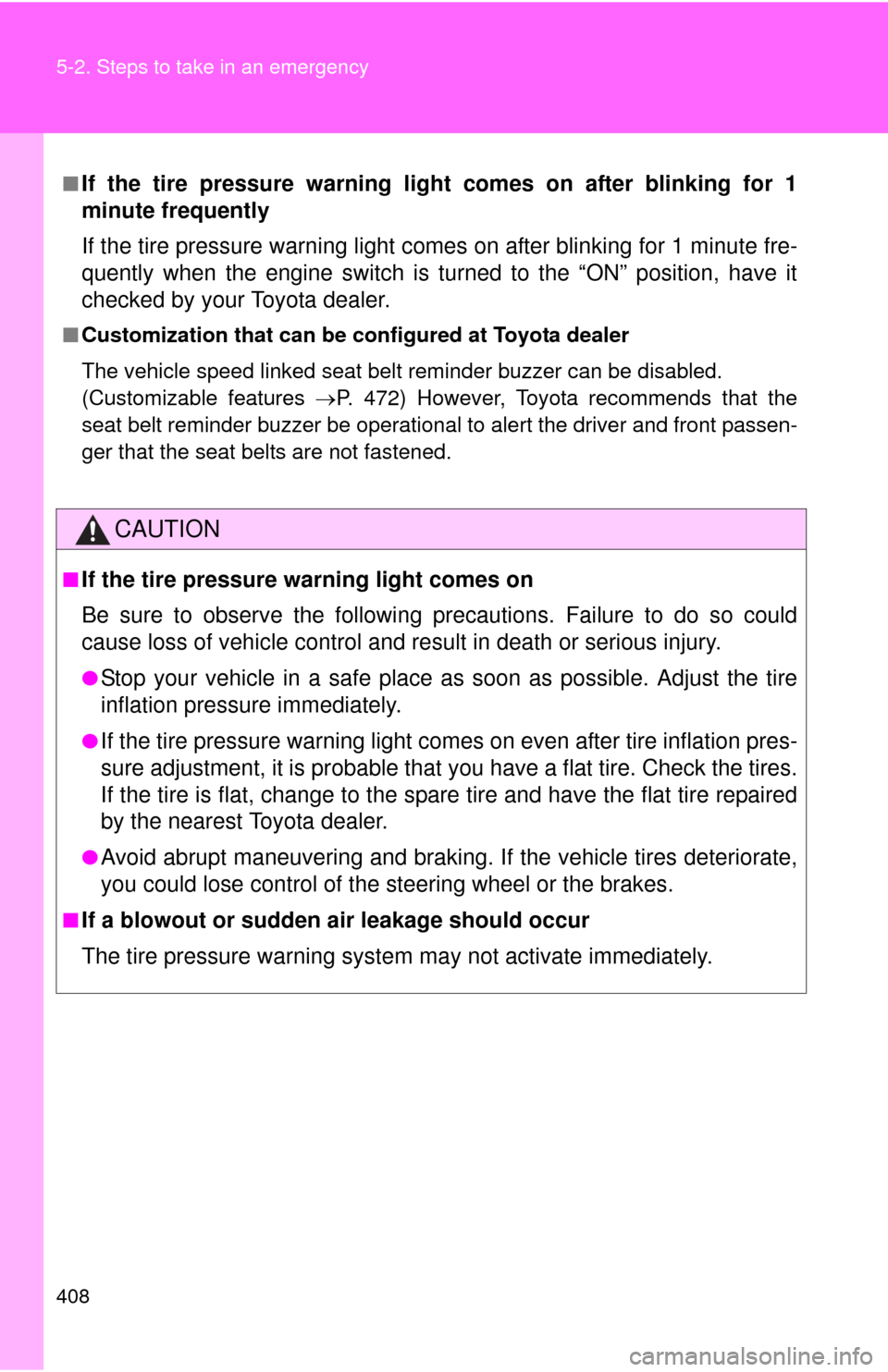
■If the tire pressure warning light comes on after blinking for 1
minute frequently
If the tire pressure warning light comes on after blinking for 1 minute fre-
quently when the engine switch is turned to the “ON” position, have it
checked by your Toyota dealer.
■Customization that can be configured at Toyota dealer
The vehicle speed linked seat belt reminder buzzer can be disabled.
(Customizable features P. 472) However, Toyota recommends that the
seat belt reminder buzzer be operational to alert the driver and front passen-
ger that the seat belts are not fastened.
CAUTION
■If the tire pressure warning light comes on
Be sure to observe the following precautions. Failure to do so could
cause loss of vehicle control and result in death or serious injury.
●Stop your vehicle in a safe place as soon as possible. Adjust the tire
inflation pressure immediately.
●If the tire pressure warning light comes on even after tire inflation pres-
sure adjustment, it is probable that you have a flat tire. Check the tires.
If the tire is flat, change to the spare tire and have the flat tire repaired
by the nearest Toyota dealer.
●Avoid abrupt maneuvering and braking. If the vehicle tires deteriorate,
you could lose control of the steering wheel or the brakes.
■If a blowout or sudden air leakage should occur
The tire pressure warning system may not activate immediately.
Page 489 of 501
488
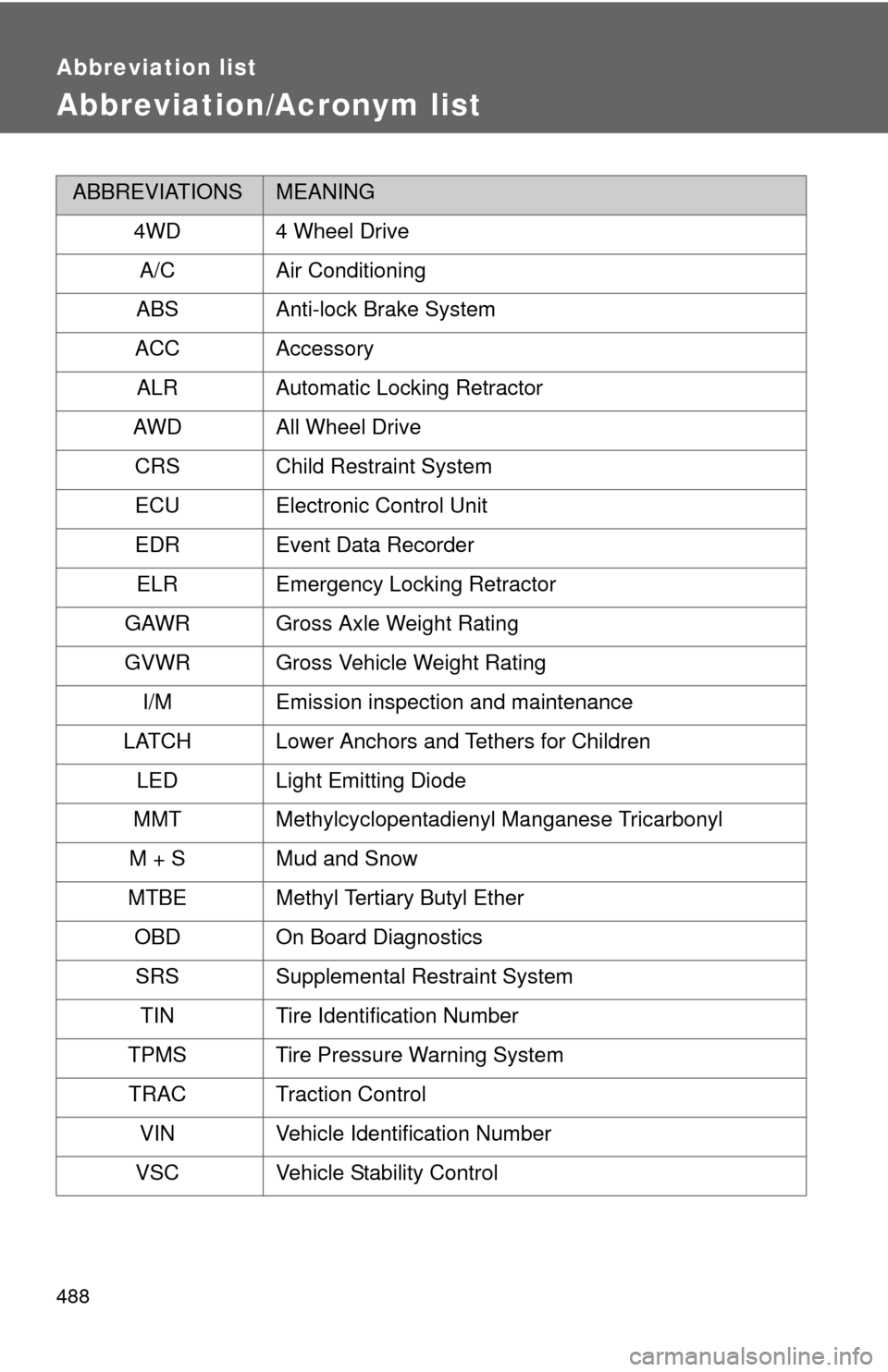
Abbreviation list
Abbreviation/Acronym list
ABBREVIATIONSMEANING
4WD 4 Wheel Drive
A/C Air Conditioning
ABS Anti-lock Brake System
ACC Accessory
ALR Automatic Locking Retractor
AWD All Wheel Drive
CRS Child Restraint System
ECU Electronic Control Unit
EDR Event Data Recorder
ELR Emergency Locking Retractor
GAWR Gross Axle Weight Rating
GVWR Gross Vehicle Weight Rating
I/M Emission inspection and maintenance
LATCH Lower Anchors and Tethers for Children
LED Light Emitting Diode
MMT Methylcyclopentadienyl Manganese Tricarbonyl
M + S Mud and Snow
MTBE Methyl Tertiary Butyl Ether
OBD On Board Diagnostics
SRS Supplemental Restraint System
TIN Tire Identification Number
TPMS Tire Pressure Warning System
TRAC Traction Control
VIN Vehicle Identification Number
VSC Vehicle Stability Control
Page 490 of 501
489
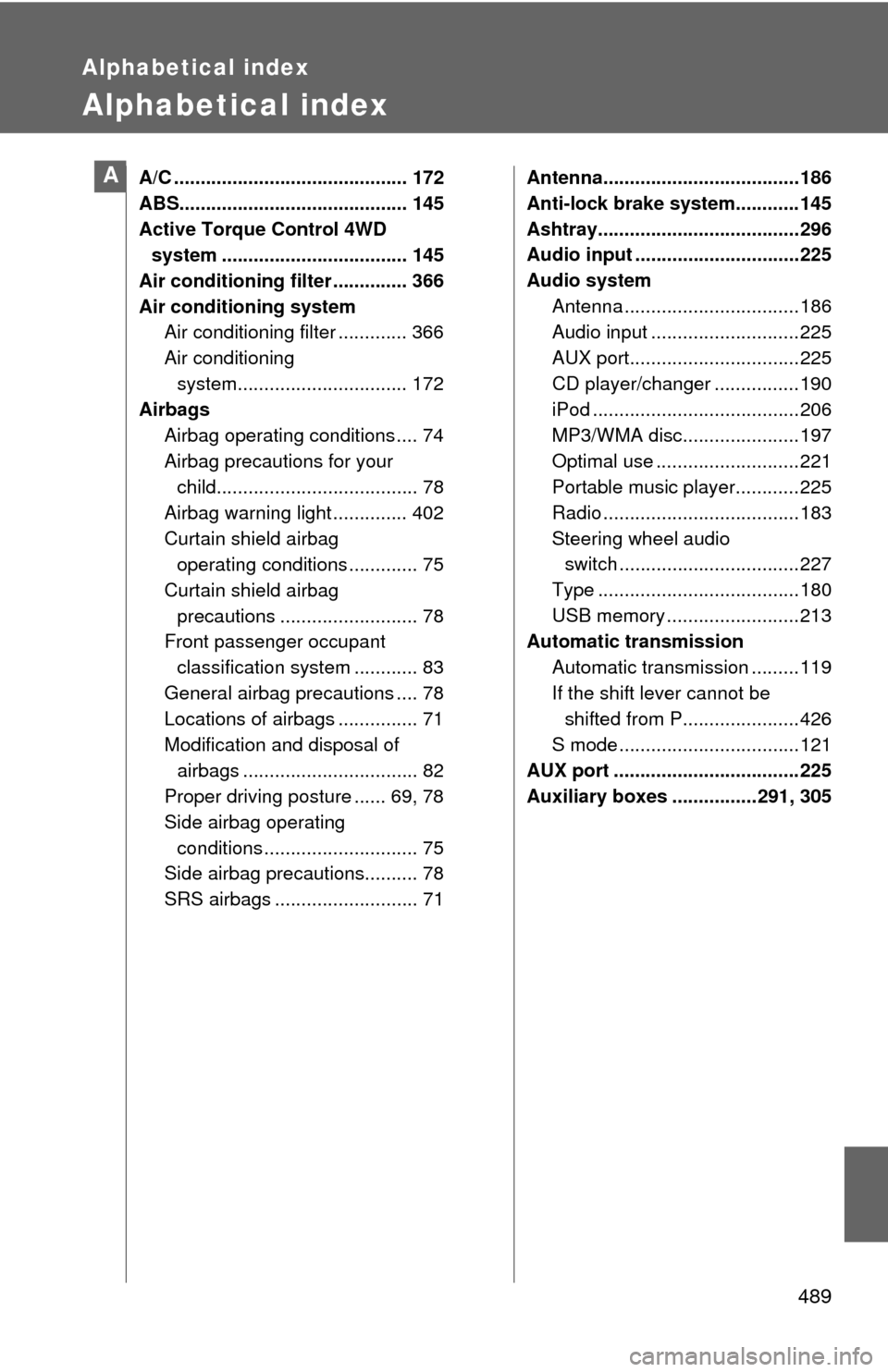
Alphabetical index
Alphabetical index
A/C ............................................ 172
ABS........................................... 145
Active Torque Control 4WD
system ................................... 145
Air conditioning filter .............. 366
Air conditioning system
Air conditioning filter ............. 366
Air conditioning
system................................ 172
Airbags
Airbag operating conditions .... 74
Airbag precautions for your
child...................................... 78
Airbag warning light .............. 402
Curtain shield airbag
operating conditions ............. 75
Curtain shield airbag
precautions .......................... 78
Front passenger occupant
classification system ............ 83
General airbag precautions .... 78
Locations of airbags ............... 71
Modification and disposal of
airbags ................................. 82
Proper driving posture ...... 69, 78
Side airbag operating
conditions ............................. 75
Side airbag precautions.......... 78
SRS airbags ........................... 71Antenna.....................................186
Anti-lock brake system............145
Ashtray......................................296
Audio input ...............................225
Audio system
Antenna .................................186
Audio input ............................225
AUX port................................225
CD player/changer ................190
iPod .......................................206
MP3/WMA disc......................197
Optimal use ...........................221
Portable music player............225
Radio .....................................183
Steering wheel audio
switch ..................................227
Type ......................................180
USB memory .........................213
Automatic transmission
Automatic transmission .........119
If the shift lever cannot be
shifted from P......................426
S mode ..................................121
AUX port ...................................225
Auxiliary boxes ................291, 305A