phone TOYOTA MATRIX 2011 E140 / 2.G Service Manual
[x] Cancel search | Manufacturer: TOYOTA, Model Year: 2011, Model line: MATRIX, Model: TOYOTA MATRIX 2011 E140 / 2.GPages: 501, PDF Size: 11.47 MB
Page 276 of 501
276 3-4. Using the hands-free phone system (for cellular phone)
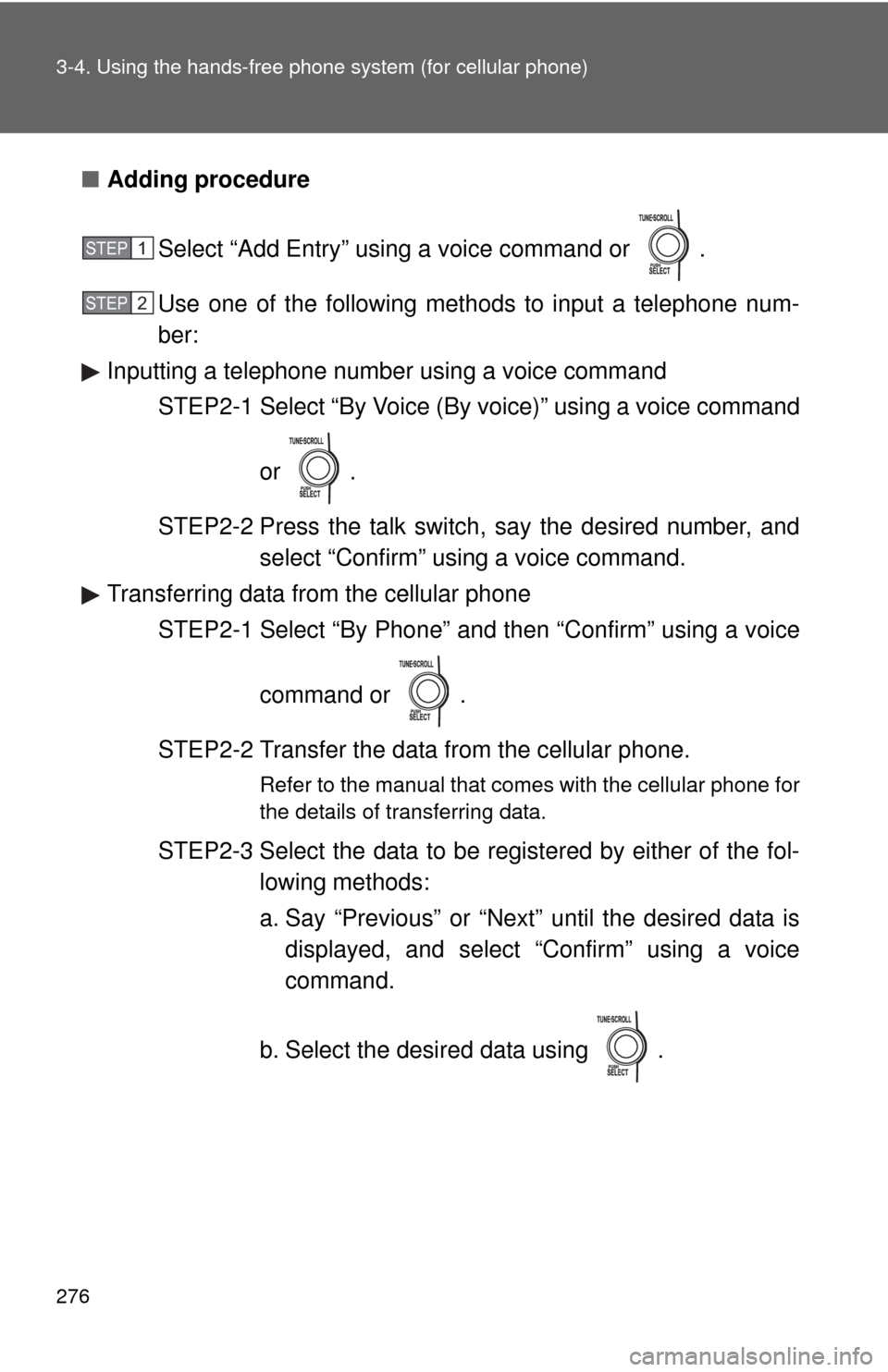
■Adding procedure
Select “Add Entry” using a voice command or .
Use one of the following methods to input a telephone num-
ber:
Inputting a telephone number using a voice command
STEP2-1 Select “By Voice (By voice)” using a voice command
or .
STEP2-2 Press the talk switch, say the desired number, and
select “Confirm” using a voice command.
Transferring data from the cellular phone
STEP2-1 Select “By Phone” and then “Confirm” using a voice
command or .
STEP2-2 Transfer the data from the cellular phone.
Refer to the manual that comes with the cellular phone for
the details of transferring data.
STEP2-3 Select the data to be registered by either of the fol-
lowing methods:
a. Say “Previous” or “Next” until the desired data is
displayed, and select “Confirm” using a voice
command.
b. Select the desired data using .
STEP1
STEP2
Page 277 of 501
277 3-4. Using the hands-free phone system (for cellular phone)
3
Interior features
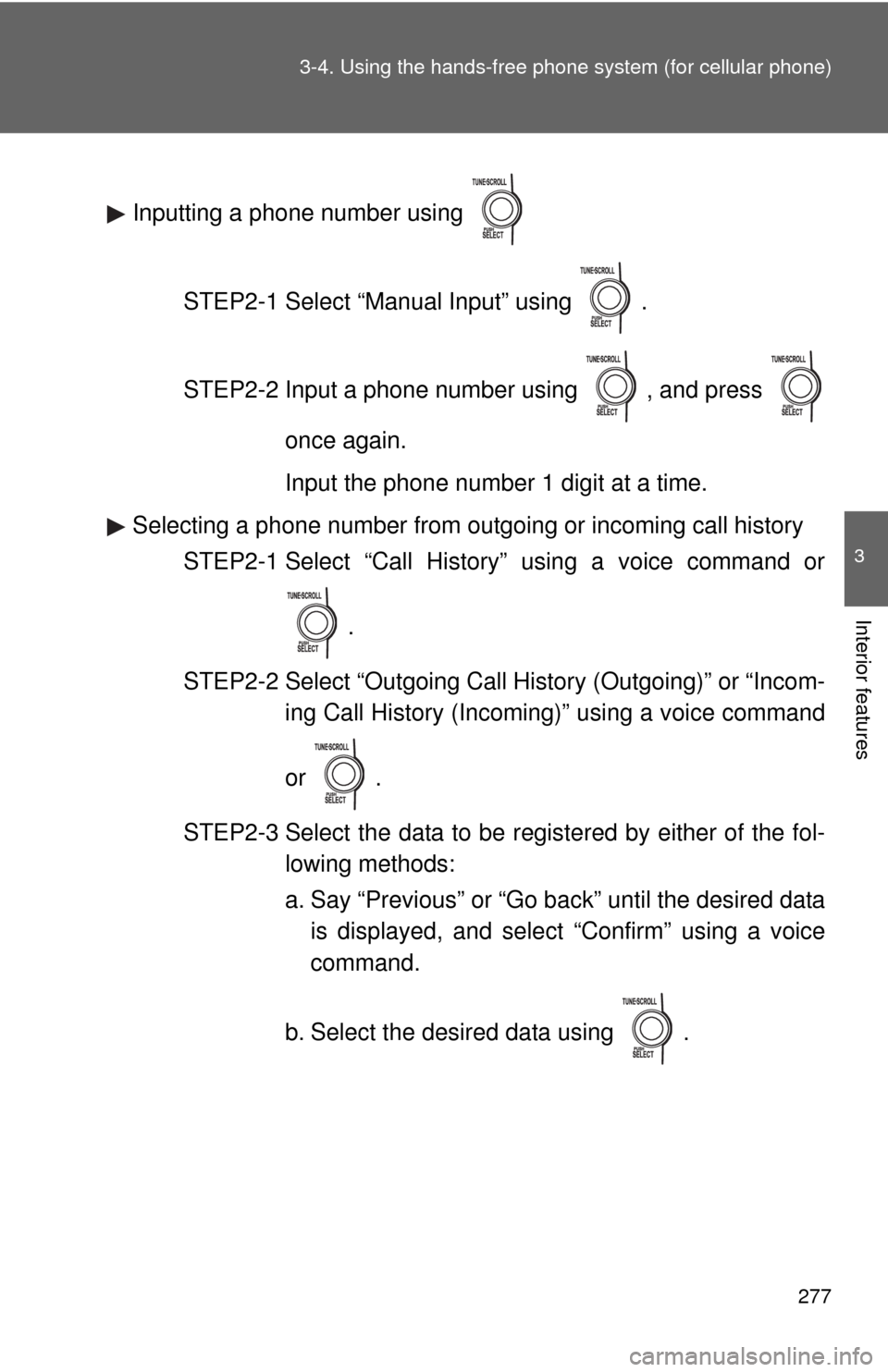
Inputting a phone number using
STEP2-1 Select “Manual Input” using .
STEP2-2 Input a phone number using , and press
once again.
Input the phone number 1 digit at a time.
Selecting a phone number from outgoing or incoming call history
STEP2-1 Select “Call History” using a voice command or
.
STEP2-2 Select “Outgoing Call History (Outgoing)” or “Incom-
ing Call History (Incoming)” using a voice command
or .
STEP2-3 Select the data to be registered by either of the fol-
lowing methods:
a. Say “Previous” or “Go back” until the desired data
is displayed, and select “Confirm” using a voice
command.
b. Select the desired data using .
Page 278 of 501
278 3-4. Using the hands-free phone system (for cellular phone)
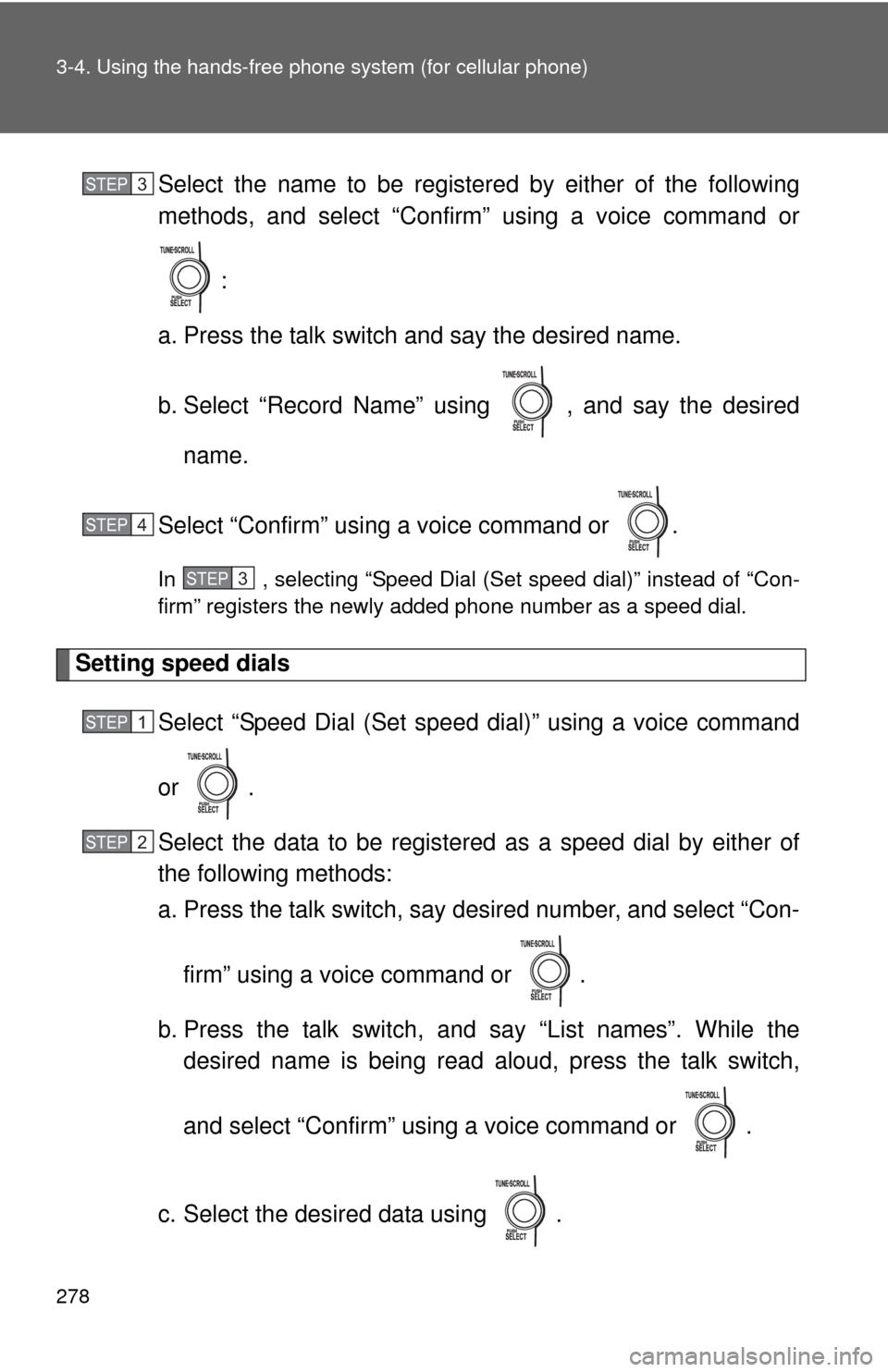
Select the name to be registered by either of the following
methods, and select “Confirm” using a voice command or
:
a. Press the talk switch and say the desired name.
b. Select “Record Name” using , and say the desired
name.
Select “Confirm” using a voice command or .
In , selecting “Speed Dial (Set speed dial)” instead of “Con-
firm” registers the newly added phone number as a speed dial.
Setting speed dials
Select “Speed Dial (Set speed dial)” using a voice command
or .
Select the data to be registered as a speed dial by either of
the following methods:
a. Press the talk switch, say desired number, and select “Con-
firm” using a voice command or
.
b. Press the talk switch, and say “List names”. While the
desired name is being read aloud, press the talk switch,
and select “Confirm” using a voice command or .
c. Select the desired data using .
STEP3
STEP4
STEP3
STEP1
STEP2
Page 279 of 501
279 3-4. Using the hands-free phone system (for cellular phone)
3
Interior features
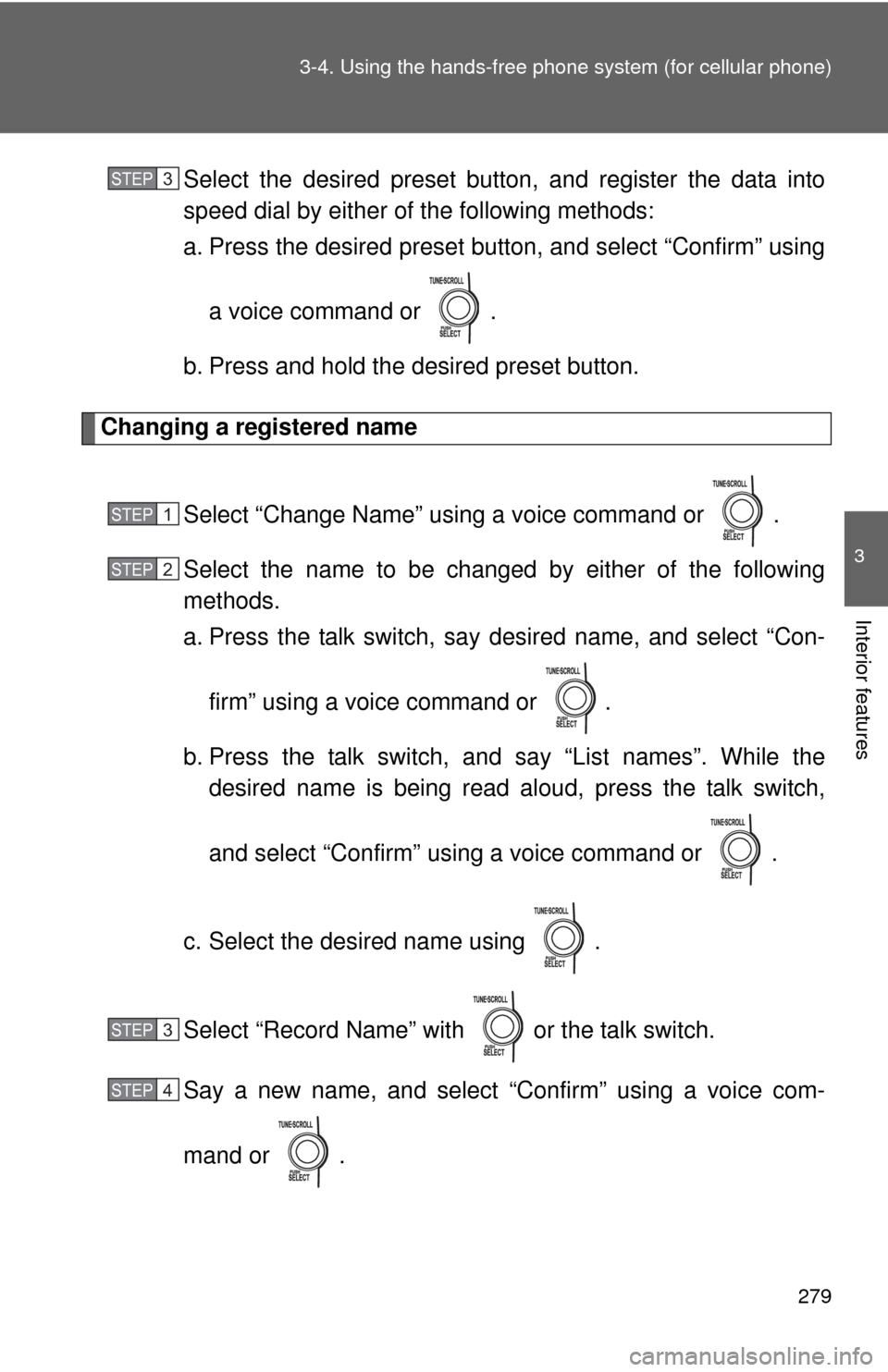
Select the desired preset button, and register the data into
speed dial by either of the following methods:
a. Press the desired preset button, and select “Confirm” using
a voice command or .
b. Press and hold the desired preset button.
Changing a registered name
Select “Change Name” using a voice command or .
Select the name to be changed by either of the following
methods.
a. Press the talk switch, say desired name, and select “Con-
firm” using a voice command or
.
b. Press the talk switch, and say “List names”. While the
desired name is being read aloud, press the talk switch,
and select “Confirm” using a voice command or .
c. Select the desired name using .
Select “Record Name” with or the talk switch.
Say a new name, and select “Confirm” using a voice com-
mand or .
STEP3
STEP1
STEP2
STEP3
STEP4
Page 280 of 501
280 3-4. Using the hands-free phone system (for cellular phone)
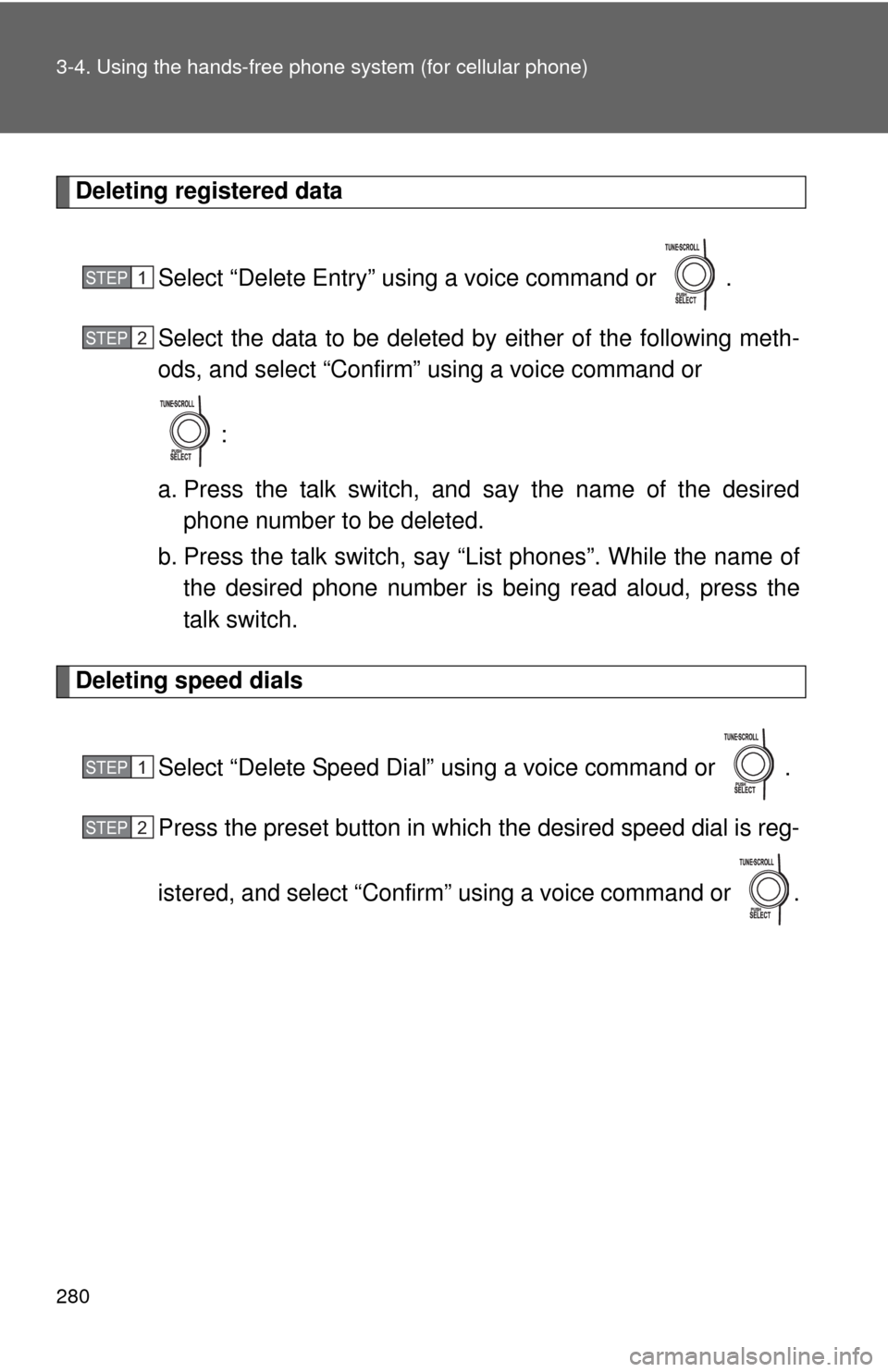
Deleting registered data
Select “Delete Entry” using a voice command or .
Select the data to be deleted by either of the following meth-
ods, and select “Confirm” using a voice command or
:
a. Press the talk switch, and say the name of the desired
phone number to be deleted.
b. Press the talk switch, say “List phones”. While the name of
the desired phone number is being read aloud, press the
talk switch.
Deleting speed dials
Select “Delete Speed Dial” using a voice command or .
Press the preset button in which the desired speed dial is reg-
istered, and select “Confirm” using a voice command or .
STEP1
STEP2
STEP1
STEP2
Page 281 of 501
281 3-4. Using the hands-free phone system (for cellular phone)
3
Interior features
Listing the registered data
Selecting “List names” using a voice command causes a list of the
registered data to be read aloud.
When listing is complete, the system returns to “Phonebook”.
Pressing the talk switch while the desired data is being read aloud
selects the data, and the following function will be available.
• Dialing: “Dial”
• Changing a registered name: “Change Name”
• Deleting an entry: “Delete Entry”
• Setting a speed dial: “Speed Dial (Set speed dial)”
■Limitation of number of digits
A phone number that exceeds 24 digits cannot be registered.
Page 491 of 501

490 Alphabetical index
Back door
Back door ................................34
Wireless remote control ..........26
Back-up lights
Wattage ................................. 456
Battery
Checking ............................... 347
If the vehicle has a
discharged battery .............. 428
Preparing and checking
before winter ....................... 154
Bluetooth
® audio ..................... 230
Bluetooth® phone .................... 247
Bottle holder ............................. 290
Brake
Fluid ...................................... 345
Parking brake ........................ 127
Brake assist .............................. 145
Break-in tips ............................. 106
Care
Exterior .................................. 316
Interior ................................... 319
Seat belts .............................. 320
Cargo capacity ......................... 150
Cargo hooks ............................. 304
CD changer ............................... 190
CD player .................................. 190
Chains ....................................... 154Child restraint system
Booster seats, definition.......... 88
Booster seats, installation ....... 92
Convertible seats,
definition ............................... 88
Convertible seats,
installation............................. 92
Front passenger occupant
classification system ............. 83
Infant seats, definition ............. 88
Infant seats, installation .......... 92
Installing CRS with LATCH
anchors ................................. 93
Installing CRS with
seat belts .............................. 95
Installing CRS with top tether
straps .................................... 99
Child safety
Airbag precautions .................. 78
Battery precautions ....... 348, 431
Child restraint system ............. 88
Child-protectors....................... 30
How your child should wear
the seat belt .......................... 48
Installing child restraints.......... 92
Moon roof precautions ............ 61
Power window lock switch ...... 57
Power window precautions ..... 58
Removed key battery
precautions ......................... 369
Seat belt extender
precautions ........................... 50
Seat belt precautions .............. 49
B
C
Page 494 of 501

493 Alphabetical index
Fuel door .................................... 62
Fuel filler door ........................... 62
Fuel pump shut off system .... 398
Fuses ........................................ 371
Gas station information .......... 500
Gauges ..................................... 129
Glove box ................................. 287
Grocery bag hooks ................. 300
Hands-free phone system
(for cellular phone) ............... 247
Hazard lights
Switch ................................... 390
Head restraints
Adjusting ................................ 44
Headlights
Replacing light bulbs ............ 380
Switch ................................... 135
Wattage ................................ 456
Heaters
Side mirror ............................ 179
Hood ......................................... 332
Hooks
Cargo hooks ......................... 304
Grocery bag hooks ............... 300
Horn .......................................... 128I/M test.......................................327
Identification number
Engine ...................................443
Vehicle ..................................443
Ignition switch ..........................115
Illuminated entry system .........283
Indicator lights .........................132
Initialization
Items to initialize....................474
Inside rear view mirror ..............53
Interior lights
Interior lights..........................282
Switch....................................283
Wattage .................................456
Jack
Positioning a floor jack ..........334
Vehicle-equipped jack ...........411
Jack handle ..............................411
Keyless entry..............................26
Keys
Engine switch ........................115
If you lose your keys .............427
Ignition switch........................115
Key number .............................24
Keyless entry...........................26
Keys ........................................24
Wireless remote control key ....26
G
H
I
J
K
Page 497 of 501

496 Alphabetical index
Side marker lights
Replacing light bulbs ............. 380
Switch.................................... 135
Wattage ................................. 456
Side mirror
Adjusting .................................55
Spare tire
Inflation pressure................... 360
Storage location .................... 411
Spark plug ................................ 449
Specifications........................... 442
Speedometer ............................ 129
Steering
Column lock release.............. 117
Steering wheel
Adjustment ..............................52
Audio switches ...................... 227
Stop lights
Replacing light bulbs ............. 380
Wattage ................................. 456
Storage feature......................... 286
Storage precautions ................150
Stuck
If your vehicle becomes
stuck ................................... 436
Sun visors................................. 293
Sunshade
Roof.........................................60
Switch
Emergency flasher switch ..... 390
Engine switch ........................ 115
Fog light switch ..................... 137
Hazard light switch ................390
Ignition switch........................ 115
Light switches........................ 135
Power door lock switch ...........29
Power window switch ..............57
Window lock switch .................57
Wiper and washer switch ...... 138Tachometer .............................. 129
Tail lights
Replacing light bulbs ............. 380
Switch ................................... 135
Wattage................................. 456
Talk switch ............................... 253
Telephone switch..................... 253
Theft deterrent system
Engine immobilizer system ..... 66
Theft prevention labels ............. 68
Tie-down belts.......................... 304
Tire inflation pressure ............. 360
Tire information
Glossary ................................ 466
Size ....................................... 463
Tire identification number...... 462
Uniform tire quality
grading................................ 464
Tires
Chains ................................... 154
Checking ............................... 351
If you have a flat tire.............. 411
Inflation pressure .................. 360
Inflation pressure sensor....... 352
Replacing .............................. 411
Rotating tires ......................... 351
Size ....................................... 454
Snow tires ............................. 154
Spare tire .............................. 411
Tonneau cover ......................... 306
Tools ......................................... 411
Total load capacity .................. 153
Towing
Dinghy towing ............... 167, 168
Trailer towing ................ 158, 159T