brake TOYOTA MATRIX 2012 E140 / 2.G Owner's Manual
[x] Cancel search | Manufacturer: TOYOTA, Model Year: 2012, Model line: MATRIX, Model: TOYOTA MATRIX 2012 E140 / 2.GPages: 516, PDF Size: 7.02 MB
Page 140 of 516

140 2-3. Operating the lights and wipers
■Daytime running light system
●To make your vehicle more visible to other drivers, the headlights turn on
automatically whenever the engine is started and the parking brake is
released.
● Compared to turning on the headlights, the daytime running light system
offers greater durability and consumes less electricity, so it can help
improve fuel economy.
■ Light reminder buzzer
A buzzer sounds when the engine switch is turned OFF and the driver's door
is opened with the key removed from the engine switch while the lights are
turned on.
NOTICE
■To prevent battery discharge
Do not leave the lights on longer than necessary when the engine is not run-
ning.
Page 150 of 516
150 2-4. Using other driving systems
■Cruise control can be set when
●Automatic transmission:
The shift lever is in the D or range 3 (standard type), or in the D or range
4 or higher of S has been selected (multi-mode type).
● Vehicle speed is above approximately 25 mph (40 km/h).
■ Accelerating
The vehicle can be accelerated normally. After acceleration, the set speed
resumes.
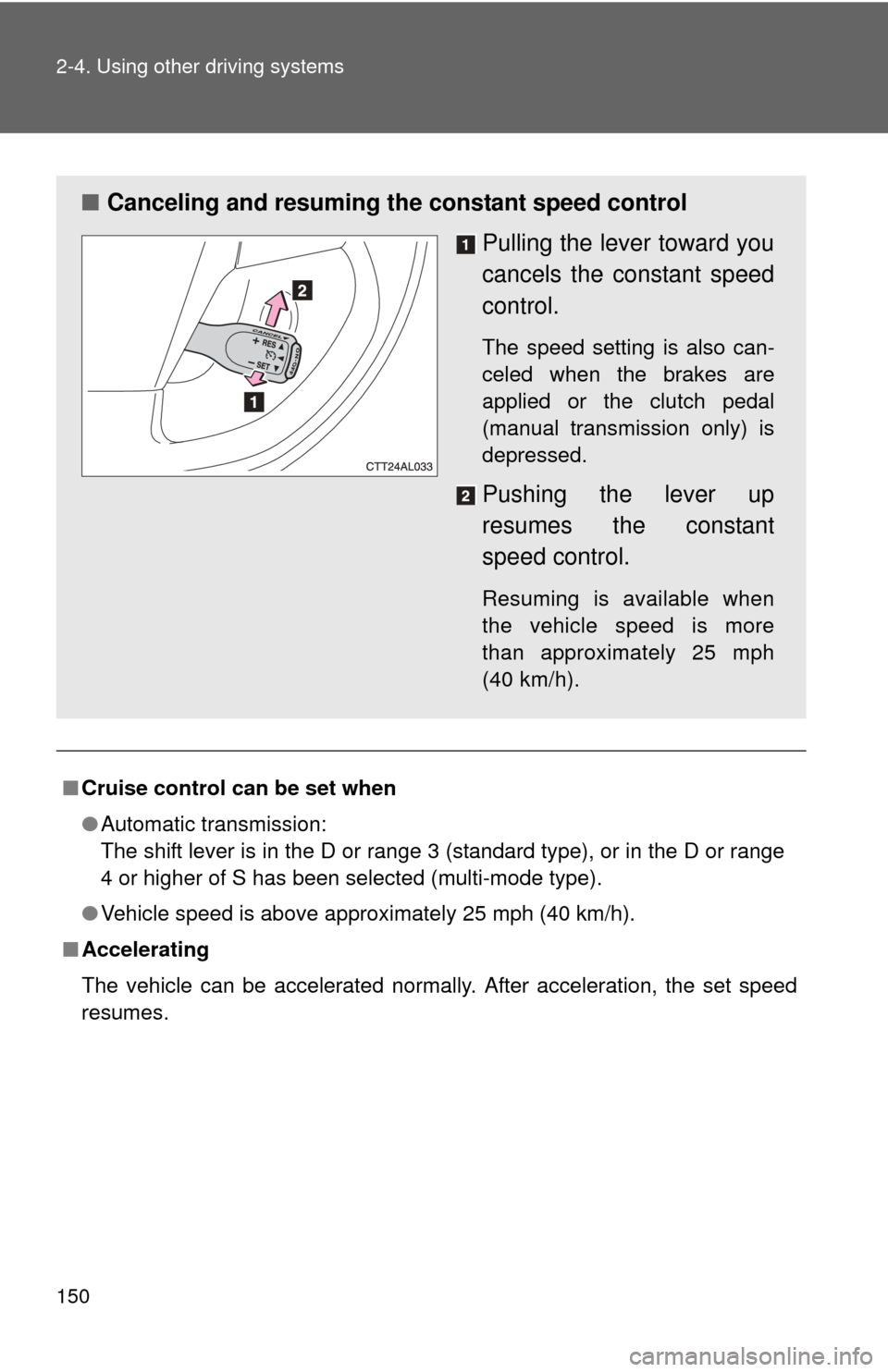
■ Canceling and resuming the constant speed control
Pulling the lever toward you
cancels the constant speed
control.
The speed setting is also can-
celed when the brakes are
applied or the clutch pedal
(manual transmission only) is
depressed.
Pushing the lever up
resumes the constant
speed control.
Resuming is available when
the vehicle speed is more
than approximately 25 mph
(40 km/h).
Page 152 of 516
152
2-4. Using other driving systems
Driving assist systems
To help enhance driving safety and performance, the following sys-
tems operate automatically in res ponse to various driving situations.
Be aware, however, that these systems are supplementary and
should not be relied upon too h eavily when operating the vehicle.
■ABS (Anti-lock Brake System)
Helps to prevent wheel lock when the brakes are applied suddenly, or if
the brakes are applied while driving on a slippery road surface.
■Brake assist
Generates an increased level of braking force after the brake pedal is
depressed, when the system detects a panic stop situation.
■VSC (Vehicle Stability Control)
Helps the driver to control skidding when swerving suddenly or turning
on slippery road surfaces.
■TRAC (Traction Control)
Maintains drive power and prevents the front wheels from spinning
when starting the vehicle or accelerating on slippery roads.
■EPS (Electric Power Steering)
Employs an electric motor to reduce the amount of effort needed to turn
the steering wheel.
■Active Torque Control 4WD system (if equipped)
Automatically switches from front-wheel drive to AWD (All-Wheel Drive)
according to driving conditions, helping to ensure reliable handling and
stability. Examples of conditions where the system will switch to AWD
are when cornering, going uphill, star ting off or accelerating, and when
the road surface is slippery due to snow or rain etc.
Page 154 of 516
154 2-4. Using other driving systems
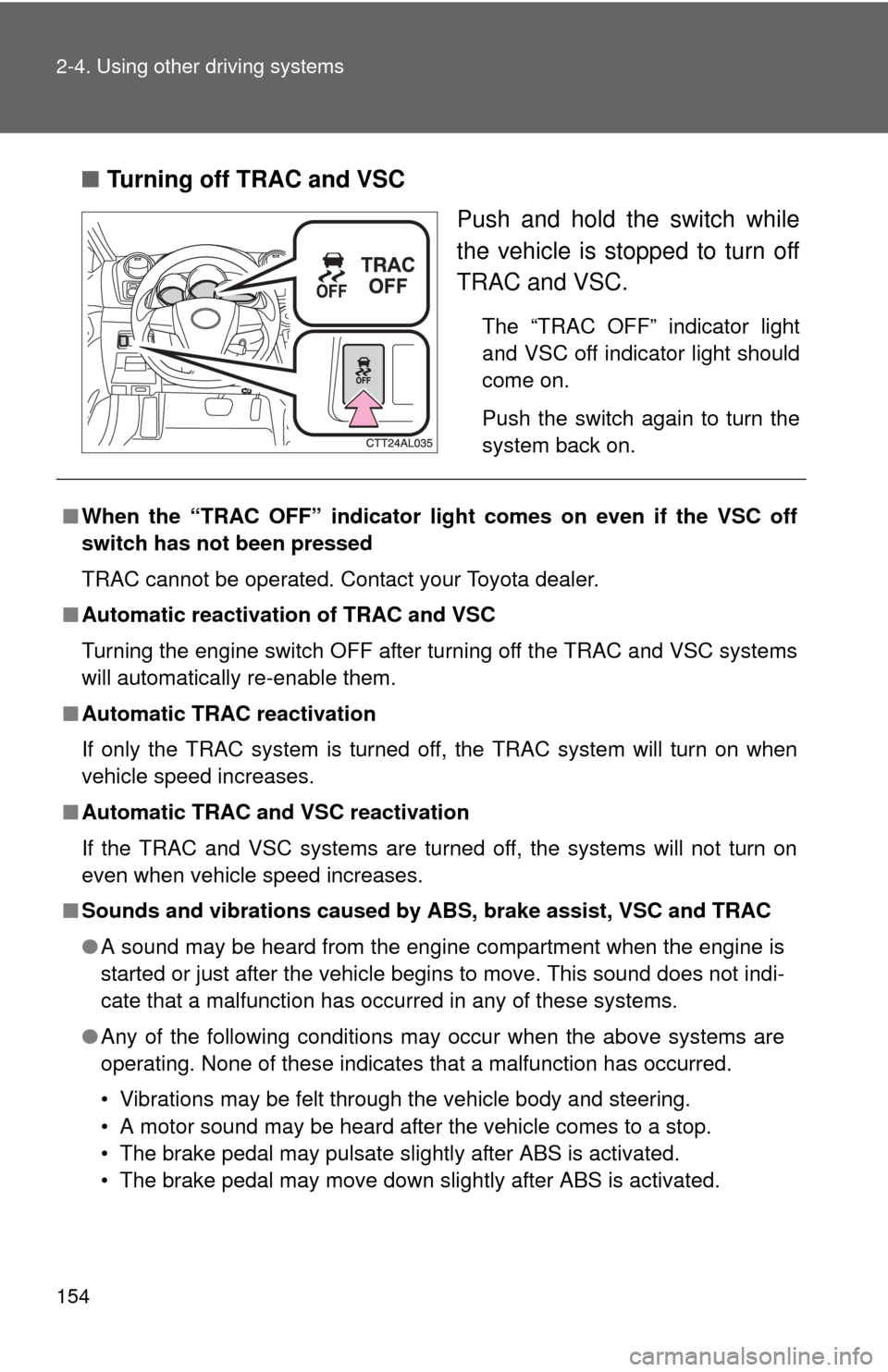
■Turning off TRAC and VSC
Push and hold the switch while
the vehicle is stopped to turn off
TRAC and VSC.
The “TRAC OFF” indicator light
and VSC off indicator light should
come on.
Push the switch again to turn the
system back on.
■When the “TRAC OFF” indicator lig ht comes on even if the VSC off
switch has not been pressed
TRAC cannot be operated. Contact your Toyota dealer.
■ Automatic reactivation of TRAC and VSC
Turning the engine switch OFF after turning off the TRAC and VSC systems
will automatically re-enable them.
■ Automatic TRAC reactivation
If only the TRAC system is turned off, the TRAC system will turn on when
vehicle speed increases.
■ Automatic TRAC and VSC reactivation
If the TRAC and VSC systems are turned off, the systems will not turn on
even when vehicle speed increases.
■ Sounds and vibrations caused by ABS, brake assist, VSC and TRAC
●A sound may be heard from the engine compartment when the engine is
started or just after the vehicle begins to move. This sound does not indi-
cate that a malfunction has occurred in any of these systems.
● Any of the following conditions may occur when the above systems are
operating. None of these indicates that a malfunction has occurred.
• Vibrations may be felt through the vehicle body and steering.
• A motor sound may be heard after the vehicle comes to a stop.
• The brake pedal may pulsate slightly after ABS is activated.
• The brake pedal may move down slightly after ABS is activated.
Page 159 of 516

159
2-5. Driving information
2
When driving
CAUTION
■Storage precautions
Observe the following precautions.
Failing to do so may result in death or serious injury.
●To prevent cargo and luggage from sliding forward during braking, do
not stack anything in the luggage compartment. Keep cargo and lug-
gage low, as close to the floor as possible.
●Never allow anyone to ride in the luggage compartment. It is not
designed for passengers. They should ride in their seats with their seat
belts properly fastened. Otherwise,
they are much more likely to suffer
death or serious bodily injury, in t he event of sudden braking, sudden
swerving or an accident.
●Do not place cargo or luggage in or on the following locations as the
item may get under the clutch, brake or accelerator pedal and prevent
the pedals from being depressed properly, block the driver’s vision, or
hit the driver or passengers, causing an accident.
• Driver’s feet
• Front passenger or rear seats (when stacking items)
• Instrument panel
• Dashboard
• Tonneau cover (if equipped)
●Secure all items in the occupant compartment, as they may shift and
injure someone during sudden braking, sudden swerving or an acci-
dent.
■Capacity and distribution
●Do not exceed the maximum axle weight rating or the total vehicle
weight rating.
●Even if the total load of occupant's weight and the cargo load is less
than the total load capacity, do not apply the load unevenly.
Improper loading may cause deterioration of steering or braking con-
trol which may cause death or serious injury.
Page 161 of 516
161
2-5. Driving information
2
When driving
Winter driving tips
Carry out the necessary preparations and inspections before driving
the vehicle in winter. Always drive the vehicle in a manner appropri-
ate to the prevailing weather conditions.
■ Pre-winter preparations
●Use fluids that are appropriate to the prevailing outside tem-
peratures.
• Engine oil
• Engine coolant
• Washer fluid
● Have a service technician inspect the level and specific grav-
ity of battery electrolyte.
● Have the vehicle fitted with four snow tires or purchase a set
of tire chains for the front tires.
Ensure that all tires are the same size and brand, and that chains
match the size of the tires.
■Before driving the vehicle
Perform the following according to the driving conditions.
●Do not try to forcibly open a window or move a wiper that is
frozen. Pour warm water over the frozen area to melt the ice.
Wipe away the water immediately to prevent it from freezing.
● To ensure proper operation of th e climate control system fan,
remove any snow that has accumulated on the air inlet vents
in front of the windshield.
● Remove any ice that has accumu lated on the vehicle chassis.
● Periodically check for and remove any excess ice or snow
that may have accumulated in the wheel well or on the
brakes.
Page 162 of 516
162 2-5. Driving information
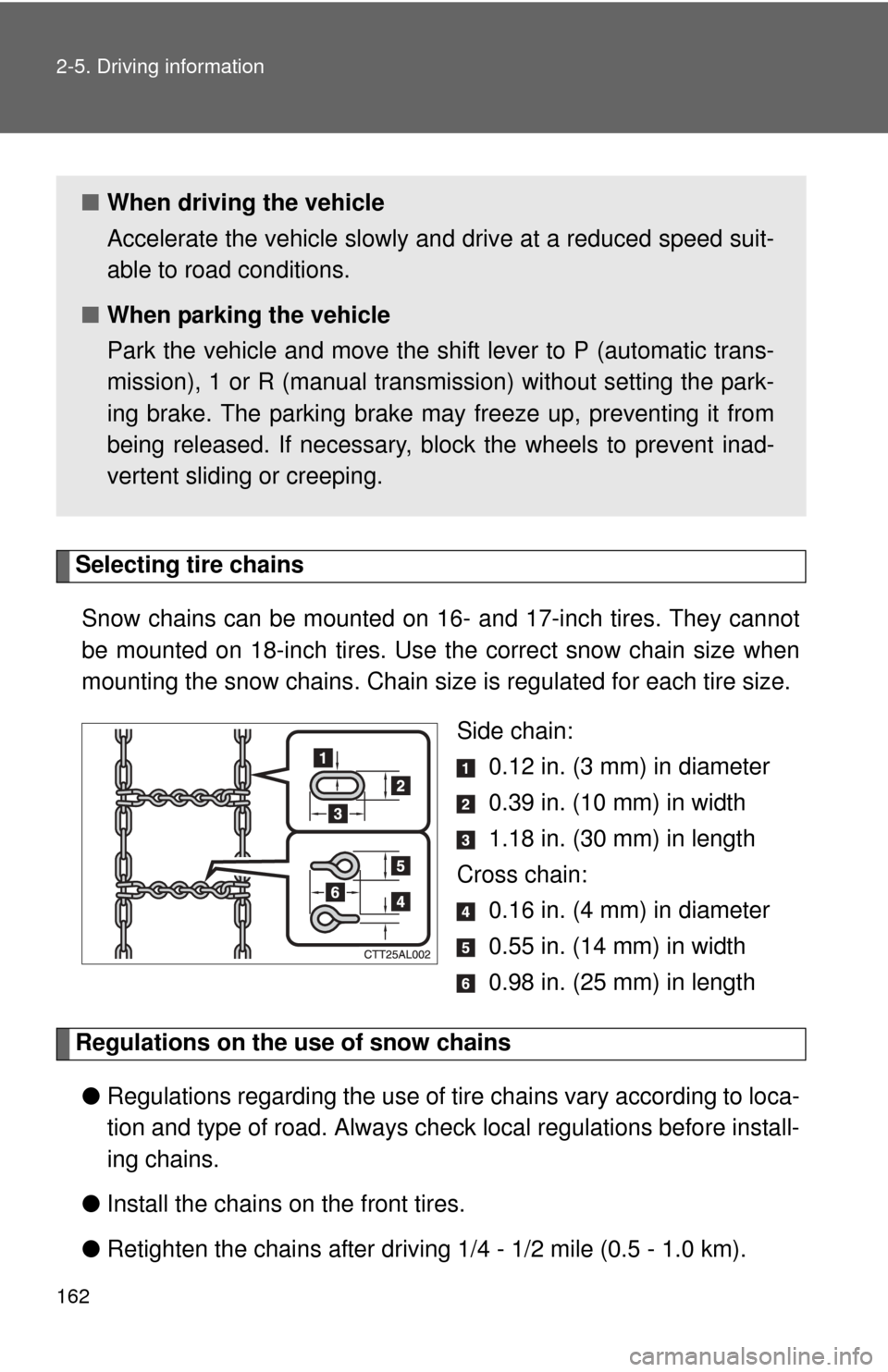
Selecting tire chainsSnow chains can be mounted on 16- and 17-inch tires. They cannot
be mounted on 18-inch tires. Use the correct snow chain size when
mounting the snow chains . Chain size is regulated for each tire size.
Side chain: 0.12 in. (3 mm) in diameter
0.39 in. (10 mm) in width
1.18 in. (30 mm) in length
Cross chain: 0.16 in. (4 mm) in diameter
0.55 in. (14 mm) in width
0.98 in. (25 mm) in length
Regulations on the use of snow chains
● Regulations regarding the use of tire chains vary according to loca-
tion and type of road. Always check local regu lations before install-
ing chains.
● Install the chains on the front tires.
● Retighten the chains after drivi ng 1/4 - 1/2 mile (0.5 - 1.0 km).
■When driving the vehicle
Accelerate the vehicle slowly and drive at a reduced speed suit-
able to road conditions.
■ When parking the vehicle
Park the vehicle and move the shift lever to P (automatic trans-
mission), 1 or R (manual transmission) without setting the park-
ing brake. The parking brake may freeze up, preventing it from
being released. If necessary, block the wheels to prevent inad-
vertent sliding or creeping.
Page 166 of 516
![TOYOTA MATRIX 2012 E140 / 2.G Owners Manual 166
2-5. Driving information
Trailer towing (2.4 L 4-cylinder [2AZ-FE] engine)
Towing related terms■ GCWR (Gross Combination Weight Rating)
The maximum allowable gross
combination weight. The gross](/img/14/6541/w960_6541-165.png "TOYOTA MATRIX 2012 E140 / 2.G Owners Manual 166
2-5. Driving information
Trailer towing (2.4 L 4-cylinder [2AZ-FE] engine)
Towing related terms■ GCWR (Gross Combination Weight Rating)
The maximum allowable gross
combination weight. The gross")
166
2-5. Driving information
Trailer towing (2.4 L 4-cylinder [2AZ-FE] engine)
Towing related terms■ GCWR (Gross Combination Weight Rating)
The maximum allowable gross
combination weight. The gross
combination weight is the sum of
the total vehicle weight (including
the occupants, cargo and any
optional equipment installed on
the vehicle) and the weight of the
trailer being towed (including the
cargo in the trailer).
Your vehicle is designed primarily as a passenger-and-load-carrying
vehicle. Towing a trailer can have an adverse impact on handling,
performance, braking, durability, and fuel consumption. For your
safety and the safety of others, yo u must not overload your vehicle
or trailer. You must also ensure that you are using appropriate tow-
ing equipment, that the towing eq uipment has been installed cor-
rectly and used properly, and that you employ the requisite driving
habits.
Vehicle-trailer stability and br aking performance are affected by
trailer stability, brake performan ce and setting, trailer brakes, the
hitch and hitch systems (if equipped).
To tow a trailer safely, use extreme care and drive the vehicle in
accordance with your trailer’s characteristics and operating condi-
tions.
Toyota warranties do not apply to damage or malfunction caused by
towing a trailer for commercial purposes.
Contact your Toyota dealer for fu rther information about additional
requirements such as towing kits, etc.
Page 168 of 516
168 2-5. Driving information
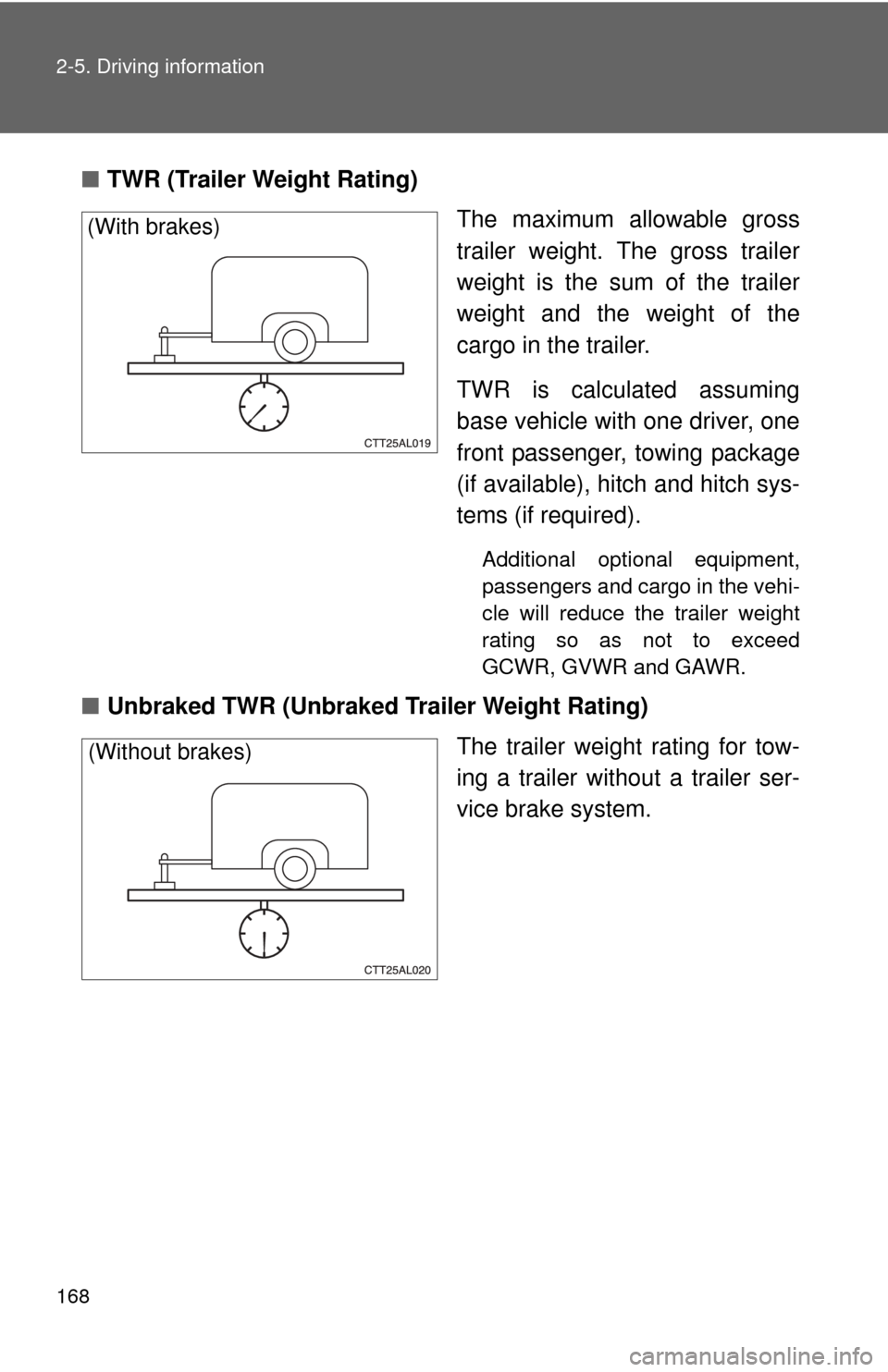
■TWR (Trailer Weight Rating)
The maximum allowable gross
trailer weight. The gross trailer
weight is the sum of the trailer
weight and the weight of the
cargo in the trailer.
TWR is calculated assuming
base vehicle with one driver, one
front passenger, towing package
(if available), hitch and hitch sys-
tems (if required).
Additional optional equipment,
passengers and cargo in the vehi-
cle will reduce the trailer weight
rating so as not to exceed
GCWR, GVWR and GAWR.
■Unbraked TWR (Unbraked Trailer Weight Rating)
The trailer weight rating for tow-
ing a trailer without a trailer ser-
vice brake system.
(With brakes)
(Without brakes)
Page 169 of 516
169
2-5. Driving information
2
When driving
■
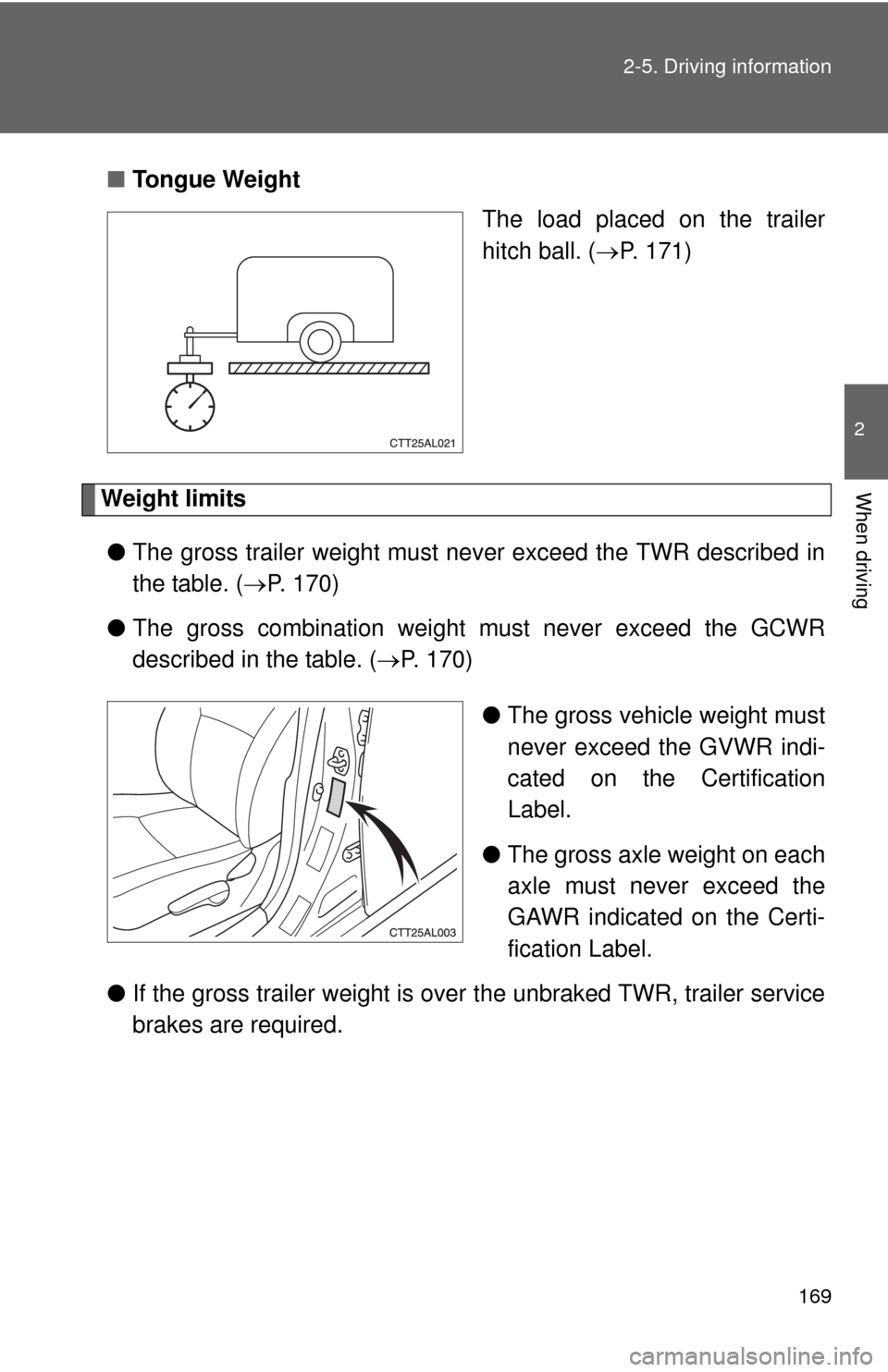
Tongue Weight
The load placed on the trailer
hitch ball. (P. 171)
Weight limits
● The gross trailer weight must never exceed the TWR described in
the table. ( P. 170)
● The gross combination weight must never exceed the GCWR
described in the table. ( P. 170)
●The gross vehicle weight must
never exceed the GVWR indi-
cated on the Certification
Label.
● The gross axle weight on each
axle must never exceed the
GAWR indicated on the Certi-
fication Label.
● If the gross trailer weight is over the unbraked TWR, trailer service
brakes are required.