steering wheel TOYOTA MATRIX 2012 E140 / 2.G Owner's Guide
[x] Cancel search | Manufacturer: TOYOTA, Model Year: 2012, Model line: MATRIX, Model: TOYOTA MATRIX 2012 E140 / 2.GPages: 516, PDF Size: 7.02 MB
Page 117 of 516

117
2-1. Driving procedures
2
When driving
NOTICE
■
If you hear a squealing or scraping noise (brake pad wear limit indica-
tors)
Have the brake pads checked and replaced by your Toyota dealer as soon
as possible.
Rotor damage can result if the pads are not replaced when needed.
It is dangerous to drive the vehicle when the wear limits of the brake pads
and/or those of the brake discs are exceeded.
■ If you get a flat tire while driving
A flat or damaged tire may cause the following situations. Hold the steering
wheel firmly and gradually press the brake pedal to slow down the vehicle.
●It may be difficult to control your vehicle.
● The vehicle will make abnormal sounds.
● The vehicle will behave abnormally.
Replace a flat tire with a new one. ( P. 427)
■ When encountering flooded roads
Do not drive on a road that has flooded after heavy rain etc. Doing so may
cause the following serious damage to the vehicle.
●Engine stalling
● Short in electrical components
● Engine damage caused by water immersion
In the event that you drive on a flooded road and the vehicle is flooded, be
sure to have your Toyota dealer check the following.
● Brake function
● Changes in quantity and quality of oil and fluid used for the engine, tran-
saxle, transfer (AWD vehicles), differential, etc.
● Lubricant condition for the propeller shaft (AWD vehicles), bearings and
suspension joints (where possible) and the function of all joints, bearings,
etc.
Page 119 of 516
119
2-1. Driving procedures
2
When driving
■
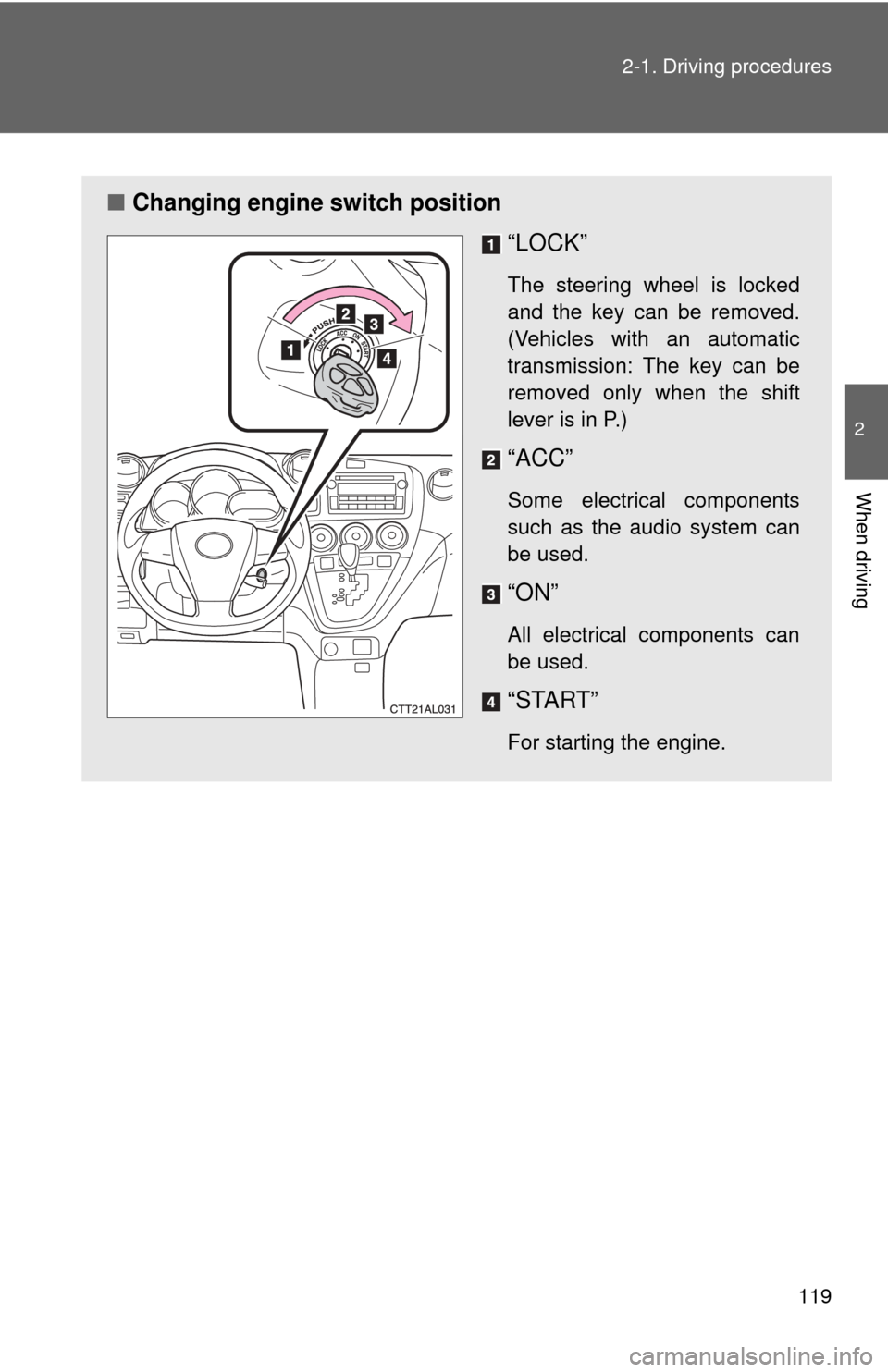
Changing engine switch position
“LOCK”
The steering wheel is locked
and the key can be removed.
(Vehicles with an automatic
transmission: The key can be
removed only when the shift
lever is in P.)
“ACC”
Some electrical components
such as the audio system can
be used.
“ON”
All electrical components can
be used.
“START”
For starting the engine.
Page 120 of 516
120 2-1. Driving procedures
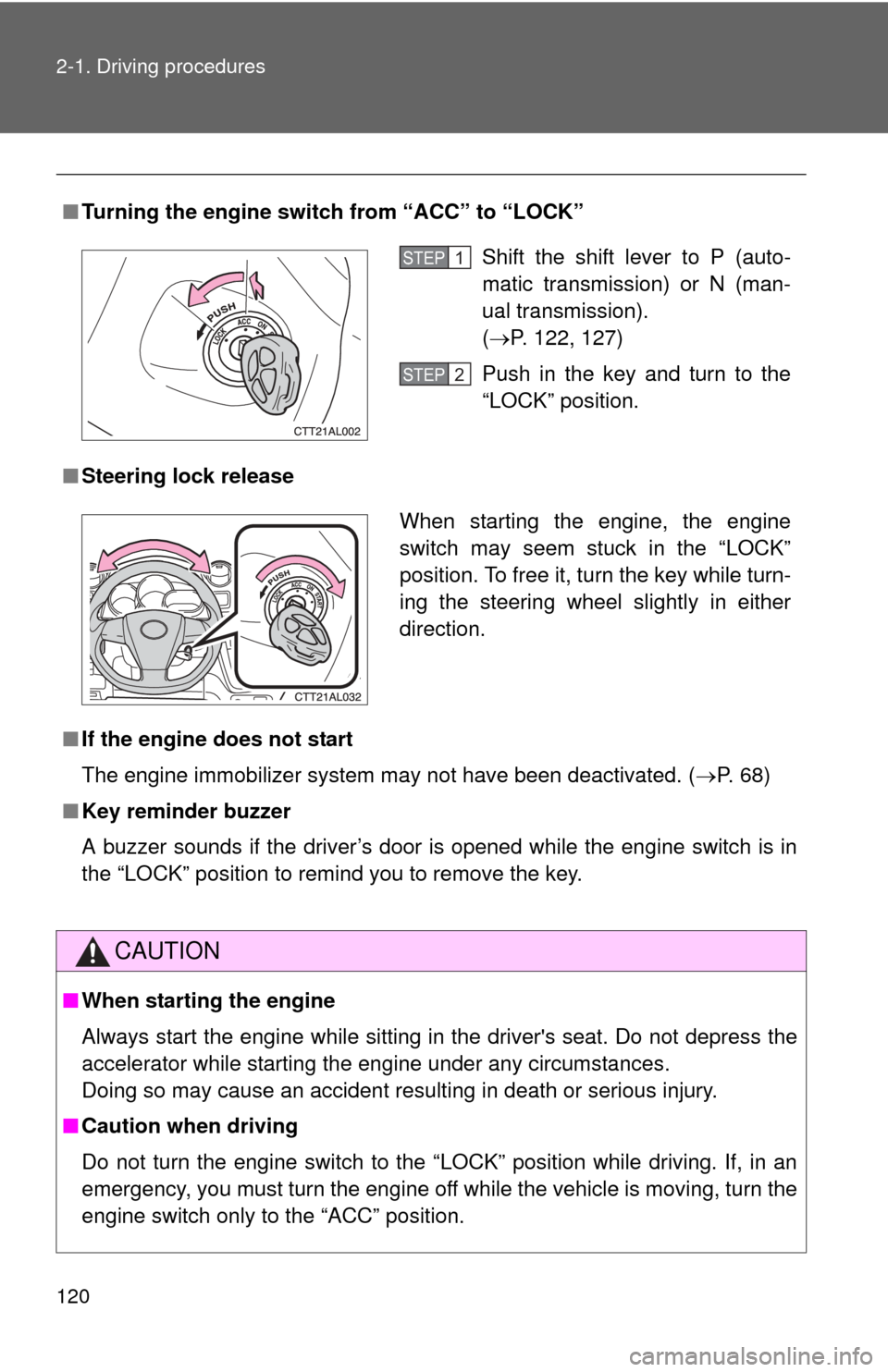
■Turning the engine switch from “ACC” to “LOCK”
■ Steering lock release
■ If the engine does not start
The engine immobilizer system may not have been deactivated. ( P. 68)
■ Key reminder buzzer
A buzzer sounds if the driver’s door is opened while the engine switch is in
the “LOCK” position to remind you to remove the key.
CAUTION
■When starting the engine
Always start the engine while sitting in the driver's seat. Do not depress the
accelerator while starting the engine under any circumstances.
Doing so may cause an accident resulting in death or serious injury.
■ Caution when driving
Do not turn the engine switch to the “LOCK” position while driving. If, in an
emergency, you must turn the engine off while the vehicle is moving, turn the
engine switch only to the “ACC” position.
Shift the shift lever to P (auto-
matic transmission) or N (man-
ual transmission).
(P. 122, 127)
Push in the key and turn to the
“LOCK” position.STEP1
STEP2
When starting the engine, the engine
switch may seem stuck in the “LOCK”
position. To free it, turn the key while turn-
ing the steering wheel slightly in either
direction.
Page 131 of 516
131
2-1. Driving procedures
2
When driving
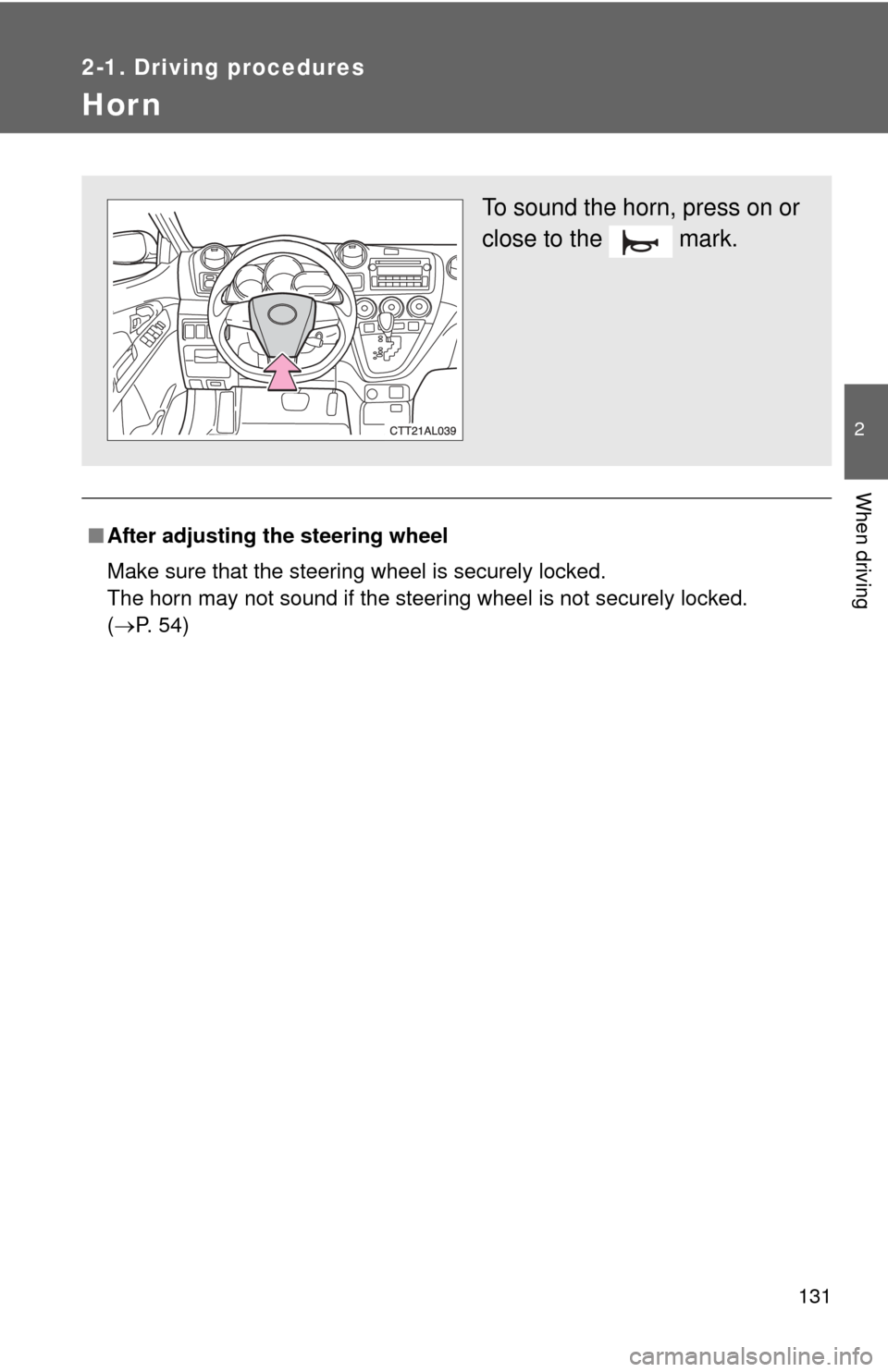
Hor n
■After adjusting the steering wheel
Make sure that the steering wheel is securely locked.
The horn may not sound if the steering wheel is not securely locked.
(P. 54)
To sound the horn, press on or
close to the mark.
Page 152 of 516
152
2-4. Using other driving systems
Driving assist systems
To help enhance driving safety and performance, the following sys-
tems operate automatically in res ponse to various driving situations.
Be aware, however, that these systems are supplementary and
should not be relied upon too h eavily when operating the vehicle.
■ABS (Anti-lock Brake System)
Helps to prevent wheel lock when the brakes are applied suddenly, or if
the brakes are applied while driving on a slippery road surface.
■Brake assist
Generates an increased level of braking force after the brake pedal is
depressed, when the system detects a panic stop situation.
■VSC (Vehicle Stability Control)
Helps the driver to control skidding when swerving suddenly or turning
on slippery road surfaces.
■TRAC (Traction Control)
Maintains drive power and prevents the front wheels from spinning
when starting the vehicle or accelerating on slippery roads.
■EPS (Electric Power Steering)
Employs an electric motor to reduce the amount of effort needed to turn
the steering wheel.
■Active Torque Control 4WD system (if equipped)
Automatically switches from front-wheel drive to AWD (All-Wheel Drive)
according to driving conditions, helping to ensure reliable handling and
stability. Examples of conditions where the system will switch to AWD
are when cornering, going uphill, star ting off or accelerating, and when
the road surface is slippery due to snow or rain etc.
Page 155 of 516
155
2-4. Using other
driving systems
2
When driving
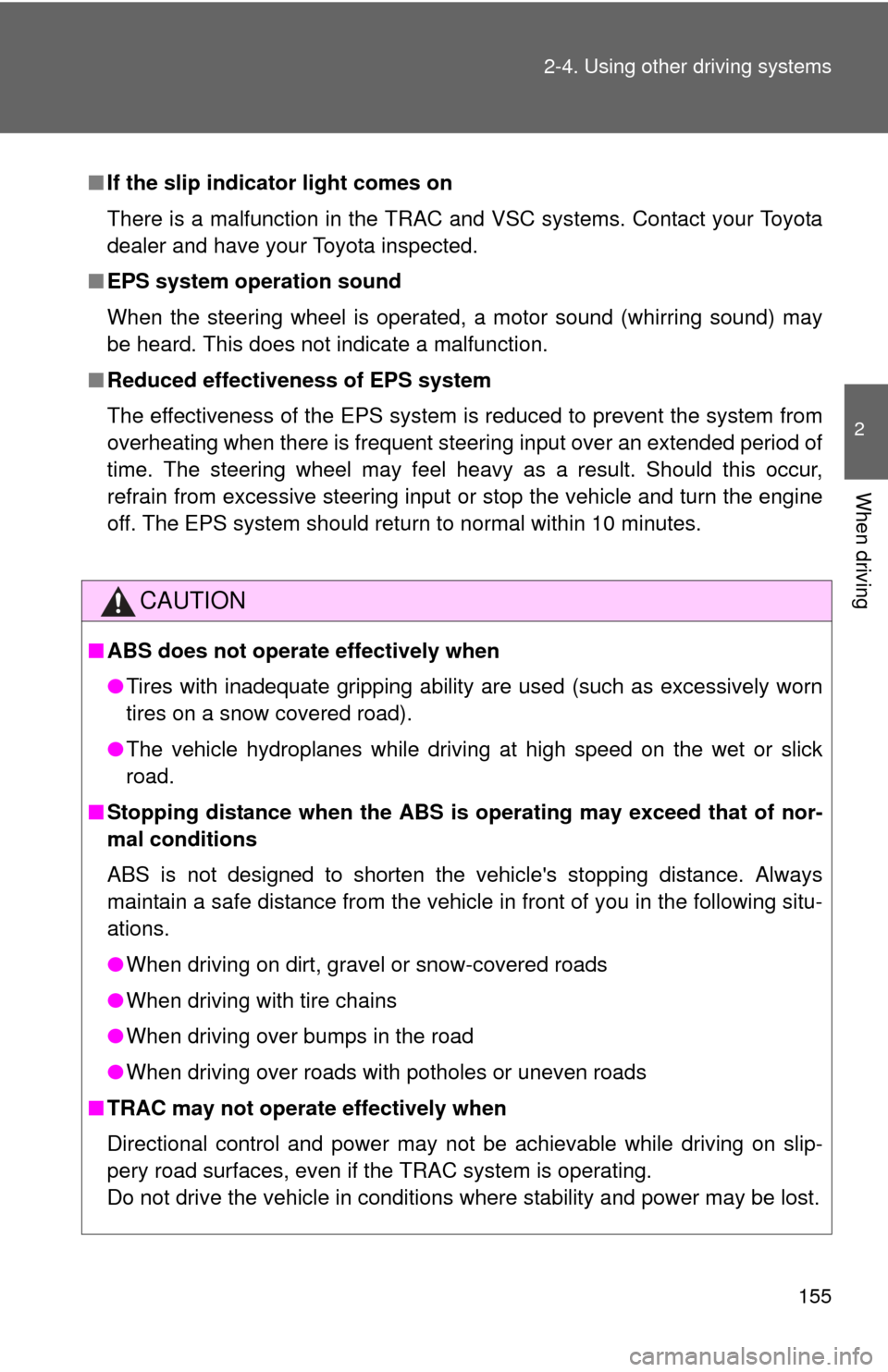
■If the slip indicator light comes on
There is a malfunction in the TRAC and VSC systems. Contact your Toyota
dealer and have your Toyota inspected.
■ EPS system oper ation sound
When the steering wheel is operated, a motor sound (whirring sound) may
be heard. This does not indicate a malfunction.
■ Reduced effectiveness of EPS system
The effectiveness of the EPS system is reduced to prevent the system from
overheating when there is frequent steering input over an extended period of
time. The steering wheel may feel heavy as a result. Should this occur,
refrain from excessive steering input or stop the vehicle and turn the engine
off. The EPS system should return to normal within 10 minutes.
CAUTION
■ABS does not operate effectively when
●Tires with inadequate gripping ability are used (such as excessively worn
tires on a snow covered road).
● The vehicle hydroplanes while driving at high speed on the wet or slick
road.
■ Stopping distance when the ABS is operating may exceed that of nor-
mal conditions
ABS is not designed to shorten the vehicle's stopping distance. Always
maintain a safe distance from the vehicle in front of you in the following situ-
ations.
● When driving on dirt, gravel or snow-covered roads
● When driving with tire chains
● When driving over bumps in the road
● When driving over roads with potholes or uneven roads
■ TRAC may not operate effectively when
Directional control and power may not be achievable while driving on slip-
pery road surfaces, even if the TRAC system is operating.
Do not drive the vehicle in conditions where stability and power may be lost.
Page 173 of 516

173
2-5. Driving information
2
When driving
Trailer towing tips
Your vehicle will handle differently when towing a trailer. Help to avoid
an accident, death or serious injury, keep the following in mind when
towing:
● Speed limits for towing a trailer vary by state or province. Do not
exceed the posted towing speed limit.
● Toyota recommends that the vehicle-trailer speed limit is 65 mph
(104 km/h) on a flat, straight, dry road. Do not exceed this limit, the
posted towing speed limit or the speed limit for your trailer as set
forth in your trailer owner’s man ual, whichever is lowest. Instability
of the towing vehicle-trailer combin ation (trailer sway) increases as
speed increases. Exceeding speed limits may cause loss of con-
trol.
● Before starting out, check the trailer lights, tires and the vehicle-
trailer connections. Recheck after driving a short distance.
● Practice turning, stopping and reve rsing with the trailer attached in
an area away from traffic until you become accustomed to the feel
of the vehicle-trailer combination.
● Reversing with a trailer attached is difficult and requires practice.
Grip the bottom of the steering wheel and move your hand to the
left to move the trailer to the left. Move your hand to the right to
move the trailer to the right. (Thi s is generally opposite to reversing
without a trailer attached.) Avoid sharp or prolonged turning. Have
someone guide you when reversing to reduce the risk of an acci-
dent.
● As stopping distance is increased when towing a trailer, vehicle-to-
vehicle distance should be increased. For each 10 mph (16 km/h)
of speed, allow at least o ne vehicle and trailer length.
● Avoid sudden braking as you may skid, resulting in the trailer jack-
knifing and a loss of vehicle control. This is especially true on wet
or slippery surfaces.
Page 174 of 516

174 2-5. Driving information
●Avoid jerky starts or sudden acceleration.
● Avoid jerky steering and sharp turns, and slow down before mak-
ing a turn.
● Note that when making a turn, th e trailer wheels will be closer than
the vehicle wheels to the inside of the turn. Compensate by making
a wider than normal turning radius.
● Slow down before making a turn, in cross winds, on wet or slippery
surfaces, etc.
Increasing vehicle speed c an destabilize the trailer.
● Take care when passing other v ehicles. Passing requires consider-
able distance. After passing a vehi cle, do not forget the length of
your trailer, and be sure you hav e plenty of room before changing
lanes.
● Automatic transmission:
To maintain engine braking efficiency and charging system perfor-
mance when using engine braking, do not put the transmission in
“D”. If in the S mode, the transmission shift gear position must be in
4 or lower.
● Manual transmission:
To maintain engine braking efficiency and charging system perfor-
mance when using engine braking, do not use fifth gear.
● Instability happens more frequently when descending steep or long
downhill grades. Before descending, slow down and downshift. Do
not make sudden downshifts while descending steep or long down-
hill grades.
● Avoid holding the brake pedal down too long or applying the
brakes too frequently. This could cause the brakes to overheat and
result in reduced braking efficiency.
Page 178 of 516

178 2-5. Driving information
■If trailer sway occurs
One or more factors (crosswinds, passing vehicles, rough roads, etc.) can
adversely affect handling of your vehicle and trailer, causing instability.
●If trailer swaying occurs:
• Firmly grip the steering wheel. Steer straight ahead.
Do not try to control trailer swaying by turning the steering wheel.
• Begin releasing the accelerator pedal immediately but very gradually to reduce speed.
Do not increase speed. Do not apply vehicle brakes.
If you make no extreme correction with the steering or brakes, your vehicle
and trailer should stabilize.
● After the trailer swaying has stopped:
• Stop in a safe place. Get all occupants out of the vehicle.
• Check the tires of the vehicle and the trailer.
• Check the load in the trailer.
Make sure the load has not shifted.
Make sure the tongue weight is appropriate, if possible.
• Check the load in the vehicle. Make sure the vehicle is not overloaded after occupants get in.
If you cannot find any problems, the speed at which trailer swaying occu\
rred
is beyond the limit of your particular vehicle-trailer combination.
Drive at a lower speed to prevent instability. Remember that swaying of the
towing vehicle-trailer increases as speed increases.
CAUTION
■ Trailer towing precautions
To tow a trailer safely, use extreme care and drive the vehicle in accordance
with the trailer’s characteristics and operating conditions. Failure to do so
could cause an accident resulting in death or serious injury. Vehicle stability
and braking performance are affected by trailer stability, brake setting and
performance, and the hitch. Your vehicle will handle differently when towing
a trailer.
Page 184 of 516
184
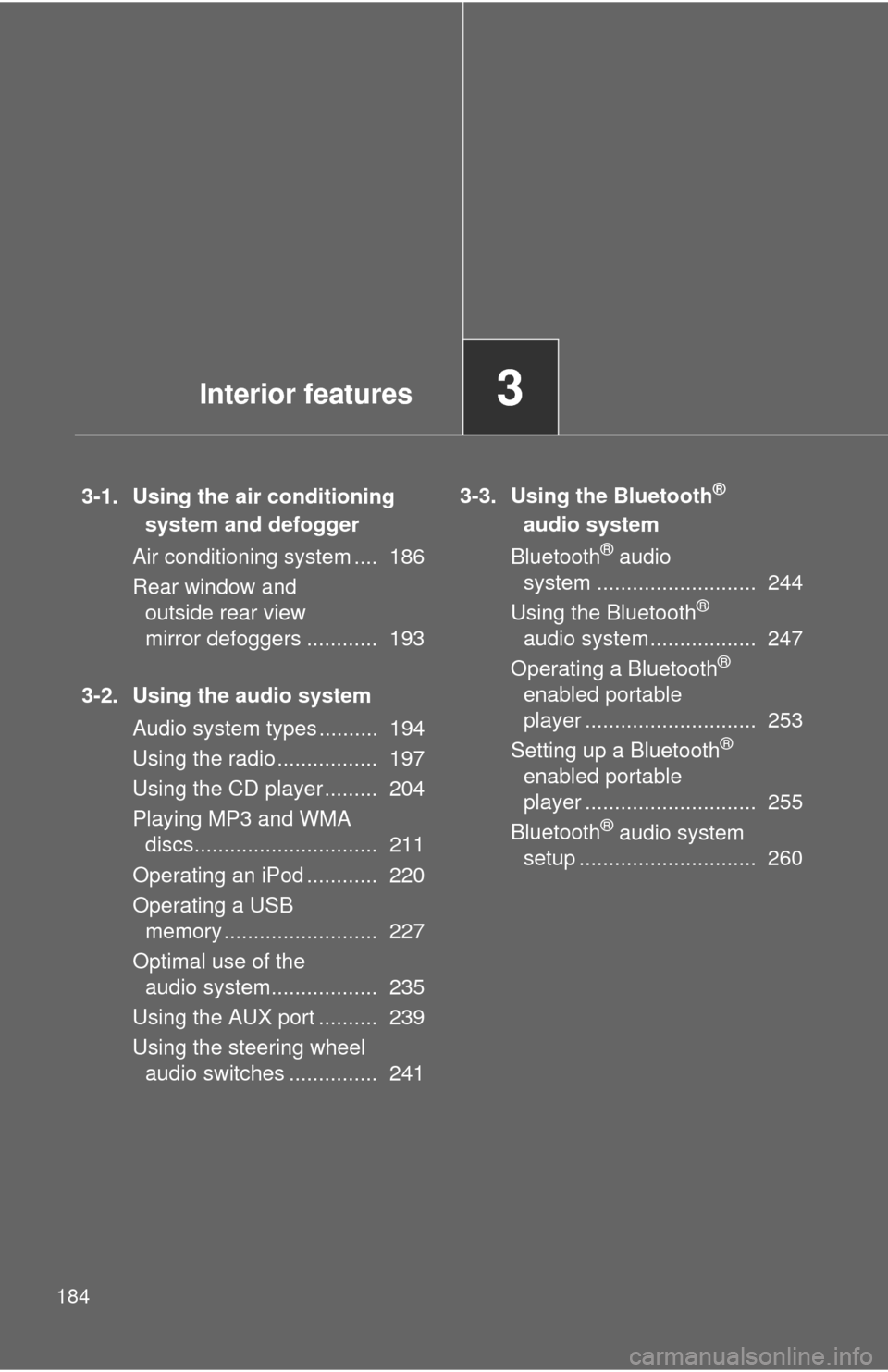
3-1. Using the air conditioningsystem and defogger
Air conditioning system .... 186
Rear window and outside rear view
mirror defoggers ............ 193
3-2. Using the audio system Audio system types .......... 194
Using the radio ................. 197
Using the CD player ......... 204
Playing MP3 and WMA discs............................... 211
Operating an iPod ............ 220
Operating a USB memory .......................... 227
Optimal use of the audio system.................. 235
Using the AUX port .......... 239
Using the steering wheel audio switches ............... 241 3-3. Using the Bluetooth®
audio system
Bluetoo
th
® audio
system ........................... 244
Using the Bluetooth
®
audio system.................. 247
Operating a Bluetooth
®
enabled portable
player ............................. 253
Setting up a Bluetooth
®
enabled portable
player ............................. 255
Bluetooth
® audio system
setup .............................. 260
Interior features3