radio TOYOTA MATRIX 2013 E140 / 2.G User Guide
[x] Cancel search | Manufacturer: TOYOTA, Model Year: 2013, Model line: MATRIX, Model: TOYOTA MATRIX 2013 E140 / 2.GPages: 500, PDF Size: 14.83 MB
Page 200 of 500

200 3-2. Using the audio system
CAUTION
■Canada (type B and Display Audio system)
This device complies with Industry Canada licence-exempt RSS
standard(s).
Operation is subject to the following two conditions:
(1) this device may not cause interference, and
(2) this device must accept any interference, including interference that may
cause undesired operation of this device.
Le présent appareil est conforme aux CNR d’Industrie Canada applicables
aux appareils radio exempts de licence.
L’exploitation est autorisée aux deux conditions suivantes : (1) l’appareil ne
doit pas produire de brouillage, et (2) l’utilisateur de l’appareil doit accepter
tout brouillage radioélectrique subi, même si le brouillage est susceptible
d’en compromettre le fonctionnement.
Under Industry Canada regulations, this radio transmitter may only operate
using an antenna of a type and maximum (or lesser) gain approved for the
transmitter by Industry Canada. To reduce potential radio interference to
other users, the antenna type and its gain should be so chosen that the
equivalent isotropically radiated power (e.i.r.p.) is not more than that neces-
sary for successful communication.
Conformément à la réglementation d’Industrie Canada, le présent émetteur
radio peut fonctionner avec une antenne d’un type et d’un gain maximal (ou
inférieur) approuvé pour l’émetteur par Industrie Canada. Dans le but de
réduire les risques de brouillage radioélectrique à l’intention des autres
utilisateurs, il faut choisir le type d’antenne et son gain de sorte que la
puissance isotrope rayonnée équivalente (p.i.r.e.) ne dépasse pas l’intensité
nécessaire à l’établissement d’une communication satisfaisante.
Page 201 of 500
201 3-2. Using the audio system
3
Interior features
CAUTION
This equipment complies with IC radiation exposure limits set forth for an
uncontrolled environment and meets RSS-102 of the IC radio frequency
(RF) Exposure rules. This equipment has very low levels of RF energy that it
deemed to comply without maximum permissive exposure evaluation
(MPE). But it is desirable that it should be installed and operated keeping the
radiator at least 20cm or more away from person's body (excluding extremi-
ties: hands, wrists, feet and ankles).
Cet équipement est conforme aux limites d’exposition aux rayonnements
énoncées pour un environnement non contrôlé et respecte les règles
d’exposition aux fréquences radioélectriques (RF) CNR-102 de l’IC. Cet
équipement émet une énergie RF très faible qui est considérée conforme
sans évaluation de l’exposition maximale autorisée.
Cependant, cet équipement doit être installé et utilisé en gardant une
distance de 20 cm ou plus entre le dispositif rayonnant et le corps (à
l’exception des extrémités : mains, poignets, pieds et chevilles).
Page 203 of 500
203
3-2. Using the audio system
3
Interior features
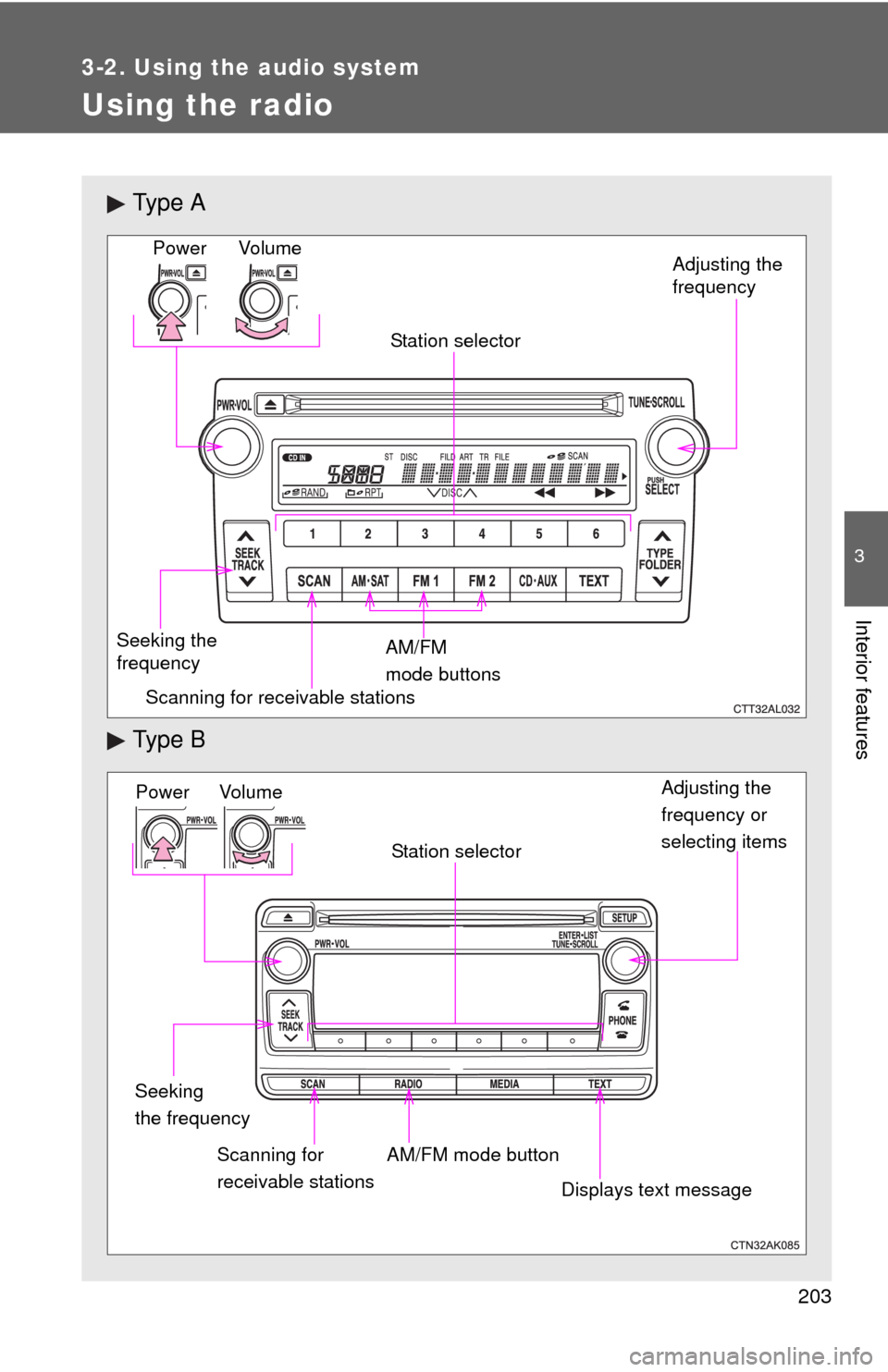
Using the radio
Ty p e A
Ty p e B
Vo lu m e
Seeking the
frequencyStation selector
AM/FM
mode buttonsAdjusting the
frequency Power
Scanning for receivable stations
Power VolumeAdjusting the
frequency or
selecting items
Seeking
the frequency
AM/FM mode button Scanning for
receivable stationsStation selector
Displays text message
Page 204 of 500
204 3-2. Using the audio system
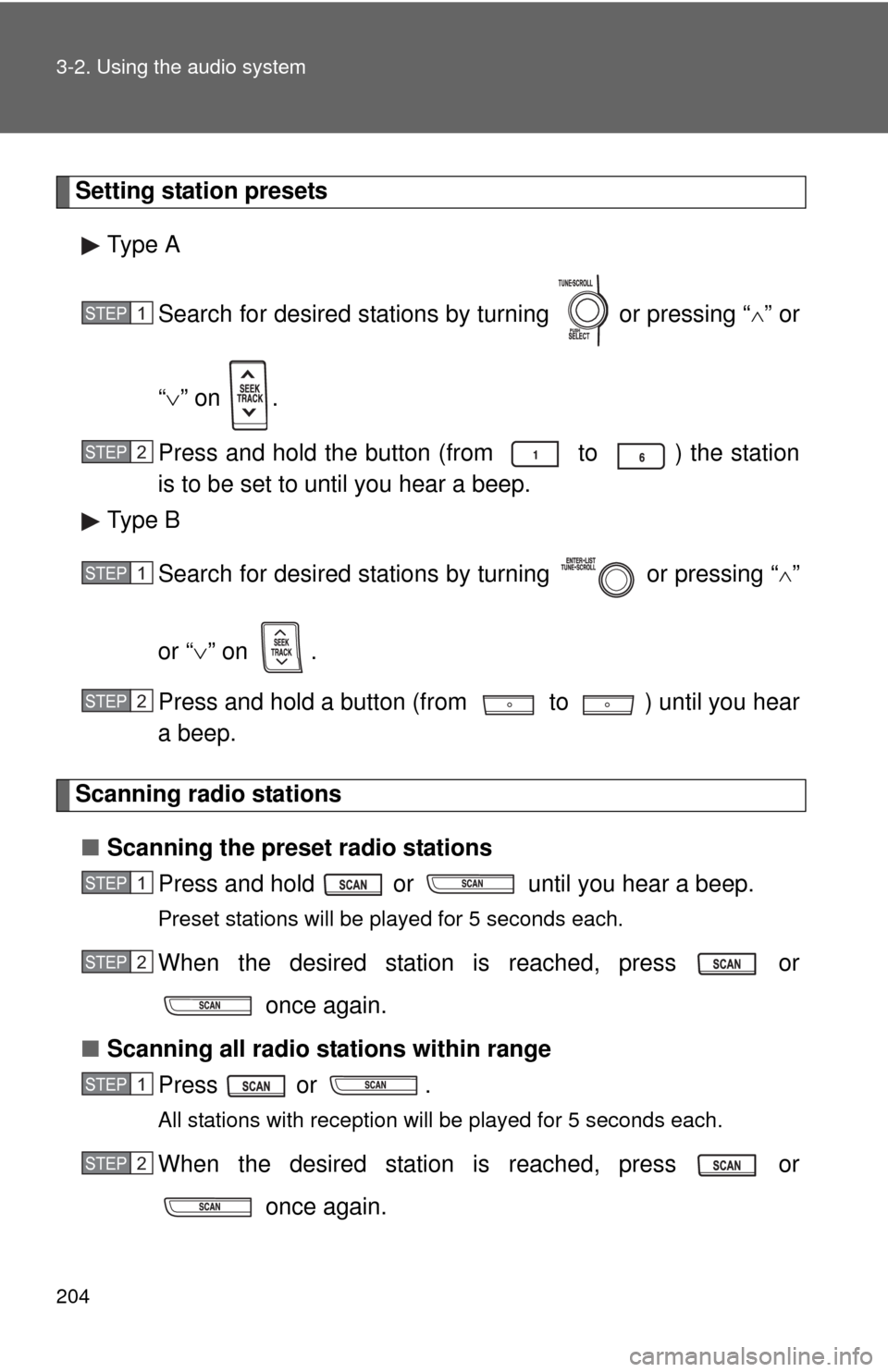
Setting station presets
Type A
Search for desired stations by turning or pressing “
” or
“” on .
Press and hold the button (from to ) the station
is to be set to until you hear a beep.
Type B
Search for desired stations by turning or pressing “
”
or “” on .
Press and hold a button (from to ) until you hear
a beep.
Scanning radio stations
■Scanning the preset radio stations
Press and hold or until you hear a beep.
Preset stations will be played for 5 seconds each.
When the desired station is reached, press or
once again.
■Scanning all radio stations within range
Press or .
All stations with reception will be played for 5 seconds each.
When the desired station is reached, press or
once again.
STEP1
STEP2
STEP1
STEP2
STEP1
STEP2
STEP1
STEP2
Page 205 of 500
205 3-2. Using the audio system
3
Interior features
Switching the display
Type A
Press .
Each time is pressed, the display changes in the following order:
Title (song/program title) Name (artist name/feature)Title (song/pro-
gram title).
Type B
Press .
If the text continues past the end of the display, “ ” is displayed. Press
.
■Reception sensitivity
●Maintaining perfect radio reception at all times is difficult due to the con-
tinually changing position of the antenna, differences in signal strength
and surrounding objects, such as trains, transmitters, etc.
●The radio antenna is mounted on the rear roof. The antenna can be
removed from the base by turning it.
■Certifications for the radio tuner
This device complies with Part 15 of the FCC Rules and RSS-210 Rules.
Operation is subject to the following two conditions; (1) This device may not
cause harmful interference, and (2) this device must accept any interference
received, including interference that may cause undesired operation.
CAUTION
■FCC WARNING
Changes or modifications not expressly approved by the party responsible
for compliance could void the user's authority to operate the equipment.
Page 244 of 500
244 3-2. Using the audio system
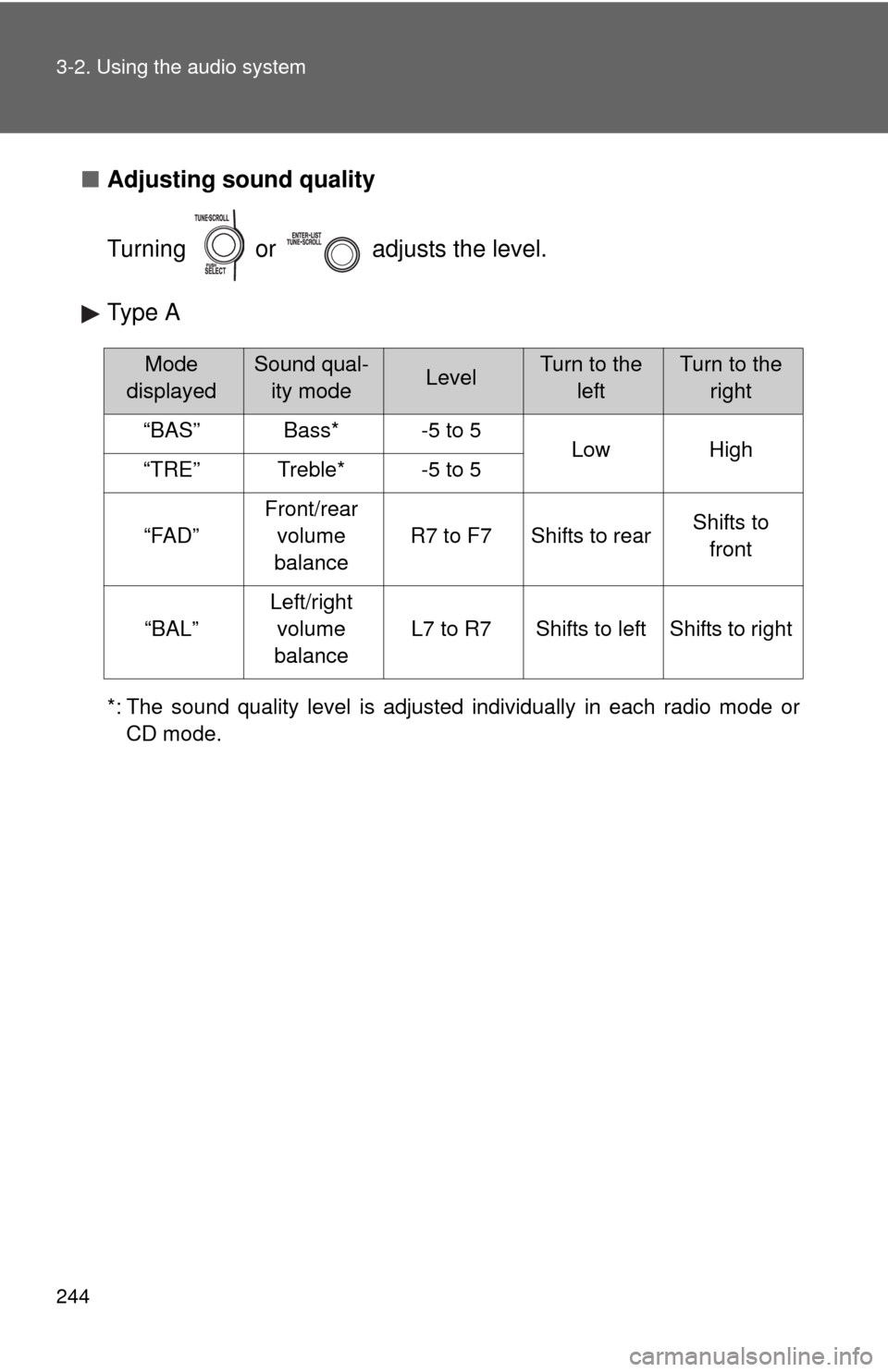
■Adjusting sound quality
Turning or adjusts the level.
Type A
*: The sound quality level is adjusted individually in each radio mode or
CD mode.
Mode
displayedSound qual-
ity modeLevelTurn to the
leftTurn to the
right
“BAS”Bass*-5 to 5LowHigh“TRE”Treble*-5 to 5
“FAD”
Front/rear
volume
balance
R7 to F7Shifts to rearShifts to
front
“BAL”
Left/right
volume
balance
L7 to R7Shifts to leftShifts to right
Page 248 of 500
248
3-2. Using the audio system
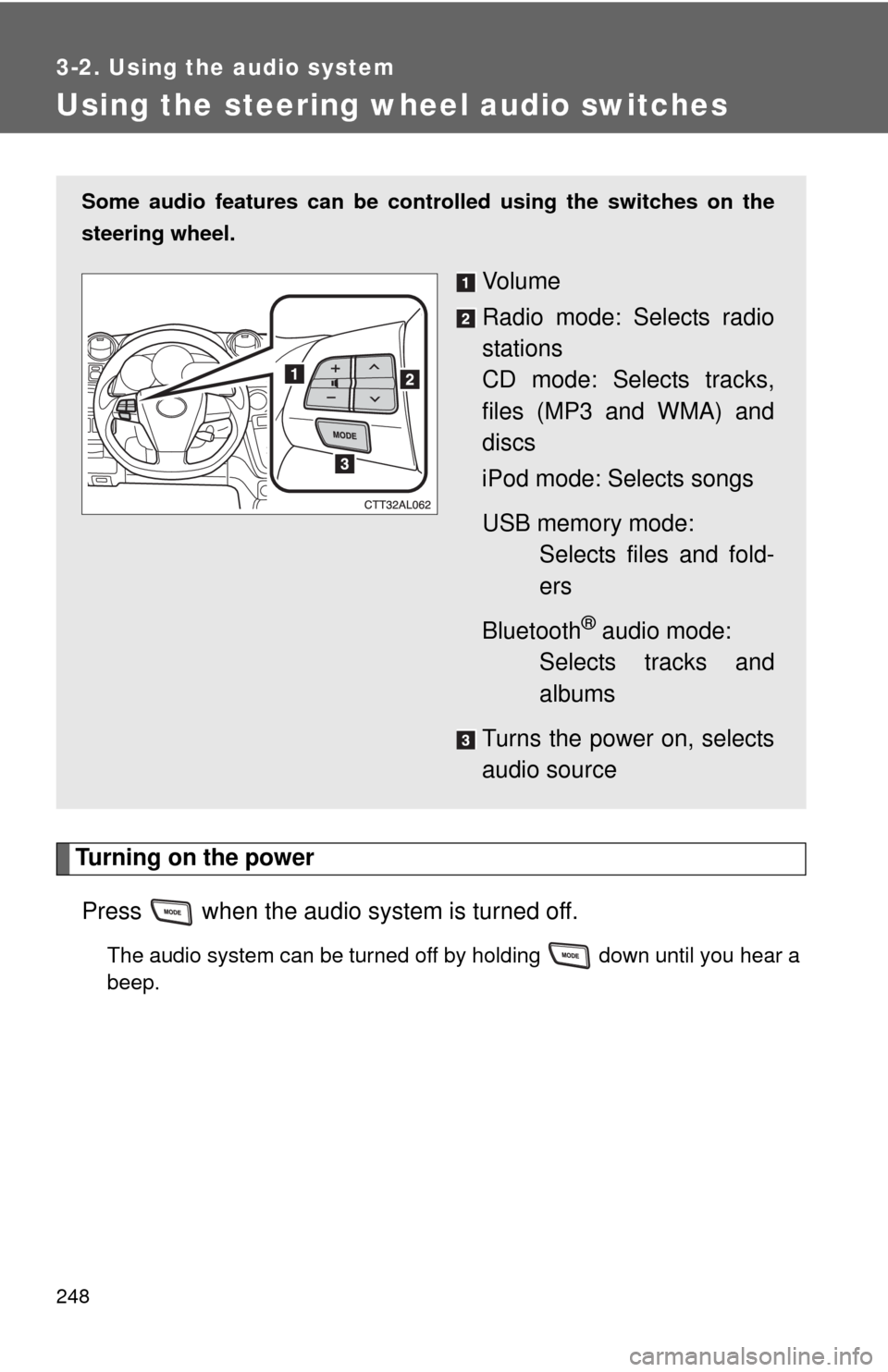
Using the steering wheel audio switches
Turning on the power
Press when the audio system is turned off.
The audio system can be turned off by holding down until you hear a
beep.
Some audio features can be controlled using the switches on the
steering wheel.
Vo l u m e
Radio mode: Selects radio
stations
CD mode: Selects tracks,
files (MP3 and WMA) and
discs
iPod mode: Selects songs
USB memory mode:
Selects files and fold-
ers
Bluetooth
® audio mode:
Selects tracks and
albums
Turns the power on, selects
audio source
Page 249 of 500
249 3-2. Using the audio system
3
Interior features
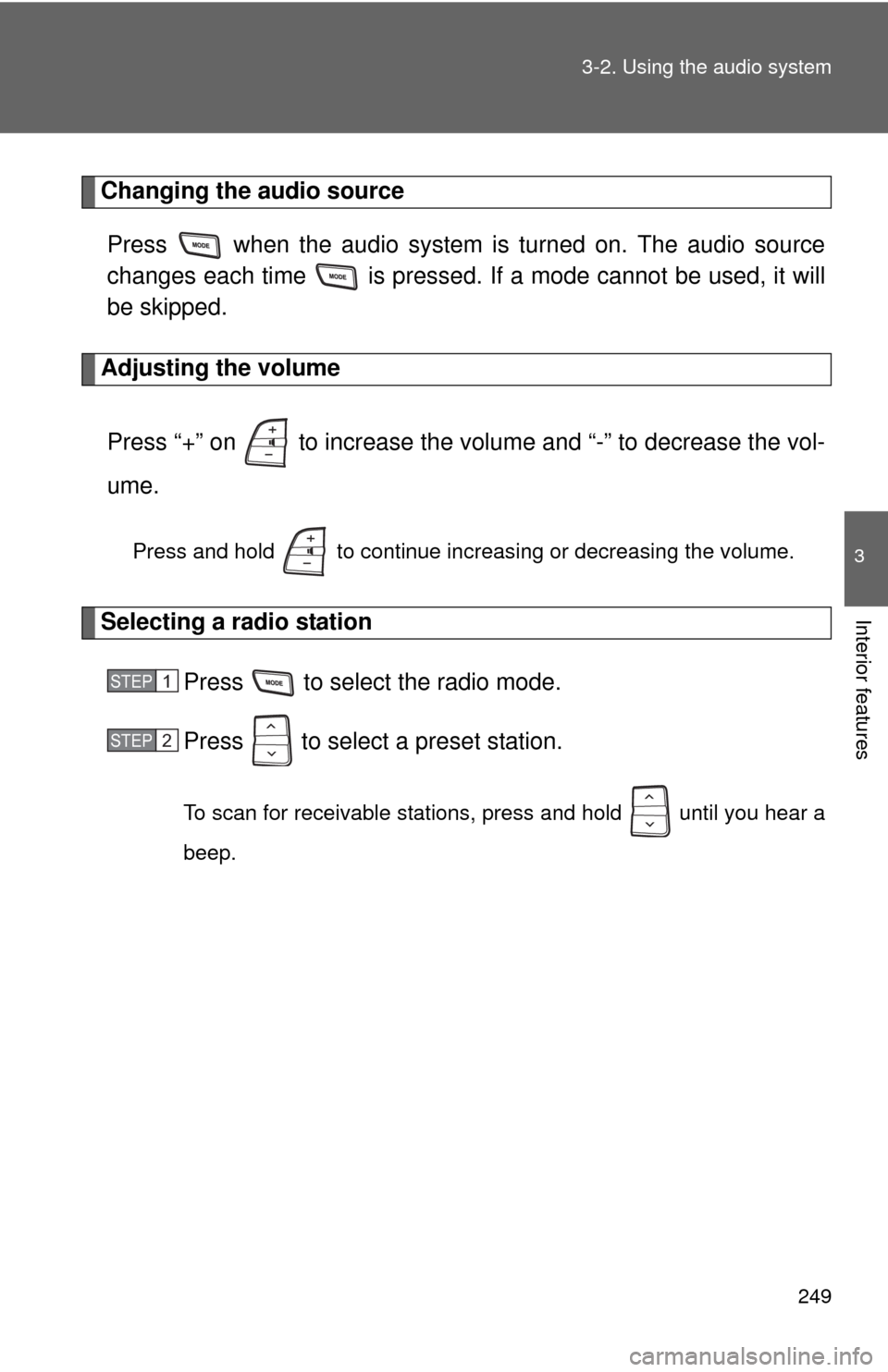
Changing the audio source
Press when the audio system is turned on. The audio source
changes each time is pressed. If a mode cannot be used, it will
be skipped.
Adjusting the volume
Press “+” on to increase the volume and “-” to decrease the vol-
ume.
Press and hold to continue increasing or decreasing the volume.
Selecting a radio station
Press to select the radio mode.
Press to select a preset station.
To scan for receivable stations, press and hold until you hear a
beep.
STEP1
STEP2
Page 404 of 500

404 5-2. Steps to take in an emergency
■If the tire pressure warning system is inoperative
The tire pressure warning system will be disabled in the following condi-
tions:
(When the condition becomes normal, the system will work properly.)
●If tires not equipped with tire pressure warning valves and transmit-
ters are used.
●If the ID code on the tire pressure warning valves and transmitters is
not registered in the tire pressure warning computer.
●If the tire inflation pressure is 73 psi (500 kPa, 5.1 kgf/cm2 or bar) or
higher.
The tire pressure warning system may be disabled in the following condi-
tions:
(When the condition becomes normal, the system will work properly.)
●If electronic devices or facilities using similar radio wave frequencies
are nearby.
●If a radio set at similar frequencies is in use in the vehicle.
●If a window tint that affects the radio wave signals is installed.
●If there is a lot of snow or ice on the vehicle, in particular around the
wheels or wheel housings.
●If non-genuine Toyota wheels are used. (Even if you use Toyota
wheels, the tire pressure warning system may not work properly with
some types of tires.)
●If tire chains are used.
■If the tire pressure warning light frequently comes on after blinking
for 1 minute
If the tire pressure warning light comes on after blinking for 1 minute fre-
quently when the engine switch is turned to the “ON” position, have it
checked by your Toyota dealer.
■Customization that can be configured at Toyota dealer
The vehicle speed linked seat belt reminder buzzer can be disabled.
(Customizable features P. 469) However, Toyota recommends that the
seat belt reminder buzzer be operational to alert the driver and front passen-
ger that the seat belts are not fastened.
Page 463 of 500
463 6-1. Specifications
6
Vehicle specifications
Warning: The temperature grades for this tire are established for a
tire that is properly inflated and not overloaded.
Excessive speed, underinflation, or excessive loading, either sepa-
rately or in combination, can cause heat buildup and possible tire fail-
ure.
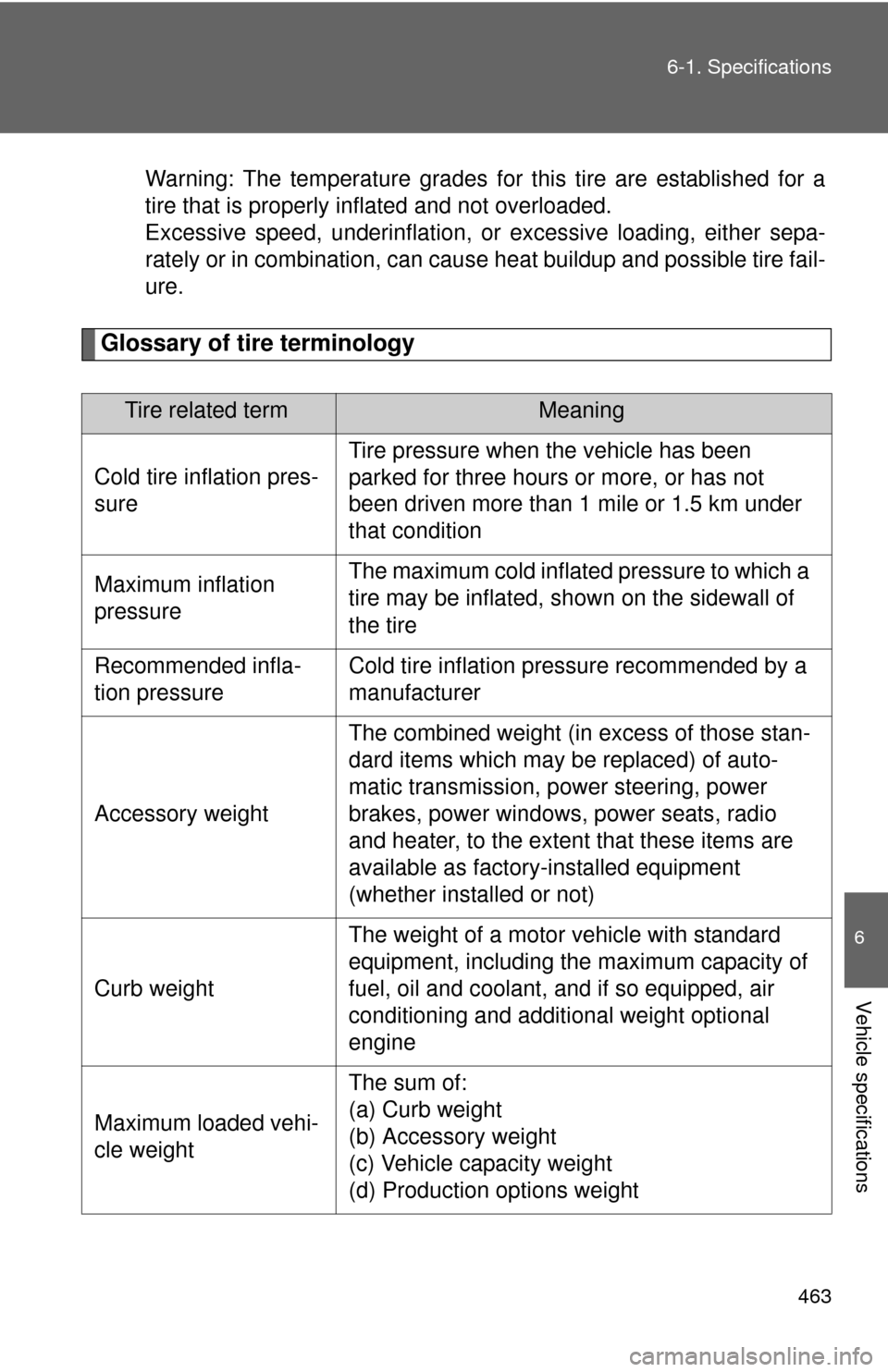
Glossary of tire terminology
Tire related termMeaning
Cold tire inflation pres-
sureTire pressure when the vehicle has been
parked for three hours or more, or has not
been driven more than 1 mile or 1.5 km under
that condition
Maximum inflation
pressureThe maximum cold inflated pressure to which a
tire may be inflated, shown on the sidewall of
the tire
Recommended infla-
tion pressureCold tire inflation pressure recommended by a
manufacturer
Accessory weightThe combined weight (in excess of those stan-
dard items which may be replaced) of auto-
matic transmission, power steering, power
brakes, power windows, power seats, radio
and heater, to the extent that these items are
available as factory-installed equipment
(whether installed or not)
Curb weightThe weight of a motor vehicle with standard
equipment, including the maximum capacity of
fuel, oil and coolant, and if so equipped, air
conditioning and additional weight optional
engine
Maximum loaded vehi-
cle weightThe sum of:
(a) Curb weight
(b) Accessory weight
(c) Vehicle capacity weight
(d) Production options weight